
C# OCR Image to Text Tutorial: Convert Images to Text Without Tesseract

C# dilinde, karmaşık Tesseract yapılandırmalarından kaçınarak görüntüleri metne dönüştürmek mi istiyorsunuz? Bu kapsamlı IronOCR C# rehberi, .NET uygulamalarınızda güçlü optik karakter tanımayı sadece birkaç satır kodla nasıl uygulayacağınızı gösterir.
Hızlı Başlangıç: Tek Satırda Görüntüden Metin ÇıkarınBu örnek, IronOCR'yi kavramanın ne kadar kolay olduğunu gösterir—sadece bir satır C# kodu ile görüntünüz metne dönüşür. OCR motorunu başlatıp, karmaşık yapılandırmalar gerektirmeden hemen metin okuma ve elde etme işlemini gösterir.
-
1Install IronOCR with NuGet Package Manager
-
2Bu kod parçacığını kopyalayın ve çalıştırın.
string text = new IronTesseract().Read("image.png").Text;C# -
3Canlı ortamınızda test için dağıtım yapın
Ücretsiz deneme ile bugün projenizde IronOCR kullanmaya başlayın
Asgari İş Akışı (5 adım)
- IronOCR'yi İndirin - görüntüden metne dönüştürme için C# OCR kütüphanesi
IronTesseractsınıfını kullanarak görüntülerden anında metin okuyun- Düşük kaliteli taramalarda OCR doğruluğunu artırmak için görüntü filtreleri uygulayın
- İndirilebilir dil paketleriyle birden fazla dili işleyin
- Sonuçları aranabilir PDF'ler olarak dışa aktarın veya metin dizgileri çıkarın
.NET Uygulamalarında Görüntülerden Metin Nasıl Okunur?
.NET uygulamalarınızda C# OCR görüntüden metne işlevselliği elde etmek için güvenilir bir OCR kütüphanesine ihtiyacınız olacak. IronOCR, hem doğruluk hem de hızı en üst düzeye çıkaran ve harici bağımlılıklar gerektirmeyen IronOcr.IronTesseract sınıfını kullanarak yönetilen bir çözüm sağlar.
Öncelikle, IronOCR'yi Visual Studio projenize kurun. IronOCR DLL dosyasını doğrudan indirebilirsiniz veya NuGet Paket Yöneticisini kullanabilirsiniz.
Google Tesseract Olmadan C# için Neden IronOCR'yi Seçmelisiniz?
C# dilinde görüntüleri metne dönüştürmeniz gerektiğinde, IronOCR geleneksel Tesseract uygulamalarına göre önemli avantajlar sunar:
- Saf .NET ortamlarında hemen çalışır
- Tesseract kurulumu veya yapılandırması gerektirmez
- En son motorları çalıştırır: Tesseract 5 (artı Tesseract 4 & 3)
- .NET Framework 4.6.2+, .NET Standard 2+, ve .NET Core 2, 3, 5, 6, 7, 8, 9 ve 10 ile uyumlu
- Vanilla Tesseract'a kıyasla doğruluğu ve hızı artırır
- Xamarin, Mono, Azure ve Docker dağıtımlarını destekler
- Karmaşık Tesseract sözlüklerini NuGet paketleri aracılığıyla yönetir
- PDF'ler, MultiFrame TIFF'ler ve tüm büyük görüntü formatlarını otomatik olarak işler
- Optimal sonuçlar için düşük kaliteli ve eğik taramaları düzeltir
IronOCR C# Öğreticisini Temel OCR için Nasıl Kullanabilirsiniz?
Bu Iron Tesseract C# örneği, IronOCR kullanarak görüntüden metin okumanın en basit yolunu gösterir. IronOcr.IronTesseract sınıfı metni ayıklar ve bir dize olarak geri döndürür.
using IronOcr;

IronTesseract ocr = new IronTesseract();
using OcrInput input = new OcrInput();
var pageindices = new int[] { 1, 2 };
input.LoadImageFrames(@"img\Potter.LowQuality.tiff", pageindices);
input.Deskew(); // removes rotation and perspective
OcrResult result = ocr.Read(input);
Console.WriteLine(result.Text);Imports IronOcr
Private ocr As New IronTesseract()
Private OcrInput As using
Private pageindices = New Integer() { 1, 2 }
input.LoadImageFrames("img\Potter.LowQuality.tiff", pageindices)
input.Deskew() ' removes rotation and perspective
Dim result As OcrResult = ocr.Read(input)
Console.WriteLine(result.Text)Bu kod, net görüntülerde %100 doğruluk sağlar, metni tam olarak göründüğü şekliyle çıkarır:
IronOCR Simple Example

In this simple example we test the accuracy of our C# OCR library to read text from a PNG Image. This is a very basic test, but things will get more complicated as the tutorial continues.

The quick brown fox jumps over the lazy dogIronTesseract sınıfı karmaşık OCR işlemlerini dahili olarak yönetir. Metini görüntüden insan düzeyinde doğrulukla okumak için IronOCR kullanarak hizalama taraması, çözünürlüğü optimize etme ve yapay zeka kullanmayı otomatik olarak yapar.
Görünmeyen süreçlerin arka planında gerçekleşen karmaşık işleme - görüntü analizi, motor optimizasyonu ve akıllı metin tanıma - rağmen OCR süreci, insan okuma hızını karşılar ve olağanüstü doğruluk seviyelerini korur.
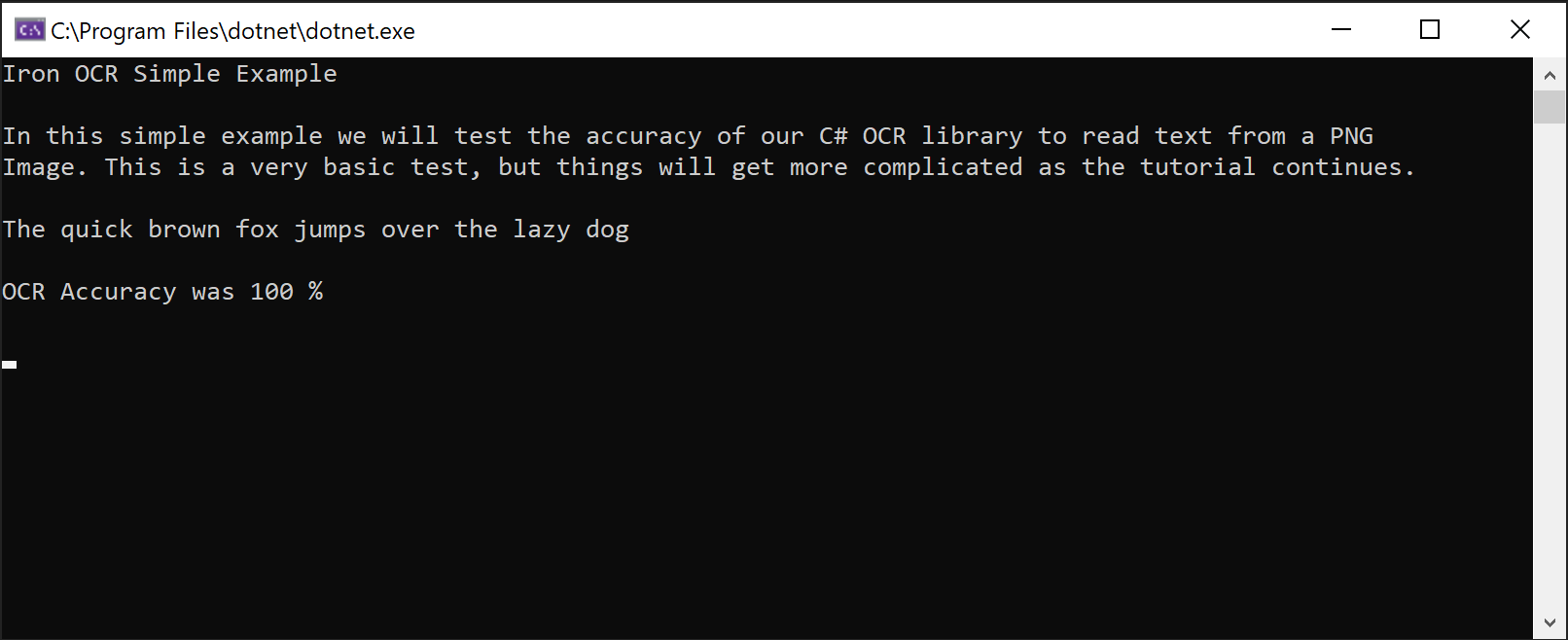 IronOCR'nin bir PNG görüntüsünden mükemmel doğrulukla metin çıkarma yeteneğini gösteren ekran görüntüsü
Tesseract Yapılandırması Olmadan Gelişmiş C# OCR Nasıl Uygulanır?
C#'da görüntüleri metne dönüştürürken optimal performans gerektiren üretim uygulamaları için OcrInput ve IronTesseract sınıflarını birlikte kullanın. Bu yaklaşım, OCR işlemi üzerinde ince-granüllü kontrol sağlar.
OcrInput Sınıf Özellikleri
- Birden fazla görüntü formatını işler: JPEG, TIFF, GIF, BMP, PNG
- Tam PDF dosyalarını veya belirli sayfaları içe aktarır
- Kontrast, çözünürlük ve görüntü kalitesini otomatik olarak artırır
- Döngü, tarama gürültüsü, kaçıklık ve negatif görüntüleri düzeltir
IronTesseract Sınıf Özellikleri
- 127'den fazla önceden paketlenmiş dile erişim
- Tesseract 5, 4 ve 3 motorları dahil
- Belge tipi belirtimi (ekran görüntüsü, snippet veya tam belge)
- Entegre barkod okuma yetenekleri
- Çoklu çıktı formatları: Aranabilir PDF'ler, HOCR HTML, DOM nesneleri ve dizgeler
OcrInput ve IronTesseract ile Başlamak İçin Nasıl?
Çoğu belge türüyle iyi çalışan bu IronOCR C# eğitimi için önerilen yapılandırma:
using IronOcr;
using IronSoftware.Drawing;

IronTesseract ocr = new IronTesseract();
using OcrInput input = new OcrInput();
// restrict OCR to a content area for faster processing
Rectangle contentArea = new Rectangle(x: 215, y: 1250, height: 280, width: 1335);
input.LoadImage("img/ComSci.png", contentArea);
OcrResult result = ocr.Read(input);
Console.WriteLine(result.Text);Bu yapılandırma, orta kaliteli taramalar üzerinde sürekli olarak neredeyse mükemmel doğruluk elde eder. LoadImageFrames yöntemi çok sayfalı belgeleri verimli bir şekilde işler ve toplu işlem senaryoları için idealdir.
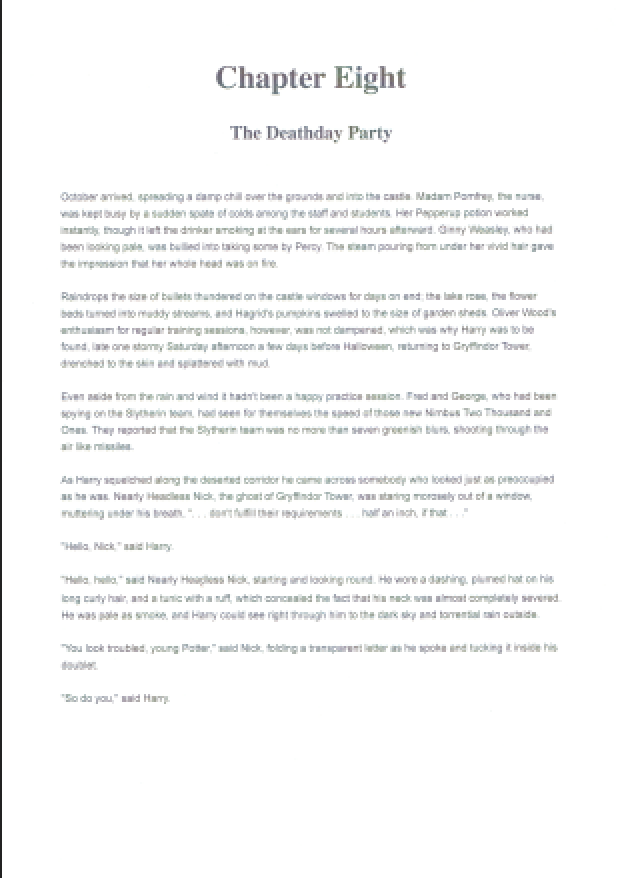
IronOCR'un çok sayfalı metin çıkarma yeteneklerini gösteren TIFF örnek belgesi
Taralı belgelerden görüntülerden ve barkodlardan metin okuma yeteneği, IronOCR'nin karmaşık OCR görevlerini nasıl basitleştirdiğini gösterir. Kütüphane, çok sayfalı TIFF'leri ve PDF metin çıkarmayı kesintisiz bir şekilde işleyen gerçek dünya belgeleriyle mükemmeldir.
IronOCR, Düşük Kaliteli Taramaları Nasıl Ele Alır?
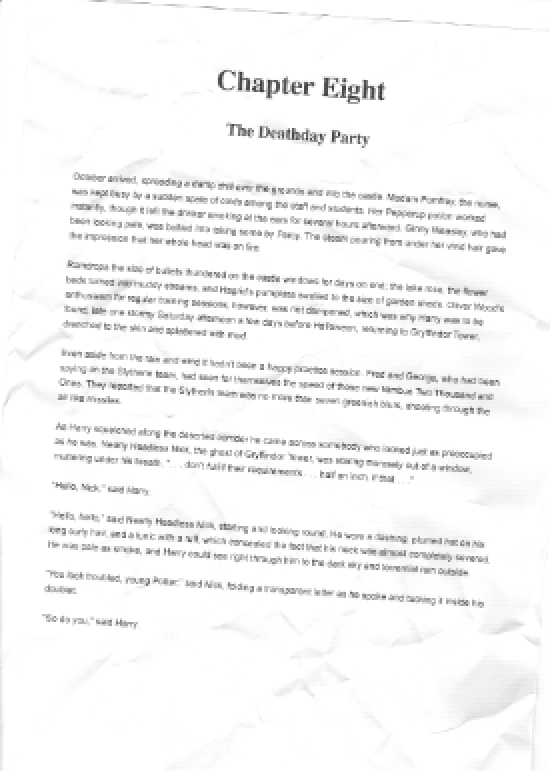
Demonstrating IronOCR's ability to accurately process low-resolution, noisy documents using image filters
IronOCR, C# OCR kütüphanelerine kıyasla düşük kaliteli taramaları daha iyi işler. Özellikle mükemmel test görüntüleri yerine gerçek dünya senaryoları için tasarlanmıştır.
// PM> Install IronOcr.Languages.Arabic
using IronOcr;

IronTesseract ocr = new IronTesseract();
ocr.Language = OcrLanguage.Arabic;

using OcrInput input = new OcrInput();
input.LoadImageFrame("img/arabic.gif", 1);
// add image filters if needed
// In this case, even thought input is very low quality
// IronTesseract can read what conventional Tesseract cannot.

OcrResult result = ocr.Read(input);

// Console can't print Arabic on Windows easily.
// Let's save to disk instead.
result.SaveAsTextFile("arabic.txt");' PM> Install IronOcr.Languages.Arabic
Imports IronOcr
Private ocr As New IronTesseract()
ocr.Language = OcrLanguage.Arabic
Using input As New OcrInput()
input.LoadImageFrame("img/arabic.gif", 1)
' add image filters if needed
' In this case, even thought input is very low quality
' IronTesseract can read what conventional Tesseract cannot.
Dim result As OcrResult = ocr.Read(input)
' Console can't print Arabic on Windows easily.
' Let's save to disk instead.
result.SaveAsTextFile("arabic.txt")
End UsingInput.Deskew() kullanarak, düşük kaliteli taramalarda doğruluk %99,8'e çıkar ve yüksek kaliteli sonuçlarla neredeyse eşleşir. Bu durum, Tesseract karmaşıklıkları olmadan C# OCR için IronOCR'nin neden tercih edildiğini göstermektedir.
Görüntü filtreleri işleme zamanını biraz artırabilir ancak genel OCR süresini önemli ölçüde azaltır. Doğru dengeyi bulmanız belgenizin kalitesine bağlıdır.
Çoğu senaryoda, Input.Deskew() ve Input.DeNoise() OCR performansında güvenilir iyileştirmeler sağlar. Görüntü ön işleme teknikleri hakkında daha fazla bilgi edinin.
OCR Performansı ve Hızı Nasıl Optimize Edilir?
C#'da görüntüleri metne dönüştürürken OCR hızı üzerinde en önemli etken giriş kalitesidir. Daha yüksek DPI (~200 dpi) ile minimal gürültü en hızlı ve en doğru sonuçları üretir.
IronOCR, kusursuz belgeleri düzeltme konusunda mükemmeldir; ancak bu iyileştirme ek işlem süresi gerektirir.
Minimal sıkıştırma artefaktları olan görüntü formatlarını seçin. TIFF ve PNG, düşük dijital gürültü nedeniyle genellikle JPEG'den daha hızlı sonuç verir.
Hangi Görüntü Filtreleri OCR Hızını Artırır?
Aşağıdaki filtreler, C# OCR görüntüden metne iş akışınızda performansı büyük ölçüde artırabilir:
OcrInput.Rotate(double degrees): Saat yönünde görüntüleri döndürür (tersi için negatif)OcrInput.Binarize(): Siyah/beyaz dönüşümü yapar, düşük kontrastlı senaryolarda performansı artırırOcrInput.ToGrayScale(): Potansiyel hız iyileştirmeleri için gri tonlamaya dönüştürürOcrInput.Contrast(): Daha iyi doğruluk için kontrastı otomatik olarak ayarlarOcrInput.DeNoise(): Gürültü beklenirken dijital artefaktları kaldırırOcrInput.Invert(): Siyah üzerine beyaz metin için renkleri ters çevirirOcrInput.Dilate(): Metin sınırlarını genişletirOcrInput.Erode(): Metin sınırlarını azaltırOcrInput.Deskew(): Hizalamayı düzeltir - eğik belgeler için esansiyeldirOcrInput.DeepCleanBackgroundNoise(): Agresif gürültü gidermeOcrInput.EnhanceResolution: Düşük çözünürlüklü görüntü kalitesini iyileştirirOcrInput.DetectPageOrientation(): Sayfa döndürmesini algılar ve düzeltir.OrientationDetectionModekullanarak doğruluk/hız dengesi üzerinde kontrol sağlayın:Fast,Balanced,DetailedveyaExtremeDetailed(v2025.8.6'da eklendi)
Scale() ve EnhanceResolution(), v2025.12.3'te bilinen bir sorun nedeniyle SaveAsSearchablePdf() ile uyumsuzdur. Diğer tüm filtreler arama yapılabilir PDF çıkışı ile doğru çalışır.
IronOCR'yi Maksimum Hız için Nasıl Yapılandırırım?
Yüksek kaliteli taramaları işlerken hızı optimize etmek için bu ayarları kullanın:
using IronOcr;

IronTesseract ocr = new IronTesseract();
ocr.Language = OcrLanguage.ChineseSimplified;

// We can add any number of languages.
ocr.AddSecondaryLanguage(OcrLanguage.English);
// Optionally add custom tesseract .traineddata files by specifying a file path

using OcrInput input = new OcrInput();
input.LoadImage("img/MultiLanguage.jpeg");
OcrResult result = ocr.Read(input);
result.SaveAsTextFile("MultiLanguage.txt");Imports IronOcr
Private ocr As New IronTesseract()
ocr.Language = OcrLanguage.ChineseSimplified
' We can add any number of languages.
ocr.AddSecondaryLanguage(OcrLanguage.English)
' Optionally add custom tesseract .traineddata files by specifying a file path
Using input As New OcrInput()
input.LoadImage("img/MultiLanguage.jpeg")
Dim result As OcrResult = ocr.Read(input)
result.SaveAsTextFile("MultiLanguage.txt")
End UsingBu optimize edilmiş yapılandırma, varsayılan ayarlara kıyasla %35 hız artışı elde ederken %99,8 doğruluk korur.
C# OCR Kullanarak Görüntülerin Belirli Alanları Nasıl Okunur?
Aşağıdaki Iron Tesseract C# örneği, System.Drawing.Rectangle kullanarak belirli bölgeleri nasıl hedefleyeceğinizi gösterir. Metnin öngörülebilir konumlarda göründüğü standart formları işlerken bu teknik son derece değerlidir.
IronOCR Kesilmiş Bölgeleri Daha Hızlı Sonuçlar için İşleyebilir mi?
Piksel tabanlı koordinatlar kullanarak, OCR'yi belirli alanlara sınırlayabilir, hızı büyük ölçüde artırabilir ve istenmeyen metin çıkarımını önleyebilirsiniz:
using IronOcr;

IronTesseract ocr = new IronTesseract();

using OcrInput input = new OcrInput();
input.LoadImage("image1.jpeg");
input.LoadImage("image2.png");
var pageindices = new int[] { 1, 2 };
input.LoadImageFrames("image3.gif", pageindices);

OcrResult result = ocr.Read(input);

Console.WriteLine($"{result.Pages.Length} Pages"); // 3 PagesImports IronOcr
Private ocr As New IronTesseract()
Private OcrInput As using
input.LoadImage("image1.jpeg")
input.LoadImage("image2.png")
Dim pageindices = New Integer() { 1, 2 }
input.LoadImageFrames("image3.gif", pageindices)
Dim result As OcrResult = ocr.Read(input)
Console.WriteLine($"{result.Pages.Length} Pages") ' 3 PagesBu hedefli yaklaşım, yalnızca ilgili metni ayıklarken %41 hız artışı sağlar. faturalar, çekler ve formlar gibi yapılandırılmış belgeler için idealdir. Aynı kırpma tekniği PDF OCR işlemleri ile sorunsuz çalışır.
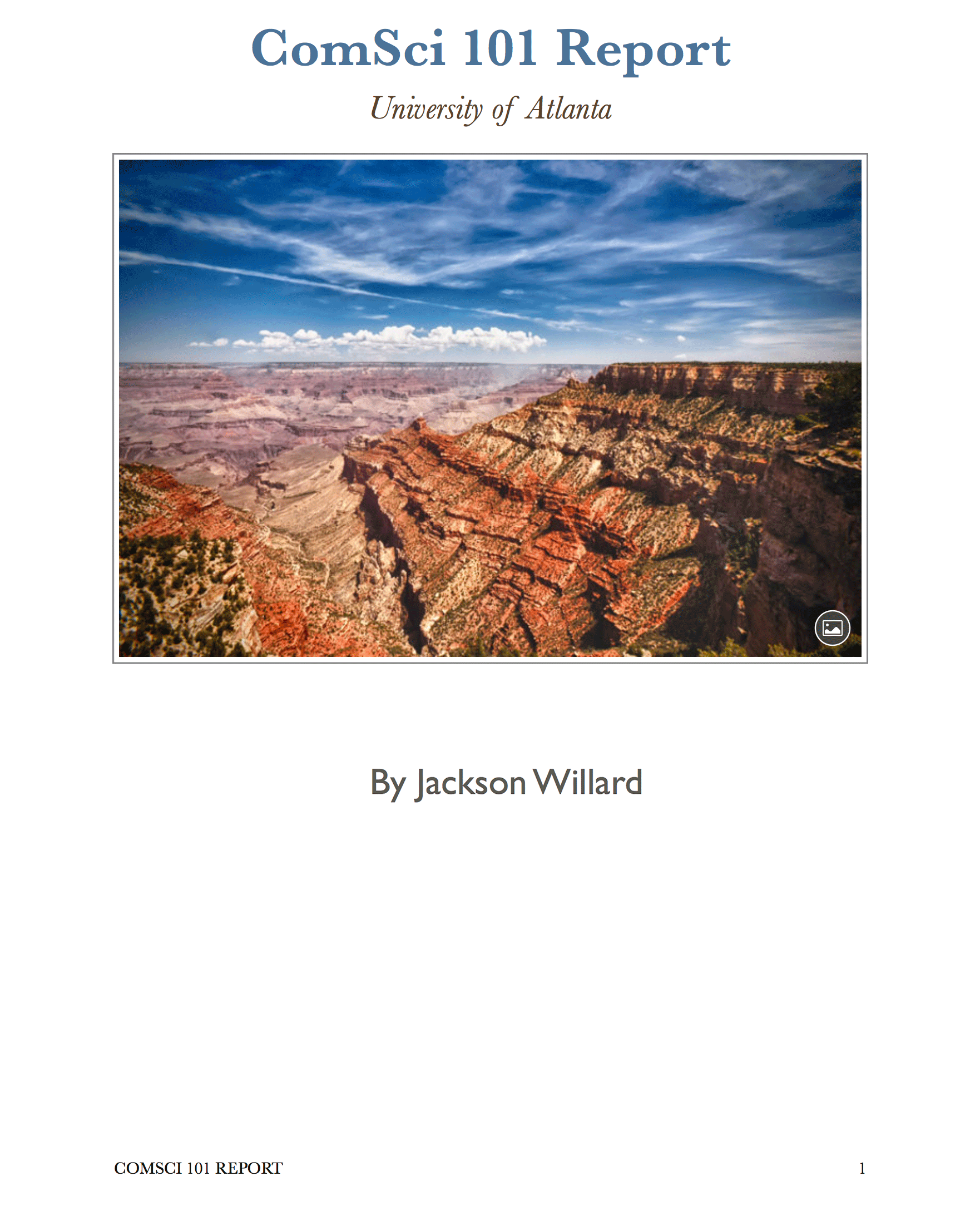 IronOCR'un dikdörtgen seçimi ile bölge bazlı metin çıkartımı gösteren doküman
IronOCR Kaç Dili Destekliyor?
IronOCR, uygun dil paketleri aracılığıyla 127 uluslararası dil sunar. Onları sitemizden veya NuGet Paket Yöneticisi üzerinden DLL olarak indirin.
NuGet ara yüzü aracılığıyla ("IronOcr.Languages" ara) dil paketlerini yükleyin veya tam dil paketi listesini ziyaret edin.
Desteklenen diller arasında Arapça, Çince (Basitleştirilmiş/Geleneksel), Japonca, Korece, Hintçe, Rusça, Almanca, Fransızca, İspanyolca ve 115+ diğerleri, her biri doğru metin tanıma için optimize edilmiştir.
Birden Fazla Dilde OCR Nasıl Uygulanır?
Bu IronOCR C# öğretici örneği, Arapça metin tanımayı gösterir:
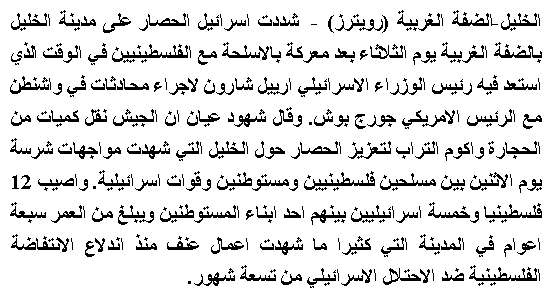
IronOCR, bir GIF görüntüsünden Arapça metni doğru bir şekilde çıkartıyor
using IronOcr;

IronTesseract ocr = new IronTesseract();
using OcrInput input = new OcrInput();
input.LoadPdf("example.pdf", Password: "password");
// We can also select specific PDF page numbers to OCR

OcrResult result = ocr.Read(input);

Console.WriteLine(result.Text);
Console.WriteLine($"{result.Pages.Length} Pages");
// 1 page for every page of the PDFImports IronOcr
Private ocr As New IronTesseract()
Private OcrInput As using
input.LoadPdf("example.pdf", Password:= "password")
' We can also select specific PDF page numbers to OCR
Dim result As OcrResult = ocr.Read(input)
Console.WriteLine(result.Text)
Console.WriteLine($"{result.Pages.Length} Pages")
' 1 page for every page of the PDFIronOCR Çok Dilli Belgelerle Başa Çıkabilir mi?
Belgeler karışık diller içerdiğinde, IronOCR'u çok dilli destek için yapılandırın:
using IronOcr;

IronTesseract ocr = new IronTesseract();

using OcrInput input = new OcrInput();
input.Title = "Pdf Metadata Name";
input.LoadPdf("example.pdf", Password: "password");
OcrResult result = ocr.Read(input);
result.SaveAsSearchablePdf("searchable.pdf");Imports IronOcr
Private ocr As New IronTesseract()
Private OcrInput As using
input.Title = "Pdf Metadata Name"
input.LoadPdf("example.pdf", Password:= "password")
Dim result As OcrResult = ocr.Read(input)
result.SaveAsSearchablePdf("searchable.pdf")C# OCR ile Çoklu Sayfa Belgeler Nasıl İşlenir?
IronOCR birden fazla sayfayı veya görüntüyü sorunsuzca tek bir OcrResult haline getirir. Bu özellik, arama yapılabilir PDF'ler oluşturma ve tam belge setlerinden metin çıkartma gibi güçlü yetenekleri olanak tanır.
Farklı kaynakları karıştırıp eşleştirin - tek bir OCR işleminde görüntüler, TIFF çerçeveleri ve PDF sayfaları:
using IronOcr;

IronTesseract ocr = new IronTesseract();
using OcrInput input = new OcrInput();
input.Title = "Pdf Title";
var pageindices = new int[] { 1, 2 };
input.LoadImageFrames("example.tiff", pageindices);
OcrResult result = ocr.Read(input);
result.SaveAsSearchablePdf("searchable.pdf");Imports IronOcr
Private ocr As New IronTesseract()
Private OcrInput As using
input.Title = "Pdf Title"
Dim pageindices = New Integer() { 1, 2 }
input.LoadImageFrames("example.tiff", pageindices)
Dim result As OcrResult = ocr.Read(input)
result.SaveAsSearchablePdf("searchable.pdf")Bir TIFF dosyasının tüm sayfalarını verimli bir şekilde işleyin:
using IronOcr;

IronTesseract ocr = new IronTesseract();

using OcrInput input = new OcrInput();
input.Title = "Html Title";

// Add more content as required...
input.LoadImage("image2.jpeg");
input.LoadPdf("example.pdf",Password: "password");
var pageindices = new int[] { 1, 2 };
input.LoadImageFrames("example.tiff", pageindices);

OcrResult result = ocr.Read(input);
result.SaveAsHocrFile("hocr.html");Imports IronOcr
Private ocr As New IronTesseract()
Private OcrInput As using
input.Title = "Html Title"
' Add more content as required...
input.LoadImage("image2.jpeg")
input.LoadPdf("example.pdf",Password:= "password")
Dim pageindices = New Integer() { 1, 2 }
input.LoadImageFrames("example.tiff", pageindices)
Dim result As OcrResult = ocr.Read(input)
result.SaveAsHocrFile("hocr.html")TIFF'leri veya PDF'leri arama yapılabilir formatlara dönüştürün:
using IronOcr;

IronTesseract ocr = new IronTesseract();

ocr.Configuration.ReadBarCodes = true;

using OcrInput input = new OcrInput();
input.LoadImage("img/Barcode.png");

OcrResult result = ocr.Read(input);

foreach (var barcode in result.Barcodes)
{
    Console.WriteLine(barcode.Value);
    // type and location properties also exposed
}Imports IronOcr
Private ocr As New IronTesseract()
ocr.Configuration.ReadBarCodes = True
Using input As New OcrInput()
input.LoadImage("img/Barcode.png")
Dim result As OcrResult = ocr.Read(input)
For Each barcode In result.Barcodes
Console.WriteLine(barcode.Value)
' type and location properties also exposed
Next barcode
End UsingMevcut PDF'leri arama yapılabilir versiyonlara dönüştürün:
using IronOcr;
using IronSoftware.Drawing;

// We can delve deep into OCR results as an object model of Pages, Barcodes, Paragraphs, Lines, Words and Characters
// This allows us to explore, export and draw OCR content using other APIs

IronTesseract ocr = new IronTesseract();
ocr.Configuration.ReadBarCodes = true;

using OcrInput input = new OcrInput();
var pageindices = new int[] { 1, 2 };
input.LoadImageFrames(@"img\Potter.tiff", pageindices);

OcrResult result = ocr.Read(input);

foreach (var page in result.Pages)
{
    // Page object
    int pageNumber = page.PageNumber;
    string pageText = page.Text;
    int pageWordCount = page.WordCount;

    // null if we don't set Ocr.Configuration.ReadBarCodes = true;
    OcrResult.Barcode[] barcodes = page.Barcodes;

    AnyBitmap pageImage = page.ToBitmap(input);
    System.Drawing.Bitmap pageImageLegacy = page.ToBitmap(input);
    double pageWidth = page.Width;
    double pageHeight = page.Height;

    foreach (var paragraph in page.Paragraphs)
    {
        // Pages -> Paragraphs
        int paragraphNumber = paragraph.ParagraphNumber;
        String paragraphText = paragraph.Text;
        System.Drawing.Bitmap paragraphImage = paragraph.ToBitmap(input);
        int paragraphXLocation = paragraph.X;
        int paragraphYLocation = paragraph.Y;
        int paragraphWidth = paragraph.Width;
        int paragraphHeight = paragraph.Height;
        double paragraphOcrAccuracy = paragraph.Confidence;
        var paragraphTextDirection = paragraph.TextDirection;

        foreach (var line in paragraph.Lines)
        {
            // Pages -> Paragraphs -> Lines
            int lineNumber = line.LineNumber;
            String lineText = line.Text;
            AnyBitmap lineImage = line.ToBitmap(input);
            System.Drawing.Bitmap lineImageLegacy = line.ToBitmap(input);
            int lineXLocation = line.X;
            int lineYLocation = line.Y;
            int lineWidth = line.Width;
            int lineHeight = line.Height;
            double lineOcrAccuracy = line.Confidence;
            double lineSkew = line.BaselineAngle;
            double lineOffset = line.BaselineOffset;

            foreach (var word in line.Words)
            {
                // Pages -> Paragraphs -> Lines -> Words
                int wordNumber = word.WordNumber;
                String wordText = word.Text;
                AnyBitmap wordImage = word.ToBitmap(input);
                System.Drawing.Image wordImageLegacy = word.ToBitmap(input);
                int wordXLocation = word.X;
                int wordYLocation = word.Y;
                int wordWidth = word.Width;
                int wordHeight = word.Height;
                double wordOcrAccuracy = word.Confidence;

                if (word.Font != null)
                {
                    // Word.Font is only set when using Tesseract Engine Modes rather than LTSM
                    String fontName = word.Font.FontName;
                    double fontSize = word.Font.FontSize;
                    bool isBold = word.Font.IsBold;
                    bool isFixedWidth = word.Font.IsFixedWidth;
                    bool isItalic = word.Font.IsItalic;
                    bool isSerif = word.Font.IsSerif;
                    bool isUnderlined = word.Font.IsUnderlined;
                    bool fontIsCaligraphic = word.Font.IsCaligraphic;
                }

                foreach (var character in word.Characters)
                {
                    // Pages -> Paragraphs -> Lines -> Words -> Characters
                    int characterNumber = character.CharacterNumber;
                    String characterText = character.Text;
                    AnyBitmap characterImage = character.ToBitmap(input);
                    System.Drawing.Bitmap characterImageLegacy = character.ToBitmap(input);
                    int characterXLocation = character.X;
                    int characterYLocation = character.Y;
                    int characterWidth = character.Width;
                    int characterHeight = character.Height;
                    double characterOcrAccuracy = character.Confidence;

                    // Output alternative symbols choices and their probability.
                    // Very useful for spell checking
                    OcrResult.Choice[] characterChoices = character.Choices;
                }
            }
        }
    }
}Imports IronOcr
Imports IronSoftware.Drawing
' We can delve deep into OCR results as an object model of Pages, Barcodes, Paragraphs, Lines, Words and Characters
' This allows us to explore, export and draw OCR content using other APIs
Private ocr As New IronTesseract()
ocr.Configuration.ReadBarCodes = True
Using input As New OcrInput()
Dim pageindices = New Integer() { 1, 2 }
input.LoadImageFrames("img\Potter.tiff", pageindices)
Dim result As OcrResult = ocr.Read(input)
For Each page In result.Pages
' Page object
Dim pageNumber As Integer = page.PageNumber
Dim pageText As String = page.Text
Dim pageWordCount As Integer = page.WordCount
' null if we don't set Ocr.Configuration.ReadBarCodes = true;
Dim barcodes() As OcrResult.Barcode = page.Barcodes
Dim pageImage As AnyBitmap = page.ToBitmap(input)
Dim pageImageLegacy As System.Drawing.Bitmap = page.ToBitmap(input)
Dim pageWidth As Double = page.Width
Dim pageHeight As Double = page.Height
For Each paragraph In page.Paragraphs
' Pages -> Paragraphs
Dim paragraphNumber As Integer = paragraph.ParagraphNumber
Dim paragraphText As String = paragraph.Text
Dim paragraphImage As System.Drawing.Bitmap = paragraph.ToBitmap(input)
Dim paragraphXLocation As Integer = paragraph.X
Dim paragraphYLocation As Integer = paragraph.Y
Dim paragraphWidth As Integer = paragraph.Width
Dim paragraphHeight As Integer = paragraph.Height
Dim paragraphOcrAccuracy As Double = paragraph.Confidence
Dim paragraphTextDirection = paragraph.TextDirection
For Each line In paragraph.Lines
' Pages -> Paragraphs -> Lines
Dim lineNumber As Integer = line.LineNumber
Dim lineText As String = line.Text
Dim lineImage As AnyBitmap = line.ToBitmap(input)
Dim lineImageLegacy As System.Drawing.Bitmap = line.ToBitmap(input)
Dim lineXLocation As Integer = line.X
Dim lineYLocation As Integer = line.Y
Dim lineWidth As Integer = line.Width
Dim lineHeight As Integer = line.Height
Dim lineOcrAccuracy As Double = line.Confidence
Dim lineSkew As Double = line.BaselineAngle
Dim lineOffset As Double = line.BaselineOffset
For Each word In line.Words
' Pages -> Paragraphs -> Lines -> Words
Dim wordNumber As Integer = word.WordNumber
Dim wordText As String = word.Text
Dim wordImage As AnyBitmap = word.ToBitmap(input)
Dim wordImageLegacy As System.Drawing.Image = word.ToBitmap(input)
Dim wordXLocation As Integer = word.X
Dim wordYLocation As Integer = word.Y
Dim wordWidth As Integer = word.Width
Dim wordHeight As Integer = word.Height
Dim wordOcrAccuracy As Double = word.Confidence
If word.Font IsNot Nothing Then
' Word.Font is only set when using Tesseract Engine Modes rather than LTSM
Dim fontName As String = word.Font.FontName
Dim fontSize As Double = word.Font.FontSize
Dim isBold As Boolean = word.Font.IsBold
Dim isFixedWidth As Boolean = word.Font.IsFixedWidth
Dim isItalic As Boolean = word.Font.IsItalic
Dim isSerif As Boolean = word.Font.IsSerif
Dim isUnderlined As Boolean = word.Font.IsUnderlined
Dim fontIsCaligraphic As Boolean = word.Font.IsCaligraphic
End If
For Each character In word.Characters
' Pages -> Paragraphs -> Lines -> Words -> Characters
Dim characterNumber As Integer = character.CharacterNumber
Dim characterText As String = character.Text
Dim characterImage As AnyBitmap = character.ToBitmap(input)
Dim characterImageLegacy As System.Drawing.Bitmap = character.ToBitmap(input)
Dim characterXLocation As Integer = character.X
Dim characterYLocation As Integer = character.Y
Dim characterWidth As Integer = character.Width
Dim characterHeight As Integer = character.Height
Dim characterOcrAccuracy As Double = character.Confidence
' Output alternative symbols choices and their probability.
' Very useful for spell checking
Dim characterChoices() As OcrResult.Choice = character.Choices
Next character
Next word
Next line
Next paragraph
Next page
End UsingAynı tekniği TIFF dönüştürmelerinde uygulayın:
using IronOcr;

var ocr = new IronTesseract();

using (var input = new OcrInput())
{
    // Configure document properties
    input.Title = "Scanned Archive Document";

    // Select pages to process
    var pageIndices = new int[] { 1, 2 };
    input.LoadImageFrames("example.tiff", pageIndices);

    // Create searchable PDF from TIFF
    OcrResult result = ocr.Read(input);
    result.SaveAsSearchablePdf("searchable.pdf");
}Imports IronOcr
Dim ocr As New IronTesseract()
Using input As New OcrInput()
' Configure document properties
input.Title = "Scanned Archive Document"
' Select pages to process
Dim pageIndices As Integer() = {1, 2}
input.LoadImageFrames("example.tiff", pageIndices)
' Create searchable PDF from TIFF
Dim result As OcrResult = ocr.Read(input)
result.SaveAsSearchablePdf("searchable.pdf")
End UsingOCR Sonuçlarını HOCR HTML Olarak Nasıl Dışa Aktarırım?
IronOCR, düzen bilgilerini korurken PDF'den HTML'ye ve TIFF'ten HTML'ye yapılandırılmış dönüşümler sağlayan HOCR HTML dışa aktarma desteğine sahiptir.
using IronOcr;

var ocr = new IronTesseract();

using (var input = new OcrInput())
{
    // Set HTML title
    input.Title = "Document Archive";

    // Process multiple document types
    input.LoadImage("image2.jpeg");
    input.LoadPdf("example.pdf", "password");

    // Add TIFF pages
    var pageIndices = new int[] { 1, 2 };
    input.LoadImageFrames("example.tiff", pageIndices);

    // Export as HOCR with position data
    OcrResult result = ocr.Read(input);
    result.SaveAsHocrFile("hocr.html");
}Imports IronOcr
Dim ocr As New IronTesseract()
Using input As New OcrInput()
' Set HTML title
input.Title = "Document Archive"
' Process multiple document types
input.LoadImage("image2.jpeg")
input.LoadPdf("example.pdf", "password")
' Add TIFF pages
Dim pageIndices As Integer() = {1, 2}
input.LoadImageFrames("example.tiff", pageIndices)
' Export as HOCR with position data
Dim result As OcrResult = ocr.Read(input)
result.SaveAsHocrFile("hocr.html")
End UsingIronOCR Metinle Birlikte Barkodları da Okuyabilir mi?
IronOCR, ayrı kütüphanelere olan ihtiyacı ortadan kaldırarak barkod okuma yetenekleri ile metin tanımayı eşsiz bir şekilde birleştirir.
// Enable combined text and barcode recognition
using IronOcr;

var ocr = new IronTesseract();

// Enable barcode detection
ocr.Configuration.ReadBarCodes = true;

using (var input = new OcrInput())
{
    // Load image containing both text and barcodes
    input.LoadImage("img/Barcode.png");

    // Process both text and barcodes
    var result = ocr.Read(input);

    // Extract barcode data
    foreach (var barcode in result.Barcodes)
    {
        Console.WriteLine($"Barcode Value: {barcode.Value}");
        Console.WriteLine($"Format: {barcode.Format}");
    }
}Detaylı OCR Sonuçları ve Meta Verilere Nasıl Erişilir?
IronOCR sonuç nesnesi, ilerlemiş geliştiricilerin karmaşık uygulamalarda faydalanabilecekleri kapsamlı veriler sağlar.
Her OcrResult sayfalar, paragraflar, satırlar, kelimeler ve karakterlerden oluşan hiyerarşik koleksiyonlar içerir. Tüm öğeler, yer, yazı tipi bilgisi ve güven puanları gibi ayrıntılı metaverileri içerir.
Bireysel öğeler (paragraflar, kelimeler, barkodlar) ek işlem için görüntüler veya bit eşlemler halinde dışa aktarılabilir:
using System;
using IronOcr;
using IronSoftware.Drawing;

// Configure with barcode support
IronTesseract ocr = new IronTesseract
{
    Configuration = { ReadBarCodes = true }
};

using OcrInput input = new OcrInput();

// Process multi-page document
int[] pageIndices = { 1, 2 };
input.LoadImageFrames(@"img\Potter.tiff", pageIndices);

OcrResult result = ocr.Read(input);

// Navigate the complete results hierarchy
foreach (var page in result.Pages)
{
    // Page-level data
    int pageNumber = page.PageNumber;
    string pageText = page.Text;
    int pageWordCount = page.WordCount;

    // Extract page elements
    OcrResult.Barcode[] barcodes = page.Barcodes;
    AnyBitmap pageImage = page.ToBitmap();
    double pageWidth = page.Width;
    double pageHeight = page.Height;

    foreach (var paragraph in page.Paragraphs)
    {
        // Paragraph properties
        int paragraphNumber = paragraph.ParagraphNumber;
        string paragraphText = paragraph.Text;
        double paragraphConfidence = paragraph.Confidence;
        var textDirection = paragraph.TextDirection;

        foreach (var line in paragraph.Lines)
        {
            // Line details including baseline information
            string lineText = line.Text;
            double lineConfidence = line.Confidence;
            double baselineAngle = line.BaselineAngle;
            double baselineOffset = line.BaselineOffset;

            foreach (var word in line.Words)
            {
                // Word-level data
                string wordText = word.Text;
                double wordConfidence = word.Confidence;

                // Font information (when available)
                if (word.Font != null)
                {
                    string fontName = word.Font.FontName;
                    double fontSize = word.Font.FontSize;
                    bool isBold = word.Font.IsBold;
                    bool isItalic = word.Font.IsItalic;
                }

                foreach (var character in word.Characters)
                {
                    // Character-level analysis
                    string charText = character.Text;
                    double charConfidence = character.Confidence;

                    // Alternative character choices for spell-checking
                    OcrResult.Choice[] alternatives = character.Choices;
                }
            }
        }
    }
}Imports System
Imports IronOcr
Imports IronSoftware.Drawing
' Configure with barcode support
Dim ocr As New IronTesseract With {
.Configuration = New TesseractConfiguration With {
.ReadBarCodes = True
}
}
Using input As New OcrInput()
' Process multi-page document
Dim pageIndices As Integer() = {1, 2}
input.LoadImageFrames("img\Potter.tiff", pageIndices)
Dim result As OcrResult = ocr.Read(input)
' Navigate the complete results hierarchy
For Each page In result.Pages
' Page-level data
Dim pageNumber As Integer = page.PageNumber
Dim pageText As String = page.Text
Dim pageWordCount As Integer = page.WordCount
' Extract page elements
Dim barcodes As OcrResult.Barcode() = page.Barcodes
Dim pageImage As AnyBitmap = page.ToBitmap()
Dim pageWidth As Double = page.Width
Dim pageHeight As Double = page.Height
For Each paragraph In page.Paragraphs
' Paragraph properties
Dim paragraphNumber As Integer = paragraph.ParagraphNumber
Dim paragraphText As String = paragraph.Text
Dim paragraphConfidence As Double = paragraph.Confidence
Dim textDirection = paragraph.TextDirection
For Each line In paragraph.Lines
' Line details including baseline information
Dim lineText As String = line.Text
Dim lineConfidence As Double = line.Confidence
Dim baselineAngle As Double = line.BaselineAngle
Dim baselineOffset As Double = line.BaselineOffset
For Each word In line.Words
' Word-level data
Dim wordText As String = word.Text
Dim wordConfidence As Double = word.Confidence
' Font information (when available)
If word.Font IsNot Nothing Then
Dim fontName As String = word.Font.FontName
Dim fontSize As Double = word.Font.FontSize
Dim isBold As Boolean = word.Font.IsBold
Dim isItalic As Boolean = word.Font.IsItalic
End If
For Each character In word.Characters
' Character-level analysis
Dim charText As String = character.Text
Dim charConfidence As Double = character.Confidence
' Alternative character choices for spell-checking
Dim alternatives As OcrResult.Choice() = character.Choices
Next
Next
Next
Next
Next
End UsingÖzet
IronOCR, Windows, Linux ve Mac platformlarında sorunsuz çalışmak üzere, C# geliştiricilerine en gelişmiş Tesseract API uygulaması sunar. IronOCR kullanarak resimden metni doğru bir şekilde okumadaki yeteneği - hatta kusurlu belgelerden - temel OCR çözümlerinden ayıran şey budur.
Kütüphanenin benzersiz özellikleri arasında, entegre barkod okuma ve standart Tesseract uygulamalarında bulunmayan arama yapılabilir PDF veya HOCR HTML olarak sonuçları dışa aktarma yeteneği vardır.
İleriye Doğru
IronOCR'u daha iyi öğrenmeye devam edin:
- kapsamlı başlarken kılavuzumuzu keşfedin
- pratik C# kod örneklerine göz atın
- detaylı API dokümantasyonu referans alın
Kaynak Kodu İndir
Uygulamalarınızda C# OCR resimden metin dönüştürmeyi uygulamaya hazır mısınız? IronOCR'u indir ve bugün ücretsiz denemenizi başlatın.
Sıkça Sorulan Sorular
Tesseract kullanmadan c# dilinde görüntüleri metne nasıl dönüştürebilirim?
Tesseract ihtiyacı olmadan, IronOCR'u kullanarak C# dilinde görüntüleri metne dönüştürebilirsiniz. IronOCR, görüntüden metne dönüşümü doğrudan ele alan yerleşik yöntemler ile süreci basitleştirir.
Düşük kaliteli görüntülerde OCR doğruluğunu nasıl artırabilirim?
IronOCR, Input.Deskew() ve Input.DeNoise() gibi görüntü filtreleri sağlar. Bu filtreler, eğriliği düzelterek ve gürültüyü azaltarak düşük kaliteli görüntüleri iyileştirebilir, bu da OCR doğruluğunu önemli ölçüde artırır.
C# kullanarak çok sayfalı bir belgeden metin çıkarmak için hangi adımlar izlenmelidir?
Çok sayfalı belgelerden metin çıkarmak için, IronOCR her bir sayfayı LoadPdf() gibi yöntemlerle PDF'leri yükleyerek veya TIFF dosyalarını işleyerek yükleyip işlem yapmayı sağlar ve böylelikle her sayfayı metne dönüştürür.
Bir görüntüden barkod ve metni aynı anda okumak mümkün mü?
Evet, IronOCR tek bir görüntüden hem metin hem de barkod okuyabilir. ocr.Configuration.ReadBarCodes = true ile barkod okunmasını etkinleştirebilir, bu da hem metin hem de barkod verilerinin çıkarılmasına imkan tanır.
Birçok dilde belge işlemek için OCR'yi nasıl kurabilirim?
IronOCR, 125'ten fazla dili destekler ve birincil dili ocr.Language ile ayarlamanıza ve çok dilli belge işlemine yönelik ek diller eklemek için ocr.AddSecondaryLanguage() kullanmanıza olanak tanır.
OCR sonuçlarını farklı formatlarda dışa aktarmak için hangi yöntemler mevcuttur?
IronOCR, OCR sonuçlarını dışa aktarmak için SaveAsSearchablePdf() gibi yöntemler sunar. Bu yöntemler, PDF'ler için aranabilir PDF, düz metin için SaveAsTextFile() ve HOCR HTML formatı için SaveAsHocrFile() sunar.
Büyük görüntü dosyaları için OCR işlem hızını nasıl optimize edebilirim?
OCR işlem hızını optimize etmek için, IronOCR'un OcrLanguage.EnglishFast gibi daha hızlı dil tanıma seçeneklerini kullanın ve işlem sürelerini azaltmak için System.Drawing.Rectangle kullanarak OCR için belirli bölgeleri tanımlayın.
Korumalı PDF dosyaları için OCR işlemini nasıl yönetirim?
Korumalı PDF'lerle çalışırken, doğru parolayla birlikte LoadPdf() yöntemini kullanın. IronOCR, sayfaları otomatik olarak OCR işlemi için resimlere dönüştürerek görüntü tabanlı PDF'leri işler.
Eğer OCR sonuçlarım doğru değilse ne yapmalıyım?
Eğer OCR sonuçları yanlışsa, Input.Deskew() ve Input.DeNoise() gibi IronOCR'nin görüntü geliştirme özelliklerini kullanmayı ve doğru dil paketlerinin kurulu olduğundan emin olmayı düşünün.
OCR sürecini belirli karakterleri hariç tutacak şekilde özelleştirebilir miyim?
Evet, IronOCR, OCR sürecini, sadece ilgili metne odaklanarak doğruluğu ve işlem hızını artırmak için BlackListCharacters özelliğini kullanarak belirli karakterleri hariç tutacak şekilde özelleştirmenize izin verir.

Jacob Mellor, Iron Software'de Baş Teknoloji Yöneticisidir ve C# PDF teknolojisinde öncü bir mühendisdir. Iron Software'ın ana kod tabanının ilk geliştiricisi olarak, CEO Cameron Rimington ile birlikte şirketin ürün mimarisini 50'den fazla kişilik bir şirkete dönüştürmüştür ve NASA, Tesla ve dünya genelindeki devlet kurumlarına hizmet etmektedir.













