using IronXL;// Accessing data as a stringstring dataString = workSheet["A1"].ToString();// Accessing data as an integerint dataInt = workSheet["B1"].Int32Value;
using IronXL;

// Accessing data as a string
string dataString = workSheet["A1"].ToString();

// Accessing data as an integer
int dataInt = workSheet["B1"].Int32Value;
ImportsIronXL' Accessing data as a stringDim dataString AsString = workSheet("A1").ToString()' Accessing data as an integerDim dataInt AsInteger = workSheet("B1").Int32Value
Imports IronXL

' Accessing data as a string
Dim dataString As String = workSheet("A1").ToString()

' Accessing data as an integer
Dim dataInt As Integer = workSheet("B1").Int32Value
IronXLはさまざまなデータ型に対してさまざまな値のアクセサを提供します:
StringValue: テキストデータ用
Int32Value: 整数用
DoubleValue: 小数点以下の数値
DateTimeValue: 日付について
BoolValue: true/false 値の場合
一度に複数のセルを読むにはどうすればよいですか?
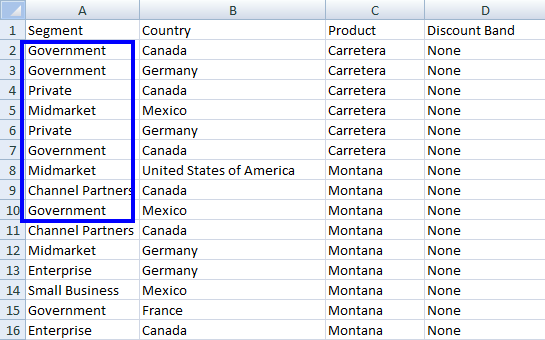
特定の列の複数のセルからデータを取得することもできます:
foreach (var cell in workSheet["A2:A10"]){Console.WriteLine("Value is: {0}", cell.Text);}
foreach (var cell in workSheet["A2:A10"])
{
    Console.WriteLine("Value is: {0}", cell.Text);
}
For Each cell In workSheet("A2:A10")Console.WriteLine("Value is: {0}", cell.Text)Next cell
For Each cell In workSheet("A2:A10")
	Console.WriteLine("Value is: {0}", cell.Text)
Next cell
using IronXL;using System;// Load an Excel fileWorkBook workBook = WorkBook.Load("sample.xlsx");WorkSheet workSheet = workBook.GetWorkSheet("Sheet1");// Specify the rangeforeach (var cell in workSheet["B2:B10"]){Console.WriteLine("Value is: {0}", cell.Text);}
using IronXL;
using System;

// Load an Excel file
WorkBook workBook = WorkBook.Load("sample.xlsx");
WorkSheet workSheet = workBook.GetWorkSheet("Sheet1");

// Specify the range
foreach (var cell in workSheet["B2:B10"])
{
    Console.WriteLine("Value is: {0}", cell.Text);
}
ImportsIronXLImportsSystem' Load an Excel fileDim workBook AsWorkBook = WorkBook.Load("sample.xlsx")Dim workSheet AsWorkSheet = workBook.GetWorkSheet("Sheet1")' Specify the rangeFor Each cell In workSheet("B2:B10")Console.WriteLine("Value is: {0}", cell.Text)Next
Imports IronXL
Imports System

' Load an Excel file
Dim workBook As WorkBook = WorkBook.Load("sample.xlsx")
Dim workSheet As WorkSheet = workBook.GetWorkSheet("Sheet1")

' Specify the range
For Each cell In workSheet("B2:B10")
    Console.WriteLine("Value is: {0}", cell.Text)
Next
以下のコードを使用して、WorkSheet のような集計関数(Min、または Max など)を適用し、Excel からフィルタリングされたデータにアクセスします:
どの集約関数が利用できますか?
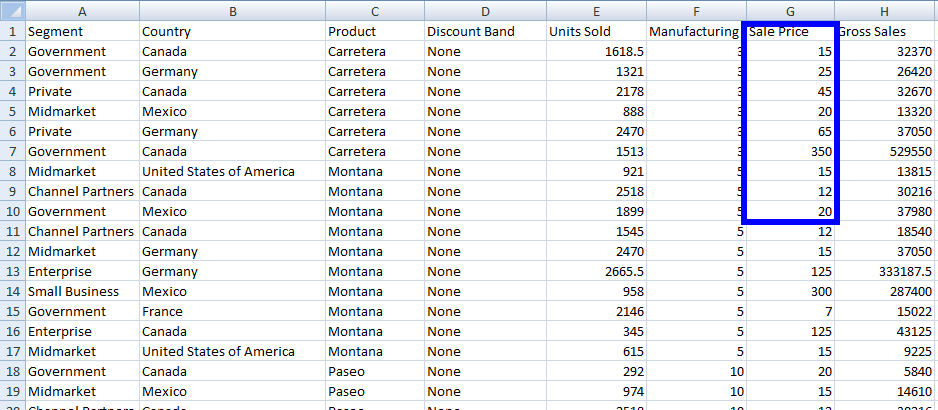
using IronXL;// Apply aggregate functionsdecimal sum = workSheet["G2:G10"].Sum(); // Sum of cells from G2 to G10decimal min = workSheet["G2:G10"].Min(); // Minimum value in cells from G2 to G10decimal max = workSheet["G2:G10"].Max(); // Maximum value in cells from G2 to G10
using IronXL;

// Apply aggregate functions
decimal sum = workSheet["G2:G10"].Sum(); // Sum of cells from G2 to G10
decimal min = workSheet["G2:G10"].Min(); // Minimum value in cells from G2 to G10
decimal max = workSheet["G2:G10"].Max(); // Maximum value in cells from G2 to G10
ImportsIronXL' Apply aggregate functionsDim sum AsDecimal = workSheet("G2:G10").Sum() ' Sum of cells from G2 to G10Dim min AsDecimal = workSheet("G2:G10").Min() ' Minimum value in cells from G2 to G10Dim max AsDecimal = workSheet("G2:G10").Max() ' Maximum value in cells from G2 to G10
Imports IronXL

' Apply aggregate functions
Dim sum As Decimal = workSheet("G2:G10").Sum() ' Sum of cells from G2 to G10
Dim min As Decimal = workSheet("G2:G10").Min() ' Minimum value in cells from G2 to G10
Dim max As Decimal = workSheet("G2:G10").Max() ' Maximum value in cells from G2 to G10
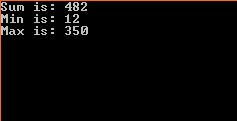
using IronXL;using System;// Load the Excel workbookWorkBook workBook = WorkBook.Load("sample.xlsx");// Get the specified WorkSheetWorkSheet workSheet = workBook.GetWorkSheet("Sheet1");// Calculate sum, minimum, and maximum for a range of cellsdecimal sum = workSheet["G2:G10"].Sum();decimal min = workSheet["G2:G10"].Min();decimal max = workSheet["G2:G10"].Max();// Output resultsConsole.WriteLine("Sum is: {0}", sum);Console.WriteLine("Min is: {0}", min);Console.WriteLine("Max is: {0}", max);
using IronXL;
using System;

// Load the Excel workbook
WorkBook workBook = WorkBook.Load("sample.xlsx");

// Get the specified WorkSheet
WorkSheet workSheet = workBook.GetWorkSheet("Sheet1");

// Calculate sum, minimum, and maximum for a range of cells
decimal sum = workSheet["G2:G10"].Sum();
decimal min = workSheet["G2:G10"].Min();
decimal max = workSheet["G2:G10"].Max();

// Output results
Console.WriteLine("Sum is: {0}", sum);
Console.WriteLine("Min is: {0}", min);
Console.WriteLine("Max is: {0}", max);
ImportsIronXLImportsSystem' Load the Excel workbookDim workBook AsWorkBook = WorkBook.Load("sample.xlsx")' Get the specified WorkSheetDim workSheet AsWorkSheet = workBook.GetWorkSheet("Sheet1")' Calculate sum, minimum, and maximum for a range of cellsDim sum AsDecimal = workSheet("G2:G10").Sum()Dim min AsDecimal = workSheet("G2:G10").Min()Dim max AsDecimal = workSheet("G2:G10").Max()' Output resultsConsole.WriteLine("Sum is: {0}", sum)Console.WriteLine("Min is: {0}", min)Console.WriteLine("Max is: {0}", max)
Imports IronXL
Imports System

' Load the Excel workbook
Dim workBook As WorkBook = WorkBook.Load("sample.xlsx")

' Get the specified WorkSheet
Dim workSheet As WorkSheet = workBook.GetWorkSheet("Sheet1")

' Calculate sum, minimum, and maximum for a range of cells
Dim sum As Decimal = workSheet("G2:G10").Sum()
Dim min As Decimal = workSheet("G2:G10").Min()
Dim max As Decimal = workSheet("G2:G10").Max()

' Output results
Console.WriteLine("Sum is: {0}", sum)
Console.WriteLine("Min is: {0}", min)
Console.WriteLine("Max is: {0}", max)
このコードは次の出力を表示します:
そして、これがExcelファイル Sample.xlsx の内容です:
ExcelワークシートをDataTableとして読み込むには?
Using IronXL, it is easy to work with Excel WorkSheet as DataTable. この機能は、Excelデータを既存のデータ処理パイプラインと統合したり、データをUIコントロールにバインドしたりする必要がある場合に特に役立ちます。
基本的な変換方法は何ですか?
using IronXL;using System.Data;// Convert worksheet to DataTableDataTable dt = workSheet.ToDataTable();
using IronXL;
using System.Data;

// Convert worksheet to DataTable
DataTable dt = workSheet.ToDataTable();
ImportsIronXLImportsSystem.Data' Convert worksheet to DataTableDim dt AsDataTable = workSheet.ToDataTable()
Imports IronXL
Imports System.Data

' Convert worksheet to DataTable
Dim dt As DataTable = workSheet.ToDataTable()
最初の行を列のヘッダーとして使用するにはどうすればよいですか?
ExcelSheet の最初の行を DataTableColumnName として使用するには:
using IronXL;using System.Data;// Convert worksheet to DataTable with the first row as column namesDataTable dt = workSheet.ToDataTable(true);
using IronXL;
using System.Data;

// Convert worksheet to DataTable with the first row as column names
DataTable dt = workSheet.ToDataTable(true);
ImportsIronXLImportsSystem.Data' Convert worksheet to DataTable with the first row as column namesDim dt AsDataTable = workSheet.ToDataTable(True)
Imports IronXL
Imports System.Data

' Convert worksheet to DataTable with the first row as column names
Dim dt As DataTable = workSheet.ToDataTable(True)
using IronXL;using System;using System.Data;// Load the Excel workbookWorkBook workBook = WorkBook.Load("sample.xlsx");// Get the specified WorkSheetWorkSheet workSheet = workBook.GetWorkSheet("Sheet1");// Convert WorkSheet to DataTableDataTable dt = workSheet.ToDataTable(true); // Use first row as column names// Iterate through rows and columns and display dataforeach (DataRow row in dt.Rows) // Access rows{ for (int i = 0; i < dt.Columns.Count; i++) // Access columns of corresponding row {Console.Write(row[i] + " "); }Console.WriteLine();}
using IronXL;
using System;
using System.Data;

// Load the Excel workbook
WorkBook workBook = WorkBook.Load("sample.xlsx");

// Get the specified WorkSheet
WorkSheet workSheet = workBook.GetWorkSheet("Sheet1");

// Convert WorkSheet to DataTable
DataTable dt = workSheet.ToDataTable(true); // Use first row as column names

// Iterate through rows and columns and display data
foreach (DataRow row in dt.Rows) // Access rows
{
    for (int i = 0; i < dt.Columns.Count; i++) // Access columns of corresponding row
    {
        Console.Write(row[i] + " ");
    }
    Console.WriteLine();
}
ImportsIronXLImportsSystemImportsSystem.Data' Load the Excel workbookDim workBook AsWorkBook = WorkBook.Load("sample.xlsx")' Get the specified WorkSheetDim workSheet AsWorkSheet = workBook.GetWorkSheet("Sheet1")' Convert WorkSheet to DataTableDim dt AsDataTable = workSheet.ToDataTable(True) ' Use first row as column names' Iterate through rows and columns and display dataFor Each row AsDataRowIn dt.Rows' Access rows For i AsInteger = 0 To dt.Columns.Count - 1 ' Access columns of corresponding rowConsole.Write(row(i) & " ") NextConsole.WriteLine()Next
Imports IronXL
Imports System
Imports System.Data

' Load the Excel workbook
Dim workBook As WorkBook = WorkBook.Load("sample.xlsx")

' Get the specified WorkSheet
Dim workSheet As WorkSheet = workBook.GetWorkSheet("Sheet1")

' Convert WorkSheet to DataTable
Dim dt As DataTable = workSheet.ToDataTable(True) ' Use first row as column names

' Iterate through rows and columns and display data
For Each row As DataRow In dt.Rows ' Access rows
    For i As Integer = 0 To dt.Columns.Count - 1 ' Access columns of corresponding row
        Console.Write(row(i) & " ")
    Next
    Console.WriteLine()
Next
using IronXL;using System;using System.Data;// Load the Excel workbookWorkBook workBook = WorkBook.Load("sample.xlsx");// Convert the WorkBook to a DataSetDataSet ds = workBook.ToDataSet();// Iterate through tables in the DataSet and display table namesforeach (DataTable dt in ds.Tables){Console.WriteLine(dt.TableName);}
using IronXL;
using System;
using System.Data;

// Load the Excel workbook
WorkBook workBook = WorkBook.Load("sample.xlsx");

// Convert the WorkBook to a DataSet
DataSet ds = workBook.ToDataSet();

// Iterate through tables in the DataSet and display table names
foreach (DataTable dt in ds.Tables)
{
    Console.WriteLine(dt.TableName);
}
ImportsIronXLImportsSystemImportsSystem.Data' Load the Excel workbookDim workBook AsWorkBook = WorkBook.Load("sample.xlsx")' Convert the WorkBook to a DataSetDim ds AsDataSet = workBook.ToDataSet()' Iterate through tables in the DataSet and display table namesFor Each dt AsDataTableIn ds.TablesConsole.WriteLine(dt.TableName)Next
Imports IronXL
Imports System
Imports System.Data

' Load the Excel workbook
Dim workBook As WorkBook = WorkBook.Load("sample.xlsx")

' Convert the WorkBook to a DataSet
Dim ds As DataSet = workBook.ToDataSet()

' Iterate through tables in the DataSet and display table names
For Each dt As DataTable In ds.Tables
    Console.WriteLine(dt.TableName)
Next
using IronXL;using System;// Load the Excel workbookWorkBook workBook = WorkBook.Load("sample.xlsx");// Iterate through every WorkSheet in the WorkBookforeach (WorkSheet workSheet in workBook.WorkSheets){Console.WriteLine($"Worksheet: {workSheet.Name}"); // Access each filled cell value on the current WorkSheet foreach (var cell in workSheet.FilledCells) {Console.WriteLine($"{cell.Address}: {cell.Text}"); }}
using IronXL;
using System;

// Load the Excel workbook
WorkBook workBook = WorkBook.Load("sample.xlsx");

// Iterate through every WorkSheet in the WorkBook
foreach (WorkSheet workSheet in workBook.WorkSheets)
{
    Console.WriteLine($"Worksheet: {workSheet.Name}");

    // Access each filled cell value on the current WorkSheet
    foreach (var cell in workSheet.FilledCells)
    {
        Console.WriteLine($"{cell.Address}: {cell.Text}");
    }
}
ImportsIronXLImportsSystem' Load the Excel workbookDim workBook AsWorkBook = WorkBook.Load("sample.xlsx")' Iterate through every WorkSheet in the WorkBookFor Each workSheet AsWorkSheetIn workBook.WorkSheetsConsole.WriteLine($"Worksheet: {workSheet.Name}") ' Access each filled cell value on the current WorkSheet For Each cell In workSheet.FilledCellsConsole.WriteLine($"{cell.Address}: {cell.Text}") NextNext
Imports IronXL
Imports System

' Load the Excel workbook
Dim workBook As WorkBook = WorkBook.Load("sample.xlsx")

' Iterate through every WorkSheet in the WorkBook
For Each workSheet As WorkSheet In workBook.WorkSheets
    Console.WriteLine($"Worksheet: {workSheet.Name}")

    ' Access each filled cell value on the current WorkSheet
    For Each cell In workSheet.FilledCells
        Console.WriteLine($"{cell.Address}: {cell.Text}")
    Next
Next
Can I convert an entire workbook to a DataSet with IronXL?
Yes, you can convert an entire workbook to a DataSet using the `ToDataSet` method, which allows you to work with each worksheet as a separate DataTable.
What is the recommended way to read multiple cells at once in IronXL?
You can read multiple cells by iterating over a specified range, for example, using `foreach` on `workSheet["A2:A10"]` to read each cell's value.
How do I install IronXL in my C# project?
You can install IronXL via direct download or through NuGet Package Manager in Visual Studio. The library is free for development purposes.
How can I display Excel sheet data results in the console using IronXL?
To display Excel sheet data in the console, load the workbook using `WorkBook.Load`, access the desired worksheet, and iterate through cells to output their values using `Console.WriteLine`.