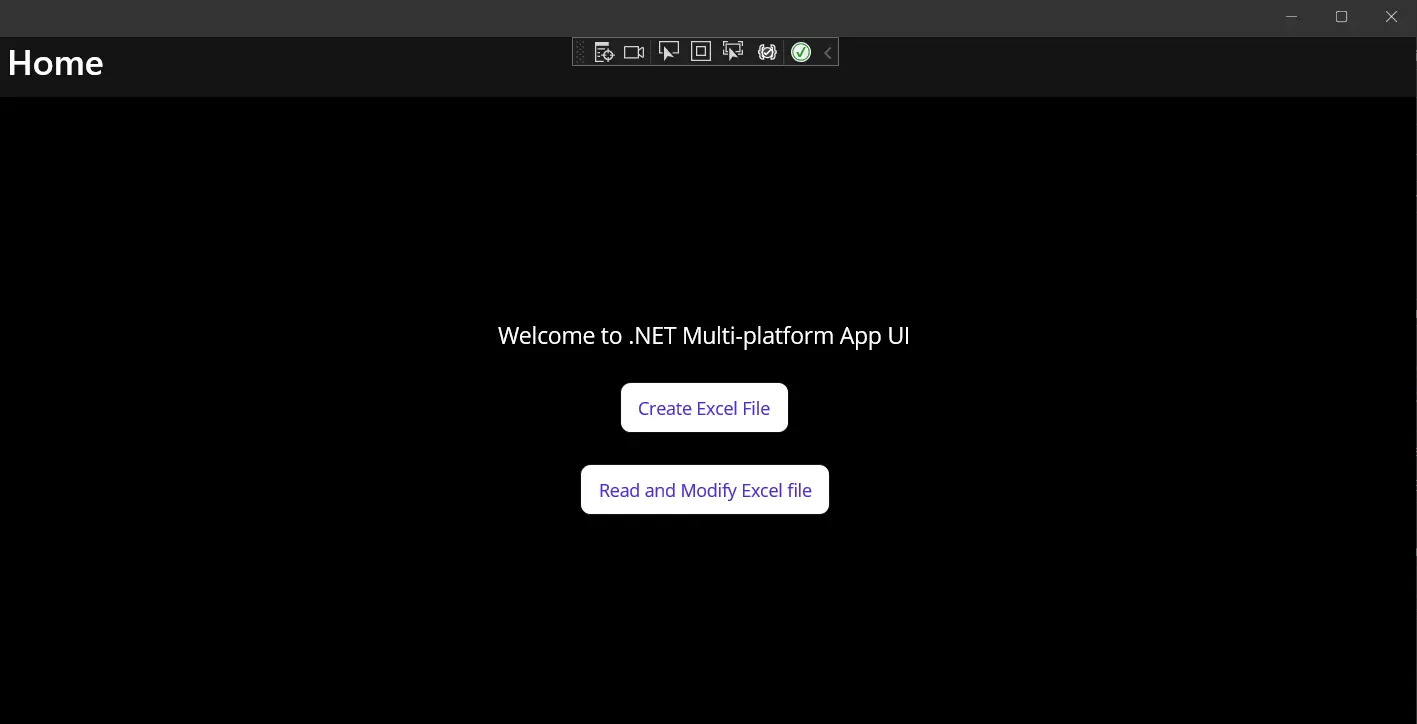
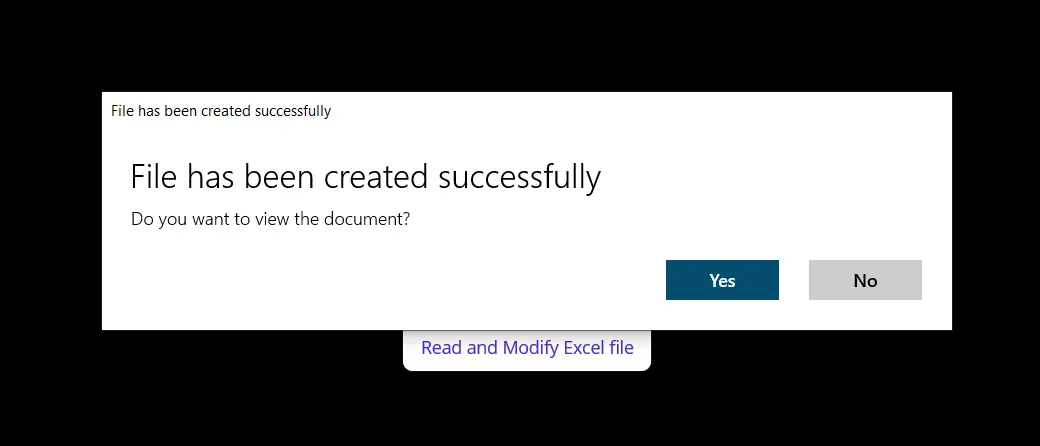
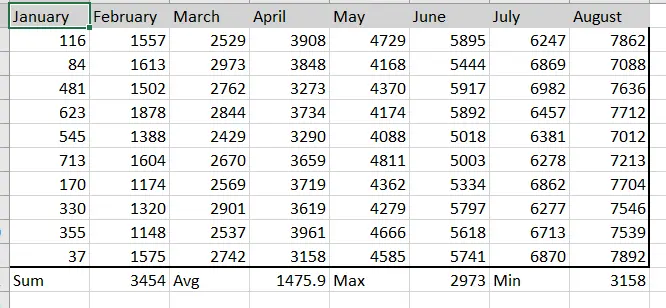
private voidCreateExcel(object sender, EventArgs e){ // Create a new Workbook WorkBook workbook = WorkBook.Create(ExcelFileFormat.XLSX); // Create a Worksheet var sheet = workbook.CreateWorkSheet("2022 Budget"); // Set cell headers sheet["A1"].Value = "January"; sheet["B1"].Value = "February"; sheet["C1"].Value = "March"; sheet["D1"].Value = "April"; sheet["E1"].Value = "May"; sheet["F1"].Value = "June"; sheet["G1"].Value = "July"; sheet["H1"].Value = "August"; // Fill worksheet cells with random values Random r = new Random(); for (int i = 2; i <= 11; i++) { sheet["A" + i].Value = r.Next(1, 1000); sheet["B" + i].Value = r.Next(1000, 2000); sheet["C" + i].Value = r.Next(2000, 3000); sheet["D" + i].Value = r.Next(3000, 4000); sheet["E" + i].Value = r.Next(4000, 5000); sheet["F" + i].Value = r.Next(5000, 6000); sheet["G" + i].Value = r.Next(6000, 7000); sheet["H" + i].Value = r.Next(7000, 8000); } // Apply formatting (background and border) sheet["A1:H1"].Style.SetBackgroundColor("#d3d3d3"); sheet["A1:H1"].Style.TopBorder.SetColor("#000000"); sheet["A1:H1"].Style.BottomBorder.SetColor("#000000"); sheet["H2:H11"].Style.RightBorder.SetColor("#000000"); sheet["H2:H11"].Style.RightBorder.Type = IronXL.Styles.BorderType.Medium; sheet["A11:H11"].Style.BottomBorder.SetColor("#000000"); sheet["A11:H11"].Style.BottomBorder.Type = IronXL.Styles.BorderType.Medium; // Apply formulas decimal sum = sheet["A2:A11"].Sum(); decimal avg = sheet["B2:B11"].Avg(); decimal max = sheet["C2:C11"].Max(); decimal min = sheet["D2:D11"].Min(); sheet["A12"].Value = "Sum"; sheet["B12"].Value = sum; sheet["C12"].Value = "Avg"; sheet["D12"].Value = avg; sheet["E12"].Value = "Max"; sheet["F12"].Value = max; sheet["G12"].Value = "Min"; sheet["H12"].Value = min; // Save and open the Excel file SaveService saveService = new SaveService(); saveService.SaveAndView("Budget.xlsx", "application/octet-stream", workbook.ToStream());}
private void CreateExcel(object sender, EventArgs e)
{
    // Create a new Workbook
    WorkBook workbook = WorkBook.Create(ExcelFileFormat.XLSX);

    // Create a Worksheet
    var sheet = workbook.CreateWorkSheet("2022 Budget");

    // Set cell headers
    sheet["A1"].Value = "January";
    sheet["B1"].Value = "February";
    sheet["C1"].Value = "March";
    sheet["D1"].Value = "April";
    sheet["E1"].Value = "May";
    sheet["F1"].Value = "June";
    sheet["G1"].Value = "July";
    sheet["H1"].Value = "August";

    // Fill worksheet cells with random values
    Random r = new Random();
    for (int i = 2; i <= 11; i++)
    {
        sheet["A" + i].Value = r.Next(1, 1000);
        sheet["B" + i].Value = r.Next(1000, 2000);
        sheet["C" + i].Value = r.Next(2000, 3000);
        sheet["D" + i].Value = r.Next(3000, 4000);
        sheet["E" + i].Value = r.Next(4000, 5000);
        sheet["F" + i].Value = r.Next(5000, 6000);
        sheet["G" + i].Value = r.Next(6000, 7000);
        sheet["H" + i].Value = r.Next(7000, 8000);
    }

    // Apply formatting (background and border)
    sheet["A1:H1"].Style.SetBackgroundColor("#d3d3d3");
    sheet["A1:H1"].Style.TopBorder.SetColor("#000000");
    sheet["A1:H1"].Style.BottomBorder.SetColor("#000000");
    sheet["H2:H11"].Style.RightBorder.SetColor("#000000");
    sheet["H2:H11"].Style.RightBorder.Type = IronXL.Styles.BorderType.Medium;
    sheet["A11:H11"].Style.BottomBorder.SetColor("#000000");
    sheet["A11:H11"].Style.BottomBorder.Type = IronXL.Styles.BorderType.Medium;

    // Apply formulas
    decimal sum = sheet["A2:A11"].Sum();
    decimal avg = sheet["B2:B11"].Avg();
    decimal max = sheet["C2:C11"].Max();
    decimal min = sheet["D2:D11"].Min();

    sheet["A12"].Value = "Sum";
    sheet["B12"].Value = sum;

    sheet["C12"].Value = "Avg";
    sheet["D12"].Value = avg;

    sheet["E12"].Value = "Max";
    sheet["F12"].Value = max;

    sheet["G12"].Value = "Min";
    sheet["H12"].Value = min;

    // Save and open the Excel file
    SaveService saveService = new SaveService();
    saveService.SaveAndView("Budget.xlsx", "application/octet-stream", workbook.ToStream());
}
Private Sub CreateExcel(ByVal sender AsObject, ByVal e AsEventArgs) ' Create a new Workbook Dim workbook AsWorkBook = WorkBook.Create(ExcelFileFormat.XLSX) ' Create a Worksheet Dim sheet = workbook.CreateWorkSheet("2022 Budget") ' Set cell headers sheet("A1").Value = "January" sheet("B1").Value = "February" sheet("C1").Value = "March" sheet("D1").Value = "April" sheet("E1").Value = "May" sheet("F1").Value = "June" sheet("G1").Value = "July" sheet("H1").Value = "August" ' Fill worksheet cells with random values Dim r As New Random() For i AsInteger = 2 To 11 sheet("A" & i).Value = r.Next(1, 1000) sheet("B" & i).Value = r.Next(1000, 2000) sheet("C" & i).Value = r.Next(2000, 3000) sheet("D" & i).Value = r.Next(3000, 4000) sheet("E" & i).Value = r.Next(4000, 5000) sheet("F" & i).Value = r.Next(5000, 6000) sheet("G" & i).Value = r.Next(6000, 7000) sheet("H" & i).Value = r.Next(7000, 8000) Next i ' Apply formatting (background and border) sheet("A1:H1").Style.SetBackgroundColor("#d3d3d3") sheet("A1:H1").Style.TopBorder.SetColor("#000000") sheet("A1:H1").Style.BottomBorder.SetColor("#000000") sheet("H2:H11").Style.RightBorder.SetColor("#000000") sheet("H2:H11").Style.RightBorder.Type = IronXL.Styles.BorderType.Medium sheet("A11:H11").Style.BottomBorder.SetColor("#000000") sheet("A11:H11").Style.BottomBorder.Type = IronXL.Styles.BorderType.Medium ' Apply formulas Dim sum AsDecimal = sheet("A2:A11").Sum() Dim avg AsDecimal = sheet("B2:B11").Avg() Dim max AsDecimal = sheet("C2:C11").Max() Dim min AsDecimal = sheet("D2:D11").Min() sheet("A12").Value = "Sum" sheet("B12").Value = sum sheet("C12").Value = "Avg" sheet("D12").Value = avg sheet("E12").Value = "Max" sheet("F12").Value = max sheet("G12").Value = "Min" sheet("H12").Value = min ' Save and open the Excel file Dim saveService As New SaveService() saveService.SaveAndView("Budget.xlsx", "application/octet-stream", workbook.ToStream())End Sub
Private Sub CreateExcel(ByVal sender As Object, ByVal e As EventArgs)
	' Create a new Workbook
	Dim workbook As WorkBook = WorkBook.Create(ExcelFileFormat.XLSX)

	' Create a Worksheet
	Dim sheet = workbook.CreateWorkSheet("2022 Budget")

	' Set cell headers
	sheet("A1").Value = "January"
	sheet("B1").Value = "February"
	sheet("C1").Value = "March"
	sheet("D1").Value = "April"
	sheet("E1").Value = "May"
	sheet("F1").Value = "June"
	sheet("G1").Value = "July"
	sheet("H1").Value = "August"

	' Fill worksheet cells with random values
	Dim r As New Random()
	For i As Integer = 2 To 11
		sheet("A" & i).Value = r.Next(1, 1000)
		sheet("B" & i).Value = r.Next(1000, 2000)
		sheet("C" & i).Value = r.Next(2000, 3000)
		sheet("D" & i).Value = r.Next(3000, 4000)
		sheet("E" & i).Value = r.Next(4000, 5000)
		sheet("F" & i).Value = r.Next(5000, 6000)
		sheet("G" & i).Value = r.Next(6000, 7000)
		sheet("H" & i).Value = r.Next(7000, 8000)
	Next i

	' Apply formatting (background and border)
	sheet("A1:H1").Style.SetBackgroundColor("#d3d3d3")
	sheet("A1:H1").Style.TopBorder.SetColor("#000000")
	sheet("A1:H1").Style.BottomBorder.SetColor("#000000")
	sheet("H2:H11").Style.RightBorder.SetColor("#000000")
	sheet("H2:H11").Style.RightBorder.Type = IronXL.Styles.BorderType.Medium
	sheet("A11:H11").Style.BottomBorder.SetColor("#000000")
	sheet("A11:H11").Style.BottomBorder.Type = IronXL.Styles.BorderType.Medium

	' Apply formulas
	Dim sum As Decimal = sheet("A2:A11").Sum()
	Dim avg As Decimal = sheet("B2:B11").Avg()
	Dim max As Decimal = sheet("C2:C11").Max()
	Dim min As Decimal = sheet("D2:D11").Min()

	sheet("A12").Value = "Sum"
	sheet("B12").Value = sum

	sheet("C12").Value = "Avg"
	sheet("D12").Value = avg

	sheet("E12").Value = "Max"
	sheet("F12").Value = max

	sheet("G12").Value = "Min"
	sheet("H12").Value = min

	' Save and open the Excel file
	Dim saveService As New SaveService()
	saveService.SaveAndView("Budget.xlsx", "application/octet-stream", workbook.ToStream())
End Sub
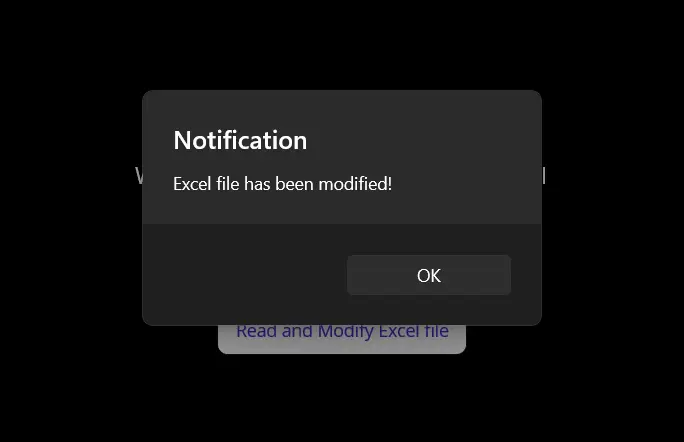
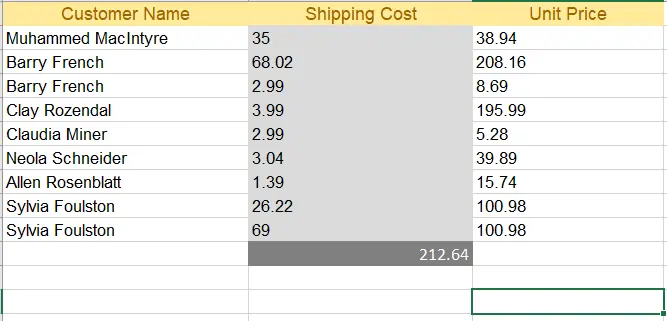
private voidReadExcel(object sender, EventArgs e){ // Store the path of the file string filepath = @"C:\Files\Customer Data.xlsx"; WorkBook workbook = WorkBook.Load(filepath); WorkSheet sheet = workbook.WorkSheets.First(); // Calculate the sum of a range decimal sum = sheet["B2:B10"].Sum(); // Modify a cell value and apply styles sheet["B11"].Value = sum; sheet["B11"].Style.SetBackgroundColor("#808080"); sheet["B11"].Style.Font.SetColor("#ffffff"); // Save and open the Excel file SaveService saveService = new SaveService(); saveService.SaveAndView("Modified Data.xlsx", "application/octet-stream", workbook.ToStream());DisplayAlert("Notification", "Excel file has been modified!", "OK");}
private void ReadExcel(object sender, EventArgs e)
{
    // Store the path of the file
    string filepath = @"C:\Files\Customer Data.xlsx";
    WorkBook workbook = WorkBook.Load(filepath);
    WorkSheet sheet = workbook.WorkSheets.First();

    // Calculate the sum of a range
    decimal sum = sheet["B2:B10"].Sum();

    // Modify a cell value and apply styles
    sheet["B11"].Value = sum;
    sheet["B11"].Style.SetBackgroundColor("#808080");
    sheet["B11"].Style.Font.SetColor("#ffffff");

    // Save and open the Excel file
    SaveService saveService = new SaveService();
    saveService.SaveAndView("Modified Data.xlsx", "application/octet-stream", workbook.ToStream());

    DisplayAlert("Notification", "Excel file has been modified!", "OK");
}
Private Sub ReadExcel(ByVal sender AsObject, ByVal e AsEventArgs) ' Store the path of the file Dim filepath AsString = "C:\Files\Customer Data.xlsx" Dim workbook AsWorkBook = WorkBook.Load(filepath) Dim sheet AsWorkSheet = workbook.WorkSheets.First() ' Calculate the sum of a range Dim sum AsDecimal = sheet("B2:B10").Sum() ' Modify a cell value and apply styles sheet("B11").Value = sum sheet("B11").Style.SetBackgroundColor("#808080") sheet("B11").Style.Font.SetColor("#ffffff") ' Save and open the Excel file Dim saveService As New SaveService() saveService.SaveAndView("Modified Data.xlsx", "application/octet-stream", workbook.ToStream())DisplayAlert("Notification", "Excel file has been modified!", "OK")End Sub
Private Sub ReadExcel(ByVal sender As Object, ByVal e As EventArgs)
	' Store the path of the file
	Dim filepath As String = "C:\Files\Customer Data.xlsx"
	Dim workbook As WorkBook = WorkBook.Load(filepath)
	Dim sheet As WorkSheet = workbook.WorkSheets.First()

	' Calculate the sum of a range
	Dim sum As Decimal = sheet("B2:B10").Sum()

	' Modify a cell value and apply styles
	sheet("B11").Value = sum
	sheet("B11").Style.SetBackgroundColor("#808080")
	sheet("B11").Style.Font.SetColor("#ffffff")

	' Save and open the Excel file
	Dim saveService As New SaveService()
	saveService.SaveAndView("Modified Data.xlsx", "application/octet-stream", workbook.ToStream())

	DisplayAlert("Notification", "Excel file has been modified!", "OK")
End Sub
using System;using System.IO;namespace MAUI_IronXL{ public partial class SaveService { public partial voidSaveAndView(string fileName, string contentType, MemoryStream stream); }}
using System;
using System.IO;

namespace MAUI_IronXL
{
    public partial class SaveService
    {
        public partial void SaveAndView(string fileName, string contentType, MemoryStream stream);
    }
}
ImportsSystemImportsSystem.IONamespaceMAUI_IronXLPartialPublic Class SaveService PublicPartial Private Sub SaveAndView(ByVal fileName AsString, ByVal contentType AsString, ByVal stream AsMemoryStream) End Sub End ClassEndNamespace
Imports System
Imports System.IO

Namespace MAUI_IronXL
	Partial Public Class SaveService
		Public Partial Private Sub SaveAndView(ByVal fileName As String, ByVal contentType As String, ByVal stream As MemoryStream)
		End Sub
	End Class
End Namespace
using System;using System.Collections.Generic;using System.IO;using System.Runtime.InteropServices.WindowsRuntime;using Windows.Storage;using Windows.Storage.Pickers;using Windows.Storage.Streams;using Windows.UI.Popups;namespace MAUI_IronXL{ public partial class SaveService { public async partial voidSaveAndView(string fileName, string contentType, MemoryStream stream) { StorageFile stFile; string extension = Path.GetExtension(fileName); IntPtr windowHandle = System.Diagnostics.Process.GetCurrentProcess().MainWindowHandle; if (!Windows.Foundation.Metadata.ApiInformation.IsTypePresent("Windows.Phone.UI.Input.HardwareButtons")) { FileSavePicker savePicker = new FileSavePicker(); savePicker.DefaultFileExtension = ".xlsx"; savePicker.SuggestedFileName = fileName; savePicker.FileTypeChoices.Add("XLSX", new List<string> { ".xlsx" });WinRT.Interop.InitializeWithWindow.Initialize(savePicker, windowHandle); stFile = await savePicker.PickSaveFileAsync(); } else { StorageFolder local = ApplicationData.Current.LocalFolder; stFile = await local.CreateFileAsync(fileName, CreationCollisionOption.ReplaceExisting); } if (stFile != null) { using (IRandomAccessStream zipStream = await stFile.OpenAsync(FileAccessMode.ReadWrite)) { using (Stream outputStream = zipStream.AsStreamForWrite()) { outputStream.SetLength(0); stream.WriteTo(outputStream); await outputStream.FlushAsync(); } } MessageDialog msgDialog = new("Do you want to view the document?", "File has been created successfully"); UICommand yesCmd = new("Yes"); msgDialog.Commands.Add(yesCmd); UICommand noCmd = new("No"); msgDialog.Commands.Add(noCmd);WinRT.Interop.InitializeWithWindow.Initialize(msgDialog, windowHandle); IUICommand cmd = await msgDialog.ShowAsync(); if (cmd.Label == yesCmd.Label) { awaitWindows.System.Launcher.LaunchFileAsync(stFile); } } } }}
using System;
using System.Collections.Generic;
using System.IO;
using System.Runtime.InteropServices.WindowsRuntime;
using Windows.Storage;
using Windows.Storage.Pickers;
using Windows.Storage.Streams;
using Windows.UI.Popups;

namespace MAUI_IronXL
{
    public partial class SaveService
    {
        public async partial void SaveAndView(string fileName, string contentType, MemoryStream stream)
        {
            StorageFile stFile;
            string extension = Path.GetExtension(fileName);
            IntPtr windowHandle = System.Diagnostics.Process.GetCurrentProcess().MainWindowHandle;

            if (!Windows.Foundation.Metadata.ApiInformation.IsTypePresent("Windows.Phone.UI.Input.HardwareButtons"))
            {
                FileSavePicker savePicker = new FileSavePicker();
                savePicker.DefaultFileExtension = ".xlsx";
                savePicker.SuggestedFileName = fileName;
                savePicker.FileTypeChoices.Add("XLSX", new List<string> { ".xlsx" });

                WinRT.Interop.InitializeWithWindow.Initialize(savePicker, windowHandle);
                stFile = await savePicker.PickSaveFileAsync();
            }
            else
            {
                StorageFolder local = ApplicationData.Current.LocalFolder;
                stFile = await local.CreateFileAsync(fileName, CreationCollisionOption.ReplaceExisting);
            }

            if (stFile != null)
            {
                using (IRandomAccessStream zipStream = await stFile.OpenAsync(FileAccessMode.ReadWrite))
                {
                    using (Stream outputStream = zipStream.AsStreamForWrite())
                    {
                        outputStream.SetLength(0);
                        stream.WriteTo(outputStream);
                        await outputStream.FlushAsync();
                    }
                }

                MessageDialog msgDialog = new("Do you want to view the document?", "File has been created successfully");
                UICommand yesCmd = new("Yes");
                msgDialog.Commands.Add(yesCmd);
                UICommand noCmd = new("No");
                msgDialog.Commands.Add(noCmd);

                WinRT.Interop.InitializeWithWindow.Initialize(msgDialog, windowHandle);

                IUICommand cmd = await msgDialog.ShowAsync();
                if (cmd.Label == yesCmd.Label)
                {
                    await Windows.System.Launcher.LaunchFileAsync(stFile);
                }
            }
        }
    }
}
ImportsSystemImportsSystem.Collections.GenericImportsSystem.IOImportsSystem.Runtime.InteropServices.WindowsRuntimeImportsWindows.StorageImportsWindows.Storage.PickersImportsWindows.Storage.StreamsImportsWindows.UI.PopupsNamespaceMAUI_IronXLPartialPublic Class SaveService PublicAsync Sub SaveAndView(ByVal fileName AsString, ByVal contentType AsString, ByVal stream AsMemoryStream) Dim stFile AsStorageFile Dim extension AsString = Path.GetExtension(fileName) Dim windowHandle AsIntPtr = System.Diagnostics.Process.GetCurrentProcess().MainWindowHandle IfNotWindows.Foundation.Metadata.ApiInformation.IsTypePresent("Windows.Phone.UI.Input.HardwareButtons") Then Dim savePicker As New FileSavePicker() savePicker.DefaultFileExtension = ".xlsx" savePicker.SuggestedFileName = fileName savePicker.FileTypeChoices.Add("XLSX", New List(OfString) From {".xlsx"})WinRT.Interop.InitializeWithWindow.Initialize(savePicker, windowHandle) stFile = Await savePicker.PickSaveFileAsync() Else Dim local AsStorageFolder = ApplicationData.Current.LocalFolder stFile = Await local.CreateFileAsync(fileName, CreationCollisionOption.ReplaceExisting) End If If stFile IsNot Nothing ThenUsing zipStream AsIRandomAccessStream = Await stFile.OpenAsync(FileAccessMode.ReadWrite)Using outputStream AsStream = zipStream.AsStreamForWrite() outputStream.SetLength(0) stream.WriteTo(outputStream)Await outputStream.FlushAsync()EndUsingEndUsing Dim msgDialog As New MessageDialog("Do you want to view the document?", "File has been created successfully") Dim yesCmd As New UICommand("Yes") msgDialog.Commands.Add(yesCmd) Dim noCmd As New UICommand("No") msgDialog.Commands.Add(noCmd)WinRT.Interop.InitializeWithWindow.Initialize(msgDialog, windowHandle) Dim cmd AsIUICommand = Await msgDialog.ShowAsync() If cmd.Label = yesCmd.LabelThenAwaitWindows.System.Launcher.LaunchFileAsync(stFile) End If End If End Sub End ClassEndNamespace
Imports System
Imports System.Collections.Generic
Imports System.IO
Imports System.Runtime.InteropServices.WindowsRuntime
Imports Windows.Storage
Imports Windows.Storage.Pickers
Imports Windows.Storage.Streams
Imports Windows.UI.Popups

Namespace MAUI_IronXL
	Partial Public Class SaveService
		Public Async Sub SaveAndView(ByVal fileName As String, ByVal contentType As String, ByVal stream As MemoryStream)
			Dim stFile As StorageFile
			Dim extension As String = Path.GetExtension(fileName)
			Dim windowHandle As IntPtr = System.Diagnostics.Process.GetCurrentProcess().MainWindowHandle

			If Not Windows.Foundation.Metadata.ApiInformation.IsTypePresent("Windows.Phone.UI.Input.HardwareButtons") Then
				Dim savePicker As New FileSavePicker()
				savePicker.DefaultFileExtension = ".xlsx"
				savePicker.SuggestedFileName = fileName
				savePicker.FileTypeChoices.Add("XLSX", New List(Of String) From {".xlsx"})

				WinRT.Interop.InitializeWithWindow.Initialize(savePicker, windowHandle)
				stFile = Await savePicker.PickSaveFileAsync()
			Else
				Dim local As StorageFolder = ApplicationData.Current.LocalFolder
				stFile = Await local.CreateFileAsync(fileName, CreationCollisionOption.ReplaceExisting)
			End If

			If stFile IsNot Nothing Then
				Using zipStream As IRandomAccessStream = Await stFile.OpenAsync(FileAccessMode.ReadWrite)
					Using outputStream As Stream = zipStream.AsStreamForWrite()
						outputStream.SetLength(0)
						stream.WriteTo(outputStream)
						Await outputStream.FlushAsync()
					End Using
				End Using

				Dim msgDialog As New MessageDialog("Do you want to view the document?", "File has been created successfully")
				Dim yesCmd As New UICommand("Yes")
				msgDialog.Commands.Add(yesCmd)
				Dim noCmd As New UICommand("No")
				msgDialog.Commands.Add(noCmd)

				WinRT.Interop.InitializeWithWindow.Initialize(msgDialog, windowHandle)

				Dim cmd As IUICommand = Await msgDialog.ShowAsync()
				If cmd.Label = yesCmd.Label Then
					Await Windows.System.Launcher.LaunchFileAsync(stFile)
				End If
			End If
		End Sub
	End Class
End Namespace
IronXLを使用した.NET MAUI ExcelプロジェクトのソースコードはGitHubで入手可能です。これにより、開発者はVisual Studio 2022を使用して迅速にセットアップし、アプリケーションでのExcelファイル操作を試すことができます。
Is IronXL compatible with different .NET project templates?
Yes, IronXL is compatible with various .NET project templates including Windows Forms, WPF, and ASP.NET Core, among others.
Where can I find additional resources and tutorials for using IronXL?
You can find additional tutorials and resources for using IronXL on the official [Iron Software website](https://ironsoftware.com) and their GitHub repository, which includes sample projects and API references.