using IronXL;using System;using System.Linq;// Load Excel workbook from file pathWorkBook workBook = WorkBook.Load("test.xlsx");// Access the first worksheet using LINQWorkSheet workSheet = workBook.WorkSheets.First();// Read integer value from cell A2int cellValue = workSheet["A2"].IntValue;Console.WriteLine($"Cell A2 value: {cellValue}");// Iterate through a range of cellsforeach (var cell in workSheet["A2:A10"]){Console.WriteLine("Cell {0} has value '{1}'", cell.AddressString, cell.Text);}// Advanced Operations with LINQ// Calculate sum using built_in Sum() methoddecimal sum = workSheet["A2:A10"].Sum();// Find maximum value using LINQdecimal max = workSheet["A2:A10"].Max(c => c.DecimalValue);// Output calculated resultsConsole.WriteLine($"Sum of A2:A10: {sum}");Console.WriteLine($"Maximum value: {max}");
using IronXL;
using System;
using System.Linq;

// Load Excel workbook from file path
WorkBook workBook = WorkBook.Load("test.xlsx");

// Access the first worksheet using LINQ
WorkSheet workSheet = workBook.WorkSheets.First();

// Read integer value from cell A2
int cellValue = workSheet["A2"].IntValue;
Console.WriteLine($"Cell A2 value: {cellValue}");

// Iterate through a range of cells
foreach (var cell in workSheet["A2:A10"])
{
    Console.WriteLine("Cell {0} has value '{1}'", cell.AddressString, cell.Text);
}

// Advanced Operations with LINQ
// Calculate sum using built_in Sum() method
decimal sum = workSheet["A2:A10"].Sum();

// Find maximum value using LINQ
decimal max = workSheet["A2:A10"].Max(c => c.DecimalValue);

// Output calculated results
Console.WriteLine($"Sum of A2:A10: {sum}");
Console.WriteLine($"Maximum value: {max}");
ImportsIronXLImportsSystemImportsSystem.Linq' Load Excel workbook from file pathDim workBook AsWorkBook = WorkBook.Load("test.xlsx")' Access the first worksheet using LINQDim workSheet AsWorkSheet = workBook.WorkSheets.First()' Read integer value from cell A2Dim cellValue AsInteger = workSheet("A2").IntValueConsole.WriteLine($"Cell A2 value: {cellValue}")' Iterate through a range of cellsFor Each cell In workSheet("A2:A10")Console.WriteLine("Cell {0} has value '{1}'", cell.AddressString, cell.Text)Next' Advanced Operations with LINQ' Calculate sum using built_in Sum() methodDim sum AsDecimal = workSheet("A2:A10").Sum()' Find maximum value using LINQDim max AsDecimal = workSheet("A2:A10").Max(Function(c) c.DecimalValue)' Output calculated resultsConsole.WriteLine($"Sum of A2:A10: {sum}")Console.WriteLine($"Maximum value: {max}")
Imports IronXL
Imports System
Imports System.Linq

' Load Excel workbook from file path
Dim workBook As WorkBook = WorkBook.Load("test.xlsx")

' Access the first worksheet using LINQ
Dim workSheet As WorkSheet = workBook.WorkSheets.First()

' Read integer value from cell A2
Dim cellValue As Integer = workSheet("A2").IntValue
Console.WriteLine($"Cell A2 value: {cellValue}")

' Iterate through a range of cells
For Each cell In workSheet("A2:A10")
    Console.WriteLine("Cell {0} has value '{1}'", cell.AddressString, cell.Text)
Next

' Advanced Operations with LINQ
' Calculate sum using built_in Sum() method
Dim sum As Decimal = workSheet("A2:A10").Sum()

' Find maximum value using LINQ
Dim max As Decimal = workSheet("A2:A10").Max(Function(c) c.DecimalValue)

' Output calculated results
Console.WriteLine($"Sum of A2:A10: {sum}")
Console.WriteLine($"Maximum value: {max}")
using IronXL;using System;using System.Linq;// Load Excel file from specified pathWorkBook workBook = WorkBook.Load(@"Spreadsheets\GDP.xlsx");Console.WriteLine("Workbook loaded successfully.");// Access specific worksheet by nameWorkSheet sheet = workBook.GetWorkSheet("Sheet1");// Read and display cell valuestring cellValue = sheet["A1"].StringValue;Console.WriteLine($"Cell A1 contains: {cellValue}");// Perform additional operations// Count non_empty cells in column Aint rowCount = sheet["A:A"].Count(cell => !cell.IsEmpty);Console.WriteLine($"Column A has {rowCount} non_empty cells");
using IronXL;
using System;
using System.Linq;

// Load Excel file from specified path
WorkBook workBook = WorkBook.Load(@"Spreadsheets\GDP.xlsx");

Console.WriteLine("Workbook loaded successfully.");

// Access specific worksheet by name
WorkSheet sheet = workBook.GetWorkSheet("Sheet1");

// Read and display cell value
string cellValue = sheet["A1"].StringValue;
Console.WriteLine($"Cell A1 contains: {cellValue}");

// Perform additional operations
// Count non_empty cells in column A
int rowCount = sheet["A:A"].Count(cell => !cell.IsEmpty);
Console.WriteLine($"Column A has {rowCount} non_empty cells");
ImportsIronXLImportsSystemImportsSystem.Linq' Load Excel file from specified pathDim workBook AsWorkBook = WorkBook.Load("Spreadsheets\GDP.xlsx")Console.WriteLine("Workbook loaded successfully.")' Access specific worksheet by nameDim sheet AsWorkSheet = workBook.GetWorkSheet("Sheet1")' Read and display cell valueDim cellValue AsString = sheet("A1").StringValueConsole.WriteLine($"Cell A1 contains: {cellValue}")' Perform additional operations' Count non_empty cells in column ADim rowCount AsInteger = sheet("A:A").Count(Function(cell) Not cell.IsEmpty)Console.WriteLine($"Column A has {rowCount} non_empty cells")
Imports IronXL
Imports System
Imports System.Linq

' Load Excel file from specified path
Dim workBook As WorkBook = WorkBook.Load("Spreadsheets\GDP.xlsx")

Console.WriteLine("Workbook loaded successfully.")

' Access specific worksheet by name
Dim sheet As WorkSheet = workBook.GetWorkSheet("Sheet1")

' Read and display cell value
Dim cellValue As String = sheet("A1").StringValue
Console.WriteLine($"Cell A1 contains: {cellValue}")

' Perform additional operations
' Count non_empty cells in column A
Dim rowCount As Integer = sheet("A:A").Count(Function(cell) Not cell.IsEmpty)
Console.WriteLine($"Column A has {rowCount} non_empty cells")
using IronXL;using System;// Get worksheet by nameWorkSheet workSheet = workBook.GetWorkSheet("GDPByCountry");Console.WriteLine("Worksheet 'GDPByCountry' not found");// List available worksheetsforeach (var sheet in workBook.WorkSheets){Console.WriteLine($"Available: {sheet.Name}");}
using IronXL;
using System;

// Get worksheet by name
WorkSheet workSheet = workBook.GetWorkSheet("GDPByCountry");

Console.WriteLine("Worksheet 'GDPByCountry' not found");
// List available worksheets
foreach (var sheet in workBook.WorkSheets)
{
    Console.WriteLine($"Available: {sheet.Name}");
}
ImportsIronXLImportsSystem' Get worksheet by nameDim workSheet AsWorkSheet = workBook.GetWorkSheet("GDPByCountry")Console.WriteLine("Worksheet 'GDPByCountry' not found")' List available worksheetsFor Each sheet In workBook.WorkSheetsConsole.WriteLine($"Available: {sheet.Name}")Next
Imports IronXL
Imports System

' Get worksheet by name
Dim workSheet As WorkSheet = workBook.GetWorkSheet("GDPByCountry")

Console.WriteLine("Worksheet 'GDPByCountry' not found")
' List available worksheets
For Each sheet In workBook.WorkSheets
    Console.WriteLine($"Available: {sheet.Name}")
Next
using IronXL;// Create new XLSX workbook (recommended format)WorkBook workBook = WorkBook.Create(ExcelFileFormat.XLSX);// Set workbook metadataworkBook.Metadata.Author = "Your Application";workBook.Metadata.Comments = "Generated by IronXL";// Create new XLS workbook for legacy supportWorkBook legacyWorkBook = WorkBook.Create(ExcelFileFormat.XLS);// Save the workbookworkBook.SaveAs("NewDocument.xlsx");
using IronXL;

// Create new XLSX workbook (recommended format)
WorkBook workBook = WorkBook.Create(ExcelFileFormat.XLSX);

// Set workbook metadata
workBook.Metadata.Author = "Your Application";
workBook.Metadata.Comments = "Generated by IronXL";

// Create new XLS workbook for legacy support
WorkBook legacyWorkBook = WorkBook.Create(ExcelFileFormat.XLS);

// Save the workbook
workBook.SaveAs("NewDocument.xlsx");
ImportsIronXL' Create new XLSX workbook (recommended format)Private workBook AsWorkBook = WorkBook.Create(ExcelFileFormat.XLSX)' Set workbook metadataworkBook.Metadata.Author = "Your Application"workBook.Metadata.Comments = "Generated by IronXL"' Create new XLS workbook for legacy supportDim legacyWorkBook AsWorkBook = WorkBook.Create(ExcelFileFormat.XLS)' Save the workbookworkBook.SaveAs("NewDocument.xlsx")
Imports IronXL

' Create new XLSX workbook (recommended format)
Private workBook As WorkBook = WorkBook.Create(ExcelFileFormat.XLSX)

' Set workbook metadata
workBook.Metadata.Author = "Your Application"
workBook.Metadata.Comments = "Generated by IronXL"

' Create new XLS workbook for legacy support
Dim legacyWorkBook As WorkBook = WorkBook.Create(ExcelFileFormat.XLS)

' Save the workbook
workBook.SaveAs("NewDocument.xlsx")
using IronXL;// Create multiple worksheets with descriptive namesWorkSheet summarySheet = workBook.CreateWorkSheet("Summary");WorkSheet dataSheet = workBook.CreateWorkSheet("RawData");WorkSheet chartSheet = workBook.CreateWorkSheet("Charts");// Set the active worksheetworkBook.SetActiveTab(0); // Makes "Summary" the active sheet// Access default worksheet (first sheet)WorkSheet defaultSheet = workBook.DefaultWorkSheet;
using IronXL;

// Create multiple worksheets with descriptive names
WorkSheet summarySheet = workBook.CreateWorkSheet("Summary");
WorkSheet dataSheet = workBook.CreateWorkSheet("RawData");
WorkSheet chartSheet = workBook.CreateWorkSheet("Charts");

// Set the active worksheet
workBook.SetActiveTab(0); // Makes "Summary" the active sheet

// Access default worksheet (first sheet)
WorkSheet defaultSheet = workBook.DefaultWorkSheet;
ImportsIronXL' Create multiple worksheets with descriptive namesDim summarySheet AsWorkSheet = workBook.CreateWorkSheet("Summary")Dim dataSheet AsWorkSheet = workBook.CreateWorkSheet("RawData")Dim chartSheet AsWorkSheet = workBook.CreateWorkSheet("Charts")' Set the active worksheetworkBook.SetActiveTab(0) ' Makes "Summary" the active sheet' Access default worksheet (first sheet)Dim defaultSheet AsWorkSheet = workBook.DefaultWorkSheet
Imports IronXL

' Create multiple worksheets with descriptive names
Dim summarySheet As WorkSheet = workBook.CreateWorkSheet("Summary")
Dim dataSheet As WorkSheet = workBook.CreateWorkSheet("RawData")
Dim chartSheet As WorkSheet = workBook.CreateWorkSheet("Charts")

' Set the active worksheet
workBook.SetActiveTab(0) ' Makes "Summary" the active sheet

' Access default worksheet (first sheet)
Dim defaultSheet As WorkSheet = workBook.DefaultWorkSheet
using IronXL;using System;using System.Linq;// Load workbook and get worksheetWorkBook workBook = WorkBook.Load("test.xlsx");WorkSheet workSheet = workBook.DefaultWorkSheet;// Access cell B1IronXL.Cell cell = workSheet["B1"].First();// Read cell value with type safetystring textValue = cell.StringValue;int intValue = cell.IntValue;decimal decimalValue = cell.DecimalValue;DateTime? dateValue = cell.DateTimeValue;// Check cell data typeif (cell.IsNumeric){Console.WriteLine($"Numeric value: {cell.DecimalValue}");}else if (cell.IsText){Console.WriteLine($"Text value: {cell.StringValue}");}
using IronXL;
using System;
using System.Linq;

// Load workbook and get worksheet
WorkBook workBook = WorkBook.Load("test.xlsx");
WorkSheet workSheet = workBook.DefaultWorkSheet;

// Access cell B1
IronXL.Cell cell = workSheet["B1"].First();

// Read cell value with type safety
string textValue = cell.StringValue;
int intValue = cell.IntValue;
decimal decimalValue = cell.DecimalValue;
DateTime? dateValue = cell.DateTimeValue;

// Check cell data type
if (cell.IsNumeric)
{
    Console.WriteLine($"Numeric value: {cell.DecimalValue}");
}
else if (cell.IsText)
{
    Console.WriteLine($"Text value: {cell.StringValue}");
}
ImportsIronXLImportsSystemImportsSystem.Linq' Load workbook and get worksheetDim workBook AsWorkBook = WorkBook.Load("test.xlsx")Dim workSheet AsWorkSheet = workBook.DefaultWorkSheet' Access cell B1Dim cell AsIronXL.Cell = workSheet("B1").First()' Read cell value with type safetyDim textValue AsString = cell.StringValueDim intValue AsInteger = cell.IntValueDim decimalValue AsDecimal = cell.DecimalValueDim dateValue AsDateTime? = cell.DateTimeValue' Check cell data typeIf cell.IsNumericThenConsole.WriteLine($"Numeric value: {cell.DecimalValue}")ElseIf cell.IsTextThenConsole.WriteLine($"Text value: {cell.StringValue}")End If
Imports IronXL
Imports System
Imports System.Linq

' Load workbook and get worksheet
Dim workBook As WorkBook = WorkBook.Load("test.xlsx")
Dim workSheet As WorkSheet = workBook.DefaultWorkSheet

' Access cell B1
Dim cell As IronXL.Cell = workSheet("B1").First()

' Read cell value with type safety
Dim textValue As String = cell.StringValue
Dim intValue As Integer = cell.IntValue
Dim decimalValue As Decimal = cell.DecimalValue
Dim dateValue As DateTime? = cell.DateTimeValue

' Check cell data type
If cell.IsNumeric Then
    Console.WriteLine($"Numeric value: {cell.DecimalValue}")
ElseIf cell.IsText Then
    Console.WriteLine($"Text value: {cell.StringValue}")
End If
// Write different data types to cellsworkSheet["A1"].Value = "Product Name"; // StringworkSheet["B1"].Value = 99.95m; // DecimalworkSheet["C1"].Value = DateTime.Today; // DateworkSheet["D1"].Formula = "=B1*1.2"; // Formula // Format cellsworkSheet["B1"].FormatString = "$#,##0.00"; // Currency formatworkSheet["C1"].FormatString = "yyyy-MM-dd";// Date format // Save changesworkBook.Save();
// Write different data types to cells
workSheet["A1"].Value = "Product Name";     // String
workSheet["B1"].Value = 99.95m;             // Decimal
workSheet["C1"].Value = DateTime.Today;     // Date
workSheet["D1"].Formula = "=B1*1.2";        // Formula
                                            // Format cells
workSheet["B1"].FormatString = "$#,##0.00"; // Currency format
workSheet["C1"].FormatString = "yyyy-MM-dd";// Date format
                                            // Save changes
workBook.Save();
' Write different data types to cellsworkSheet("A1").Value = "Product Name" ' StringworkSheet("B1").Value = 99.95D ' DecimalworkSheet("C1").Value = DateTime.Today' DateworkSheet("D1").Formula = "=B1*1.2" ' Formula ' Format cellsworkSheet("B1").FormatString = "$#,##0.00" ' Currency formatworkSheet("C1").FormatString = "yyyy-MM-dd" ' Date format ' Save changesworkBook.Save()
' Write different data types to cells
workSheet("A1").Value = "Product Name" ' String
workSheet("B1").Value = 99.95D ' Decimal
workSheet("C1").Value = DateTime.Today ' Date
workSheet("D1").Formula = "=B1*1.2" ' Formula
											' Format cells
workSheet("B1").FormatString = "$#,##0.00" ' Currency format
workSheet("C1").FormatString = "yyyy-MM-dd" ' Date format
											' Save changes
workBook.Save()
using IronXL;using Range = IronXL.Range;// Select range using Excel notationRange range = workSheet["D2:D101"];// Alternative: Use Range class for dynamic selectionRange dynamicRange = workSheet.GetRange("D2:D101"); // Row 2_101, Column D// Perform bulk operationsrange.Value = 0; // Set all cells to 0
using IronXL;
using Range = IronXL.Range;

// Select range using Excel notation
Range range = workSheet["D2:D101"];

// Alternative: Use Range class for dynamic selection
Range dynamicRange = workSheet.GetRange("D2:D101"); // Row 2_101, Column D

// Perform bulk operations
range.Value = 0; // Set all cells to 0
ImportsIronXL' Select range using Excel notationDim range AsRange = workSheet("D2:D101")' Alternative: Use Range class for dynamic selectionDim dynamicRange AsRange = workSheet.GetRange("D2:D101") ' Row 2_101, Column D' Perform bulk operationsrange.Value = 0 ' Set all cells to 0
Imports IronXL

' Select range using Excel notation
Dim range As Range = workSheet("D2:D101")

' Alternative: Use Range class for dynamic selection
Dim dynamicRange As Range = workSheet.GetRange("D2:D101") ' Row 2_101, Column D

' Perform bulk operations
range.Value = 0 ' Set all cells to 0
セルの数がわかっている場合は、ループを使用して効率的に範囲を処理します:
// Data validation examplepublic class ValidationResult{ public intRow { get; set; } public stringPhoneError { get; set; } public stringEmailError { get; set; } public stringDateError { get; set; } public boolIsValid => string.IsNullOrEmpty(PhoneError) && string.IsNullOrEmpty(EmailError) && string.IsNullOrEmpty(DateError);}// Validate data in rows 2-101var results = new List<ValidationResult>();for (int row = 2; row <= 101; row++){ var result = new ValidationResult { Row = row }; // Get row data efficiently var phoneCell = workSheet[$"B{row}"]; var emailCell = workSheet[$"D{row}"]; var dateCell = workSheet[$"E{row}"]; // Validate phone number if (!IsValidPhoneNumber(phoneCell.StringValue)) result.PhoneError = "Invalid phone format"; // Validate email if (!IsValidEmail(emailCell.StringValue)) result.EmailError = "Invalid email format"; // Validate date if (!dateCell.IsDateTime) result.DateError = "Invalid date format"; results.Add(result);}// Helper methodsboolIsValidPhoneNumber(string phone) => System.Text.RegularExpressions.Regex.IsMatch(phone, @"^\d{3}-\d{3}-\d{4}$");boolIsValidEmail(string email) => email.Contains("@") && email.Contains(".");
// Data validation example
public class ValidationResult
{
    public int Row { get; set; }
    public string PhoneError { get; set; }
    public string EmailError { get; set; }
    public string DateError { get; set; }
    public bool IsValid => string.IsNullOrEmpty(PhoneError) &&
                           string.IsNullOrEmpty(EmailError) &&
                           string.IsNullOrEmpty(DateError);
}

// Validate data in rows 2-101
var results = new List<ValidationResult>();

for (int row = 2; row <= 101; row++)
{
    var result = new ValidationResult { Row = row };

    // Get row data efficiently
    var phoneCell = workSheet[$"B{row}"];
    var emailCell = workSheet[$"D{row}"];
    var dateCell = workSheet[$"E{row}"];

    // Validate phone number
    if (!IsValidPhoneNumber(phoneCell.StringValue))
        result.PhoneError = "Invalid phone format";

    // Validate email
    if (!IsValidEmail(emailCell.StringValue))
        result.EmailError = "Invalid email format";

    // Validate date
    if (!dateCell.IsDateTime)
        result.DateError = "Invalid date format";

    results.Add(result);
}

// Helper methods
bool IsValidPhoneNumber(string phone) =>
    System.Text.RegularExpressions.Regex.IsMatch(phone, @"^\d{3}-\d{3}-\d{4}$");

bool IsValidEmail(string email) =>
    email.Contains("@") && email.Contains(".");
' Data validation examplePublic Class ValidationResult Public Property RowAsInteger Public Property PhoneErrorAsString Public Property EmailErrorAsString Public Property DateErrorAsString PublicReadOnlyPropertyIsValidAsBoolean Get ReturnString.IsNullOrEmpty(PhoneError) AndAlsoString.IsNullOrEmpty(EmailError) AndAlsoString.IsNullOrEmpty(DateError)End Get End PropertyEnd Class' Validate data in rows 2-101Dim results As New List(OfValidationResult)()For row AsInteger = 2 To 101 Dim result As New ValidationResultWith {.Row = row} ' Get row data efficiently Dim phoneCell = workSheet($"B{row}") Dim emailCell = workSheet($"D{row}") Dim dateCell = workSheet($"E{row}") ' Validate phone number IfNotIsValidPhoneNumber(phoneCell.StringValue) Then result.PhoneError = "Invalid phone format" End If ' Validate email IfNotIsValidEmail(emailCell.StringValue) Then result.EmailError = "Invalid email format" End If ' Validate date IfNot dateCell.IsDateTimeThen result.DateError = "Invalid date format" End If results.Add(result)Next' Helper methodsPrivate Function IsValidPhoneNumber(phone AsString) AsBoolean ReturnSystem.Text.RegularExpressions.Regex.IsMatch(phone, "^\d{3}-\d{3}-\d{4}$")End FunctionPrivate Function IsValidEmail(email AsString) AsBoolean Return email.Contains("@") AndAlso email.Contains(".")End Function
' Data validation example
Public Class ValidationResult
    Public Property Row As Integer
    Public Property PhoneError As String
    Public Property EmailError As String
    Public Property DateError As String
    Public ReadOnly Property IsValid As Boolean
        Get
            Return String.IsNullOrEmpty(PhoneError) AndAlso
                   String.IsNullOrEmpty(EmailError) AndAlso
                   String.IsNullOrEmpty(DateError)
        End Get
    End Property
End Class

' Validate data in rows 2-101
Dim results As New List(Of ValidationResult)()

For row As Integer = 2 To 101
    Dim result As New ValidationResult With {.Row = row}

    ' Get row data efficiently
    Dim phoneCell = workSheet($"B{row}")
    Dim emailCell = workSheet($"D{row}")
    Dim dateCell = workSheet($"E{row}")

    ' Validate phone number
    If Not IsValidPhoneNumber(phoneCell.StringValue) Then
        result.PhoneError = "Invalid phone format"
    End If

    ' Validate email
    If Not IsValidEmail(emailCell.StringValue) Then
        result.EmailError = "Invalid email format"
    End If

    ' Validate date
    If Not dateCell.IsDateTime Then
        result.DateError = "Invalid date format"
    End If

    results.Add(result)
Next

' Helper methods
Private Function IsValidPhoneNumber(phone As String) As Boolean
    Return System.Text.RegularExpressions.Regex.IsMatch(phone, "^\d{3}-\d{3}-\d{4}$")
End Function

Private Function IsValidEmail(email As String) As Boolean
    Return email.Contains("@") AndAlso email.Contains(".")
End Function
Excelスプレッドシートに数式を追加するにはどうすればいいですか?
Formula プロパティを使用して Excel の数式を適用します。 IronXLは、標準のExcel数式構文をサポートしています。
using IronXL;// Add formulas to calculate percentagesint lastRow = 50;for (int row = 2; row < lastRow; row++){ // Calculate percentage: current value / total workSheet[$"C{row}"].Formula = $"=B{row}/B{lastRow}"; // Format as percentage workSheet[$"C{row}"].FormatString = "0.00%";}// Add summary formulasworkSheet["B52"].Formula = "=SUM(B2:B50)"; // SumworkSheet["B53"].Formula = "=AVERAGE(B2:B50)"; // AverageworkSheet["B54"].Formula = "=MAX(B2:B50)"; // MaximumworkSheet["B55"].Formula = "=MIN(B2:B50)"; // Minimum // Force formula evaluationworkBook.EvaluateAll();
using IronXL;

// Add formulas to calculate percentages
int lastRow = 50;
for (int row = 2; row < lastRow; row++)
{
    // Calculate percentage: current value / total
    workSheet[$"C{row}"].Formula = $"=B{row}/B{lastRow}";
    // Format as percentage
    workSheet[$"C{row}"].FormatString = "0.00%";
}
// Add summary formulas
workSheet["B52"].Formula = "=SUM(B2:B50)";      // Sum
workSheet["B53"].Formula = "=AVERAGE(B2:B50)";   // Average
workSheet["B54"].Formula = "=MAX(B2:B50)";       // Maximum
workSheet["B55"].Formula = "=MIN(B2:B50)";       // Minimum
                                                 // Force formula evaluation
workBook.EvaluateAll();
ImportsIronXL' Add formulas to calculate percentagesDim lastRow AsInteger = 50For row AsInteger = 2 To lastRow - 1 ' Calculate percentage: current value / total workSheet($"C{row}").Formula = $"=B{row}/B{lastRow}" ' Format as percentage workSheet($"C{row}").FormatString = "0.00%"Next' Add summary formulasworkSheet("B52").Formula = "=SUM(B2:B50)" ' SumworkSheet("B53").Formula = "=AVERAGE(B2:B50)" ' AverageworkSheet("B54").Formula = "=MAX(B2:B50)" ' MaximumworkSheet("B55").Formula = "=MIN(B2:B50)" ' Minimum' Force formula evaluationworkBook.EvaluateAll()
Imports IronXL

' Add formulas to calculate percentages
Dim lastRow As Integer = 50
For row As Integer = 2 To lastRow - 1
    ' Calculate percentage: current value / total
    workSheet($"C{row}").Formula = $"=B{row}/B{lastRow}"
    ' Format as percentage
    workSheet($"C{row}").FormatString = "0.00%"
Next
' Add summary formulas
workSheet("B52").Formula = "=SUM(B2:B50)"      ' Sum
workSheet("B53").Formula = "=AVERAGE(B2:B50)"  ' Average
workSheet("B54").Formula = "=MAX(B2:B50)"      ' Maximum
workSheet("B55").Formula = "=MIN(B2:B50)"      ' Minimum
' Force formula evaluation
workBook.EvaluateAll()
using System.Text.RegularExpressions;using IronXL;// Validation implementationfor (int i = 2; i <= 101; i++){ var result = new PersonValidationResult { Row = i }; results.Add(result); // Get cells for current person var cells = workSheet[$"A{i}:E{i}"].ToList(); // Validate phone (column B) string phone = cells[1].StringValue; if (!Regex.IsMatch(phone, @"^\+?1?\d{10,14}$")) { result.PhoneNumberErrorMessage = "Invalid phone format"; } // Validate email (column D) string email = cells[3].StringValue; if (!Regex.IsMatch(email, @"^[^@\s]+@[^@\s]+\.[^@\s]+$")) { result.EmailErrorMessage = "Invalid email address"; } // Validate date (column E) if (!cells[4].IsDateTime) { result.DateErrorMessage = "Invalid date format"; }}
using System.Text.RegularExpressions;
using IronXL;

// Validation implementation
for (int i = 2; i <= 101; i++)
{
    var result = new PersonValidationResult { Row = i };
    results.Add(result);

    // Get cells for current person
    var cells = workSheet[$"A{i}:E{i}"].ToList();

    // Validate phone (column B)
    string phone = cells[1].StringValue;
    if (!Regex.IsMatch(phone, @"^\+?1?\d{10,14}$"))
    {
        result.PhoneNumberErrorMessage = "Invalid phone format";
    }

    // Validate email (column D)
    string email = cells[3].StringValue;
    if (!Regex.IsMatch(email, @"^[^@\s]+@[^@\s]+\.[^@\s]+$"))
    {
        result.EmailErrorMessage = "Invalid email address";
    }

    // Validate date (column E)
    if (!cells[4].IsDateTime)
    {
        result.DateErrorMessage = "Invalid date format";
    }
}
ImportsSystem.Text.RegularExpressionsImportsIronXL' Validation implementationFor i AsInteger = 2 To 101 Dim result As New PersonValidationResultWith {.Row = i} results.Add(result) ' Get cells for current person Dim cells = workSheet($"A{i}:E{i}").ToList() ' Validate phone (column B) Dim phone AsString = cells(1).StringValue IfNotRegex.IsMatch(phone, "^\+?1?\d{10,14}$") Then result.PhoneNumberErrorMessage = "Invalid phone format" End If ' Validate email (column D) Dim email AsString = cells(3).StringValue IfNotRegex.IsMatch(email, "^[^@\s]+@[^@\s]+\.[^@\s]+$") Then result.EmailErrorMessage = "Invalid email address" End If ' Validate date (column E) IfNot cells(4).IsDateTimeThen result.DateErrorMessage = "Invalid date format" End IfNext i
Imports System.Text.RegularExpressions
Imports IronXL

' Validation implementation
For i As Integer = 2 To 101
    Dim result As New PersonValidationResult With {.Row = i}
    results.Add(result)

    ' Get cells for current person
    Dim cells = workSheet($"A{i}:E{i}").ToList()

    ' Validate phone (column B)
    Dim phone As String = cells(1).StringValue
    If Not Regex.IsMatch(phone, "^\+?1?\d{10,14}$") Then
        result.PhoneNumberErrorMessage = "Invalid phone format"
    End If

    ' Validate email (column D)
    Dim email As String = cells(3).StringValue
    If Not Regex.IsMatch(email, "^[^@\s]+@[^@\s]+\.[^@\s]+$") Then
        result.EmailErrorMessage = "Invalid email address"
    End If

    ' Validate date (column E)
    If Not cells(4).IsDateTime Then
        result.DateErrorMessage = "Invalid date format"
    End If
Next i
検証結果を新しいワークシートに保存します:
// Create results worksheetvar resultsSheet = workBook.CreateWorkSheet("ValidationResults");// Add headersresultsSheet["A1"].Value = "Row";resultsSheet["B1"].Value = "Valid";resultsSheet["C1"].Value = "Phone Error";resultsSheet["D1"].Value = "Email Error";resultsSheet["E1"].Value = "Date Error";// Style headersresultsSheet["A1:E1"].Style.Font.Bold = true;resultsSheet["A1:E1"].Style.SetBackgroundColor("#4472C4");resultsSheet["A1:E1"].Style.Font.Color = "#FFFFFF";// Output validation resultsfor (int i = 0; i < results.Count; i++){ var result = results[i]; int outputRow = i + 2; resultsSheet[$"A{outputRow}"].Value = result.Row; resultsSheet[$"B{outputRow}"].Value = result.IsValid ? "Yes" : "No"; resultsSheet[$"C{outputRow}"].Value = result.PhoneNumberErrorMessage ?? ""; resultsSheet[$"D{outputRow}"].Value = result.EmailErrorMessage ?? ""; resultsSheet[$"E{outputRow}"].Value = result.DateErrorMessage ?? ""; // Highlight invalid rows if (!result.IsValid) { resultsSheet[$"A{outputRow}:E{outputRow}"].Style.SetBackgroundColor("#FFE6E6"); }}// Auto-fit columnsfor (int col = 0; col < 5; col++){ resultsSheet.AutoSizeColumn(col);}// Save validated workbookworkBook.SaveAs(@"Spreadsheets\PeopleValidated.xlsx");
// Create results worksheet
var resultsSheet = workBook.CreateWorkSheet("ValidationResults");

// Add headers
resultsSheet["A1"].Value = "Row";
resultsSheet["B1"].Value = "Valid";
resultsSheet["C1"].Value = "Phone Error";
resultsSheet["D1"].Value = "Email Error";
resultsSheet["E1"].Value = "Date Error";

// Style headers
resultsSheet["A1:E1"].Style.Font.Bold = true;
resultsSheet["A1:E1"].Style.SetBackgroundColor("#4472C4");
resultsSheet["A1:E1"].Style.Font.Color = "#FFFFFF";

// Output validation results
for (int i = 0; i < results.Count; i++)
{
    var result = results[i];
    int outputRow = i + 2;

    resultsSheet[$"A{outputRow}"].Value = result.Row;
    resultsSheet[$"B{outputRow}"].Value = result.IsValid ? "Yes" : "No";
    resultsSheet[$"C{outputRow}"].Value = result.PhoneNumberErrorMessage ?? "";
    resultsSheet[$"D{outputRow}"].Value = result.EmailErrorMessage ?? "";
    resultsSheet[$"E{outputRow}"].Value = result.DateErrorMessage ?? "";

    // Highlight invalid rows
    if (!result.IsValid)
    {
        resultsSheet[$"A{outputRow}:E{outputRow}"].Style.SetBackgroundColor("#FFE6E6");
    }
}

// Auto-fit columns
for (int col = 0; col < 5; col++)
{
    resultsSheet.AutoSizeColumn(col);
}

// Save validated workbook
workBook.SaveAs(@"Spreadsheets\PeopleValidated.xlsx");
ImportsSystem' Create results worksheetDim resultsSheet = workBook.CreateWorkSheet("ValidationResults")' Add headersresultsSheet("A1").Value = "Row"resultsSheet("B1").Value = "Valid"resultsSheet("C1").Value = "Phone Error"resultsSheet("D1").Value = "Email Error"resultsSheet("E1").Value = "Date Error"' Style headersresultsSheet("A1:E1").Style.Font.Bold = TrueresultsSheet("A1:E1").Style.SetBackgroundColor("#4472C4")resultsSheet("A1:E1").Style.Font.Color = "#FFFFFF"' Output validation resultsFor i AsInteger = 0 To results.Count - 1 Dim result = results(i) Dim outputRow AsInteger = i + 2 resultsSheet($"A{outputRow}").Value = result.Row resultsSheet($"B{outputRow}").Value = If(result.IsValid, "Yes", "No") resultsSheet($"C{outputRow}").Value = If(result.PhoneNumberErrorMessage, "") resultsSheet($"D{outputRow}").Value = If(result.EmailErrorMessage, "") resultsSheet($"E{outputRow}").Value = If(result.DateErrorMessage, "") ' Highlight invalid rows IfNot result.IsValidThen resultsSheet($"A{outputRow}:E{outputRow}").Style.SetBackgroundColor("#FFE6E6") End IfNext' Auto-fit columnsFor col AsInteger = 0 To 4 resultsSheet.AutoSizeColumn(col)Next' Save validated workbookworkBook.SaveAs("Spreadsheets\PeopleValidated.xlsx")
Imports System

' Create results worksheet
Dim resultsSheet = workBook.CreateWorkSheet("ValidationResults")

' Add headers
resultsSheet("A1").Value = "Row"
resultsSheet("B1").Value = "Valid"
resultsSheet("C1").Value = "Phone Error"
resultsSheet("D1").Value = "Email Error"
resultsSheet("E1").Value = "Date Error"

' Style headers
resultsSheet("A1:E1").Style.Font.Bold = True
resultsSheet("A1:E1").Style.SetBackgroundColor("#4472C4")
resultsSheet("A1:E1").Style.Font.Color = "#FFFFFF"

' Output validation results
For i As Integer = 0 To results.Count - 1
    Dim result = results(i)
    Dim outputRow As Integer = i + 2

    resultsSheet($"A{outputRow}").Value = result.Row
    resultsSheet($"B{outputRow}").Value = If(result.IsValid, "Yes", "No")
    resultsSheet($"C{outputRow}").Value = If(result.PhoneNumberErrorMessage, "")
    resultsSheet($"D{outputRow}").Value = If(result.EmailErrorMessage, "")
    resultsSheet($"E{outputRow}").Value = If(result.DateErrorMessage, "")

    ' Highlight invalid rows
    If Not result.IsValid Then
        resultsSheet($"A{outputRow}:E{outputRow}").Style.SetBackgroundColor("#FFE6E6")
    End If
Next

' Auto-fit columns
For col As Integer = 0 To 4
    resultsSheet.AutoSizeColumn(col)
Next

' Save validated workbook
workBook.SaveAs("Spreadsheets\PeopleValidated.xlsx")
using System;using System.ComponentModel.DataAnnotations;using Microsoft.EntityFrameworkCore;using IronXL;// Define entity modelpublic class Country{ [Key] public GuidId { get; set; } = Guid.NewGuid(); [Required] [MaxLength(100)] public stringName { get; set; } [Range(0, double.MaxValue)] public decimalGDP { get; set; } public DateTimeImportedDate { get; set; } = DateTime.UtcNow;}
using System;
using System.ComponentModel.DataAnnotations;
using Microsoft.EntityFrameworkCore;
using IronXL;

// Define entity model
public class Country
{
    [Key]
    public Guid Id { get; set; } = Guid.NewGuid();

    [Required]
    [MaxLength(100)]
    public string Name { get; set; }

    [Range(0, double.MaxValue)]
    public decimal GDP { get; set; }

    public DateTime ImportedDate { get; set; } = DateTime.UtcNow;
}
ImportsSystemImportsSystem.ComponentModel.DataAnnotationsImportsMicrosoft.EntityFrameworkCoreImportsIronXL' Define entity modelPublic Class Country <Key> Public Property IdAsGuid = Guid.NewGuid() <Required> <MaxLength(100)> Public Property NameAsString <Range(0, Double.MaxValue)> Public Property GDPAsDecimal Public Property ImportedDateAsDateTime = DateTime.UtcNowEnd Class
Imports System
Imports System.ComponentModel.DataAnnotations
Imports Microsoft.EntityFrameworkCore
Imports IronXL

' Define entity model
Public Class Country
    <Key>
    Public Property Id As Guid = Guid.NewGuid()

    <Required>
    <MaxLength(100)>
    Public Property Name As String

    <Range(0, Double.MaxValue)>
    Public Property GDP As Decimal

    Public Property ImportedDate As DateTime = DateTime.UtcNow
End Class
データベース操作のためにEntity Frameworkコンテキストを構成します:
public class CountryContext : DbContext{ public DbSet<Country> Countries { get; set; } protected override voidOnConfiguring(DbContextOptionsBuilder optionsBuilder) { // Configure SQLite connection optionsBuilder.UseSqlite("Data Source=CountryGDP.db"); // Enable sensitive data logging in development #ifDEBUG optionsBuilder.EnableSensitiveDataLogging(); #endif } protected override voidOnModelCreating(ModelBuilder modelBuilder) { // Configure decimal precision modelBuilder.Entity<Country>() .Property(c => c.GDP) .HasPrecision(18, 2); }}
public class CountryContext : DbContext
{
    public DbSet<Country> Countries { get; set; }

    protected override void OnConfiguring(DbContextOptionsBuilder optionsBuilder)
    {
        // Configure SQLite connection
        optionsBuilder.UseSqlite("Data Source=CountryGDP.db");

        // Enable sensitive data logging in development
        #if DEBUG
        optionsBuilder.EnableSensitiveDataLogging();
        #endif
    }

    protected override void OnModelCreating(ModelBuilder modelBuilder)
    {
        // Configure decimal precision
        modelBuilder.Entity<Country>()
            .Property(c => c.GDP)
            .HasPrecision(18, 2);
    }
}
Public Class CountryContextInheritsDbContext Public Property CountriesAsDbSet(OfCountry)ProtectedOverrides Sub OnConfiguring(optionsBuilder AsDbContextOptionsBuilder) ' Configure SQLite connection optionsBuilder.UseSqlite("Data Source=CountryGDP.db") ' Enable sensitive data logging in development#IfDEBUGThen optionsBuilder.EnableSensitiveDataLogging()#End If End SubProtectedOverrides Sub OnModelCreating(modelBuilder AsModelBuilder) ' Configure decimal precision modelBuilder.Entity(OfCountry)() _ .Property(Function(c) c.GDP) _ .HasPrecision(18, 2) End SubEnd Class
Public Class CountryContext
    Inherits DbContext

    Public Property Countries As DbSet(Of Country)

    Protected Overrides Sub OnConfiguring(optionsBuilder As DbContextOptionsBuilder)
        ' Configure SQLite connection
        optionsBuilder.UseSqlite("Data Source=CountryGDP.db")

        ' Enable sensitive data logging in development
#If DEBUG Then
        optionsBuilder.EnableSensitiveDataLogging()
#End If
    End Sub

    Protected Overrides Sub OnModelCreating(modelBuilder As ModelBuilder)
        ' Configure decimal precision
        modelBuilder.Entity(Of Country)() _
            .Property(Function(c) c.GDP) _
            .HasPrecision(18, 2)
    End Sub
End Class
ご注意: 注:異なるデータベースを使用する場合は、適切な NuGet パッケージ(例:SQL Server の場合は Microsoft.EntityFrameworkCore.SqlServer)をインストールし、接続設定を適宜変更してください。
Excelデータをデータベースにインポートします:
using System.Threading.Tasks;using IronXL;using Microsoft.EntityFrameworkCore;public async TaskImportGDPDataAsync(){ try { // Load Excel file var workBook = WorkBook.Load(@"Spreadsheets\GDP.xlsx"); var workSheet = workBook.GetWorkSheet("GDPByCountry"); using (var context = new CountryContext()) { // Ensure database exists await context.Database.EnsureCreatedAsync(); // Clear existing data (optional) await context.Database.ExecuteSqlRawAsync("DELETE FROM Countries"); // Import data with progress tracking int totalRows = 213; for (int row = 2; row <= totalRows; row++) { // Read country data var countryName = workSheet[$"A{row}"].StringValue; var gdpValue = workSheet[$"B{row}"].DecimalValue; // Skip empty rows if (string.IsNullOrWhiteSpace(countryName)) continue; // Create and add entity var country = new Country {Name = countryName.Trim(),GDP = gdpValue * 1_000_000 // Convert to actual value if in millions }; await context.Countries.AddAsync(country); // Save in batches for performance if (row % 50 == 0) { await context.SaveChangesAsync();Console.WriteLine($"Imported {row - 1} of {totalRows} countries"); } } // Save remaining records await context.SaveChangesAsync();Console.WriteLine($"Successfully imported {await context.Countries.CountAsync()} countries"); } } catch (Exception ex) {Console.WriteLine($"Import failed: {ex.Message}"); throw; }}
using System.Threading.Tasks;
using IronXL;
using Microsoft.EntityFrameworkCore;

public async Task ImportGDPDataAsync()
{
    try
    {
        // Load Excel file
        var workBook = WorkBook.Load(@"Spreadsheets\GDP.xlsx");
        var workSheet = workBook.GetWorkSheet("GDPByCountry");

        using (var context = new CountryContext())
        {
            // Ensure database exists
            await context.Database.EnsureCreatedAsync();

            // Clear existing data (optional)
            await context.Database.ExecuteSqlRawAsync("DELETE FROM Countries");

            // Import data with progress tracking
            int totalRows = 213;
            for (int row = 2; row <= totalRows; row++)
            {
                // Read country data
                var countryName = workSheet[$"A{row}"].StringValue;
                var gdpValue = workSheet[$"B{row}"].DecimalValue;

                // Skip empty rows
                if (string.IsNullOrWhiteSpace(countryName))
                    continue;

                // Create and add entity
                var country = new Country
                {
                    Name = countryName.Trim(),
                    GDP = gdpValue * 1_000_000 // Convert to actual value if in millions
                };

                await context.Countries.AddAsync(country);

                // Save in batches for performance
                if (row % 50 == 0)
                {
                    await context.SaveChangesAsync();
                    Console.WriteLine($"Imported {row - 1} of {totalRows} countries");
                }
            }

            // Save remaining records
            await context.SaveChangesAsync();
            Console.WriteLine($"Successfully imported {await context.Countries.CountAsync()} countries");
        }
    }
    catch (Exception ex)
    {
        Console.WriteLine($"Import failed: {ex.Message}");
        throw;
    }
}
ImportsSystem.Threading.TasksImportsIronXLImportsMicrosoft.EntityFrameworkCorePublicAsync Function ImportGDPDataAsync() AsTaskTry ' Load Excel file Dim workBook = WorkBook.Load("Spreadsheets\GDP.xlsx") Dim workSheet = workBook.GetWorkSheet("GDPByCountry")Using context = New CountryContext() ' Ensure database existsAwait context.Database.EnsureCreatedAsync() ' Clear existing data (optional)Await context.Database.ExecuteSqlRawAsync("DELETE FROM Countries") ' Import data with progress tracking Dim totalRows AsInteger = 213 For row AsInteger = 2 To totalRows ' Read country data Dim countryName = workSheet($"A{row}").StringValue Dim gdpValue = workSheet($"B{row}").DecimalValue ' Skip empty rows IfString.IsNullOrWhiteSpace(countryName) Then Continue For End If ' Create and add entity Dim country = New CountryWith { .Name = countryName.Trim(), .GDP = gdpValue * 1_000_000 ' Convert to actual value if in millions }Await context.Countries.AddAsync(country) ' Save in batches for performance If row Mod50 = 0 ThenAwait context.SaveChangesAsync()Console.WriteLine($"Imported {row - 1} of {totalRows} countries") End If Next ' Save remaining recordsAwait context.SaveChangesAsync()Console.WriteLine($"Successfully imported {Await context.Countries.CountAsync()} countries")EndUsingCatch ex AsExceptionConsole.WriteLine($"Import failed: {ex.Message}")ThrowEndTryEnd Function
Imports System.Threading.Tasks
Imports IronXL
Imports Microsoft.EntityFrameworkCore

Public Async Function ImportGDPDataAsync() As Task
    Try
        ' Load Excel file
        Dim workBook = WorkBook.Load("Spreadsheets\GDP.xlsx")
        Dim workSheet = workBook.GetWorkSheet("GDPByCountry")

        Using context = New CountryContext()
            ' Ensure database exists
            Await context.Database.EnsureCreatedAsync()

            ' Clear existing data (optional)
            Await context.Database.ExecuteSqlRawAsync("DELETE FROM Countries")

            ' Import data with progress tracking
            Dim totalRows As Integer = 213
            For row As Integer = 2 To totalRows
                ' Read country data
                Dim countryName = workSheet($"A{row}").StringValue
                Dim gdpValue = workSheet($"B{row}").DecimalValue

                ' Skip empty rows
                If String.IsNullOrWhiteSpace(countryName) Then
                    Continue For
                End If

                ' Create and add entity
                Dim country = New Country With {
                    .Name = countryName.Trim(),
                    .GDP = gdpValue * 1_000_000 ' Convert to actual value if in millions
                }

                Await context.Countries.AddAsync(country)

                ' Save in batches for performance
                If row Mod 50 = 0 Then
                    Await context.SaveChangesAsync()
                    Console.WriteLine($"Imported {row - 1} of {totalRows} countries")
                End If
            Next

            ' Save remaining records
            Await context.SaveChangesAsync()
            Console.WriteLine($"Successfully imported {Await context.Countries.CountAsync()} countries")
        End Using
    Catch ex As Exception
        Console.WriteLine($"Import failed: {ex.Message}")
        Throw
    End Try
End Function
using System;using System.Collections.Generic;using System.Net.Http;using System.Threading.Tasks;using Newtonsoft.Json;using IronXL;// Define data model matching API responsepublic class RestCountry{ public stringName { get; set; } public longPopulation { get; set; } public stringRegion { get; set; } public stringNumericCode { get; set; } public List<Language> Languages { get; set; }}public class Language{ public stringName { get; set; } public stringNativeName { get; set; }}// Fetch and process API datapublic async TaskImportCountryDataAsync(){ using var httpClient = new HttpClient(); try { // Call REST API var response = await httpClient.GetStringAsync("https://restcountries.com/v3.1/all"); var countries = JsonConvert.DeserializeObject<List<RestCountry>>(response); // Create new workbook var workBook = WorkBook.Create(ExcelFileFormat.XLSX); var workSheet = workBook.CreateWorkSheet("Countries"); // Add headers with styling string[] headers = { "Country", "Population", "Region", "Code", "Language 1", "Language 2", "Language 3" }; for (int col = 0; col < headers.Length; col++) { var headerCell = workSheet[0, col]; headerCell.Value = headers[col]; headerCell.Style.Font.Bold = true; headerCell.Style.SetBackgroundColor("#366092"); headerCell.Style.Font.Color = "#FFFFFF"; } // Import country data awaitProcessCountryData(countries, workSheet); // Save workbook workBook.SaveAs("CountriesFromAPI.xlsx"); } catch (Exception ex) {Console.WriteLine($"API import failed: {ex.Message}"); }}
using System;
using System.Collections.Generic;
using System.Net.Http;
using System.Threading.Tasks;
using Newtonsoft.Json;
using IronXL;

// Define data model matching API response
public class RestCountry
{
    public string Name { get; set; }
    public long Population { get; set; }
    public string Region { get; set; }
    public string NumericCode { get; set; }
    public List<Language> Languages { get; set; }
}

public class Language
{
    public string Name { get; set; }
    public string NativeName { get; set; }
}

// Fetch and process API data
public async Task ImportCountryDataAsync()
{
    using var httpClient = new HttpClient();

    try
    {
        // Call REST API
        var response = await httpClient.GetStringAsync("https://restcountries.com/v3.1/all");
        var countries = JsonConvert.DeserializeObject<List<RestCountry>>(response);

        // Create new workbook
        var workBook = WorkBook.Create(ExcelFileFormat.XLSX);
        var workSheet = workBook.CreateWorkSheet("Countries");

        // Add headers with styling
        string[] headers = { "Country", "Population", "Region", "Code", "Language 1", "Language 2", "Language 3" };
        for (int col = 0; col < headers.Length; col++)
        {
            var headerCell = workSheet[0, col];
            headerCell.Value = headers[col];
            headerCell.Style.Font.Bold = true;
            headerCell.Style.SetBackgroundColor("#366092");
            headerCell.Style.Font.Color = "#FFFFFF";
        }

        // Import country data
        await ProcessCountryData(countries, workSheet);

        // Save workbook
        workBook.SaveAs("CountriesFromAPI.xlsx");
    }
    catch (Exception ex)
    {
        Console.WriteLine($"API import failed: {ex.Message}");
    }
}
ImportsSystemImportsSystem.Collections.GenericImportsSystem.Net.HttpImportsSystem.Threading.TasksImportsNewtonsoft.JsonImportsIronXL' Define data model matching API responsePublic Class RestCountry Public Property NameAsString Public Property PopulationAsLong Public Property RegionAsString Public Property NumericCodeAsString Public Property LanguagesAsList(OfLanguage)End ClassPublic Class Language Public Property NameAsString Public Property NativeNameAsStringEnd Class' Fetch and process API dataPublicAsync Function ImportCountryDataAsync() AsTaskUsing httpClient As New HttpClient()Try ' Call REST API Dim response AsString = Await httpClient.GetStringAsync("https://restcountries.com/v3.1/all") Dim countries AsList(OfRestCountry) = JsonConvert.DeserializeObject(OfList(OfRestCountry))(response) ' Create new workbook Dim workBook AsWorkBook = WorkBook.Create(ExcelFileFormat.XLSX) Dim workSheet AsWorkSheet = workBook.CreateWorkSheet("Countries") ' Add headers with styling Dim headers AsString() = {"Country", "Population", "Region", "Code", "Language 1", "Language 2", "Language 3"} For col AsInteger = 0 To headers.Length - 1 Dim headerCell = workSheet(0, col) headerCell.Value = headers(col) headerCell.Style.Font.Bold = True headerCell.Style.SetBackgroundColor("#366092") headerCell.Style.Font.Color = "#FFFFFF" Next ' Import country dataAwaitProcessCountryData(countries, workSheet) ' Save workbook workBook.SaveAs("CountriesFromAPI.xlsx")Catch ex AsExceptionConsole.WriteLine($"API import failed: {ex.Message}")EndTryEndUsingEnd Function
Imports System
Imports System.Collections.Generic
Imports System.Net.Http
Imports System.Threading.Tasks
Imports Newtonsoft.Json
Imports IronXL

' Define data model matching API response
Public Class RestCountry
    Public Property Name As String
    Public Property Population As Long
    Public Property Region As String
    Public Property NumericCode As String
    Public Property Languages As List(Of Language)
End Class

Public Class Language
    Public Property Name As String
    Public Property NativeName As String
End Class

' Fetch and process API data
Public Async Function ImportCountryDataAsync() As Task
    Using httpClient As New HttpClient()

        Try
            ' Call REST API
            Dim response As String = Await httpClient.GetStringAsync("https://restcountries.com/v3.1/all")
            Dim countries As List(Of RestCountry) = JsonConvert.DeserializeObject(Of List(Of RestCountry))(response)

            ' Create new workbook
            Dim workBook As WorkBook = WorkBook.Create(ExcelFileFormat.XLSX)
            Dim workSheet As WorkSheet = workBook.CreateWorkSheet("Countries")

            ' Add headers with styling
            Dim headers As String() = {"Country", "Population", "Region", "Code", "Language 1", "Language 2", "Language 3"}
            For col As Integer = 0 To headers.Length - 1
                Dim headerCell = workSheet(0, col)
                headerCell.Value = headers(col)
                headerCell.Style.Font.Bold = True
                headerCell.Style.SetBackgroundColor("#366092")
                headerCell.Style.Font.Color = "#FFFFFF"
            Next

            ' Import country data
            Await ProcessCountryData(countries, workSheet)

            ' Save workbook
            workBook.SaveAs("CountriesFromAPI.xlsx")
        Catch ex As Exception
            Console.WriteLine($"API import failed: {ex.Message}")
        End Try

    End Using
End Function
APIはこの形式でJSONデータを返します:
階層的な国情報を示すREST Countries APIからのサンプルJSON応答。
APIデータを処理してExcelに書き込みます:
private async TaskProcessCountryData(List<RestCountry> countries, WorkSheet workSheet){ for (int i = 0; i < countries.Count; i++) { var country = countries[i]; int row = i + 1; // Start from row 1 (after headers) // Write basic country data workSheet[$"A{row}"].Value = country.Name; workSheet[$"B{row}"].Value = country.Population; workSheet[$"C{row}"].Value = country.Region; workSheet[$"D{row}"].Value = country.NumericCode; // Format population with thousands separator workSheet[$"B{row}"].FormatString = "#,##0"; // Add up to 3 languages for (int langIndex = 0; langIndex < Math.Min(3, country.Languages?.Count ?? 0); langIndex++) { var language = country.Languages[langIndex]; string columnLetter = ((char)('E' + langIndex)).ToString(); workSheet[$"{columnLetter}{row}"].Value = language.Name; } // Add conditional formatting for regions if (country.Region == "Europe") { workSheet[$"C{row}"].Style.SetBackgroundColor("#E6F3FF"); } else if (country.Region == "Asia") { workSheet[$"C{row}"].Style.SetBackgroundColor("#FFF2E6"); } // Show progress every 50 countries if (i % 50 == 0) {Console.WriteLine($"Processed {i} of {countries.Count} countries"); } } // Auto-size all columns for (int col = 0; col < 7; col++) { workSheet.AutoSizeColumn(col); }}
private async Task ProcessCountryData(List<RestCountry> countries, WorkSheet workSheet)
{
    for (int i = 0; i < countries.Count; i++)
    {
        var country = countries[i];
        int row = i + 1; // Start from row 1 (after headers)

        // Write basic country data
        workSheet[$"A{row}"].Value = country.Name;
        workSheet[$"B{row}"].Value = country.Population;
        workSheet[$"C{row}"].Value = country.Region;
        workSheet[$"D{row}"].Value = country.NumericCode;

        // Format population with thousands separator
        workSheet[$"B{row}"].FormatString = "#,##0";

        // Add up to 3 languages
        for (int langIndex = 0; langIndex < Math.Min(3, country.Languages?.Count ?? 0); langIndex++)
        {
            var language = country.Languages[langIndex];
            string columnLetter = ((char)('E' + langIndex)).ToString();
            workSheet[$"{columnLetter}{row}"].Value = language.Name;
        }

        // Add conditional formatting for regions
        if (country.Region == "Europe")
        {
            workSheet[$"C{row}"].Style.SetBackgroundColor("#E6F3FF");
        }
        else if (country.Region == "Asia")
        {
            workSheet[$"C{row}"].Style.SetBackgroundColor("#FFF2E6");
        }

        // Show progress every 50 countries
        if (i % 50 == 0)
        {
            Console.WriteLine($"Processed {i} of {countries.Count} countries");
        }
    }

    // Auto-size all columns
    for (int col = 0; col < 7; col++)
    {
        workSheet.AutoSizeColumn(col);
    }
}
PrivateAsync Function ProcessCountryData(countries AsList(OfRestCountry), workSheet AsWorkSheet) AsTask For i AsInteger = 0 To countries.Count - 1 Dim country = countries(i) Dim row AsInteger = i + 1 ' Start from row 1 (after headers) ' Write basic country data workSheet($"A{row}").Value = country.Name workSheet($"B{row}").Value = country.Population workSheet($"C{row}").Value = country.Region workSheet($"D{row}").Value = country.NumericCode ' Format population with thousands separator workSheet($"B{row}").FormatString = "#,##0" ' Add up to 3 languages For langIndex AsInteger = 0 ToMath.Min(3, If(country.Languages?.Count, 0)) - 1 Dim language = country.Languages(langIndex) Dim columnLetter AsString = ChrW(AscW("E"c) + langIndex).ToString() workSheet($"{columnLetter}{row}").Value = language.Name Next ' Add conditional formatting for regions If country.Region = "Europe" Then workSheet($"C{row}").Style.SetBackgroundColor("#E6F3FF") ElseIf country.Region = "Asia" Then workSheet($"C{row}").Style.SetBackgroundColor("#FFF2E6") End If ' Show progress every 50 countries If i Mod50 = 0 ThenConsole.WriteLine($"Processed {i} of {countries.Count} countries") End If Next ' Auto-size all columns For col AsInteger = 0 To 6 workSheet.AutoSizeColumn(col) NextEnd Function
Private Async Function ProcessCountryData(countries As List(Of RestCountry), workSheet As WorkSheet) As Task
    For i As Integer = 0 To countries.Count - 1
        Dim country = countries(i)
        Dim row As Integer = i + 1 ' Start from row 1 (after headers)

        ' Write basic country data
        workSheet($"A{row}").Value = country.Name
        workSheet($"B{row}").Value = country.Population
        workSheet($"C{row}").Value = country.Region
        workSheet($"D{row}").Value = country.NumericCode

        ' Format population with thousands separator
        workSheet($"B{row}").FormatString = "#,##0"

        ' Add up to 3 languages
        For langIndex As Integer = 0 To Math.Min(3, If(country.Languages?.Count, 0)) - 1
            Dim language = country.Languages(langIndex)
            Dim columnLetter As String = ChrW(AscW("E"c) + langIndex).ToString()
            workSheet($"{columnLetter}{row}").Value = language.Name
        Next

        ' Add conditional formatting for regions
        If country.Region = "Europe" Then
            workSheet($"C{row}").Style.SetBackgroundColor("#E6F3FF")
        ElseIf country.Region = "Asia" Then
            workSheet($"C{row}").Style.SetBackgroundColor("#FFF2E6")
        End If

        ' Show progress every 50 countries
        If i Mod 50 = 0 Then
            Console.WriteLine($"Processed {i} of {countries.Count} countries")
        End If
    Next

    ' Auto-size all columns
    For col As Integer = 0 To 6
        workSheet.AutoSizeColumn(col)
    Next
End Function
Is it possible to validate Excel data with IronXL before importing it into a database?
Yes, you can validate spreadsheet data by using IronXL to iterate over the cell values, check for expected formats or values, and log any discrepancies before executing a database import.
Can IronXL be used in both C# and VB.NET projects?
Yes, IronXL can be utilized in both C# and VB.NET projects without any difference in functionality, allowing for smooth Excel file operations across these .NET languages.


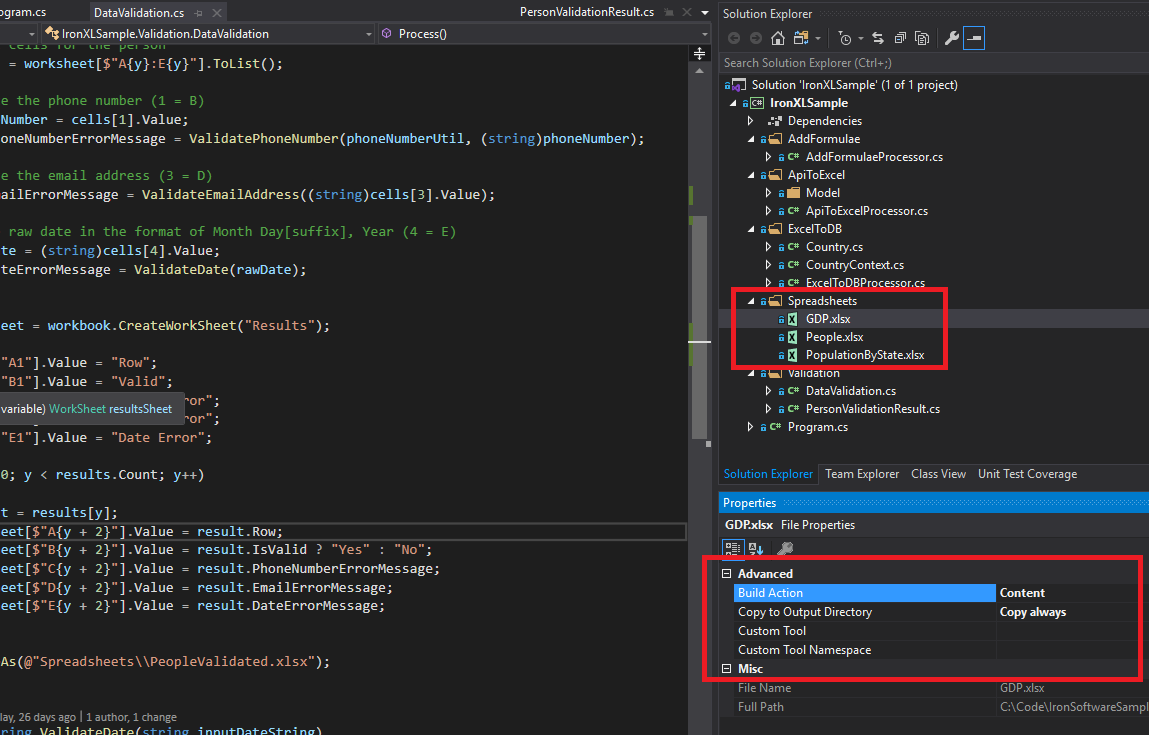 このチュートリアルで使用されるサンプルExcelファイル(GDP.xlsx、People.xlsx、PopulationByState.xlsx)は、さまざまなIronXL操作を示します。
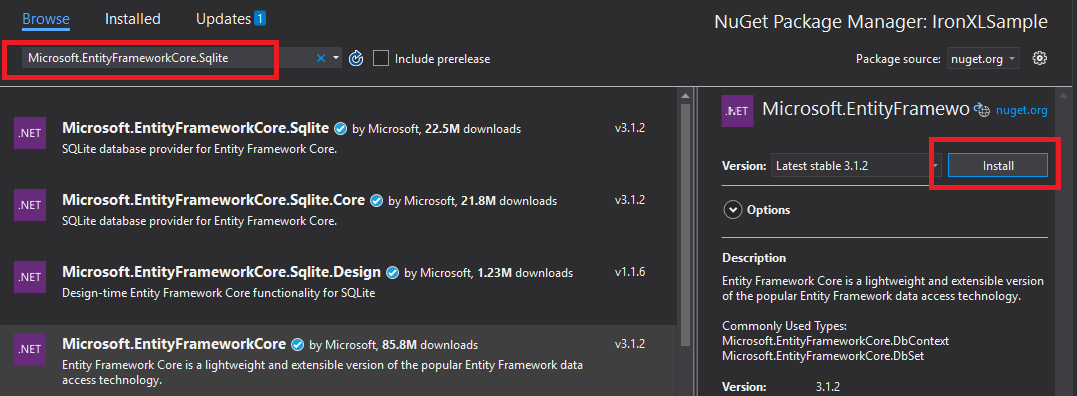 Visual StudioのNuGetパッケージマネージャーを通じてIronXLをインストールすることにより、自動的な依存関係の管理を提供します。
 IronXLの複数の
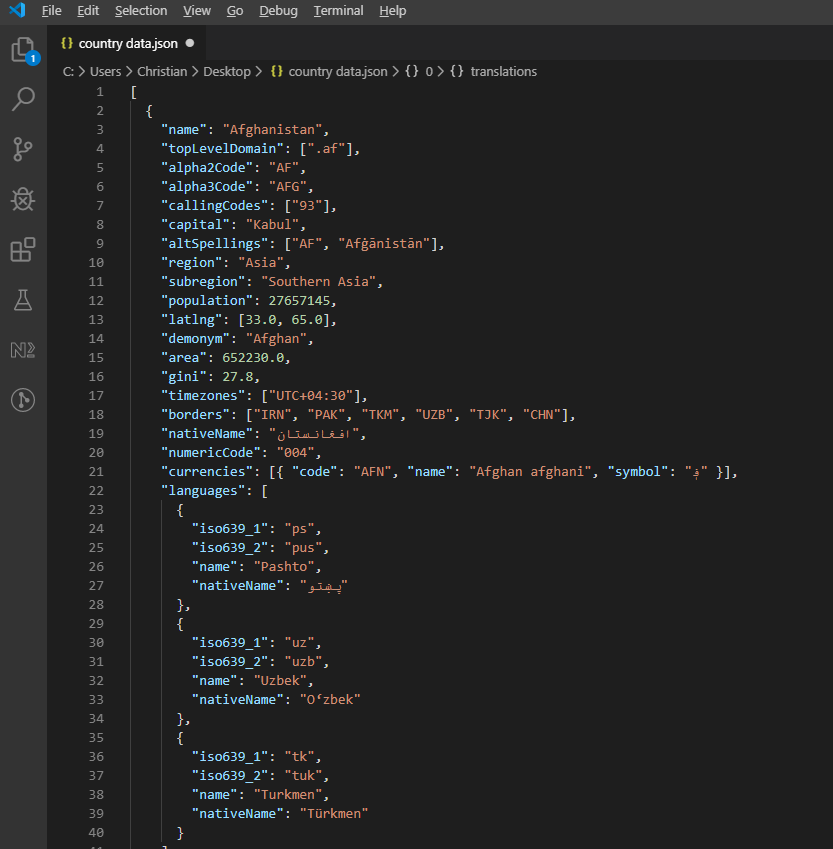 階層的な国情報を示すREST Countries APIからのサンプルJSON応答。