IronXLを使用してすぐに新しいExcelファイルを立ち上げましょう。フォーマットを選択し、シートを追加し、任意のセル値を設定して保存するだけです。 これは、直感的な API 呼び出しと相互運用性の問題を一切伴わずに XLSX ファイルを生成する最も簡単な方法です。
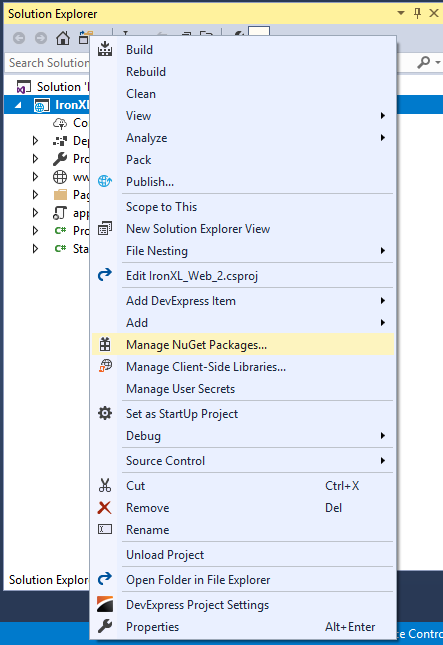
1Install IronXL with NuGet Package Manager
PM > Install-Package IronXL.Excel
Install-Package IronXL.Excel
2このコード スニペットをコピーして実行します。
WorkBook book = IronXL.WorkBook.Create(IronXL.ExcelFileFormat.XLSX); book.CreateWorkSheet("Sheet1")["A1"].Value = "Hello World"; book.SaveAs("MyFile.xlsx");
WorkBook book = IronXL.WorkBook.Create(IronXL.ExcelFileFormat.XLSX); book.CreateWorkSheet("Sheet1")["A1"].Value = "Hello World"; book.SaveAs("MyFile.xlsx");
Dim book AsWorkBook = IronXL.WorkBook.Create(IronXL.ExcelFileFormat.XLSX)book.CreateWorkSheet("Sheet1")("A1").Value = "Hello World"book.SaveAs("MyFile.xlsx")
Dim book As WorkBook = IronXL.WorkBook.Create(IronXL.ExcelFileFormat.XLSX)
book.CreateWorkSheet("Sheet1")("A1").Value = "Hello World"
book.SaveAs("MyFile.xlsx")
using IronXL;// Create workbook with XLSX format (recommended for modern Excel)WorkBook workbook = WorkBook.Create(ExcelFileFormat.XLSX);// Alternative: Create legacy XLS format for older Excel versionsWorkBook legacyWorkbook = WorkBook.Create(ExcelFileFormat.XLS);
using IronXL;

// Create workbook with XLSX format (recommended for modern Excel)
WorkBook workbook = WorkBook.Create(ExcelFileFormat.XLSX);

// Alternative: Create legacy XLS format for older Excel versions
WorkBook legacyWorkbook = WorkBook.Create(ExcelFileFormat.XLS);
ImportsIronXL' Create workbook with XLSX format (recommended for modern Excel)Private workbook AsWorkBook = WorkBook.Create(ExcelFileFormat.XLSX)' Alternative: Create legacy XLS format for older Excel versionsPrivate legacyWorkbook AsWorkBook = WorkBook.Create(ExcelFileFormat.XLS)
Imports IronXL

' Create workbook with XLSX format (recommended for modern Excel)
Private workbook As WorkBook = WorkBook.Create(ExcelFileFormat.XLSX)

' Alternative: Create legacy XLS format for older Excel versions
Private legacyWorkbook As WorkBook = WorkBook.Create(ExcelFileFormat.XLS)
// Create a worksheet with custom name for budget trackingWorkSheet budgetSheet = workbook.CreateWorkSheet("2020 Budget");// Add multiple worksheets for different purposesWorkSheet salesSheet = workbook.CreateWorkSheet("Sales Data");WorkSheet inventorySheet = workbook.CreateWorkSheet("Inventory");// Access existing worksheet by nameWorkSheet existingSheet = workbook.GetWorkSheet("2020 Budget");
// Create a worksheet with custom name for budget tracking
WorkSheet budgetSheet = workbook.CreateWorkSheet("2020 Budget");

// Add multiple worksheets for different purposes
WorkSheet salesSheet = workbook.CreateWorkSheet("Sales Data");
WorkSheet inventorySheet = workbook.CreateWorkSheet("Inventory");

// Access existing worksheet by name
WorkSheet existingSheet = workbook.GetWorkSheet("2020 Budget");
' Create a worksheet with custom name for budget trackingDim budgetSheet AsWorkSheet = workbook.CreateWorkSheet("2020 Budget")' Add multiple worksheets for different purposesDim salesSheet AsWorkSheet = workbook.CreateWorkSheet("Sales Data")Dim inventorySheet AsWorkSheet = workbook.CreateWorkSheet("Inventory")' Access existing worksheet by nameDim existingSheet AsWorkSheet = workbook.GetWorkSheet("2020 Budget")
' Create a worksheet with custom name for budget tracking
Dim budgetSheet As WorkSheet = workbook.CreateWorkSheet("2020 Budget")

' Add multiple worksheets for different purposes
Dim salesSheet As WorkSheet = workbook.CreateWorkSheet("Sales Data")
Dim inventorySheet As WorkSheet = workbook.CreateWorkSheet("Inventory")

' Access existing worksheet by name
Dim existingSheet As WorkSheet = workbook.GetWorkSheet("2020 Budget")
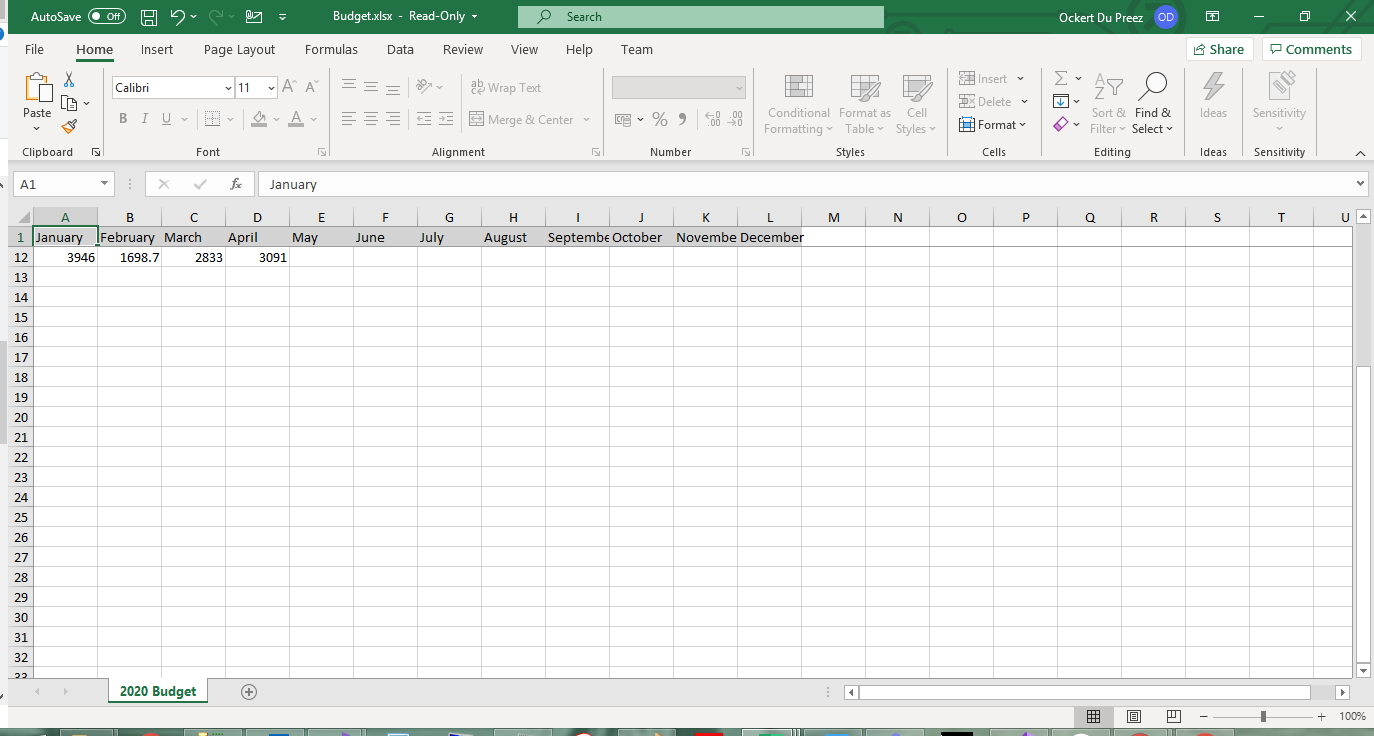
// Set month names in first row for annual budget spreadsheetworkSheet["A1"].Value = "January";workSheet["B1"].Value = "February";workSheet["C1"].Value = "March";workSheet["D1"].Value = "April";workSheet["E1"].Value = "May";workSheet["F1"].Value = "June";workSheet["G1"].Value = "July";workSheet["H1"].Value = "August";workSheet["I1"].Value = "September";workSheet["J1"].Value = "October";workSheet["K1"].Value = "November";workSheet["L1"].Value = "December";// Set different data types - IronXL handles conversion automaticallyworkSheet["A2"].Value = 1500.50m; // Decimal for currencyworkSheet["A3"].Value = DateTime.Now; // Date valuesworkSheet["A4"].Value = true; // Boolean values
// Set month names in first row for annual budget spreadsheet
workSheet["A1"].Value = "January";
workSheet["B1"].Value = "February";
workSheet["C1"].Value = "March";
workSheet["D1"].Value = "April";
workSheet["E1"].Value = "May";
workSheet["F1"].Value = "June";
workSheet["G1"].Value = "July";
workSheet["H1"].Value = "August";
workSheet["I1"].Value = "September";
workSheet["J1"].Value = "October";
workSheet["K1"].Value = "November";
workSheet["L1"].Value = "December";

// Set different data types - IronXL handles conversion automatically
workSheet["A2"].Value = 1500.50m;  // Decimal for currency
workSheet["A3"].Value = DateTime.Now;  // Date values
workSheet["A4"].Value = true;  // Boolean values
' Set month names in first row for annual budget spreadsheetworkSheet("A1").Value = "January"workSheet("B1").Value = "February"workSheet("C1").Value = "March"workSheet("D1").Value = "April"workSheet("E1").Value = "May"workSheet("F1").Value = "June"workSheet("G1").Value = "July"workSheet("H1").Value = "August"workSheet("I1").Value = "September"workSheet("J1").Value = "October"workSheet("K1").Value = "November"workSheet("L1").Value = "December"' Set different data types - IronXL handles conversion automaticallyworkSheet("A2").Value = 1500.50D ' Decimal for currencyworkSheet("A3").Value = DateTime.Now' Date valuesworkSheet("A4").Value = True ' Boolean values
' Set month names in first row for annual budget spreadsheet
workSheet("A1").Value = "January"
workSheet("B1").Value = "February"
workSheet("C1").Value = "March"
workSheet("D1").Value = "April"
workSheet("E1").Value = "May"
workSheet("F1").Value = "June"
workSheet("G1").Value = "July"
workSheet("H1").Value = "August"
workSheet("I1").Value = "September"
workSheet("J1").Value = "October"
workSheet("K1").Value = "November"
workSheet("L1").Value = "December"

' Set different data types - IronXL handles conversion automatically
workSheet("A2").Value = 1500.50D ' Decimal for currency
workSheet("A3").Value = DateTime.Now ' Date values
workSheet("A4").Value = True ' Boolean values
Value プロパティは、文字列、数値、日付、ブール値など、さまざまなデータ型を受け入れます。 IronXLはデータタイプに基づいてセルを自動的にフォーマットします。
セルの値を動的に設定するにはどうすればよいですか?
動的な値設定はデータ駆動型アプリケーションに最適です:
// Initialize random number generator for sample dataRandom r = new Random();// Populate cells with random budget data for each monthfor (int i = 2; i <= 11; i++){ // Set different budget categories with increasing ranges workSheet[$"A{i}"].Value = r.Next(1, 1000); // Office Supplies workSheet[$"B{i}"].Value = r.Next(1000, 2000); // Utilities workSheet[$"C{i}"].Value = r.Next(2000, 3000); // Rent workSheet[$"D{i}"].Value = r.Next(3000, 4000); // Salaries workSheet[$"E{i}"].Value = r.Next(4000, 5000); // Marketing workSheet[$"F{i}"].Value = r.Next(5000, 6000); // IT Services workSheet[$"G{i}"].Value = r.Next(6000, 7000); // Travel workSheet[$"H{i}"].Value = r.Next(7000, 8000); // Training workSheet[$"I{i}"].Value = r.Next(8000, 9000); // Insurance workSheet[$"J{i}"].Value = r.Next(9000, 10000); // Equipment workSheet[$"K{i}"].Value = r.Next(10000, 11000); // Research workSheet[$"L{i}"].Value = r.Next(11000, 12000); // Misc}// Alternative: Set range of cells with same valueworkSheet["A13:L13"].Value = 0; // Initialize totals row
// Initialize random number generator for sample data
Random r = new Random();

// Populate cells with random budget data for each month
for (int i = 2; i <= 11; i++)
{
    // Set different budget categories with increasing ranges
    workSheet[$"A{i}"].Value = r.Next(1, 1000);     // Office Supplies
    workSheet[$"B{i}"].Value = r.Next(1000, 2000);  // Utilities
    workSheet[$"C{i}"].Value = r.Next(2000, 3000);  // Rent
    workSheet[$"D{i}"].Value = r.Next(3000, 4000);  // Salaries
    workSheet[$"E{i}"].Value = r.Next(4000, 5000);  // Marketing
    workSheet[$"F{i}"].Value = r.Next(5000, 6000);  // IT Services
    workSheet[$"G{i}"].Value = r.Next(6000, 7000);  // Travel
    workSheet[$"H{i}"].Value = r.Next(7000, 8000);  // Training
    workSheet[$"I{i}"].Value = r.Next(8000, 9000);  // Insurance
    workSheet[$"J{i}"].Value = r.Next(9000, 10000); // Equipment
    workSheet[$"K{i}"].Value = r.Next(10000, 11000); // Research
    workSheet[$"L{i}"].Value = r.Next(11000, 12000); // Misc
}

// Alternative: Set range of cells with same value
workSheet["A13:L13"].Value = 0; // Initialize totals row
' Initialize random number generator for sample dataDim r As New Random()' Populate cells with random budget data for each monthFor i AsInteger = 2 To 11 ' Set different budget categories with increasing ranges workSheet($"A{i}").Value = r.Next(1, 1000) ' Office Supplies workSheet($"B{i}").Value = r.Next(1000, 2000) ' Utilities workSheet($"C{i}").Value = r.Next(2000, 3000) ' Rent workSheet($"D{i}").Value = r.Next(3000, 4000) ' Salaries workSheet($"E{i}").Value = r.Next(4000, 5000) ' Marketing workSheet($"F{i}").Value = r.Next(5000, 6000) ' IT Services workSheet($"G{i}").Value = r.Next(6000, 7000) ' Travel workSheet($"H{i}").Value = r.Next(7000, 8000) ' Training workSheet($"I{i}").Value = r.Next(8000, 9000) ' Insurance workSheet($"J{i}").Value = r.Next(9000, 10000) ' Equipment workSheet($"K{i}").Value = r.Next(10000, 11000) ' Research workSheet($"L{i}").Value = r.Next(11000, 12000) ' MiscNext i' Alternative: Set range of cells with same valueworkSheet("A13:L13").Value = 0 ' Initialize totals row
' Initialize random number generator for sample data
Dim r As New Random()

' Populate cells with random budget data for each month
For i As Integer = 2 To 11
	' Set different budget categories with increasing ranges
	workSheet($"A{i}").Value = r.Next(1, 1000) ' Office Supplies
	workSheet($"B{i}").Value = r.Next(1000, 2000) ' Utilities
	workSheet($"C{i}").Value = r.Next(2000, 3000) ' Rent
	workSheet($"D{i}").Value = r.Next(3000, 4000) ' Salaries
	workSheet($"E{i}").Value = r.Next(4000, 5000) ' Marketing
	workSheet($"F{i}").Value = r.Next(5000, 6000) ' IT Services
	workSheet($"G{i}").Value = r.Next(6000, 7000) ' Travel
	workSheet($"H{i}").Value = r.Next(7000, 8000) ' Training
	workSheet($"I{i}").Value = r.Next(8000, 9000) ' Insurance
	workSheet($"J{i}").Value = r.Next(9000, 10000) ' Equipment
	workSheet($"K{i}").Value = r.Next(10000, 11000) ' Research
	workSheet($"L{i}").Value = r.Next(11000, 12000) ' Misc
Next i

' Alternative: Set range of cells with same value
workSheet("A13:L13").Value = 0 ' Initialize totals row
using System.Data;using System.Data.SqlClient;using IronXL;// Database connection setup for retrieving sales datastring connectionString = @"Data Source=ServerName;Initial Catalog=SalesDB;Integrated Security=true";string query = "SELECT ProductName, Quantity, UnitPrice, TotalSales FROM MonthlySales";// Create DataSet to hold query resultsDataSet salesData = new DataSet();using (SqlConnection connection = new SqlConnection(connectionString))using (SqlDataAdapter adapter = new SqlDataAdapter(query, connection)){ // Fill DataSet with sales information adapter.Fill(salesData);}// Write headers for database columnsworkSheet["A1"].Value = "Product Name";workSheet["B1"].Value = "Quantity";workSheet["C1"].Value = "Unit Price";workSheet["D1"].Value = "Total Sales";// Apply header formattingworkSheet["A1:D1"].Style.Font.Bold = true;workSheet["A1:D1"].Style.SetBackgroundColor("#4472C4");workSheet["A1:D1"].Style.Font.FontColor = "#FFFFFF";// Populate Excel with database recordsDataTable salesTable = salesData.Tables[0];for (int row = 0; row < salesTable.Rows.Count; row++){ int excelRow = row + 2; // Start from row 2 (after headers) workSheet[$"A{excelRow}"].Value = salesTable.Rows[row]["ProductName"].ToString(); workSheet[$"B{excelRow}"].Value = Convert.ToInt32(salesTable.Rows[row]["Quantity"]); workSheet[$"C{excelRow}"].Value = Convert.ToDecimal(salesTable.Rows[row]["UnitPrice"]); workSheet[$"D{excelRow}"].Value = Convert.ToDecimal(salesTable.Rows[row]["TotalSales"]); // Format currency columns workSheet[$"C{excelRow}"].FormatString = "$#,##0.00"; workSheet[$"D{excelRow}"].FormatString = "$#,##0.00";}// Add summary row with formulasint summaryRow = salesTable.Rows.Count + 2;workSheet[$"A{summaryRow}"].Value = "TOTAL";workSheet[$"B{summaryRow}"].Formula = $"=SUM(B2:B{summaryRow-1})";workSheet[$"D{summaryRow}"].Formula = $"=SUM(D2:D{summaryRow-1})";
using System.Data;
using System.Data.SqlClient;
using IronXL;

// Database connection setup for retrieving sales data
string connectionString = @"Data Source=ServerName;Initial Catalog=SalesDB;Integrated Security=true";
string query = "SELECT ProductName, Quantity, UnitPrice, TotalSales FROM MonthlySales";

// Create DataSet to hold query results
DataSet salesData = new DataSet();

using (SqlConnection connection = new SqlConnection(connectionString))
using (SqlDataAdapter adapter = new SqlDataAdapter(query, connection))
{
    // Fill DataSet with sales information
    adapter.Fill(salesData);
}

// Write headers for database columns
workSheet["A1"].Value = "Product Name";
workSheet["B1"].Value = "Quantity";
workSheet["C1"].Value = "Unit Price";
workSheet["D1"].Value = "Total Sales";

// Apply header formatting
workSheet["A1:D1"].Style.Font.Bold = true;
workSheet["A1:D1"].Style.SetBackgroundColor("#4472C4");
workSheet["A1:D1"].Style.Font.FontColor = "#FFFFFF";

// Populate Excel with database records
DataTable salesTable = salesData.Tables[0];
for (int row = 0; row < salesTable.Rows.Count; row++)
{
    int excelRow = row + 2; // Start from row 2 (after headers)

    workSheet[$"A{excelRow}"].Value = salesTable.Rows[row]["ProductName"].ToString();
    workSheet[$"B{excelRow}"].Value = Convert.ToInt32(salesTable.Rows[row]["Quantity"]);
    workSheet[$"C{excelRow}"].Value = Convert.ToDecimal(salesTable.Rows[row]["UnitPrice"]);
    workSheet[$"D{excelRow}"].Value = Convert.ToDecimal(salesTable.Rows[row]["TotalSales"]);

    // Format currency columns
    workSheet[$"C{excelRow}"].FormatString = "$#,##0.00";
    workSheet[$"D{excelRow}"].FormatString = "$#,##0.00";
}

// Add summary row with formulas
int summaryRow = salesTable.Rows.Count + 2;
workSheet[$"A{summaryRow}"].Value = "TOTAL";
workSheet[$"B{summaryRow}"].Formula = $"=SUM(B2:B{summaryRow-1})";
workSheet[$"D{summaryRow}"].Formula = $"=SUM(D2:D{summaryRow-1})";
ImportsSystem.DataImportsSystem.Data.SqlClientImportsIronXL' Database connection setup for retrieving sales dataPrivate connectionString AsString = "Data Source=ServerName;Initial Catalog=SalesDB;Integrated Security=true"Private query AsString = "SELECT ProductName, Quantity, UnitPrice, TotalSales FROM MonthlySales"' Create DataSet to hold query resultsPrivate salesData As New DataSet()Using connection As New SqlConnection(connectionString)Using adapter As New SqlDataAdapter(query, connection) ' Fill DataSet with sales information adapter.Fill(salesData)EndUsingEndUsing' Write headers for database columnsworkSheet("A1").Value = "Product Name"workSheet("B1").Value = "Quantity"workSheet("C1").Value = "Unit Price"workSheet("D1").Value = "Total Sales"' Apply header formattingworkSheet("A1:D1").Style.Font.Bold = TrueworkSheet("A1:D1").Style.SetBackgroundColor("#4472C4")workSheet("A1:D1").Style.Font.FontColor = "#FFFFFF"' Populate Excel with database recordsDim salesTable AsDataTable = salesData.Tables(0)For row AsInteger = 0 To salesTable.Rows.Count - 1 Dim excelRow AsInteger = row + 2 ' Start from row 2 (after headers) workSheet($"A{excelRow}").Value = salesTable.Rows(row)("ProductName").ToString() workSheet($"B{excelRow}").Value = Convert.ToInt32(salesTable.Rows(row)("Quantity")) workSheet($"C{excelRow}").Value = Convert.ToDecimal(salesTable.Rows(row)("UnitPrice")) workSheet($"D{excelRow}").Value = Convert.ToDecimal(salesTable.Rows(row)("TotalSales")) ' Format currency columns workSheet($"C{excelRow}").FormatString = "$#,##0.00" workSheet($"D{excelRow}").FormatString = "$#,##0.00"Next row' Add summary row with formulasDim summaryRow AsInteger = salesTable.Rows.Count + 2workSheet($"A{summaryRow}").Value = "TOTAL"workSheet($"B{summaryRow}").Formula = $"=SUM(B2:B{summaryRow-1})"workSheet($"D{summaryRow}").Formula = $"=SUM(D2:D{summaryRow-1})"
Imports System.Data
Imports System.Data.SqlClient
Imports IronXL

' Database connection setup for retrieving sales data
Private connectionString As String = "Data Source=ServerName;Initial Catalog=SalesDB;Integrated Security=true"
Private query As String = "SELECT ProductName, Quantity, UnitPrice, TotalSales FROM MonthlySales"

' Create DataSet to hold query results
Private salesData As New DataSet()

Using connection As New SqlConnection(connectionString)
Using adapter As New SqlDataAdapter(query, connection)
	' Fill DataSet with sales information
	adapter.Fill(salesData)
End Using
End Using

' Write headers for database columns
workSheet("A1").Value = "Product Name"
workSheet("B1").Value = "Quantity"
workSheet("C1").Value = "Unit Price"
workSheet("D1").Value = "Total Sales"

' Apply header formatting
workSheet("A1:D1").Style.Font.Bold = True
workSheet("A1:D1").Style.SetBackgroundColor("#4472C4")
workSheet("A1:D1").Style.Font.FontColor = "#FFFFFF"

' Populate Excel with database records
Dim salesTable As DataTable = salesData.Tables(0)
For row As Integer = 0 To salesTable.Rows.Count - 1
	Dim excelRow As Integer = row + 2 ' Start from row 2 (after headers)

	workSheet($"A{excelRow}").Value = salesTable.Rows(row)("ProductName").ToString()
	workSheet($"B{excelRow}").Value = Convert.ToInt32(salesTable.Rows(row)("Quantity"))
	workSheet($"C{excelRow}").Value = Convert.ToDecimal(salesTable.Rows(row)("UnitPrice"))
	workSheet($"D{excelRow}").Value = Convert.ToDecimal(salesTable.Rows(row)("TotalSales"))

	' Format currency columns
	workSheet($"C{excelRow}").FormatString = "$#,##0.00"
	workSheet($"D{excelRow}").FormatString = "$#,##0.00"
Next row

' Add summary row with formulas
Dim summaryRow As Integer = salesTable.Rows.Count + 2
workSheet($"A{summaryRow}").Value = "TOTAL"
workSheet($"B{summaryRow}").Formula = $"=SUM(B2:B{summaryRow-1})"
workSheet($"D{summaryRow}").Formula = $"=SUM(D2:D{summaryRow-1})"
// Set header row background to light gray using hex colorworkSheet["A1:L1"].Style.SetBackgroundColor("#d3d3d3");// Apply different colors for data categorizationworkSheet["A2:A11"].Style.SetBackgroundColor("#E7F3FF"); // Light blue for JanuaryworkSheet["B2:B11"].Style.SetBackgroundColor("#FFF2CC"); // Light yellow for February// Highlight important cells with bold colorsworkSheet["L12"].Style.SetBackgroundColor("#FF0000"); // Red for totalsworkSheet["L12"].Style.Font.FontColor = "#FFFFFF"; // White text// Create alternating row colors for better readabilityfor (int row = 2; row <= 11; row++){ if (row % 2 == 0) { workSheet[$"A{row}:L{row}"].Style.SetBackgroundColor("#F2F2F2"); }}
// Set header row background to light gray using hex color
workSheet["A1:L1"].Style.SetBackgroundColor("#d3d3d3");

// Apply different colors for data categorization
workSheet["A2:A11"].Style.SetBackgroundColor("#E7F3FF"); // Light blue for January
workSheet["B2:B11"].Style.SetBackgroundColor("#FFF2CC"); // Light yellow for February

// Highlight important cells with bold colors
workSheet["L12"].Style.SetBackgroundColor("#FF0000"); // Red for totals
workSheet["L12"].Style.Font.FontColor = "#FFFFFF"; // White text

// Create alternating row colors for better readability
for (int row = 2; row <= 11; row++)
{
    if (row % 2 == 0)
    {
        workSheet[$"A{row}:L{row}"].Style.SetBackgroundColor("#F2F2F2");
    }
}
' Set header row background to light gray using hex colorworkSheet("A1:L1").Style.SetBackgroundColor("#d3d3d3")' Apply different colors for data categorizationworkSheet("A2:A11").Style.SetBackgroundColor("#E7F3FF") ' Light blue for JanuaryworkSheet("B2:B11").Style.SetBackgroundColor("#FFF2CC") ' Light yellow for February' Highlight important cells with bold colorsworkSheet("L12").Style.SetBackgroundColor("#FF0000") ' Red for totalsworkSheet("L12").Style.Font.FontColor = "#FFFFFF" ' White text' Create alternating row colors for better readabilityFor row AsInteger = 2 To 11 If row Mod2 = 0 Then workSheet($"A{row}:L{row}").Style.SetBackgroundColor("#F2F2F2") End IfNext row
' Set header row background to light gray using hex color
workSheet("A1:L1").Style.SetBackgroundColor("#d3d3d3")

' Apply different colors for data categorization
workSheet("A2:A11").Style.SetBackgroundColor("#E7F3FF") ' Light blue for January
workSheet("B2:B11").Style.SetBackgroundColor("#FFF2CC") ' Light yellow for February

' Highlight important cells with bold colors
workSheet("L12").Style.SetBackgroundColor("#FF0000") ' Red for totals
workSheet("L12").Style.Font.FontColor = "#FFFFFF" ' White text

' Create alternating row colors for better readability
For row As Integer = 2 To 11
	If row Mod 2 = 0 Then
		workSheet($"A{row}:L{row}").Style.SetBackgroundColor("#F2F2F2")
	End If
Next row
using IronXL;using IronXL.Styles;// Create header border - thick bottom line to separate from dataworkSheet["A1:L1"].Style.TopBorder.SetColor("#000000");workSheet["A1:L1"].Style.TopBorder.Type = BorderType.Thick;workSheet["A1:L1"].Style.BottomBorder.SetColor("#000000");workSheet["A1:L1"].Style.BottomBorder.Type = BorderType.Thick;// Add right border to last columnworkSheet["L2:L11"].Style.RightBorder.SetColor("#000000");workSheet["L2:L11"].Style.RightBorder.Type = BorderType.Medium;// Create bottom border for data areaworkSheet["A11:L11"].Style.BottomBorder.SetColor("#000000");workSheet["A11:L11"].Style.BottomBorder.Type = BorderType.Medium;// Apply complete border around summary sectionvar summaryRange = workSheet["A12:L12"];summaryRange.Style.TopBorder.Type = BorderType.Double;summaryRange.Style.BottomBorder.Type = BorderType.Double;summaryRange.Style.LeftBorder.Type = BorderType.Thin;summaryRange.Style.RightBorder.Type = BorderType.Thin;summaryRange.Style.SetBorderColor("#0070C0"); // Blue borders
using IronXL;
using IronXL.Styles;

// Create header border - thick bottom line to separate from data
workSheet["A1:L1"].Style.TopBorder.SetColor("#000000");
workSheet["A1:L1"].Style.TopBorder.Type = BorderType.Thick;
workSheet["A1:L1"].Style.BottomBorder.SetColor("#000000");
workSheet["A1:L1"].Style.BottomBorder.Type = BorderType.Thick;

// Add right border to last column
workSheet["L2:L11"].Style.RightBorder.SetColor("#000000");
workSheet["L2:L11"].Style.RightBorder.Type = BorderType.Medium;

// Create bottom border for data area
workSheet["A11:L11"].Style.BottomBorder.SetColor("#000000");
workSheet["A11:L11"].Style.BottomBorder.Type = BorderType.Medium;

// Apply complete border around summary section
var summaryRange = workSheet["A12:L12"];
summaryRange.Style.TopBorder.Type = BorderType.Double;
summaryRange.Style.BottomBorder.Type = BorderType.Double;
summaryRange.Style.LeftBorder.Type = BorderType.Thin;
summaryRange.Style.RightBorder.Type = BorderType.Thin;
summaryRange.Style.SetBorderColor("#0070C0"); // Blue borders
ImportsIronXLImportsIronXL.Styles' Create header border - thick bottom line to separate from dataworkSheet("A1:L1").Style.TopBorder.SetColor("#000000")workSheet("A1:L1").Style.TopBorder.Type = BorderType.ThickworkSheet("A1:L1").Style.BottomBorder.SetColor("#000000")workSheet("A1:L1").Style.BottomBorder.Type = BorderType.Thick' Add right border to last columnworkSheet("L2:L11").Style.RightBorder.SetColor("#000000")workSheet("L2:L11").Style.RightBorder.Type = BorderType.Medium' Create bottom border for data areaworkSheet("A11:L11").Style.BottomBorder.SetColor("#000000")workSheet("A11:L11").Style.BottomBorder.Type = BorderType.Medium' Apply complete border around summary sectionDim summaryRange = workSheet("A12:L12")summaryRange.Style.TopBorder.Type = BorderType.DoublesummaryRange.Style.BottomBorder.Type = BorderType.DoublesummaryRange.Style.LeftBorder.Type = BorderType.ThinsummaryRange.Style.RightBorder.Type = BorderType.ThinsummaryRange.Style.SetBorderColor("#0070C0") ' Blue borders
Imports IronXL
Imports IronXL.Styles

' Create header border - thick bottom line to separate from data
workSheet("A1:L1").Style.TopBorder.SetColor("#000000")
workSheet("A1:L1").Style.TopBorder.Type = BorderType.Thick
workSheet("A1:L1").Style.BottomBorder.SetColor("#000000")
workSheet("A1:L1").Style.BottomBorder.Type = BorderType.Thick

' Add right border to last column
workSheet("L2:L11").Style.RightBorder.SetColor("#000000")
workSheet("L2:L11").Style.RightBorder.Type = BorderType.Medium

' Create bottom border for data area
workSheet("A11:L11").Style.BottomBorder.SetColor("#000000")
workSheet("A11:L11").Style.BottomBorder.Type = BorderType.Medium

' Apply complete border around summary section
Dim summaryRange = workSheet("A12:L12")
summaryRange.Style.TopBorder.Type = BorderType.Double
summaryRange.Style.BottomBorder.Type = BorderType.Double
summaryRange.Style.LeftBorder.Type = BorderType.Thin
summaryRange.Style.RightBorder.Type = BorderType.Thin
summaryRange.Style.SetBorderColor("#0070C0") ' Blue borders
// Use built-in aggregation functions for rangesdecimal sum = workSheet["A2:A11"].Sum();decimal avg = workSheet["B2:B11"].Avg();decimal max = workSheet["C2:C11"].Max();decimal min = workSheet["D2:D11"].Min();// Assign calculated values to cellsworkSheet["A12"].Value = sum;workSheet["B12"].Value = avg;workSheet["C12"].Value = max;workSheet["D12"].Value = min;// Or use Excel formulas directlyworkSheet["A12"].Formula = "=SUM(A2:A11)";workSheet["B12"].Formula = "=AVERAGE(B2:B11)";workSheet["C12"].Formula = "=MAX(C2:C11)";workSheet["D12"].Formula = "=MIN(D2:D11)";// Complex formulas with multiple functionsworkSheet["E12"].Formula = "=IF(SUM(E2:E11)>50000,\"Over Budget\",\"On Track\")";workSheet["F12"].Formula = "=SUMIF(F2:F11,\">5000\")";// Percentage calculationsworkSheet["G12"].Formula = "=G11/SUM(G2:G11)*100";workSheet["G12"].FormatString = "0.00%";// Ensure all formulas calculateworkSheet.EvaluateAll();
// Use built-in aggregation functions for ranges
decimal sum = workSheet["A2:A11"].Sum();
decimal avg = workSheet["B2:B11"].Avg();
decimal max = workSheet["C2:C11"].Max();
decimal min = workSheet["D2:D11"].Min();

// Assign calculated values to cells
workSheet["A12"].Value = sum;
workSheet["B12"].Value = avg;
workSheet["C12"].Value = max;
workSheet["D12"].Value = min;

// Or use Excel formulas directly
workSheet["A12"].Formula = "=SUM(A2:A11)";
workSheet["B12"].Formula = "=AVERAGE(B2:B11)";
workSheet["C12"].Formula = "=MAX(C2:C11)";
workSheet["D12"].Formula = "=MIN(D2:D11)";

// Complex formulas with multiple functions
workSheet["E12"].Formula = "=IF(SUM(E2:E11)>50000,\"Over Budget\",\"On Track\")";
workSheet["F12"].Formula = "=SUMIF(F2:F11,\">5000\")";

// Percentage calculations
workSheet["G12"].Formula = "=G11/SUM(G2:G11)*100";
workSheet["G12"].FormatString = "0.00%";

// Ensure all formulas calculate
workSheet.EvaluateAll();
' Use built-in aggregation functions for rangesDim sum AsDecimal = workSheet("A2:A11").Sum()Dim avg AsDecimal = workSheet("B2:B11").Avg()Dim max AsDecimal = workSheet("C2:C11").Max()Dim min AsDecimal = workSheet("D2:D11").Min()' Assign calculated values to cellsworkSheet("A12").Value = sumworkSheet("B12").Value = avgworkSheet("C12").Value = maxworkSheet("D12").Value = min' Or use Excel formulas directlyworkSheet("A12").Formula = "=SUM(A2:A11)"workSheet("B12").Formula = "=AVERAGE(B2:B11)"workSheet("C12").Formula = "=MAX(C2:C11)"workSheet("D12").Formula = "=MIN(D2:D11)"' Complex formulas with multiple functionsworkSheet("E12").Formula = "=IF(SUM(E2:E11)>50000,""Over Budget"",""On Track"")"workSheet("F12").Formula = "=SUMIF(F2:F11,"">5000"")"' Percentage calculationsworkSheet("G12").Formula = "=G11/SUM(G2:G11)*100"workSheet("G12").FormatString = "0.00%"' Ensure all formulas calculateworkSheet.EvaluateAll()
' Use built-in aggregation functions for ranges
Dim sum As Decimal = workSheet("A2:A11").Sum()
Dim avg As Decimal = workSheet("B2:B11").Avg()
Dim max As Decimal = workSheet("C2:C11").Max()
Dim min As Decimal = workSheet("D2:D11").Min()

' Assign calculated values to cells
workSheet("A12").Value = sum
workSheet("B12").Value = avg
workSheet("C12").Value = max
workSheet("D12").Value = min

' Or use Excel formulas directly
workSheet("A12").Formula = "=SUM(A2:A11)"
workSheet("B12").Formula = "=AVERAGE(B2:B11)"
workSheet("C12").Formula = "=MAX(C2:C11)"
workSheet("D12").Formula = "=MIN(D2:D11)"

' Complex formulas with multiple functions
workSheet("E12").Formula = "=IF(SUM(E2:E11)>50000,""Over Budget"",""On Track"")"
workSheet("F12").Formula = "=SUMIF(F2:F11,"">5000"")"

' Percentage calculations
workSheet("G12").Formula = "=G11/SUM(G2:G11)*100"
workSheet("G12").FormatString = "0.00%"

' Ensure all formulas calculate
workSheet.EvaluateAll()
Range クラスは、Max、および Min といった、迅速な計算を行うためのメソッドを提供します。 より複雑なシナリオでは、Formula プロパティを使用して、Excel の数式を直接設定してください。
// Protect worksheet with password to prevent unauthorized changesworkSheet.ProtectSheet("SecurePassword123");// Freeze panes to keep headers visible while scrollingworkSheet.CreateFreezePane(0, 1); // Freeze first row// workSheet.CreateFreezePane(1, 1); // Freeze first row and column// Set worksheet visibility optionsworkSheet.ViewState = WorkSheetViewState.Visible; // or Hidden, VeryHidden// Configure gridlines and headersworkSheet.ShowGridLines = true;workSheet.ShowRowColHeaders = true;// Set zoom level for better viewingworkSheet.Zoom = 85; // 85% zoom
// Protect worksheet with password to prevent unauthorized changes
workSheet.ProtectSheet("SecurePassword123");

// Freeze panes to keep headers visible while scrolling
workSheet.CreateFreezePane(0, 1); // Freeze first row
// workSheet.CreateFreezePane(1, 1); // Freeze first row and column

// Set worksheet visibility options
workSheet.ViewState = WorkSheetViewState.Visible; // or Hidden, VeryHidden

// Configure gridlines and headers
workSheet.ShowGridLines = true;
workSheet.ShowRowColHeaders = true;

// Set zoom level for better viewing
workSheet.Zoom = 85; // 85% zoom
' Protect worksheet with password to prevent unauthorized changesworkSheet.ProtectSheet("SecurePassword123")' Freeze panes to keep headers visible while scrollingworkSheet.CreateFreezePane(0, 1) ' Freeze first row' workSheet.CreateFreezePane(1, 1); // Freeze first row and column' Set worksheet visibility optionsworkSheet.ViewState = WorkSheetViewState.Visible' or Hidden, VeryHidden' Configure gridlines and headersworkSheet.ShowGridLines = TrueworkSheet.ShowRowColHeaders = True' Set zoom level for better viewingworkSheet.Zoom = 85 ' 85% zoom
' Protect worksheet with password to prevent unauthorized changes
workSheet.ProtectSheet("SecurePassword123")

' Freeze panes to keep headers visible while scrolling
workSheet.CreateFreezePane(0, 1) ' Freeze first row
' workSheet.CreateFreezePane(1, 1); // Freeze first row and column

' Set worksheet visibility options
workSheet.ViewState = WorkSheetViewState.Visible ' or Hidden, VeryHidden

' Configure gridlines and headers
workSheet.ShowGridLines = True
workSheet.ShowRowColHeaders = True

' Set zoom level for better viewing
workSheet.Zoom = 85 ' 85% zoom
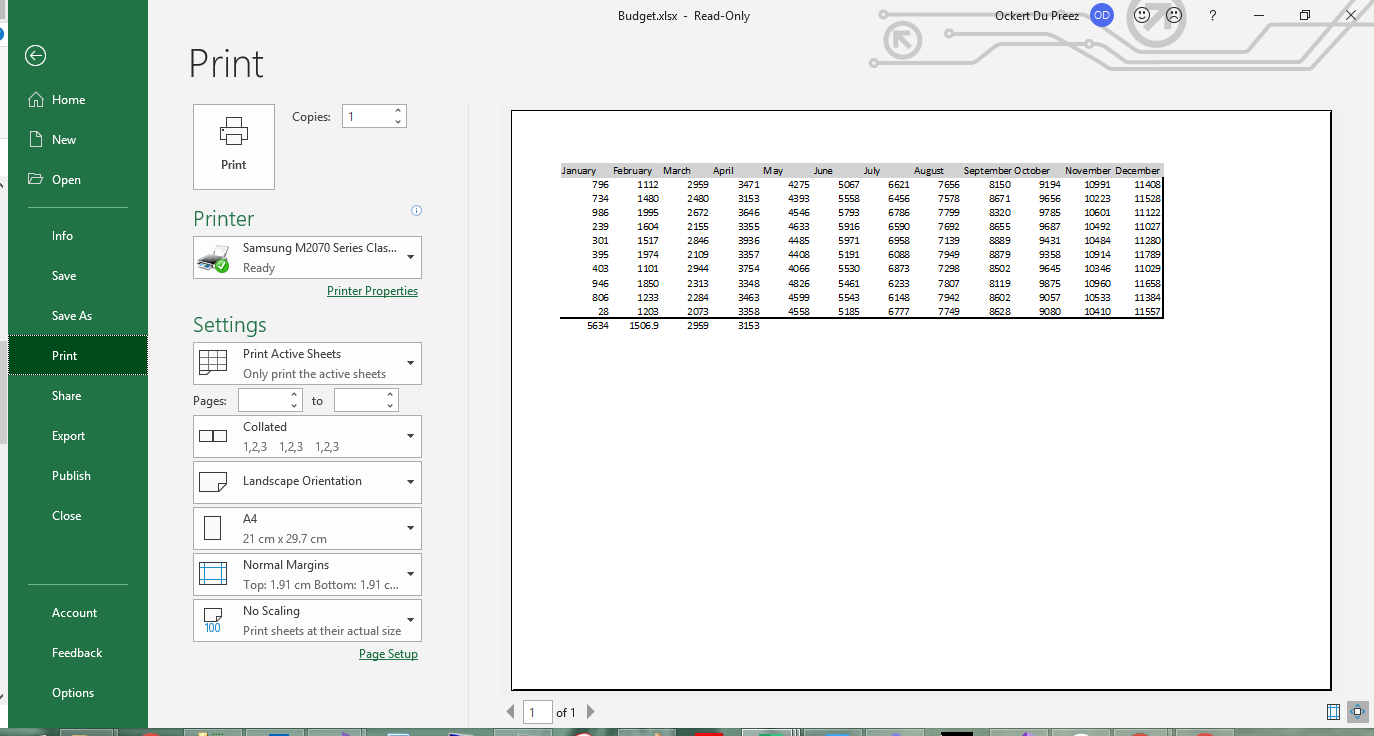
using IronXL.Printing;// Define print area to exclude empty cellsworkSheet.SetPrintArea("A1:L12");// Configure page orientation for wide dataworkSheet.PrintSetup.PrintOrientation = PrintOrientation.Landscape;// Set paper size for standard printingworkSheet.PrintSetup.PaperSize = PaperSize.A4;// Adjust margins for better layout (in inches)workSheet.PrintSetup.LeftMargin = 0.5;workSheet.PrintSetup.RightMargin = 0.5;workSheet.PrintSetup.TopMargin = 0.75;workSheet.PrintSetup.BottomMargin = 0.75;// Configure header and footerworkSheet.PrintSetup.HeaderMargin = 0.3;workSheet.PrintSetup.FooterMargin = 0.3;// Scale to fit on one pageworkSheet.PrintSetup.FitToPage = true;workSheet.PrintSetup.FitToHeight = 1;workSheet.PrintSetup.FitToWidth = 1;// Add print headers/footersworkSheet.Header.Center = "Monthly Budget Report";workSheet.Footer.Left = DateTime.Now.ToShortDateString();workSheet.Footer.Right = "Page &P of &N"; // Page numbering
using IronXL.Printing;

// Define print area to exclude empty cells
workSheet.SetPrintArea("A1:L12");

// Configure page orientation for wide data
workSheet.PrintSetup.PrintOrientation = PrintOrientation.Landscape;

// Set paper size for standard printing
workSheet.PrintSetup.PaperSize = PaperSize.A4;

// Adjust margins for better layout (in inches)
workSheet.PrintSetup.LeftMargin = 0.5;
workSheet.PrintSetup.RightMargin = 0.5;
workSheet.PrintSetup.TopMargin = 0.75;
workSheet.PrintSetup.BottomMargin = 0.75;

// Configure header and footer
workSheet.PrintSetup.HeaderMargin = 0.3;
workSheet.PrintSetup.FooterMargin = 0.3;

// Scale to fit on one page
workSheet.PrintSetup.FitToPage = true;
workSheet.PrintSetup.FitToHeight = 1;
workSheet.PrintSetup.FitToWidth = 1;

// Add print headers/footers
workSheet.Header.Center = "Monthly Budget Report";
workSheet.Footer.Left = DateTime.Now.ToShortDateString();
workSheet.Footer.Right = "Page &P of &N"; // Page numbering
ImportsIronXL.Printing' Define print area to exclude empty cellsworkSheet.SetPrintArea("A1:L12")' Configure page orientation for wide dataworkSheet.PrintSetup.PrintOrientation = PrintOrientation.Landscape' Set paper size for standard printingworkSheet.PrintSetup.PaperSize = PaperSize.A4' Adjust margins for better layout (in inches)workSheet.PrintSetup.LeftMargin = 0.5workSheet.PrintSetup.RightMargin = 0.5workSheet.PrintSetup.TopMargin = 0.75workSheet.PrintSetup.BottomMargin = 0.75' Configure header and footerworkSheet.PrintSetup.HeaderMargin = 0.3workSheet.PrintSetup.FooterMargin = 0.3' Scale to fit on one pageworkSheet.PrintSetup.FitToPage = TrueworkSheet.PrintSetup.FitToHeight = 1workSheet.PrintSetup.FitToWidth = 1' Add print headers/footersworkSheet.Header.Center = "Monthly Budget Report"workSheet.Footer.Left = DateTime.Now.ToShortDateString()workSheet.Footer.Right = "Page &P of &N" ' Page numbering
Imports IronXL.Printing

' Define print area to exclude empty cells
workSheet.SetPrintArea("A1:L12")

' Configure page orientation for wide data
workSheet.PrintSetup.PrintOrientation = PrintOrientation.Landscape

' Set paper size for standard printing
workSheet.PrintSetup.PaperSize = PaperSize.A4

' Adjust margins for better layout (in inches)
workSheet.PrintSetup.LeftMargin = 0.5
workSheet.PrintSetup.RightMargin = 0.5
workSheet.PrintSetup.TopMargin = 0.75
workSheet.PrintSetup.BottomMargin = 0.75

' Configure header and footer
workSheet.PrintSetup.HeaderMargin = 0.3
workSheet.PrintSetup.FooterMargin = 0.3

' Scale to fit on one page
workSheet.PrintSetup.FitToPage = True
workSheet.PrintSetup.FitToHeight = 1
workSheet.PrintSetup.FitToWidth = 1

' Add print headers/footers
workSheet.Header.Center = "Monthly Budget Report"
workSheet.Footer.Left = DateTime.Now.ToShortDateString()
workSheet.Footer.Right = "Page &P of &N" ' Page numbering
// Save as XLSX (recommended for modern Excel)workBook.SaveAs("Budget.xlsx");// Save as XLS for legacy compatibilityworkBook.SaveAs("Budget.xls");// Save as CSV for data exchangeworkBook.SaveAsCsv("Budget.csv");// Save as JSON for web applicationsworkBook.SaveAsJson("Budget.json");// Save to stream for web downloads or cloud storageusing (var stream = new MemoryStream()){ workBook.SaveAs(stream); byte[] excelData = stream.ToArray(); // Send to client or save to cloud}// Save with specific encoding for international charactersworkBook.SaveAsCsv("Budget_UTF8.csv", System.Text.Encoding.UTF8);
// Save as XLSX (recommended for modern Excel)
workBook.SaveAs("Budget.xlsx");

// Save as XLS for legacy compatibility
workBook.SaveAs("Budget.xls");

// Save as CSV for data exchange
workBook.SaveAsCsv("Budget.csv");

// Save as JSON for web applications
workBook.SaveAsJson("Budget.json");

// Save to stream for web downloads or cloud storage
using (var stream = new MemoryStream())
{
    workBook.SaveAs(stream);
    byte[] excelData = stream.ToArray();
    // Send to client or save to cloud
}

// Save with specific encoding for international characters
workBook.SaveAsCsv("Budget_UTF8.csv", System.Text.Encoding.UTF8);
' Save as XLSX (recommended for modern Excel)workBook.SaveAs("Budget.xlsx")' Save as XLS for legacy compatibilityworkBook.SaveAs("Budget.xls")' Save as CSV for data exchangeworkBook.SaveAsCsv("Budget.csv")' Save as JSON for web applicationsworkBook.SaveAsJson("Budget.json")' Save to stream for web downloads or cloud storageUsing stream = New MemoryStream() workBook.SaveAs(stream) Dim excelData() AsByte = stream.ToArray() ' Send to client or save to cloudEndUsing' Save with specific encoding for international charactersworkBook.SaveAsCsv("Budget_UTF8.csv", System.Text.Encoding.UTF8)
' Save as XLSX (recommended for modern Excel)
workBook.SaveAs("Budget.xlsx")

' Save as XLS for legacy compatibility
workBook.SaveAs("Budget.xls")

' Save as CSV for data exchange
workBook.SaveAsCsv("Budget.csv")

' Save as JSON for web applications
workBook.SaveAsJson("Budget.json")

' Save to stream for web downloads or cloud storage
Using stream = New MemoryStream()
	workBook.SaveAs(stream)
	Dim excelData() As Byte = stream.ToArray()
	' Send to client or save to cloud
End Using

' Save with specific encoding for international characters
workBook.SaveAsCsv("Budget_UTF8.csv", System.Text.Encoding.UTF8)
IronXLはXLSX、XLS、CSV、TSV、JSONを含む複数のエクスポートフォーマットをサポートします。 Save メソッドは、ファイル拡張子から形式を自動的に判別します。


!["NuGet パッケージの管理"オプションが表示された Visual Studio の [プロジェクト] メニュー](/img/tutorials/create-excel-file-net/project-menu.png)

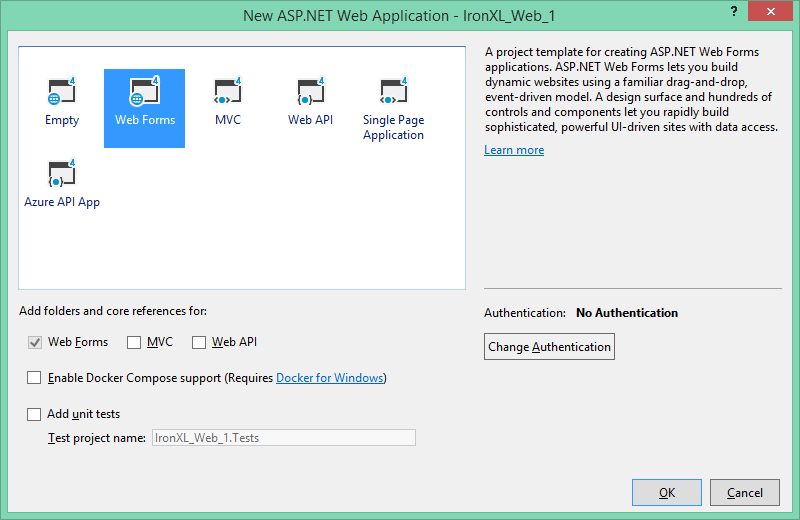
![Visual Studio の [新しいプロジェクト] ダイアログで ASP.NET Web アプリケーションが選択された状態](/img/tutorials/create-excel-file-net/new-project-asp-net.png)