WorkBook book = IronXL.WorkBook.Create(IronXL.ExcelFileFormat.XLSX); book.CreateWorkSheet("Sheet1")["A1"].Value = "Hello World"; book.SaveAs("MyFile.xlsx");
WorkBook book = IronXL.WorkBook.Create(IronXL.ExcelFileFormat.XLSX); book.CreateWorkSheet("Sheet1")["A1"].Value = "Hello World"; book.SaveAs("MyFile.xlsx");
Dim book AsWorkBook = IronXL.WorkBook.Create(IronXL.ExcelFileFormat.XLSX)book.CreateWorkSheet("Sheet1")("A1").Value = "Hello World"book.SaveAs("MyFile.xlsx")
Dim book As WorkBook = IronXL.WorkBook.Create(IronXL.ExcelFileFormat.XLSX)
book.CreateWorkSheet("Sheet1")("A1").Value = "Hello World"
book.SaveAs("MyFile.xlsx")
// Initialize random number generator for sample dataRandom r = new Random();// Populate cells with random budget data for each monthfor (int i = 2; i <= 11; i++){ // Set different budget categories with increasing ranges workSheet[$"A{i}"].Value = r.Next(1, 1000); // Office Supplies workSheet[$"B{i}"].Value = r.Next(1000, 2000); // Utilities workSheet[$"C{i}"].Value = r.Next(2000, 3000); // Rent workSheet[$"D{i}"].Value = r.Next(3000, 4000); // Salaries workSheet[$"E{i}"].Value = r.Next(4000, 5000); // Marketing workSheet[$"F{i}"].Value = r.Next(5000, 6000); // IT Services workSheet[$"G{i}"].Value = r.Next(6000, 7000); // Travel workSheet[$"H{i}"].Value = r.Next(7000, 8000); // Training workSheet[$"I{i}"].Value = r.Next(8000, 9000); // Insurance workSheet[$"J{i}"].Value = r.Next(9000, 10000); // Equipment workSheet[$"K{i}"].Value = r.Next(10000, 11000); // Research workSheet[$"L{i}"].Value = r.Next(11000, 12000); // Misc}// Alternative: Set range of cells with same valueworkSheet["A13:L13"].Value = 0; // Initialize totals row
// Initialize random number generator for sample data
Random r = new Random();

// Populate cells with random budget data for each month
for (int i = 2; i <= 11; i++)
{
    // Set different budget categories with increasing ranges
    workSheet[$"A{i}"].Value = r.Next(1, 1000);     // Office Supplies
    workSheet[$"B{i}"].Value = r.Next(1000, 2000);  // Utilities
    workSheet[$"C{i}"].Value = r.Next(2000, 3000);  // Rent
    workSheet[$"D{i}"].Value = r.Next(3000, 4000);  // Salaries
    workSheet[$"E{i}"].Value = r.Next(4000, 5000);  // Marketing
    workSheet[$"F{i}"].Value = r.Next(5000, 6000);  // IT Services
    workSheet[$"G{i}"].Value = r.Next(6000, 7000);  // Travel
    workSheet[$"H{i}"].Value = r.Next(7000, 8000);  // Training
    workSheet[$"I{i}"].Value = r.Next(8000, 9000);  // Insurance
    workSheet[$"J{i}"].Value = r.Next(9000, 10000); // Equipment
    workSheet[$"K{i}"].Value = r.Next(10000, 11000); // Research
    workSheet[$"L{i}"].Value = r.Next(11000, 12000); // Misc
}

// Alternative: Set range of cells with same value
workSheet["A13:L13"].Value = 0; // Initialize totals row
' Initialize random number generator for sample dataDim r As New Random()' Populate cells with random budget data for each monthFor i AsInteger = 2 To 11 ' Set different budget categories with increasing ranges workSheet($"A{i}").Value = r.Next(1, 1000) ' Office Supplies workSheet($"B{i}").Value = r.Next(1000, 2000) ' Utilities workSheet($"C{i}").Value = r.Next(2000, 3000) ' Rent workSheet($"D{i}").Value = r.Next(3000, 4000) ' Salaries workSheet($"E{i}").Value = r.Next(4000, 5000) ' Marketing workSheet($"F{i}").Value = r.Next(5000, 6000) ' IT Services workSheet($"G{i}").Value = r.Next(6000, 7000) ' Travel workSheet($"H{i}").Value = r.Next(7000, 8000) ' Training workSheet($"I{i}").Value = r.Next(8000, 9000) ' Insurance workSheet($"J{i}").Value = r.Next(9000, 10000) ' Equipment workSheet($"K{i}").Value = r.Next(10000, 11000) ' Research workSheet($"L{i}").Value = r.Next(11000, 12000) ' MiscNext i' Alternative: Set range of cells with same valueworkSheet("A13:L13").Value = 0 ' Initialize totals row
' Initialize random number generator for sample data
Dim r As New Random()

' Populate cells with random budget data for each month
For i As Integer = 2 To 11
	' Set different budget categories with increasing ranges
	workSheet($"A{i}").Value = r.Next(1, 1000) ' Office Supplies
	workSheet($"B{i}").Value = r.Next(1000, 2000) ' Utilities
	workSheet($"C{i}").Value = r.Next(2000, 3000) ' Rent
	workSheet($"D{i}").Value = r.Next(3000, 4000) ' Salaries
	workSheet($"E{i}").Value = r.Next(4000, 5000) ' Marketing
	workSheet($"F{i}").Value = r.Next(5000, 6000) ' IT Services
	workSheet($"G{i}").Value = r.Next(6000, 7000) ' Travel
	workSheet($"H{i}").Value = r.Next(7000, 8000) ' Training
	workSheet($"I{i}").Value = r.Next(8000, 9000) ' Insurance
	workSheet($"J{i}").Value = r.Next(9000, 10000) ' Equipment
	workSheet($"K{i}").Value = r.Next(10000, 11000) ' Research
	workSheet($"L{i}").Value = r.Next(11000, 12000) ' Misc
Next i

' Alternative: Set range of cells with same value
workSheet("A13:L13").Value = 0 ' Initialize totals row
// Set header row background to light gray using hex colorworkSheet["A1:L1"].Style.SetBackgroundColor("#d3d3d3");// Apply different colors for data categorizationworkSheet["A2:A11"].Style.SetBackgroundColor("#E7F3FF"); // Light blue for JanuaryworkSheet["B2:B11"].Style.SetBackgroundColor("#FFF2CC"); // Light yellow for February// Highlight important cells with bold colorsworkSheet["L12"].Style.SetBackgroundColor("#FF0000"); // Red for totalsworkSheet["L12"].Style.Font.FontColor = "#FFFFFF"; // White text// Create alternating row colors for better readabilityfor (int row = 2; row <= 11; row++){ if (row % 2 == 0) { workSheet[$"A{row}:L{row}"].Style.SetBackgroundColor("#F2F2F2"); }}
// Set header row background to light gray using hex color
workSheet["A1:L1"].Style.SetBackgroundColor("#d3d3d3");

// Apply different colors for data categorization
workSheet["A2:A11"].Style.SetBackgroundColor("#E7F3FF"); // Light blue for January
workSheet["B2:B11"].Style.SetBackgroundColor("#FFF2CC"); // Light yellow for February

// Highlight important cells with bold colors
workSheet["L12"].Style.SetBackgroundColor("#FF0000"); // Red for totals
workSheet["L12"].Style.Font.FontColor = "#FFFFFF"; // White text

// Create alternating row colors for better readability
for (int row = 2; row <= 11; row++)
{
    if (row % 2 == 0)
    {
        workSheet[$"A{row}:L{row}"].Style.SetBackgroundColor("#F2F2F2");
    }
}
' Set header row background to light gray using hex colorworkSheet("A1:L1").Style.SetBackgroundColor("#d3d3d3")' Apply different colors for data categorizationworkSheet("A2:A11").Style.SetBackgroundColor("#E7F3FF") ' Light blue for JanuaryworkSheet("B2:B11").Style.SetBackgroundColor("#FFF2CC") ' Light yellow for February' Highlight important cells with bold colorsworkSheet("L12").Style.SetBackgroundColor("#FF0000") ' Red for totalsworkSheet("L12").Style.Font.FontColor = "#FFFFFF" ' White text' Create alternating row colors for better readabilityFor row AsInteger = 2 To 11 If row Mod2 = 0 Then workSheet($"A{row}:L{row}").Style.SetBackgroundColor("#F2F2F2") End IfNext row
' Set header row background to light gray using hex color
workSheet("A1:L1").Style.SetBackgroundColor("#d3d3d3")

' Apply different colors for data categorization
workSheet("A2:A11").Style.SetBackgroundColor("#E7F3FF") ' Light blue for January
workSheet("B2:B11").Style.SetBackgroundColor("#FFF2CC") ' Light yellow for February

' Highlight important cells with bold colors
workSheet("L12").Style.SetBackgroundColor("#FF0000") ' Red for totals
workSheet("L12").Style.Font.FontColor = "#FFFFFF" ' White text

' Create alternating row colors for better readability
For row As Integer = 2 To 11
	If row Mod 2 = 0 Then
		workSheet($"A{row}:L{row}").Style.SetBackgroundColor("#F2F2F2")
	End If
Next row
// Use IronXL built-in aggregationsdecimal sum = workSheet["A2:A11"].Sum();decimal avg = workSheet["B2:B11"].Avg();decimal max = workSheet["C2:C11"].Max();decimal min = workSheet["D2:D11"].Min();// Assign value to cellsworkSheet["A12"].Value = sum;workSheet["B12"].Value = avg;workSheet["C12"].Value = max;workSheet["D12"].Value = min;
// Use IronXL built-in aggregations
decimal sum = workSheet["A2:A11"].Sum();
decimal avg = workSheet["B2:B11"].Avg();
decimal max = workSheet["C2:C11"].Max();
decimal min = workSheet["D2:D11"].Min();

// Assign value to cells
workSheet["A12"].Value = sum;
workSheet["B12"].Value = avg;
workSheet["C12"].Value = max;
workSheet["D12"].Value = min;
' Use IronXL built-in aggregationsDim sum AsDecimal = workSheet("A2:A11").Sum()Dim avg AsDecimal = workSheet("B2:B11").Avg()Dim max AsDecimal = workSheet("C2:C11").Max()Dim min AsDecimal = workSheet("D2:D11").Min()' Assign value to cellsworkSheet("A12").Value = sumworkSheet("B12").Value = avgworkSheet("C12").Value = maxworkSheet("D12").Value = min
' Use IronXL built-in aggregations
Dim sum As Decimal = workSheet("A2:A11").Sum()
Dim avg As Decimal = workSheet("B2:B11").Avg()
Dim max As Decimal = workSheet("C2:C11").Max()
Dim min As Decimal = workSheet("D2:D11").Min()

' Assign value to cells
workSheet("A12").Value = sum
workSheet("B12").Value = avg
workSheet("C12").Value = max
workSheet("D12").Value = min
// Use built-in aggregation functions for rangesdecimal sum = workSheet["A2:A11"].Sum();decimal avg = workSheet["B2:B11"].Avg();decimal max = workSheet["C2:C11"].Max();decimal min = workSheet["D2:D11"].Min();// Assign calculated values to cellsworkSheet["A12"].Value = sum;workSheet["B12"].Value = avg;workSheet["C12"].Value = max;workSheet["D12"].Value = min;// Or use Excel formulas directlyworkSheet["A12"].Formula = "=SUM(A2:A11)";workSheet["B12"].Formula = "=AVERAGE(B2:B11)";workSheet["C12"].Formula = "=MAX(C2:C11)";workSheet["D12"].Formula = "=MIN(D2:D11)";// Complex formulas with multiple functionsworkSheet["E12"].Formula = "=IF(SUM(E2:E11)>50000,\"Over Budget\",\"On Track\")";workSheet["F12"].Formula = "=SUMIF(F2:F11,\">5000\")";// Percentage calculationsworkSheet["G12"].Formula = "=G11/SUM(G2:G11)*100";workSheet["G12"].FormatString = "0.00%";// Ensure all formulas calculateworkSheet.EvaluateAll();
// Use built-in aggregation functions for ranges
decimal sum = workSheet["A2:A11"].Sum();
decimal avg = workSheet["B2:B11"].Avg();
decimal max = workSheet["C2:C11"].Max();
decimal min = workSheet["D2:D11"].Min();

// Assign calculated values to cells
workSheet["A12"].Value = sum;
workSheet["B12"].Value = avg;
workSheet["C12"].Value = max;
workSheet["D12"].Value = min;

// Or use Excel formulas directly
workSheet["A12"].Formula = "=SUM(A2:A11)";
workSheet["B12"].Formula = "=AVERAGE(B2:B11)";
workSheet["C12"].Formula = "=MAX(C2:C11)";
workSheet["D12"].Formula = "=MIN(D2:D11)";

// Complex formulas with multiple functions
workSheet["E12"].Formula = "=IF(SUM(E2:E11)>50000,\"Over Budget\",\"On Track\")";
workSheet["F12"].Formula = "=SUMIF(F2:F11,\">5000\")";

// Percentage calculations
workSheet["G12"].Formula = "=G11/SUM(G2:G11)*100";
workSheet["G12"].FormatString = "0.00%";

// Ensure all formulas calculate
workSheet.EvaluateAll();
' Use built-in aggregation functions for rangesDim sum AsDecimal = workSheet("A2:A11").Sum()Dim avg AsDecimal = workSheet("B2:B11").Avg()Dim max AsDecimal = workSheet("C2:C11").Max()Dim min AsDecimal = workSheet("D2:D11").Min()' Assign calculated values to cellsworkSheet("A12").Value = sumworkSheet("B12").Value = avgworkSheet("C12").Value = maxworkSheet("D12").Value = min' Or use Excel formulas directlyworkSheet("A12").Formula = "=SUM(A2:A11)"workSheet("B12").Formula = "=AVERAGE(B2:B11)"workSheet("C12").Formula = "=MAX(C2:C11)"workSheet("D12").Formula = "=MIN(D2:D11)"' Complex formulas with multiple functionsworkSheet("E12").Formula = "=IF(SUM(E2:E11)>50000,""Over Budget"",""On Track"")"workSheet("F12").Formula = "=SUMIF(F2:F11,"">5000"")"' Percentage calculationsworkSheet("G12").Formula = "=G11/SUM(G2:G11)*100"workSheet("G12").FormatString = "0.00%"' Ensure all formulas calculateworkSheet.EvaluateAll()
' Use built-in aggregation functions for ranges
Dim sum As Decimal = workSheet("A2:A11").Sum()
Dim avg As Decimal = workSheet("B2:B11").Avg()
Dim max As Decimal = workSheet("C2:C11").Max()
Dim min As Decimal = workSheet("D2:D11").Min()

' Assign calculated values to cells
workSheet("A12").Value = sum
workSheet("B12").Value = avg
workSheet("C12").Value = max
workSheet("D12").Value = min

' Or use Excel formulas directly
workSheet("A12").Formula = "=SUM(A2:A11)"
workSheet("B12").Formula = "=AVERAGE(B2:B11)"
workSheet("C12").Formula = "=MAX(C2:C11)"
workSheet("D12").Formula = "=MIN(D2:D11)"

' Complex formulas with multiple functions
workSheet("E12").Formula = "=IF(SUM(E2:E11)>50000,""Over Budget"",""On Track"")"
workSheet("F12").Formula = "=SUMIF(F2:F11,"">5000"")"

' Percentage calculations
workSheet("G12").Formula = "=G11/SUM(G2:G11)*100"
workSheet("G12").FormatString = "0.00%"

' Ensure all formulas calculate
workSheet.EvaluateAll()
// Save as XLSX (recommended for modern Excel)workBook.SaveAs("Budget.xlsx");// Save as XLS for legacy compatibilityworkBook.SaveAs("Budget.xls");// Save as CSV for data exchangeworkBook.SaveAsCsv("Budget.csv");// Save as JSON for web applicationsworkBook.SaveAsJson("Budget.json");// Save to stream for web downloads or cloud storageusing (var stream = new MemoryStream()){ workBook.SaveAs(stream); byte[] excelData = stream.ToArray(); // Send to client or save to cloud}// Save with specific encoding for international charactersworkBook.SaveAsCsv("Budget_UTF8.csv", System.Text.Encoding.UTF8);
// Save as XLSX (recommended for modern Excel)
workBook.SaveAs("Budget.xlsx");

// Save as XLS for legacy compatibility
workBook.SaveAs("Budget.xls");

// Save as CSV for data exchange
workBook.SaveAsCsv("Budget.csv");

// Save as JSON for web applications
workBook.SaveAsJson("Budget.json");

// Save to stream for web downloads or cloud storage
using (var stream = new MemoryStream())
{
    workBook.SaveAs(stream);
    byte[] excelData = stream.ToArray();
    // Send to client or save to cloud
}

// Save with specific encoding for international characters
workBook.SaveAsCsv("Budget_UTF8.csv", System.Text.Encoding.UTF8);
' Save as XLSX (recommended for modern Excel)workBook.SaveAs("Budget.xlsx")' Save as XLS for legacy compatibilityworkBook.SaveAs("Budget.xls")' Save as CSV for data exchangeworkBook.SaveAsCsv("Budget.csv")' Save as JSON for web applicationsworkBook.SaveAsJson("Budget.json")' Save to stream for web downloads or cloud storageUsing stream = New MemoryStream() workBook.SaveAs(stream) Dim excelData() AsByte = stream.ToArray() ' Send to client or save to cloudEndUsing' Save with specific encoding for international charactersworkBook.SaveAsCsv("Budget_UTF8.csv", System.Text.Encoding.UTF8)
' Save as XLSX (recommended for modern Excel)
workBook.SaveAs("Budget.xlsx")

' Save as XLS for legacy compatibility
workBook.SaveAs("Budget.xls")

' Save as CSV for data exchange
workBook.SaveAsCsv("Budget.csv")

' Save as JSON for web applications
workBook.SaveAsJson("Budget.json")

' Save to stream for web downloads or cloud storage
Using stream = New MemoryStream()
	workBook.SaveAs(stream)
	Dim excelData() As Byte = stream.ToArray()
	' Send to client or save to cloud
End Using

' Save with specific encoding for international characters
workBook.SaveAsCsv("Budget_UTF8.csv", System.Text.Encoding.UTF8)
// CreateExcelBenchmark/Program.cs (excerpt)IronXL.License.LicenseKey = Environment.GetEnvironmentVariable("IRONXL_LICENSE_KEY");var sw = Stopwatch.StartNew();var workbook = WorkBook.Create(ExcelFileFormat.XLSX);var sheet = workbook.CreateWorkSheet("Data");sheet["A1"].Value = "Id";sheet["B1"].Value = "Name";sheet["C1"].Value = "Amount";for (int i = 0; i < 10_000; i++){ int row = i + 2; sheet[$"A{row}"].Value = i + 1; sheet[$"B{row}"].Value = $"Item {i + 1}"; sheet[$"C{row}"].Value = (i + 1) * 1.25m;}workbook.SaveAs("Generated.xlsx");sw.Stop();Console.WriteLine($"cold: {sw.Elapsed.TotalMilliseconds:F1} ms");
// CreateExcelBenchmark/Program.cs (excerpt)
IronXL.License.LicenseKey = Environment.GetEnvironmentVariable("IRONXL_LICENSE_KEY");

var sw = Stopwatch.StartNew();
var workbook = WorkBook.Create(ExcelFileFormat.XLSX);
var sheet = workbook.CreateWorkSheet("Data");
sheet["A1"].Value = "Id";
sheet["B1"].Value = "Name";
sheet["C1"].Value = "Amount";
for (int i = 0; i < 10_000; i++)
{
    int row = i + 2;
    sheet[$"A{row}"].Value = i + 1;
    sheet[$"B{row}"].Value = $"Item {i + 1}";
    sheet[$"C{row}"].Value = (i + 1) * 1.25m;
}
workbook.SaveAs("Generated.xlsx");
sw.Stop();
Console.WriteLine($"cold: {sw.Elapsed.TotalMilliseconds:F1} ms");
ImportsSystemImportsSystem.DiagnosticsImportsIronXLModuleProgram Sub Main()License.LicenseKey = Environment.GetEnvironmentVariable("IRONXL_LICENSE_KEY") Dim sw AsStopwatch = Stopwatch.StartNew() Dim workbook AsWorkBook = WorkBook.Create(ExcelFileFormat.XLSX) Dim sheet AsWorkSheet = workbook.CreateWorkSheet("Data") sheet("A1").Value = "Id" sheet("B1").Value = "Name" sheet("C1").Value = "Amount" For i AsInteger = 0 To 9999 Dim row AsInteger = i + 2 sheet($"A{row}").Value = i + 1 sheet($"B{row}").Value = $"Item {i + 1}" sheet($"C{row}").Value = (i + 1) * 1.25D Next workbook.SaveAs("Generated.xlsx") sw.Stop()Console.WriteLine($"cold: {sw.Elapsed.TotalMilliseconds:F1} ms") End SubEndModule
Imports System
Imports System.Diagnostics
Imports IronXL

Module Program
    Sub Main()
        License.LicenseKey = Environment.GetEnvironmentVariable("IRONXL_LICENSE_KEY")

        Dim sw As Stopwatch = Stopwatch.StartNew()
        Dim workbook As WorkBook = WorkBook.Create(ExcelFileFormat.XLSX)
        Dim sheet As WorkSheet = workbook.CreateWorkSheet("Data")
        sheet("A1").Value = "Id"
        sheet("B1").Value = "Name"
        sheet("C1").Value = "Amount"
        For i As Integer = 0 To 9999
            Dim row As Integer = i + 2
            sheet($"A{row}").Value = i + 1
            sheet($"B{row}").Value = $"Item {i + 1}"
            sheet($"C{row}").Value = (i + 1) * 1.25D
        Next
        workbook.SaveAs("Generated.xlsx")
        sw.Stop()
        Console.WriteLine($"cold: {sw.Elapsed.TotalMilliseconds:F1} ms")
    End Sub
End Module
在dotnet run -c Release下运行它,并代入您自己的行数、列数或样式,看看随着工作簿复杂性的增加,数字如何变化。
Jacob Mellor 是 Iron Software 的首席技术官,也是一位开创 C# PDF 技术的有远见的工程师。作为 Iron Software 核心代码库的原始开发者,他从公司成立之初就开始塑造公司的产品架构,与首席执行官 Cameron Rimington 一起将公司转变为一家拥有 50 多名员工的公司,为 NASA、特斯拉和全球政府机构提供服务。


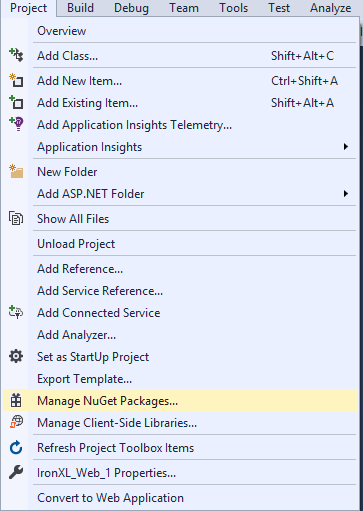 图 3 - 通过项目菜单访问 NuGet 包管理器
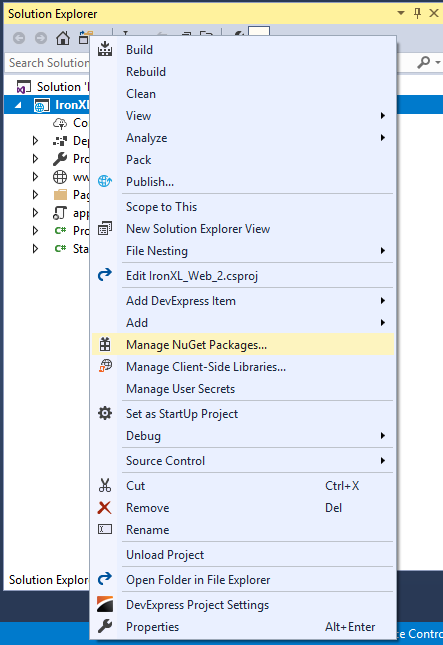 图 4 - 解决方案资源管理器中的右键单击上下文菜单
 图 5 - 通过 NuGet 包管理器安装 IronXL.Excel
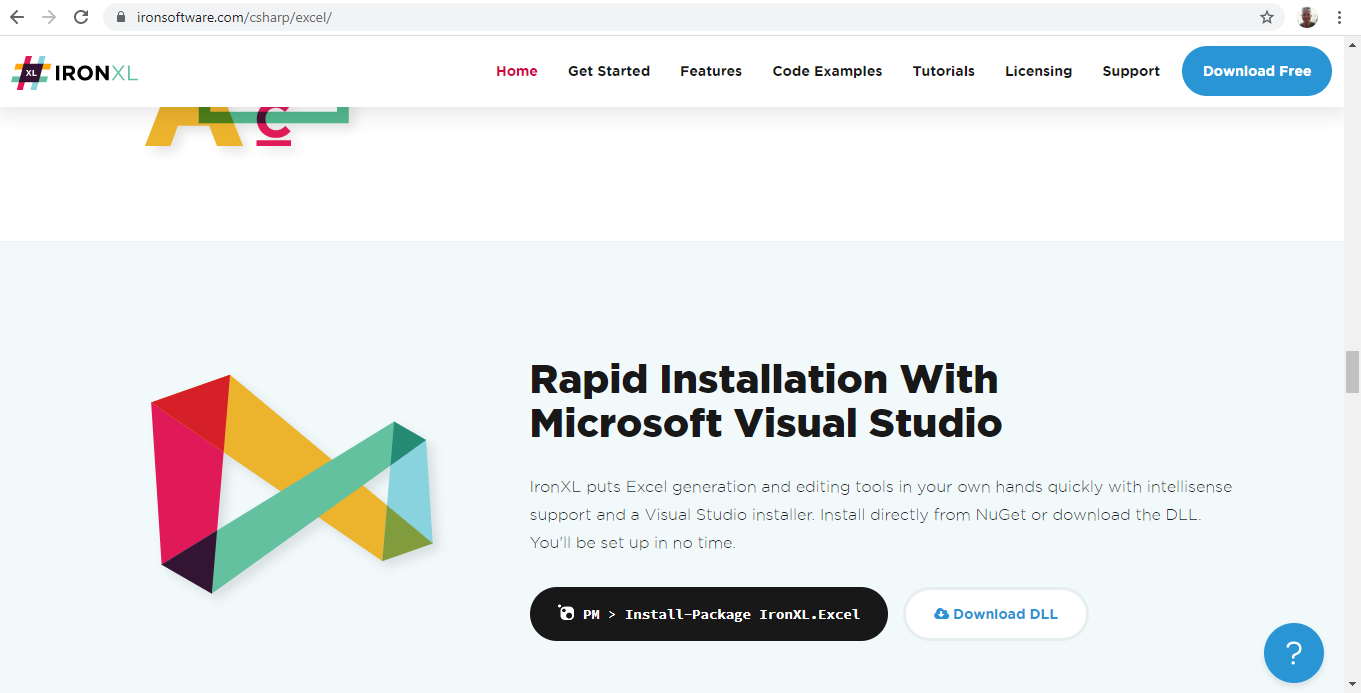 图 6 - 从官方下载 IronXL 库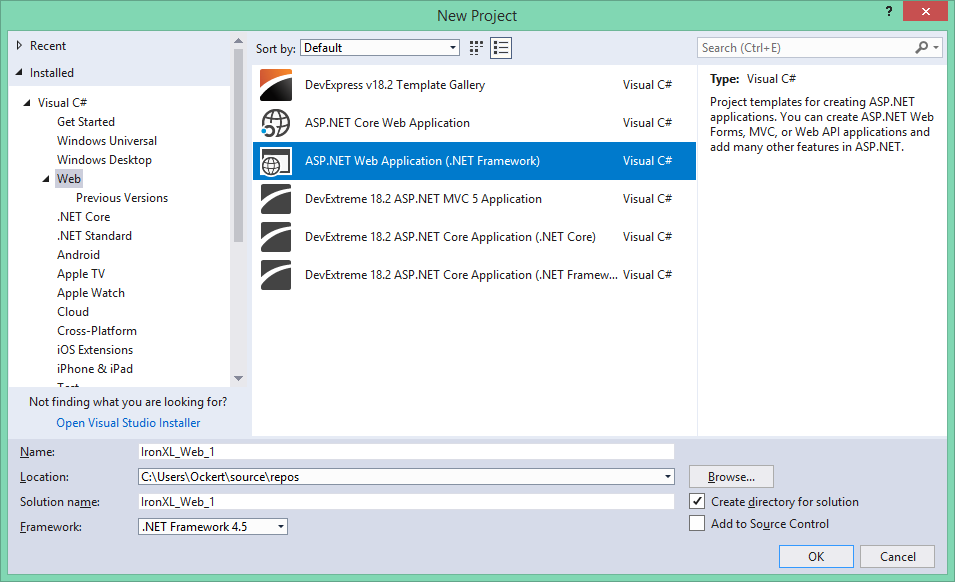
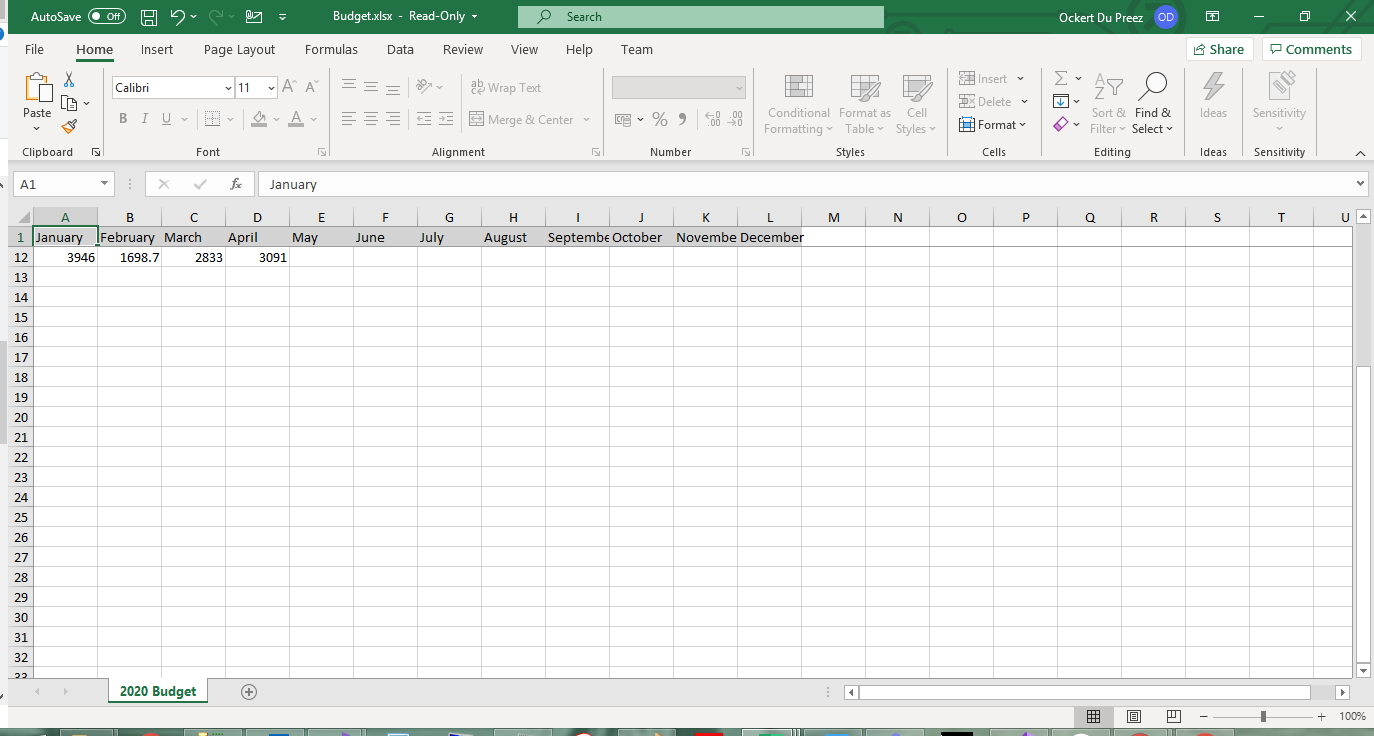 图 7 - 冻结的标题行在滚动时保持可见
 图 8 - 密码保护可防止未经授权的编辑
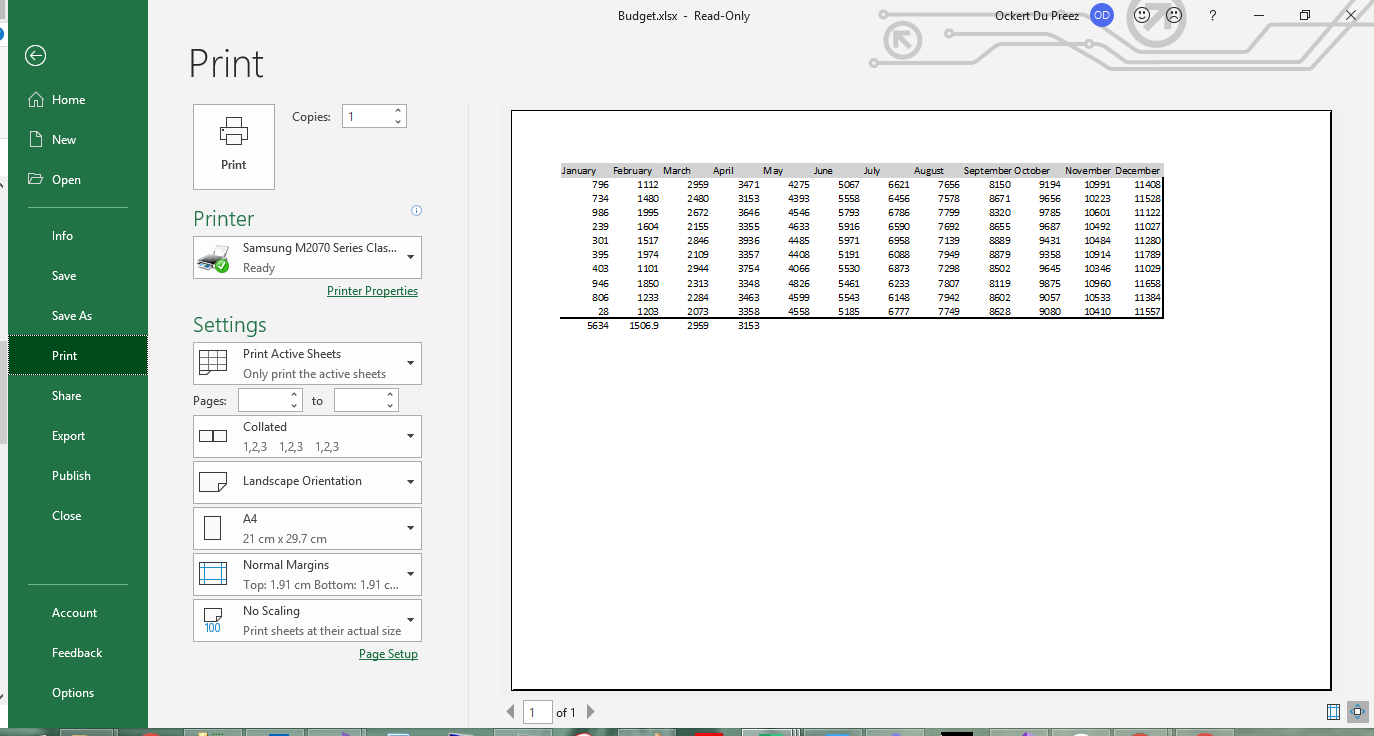 图 9 - 具有横向格式和自定义页边距的打印预览