
C# Excel Interop Workaround

许多项目使用Excel清晰地沟通,但如果您使用Microsoft.Office.Interop.Excel,那么您可能不得不面对很多复杂的代码行。 在本教程中,我们将使用 IronXL 作为 C# Excel Interop 的变通方案,这样您就不必使用 Interop 来完成您的项目。 您可以使用 C# 编程来使用 Excel 文件数据、创建 Excel 文件、编辑和操作所有数据。
C# Excel 无互操作性
- 下载 Excel 无互操作库
- 使用 C# 访问 Excel 文件
- 创建一个新的 Excel 文件并通过编程方式插入数据
- 修改现有文件、更新和替换单元格值、删除行等等
如何替代使用 Excel Interop
- 安装 Excel 库以处理 Excel 文件。
- 打开
Workbook并添加当前的Excel文件。 - 设置默认工作表。
- 从 Excel 工作簿中读取值。
- 处理并显示该值。
步骤1
1. 下载 IronXL 库
下载 IronXL 库或使用 NuGet 安装即可免费使用该库,然后按照本教程的步骤操作,学习如何在不使用 Interop 的情况下使用 Excel。如果您想将项目正式发布,可以购买相应的许可证。
如何使用教程
2. 访问 Excel 文件数据
为了开发商业应用程序,我们需要能够轻松、完美地访问 Excel 文件中的数据,并能够根据各种要求以编程方式操作这些数据。 使用IronXL,使用WorkBook.Load()函数,允许访问读取特定的Excel文件。
访问WorkBook后,可以使用WorkBook.GetWorkSheet()函数选择特定的WorkSheet。 现在您已拥有所有Excel文件数据。 以下示例展示了我们如何在 C# 项目中使用这些函数获取 Excel 文件数据。
// Import the IronXL library to access its functionality
using IronXL;

static void Main(string[] args)
{
    // Access Excel file
    WorkBook wb = WorkBook.Load("sample.xlsx");
    // Access WorkSheet of Excel file
    WorkSheet ws = wb.GetWorkSheet("Sheet1");

    // Get a specific cell value, convert it to a string, and print it
    string a = ws["A5"].Value.ToString();
    Console.WriteLine("Getting Single Value:\n\n   Value of Cell A5: {0}", a);

    Console.WriteLine("\nGetting Many Cells Value using Loop:\n");
    // Get multiple cell values using range function and iterate through them
    foreach (var cell in ws["B2:B10"])
    {
        Console.WriteLine("   Value is: {0}", cell.Text);
    }

    Console.ReadKey(); // Pause the console to view output
}' Import the IronXL library to access its functionality
Imports Microsoft.VisualBasic
Imports IronXL
Shared Sub Main(ByVal args() As String)
' Access Excel file
Dim wb As WorkBook = WorkBook.Load("sample.xlsx")
' Access WorkSheet of Excel file
Dim ws As WorkSheet = wb.GetWorkSheet("Sheet1")
' Get a specific cell value, convert it to a string, and print it
Dim a As String = ws("A5").Value.ToString()
Console.WriteLine("Getting Single Value:" & vbLf & vbLf & " Value of Cell A5: {0}", a)
Console.WriteLine(vbLf & "Getting Many Cells Value using Loop:" & vbLf)
' Get multiple cell values using range function and iterate through them
For Each cell In ws("B2:B10")
Console.WriteLine(" Value is: {0}", cell.Text)
Next cell
Console.ReadKey() ' Pause the console to view output
End Sub' Import the IronXL library to access its functionality
Imports Microsoft.VisualBasic
Imports IronXL
Shared Sub Main(ByVal args() As String)
' Access Excel file
Dim wb As WorkBook = WorkBook.Load("sample.xlsx")
' Access WorkSheet of Excel file
Dim ws As WorkSheet = wb.GetWorkSheet("Sheet1")
' Get a specific cell value, convert it to a string, and print it
Dim a As String = ws("A5").Value.ToString()
Console.WriteLine("Getting Single Value:" & vbLf & vbLf & " Value of Cell A5: {0}", a)
Console.WriteLine(vbLf & "Getting Many Cells Value using Loop:" & vbLf)
' Get multiple cell values using range function and iterate through them
For Each cell In ws("B2:B10")
Console.WriteLine(" Value is: {0}", cell.Text)
Next cell
Console.ReadKey() ' Pause the console to view output
End Sub这段代码将产生以下结果:
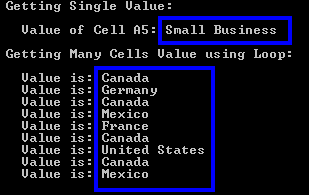
Excel 文件内容如下:
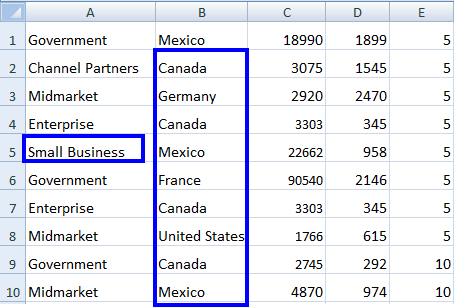
我们可以看到我们的Excel文件small business。 从B10的其他值是相同的,并在输出中显示。
数据集和数据表
我们还可以使用这些说明将 Excel 文件作为数据集和数据表进行处理。
// Access WorkBook and WorkSheet
WorkBook wb = WorkBook.Load("sample.xlsx");
WorkSheet ws = wb.GetWorkSheet("Sheet1");

// Convert workbook to DataSet
DataSet ds = wb.ToDataSet();

// Convert worksheet to DataTable
DataTable dt = ws.ToDataTable(true);
// Access WorkBook and WorkSheet
WorkBook wb = WorkBook.Load("sample.xlsx");
WorkSheet ws = wb.GetWorkSheet("Sheet1");
// Convert workbook to DataSet
DataSet ds = wb.ToDataSet();
// Convert worksheet to DataTable
DataTable dt = ws.ToDataTable(true);' Access WorkBook and WorkSheet
Dim wb As WorkBook = WorkBook.Load("sample.xlsx")
Dim ws As WorkSheet = wb.GetWorkSheet("Sheet1")
' Convert workbook to DataSet
Dim ds As DataSet = wb.ToDataSet()
' Convert worksheet to DataTable
Dim dt As DataTable = ws.ToDataTable(True)' Access WorkBook and WorkSheet
Dim wb As WorkBook = WorkBook.Load("sample.xlsx")
Dim ws As WorkSheet = wb.GetWorkSheet("Sheet1")
' Convert workbook to DataSet
Dim ds As DataSet = wb.ToDataSet()
' Convert worksheet to DataTable
Dim dt As DataTable = ws.ToDataTable(True)您可以阅读更多关于如何使用Excel 数据集和数据表的内容,其中提供了更多代码示例和过程说明。
现在,我们将看到另一个方面,即在我们的 C# 项目中创建一个新的 Excel 文件。
3. 创建新的 Excel 文件
我们可以轻松地在 C# 项目中创建一个新的 Excel 电子表格,并通过编程方式向其中插入数据。 为实现这一目的,IronXL提供了WorkBook.Create()函数,创建一个新的Excel文件。
然后我们可以使用WorkBook.CreateWorkSheet()函数根据需要创建多个工作表。
之后,我们还可以插入数据,如下例所示:
// Import the IronXL library
using IronXL;

static void Main(string[] args)
{
    // Create a new WorkBook
    WorkBook wb = WorkBook.Create();

    // Create a new WorkSheet in the workbook
    WorkSheet ws = wb.CreateWorkSheet("sheet1");

    // Insert data into cells
    ws["A1"].Value = "New Value A1";
    ws["B2"].Value = "New Value B2";

    // Save the newly created Excel file
    wb.SaveAs("NewExcelFile.xlsx");
}
// Import the IronXL library
using IronXL;
static void Main(string[] args)
{
// Create a new WorkBook
WorkBook wb = WorkBook.Create();
// Create a new WorkSheet in the workbook
WorkSheet ws = wb.CreateWorkSheet("sheet1");
// Insert data into cells
ws["A1"].Value = "New Value A1";
ws["B2"].Value = "New Value B2";
// Save the newly created Excel file
wb.SaveAs("NewExcelFile.xlsx");
}' Import the IronXL library
Imports IronXL
Shared Sub Main(ByVal args() As String)
' Create a new WorkBook
Dim wb As WorkBook = WorkBook.Create()
' Create a new WorkSheet in the workbook
Dim ws As WorkSheet = wb.CreateWorkSheet("sheet1")
' Insert data into cells
ws("A1").Value = "New Value A1"
ws("B2").Value = "New Value B2"
' Save the newly created Excel file
wb.SaveAs("NewExcelFile.xlsx")
End Sub' Import the IronXL library
Imports IronXL
Shared Sub Main(ByVal args() As String)
' Create a new WorkBook
Dim wb As WorkBook = WorkBook.Create()
' Create a new WorkSheet in the workbook
Dim ws As WorkSheet = wb.CreateWorkSheet("sheet1")
' Insert data into cells
ws("A1").Value = "New Value A1"
ws("B2").Value = "New Value B2"
' Save the newly created Excel file
wb.SaveAs("NewExcelFile.xlsx")
End Sub以上代码将创建一个名为New Value B2。 通过这种设置,您可以根据需要以相同的方式插入数据。
注意:如果您要创建新的 Excel 文件或修改现有文件,请不要忘记保存文件,如上面的示例所示。
深入了解如何使用 C# 创建新的 Excel 电子表格,并在您的项目中尝试代码。
4. 修改现有 Excel 文件
我们可以通过编程方式修改现有的 Excel 文件,并将更新后的数据插入其中。 在修改Excel文件时,我们将看到以下几个方面:
- 更新单元格值
- 将旧值替换为新值
- 删除行或列
让我们看看如何在我们的 C# 项目中实现以上主题。
更新单元格值
更新现有Excel电子表格中的单元格值非常简单。 只需在项目中打开 Excel 文件并指定其工作表,然后按照以下示例所示更新其数据:
// Import the IronXL library
using IronXL;

static void Main(string[] args)
{
    // Access the WorkBook and WorkSheet
    WorkBook wb = WorkBook.Load("sample.xlsx");
    WorkSheet ws = wb.GetWorkSheet("Sheet1");

    // Update A3 cell value
    ws["A3"].Value = "New Value of A3";

    // Save the updated Excel file
    wb.SaveAs("sample.xlsx");
}
// Import the IronXL library
using IronXL;
static void Main(string[] args)
{
// Access the WorkBook and WorkSheet
WorkBook wb = WorkBook.Load("sample.xlsx");
WorkSheet ws = wb.GetWorkSheet("Sheet1");
// Update A3 cell value
ws["A3"].Value = "New Value of A3";
// Save the updated Excel file
wb.SaveAs("sample.xlsx");
}' Import the IronXL library
Imports IronXL
Shared Sub Main(ByVal args() As String)
' Access the WorkBook and WorkSheet
Dim wb As WorkBook = WorkBook.Load("sample.xlsx")
Dim ws As WorkSheet = wb.GetWorkSheet("Sheet1")
' Update A3 cell value
ws("A3").Value = "New Value of A3"
' Save the updated Excel file
wb.SaveAs("sample.xlsx")
End Sub' Import the IronXL library
Imports IronXL
Shared Sub Main(ByVal args() As String)
' Access the WorkBook and WorkSheet
Dim wb As WorkBook = WorkBook.Load("sample.xlsx")
Dim ws As WorkSheet = wb.GetWorkSheet("Sheet1")
' Update A3 cell value
ws("A3").Value = "New Value of A3"
' Save the updated Excel file
wb.SaveAs("sample.xlsx")
End Sub上述代码将更新单元格New Value of A3。
我们还可以使用 range 函数将多个单元格的值更新为静态值:
ws["A3:C3"].Value = "New Value";ws["A3:C3"].Value = "New Value";ws("A3:C3").Value = "New Value"ws("A3:C3").Value = "New Value"这将更新Excel文件中从New Value。
通过以下示例了解更多关于在 C# 中使用 Range 函数的信息。
替换单元格值
IronXL的优势之一是能够轻松地在现有的Excel文件中将new values,涵盖以下所有方面:
- 替换整个工作表中的值:
ws.Replace("old value", "new value");ws.Replace("old value", "new value");ws.Replace("old value", "new value")ws.Replace("old value", "new value")- 替换特定行的值:
ws.Rows[RowIndex].Replace("old value", "new value");ws.Rows[RowIndex].Replace("old value", "new value");ws.Rows(RowIndex).Replace("old value", "new value")ws.Rows(RowIndex).Replace("old value", "new value")- 替换特定列的值:
ws.Columns[ColumnIndex].Replace("old value", "new Value");ws.Columns[ColumnIndex].Replace("old value", "new Value");ws.Columns(ColumnIndex).Replace("old value", "new Value")ws.Columns(ColumnIndex).Replace("old value", "new Value")- 替换特定范围内的值:
ws["From:To"].Replace("old value", "new value");ws["From:To"].Replace("old value", "new value");ws("From:To").Replace("old value", "new value")ws("From:To").Replace("old value", "new value")让我们来看一个例子,以便清楚地了解如何在我们的 C# 项目中使用上述函数来替换值。 在这个例子中,我们将使用 replace 函数来替换特定范围内的值。
// Import the IronXL library
using IronXL;

static void Main(string[] args)
{
    // Access the WorkBook and WorkSheet
    WorkBook wb = WorkBook.Load("sample.xlsx");
    WorkSheet ws = wb.GetWorkSheet("Sheet1");

    // Specify a range from B5 to G5 and replace "Normal" value with "Good"
    ws["B5:G5"].Replace("Normal", "Good");

    // Save the updated Excel file
    wb.SaveAs("sample.xlsx");
}
// Import the IronXL library
using IronXL;
static void Main(string[] args)
{
// Access the WorkBook and WorkSheet
WorkBook wb = WorkBook.Load("sample.xlsx");
WorkSheet ws = wb.GetWorkSheet("Sheet1");
// Specify a range from B5 to G5 and replace "Normal" value with "Good"
ws["B5:G5"].Replace("Normal", "Good");
// Save the updated Excel file
wb.SaveAs("sample.xlsx");
}' Import the IronXL library
Imports IronXL
Shared Sub Main(ByVal args() As String)
' Access the WorkBook and WorkSheet
Dim wb As WorkBook = WorkBook.Load("sample.xlsx")
Dim ws As WorkSheet = wb.GetWorkSheet("Sheet1")
' Specify a range from B5 to G5 and replace "Normal" value with "Good"
ws("B5:G5").Replace("Normal", "Good")
' Save the updated Excel file
wb.SaveAs("sample.xlsx")
End Sub' Import the IronXL library
Imports IronXL
Shared Sub Main(ByVal args() As String)
' Access the WorkBook and WorkSheet
Dim wb As WorkBook = WorkBook.Load("sample.xlsx")
Dim ws As WorkSheet = wb.GetWorkSheet("Sheet1")
' Specify a range from B5 to G5 and replace "Normal" value with "Good"
ws("B5:G5").Replace("Normal", "Good")
' Save the updated Excel file
wb.SaveAs("sample.xlsx")
End Sub上述代码将从Good,其余的WorkSheet保持不变。 了解更多关于如何使用 IronXL 的此功能编辑 Excel 区域中单元格值的信息。
删除 Excel 文件中的行
在应用程序开发中,我们有时需要通过编程方式删除现有 Excel 文件中的整行数据。 对于这个任务,我们使用IronXL的Remove()函数。 下面是一个例子:
// Import the IronXL library
using IronXL;

static void Main(string[] args)
{
    // Access the WorkBook and WorkSheet
    WorkBook wb = WorkBook.Load("sample.xlsx");
    WorkSheet ws = wb.GetWorkSheet("Sheet1");

    // Remove the row number 2
    ws.Rows[2].Remove();

    // Save the updated Excel file
    wb.SaveAs("sample.xlsx");
}
// Import the IronXL library
using IronXL;
static void Main(string[] args)
{
// Access the WorkBook and WorkSheet
WorkBook wb = WorkBook.Load("sample.xlsx");
WorkSheet ws = wb.GetWorkSheet("Sheet1");
// Remove the row number 2
ws.Rows[2].Remove();
// Save the updated Excel file
wb.SaveAs("sample.xlsx");
}' Import the IronXL library
Imports IronXL
Sub Main(ByVal args() As String)
' Access the WorkBook and WorkSheet
Dim wb As WorkBook = WorkBook.Load("sample.xlsx")
Dim ws As WorkSheet = wb.GetWorkSheet("Sheet1")
' Remove the row number 2
ws.Rows(2).Remove()
' Save the updated Excel file
wb.SaveAs("sample.xlsx")
End Sub' Import the IronXL library
Imports IronXL
Sub Main(ByVal args() As String)
' Access the WorkBook and WorkSheet
Dim wb As WorkBook = WorkBook.Load("sample.xlsx")
Dim ws As WorkSheet = wb.GetWorkSheet("Sheet1")
' Remove the row number 2
ws.Rows(2).Remove()
' Save the updated Excel file
wb.SaveAs("sample.xlsx")
End Sub上述代码将删除sample.xlsx中的行号。
教程快速访问

常见问题解答
如何在不使用 Interop 的情况下在 C# 中读取 Excel 文件?
您可以使用 IronXL 在 C# 中读取 Excel 文件而无需 Interop。使用 WorkBook.Load() 函数加载文件,并使用 WorkBook.GetWorkSheet() 访问工作表。
如何在 C# 中以编程方式创建一个新的 Excel 文件?
using IronXL,您可以通过使用 WorkBook.Create() 方法创建一个新的 Excel 文件,然后使用 WorkSheet.CreateWorkSheet() 添加数据。
是否可以在不使用 Interop 的情况下在 C# 中修改 Excel 文件?
是的,IronXL 提供了无需 Interop 便可修改 Excel 文件的功能,包括更新单元格值、替换旧值和直接移除行或列。
如何使用 IronXL 更新 Excel 表格中的特定单元格值?
要更新单元格值,请使用 WorkBook.GetWorkSheet() 加载您的工作表,为单元格指定新值,然后保存更改。
我可以使用 IronXL 替换一系列单元格中的值吗?
IronXL 允许您通过在工作表或特定范围对象上使用 Replace() 函数来替换值。
using IronXL 比使用 Microsoft.Office.Interop.Excel 有何优势?
IronXL 通过提供易于使用的 API 简化了 Excel 文件操作,减少了复杂的 Interop 代码需求,并提供了更好的性能和可靠性。
如何使用 IronXL 从 Excel 文件中删除一行?
要在 IronXL 中删除一行,请在工作表内的指定行对象上使用 Remove() 函数。
IronXL 是否支持将 Excel 文件转换为 DataSets 和 DataTables?
是的,IronXL 支持将工作簿转换为 DataSets 以及将工作表转换为 DataTables,允许更灵活的数据处理。
如何在 C# 项目中安装 IronXL?
您可以通过从 Iron Software 网站下载或使用 NuGet 包管理器并使用命令:Install-Package IronXL.Excel 在您的 C# 项目中安装 IronXL。
IronXL 适合大型 Excel 文件吗?
IronXL 优化了对大型 Excel 文件的处理,提供了比传统 Interop 方法更快的处理速度和更小的内存占用。

Curtis Chau 拥有卡尔顿大学的计算机科学学士学位,专注于前端开发,精通 Node.js、TypeScript、JavaScript 和 React。他热衷于打造直观且美观的用户界面,喜欢使用现代框架并创建结构良好、视觉吸引力强的手册。



