using IronXL;using System.Linq;// Open by sheet indexWorkSheet workSheet = workBook.WorkSheets[0];// Open the default worksheetWorkSheet workSheet2 = workBook.DefaultWorkSheet;// Open the first sheetWorkSheet workSheet3 = workBook.WorkSheets.First();// Open the first or default sheetWorkSheet workSheet4 = workBook.WorkSheets.FirstOrDefault();
using IronXL;
using System.Linq;

// Open by sheet index
WorkSheet workSheet = workBook.WorkSheets[0];

// Open the default worksheet
WorkSheet workSheet2 = workBook.DefaultWorkSheet;

// Open the first sheet
WorkSheet workSheet3 = workBook.WorkSheets.First();

// Open the first or default sheet
WorkSheet workSheet4 = workBook.WorkSheets.FirstOrDefault();
ImportsIronXLImportsSystem.Linq' Open by sheet indexPrivate workSheet AsWorkSheet = workBook.WorkSheets(0)' Open the default worksheetPrivate workSheet2 AsWorkSheet = workBook.DefaultWorkSheet' Open the first sheetPrivate workSheet3 AsWorkSheet = workBook.WorkSheets.First()' Open the first or default sheetPrivate workSheet4 AsWorkSheet = workBook.WorkSheets.FirstOrDefault()
Imports IronXL
Imports System.Linq

' Open by sheet index
Private workSheet As WorkSheet = workBook.WorkSheets(0)

' Open the default worksheet
Private workSheet2 As WorkSheet = workBook.DefaultWorkSheet

' Open the first sheet
Private workSheet3 As WorkSheet = workBook.WorkSheets.First()

' Open the first or default sheet
Private workSheet4 As WorkSheet = workBook.WorkSheets.FirstOrDefault()
// Access a specific cell value by its addressstring val = workSheet["Cell Address"].ToString();
// Access a specific cell value by its address
string val = workSheet["Cell Address"].ToString();
' Access a specific cell value by its addressDim val AsString = workSheet("Cell Address").ToString()
' Access a specific cell value by its address
Dim val As String = workSheet("Cell Address").ToString()
WorkSheet,如下所示。 還可以通過指定行索引和列索引來存取特定單元格值。
// Access a cell value by row index and column indexstring val = workSheet.Rows[RowIndex].Columns[ColumnIndex].Value.ToString();
// Access a cell value by row index and column index
string val = workSheet.Rows[RowIndex].Columns[ColumnIndex].Value.ToString();
' Access a cell value by row index and column indexDim val AsString = workSheet.Rows(RowIndex).Columns(ColumnIndex).Value.ToString()
' Access a cell value by row index and column index
Dim val As String = workSheet.Rows(RowIndex).Columns(ColumnIndex).Value.ToString()
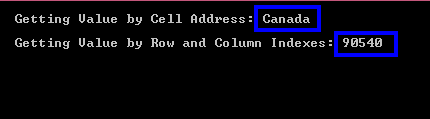
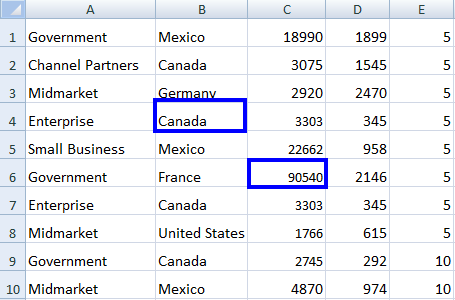
這是一個在您的C#項目中打開Excel文件並使用這兩種方法獲取特定單元格值的範例:
using IronXL;using System;WorkBook workBook = WorkBook.Load("sample.xlsx");// Open WorkSheetWorkSheet workSheet = workBook.GetWorkSheet("Sheet1");// Get value By Cell Addressint intValue = workSheet["C6"].Int32Value;// Get value by Row and Column Addressstring strValue = workSheet.Rows[3].Columns[1].Value.ToString();Console.WriteLine("Getting Value by Cell Address: {0}", intValue);Console.WriteLine("Getting Value by Row and Column Indexes: {0}", strValue);
using IronXL;
using System;

WorkBook workBook = WorkBook.Load("sample.xlsx");

// Open WorkSheet
WorkSheet workSheet = workBook.GetWorkSheet("Sheet1");

// Get value By Cell Address
int intValue = workSheet["C6"].Int32Value;

// Get value by Row and Column Address
string strValue = workSheet.Rows[3].Columns[1].Value.ToString();

Console.WriteLine("Getting Value by Cell Address: {0}", intValue);
Console.WriteLine("Getting Value by Row and Column Indexes: {0}", strValue);
ImportsIronXLImportsSystemPrivate workBook AsWorkBook = WorkBook.Load("sample.xlsx")' Open WorkSheetPrivate workSheet AsWorkSheet = workBook.GetWorkSheet("Sheet1")' Get value By Cell AddressPrivate intValue AsInteger = workSheet("C6").Int32Value' Get value by Row and Column AddressPrivate strValue AsString = workSheet.Rows(3).Columns(1).Value.ToString()Console.WriteLine("Getting Value by Cell Address: {0}", intValue)Console.WriteLine("Getting Value by Row and Column Indexes: {0}", strValue)
Imports IronXL
Imports System

Private workBook As WorkBook = WorkBook.Load("sample.xlsx")

' Open WorkSheet
Private workSheet As WorkSheet = workBook.GetWorkSheet("Sheet1")

' Get value By Cell Address
Private intValue As Integer = workSheet("C6").Int32Value

' Get value by Row and Column Address
Private strValue As String = workSheet.Rows(3).Columns(1).Value.ToString()

Console.WriteLine("Getting Value by Cell Address: {0}", intValue)
Console.WriteLine("Getting Value by Row and Column Indexes: {0}", strValue)
// Access data from a specific rangevar rangeData = workSheet["From Cell Address : To Cell Address"];
// Access data from a specific range
var rangeData = workSheet["From Cell Address : To Cell Address"];
' Access data from a specific rangeDim rangeData = workSheet("From Cell Address : To Cell Address")
' Access data from a specific range
Dim rangeData = workSheet("From Cell Address : To Cell Address")
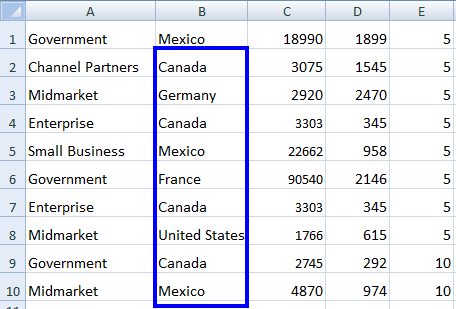
這裡有一個使用範圍從打開的Excel WorkSheet中獲取資料的範例:
using IronXL;using System;// Load Excel fileWorkBook workBook = WorkBook.Load("sample.xlsx");WorkSheet workSheet = workBook.GetWorkSheet("Sheet1");// Specify the rangeforeach (var cell in workSheet["B2:B10"]){Console.WriteLine("Value is: {0}", cell.Text);}
using IronXL;
using System;

// Load Excel file
WorkBook workBook = WorkBook.Load("sample.xlsx");
WorkSheet workSheet = workBook.GetWorkSheet("Sheet1");

// Specify the range
foreach (var cell in workSheet["B2:B10"])
{
    Console.WriteLine("Value is: {0}", cell.Text);
}
ImportsIronXLImportsSystem' Load Excel fileDim workBook AsWorkBook = WorkBook.Load("sample.xlsx")Dim workSheet AsWorkSheet = workBook.GetWorkSheet("Sheet1")' Specify the rangeFor Each cell In workSheet("B2:B10")Console.WriteLine("Value is: {0}", cell.Text)Next
Imports IronXL
Imports System

' Load Excel file
Dim workBook As WorkBook = WorkBook.Load("sample.xlsx")
Dim workSheet As WorkSheet = workBook.GetWorkSheet("Sheet1")

' Specify the range
For Each cell In workSheet("B2:B10")
    Console.WriteLine("Value is: {0}", cell.Text)
Next
using IronXL;using System;using System.Linq;// Load Excel fileWorkBook workBook = WorkBook.Load("sample2.xlsx");WorkSheet workSheet = workBook.GetWorkSheet("Sheet1");// Access all rows of the open Excel WorkSheetfor (int i = 0; i < workSheet.Rows.Count(); i++){ // Access all columns of a specific row for (int j = 0; j < workSheet.Columns.Count(); j++) { // Access each cell for the specified columnConsole.WriteLine(workSheet.Rows[i].Columns[j].Value.ToString()); }}
using IronXL;
using System;
using System.Linq;

// Load Excel file
WorkBook workBook = WorkBook.Load("sample2.xlsx");
WorkSheet workSheet = workBook.GetWorkSheet("Sheet1");

// Access all rows of the open Excel WorkSheet
for (int i = 0; i < workSheet.Rows.Count(); i++)
{
    // Access all columns of a specific row
    for (int j = 0; j < workSheet.Columns.Count(); j++)
    {
        // Access each cell for the specified column
        Console.WriteLine(workSheet.Rows[i].Columns[j].Value.ToString());
    }
}
ImportsIronXLImportsSystemImportsSystem.Linq' Load Excel filePrivate workBook AsWorkBook = WorkBook.Load("sample2.xlsx")Private workSheet AsWorkSheet = workBook.GetWorkSheet("Sheet1")' Access all rows of the open Excel WorkSheetFor i AsInteger = 0 To workSheet.Rows.Count() - 1 ' Access all columns of a specific row For j AsInteger = 0 To workSheet.Columns.Count() - 1 ' Access each cell for the specified columnConsole.WriteLine(workSheet.Rows(i).Columns(j).Value.ToString()) Next jNext i
Imports IronXL
Imports System
Imports System.Linq

' Load Excel file
Private workBook As WorkBook = WorkBook.Load("sample2.xlsx")
Private workSheet As WorkSheet = workBook.GetWorkSheet("Sheet1")

' Access all rows of the open Excel WorkSheet
For i As Integer = 0 To workSheet.Rows.Count() - 1
	' Access all columns of a specific row
	For j As Integer = 0 To workSheet.Columns.Count() - 1
		' Access each cell for the specified column
		Console.WriteLine(workSheet.Rows(i).Columns(j).Value.ToString())
	Next j
Next i
Can IronXL handle password-protected Excel workbooks?
IronXL supports loading password-protected workbooks through its LoadingOptions parameter, which allows you to specify the password when opening the workbook.
How do I install IronXL to start working with Excel worksheets in C#?
You can install IronXL via the NuGet package manager by searching for IronXL.Excel or by downloading the library directly from Iron Software's website.
What platforms are supported by IronXL for Excel operations?
IronXL supports a wide range of platforms including Windows, Linux, macOS, and even Docker containers, making it adaptable for various development environments.
How does IronXL compare to using Excel Interop for C# applications?
IronXL provides a more efficient approach compared to Excel Interop by requiring fewer lines of code, offering faster performance, and eliminating dependencies on Excel installations.
Can I export data from an Excel worksheet to other formats using IronXL?
Yes, IronXL allows you to export data from an Excel worksheet to formats like CSV, JSON, or XML, enabling easier data handling and integration with other systems.