
Scraping an Online Movie Website using C# and IronWebScraper

IronWebScraper extracts movie data from websites by parsing HTML elements, creating typed objects for structured data storage, and navigating between pages using metadata to build comprehensive movie information datasets. This C# Web Scraper library simplifies converting unstructured web content into organized, analyzable data.
Quickstart: Scrape Movies in C#- Install
IronWebScrapervia NuGet Package Manager - Create a class that inherits from
WebScraper - Override
Init()to set license and request the target URL - Override
Parse()to extract movie data using CSS selectors - Use
Scrape()method to save data in JSON format
-
1Install IronWebScraper with NuGet Package Manager
-
2Copy and run this code snippet.
using IronWebScraper; using System; public class QuickstartMovieScraper : WebScraper { public override void Init() { // Set your license key License.LicenseKey = "YOUR-LICENSE-KEY"; // Configure scraper settings this.LoggingLevel = LogLevel.All; this.WorkingDirectory = @"C:\MovieData\Output\"; // Start scraping from the homepage this.Request("https://example-movie-site.com", Parse); } public override void Parse(Response response) { // Extract movie titles using CSS selectors foreach (var movieDiv in response.Css(".movie-item")) { var title = movieDiv.Css("h2")[0].TextContentClean; var url = movieDiv.Css("a")[0].Attributes["href"]; // Save the scraped data Scrape(new { Title = title, Url = url }, "movies.json"); } } } // Run the scraper var scraper = new QuickstartMovieScraper(); scraper.Start();Imports IronWebScraper Imports System Public Class QuickstartMovieScraper Inherits WebScraper Public Overrides Sub Init() ' Set your license key License.LicenseKey = "YOUR-LICENSE-KEY" ' Configure scraper settings Me.LoggingLevel = LogLevel.All Me.WorkingDirectory = "C:\MovieData\Output\" ' Start scraping from the homepage Me.Request("https://example-movie-site.com", AddressOf Parse) End Sub Public Overrides Sub Parse(response As Response) ' Extract movie titles using CSS selectors For Each movieDiv In response.Css(".movie-item") Dim title = movieDiv.Css("h2")(0).TextContentClean Dim url = movieDiv.Css("a")(0).Attributes("href") ' Save the scraped data Scrape(New With {Key .Title = title, Key .Url = url}, "movies.json") Next End Sub End Class ' Run the scraper Dim scraper As New QuickstartMovieScraper() scraper.Start()Imports IronWebScraper Imports System Public Class QuickstartMovieScraper Inherits WebScraper Public Overrides Sub Init() ' Set your license key License.LicenseKey = "YOUR-LICENSE-KEY" ' Configure scraper settings Me.LoggingLevel = LogLevel.All Me.WorkingDirectory = "C:\MovieData\Output\" ' Start scraping from the homepage Me.Request("https://example-movie-site.com", AddressOf Parse) End Sub Public Overrides Sub Parse(response As Response) ' Extract movie titles using CSS selectors For Each movieDiv In response.Css(".movie-item") Dim title = movieDiv.Css("h2")(0).TextContentClean Dim url = movieDiv.Css("a")(0).Attributes("href") ' Save the scraped data Scrape(New With {Key .Title = title, Key .Url = url}, "movies.json") Next End Sub End Class ' Run the scraper Dim scraper As New QuickstartMovieScraper() scraper.Start() -
3Deploy to test on your live environment
Start using IronWebScraper in your project today with a free trial
How Do I Set Up a Movie Scraper Class?
Begin with a real-world website example. We'll scrape a movie website using the techniques outlined in our Webscraping in C# tutorial.
Add a new class and name it MovieScraper:
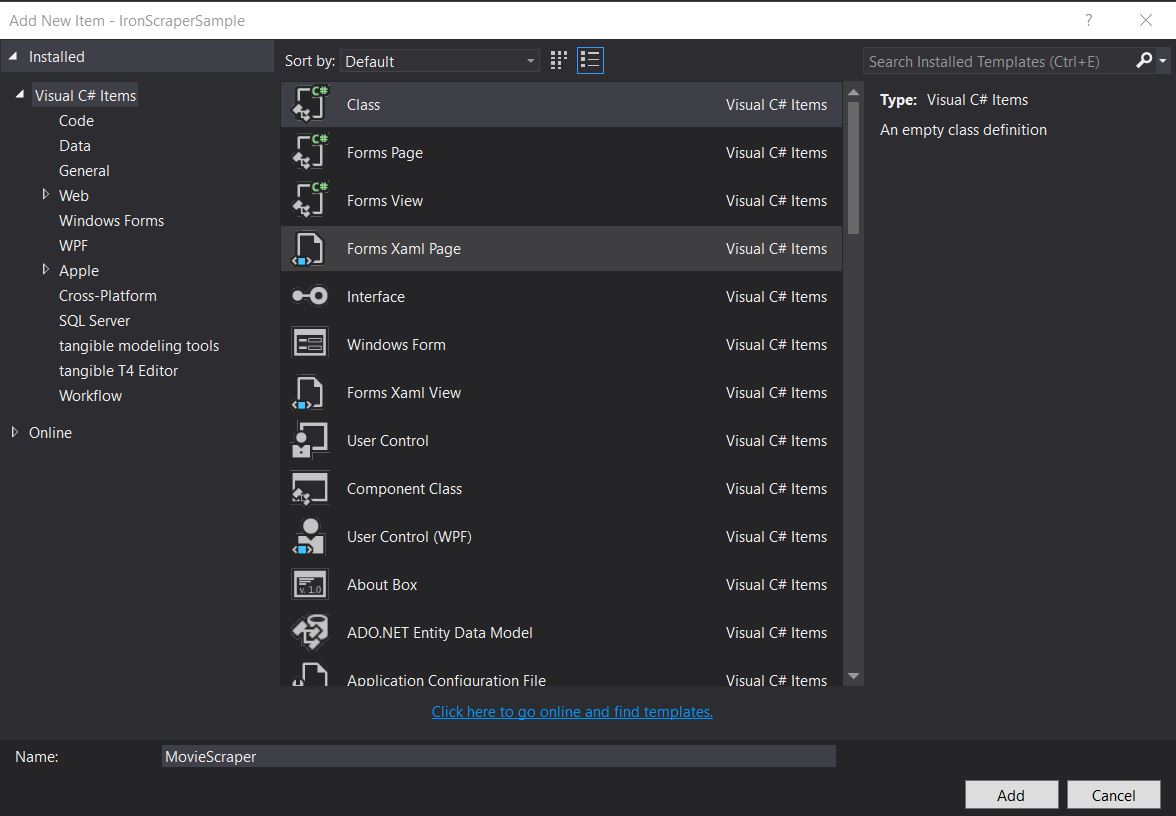
Creating a dedicated scraper class helps organize your code and makes it reusable. This approach follows object-oriented principles and allows you to easily extend functionality later.
What Does the Target Website Structure Look Like?
Examine the site structure for scraping. Understanding the website's structure is crucial for effective web scraping. Similar to our guide on Scraping from an Online Movie Website, analyze the HTML structure first:
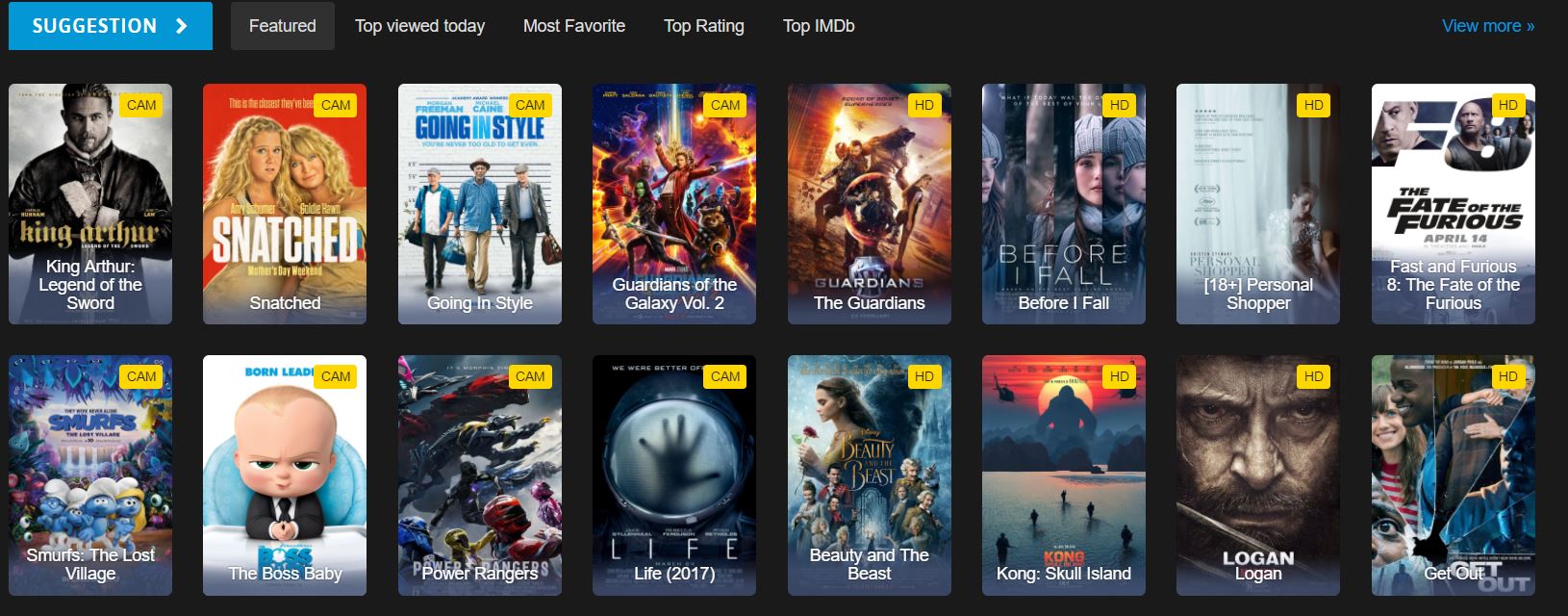
Which HTML Elements Contain Movie Data?
This is part of the homepage HTML we see on the website. Examining the HTML structure helps identify the correct CSS selectors to use:
<div id="movie-featured" class="movies-list movies-list-full tab-pane in fade active">
    <div data-movie-id="20746" class="ml-item">
        <a href="https://website.com/film/king-arthur-legend-of-the-sword-20746/">
            <span class="mli-quality">CAM</span>
            <img data-original="https://img.gocdn.online/2017/05/16/poster/2116d6719c710eabe83b377463230fbe-king-arthur-legend-of-the-sword.jpg"
                 class="lazy thumb mli-thumb" alt="King Arthur: Legend of the Sword"
                 src="https://img.gocdn.online/2017/05/16/poster/2116d6719c710eabe83b377463230fbe-king-arthur-legend-of-the-sword.jpg"
                 style="display: inline-block;">
            <span class="mli-info"><h2>King Arthur: Legend of the Sword</h2></span>
        </a>
    </div>
    <div data-movie-id="20724" class="ml-item">
        <a href="https://website.com/film/snatched-20724/">
            <span class="mli-quality">CAM</span>
            <img data-original="https://img.gocdn.online/2017/05/16/poster/5ef66403dc331009bdb5aa37cfe819ba-snatched.jpg"
                 class="lazy thumb mli-thumb" alt="Snatched"
                 src="https://img.gocdn.online/2017/05/16/poster/5ef66403dc331009bdb5aa37cfe819ba-snatched.jpg"
                 style="display: inline-block;">
            <span class="mli-info"><h2>Snatched</h2></span>
        </a>
    </div>
</div>We have a movie ID, title, and link to a detailed page. Each movie is contained within a div element with the class ml-item and includes a unique data-movie-id attribute for identification.
How Do I Implement Basic Movie Scraping?
Begin scraping this data set. Before running any scraper, ensure you have properly configured your license key as shown below:
public class MovieScraper : WebScraper
{
    public override void Init()
    {
        // Initialize scraper settings
        License.LicenseKey = "LicenseKey";
        this.LoggingLevel = WebScraper.LogLevel.All;
        this.WorkingDirectory = AppSetting.GetAppRoot() + @"\MovieSample\Output\";

        // Request homepage content for scraping
        this.Request("www.website.com", Parse);
    }

    public override void Parse(Response response)
    {
        // Iterate over each movie div within the featured movie section
        foreach (var div in response.Css("#movie-featured > div"))
        {
            if (div.Attributes["class"] != "clearfix")
            {
                var movieId = Convert.ToInt32(div.GetAttribute("data-movie-id"));
                var link = div.Css("a")[0];
                var movieTitle = link.TextContentClean;

                // Scrape and store movie data as key-value pairs
                Scrape(new ScrapedData()
                {
                    { "MovieId", movieId },
                    { "MovieTitle", movieTitle }
                }, "Movie.Jsonl");
            }
        }
    }
}
public class MovieScraper : WebScraper
{
public override void Init()
{
// Initialize scraper settings
License.LicenseKey = "LicenseKey";
this.LoggingLevel = WebScraper.LogLevel.All;
this.WorkingDirectory = AppSetting.GetAppRoot() + @"\MovieSample\Output\";
// Request homepage content for scraping
this.Request("www.website.com", Parse);
}
public override void Parse(Response response)
{
// Iterate over each movie div within the featured movie section
foreach (var div in response.Css("#movie-featured > div"))
{
if (div.Attributes["class"] != "clearfix")
{
var movieId = Convert.ToInt32(div.GetAttribute("data-movie-id"));
var link = div.Css("a")[0];
var movieTitle = link.TextContentClean;
// Scrape and store movie data as key-value pairs
Scrape(new ScrapedData()
{
{ "MovieId", movieId },
{ "MovieTitle", movieTitle }
}, "Movie.Jsonl");
}
}
}
}Public Class MovieScraper
Inherits WebScraper
Public Overrides Sub Init()
' Initialize scraper settings
License.LicenseKey = "LicenseKey"
Me.LoggingLevel = WebScraper.LogLevel.All
Me.WorkingDirectory = AppSetting.GetAppRoot() & "\MovieSample\Output\"
' Request homepage content for scraping
Me.Request("www.website.com", AddressOf Parse)
End Sub
Public Overrides Sub Parse(ByVal response As Response)
' Iterate over each movie div within the featured movie section
For Each div In response.Css("#movie-featured > div")
If div.Attributes("class") <> "clearfix" Then
Dim movieId = Convert.ToInt32(div.GetAttribute("data-movie-id"))
Dim link = div.Css("a")(0)
Dim movieTitle = link.TextContentClean
' Scrape and store movie data as key-value pairs
Scrape(New ScrapedData() From {
{"MovieId", movieId},
{"MovieTitle", movieTitle}
}, "Movie.Jsonl")
End If
Next
End Sub
End ClassPublic Class MovieScraper
Inherits WebScraper
Public Overrides Sub Init()
' Initialize scraper settings
License.LicenseKey = "LicenseKey"
Me.LoggingLevel = WebScraper.LogLevel.All
Me.WorkingDirectory = AppSetting.GetAppRoot() & "\MovieSample\Output\"
' Request homepage content for scraping
Me.Request("www.website.com", AddressOf Parse)
End Sub
Public Overrides Sub Parse(ByVal response As Response)
' Iterate over each movie div within the featured movie section
For Each div In response.Css("#movie-featured > div")
If div.Attributes("class") <> "clearfix" Then
Dim movieId = Convert.ToInt32(div.GetAttribute("data-movie-id"))
Dim link = div.Css("a")(0)
Dim movieTitle = link.TextContentClean
' Scrape and store movie data as key-value pairs
Scrape(New ScrapedData() From {
{"MovieId", movieId},
{"MovieTitle", movieTitle}
}, "Movie.Jsonl")
End If
Next
End Sub
End ClassWhat Is the Working Directory Property For?
What's new in this code?
The Working Directory property sets the main working directory for all scraped data and related files. This ensures all output files are organized in a single location, making it easier to manage large-scale scraping projects. The directory will be created automatically if it doesn't exist.
When Should I Use CSS Selectors vs Attributes?
Additional considerations:
CSS selectors are ideal when targeting elements by their structural position or class names, while direct attribute access is better for extracting specific values like IDs or custom data attributes. In our example, we use CSS selectors (#movie-featured > div) to navigate the DOM structure and attributes (data-movie-id) to extract specific values.
How Do I Create Typed Objects for Scraped Data?
Build typed objects to hold scraped data in formatted objects. Using strongly-typed objects provides better code organization, IntelliSense support, and compile-time type checking.
Implement a Movie class that will hold formatted data:
public class Movie
{
    public int Id { get; set; }
    public string Title { get; set; }
    public string URL { get; set; }
}
public class Movie
{
public int Id { get; set; }
public string Title { get; set; }
public string URL { get; set; }
}Public Class Movie
Public Property Id As Integer
Public Property Title As String
Public Property URL As String
End ClassPublic Class Movie
Public Property Id As Integer
Public Property Title As String
Public Property URL As String
End ClassHow Does Using Typed Objects Improve Data Organization?
Update the code to use the typed Movie class instead of the generic ScrapedData dictionary:
public class MovieScraper : WebScraper
{
    public override void Init()
    {
        // Initialize scraper settings
        License.LicenseKey = "LicenseKey";
        this.LoggingLevel = WebScraper.LogLevel.All;
        this.WorkingDirectory = AppSetting.GetAppRoot() + @"\MovieSample\Output\";

        // Request homepage content for scraping
        this.Request("https://website.com/", Parse);
    }

    public override void Parse(Response response)
    {
        // Iterate over each movie div within the featured movie section
        foreach (var div in response.Css("#movie-featured > div"))
        {
            if (div.Attributes["class"] != "clearfix")
            {
                var movie = new Movie
                {
                    Id = Convert.ToInt32(div.GetAttribute("data-movie-id"))
                };

                var link = div.Css("a")[0];
                movie.Title = link.TextContentClean;
                movie.URL = link.Attributes["href"];

                // Scrape and store movie object
                Scrape(movie, "Movie.Jsonl");
            }
        }
    }
}
public class MovieScraper : WebScraper
{
public override void Init()
{
// Initialize scraper settings
License.LicenseKey = "LicenseKey";
this.LoggingLevel = WebScraper.LogLevel.All;
this.WorkingDirectory = AppSetting.GetAppRoot() + @"\MovieSample\Output\";
// Request homepage content for scraping
this.Request("https://website.com/", Parse);
}
public override void Parse(Response response)
{
// Iterate over each movie div within the featured movie section
foreach (var div in response.Css("#movie-featured > div"))
{
if (div.Attributes["class"] != "clearfix")
{
var movie = new Movie
{
Id = Convert.ToInt32(div.GetAttribute("data-movie-id"))
};
var link = div.Css("a")[0];
movie.Title = link.TextContentClean;
movie.URL = link.Attributes["href"];
// Scrape and store movie object
Scrape(movie, "Movie.Jsonl");
}
}
}
}Public Class MovieScraper
Inherits WebScraper
Public Overrides Sub Init()
' Initialize scraper settings
License.LicenseKey = "LicenseKey"
Me.LoggingLevel = WebScraper.LogLevel.All
Me.WorkingDirectory = AppSetting.GetAppRoot() & "\MovieSample\Output\"
' Request homepage content for scraping
Me.Request("https://website.com/", AddressOf Parse)
End Sub
Public Overrides Sub Parse(response As Response)
' Iterate over each movie div within the featured movie section
For Each div In response.Css("#movie-featured > div")
If div.Attributes("class") <> "clearfix" Then
Dim movie As New Movie With {
.Id = Convert.ToInt32(div.GetAttribute("data-movie-id"))
}
Dim link = div.Css("a")(0)
movie.Title = link.TextContentClean
movie.URL = link.Attributes("href")
' Scrape and store movie object
Scrape(movie, "Movie.Jsonl")
End If
Next
End Sub
End ClassPublic Class MovieScraper
Inherits WebScraper
Public Overrides Sub Init()
' Initialize scraper settings
License.LicenseKey = "LicenseKey"
Me.LoggingLevel = WebScraper.LogLevel.All
Me.WorkingDirectory = AppSetting.GetAppRoot() & "\MovieSample\Output\"
' Request homepage content for scraping
Me.Request("https://website.com/", AddressOf Parse)
End Sub
Public Overrides Sub Parse(response As Response)
' Iterate over each movie div within the featured movie section
For Each div In response.Css("#movie-featured > div")
If div.Attributes("class") <> "clearfix" Then
Dim movie As New Movie With {
.Id = Convert.ToInt32(div.GetAttribute("data-movie-id"))
}
Dim link = div.Css("a")(0)
movie.Title = link.TextContentClean
movie.URL = link.Attributes("href")
' Scrape and store movie object
Scrape(movie, "Movie.Jsonl")
End If
Next
End Sub
End ClassWhat Format Does the Scrape Method Use for Typed Objects?
What's new?
- We implemented a
Movieclass to hold scraped data, providing type safety and better code organization. - We pass movie objects to the
Scrapemethod which understands our format and saves it in a defined manner as shown below:
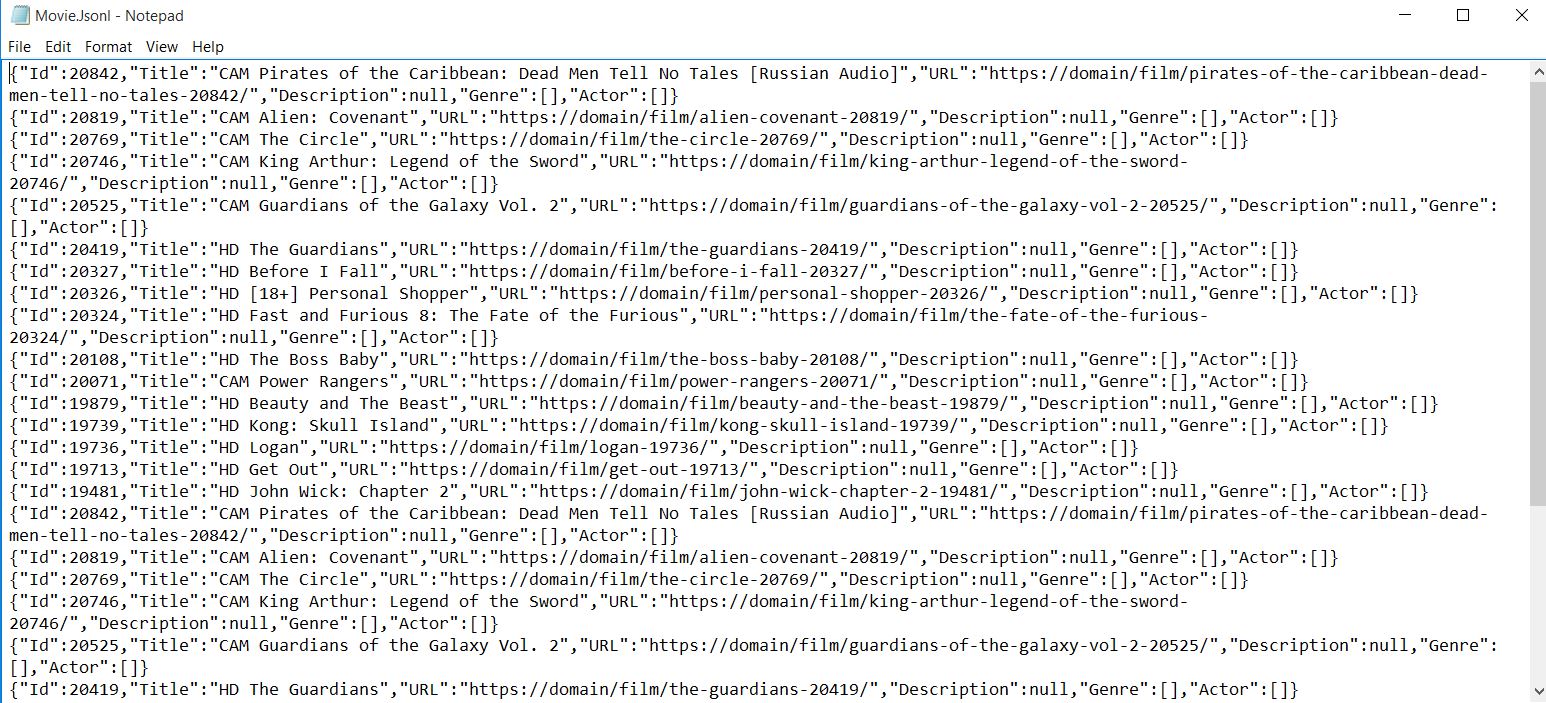
The output is automatically serialized to JSON format, making it easy to import into databases or other applications.
How Do I Scrape Detailed Movie Pages?
Begin scraping more detailed pages. Multi-page scraping is a common requirement, and IronWebScraper makes it straightforward through its request chaining mechanism.
What Additional Data Can I Extract from Detail Pages?
The Movie Page looks like this, containing rich metadata about each film:

<div class="mvi-content">
    <div class="thumb mvic-thumb"
         style="background-image: url(https://img.gocdn.online/2017/04/28/poster/5a08e94ba02118f22dc30f298c603210-guardians-of-the-galaxy-vol-2.jpg);"></div>
    <div class="mvic-desc">
        <h3>Guardians of the Galaxy Vol. 2</h3>
        <div class="desc">
            Set to the backdrop of Awesome Mixtape #2, Marvel's Guardians of the Galaxy Vol. 2 continues the team's adventures as they travel throughout the cosmos to help Peter Quill learn more about his true parentage.
        </div>
        <div class="mvic-info">
            <div class="mvici-left">
                <p>
                    <strong>Genre: </strong>
                    <a href="https://Domain/genre/action/" title="Action">Action</a>,
                    <a href="https://Domain/genre/adventure/" title="Adventure">Adventure</a>,
                    <a href="https://Domain/genre/sci-fi/" title="Sci-Fi">Sci-Fi</a>
                </p>
                <p>
                    <strong>Actor: </strong>
                    <a target="_blank" href="https://Domain/actor/chris-pratt" title="Chris Pratt">Chris Pratt</a>,
                    <a target="_blank" href="https://Domain/actor/-zoe-saldana" title="Zoe Saldana">Zoe Saldana</a>,
                    <a target="_blank" href="https://Domain/actor/-dave-bautista-" title="Dave Bautista">Dave Bautista</a>
                </p>
                <p>
                    <strong>Director: </strong>
                    <a href="#" title="James Gunn">James Gunn</a>
                </p>
                <p>
                    <strong>Country: </strong>
                    <a href="https://Domain/country/us" title="United States">United States</a>
                </p>
            </div>
            <div class="mvici-right">
                <p><strong>Duration:</strong> 136 min</p>
                <p><strong>Quality:</strong> <span class="quality">CAM</span></p>
                <p><strong>Release:</strong> 2017</p>
                <p><strong>IMDb:</strong> 8.3</p>
            </div>
            <div class="clearfix"></div>
        </div>
        <div class="clearfix"></div>
    </div>
    <div class="clearfix"></div>
</div>How Should I Extend My Movie Class for Additional Properties?
Extend the Movie class with new properties (Description, Genre, Actor, Director, Country, Duration, IMDb Score) but use only Description, Genre, and Actor for this sample. Using List<string> for genres and actors allows handling multiple values elegantly:
using System.Collections.Generic;

public class Movie
{
    public int Id { get; set; }
    public string Title { get; set; }
    public string URL { get; set; }
    public string Description { get; set; }
    public List<string> Genre { get; set; }
    public List<string> Actor { get; set; }
}
using System.Collections.Generic;
public class Movie
{
public int Id { get; set; }
public string Title { get; set; }
public string URL { get; set; }
public string Description { get; set; }
public List<string> Genre { get; set; }
public List<string> Actor { get; set; }
}Imports System.Collections.Generic
Public Class Movie
Public Property Id() As Integer
Public Property Title() As String
Public Property URL() As String
Public Property Description() As String
Public Property Genre() As List(Of String)
Public Property Actor() As List(Of String)
End ClassImports System.Collections.Generic
Public Class Movie
Public Property Id() As Integer
Public Property Title() As String
Public Property URL() As String
Public Property Description() As String
Public Property Genre() As List(Of String)
Public Property Actor() As List(Of String)
End ClassHow Do I Navigate Between Pages While Scraping?
Navigate to the detailed page to scrape it. IronWebScraper handles thread safety automatically, allowing multiple pages to be processed concurrently.
Why Use Multiple Parse Functions for Different Page Types?
IronWebScraper enables adding multiple scrape functions to handle different page formats. This separation of concerns makes your code more maintainable and allows appropriate handling of different page structures. Each parse function can focus on extracting data from a specific page type.
How Does MetaData Help Pass Objects Between Parse Functions?
The MetaData feature is crucial for maintaining state between requests. For more advanced webscraping features, check our detailed guide:
public class MovieScraper : WebScraper
{
    public override void Init()
    {
        // Initialize scraper settings
        License.LicenseKey = "LicenseKey";
        this.LoggingLevel = WebScraper.LogLevel.All;
        this.WorkingDirectory = AppSetting.GetAppRoot() + @"\MovieSample\Output\";

        // Request homepage content for scraping
        this.Request("https://domain/", Parse);
    }

    public override void Parse(Response response)
    {
        // Iterate over each movie div within the featured movie section
        foreach (var div in response.Css("#movie-featured > div"))
        {
            if (div.Attributes["class"] != "clearfix")
            {
                var movie = new Movie
                {
                    Id = Convert.ToInt32(div.GetAttribute("data-movie-id"))
                };

                var link = div.Css("a")[0];
                movie.Title = link.TextContentClean;
                movie.URL = link.Attributes["href"];

                // Request detailed page
                this.Request(movie.URL, ParseDetails, new MetaData() { { "movie", movie } });
            }
        }
    }

    public void ParseDetails(Response response)
    {
        // Retrieve movie object from metadata
        var movie = response.MetaData.Get<Movie>("movie");
        var div = response.Css("div.mvic-desc")[0];

        // Extract description
        movie.Description = div.Css("div.desc")[0].TextContentClean;

        // Extract genres
        movie.Genre = new List<string>(); // Initialize genre list
        foreach(var genre in div.Css("div > p > a"))
        {
            movie.Genre.Add(genre.TextContentClean);
        }

        // Extract actors
        movie.Actor = new List<string>(); // Initialize actor list
        foreach (var actor in div.Css("div > p:nth-child(2) > a"))
        {
            movie.Actor.Add(actor.TextContentClean);
        }

        // Scrape and store detailed movie data
        Scrape(movie, "Movie.Jsonl");
    }
}
public class MovieScraper : WebScraper
{
public override void Init()
{
// Initialize scraper settings
License.LicenseKey = "LicenseKey";
this.LoggingLevel = WebScraper.LogLevel.All;
this.WorkingDirectory = AppSetting.GetAppRoot() + @"\MovieSample\Output\";
// Request homepage content for scraping
this.Request("https://domain/", Parse);
}
public override void Parse(Response response)
{
// Iterate over each movie div within the featured movie section
foreach (var div in response.Css("#movie-featured > div"))
{
if (div.Attributes["class"] != "clearfix")
{
var movie = new Movie
{
Id = Convert.ToInt32(div.GetAttribute("data-movie-id"))
};
var link = div.Css("a")[0];
movie.Title = link.TextContentClean;
movie.URL = link.Attributes["href"];
// Request detailed page
this.Request(movie.URL, ParseDetails, new MetaData() { { "movie", movie } });
}
}
}
public void ParseDetails(Response response)
{
// Retrieve movie object from metadata
var movie = response.MetaData.Get<Movie>("movie");
var div = response.Css("div.mvic-desc")[0];
// Extract description
movie.Description = div.Css("div.desc")[0].TextContentClean;
// Extract genres
movie.Genre = new List<string>(); // Initialize genre list
foreach(var genre in div.Css("div > p > a"))
{
movie.Genre.Add(genre.TextContentClean);
}
// Extract actors
movie.Actor = new List<string>(); // Initialize actor list
foreach (var actor in div.Css("div > p:nth-child(2) > a"))
{
movie.Actor.Add(actor.TextContentClean);
}
// Scrape and store detailed movie data
Scrape(movie, "Movie.Jsonl");
}
}Public Class MovieScraper
Inherits WebScraper
Public Overrides Sub Init()
' Initialize scraper settings
License.LicenseKey = "LicenseKey"
Me.LoggingLevel = WebScraper.LogLevel.All
Me.WorkingDirectory = AppSetting.GetAppRoot() & "\MovieSample\Output\"
' Request homepage content for scraping
Me.Request("https://domain/", AddressOf Parse)
End Sub
Public Overrides Sub Parse(response As Response)
' Iterate over each movie div within the featured movie section
For Each div In response.Css("#movie-featured > div")
If div.Attributes("class") <> "clearfix" Then
Dim movie As New Movie With {
.Id = Convert.ToInt32(div.GetAttribute("data-movie-id"))
}
Dim link = div.Css("a")(0)
movie.Title = link.TextContentClean
movie.URL = link.Attributes("href")
' Request detailed page
Me.Request(movie.URL, AddressOf ParseDetails, New MetaData() From {{"movie", movie}})
End If
Next
End Sub
Public Sub ParseDetails(response As Response)
' Retrieve movie object from metadata
Dim movie = response.MetaData.Get(Of Movie)("movie")
Dim div = response.Css("div.mvic-desc")(0)
' Extract description
movie.Description = div.Css("div.desc")(0).TextContentClean
' Extract genres
movie.Genre = New List(Of String)() ' Initialize genre list
For Each genre In div.Css("div > p > a")
movie.Genre.Add(genre.TextContentClean)
Next
' Extract actors
movie.Actor = New List(Of String)() ' Initialize actor list
For Each actor In div.Css("div > p:nth-child(2) > a")
movie.Actor.Add(actor.TextContentClean)
Next
' Scrape and store detailed movie data
Scrape(movie, "Movie.Jsonl")
End Sub
End ClassPublic Class MovieScraper
Inherits WebScraper
Public Overrides Sub Init()
' Initialize scraper settings
License.LicenseKey = "LicenseKey"
Me.LoggingLevel = WebScraper.LogLevel.All
Me.WorkingDirectory = AppSetting.GetAppRoot() & "\MovieSample\Output\"
' Request homepage content for scraping
Me.Request("https://domain/", AddressOf Parse)
End Sub
Public Overrides Sub Parse(response As Response)
' Iterate over each movie div within the featured movie section
For Each div In response.Css("#movie-featured > div")
If div.Attributes("class") <> "clearfix" Then
Dim movie As New Movie With {
.Id = Convert.ToInt32(div.GetAttribute("data-movie-id"))
}
Dim link = div.Css("a")(0)
movie.Title = link.TextContentClean
movie.URL = link.Attributes("href")
' Request detailed page
Me.Request(movie.URL, AddressOf ParseDetails, New MetaData() From {{"movie", movie}})
End If
Next
End Sub
Public Sub ParseDetails(response As Response)
' Retrieve movie object from metadata
Dim movie = response.MetaData.Get(Of Movie)("movie")
Dim div = response.Css("div.mvic-desc")(0)
' Extract description
movie.Description = div.Css("div.desc")(0).TextContentClean
' Extract genres
movie.Genre = New List(Of String)() ' Initialize genre list
For Each genre In div.Css("div > p > a")
movie.Genre.Add(genre.TextContentClean)
Next
' Extract actors
movie.Actor = New List(Of String)() ' Initialize actor list
For Each actor In div.Css("div > p:nth-child(2) > a")
movie.Actor.Add(actor.TextContentClean)
Next
' Scrape and store detailed movie data
Scrape(movie, "Movie.Jsonl")
End Sub
End ClassWhat Are the Key Features of This Multi-Page Scraping Approach?
What's new?
- Add scrape functions (e.g.,
ParseDetails) to scrape detailed pages, similar to techniques used when scraping from a shopping website. - Move the
Scrapefunction that generates files to the new function, ensuring data is saved only after all details are collected. - Use the IronWebScraper feature (
MetaData) to pass movie objects to new scrape functions, maintaining object state across requests. - Scrape pages and save movie object data to files with complete information.
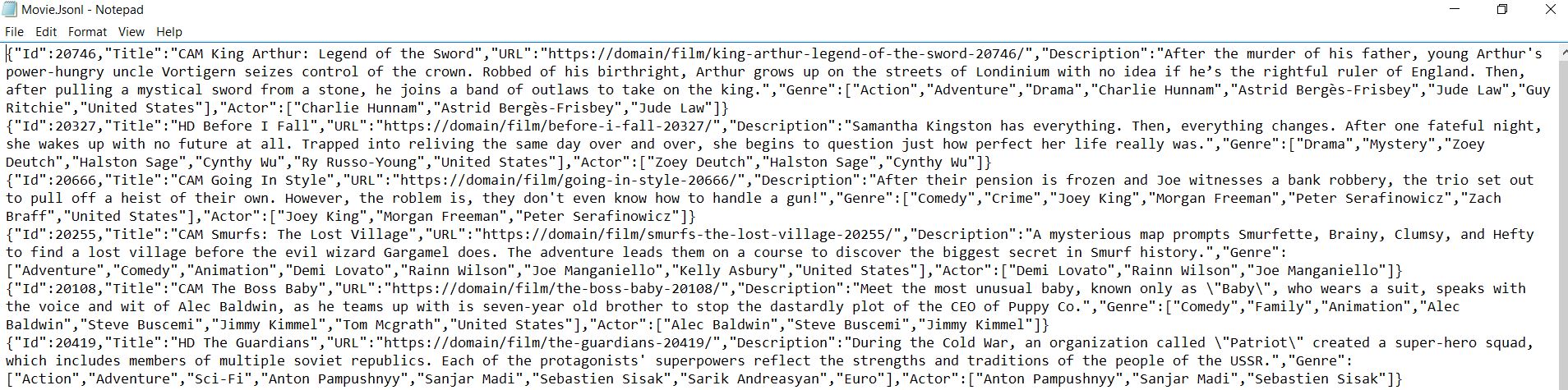
For more information on available methods and properties, consult the API Reference. IronWebScraper provides a reliable framework for extracting structured data from websites, making it an essential tool for data collection and analysis projects.
Frequently Asked Questions
What is IronWebScraper used for in C#?
IronWebScraper is used to extract movie data from websites by parsing HTML elements and creating structured datasets, greatly simplifying the conversion of unstructured web content into organized data.
How do I install IronWebScraper in a C# project?
You can install IronWebScraper in a C# project via the NuGet Package Manager, which allows you to easily integrate it into your project for web scraping tasks.
Which CSS selectors are commonly used for scraping movie websites?
CSS selectors are used to navigate and select elements within the movie website's HTML structure. For example, the .movie-item class might be used to select divs that contain movie information, such as titles or URLs.
Can IronWebScraper handle multi-page scraping?
Yes, IronWebScraper can handle multi-page scraping efficiently. It uses a request chaining mechanism to navigate between different pages and scrape detailed data.
What is the benefit of using typed objects in IronWebScraper?
Using typed objects, such as a Movie class, allows for better code organization, enhanced IntelliSense support, and compile-time type checking when scraping data from websites.
How can I organize scraped data from movie websites?
Scraped data can be organized into JSON format using IronWebScraper's Scrape method, which aids in saving structured data in a manageable and analyzable format.
What role does the `MetaData` feature play in IronWebScraper?
The MetaData feature in IronWebScraper helps maintain object state across requests, allowing data to be passed between multiple parsing functions, which is useful in multi-page scraping.
Why choose IronWebScraper for data extraction?
IronWebScraper provides a reliable framework for effective and efficient web scraping with features like multi-page scraping, typed data objects, and detailed API references, making it ideal for complex data collection projects.
How does IronWebScraper improve the management of output files?
IronWebScraper improves management by using a working directory to organize all output files from scraping operations in a single, predefined location, facilitating large-scale scraping projects.
What additional data can IronWebScraper extract from detailed movie pages?
IronWebScraper can extract additional data such as movie descriptions, genres, and actors from detailed movie pages, using CSS selectors and custom scraping functions to gather comprehensive data.

Curtis Chau holds a Bachelor’s degree in Computer Science (Carleton University) and specializes in front-end development with expertise in Node.js, TypeScript, JavaScript, and React. Passionate about crafting intuitive and aesthetically pleasing user interfaces, Curtis enjoys working with modern frameworks and creating well-structured, visually appealing manuals.



