
使用 C## 和 IronWebScraper 抓取在线电影网站

IronWebScraper通过解析HTML元素提取网站上的电影数据,创建用于结构化数据存储的类型化对象,并使用元数据在页面之间导航以构建全面的电影信息数据集。 该 C# Web Scraper 库简化了将非结构化 Web 内容转换为有组织、可分析数据的过程。
快速入门:在C#中爬取电影- 通过NuGet包管理器安装
IronWebScraper。 - 创建一个继承自
WebScraper的类。 - 覆盖
Init()以设置许可证并请求目标URL。 - 覆盖
Parse()以使用CSS选择器提取电影数据。 - 使用
Scrape()方法以JSON格式保存数据。
-
1Install IronWebScraper with NuGet Package Manager
-
2复制并运行这段代码。
using IronWebScraper; using System; public class QuickstartMovieScraper : WebScraper { public override void Init() { // Set your license key License.LicenseKey = "YOUR-LICENSE-KEY"; // Configure scraper settings this.LoggingLevel = LogLevel.All; this.WorkingDirectory = @"C:\MovieData\Output\"; // Start scraping from the homepage this.Request("https://example-movie-site.com", Parse); } public override void Parse(Response response) { // Extract movie titles using CSS selectors foreach (var movieDiv in response.Css(".movie-item")) { var title = movieDiv.Css("h2")[0].TextContentClean; var url = movieDiv.Css("a")[0].Attributes["href"]; // Save the scraped data Scrape(new { Title = title, Url = url }, "movies.json"); } } } // Run the scraper var scraper = new QuickstartMovieScraper(); scraper.Start();Imports IronWebScraper Imports System Public Class QuickstartMovieScraper Inherits WebScraper Public Overrides Sub Init() ' Set your license key License.LicenseKey = "YOUR-LICENSE-KEY" ' Configure scraper settings Me.LoggingLevel = LogLevel.All Me.WorkingDirectory = "C:\MovieData\Output\" ' Start scraping from the homepage Me.Request("https://example-movie-site.com", AddressOf Parse) End Sub Public Overrides Sub Parse(response As Response) ' Extract movie titles using CSS selectors For Each movieDiv In response.Css(".movie-item") Dim title = movieDiv.Css("h2")(0).TextContentClean Dim url = movieDiv.Css("a")(0).Attributes("href") ' Save the scraped data Scrape(New With {Key .Title = title, Key .Url = url}, "movies.json") Next End Sub End Class ' Run the scraper Dim scraper As New QuickstartMovieScraper() scraper.Start()Imports IronWebScraper Imports System Public Class QuickstartMovieScraper Inherits WebScraper Public Overrides Sub Init() ' Set your license key License.LicenseKey = "YOUR-LICENSE-KEY" ' Configure scraper settings Me.LoggingLevel = LogLevel.All Me.WorkingDirectory = "C:\MovieData\Output\" ' Start scraping from the homepage Me.Request("https://example-movie-site.com", AddressOf Parse) End Sub Public Overrides Sub Parse(response As Response) ' Extract movie titles using CSS selectors For Each movieDiv In response.Css(".movie-item") Dim title = movieDiv.Css("h2")(0).TextContentClean Dim url = movieDiv.Css("a")(0).Attributes("href") ' Save the scraped data Scrape(New With {Key .Title = title, Key .Url = url}, "movies.json") Next End Sub End Class ' Run the scraper Dim scraper As New QuickstartMovieScraper() scraper.Start() -
3部署到您的生产环境中进行测试
通过免费试用立即在您的项目中开始使用IronWebScraper
如何设置 Movie Scraper 类?
从真实世界的网站示例开始。 我们将使用 Webscraping in C# 教程中概述的技术来抓取一个电影网站。
添加一个新的类并命名为MovieScraper:
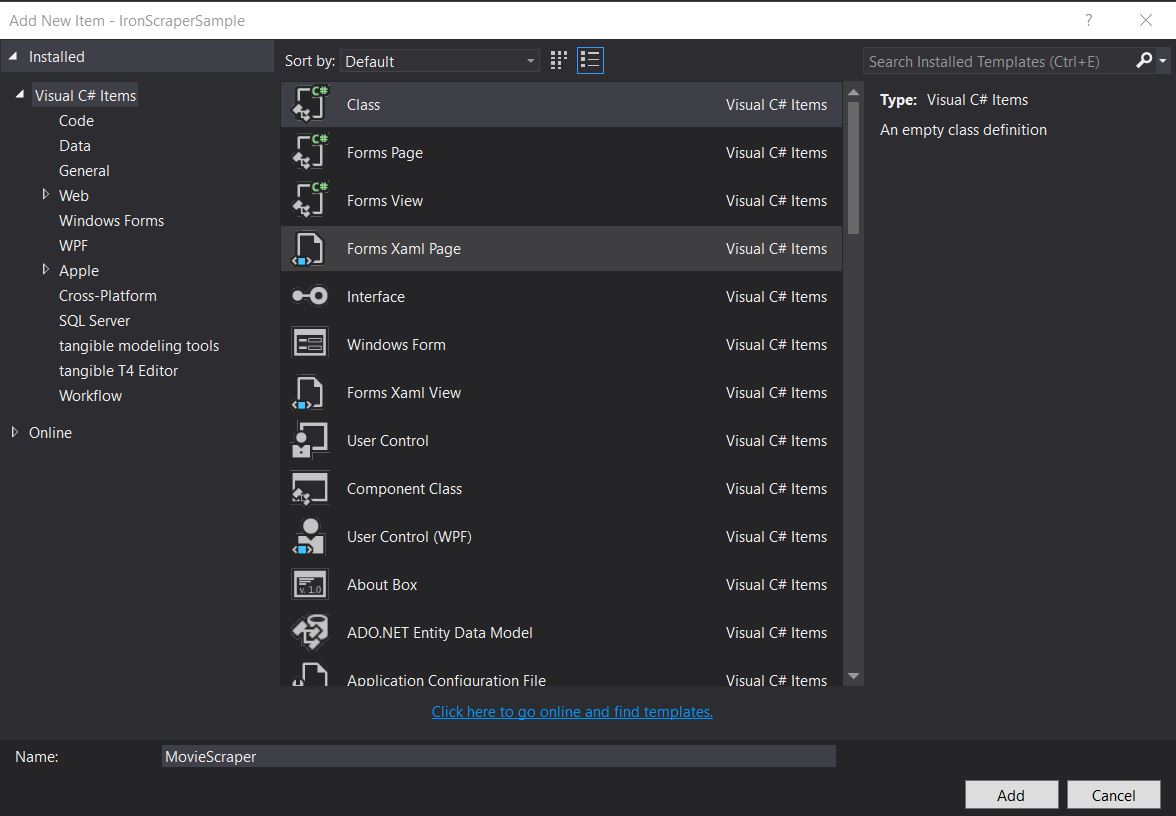
创建专用的 scraper 类有助于组织代码并使其可重复使用。 这种方法遵循面向对象的原则,使您以后可以轻松扩展功能。
目标网站结构是什么样的?
检查网站结构,以便进行刮擦。 了解网站结构对于有效的网络扫描至关重要。 与我们的从在线电影网站抓取指南类似,首先要分析 HTML 结构:
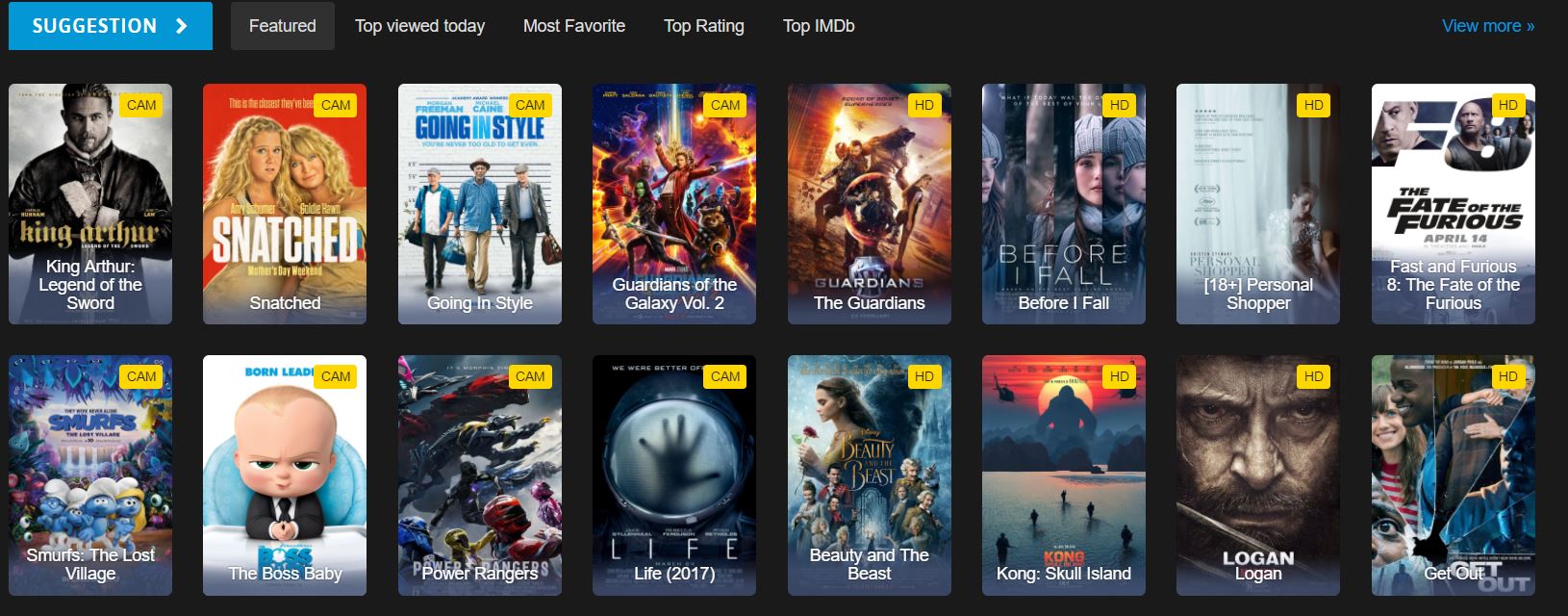
哪些 HTML 元素包含电影数据?
这是我们在网站上看到的主页 HTML 的一部分。检查 HTML 结构有助于确定要使用的正确 CSS 选择器:
<div id="movie-featured" class="movies-list movies-list-full tab-pane in fade active">
    <div data-movie-id="20746" class="ml-item">
        <a href="https://website.com/film/king-arthur-legend-of-the-sword-20746/">
            <span class="mli-quality">CAM</span>
            <img data-original="https://img.gocdn.online/2017/05/16/poster/2116d6719c710eabe83b377463230fbe-king-arthur-legend-of-the-sword.jpg"
                 class="lazy thumb mli-thumb" alt="King Arthur: Legend of the Sword"
                 src="https://img.gocdn.online/2017/05/16/poster/2116d6719c710eabe83b377463230fbe-king-arthur-legend-of-the-sword.jpg"
                 style="display: inline-block;">
            <span class="mli-info"><h2>King Arthur: Legend of the Sword</h2></span>
        </a>
    </div>
    <div data-movie-id="20724" class="ml-item">
        <a href="https://website.com/film/snatched-20724/">
            <span class="mli-quality">CAM</span>
            <img data-original="https://img.gocdn.online/2017/05/16/poster/5ef66403dc331009bdb5aa37cfe819ba-snatched.jpg"
                 class="lazy thumb mli-thumb" alt="Snatched"
                 src="https://img.gocdn.online/2017/05/16/poster/5ef66403dc331009bdb5aa37cfe819ba-snatched.jpg"
                 style="display: inline-block;">
            <span class="mli-info"><h2>Snatched</h2></span>
        </a>
    </div>
</div>我们有一个电影 ID、标题和详细页面的链接。 每部电影都包含在一个具有data-movie-id属性。
如何实现基本的电影抓取?
开始搜索该数据集。 在运行任何刮擦工具之前,请确保您已正确配置许可证密钥,如下所示:
public class MovieScraper : WebScraper
{
    public override void Init()
    {
        // Initialize scraper settings
        License.LicenseKey = "LicenseKey";
        this.LoggingLevel = WebScraper.LogLevel.All;
        this.WorkingDirectory = AppSetting.GetAppRoot() + @"\MovieSample\Output\";

        // Request homepage content for scraping
        this.Request("www.website.com", Parse);
    }

    public override void Parse(Response response)
    {
        // Iterate over each movie div within the featured movie section
        foreach (var div in response.Css("#movie-featured > div"))
        {
            if (div.Attributes["class"] != "clearfix")
            {
                var movieId = Convert.ToInt32(div.GetAttribute("data-movie-id"));
                var link = div.Css("a")[0];
                var movieTitle = link.TextContentClean;

                // Scrape and store movie data as key-value pairs
                Scrape(new ScrapedData()
                {
                    { "MovieId", movieId },
                    { "MovieTitle", movieTitle }
                }, "Movie.Jsonl");
            }
        }
    }
}
public class MovieScraper : WebScraper
{
public override void Init()
{
// Initialize scraper settings
License.LicenseKey = "LicenseKey";
this.LoggingLevel = WebScraper.LogLevel.All;
this.WorkingDirectory = AppSetting.GetAppRoot() + @"\MovieSample\Output\";
// Request homepage content for scraping
this.Request("www.website.com", Parse);
}
public override void Parse(Response response)
{
// Iterate over each movie div within the featured movie section
foreach (var div in response.Css("#movie-featured > div"))
{
if (div.Attributes["class"] != "clearfix")
{
var movieId = Convert.ToInt32(div.GetAttribute("data-movie-id"));
var link = div.Css("a")[0];
var movieTitle = link.TextContentClean;
// Scrape and store movie data as key-value pairs
Scrape(new ScrapedData()
{
{ "MovieId", movieId },
{ "MovieTitle", movieTitle }
}, "Movie.Jsonl");
}
}
}
}Public Class MovieScraper
Inherits WebScraper
Public Overrides Sub Init()
' Initialize scraper settings
License.LicenseKey = "LicenseKey"
Me.LoggingLevel = WebScraper.LogLevel.All
Me.WorkingDirectory = AppSetting.GetAppRoot() & "\MovieSample\Output\"
' Request homepage content for scraping
Me.Request("www.website.com", AddressOf Parse)
End Sub
Public Overrides Sub Parse(ByVal response As Response)
' Iterate over each movie div within the featured movie section
For Each div In response.Css("#movie-featured > div")
If div.Attributes("class") <> "clearfix" Then
Dim movieId = Convert.ToInt32(div.GetAttribute("data-movie-id"))
Dim link = div.Css("a")(0)
Dim movieTitle = link.TextContentClean
' Scrape and store movie data as key-value pairs
Scrape(New ScrapedData() From {
{"MovieId", movieId},
{"MovieTitle", movieTitle}
}, "Movie.Jsonl")
End If
Next
End Sub
End ClassPublic Class MovieScraper
Inherits WebScraper
Public Overrides Sub Init()
' Initialize scraper settings
License.LicenseKey = "LicenseKey"
Me.LoggingLevel = WebScraper.LogLevel.All
Me.WorkingDirectory = AppSetting.GetAppRoot() & "\MovieSample\Output\"
' Request homepage content for scraping
Me.Request("www.website.com", AddressOf Parse)
End Sub
Public Overrides Sub Parse(ByVal response As Response)
' Iterate over each movie div within the featured movie section
For Each div In response.Css("#movie-featured > div")
If div.Attributes("class") <> "clearfix" Then
Dim movieId = Convert.ToInt32(div.GetAttribute("data-movie-id"))
Dim link = div.Css("a")(0)
Dim movieTitle = link.TextContentClean
' Scrape and store movie data as key-value pairs
Scrape(New ScrapedData() From {
{"MovieId", movieId},
{"MovieTitle", movieTitle}
}, "Movie.Jsonl")
End If
Next
End Sub
End Class工作目录属性有什么用?
本代码有哪些新内容?Working Directory属性设置所有抓取数据和相关文件的主工作目录。 这样可以确保所有输出文件都组织在一个位置,从而更便于管理大规模的刮擦项目。 如果目录不存在,将自动创建。
何时应使用 CSS 选择器与属性?
其他注意事项:
CSS 选择器是通过结构位置或类名来定位元素的理想选择,而直接属性访问则更适合提取 ID 或自定义数据属性等特定值。 在我们的示例中,我们使用CSS选择器(data-movie-id)以提取特定值。
如何为抓取的数据创建类型对象?
构建类型化对象,以格式化对象保存刮擦数据。 使用强类型对象可以提供更好的代码组织、IntelliSense 支持和编译时类型检查。
实现一个Movie类来持有格式化数据:
public class Movie
{
    public int Id { get; set; }
    public string Title { get; set; }
    public string URL { get; set; }
}
public class Movie
{
public int Id { get; set; }
public string Title { get; set; }
public string URL { get; set; }
}Public Class Movie
Public Property Id As Integer
Public Property Title As String
Public Property URL As String
End ClassPublic Class Movie
Public Property Id As Integer
Public Property Title As String
Public Property URL As String
End Class使用类型对象如何改进数据组织?
更新代码以使用类型化的ScrapedData字典:
public class MovieScraper : WebScraper
{
    public override void Init()
    {
        // Initialize scraper settings
        License.LicenseKey = "LicenseKey";
        this.LoggingLevel = WebScraper.LogLevel.All;
        this.WorkingDirectory = AppSetting.GetAppRoot() + @"\MovieSample\Output\";

        // Request homepage content for scraping
        this.Request("https://website.com/", Parse);
    }

    public override void Parse(Response response)
    {
        // Iterate over each movie div within the featured movie section
        foreach (var div in response.Css("#movie-featured > div"))
        {
            if (div.Attributes["class"] != "clearfix")
            {
                var movie = new Movie
                {
                    Id = Convert.ToInt32(div.GetAttribute("data-movie-id"))
                };

                var link = div.Css("a")[0];
                movie.Title = link.TextContentClean;
                movie.URL = link.Attributes["href"];

                // Scrape and store movie object
                Scrape(movie, "Movie.Jsonl");
            }
        }
    }
}
public class MovieScraper : WebScraper
{
public override void Init()
{
// Initialize scraper settings
License.LicenseKey = "LicenseKey";
this.LoggingLevel = WebScraper.LogLevel.All;
this.WorkingDirectory = AppSetting.GetAppRoot() + @"\MovieSample\Output\";
// Request homepage content for scraping
this.Request("https://website.com/", Parse);
}
public override void Parse(Response response)
{
// Iterate over each movie div within the featured movie section
foreach (var div in response.Css("#movie-featured > div"))
{
if (div.Attributes["class"] != "clearfix")
{
var movie = new Movie
{
Id = Convert.ToInt32(div.GetAttribute("data-movie-id"))
};
var link = div.Css("a")[0];
movie.Title = link.TextContentClean;
movie.URL = link.Attributes["href"];
// Scrape and store movie object
Scrape(movie, "Movie.Jsonl");
}
}
}
}Public Class MovieScraper
Inherits WebScraper
Public Overrides Sub Init()
' Initialize scraper settings
License.LicenseKey = "LicenseKey"
Me.LoggingLevel = WebScraper.LogLevel.All
Me.WorkingDirectory = AppSetting.GetAppRoot() & "\MovieSample\Output\"
' Request homepage content for scraping
Me.Request("https://website.com/", AddressOf Parse)
End Sub
Public Overrides Sub Parse(response As Response)
' Iterate over each movie div within the featured movie section
For Each div In response.Css("#movie-featured > div")
If div.Attributes("class") <> "clearfix" Then
Dim movie As New Movie With {
.Id = Convert.ToInt32(div.GetAttribute("data-movie-id"))
}
Dim link = div.Css("a")(0)
movie.Title = link.TextContentClean
movie.URL = link.Attributes("href")
' Scrape and store movie object
Scrape(movie, "Movie.Jsonl")
End If
Next
End Sub
End ClassPublic Class MovieScraper
Inherits WebScraper
Public Overrides Sub Init()
' Initialize scraper settings
License.LicenseKey = "LicenseKey"
Me.LoggingLevel = WebScraper.LogLevel.All
Me.WorkingDirectory = AppSetting.GetAppRoot() & "\MovieSample\Output\"
' Request homepage content for scraping
Me.Request("https://website.com/", AddressOf Parse)
End Sub
Public Overrides Sub Parse(response As Response)
' Iterate over each movie div within the featured movie section
For Each div In response.Css("#movie-featured > div")
If div.Attributes("class") <> "clearfix" Then
Dim movie As New Movie With {
.Id = Convert.ToInt32(div.GetAttribute("data-movie-id"))
}
Dim link = div.Css("a")(0)
movie.Title = link.TextContentClean
movie.URL = link.Attributes("href")
' Scrape and store movie object
Scrape(movie, "Movie.Jsonl")
End If
Next
End Sub
End ClassScrape 方法对类型对象使用什么格式?
有什么新东西?
- 我们实现了一个
Movie类来持有抓取的数据,提供类型安全和更好的代码组织。 - 我们将电影对象传递给
Scrape方法,该方法理解我们的格式并按如下方式以定义的方式保存它:
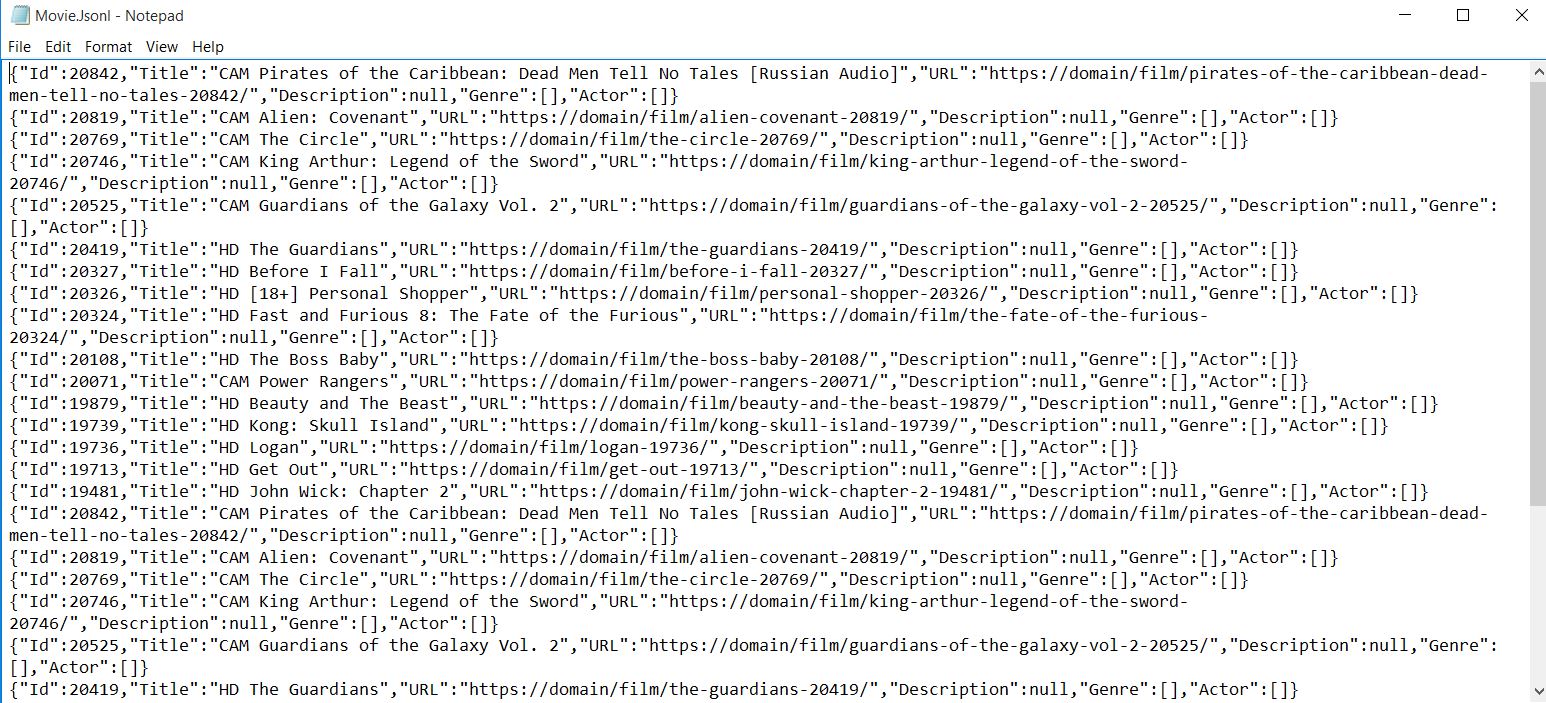
输出会自动序列化为 JSON 格式,便于导入数据库或其他应用程序。
如何抓取详细的电影页面?
开始抓取更详细的页面。 多页面抓取是一种常见需求,IronWebScraper 通过其请求链机制使其变得简单明了。
我可以从详细页面中提取哪些其他数据?
电影页面看起来是这样的,包含每部电影的丰富元数据:

<div class="mvi-content">
    <div class="thumb mvic-thumb"
         style="background-image: url(https://img.gocdn.online/2017/04/28/poster/5a08e94ba02118f22dc30f298c603210-guardians-of-the-galaxy-vol-2.jpg);"></div>
    <div class="mvic-desc">
        <h3>Guardians of the Galaxy Vol. 2</h3>
        <div class="desc">
            Set to the backdrop of Awesome Mixtape #2, Marvel's Guardians of the Galaxy Vol. 2 continues the team's adventures as they travel throughout the cosmos to help Peter Quill learn more about his true parentage.
        </div>
        <div class="mvic-info">
            <div class="mvici-left">
                <p>
                    <strong>Genre: </strong>
                    <a href="https://Domain/genre/action/" title="Action">Action</a>,
                    <a href="https://Domain/genre/adventure/" title="Adventure">Adventure</a>,
                    <a href="https://Domain/genre/sci-fi/" title="Sci-Fi">Sci-Fi</a>
                </p>
                <p>
                    <strong>Actor: </strong>
                    <a target="_blank" href="https://Domain/actor/chris-pratt" title="Chris Pratt">Chris Pratt</a>,
                    <a target="_blank" href="https://Domain/actor/-zoe-saldana" title="Zoe Saldana">Zoe Saldana</a>,
                    <a target="_blank" href="https://Domain/actor/-dave-bautista-" title="Dave Bautista">Dave Bautista</a>
                </p>
                <p>
                    <strong>Director: </strong>
                    <a href="#" title="James Gunn">James Gunn</a>
                </p>
                <p>
                    <strong>Country: </strong>
                    <a href="https://Domain/country/us" title="United States">United States</a>
                </p>
            </div>
            <div class="mvici-right">
                <p><strong>Duration:</strong> 136 min</p>
                <p><strong>Quality:</strong> <span class="quality">CAM</span></p>
                <p><strong>Release:</strong> 2017</p>
                <p><strong>IMDb:</strong> 8.3</p>
            </div>
            <div class="clearfix"></div>
        </div>
        <div class="clearfix"></div>
    </div>
    <div class="clearfix"></div>
</div>我应该如何扩展我的 Movie 类以获得更多属性?
扩展Description, Genre, Actor, Director, Country, Duration, Description, Actor。 使用List<string>进行类型和演员的管理,可以优雅地处理多个值:
using System.Collections.Generic;

public class Movie
{
    public int Id { get; set; }
    public string Title { get; set; }
    public string URL { get; set; }
    public string Description { get; set; }
    public List<string> Genre { get; set; }
    public List<string> Actor { get; set; }
}
using System.Collections.Generic;
public class Movie
{
public int Id { get; set; }
public string Title { get; set; }
public string URL { get; set; }
public string Description { get; set; }
public List<string> Genre { get; set; }
public List<string> Actor { get; set; }
}Imports System.Collections.Generic
Public Class Movie
Public Property Id() As Integer
Public Property Title() As String
Public Property URL() As String
Public Property Description() As String
Public Property Genre() As List(Of String)
Public Property Actor() As List(Of String)
End ClassImports System.Collections.Generic
Public Class Movie
Public Property Id() As Integer
Public Property Title() As String
Public Property URL() As String
Public Property Description() As String
Public Property Genre() As List(Of String)
Public Property Actor() As List(Of String)
End Class如何在抓取网页时在页面之间导航?
请导航至详细页面进行抓取。 IronWebScraper自动处理线程安全,允许多个页面并发处理。
为什么对不同页面类型使用多个解析函数?
IronWebScraper 可添加多种抓取功能,以处理不同的页面格式。 这种关注点的分离使您的代码更易于维护,并允许适当处理不同的页面结构。 每个解析函数可以侧重于从特定页面类型中提取数据。
元数据如何帮助在解析函数之间传递对象?
MetaData功能对于保持请求间的状态至关重要。 有关更多高级网络抓取功能,请查看我们的详细指南:
public class MovieScraper : WebScraper
{
    public override void Init()
    {
        // Initialize scraper settings
        License.LicenseKey = "LicenseKey";
        this.LoggingLevel = WebScraper.LogLevel.All;
        this.WorkingDirectory = AppSetting.GetAppRoot() + @"\MovieSample\Output\";

        // Request homepage content for scraping
        this.Request("https://domain/", Parse);
    }

    public override void Parse(Response response)
    {
        // Iterate over each movie div within the featured movie section
        foreach (var div in response.Css("#movie-featured > div"))
        {
            if (div.Attributes["class"] != "clearfix")
            {
                var movie = new Movie
                {
                    Id = Convert.ToInt32(div.GetAttribute("data-movie-id"))
                };

                var link = div.Css("a")[0];
                movie.Title = link.TextContentClean;
                movie.URL = link.Attributes["href"];

                // Request detailed page
                this.Request(movie.URL, ParseDetails, new MetaData() { { "movie", movie } });
            }
        }
    }

    public void ParseDetails(Response response)
    {
        // Retrieve movie object from metadata
        var movie = response.MetaData.Get<Movie>("movie");
        var div = response.Css("div.mvic-desc")[0];

        // Extract description
        movie.Description = div.Css("div.desc")[0].TextContentClean;

        // Extract genres
        movie.Genre = new List<string>(); // Initialize genre list
        foreach(var genre in div.Css("div > p > a"))
        {
            movie.Genre.Add(genre.TextContentClean);
        }

        // Extract actors
        movie.Actor = new List<string>(); // Initialize actor list
        foreach (var actor in div.Css("div > p:nth-child(2) > a"))
        {
            movie.Actor.Add(actor.TextContentClean);
        }

        // Scrape and store detailed movie data
        Scrape(movie, "Movie.Jsonl");
    }
}
public class MovieScraper : WebScraper
{
public override void Init()
{
// Initialize scraper settings
License.LicenseKey = "LicenseKey";
this.LoggingLevel = WebScraper.LogLevel.All;
this.WorkingDirectory = AppSetting.GetAppRoot() + @"\MovieSample\Output\";
// Request homepage content for scraping
this.Request("https://domain/", Parse);
}
public override void Parse(Response response)
{
// Iterate over each movie div within the featured movie section
foreach (var div in response.Css("#movie-featured > div"))
{
if (div.Attributes["class"] != "clearfix")
{
var movie = new Movie
{
Id = Convert.ToInt32(div.GetAttribute("data-movie-id"))
};
var link = div.Css("a")[0];
movie.Title = link.TextContentClean;
movie.URL = link.Attributes["href"];
// Request detailed page
this.Request(movie.URL, ParseDetails, new MetaData() { { "movie", movie } });
}
}
}
public void ParseDetails(Response response)
{
// Retrieve movie object from metadata
var movie = response.MetaData.Get<Movie>("movie");
var div = response.Css("div.mvic-desc")[0];
// Extract description
movie.Description = div.Css("div.desc")[0].TextContentClean;
// Extract genres
movie.Genre = new List<string>(); // Initialize genre list
foreach(var genre in div.Css("div > p > a"))
{
movie.Genre.Add(genre.TextContentClean);
}
// Extract actors
movie.Actor = new List<string>(); // Initialize actor list
foreach (var actor in div.Css("div > p:nth-child(2) > a"))
{
movie.Actor.Add(actor.TextContentClean);
}
// Scrape and store detailed movie data
Scrape(movie, "Movie.Jsonl");
}
}Public Class MovieScraper
Inherits WebScraper
Public Overrides Sub Init()
' Initialize scraper settings
License.LicenseKey = "LicenseKey"
Me.LoggingLevel = WebScraper.LogLevel.All
Me.WorkingDirectory = AppSetting.GetAppRoot() & "\MovieSample\Output\"
' Request homepage content for scraping
Me.Request("https://domain/", AddressOf Parse)
End Sub
Public Overrides Sub Parse(response As Response)
' Iterate over each movie div within the featured movie section
For Each div In response.Css("#movie-featured > div")
If div.Attributes("class") <> "clearfix" Then
Dim movie As New Movie With {
.Id = Convert.ToInt32(div.GetAttribute("data-movie-id"))
}
Dim link = div.Css("a")(0)
movie.Title = link.TextContentClean
movie.URL = link.Attributes("href")
' Request detailed page
Me.Request(movie.URL, AddressOf ParseDetails, New MetaData() From {{"movie", movie}})
End If
Next
End Sub
Public Sub ParseDetails(response As Response)
' Retrieve movie object from metadata
Dim movie = response.MetaData.Get(Of Movie)("movie")
Dim div = response.Css("div.mvic-desc")(0)
' Extract description
movie.Description = div.Css("div.desc")(0).TextContentClean
' Extract genres
movie.Genre = New List(Of String)() ' Initialize genre list
For Each genre In div.Css("div > p > a")
movie.Genre.Add(genre.TextContentClean)
Next
' Extract actors
movie.Actor = New List(Of String)() ' Initialize actor list
For Each actor In div.Css("div > p:nth-child(2) > a")
movie.Actor.Add(actor.TextContentClean)
Next
' Scrape and store detailed movie data
Scrape(movie, "Movie.Jsonl")
End Sub
End ClassPublic Class MovieScraper
Inherits WebScraper
Public Overrides Sub Init()
' Initialize scraper settings
License.LicenseKey = "LicenseKey"
Me.LoggingLevel = WebScraper.LogLevel.All
Me.WorkingDirectory = AppSetting.GetAppRoot() & "\MovieSample\Output\"
' Request homepage content for scraping
Me.Request("https://domain/", AddressOf Parse)
End Sub
Public Overrides Sub Parse(response As Response)
' Iterate over each movie div within the featured movie section
For Each div In response.Css("#movie-featured > div")
If div.Attributes("class") <> "clearfix" Then
Dim movie As New Movie With {
.Id = Convert.ToInt32(div.GetAttribute("data-movie-id"))
}
Dim link = div.Css("a")(0)
movie.Title = link.TextContentClean
movie.URL = link.Attributes("href")
' Request detailed page
Me.Request(movie.URL, AddressOf ParseDetails, New MetaData() From {{"movie", movie}})
End If
Next
End Sub
Public Sub ParseDetails(response As Response)
' Retrieve movie object from metadata
Dim movie = response.MetaData.Get(Of Movie)("movie")
Dim div = response.Css("div.mvic-desc")(0)
' Extract description
movie.Description = div.Css("div.desc")(0).TextContentClean
' Extract genres
movie.Genre = New List(Of String)() ' Initialize genre list
For Each genre In div.Css("div > p > a")
movie.Genre.Add(genre.TextContentClean)
Next
' Extract actors
movie.Actor = New List(Of String)() ' Initialize actor list
For Each actor In div.Css("div > p:nth-child(2) > a")
movie.Actor.Add(actor.TextContentClean)
Next
' Scrape and store detailed movie data
Scrape(movie, "Movie.Jsonl")
End Sub
End Class这种多页面抓取方法的主要功能是什么?
有什么新东西?
- 添加抓取函数(例如,
ParseDetails)以抓取详细页面,类似于从购物网站抓取时使用的技术。 - 将生成文件的
Scrape函数移到新函数中,确保在所有详细信息收集完后再保存数据。 - 使用IronWebScraper功能(
MetaData)将电影对象传递给新的抓取函数,保持对象状态跨请求。 4.抓取页面并将电影对象数据保存到包含完整信息的文件中。
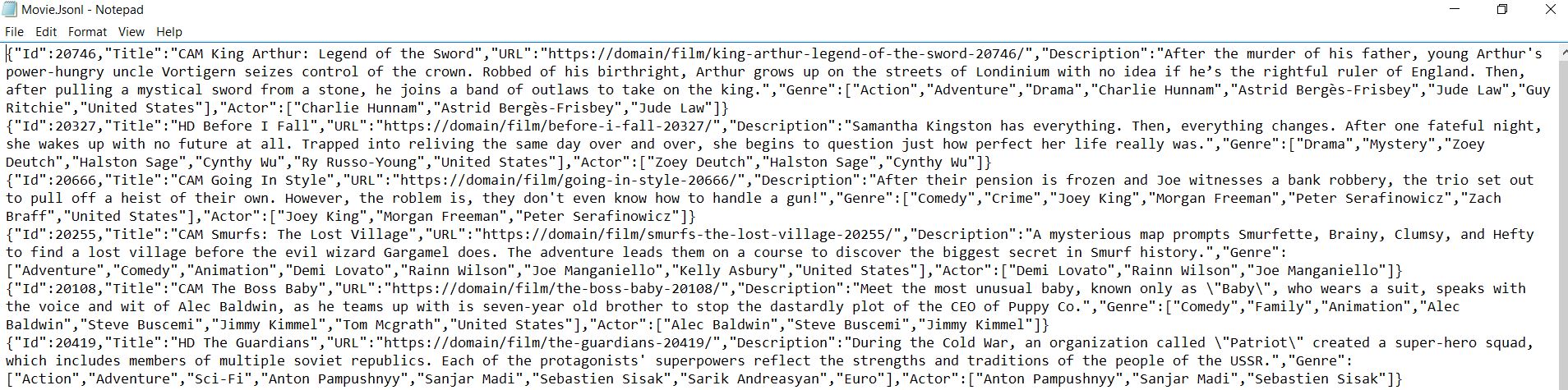
有关可用方法和属性的详细信息,请查阅 API 参考。 IronWebScraper 为从网站中提取结构化数据提供了一个强大的框架,使其成为数据收集和分析项目的必备工具。
常见问题解答
如何使用 C# 从 HTML 中提取电影标题?
IronWebScraper 提供了从 HTML 中提取电影标题的 CSS 选择器方法。使用 response.Css() 方法和适当的选择器(如".movie-item h2")来锁定标题元素,然后访问 TextContentClean 属性来获取干净的文本值。
在多个电影页面之间导航的最佳方式是什么?
IronWebScraper 通过 Request() 方法处理页面导航。您可以使用 CSS 选择器提取分页链接,然后使用每个 URL 调用 Request() 从多个页面中抓取数据,自动构建全面的电影数据集。
如何以结构化格式保存刮擦的电影数据?
using IronWebScraper 的 Scrape() 方法以 JSON 格式保存数据。创建包含标题、URL 和评分等电影属性的匿名对象或类型类,然后将它们连同文件名一起传递给 Scrape(),以自动序列化和保存数据。
我应该使用哪些 CSS 选择器来提取电影信息?
IronWebScraper 支持标准 CSS 选择器。对于电影网站,可使用".movie-item "等选择器来表示容器,"h2 "表示标题,"a[href]"表示链接,以及特定的类名表示评级或流派。Css() 方法会返回可以遍历的集合。
如何处理刮擦数据中的 "CAM "等电影质量指标?
通过 IronWebScraper,您可以针对其特定的 HTML 元素提取和处理质量指标。使用 CSS 选择器定位质量徽章或文本,然后将它们作为属性包含在您的刮擦数据对象中,以获得全面的电影信息。
我能否为我的电影搜索操作设置日志记录?
是的,IronWebScraper 包含内置日志功能。在 Init() 方法中将 LoggingLevel 属性设置为 LogLevel.All,以跟踪所有刮擦活动、错误和进度,这有助于调试和监控电影数据提取。
配置刮擦数据工作目录的正确方法是什么?
IronWebScraper 可让你在 Init() 方法中设置一个 WorkingDirectory 属性。指定一个类似于 "C:\MovieData\Output\"的路径,用于保存刮擦的电影数据文件。这样可以集中管理输出,让你的数据井井有条。
如何正确继承 WebScraper 类?
创建一个继承自 IronWebScraper 的 WebScraper 基类的新类。覆盖用于配置的 Init() 方法和用于数据提取逻辑的 Parse() 方法。这种面向对象的方法使你的电影刮刀可重复使用并易于维护。
How does IronWebScraper improve the management of output files?
IronWebScraper improves management by using a working directory to organize all output files from scraping operations in a single, predefined location, facilitating large-scale scraping projects.
What additional data can IronWebScraper extract from detailed movie pages?
IronWebScraper can extract additional data such as movie descriptions, genres, and actors from detailed movie pages, using CSS selectors and custom scraping functions to gather comprehensive data.

Curtis Chau 拥有卡尔顿大学的计算机科学学士学位,专注于前端开发,精通 Node.js、TypeScript、JavaScript 和 React。他热衷于打造直观且美观的用户界面,喜欢使用现代框架并创建结构良好、视觉吸引力强的手册。



