
How to Scrape Data from Websites in C#

IronWebScraper is a .NET Library for web scraping, web data extraction, and web content parsing. It is an easy-to-use library that can be added to Microsoft Visual Studio projects for use in development and production.
IronWebScraper has lots of unique features and capabilities such as controlling allowed and prohibited pages, objects, media, etc. It also allows for the management of multiple identities, web cache, and lots of other features that we will cover in this tutorial.
Get started with IronWebScraper
Start using IronWebScraper in your project today with a free trial.

Target Audience
This tutorial targets software developers with basic or advanced programming skills, who wish to build and implement solutions for advanced scraping capabilities (websites scraping, website data gathering and extraction, websites contents parsing, web harvesting).

Skills required
- Basic fundamentals of programming with skills using one of Microsoft Programming languages such as C# or VB.NET
- Basic understanding of Web Technologies (HTML, JavaScript, JQuery, CSS, etc.) and how they work
- Basic knowledge of DOM, XPath, HTML, and CSS Selectors
Tools
- Microsoft Visual Studio 2010 or above
- Web developer extensions for browsers such as web inspector for Chrome or Firebug for Firefox
Why Scrape? (Reasons and Concepts)
If you want to build a product or solution that has the capabilities to:
- Extract website data
- Compare contents, prices, features, etc. from multiple websites
- Scanning and caching website content
If you have one or more reasons from the above, then IronWebScraper is a great library to fit your needs
How to Install IronWebScraper?
After you Create a New Project (See Appendix A) you can add IronWebScraper library to your project by automatically inserting the library using NuGet or manually installing the DLL.
Install using NuGet
To add IronWebScraper library to our project using NuGet, we can do it using the visual interface (NuGet Package Manager) or by command using the Package Manager Console.
Using NuGet Package Manager
- Using mouse -> right click on project name -> Select manage NuGet Package
- From browse tab -> search for
IronWebScraper-> Install - Click Ok
- And we are Done
Using NuGet Package Console
- From tools -> NuGet Package Manager -> Package Manager Console
- Choose Class Library Project as Default Project
- Run command ->
Install-Package IronWebScraper
Install Manually
-
Go to https://ironsoftware.com
-
Click IronWebScraper or visit its page directly using URL https://ironsoftware.com/csharp/webscraper/
-
Click Download DLL.
-
Extract the downloaded compressed file
-
In Visual Studio right-click on project -> add -> reference -> browse
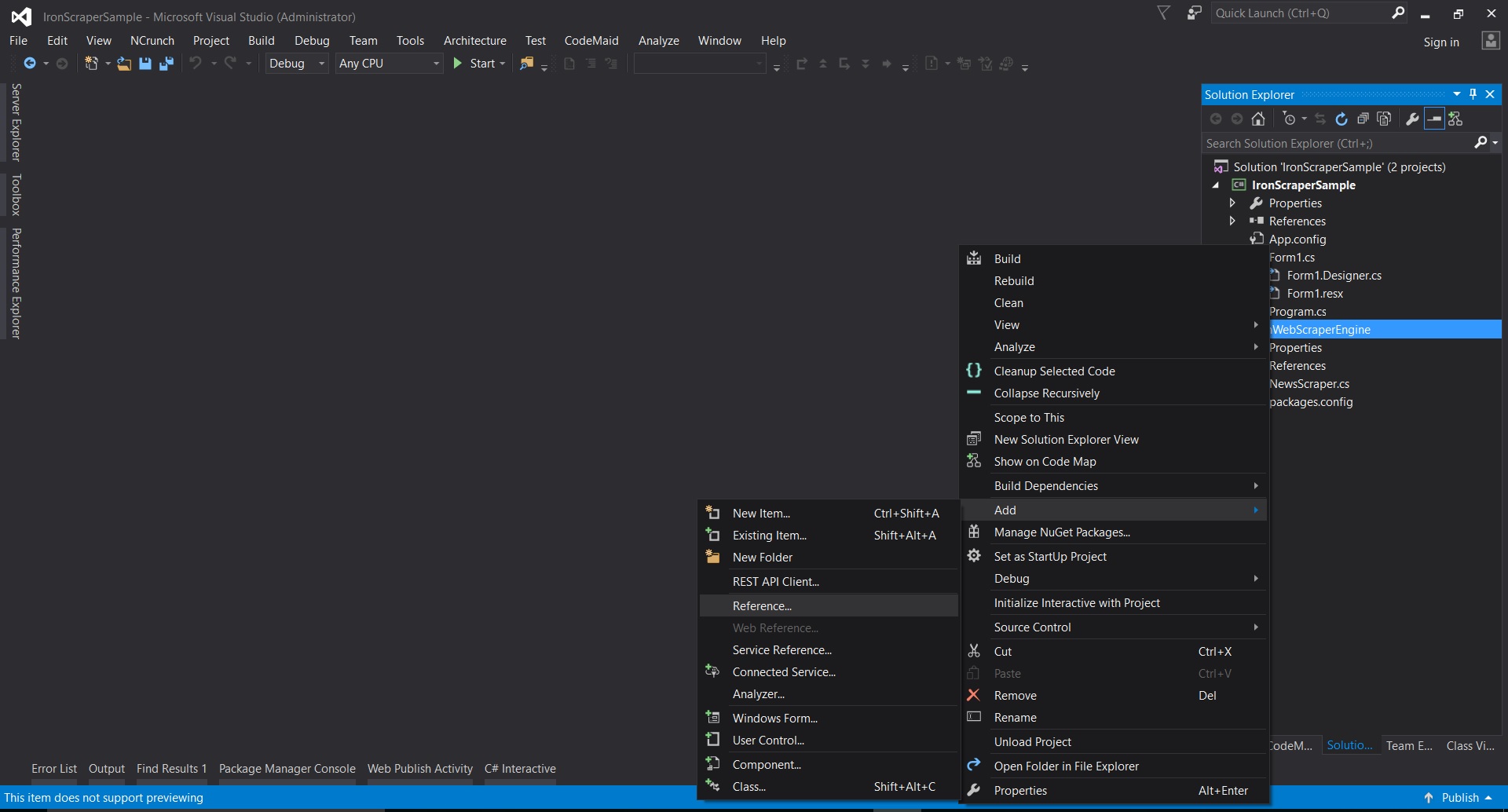
-
Go to the extracted folder ->
netstandard2.0-> and select all.dllfiles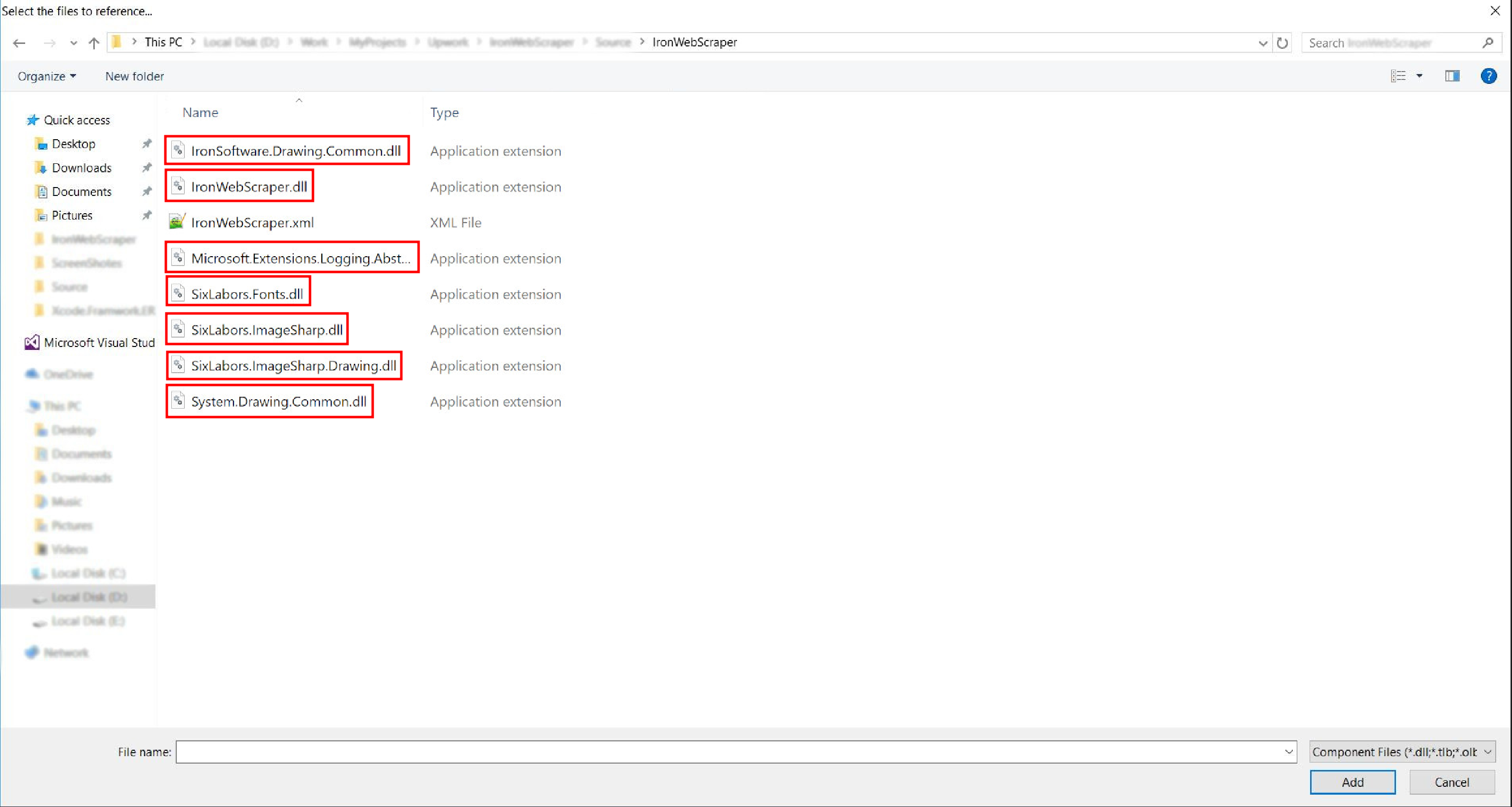
-
And it's done!
HelloScraper - Our First IronWebScraper Sample
As usual, we will start by implementing the Hello Scraper App to make our first step using IronWebScraper.
- We have Created a New Console Application with the name "IronWebScraperSample"
Steps to Create IronWebScraper Sample
-
Create a Folder and name it "HelloScraperSample"
-
Then add a new class and name it
HelloScraper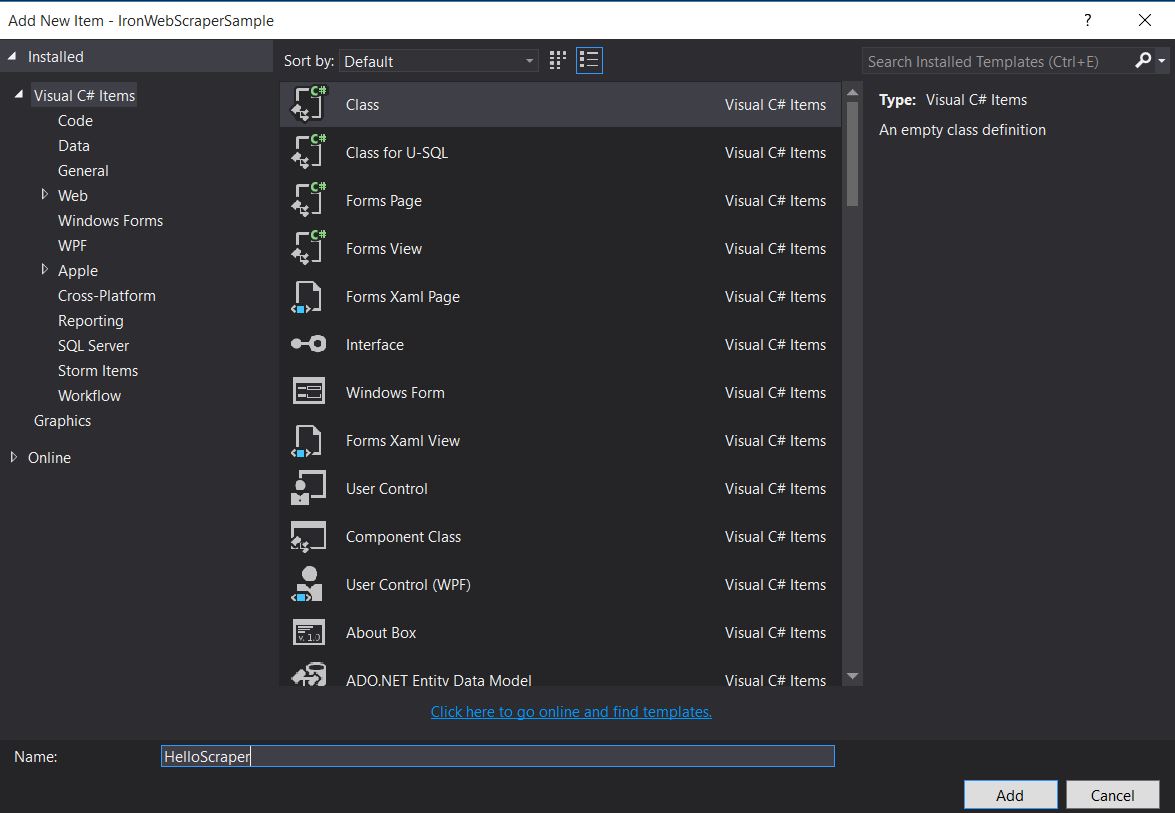
-
Add this Code snippet to
HelloScraperpublic class HelloScraper : WebScraper { /// <summary> /// Override this method to initialize your web scraper. /// Important tasks will be to request at least one start URL and set allowed/banned domain or URL patterns. /// </summary> public override void Init() { License.LicenseKey = "LicenseKey"; // Write License Key this.LoggingLevel = WebScraper.LogLevel.All; // Log all events this.Request("https://blog.scrapinghub.com", Parse); // Initialize a web request to the given URL } /// <summary> /// Override this method to create the default Response handler for your web scraper. /// If you have multiple page types, you can add additional similar methods. /// </summary> /// <param name="response">The HTTP Response object to parse</param> public override void Parse(Response response) { // Set working directory for the project this.WorkingDirectory = AppSetting.GetAppRoot() + @"\HelloScraperSample\Output\"; // Loop on all links foreach (var titleLink in response.Css("h2.entry-title a")) { // Read link text string title = titleLink.TextContentClean; // Save result to file Scrape(new ScrapedData() { { "Title", title } }, "HelloScraper.json"); } // Loop on all links for pagination if (response.CssExists("div.prev-post > a[href]")) { // Get next page URL var nextPage = response.Css("div.prev-post > a[href]")[0].Attributes["href"]; // Scrape next URL this.Request(nextPage, Parse); } } }Public Class HelloScraper Inherits WebScraper ''' <summary> ''' Override this method to initialize your web scraper. ''' Important tasks will be to request at least one start URL and set allowed/banned domain or URL patterns. ''' </summary> Public Overrides Sub Init() License.LicenseKey = "LicenseKey" ' Write License Key Me.LoggingLevel = WebScraper.LogLevel.All ' Log all events Me.Request("https://blog.scrapinghub.com", AddressOf Parse) ' Initialize a web request to the given URL End Sub ''' <summary> ''' Override this method to create the default Response handler for your web scraper. ''' If you have multiple page types, you can add additional similar methods. ''' </summary> ''' <param name="response">The HTTP Response object to parse</param> Public Overrides Sub Parse(ByVal response As Response) ' Set working directory for the project Me.WorkingDirectory = AppSetting.GetAppRoot() & "\HelloScraperSample\Output\" ' Loop on all links For Each titleLink In response.Css("h2.entry-title a") ' Read link text Dim title As String = titleLink.TextContentClean ' Save result to file Scrape(New ScrapedData() From { { "Title", title } }, "HelloScraper.json") Next titleLink ' Loop on all links for pagination If response.CssExists("div.prev-post > a[href]") Then ' Get next page URL Dim nextPage = response.Css("div.prev-post > a[href]")(0).Attributes("href") ' Scrape next URL Me.Request(nextPage, AddressOf Parse) End If End Sub End ClassPublic Class HelloScraper Inherits WebScraper ''' <summary> ''' Override this method to initialize your web scraper. ''' Important tasks will be to request at least one start URL and set allowed/banned domain or URL patterns. ''' </summary> Public Overrides Sub Init() License.LicenseKey = "LicenseKey" ' Write License Key Me.LoggingLevel = WebScraper.LogLevel.All ' Log all events Me.Request("https://blog.scrapinghub.com", AddressOf Parse) ' Initialize a web request to the given URL End Sub ''' <summary> ''' Override this method to create the default Response handler for your web scraper. ''' If you have multiple page types, you can add additional similar methods. ''' </summary> ''' <param name="response">The HTTP Response object to parse</param> Public Overrides Sub Parse(ByVal response As Response) ' Set working directory for the project Me.WorkingDirectory = AppSetting.GetAppRoot() & "\HelloScraperSample\Output\" ' Loop on all links For Each titleLink In response.Css("h2.entry-title a") ' Read link text Dim title As String = titleLink.TextContentClean ' Save result to file Scrape(New ScrapedData() From { { "Title", title } }, "HelloScraper.json") Next titleLink ' Loop on all links for pagination If response.CssExists("div.prev-post > a[href]") Then ' Get next page URL Dim nextPage = response.Css("div.prev-post > a[href]")(0).Attributes("href") ' Scrape next URL Me.Request(nextPage, AddressOf Parse) End If End Sub End Class -
Now to start Scrape, add this code snippet to
Mainstatic void Main(string[] args) { // Create Object From Hello Scrape class HelloScraperSample.HelloScraper scrape = new HelloScraperSample.HelloScraper(); // Start Scraping scrape.Start(); }static void Main(string[] args) { // Create Object From Hello Scrape class HelloScraperSample.HelloScraper scrape = new HelloScraperSample.HelloScraper(); // Start Scraping scrape.Start(); }Shared Sub Main(ByVal args() As String) ' Create Object From Hello Scrape class Dim scrape As New HelloScraperSample.HelloScraper() ' Start Scraping scrape.Start() End SubShared Sub Main(ByVal args() As String) ' Create Object From Hello Scrape class Dim scrape As New HelloScraperSample.HelloScraper() ' Start Scraping scrape.Start() End Sub -
The result will be saved in a file with the format
WebScraper.WorkingDirectory/classname.Json
Code Overview
Scrape.Start() triggers the scraping logic as follows:
- Calls the
Init()method to initiate variables, scrape properties, and behavior attributes. - Sets the starting page request in
Init()withRequest("https://blog.scrapinghub.com", Parse). - Handles multiple HTTP requests and threads in parallel, keeping code synchronous and easier to debug.
- The
Parse()method is triggered afterInit()to handle the response, extracting data using CSS selectors and saving it in JSON format.
IronWebScraper Library Functions and Options
Updated documentation can be found inside the zip file downloaded with the manual installation method (IronWebScraper Documentation.chm File), or you can check the online documentation for the library's latest update at https://ironsoftware.com/csharp/webscraper/object-reference/.
To start using IronWebScraper in your project you must inherit from the IronWebScraper.WebScraper class, which extends your class library and adds scraping functionality to it. Also, you must implement the Init() and Parse(Response response) methods.
namespace IronWebScraperEngine
{
    public class NewsScraper : IronWebScraper.WebScraper
    {
        public override void Init()
        {
            throw new NotImplementedException();
        }

        public override void Parse(Response response)
        {
            throw new NotImplementedException();
        }
    }
}
namespace IronWebScraperEngine
{
public class NewsScraper : IronWebScraper.WebScraper
{
public override void Init()
{
throw new NotImplementedException();
}
public override void Parse(Response response)
{
throw new NotImplementedException();
}
}
}Namespace IronWebScraperEngine
Public Class NewsScraper
Inherits IronWebScraper.WebScraper
Public Overrides Sub Init()
Throw New NotImplementedException()
End Sub
Public Overrides Sub Parse(ByVal response As Response)
Throw New NotImplementedException()
End Sub
End Class
End NamespaceNamespace IronWebScraperEngine
Public Class NewsScraper
Inherits IronWebScraper.WebScraper
Public Overrides Sub Init()
Throw New NotImplementedException()
End Sub
Public Overrides Sub Parse(ByVal response As Response)
Throw New NotImplementedException()
End Sub
End Class
End Namespace| Properties \ functions | Type | Description |
|---|---|---|
Init () | Method | Used to set up the scraper |
Parse (Response response) | Method | Used to implement the logic that the scraper will use and how it will process it. Can implement multiple methods for different page behaviors or structures. |
BannedUrls, AllowedUrls, BannedDomains | Collections | Used to ban/allow URLs and/or domains. Ex: BannedUrls.Add("*.zip", "*.exe", "*.gz", "*.pdf"); Supports wildcards and regular expressions. |
ObeyRobotsDotTxt | Boolean | Used to enable or disable reading and following the directives in robots.txt. |
ObeyRobotsDotTxtForHost (string Host) | Method | Used to enable or disable reading and following the directives in robots.txt for a certain domain. |
Scrape, ScrapeUnique | Method | |
ThrottleMode | Enumeration | Enum Options: ByIpAddress, ByDomainHostName. Enables intelligent request throttling, respectful of host IP addresses or domain hostnames. |
EnableWebCache, EnableWebCache (TimeSpan cacheDuration) | Method | Enables caching for web requests. |
MaxHttpConnectionLimit | Int | Sets the total number of allowed open HTTP requests (threads). |
RateLimitPerHost | TimeSpan | Sets the minimum polite delay (pause) between requests to a given domain or IP address. |
OpenConnectionLimitPerHost | Int | Sets the allowed number of concurrent HTTP requests (threads) per hostname or IP address. |
WorkingDirectory | string | Sets a working directory path for storing data. |
Real World Samples and Practice
Scraping an Online Movie Website
Let's build an example where we scrape a movie website.
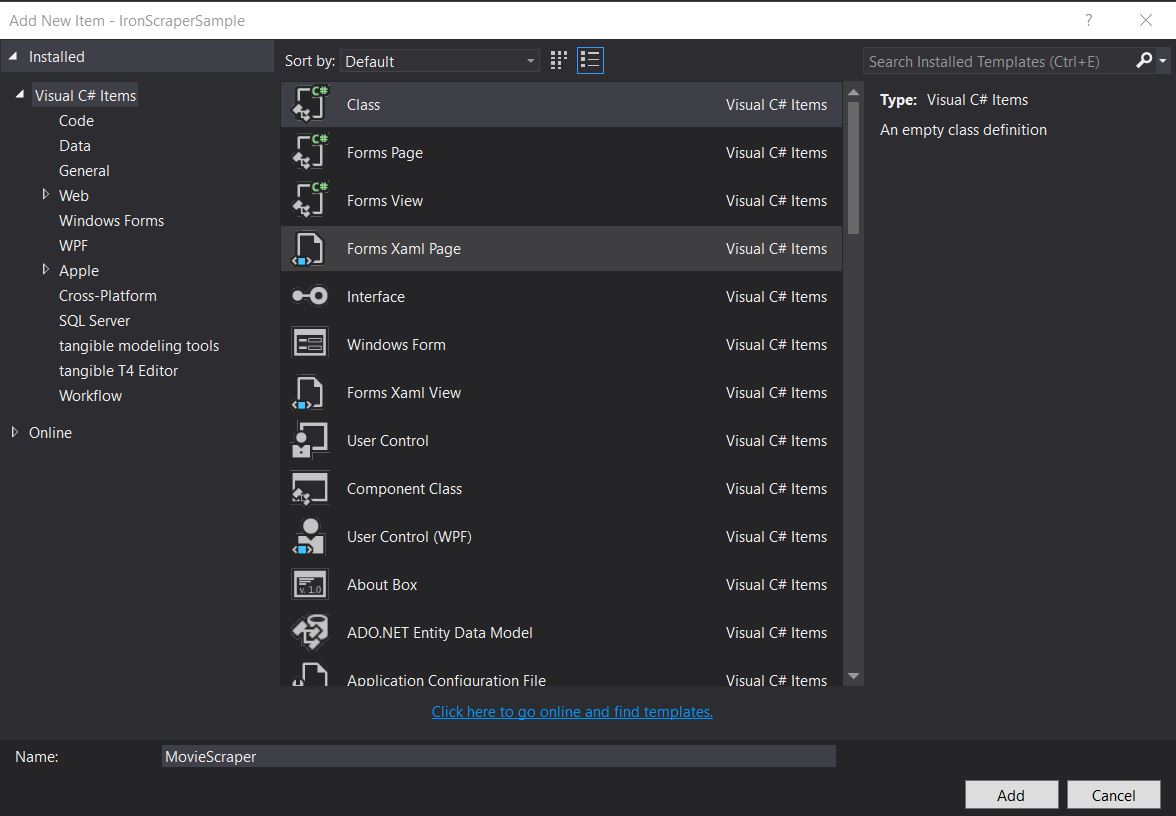
Add a new class and name it MovieScraper:
HTML Structure
This is a part of the homepage HTML we see on the website:
<div id="movie-featured" class="movies-list movies-list-full tab-pane in fade active">
    <div data-movie-id="20746" class="ml-item">
        <a href="https://website.com/film/king-arthur-legend-of-the-sword-20746/">
            <span class="mli-quality">CAM</span>
            <img data-original="https://img.gocdn.online/2017/05/16/poster/2116d6719c710eabe83b377463230fbe-king-arthur-legend-of-the-sword.jpg"
                 class="lazy thumb mli-thumb" alt="King Arthur: Legend of the Sword"
                  src="https://img.gocdn.online/2017/05/16/poster/2116d6719c710eabe83b377463230fbe-king-arthur-legend-of-the-sword.jpg"
                 style="display: inline-block;">
            <span class="mli-info"><h2>King Arthur: Legend of the Sword</h2></span>
        </a>
    </div>
    <div data-movie-id="20724" class="ml-item">
        <a href="https://website.com/film/snatched-20724/" >
            <span class="mli-quality">CAM</span>
            <img data-original="https://img.gocdn.online/2017/05/16/poster/5ef66403dc331009bdb5aa37cfe819ba-snatched.jpg"
                 class="lazy thumb mli-thumb" alt="Snatched"
                 src="https://img.gocdn.online/2017/05/16/poster/5ef66403dc331009bdb5aa37cfe819ba-snatched.jpg"
                 style="display: inline-block;">
            <span class="mli-info"><h2>Snatched</h2></span>
        </a>
    </div>
</div>As we can see, we have a movie ID, Title, and Link to a Detailed Page. Let's start to scrape this data:
public class MovieScraper : WebScraper
{
    public override void Init()
    {
        License.LicenseKey = "LicenseKey";
        this.LoggingLevel = WebScraper.LogLevel.All;
        this.WorkingDirectory = AppSetting.GetAppRoot() + @"\MovieSample\Output\";
        this.Request("www.website.com", Parse);
    }

    public override void Parse(Response response)
    {
        foreach (var div in response.Css("#movie-featured > div"))
        {
            if (div.GetAttribute("class") != "clearfix")
            {
                var movieId = div.GetAttribute("data-movie-id");
                var link = div.Css("a")[0];
                var movieTitle = link.TextContentClean;
                Scrape(new ScrapedData() { { "MovieId", movieId }, { "MovieTitle", movieTitle } }, "Movie.Jsonl");
            }
        }
    }
}
public class MovieScraper : WebScraper
{
public override void Init()
{
License.LicenseKey = "LicenseKey";
this.LoggingLevel = WebScraper.LogLevel.All;
this.WorkingDirectory = AppSetting.GetAppRoot() + @"\MovieSample\Output\";
this.Request("www.website.com", Parse);
}
public override void Parse(Response response)
{
foreach (var div in response.Css("#movie-featured > div"))
{
if (div.GetAttribute("class") != "clearfix")
{
var movieId = div.GetAttribute("data-movie-id");
var link = div.Css("a")[0];
var movieTitle = link.TextContentClean;
Scrape(new ScrapedData() { { "MovieId", movieId }, { "MovieTitle", movieTitle } }, "Movie.Jsonl");
}
}
}
}Public Class MovieScraper
Inherits WebScraper
Public Overrides Sub Init()
License.LicenseKey = "LicenseKey"
Me.LoggingLevel = WebScraper.LogLevel.All
Me.WorkingDirectory = AppSetting.GetAppRoot() & "\MovieSample\Output\"
Me.Request("www.website.com", AddressOf Parse)
End Sub
Public Overrides Sub Parse(ByVal response As Response)
For Each div In response.Css("#movie-featured > div")
If div.GetAttribute("class") <> "clearfix" Then
Dim movieId = div.GetAttribute("data-movie-id")
Dim link = div.Css("a")(0)
Dim movieTitle = link.TextContentClean
Scrape(New ScrapedData() From {
{ "MovieId", movieId },
{ "MovieTitle", movieTitle }
},
"Movie.Jsonl")
End If
Next div
End Sub
End ClassPublic Class MovieScraper
Inherits WebScraper
Public Overrides Sub Init()
License.LicenseKey = "LicenseKey"
Me.LoggingLevel = WebScraper.LogLevel.All
Me.WorkingDirectory = AppSetting.GetAppRoot() & "\MovieSample\Output\"
Me.Request("www.website.com", AddressOf Parse)
End Sub
Public Overrides Sub Parse(ByVal response As Response)
For Each div In response.Css("#movie-featured > div")
If div.GetAttribute("class") <> "clearfix" Then
Dim movieId = div.GetAttribute("data-movie-id")
Dim link = div.Css("a")(0)
Dim movieTitle = link.TextContentClean
Scrape(New ScrapedData() From {
{ "MovieId", movieId },
{ "MovieTitle", movieTitle }
},
"Movie.Jsonl")
End If
Next div
End Sub
End ClassStructured Movie Class
To hold our formatted data, let's implement a movie class:
public class Movie
{
    public int Id { get; set; }
    public string Title { get; set; }
    public string URL { get; set; }
}
public class Movie
{
public int Id { get; set; }
public string Title { get; set; }
public string URL { get; set; }
}Public Class Movie
Public Property Id As Integer
Public Property Title As String
Public Property URL As String
End ClassPublic Class Movie
Public Property Id As Integer
Public Property Title As String
Public Property URL As String
End ClassNow update our code to use the Movie class:
public class MovieScraper : WebScraper
{
    public override void Init()
    {
        License.LicenseKey = "LicenseKey";
        this.LoggingLevel = WebScraper.LogLevel.All;
        this.WorkingDirectory = AppSetting.GetAppRoot() + @"\MovieSample\Output\";
        this.Request("https://website.com/", Parse);
    }

    public override void Parse(Response response)
    {
        foreach (var div in response.Css("#movie-featured > div"))
        {
            if (div.GetAttribute("class") != "clearfix")
            {
                var movie = new Movie
                {
                    Id = Convert.ToInt32(div.GetAttribute("data-movie-id")),
                    Title = div.Css("a")[0].TextContentClean,
                    URL = div.Css("a")[0].Attributes["href"]
                };
                Scrape(movie, "Movie.Jsonl");
            }
        }
    }
}
public class MovieScraper : WebScraper
{
public override void Init()
{
License.LicenseKey = "LicenseKey";
this.LoggingLevel = WebScraper.LogLevel.All;
this.WorkingDirectory = AppSetting.GetAppRoot() + @"\MovieSample\Output\";
this.Request("https://website.com/", Parse);
}
public override void Parse(Response response)
{
foreach (var div in response.Css("#movie-featured > div"))
{
if (div.GetAttribute("class") != "clearfix")
{
var movie = new Movie
{
Id = Convert.ToInt32(div.GetAttribute("data-movie-id")),
Title = div.Css("a")[0].TextContentClean,
URL = div.Css("a")[0].Attributes["href"]
};
Scrape(movie, "Movie.Jsonl");
}
}
}
}Public Class MovieScraper
Inherits WebScraper
Public Overrides Sub Init()
License.LicenseKey = "LicenseKey"
Me.LoggingLevel = WebScraper.LogLevel.All
Me.WorkingDirectory = AppSetting.GetAppRoot() & "\MovieSample\Output\"
Me.Request("https://website.com/", AddressOf Parse)
End Sub
Public Overrides Sub Parse(ByVal response As Response)
For Each div In response.Css("#movie-featured > div")
If div.GetAttribute("class") <> "clearfix" Then
Dim movie As New Movie With {
.Id = Convert.ToInt32(div.GetAttribute("data-movie-id")),
.Title = div.Css("a")(0).TextContentClean,
.URL = div.Css("a")(0).Attributes("href")
}
Scrape(movie, "Movie.Jsonl")
End If
Next div
End Sub
End ClassPublic Class MovieScraper
Inherits WebScraper
Public Overrides Sub Init()
License.LicenseKey = "LicenseKey"
Me.LoggingLevel = WebScraper.LogLevel.All
Me.WorkingDirectory = AppSetting.GetAppRoot() & "\MovieSample\Output\"
Me.Request("https://website.com/", AddressOf Parse)
End Sub
Public Overrides Sub Parse(ByVal response As Response)
For Each div In response.Css("#movie-featured > div")
If div.GetAttribute("class") <> "clearfix" Then
Dim movie As New Movie With {
.Id = Convert.ToInt32(div.GetAttribute("data-movie-id")),
.Title = div.Css("a")(0).TextContentClean,
.URL = div.Css("a")(0).Attributes("href")
}
Scrape(movie, "Movie.Jsonl")
End If
Next div
End Sub
End ClassDetailed Page Scraping
Let's extend our Movie class to have new properties for the detailed information:
public class Movie
{
    public int Id { get; set; }
    public string Title { get; set; }
    public string URL { get; set; }
    public string Description { get; set; }
    public List<string> Genre { get; set; }
    public List<string> Actor { get; set; }
}
public class Movie
{
public int Id { get; set; }
public string Title { get; set; }
public string URL { get; set; }
public string Description { get; set; }
public List<string> Genre { get; set; }
public List<string> Actor { get; set; }
}Public Class Movie
Public Property Id As Integer
Public Property Title As String
Public Property URL As String
Public Property Description As String
Public Property Genre As List(Of String)
Public Property Actor As List(Of String)
End ClassPublic Class Movie
Public Property Id As Integer
Public Property Title As String
Public Property URL As String
Public Property Description As String
Public Property Genre As List(Of String)
Public Property Actor As List(Of String)
End ClassThen navigate to the Detailed page to scrape it, using extended IronWebScraper capabilities:
public class MovieScraper : WebScraper
{
    public override void Init()
    {
        License.LicenseKey = "LicenseKey";
        this.LoggingLevel = WebScraper.LogLevel.All;
        this.WorkingDirectory = AppSetting.GetAppRoot() + @"\MovieSample\Output\";
        this.Request("https://domain/", Parse);
    }

    public override void Parse(Response response)
    {
        foreach (var div in response.Css("#movie-featured > div"))
        {
            if (div.GetAttribute("class") != "clearfix")
            {
                var movie = new Movie
                {
                    Id = Convert.ToInt32(div.GetAttribute("data-movie-id")),
                    Title = div.Css("a")[0].TextContentClean,
                    URL = div.Css("a")[0].Attributes["href"]
                };
                this.Request(movie.URL, ParseDetails, new MetaData() { { "movie", movie } });
            }
        }
    }

    public void ParseDetails(Response response)
    {
        var movie = response.MetaData.Get<Movie>("movie");
        var div = response.Css("div.mvic-desc")[0];
        movie.Description = div.Css("div.desc")[0].TextContentClean;
        movie.Genre = div.Css("div > p > a").Select(element => element.TextContentClean).ToList();
        movie.Actor = div.Css("div > p:nth-child(2) > a").Select(element => element.TextContentClean).ToList();

        Scrape(movie, "Movie.Jsonl");
    }
}
public class MovieScraper : WebScraper
{
public override void Init()
{
License.LicenseKey = "LicenseKey";
this.LoggingLevel = WebScraper.LogLevel.All;
this.WorkingDirectory = AppSetting.GetAppRoot() + @"\MovieSample\Output\";
this.Request("https://domain/", Parse);
}
public override void Parse(Response response)
{
foreach (var div in response.Css("#movie-featured > div"))
{
if (div.GetAttribute("class") != "clearfix")
{
var movie = new Movie
{
Id = Convert.ToInt32(div.GetAttribute("data-movie-id")),
Title = div.Css("a")[0].TextContentClean,
URL = div.Css("a")[0].Attributes["href"]
};
this.Request(movie.URL, ParseDetails, new MetaData() { { "movie", movie } });
}
}
}
public void ParseDetails(Response response)
{
var movie = response.MetaData.Get<Movie>("movie");
var div = response.Css("div.mvic-desc")[0];
movie.Description = div.Css("div.desc")[0].TextContentClean;
movie.Genre = div.Css("div > p > a").Select(element => element.TextContentClean).ToList();
movie.Actor = div.Css("div > p:nth-child(2) > a").Select(element => element.TextContentClean).ToList();
Scrape(movie, "Movie.Jsonl");
}
}Public Class MovieScraper
Inherits WebScraper
Public Overrides Sub Init()
License.LicenseKey = "LicenseKey"
Me.LoggingLevel = WebScraper.LogLevel.All
Me.WorkingDirectory = AppSetting.GetAppRoot() & "\MovieSample\Output\"
Me.Request("https://domain/", AddressOf Parse)
End Sub
Public Overrides Sub Parse(ByVal response As Response)
For Each div In response.Css("#movie-featured > div")
If div.GetAttribute("class") <> "clearfix" Then
Dim movie As New Movie With {
.Id = Convert.ToInt32(div.GetAttribute("data-movie-id")),
.Title = div.Css("a")(0).TextContentClean,
.URL = div.Css("a")(0).Attributes("href")
}
Me.Request(movie.URL, AddressOf ParseDetails, New MetaData() From {
{ "movie", movie }
})
End If
Next div
End Sub
Public Sub ParseDetails(ByVal response As Response)
Dim movie = response.MetaData.Get(Of Movie)("movie")
Dim div = response.Css("div.mvic-desc")(0)
movie.Description = div.Css("div.desc")(0).TextContentClean
movie.Genre = div.Css("div > p > a").Select(Function(element) element.TextContentClean).ToList()
movie.Actor = div.Css("div > p:nth-child(2) > a").Select(Function(element) element.TextContentClean).ToList()
Scrape(movie, "Movie.Jsonl")
End Sub
End ClassPublic Class MovieScraper
Inherits WebScraper
Public Overrides Sub Init()
License.LicenseKey = "LicenseKey"
Me.LoggingLevel = WebScraper.LogLevel.All
Me.WorkingDirectory = AppSetting.GetAppRoot() & "\MovieSample\Output\"
Me.Request("https://domain/", AddressOf Parse)
End Sub
Public Overrides Sub Parse(ByVal response As Response)
For Each div In response.Css("#movie-featured > div")
If div.GetAttribute("class") <> "clearfix" Then
Dim movie As New Movie With {
.Id = Convert.ToInt32(div.GetAttribute("data-movie-id")),
.Title = div.Css("a")(0).TextContentClean,
.URL = div.Css("a")(0).Attributes("href")
}
Me.Request(movie.URL, AddressOf ParseDetails, New MetaData() From {
{ "movie", movie }
})
End If
Next div
End Sub
Public Sub ParseDetails(ByVal response As Response)
Dim movie = response.MetaData.Get(Of Movie)("movie")
Dim div = response.Css("div.mvic-desc")(0)
movie.Description = div.Css("div.desc")(0).TextContentClean
movie.Genre = div.Css("div > p > a").Select(Function(element) element.TextContentClean).ToList()
movie.Actor = div.Css("div > p:nth-child(2) > a").Select(Function(element) element.TextContentClean).ToList()
Scrape(movie, "Movie.Jsonl")
End Sub
End ClassIronWebScraper Library Features
HttpIdentity Feature
Some systems require the user to be logged in to view content; use HttpIdentity for credentials:
HttpIdentity id = new HttpIdentity
{
    NetworkUsername = "username",
    NetworkPassword = "pwd"
};
Identities.Add(id);
HttpIdentity id = new HttpIdentity
{
NetworkUsername = "username",
NetworkPassword = "pwd"
};
Identities.Add(id);Dim id As New HttpIdentity With {
.NetworkUsername = "username",
.NetworkPassword = "pwd"
}
Identities.Add(id)Dim id As New HttpIdentity With {
.NetworkUsername = "username",
.NetworkPassword = "pwd"
}
Identities.Add(id)Enable Web Cache
Cache requested pages for reuse during development:
public override void Init()
{
    License.LicenseKey = "LicenseKey";
    this.LoggingLevel = WebScraper.LogLevel.All;
    this.WorkingDirectory = AppSetting.GetAppRoot() + @"\ShoppingSiteSample\Output\";
    EnableWebCache();
    this.Request("http://www.WebSite.com", Parse);
}
public override void Init()
{
License.LicenseKey = "LicenseKey";
this.LoggingLevel = WebScraper.LogLevel.All;
this.WorkingDirectory = AppSetting.GetAppRoot() + @"\ShoppingSiteSample\Output\";
EnableWebCache();
this.Request("http://www.WebSite.com", Parse);
}Public Overrides Sub Init()
License.LicenseKey = "LicenseKey"
Me.LoggingLevel = WebScraper.LogLevel.All
Me.WorkingDirectory = AppSetting.GetAppRoot() & "\ShoppingSiteSample\Output\"
EnableWebCache()
Me.Request("http://www.WebSite.com", Parse)
End SubPublic Overrides Sub Init()
License.LicenseKey = "LicenseKey"
Me.LoggingLevel = WebScraper.LogLevel.All
Me.WorkingDirectory = AppSetting.GetAppRoot() & "\ShoppingSiteSample\Output\"
EnableWebCache()
Me.Request("http://www.WebSite.com", Parse)
End SubThrottling
Control connection numbers and speed:
public override void Init()
{
    License.LicenseKey = "LicenseKey";
    this.LoggingLevel = WebScraper.LogLevel.All;
    this.WorkingDirectory = AppSetting.GetAppRoot() + @"\ShoppingSiteSample\Output\";
    this.MaxHttpConnectionLimit = 80;
    this.RateLimitPerHost = TimeSpan.FromMilliseconds(50);
    this.OpenConnectionLimitPerHost = 25;
    this.ObeyRobotsDotTxt = false;
    this.ThrottleMode = Throttle.ByDomainHostName;
    this.Request("https://www.Website.com", Parse);
}
public override void Init()
{
License.LicenseKey = "LicenseKey";
this.LoggingLevel = WebScraper.LogLevel.All;
this.WorkingDirectory = AppSetting.GetAppRoot() + @"\ShoppingSiteSample\Output\";
this.MaxHttpConnectionLimit = 80;
this.RateLimitPerHost = TimeSpan.FromMilliseconds(50);
this.OpenConnectionLimitPerHost = 25;
this.ObeyRobotsDotTxt = false;
this.ThrottleMode = Throttle.ByDomainHostName;
this.Request("https://www.Website.com", Parse);
}Public Overrides Sub Init()
License.LicenseKey = "LicenseKey"
Me.LoggingLevel = WebScraper.LogLevel.All
Me.WorkingDirectory = AppSetting.GetAppRoot() & "\ShoppingSiteSample\Output\"
Me.MaxHttpConnectionLimit = 80
Me.RateLimitPerHost = TimeSpan.FromMilliseconds(50)
Me.OpenConnectionLimitPerHost = 25
Me.ObeyRobotsDotTxt = False
Me.ThrottleMode = Throttle.ByDomainHostName
Me.Request("https://www.Website.com", Parse)
End SubPublic Overrides Sub Init()
License.LicenseKey = "LicenseKey"
Me.LoggingLevel = WebScraper.LogLevel.All
Me.WorkingDirectory = AppSetting.GetAppRoot() & "\ShoppingSiteSample\Output\"
Me.MaxHttpConnectionLimit = 80
Me.RateLimitPerHost = TimeSpan.FromMilliseconds(50)
Me.OpenConnectionLimitPerHost = 25
Me.ObeyRobotsDotTxt = False
Me.ThrottleMode = Throttle.ByDomainHostName
Me.Request("https://www.Website.com", Parse)
End SubThrottling properties
MaxHttpConnectionLimit
total number of allowed open HTTP requests (threads)RateLimitPerHost
minimum polite delay (pause) between request to a given domain or IP addressOpenConnectionLimitPerHost
allowed number of concurrent HTTP requests (threads) per hostname or IP addressThrottleMode
Makes the WebScraper intelligently throttle requests not only by hostname, but also by host servers' IP addresses. This is polite in-case multiple scraped domains are hosted on the same machine.
Appendix
How to Create a Windows Form Application?
Use Visual Studio 2013 or higher.
- Open Visual Studio.
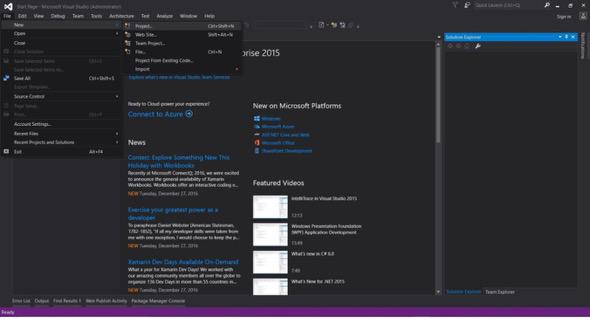
- File -> New -> Project
- Choose Visual C# or VB -> Windows -> Windows Forms Application.
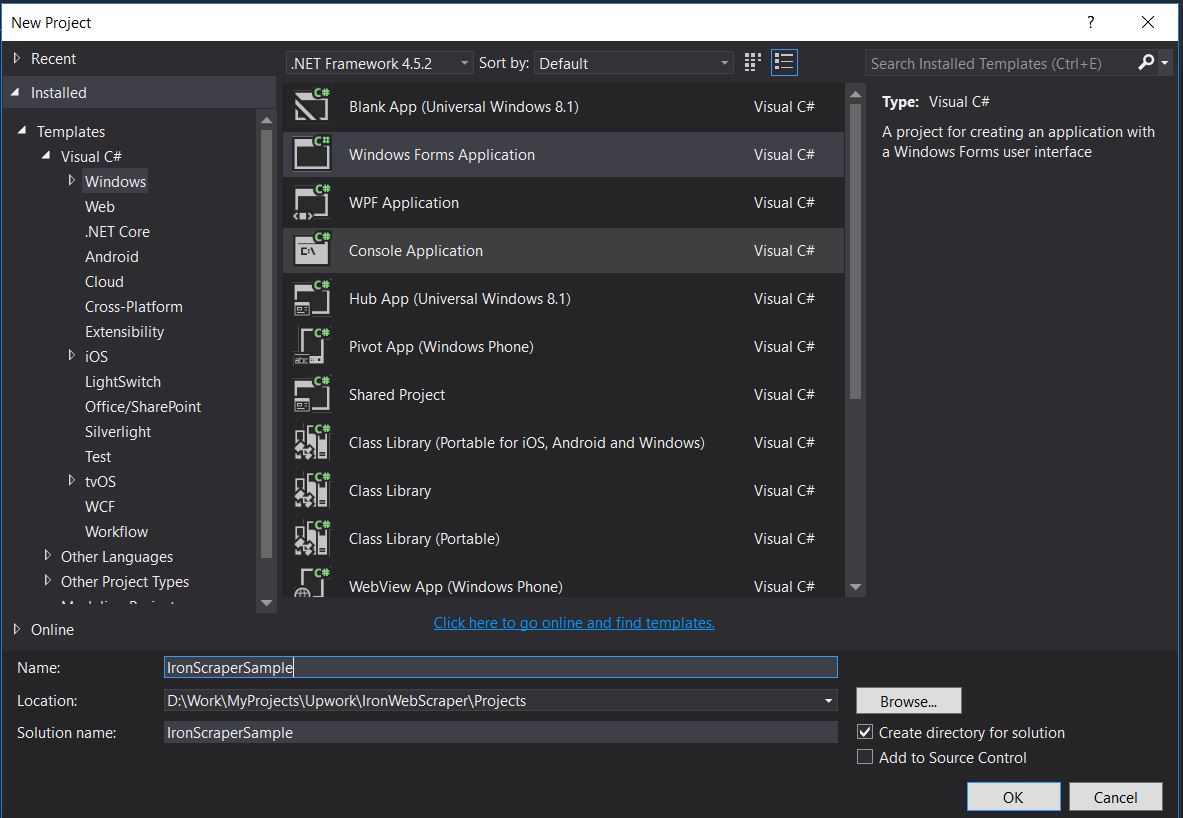
Project Name: IronScraperSample
Location: Select a location on your disk.
How to Create an ASP.NET Web Form Application?
- Open Visual Studio.
- File -> New -> Project
- Choose Visual C# or VB -> Web -> ASP.NET Web Application (.NET Framework).
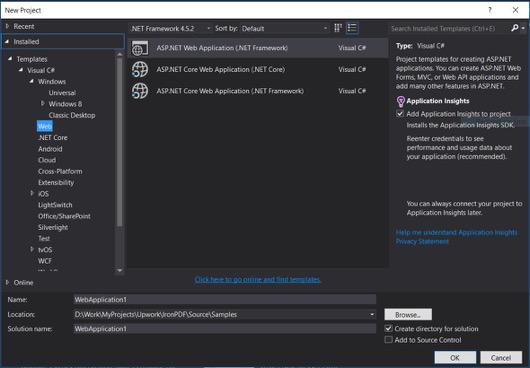
Project Name: IronScraperSample
Location: Select a location on your disk.
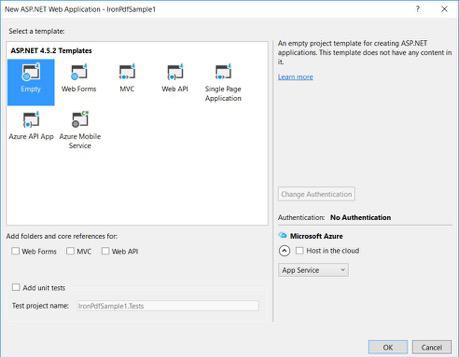
- From your ASP.NET templates, select an empty template and check Web Forms.
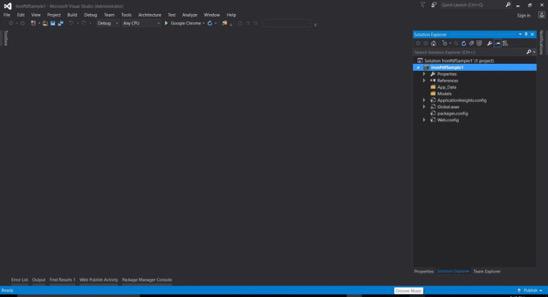
- Your basic ASP.NET Web Form Project is created.
Download the full tutorial sample project code project here.
Frequently Asked Questions
What is IronWebScraper?
IronWebScraper is a .NET library designed for web scraping, data extraction, and web content parsing, which can be integrated into Microsoft Visual Studio projects.
Who is the target audience for the C# Web Scraping Tutorial?
The tutorial is aimed at software developers with basic or advanced programming skills who want to implement solutions for advanced web scraping, data gathering, and content parsing.
What skills are required to follow the C# Web Scraping Tutorial?
Basic knowledge of programming using C# or VB.NET, an understanding of web technologies like HTML, JavaScript, JQuery, CSS, and familiarity with DOM, XPath, HTML, and CSS Selectors are required.
How can I install IronWebScraper using NuGet?
You can install IronWebScraper via NuGet by searching for 'IronWebScraper' in the NuGet Package Manager in Visual Studio and clicking on the install option.
What is the purpose of the 'HelloScraper' application in the tutorial?
The 'HelloScraper' application serves as an introductory example for users to learn the basic implementation of IronWebScraper, demonstrating data extraction and saving using JSON format.
Can IronWebScraper handle multiple web requests and how?
Yes, IronWebScraper is capable of handling multiple HTTP requests and threads in parallel, allowing synchronous code that is easier to debug.
What features does IronWebScraper offer for handling HTTP identities?
IronWebScraper provides the HttpIdentity feature, which allows users to specify network credentials, enabling scraping on websites that require authentication.
How does IronWebScraper ensure polite web scraping with respect to server load?
IronWebScraper uses throttling features like MaxHttpConnectionLimit, RateLimitPerHost, and OpenConnectionLimitPerHost to manage request rates, ensuring polite and respectful scraping by controlling the speed and number of requests.
What are the recommended tools for developing with IronWebScraper?
Microsoft Visual Studio 2010 or above, along with web developer extensions for browsers such as web inspector for Chrome or Firebug for Firefox, are recommended for development.
How can developers extend the functionality of IronWebScraper for specific data extraction needs?
Developers can inherit from the IronWebScraper.WebScraper class to extend functionality and implement custom data extraction logic by overriding methods like Init() and Parse(Response response).

Curtis Chau holds a Bachelor’s degree in Computer Science (Carleton University) and specializes in front-end development with expertise in Node.js, TypeScript, JavaScript, and React. Passionate about crafting intuitive and aesthetically pleasing user interfaces, Curtis enjoys working with modern frameworks and creating well-structured, visually appealing manuals.



