
Jak pobierać dane ze stron internetowych w C#

IronWebScraper to biblioteka .NET do scrapingu toles i zawartych treści WWW. Jest to łatwa w użyciu biblioteka, którą można dodać do projektów Microsoft Visual Studio w celu wykorzystania w rozwoju oraz produkcji.
IronWebScraper ma wiele unikalnych cech i funkcji, takich jak kontrolowanie dozwolonych i zabronionych stron, obiektów, mediów itp. Pozwala również na zarządzanie wieloma tożsamościami, pamięcią podręczną sieci oraz wiele innych funkcji, które omówimy w tym tutorialu.
Rozpocznij korzystanie z IronWebScraper
Rozpocznij korzystanie z IronWebScraper we własnym projekcie już dziś z darmową wersją próbną.

Docelowa grupa odbiorców
Ten samouczek jest skierowany do programistów o podstawowych lub zaawansowanych umiejętnościach programistycznych, którzy chcą budować i wdrażać rozwiązania dla zaawansowanych możliwości skrobania (skrobanie stron internetowych, zbieranie i ekstrakcja danych z witryn, parsowanie zawartości stron, pozyskiwanie danych z sieci).

Wymagane umiejętności
- Podstawy programowania z umiejętnościami korzystania z jednego z języków programowania Microsoft, takich jak C# lub VB.NET
- Podstawowe zrozumienie technologii sieciowych (HTML, JavaScript, JQuery, CSS, itp.) i tego, jak działają
- Podstawowa wiedza na temat DOM, XPath, HTML i CSS Selectors
Narzędzia
- Microsoft Visual Studio 2010 lub nowszy
- Rozszerzenia dla deweloperów stron internetowych dla przeglądarek, takie jak web inspector dla Chrome lub Firebug dla Firefox
Dłączego skrobać? (Powody i Koncepcje)
Jeśli chcesz zbudować produkt lub rozwiązanie, które ma możliwości:
- Ekstrakcja danych ze strony internetowej
- Porównanie treści, cen, cech, itp. z różnych stron internetowych
- Skanowanie i buforowanie treści stron internetowych
Jeśli masz jeden lub więcej powodów z powyższego, IronWebScraper to doskonała biblioteka do spełniania twoich potrzeb
Jak zainstalować IronWebScraper?
Po Create a New Project (patrz Dodatek A) możesz dodać bibliotekę IronWebScraper do swojego projektu, automatycznie wstawiając bibliotekę za pomocą NuGet lub ręcznie instalując plik DLL.
Instalacja przy użyciu NuGet
Aby dodać IronWebScraper bibliotekę do naszego projektu przy użyciu NuGet, możemy to zrobić przez interfejs wizualny (NuGet Package Manager) lub przy użyciu polecenia w Package Manager Console.
Korzystanie z menedżera pakietów NuGet
- Korzystanie z myszy -> prawy klik na nazwę projektu -> Wybierz Manage NuGet Package
- Z zakładki przeglądania -> wyszukaj
IronWebScraper-> Zainstaluj - Kliknij OK
- I gotowe
Używanie konsoli NuGet Package
- Z narzędzi -> Menedżer pakietów NuGet -> Konsola Menedżera pakietów
- Wybierz projekt Class Library Project jako projekt domyślny
- Uruchom polecenie ->
Install-Package IronWebScraper
Instalacja ręczna
-
Przejdź do https://ironsoftware.com
-
Kliknij IronWebScraper lub odwiedź jego stronę bezpośrednio, używając URL https://ironsoftware.com/csharp/webscraper/
-
Kliknij Pobierz DLL.
-
Rozpakuj pobrany skompresowany plik
-
W Visual Studio kliknij prawym przyciskiem myszy na projekt -> dodaj -> referencja -> przeglądaj
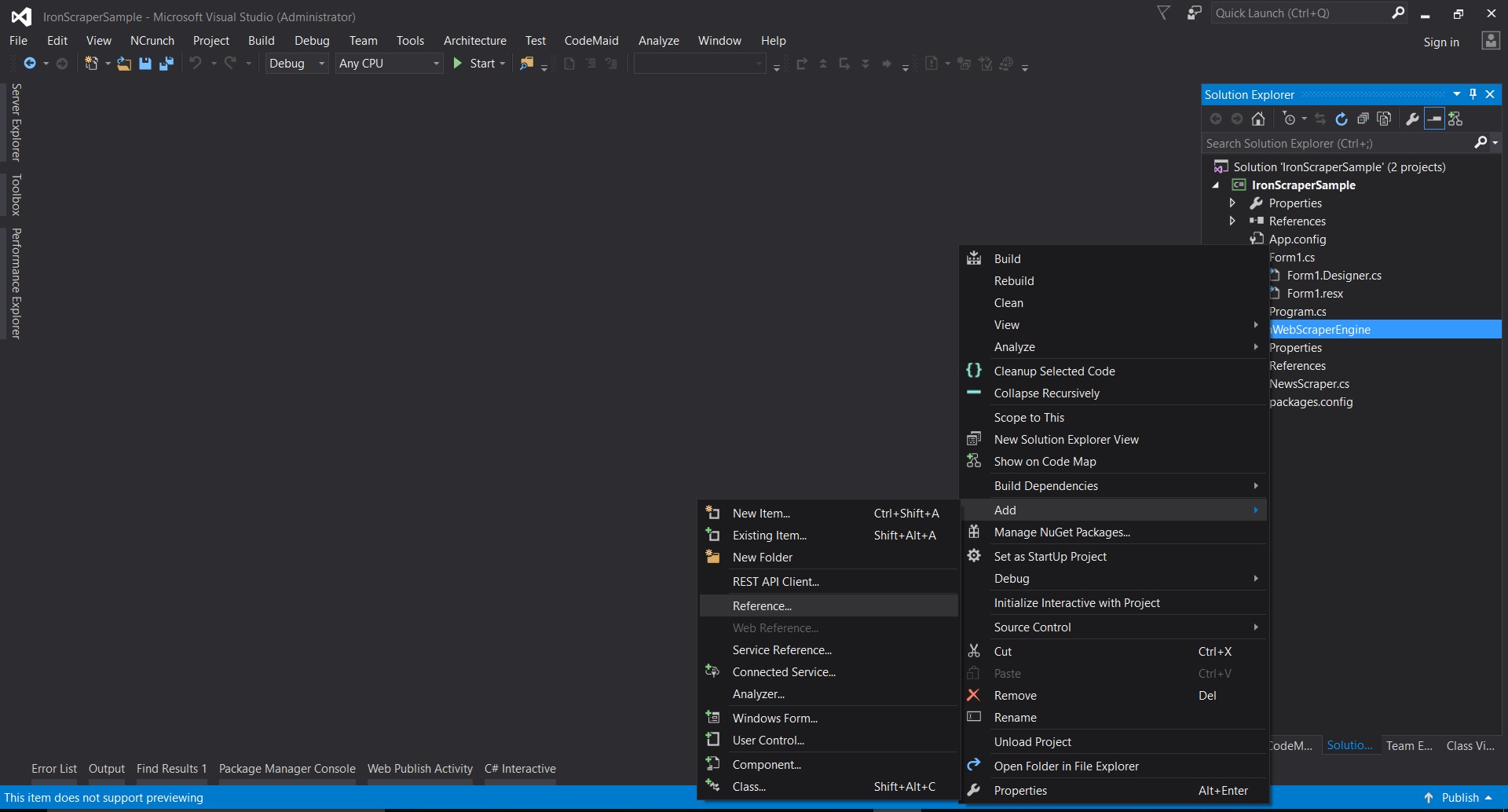
-
Przejdź do wypakowanego folderu ->
netstandard2.0-> i wybierz wszystkie pliki.dll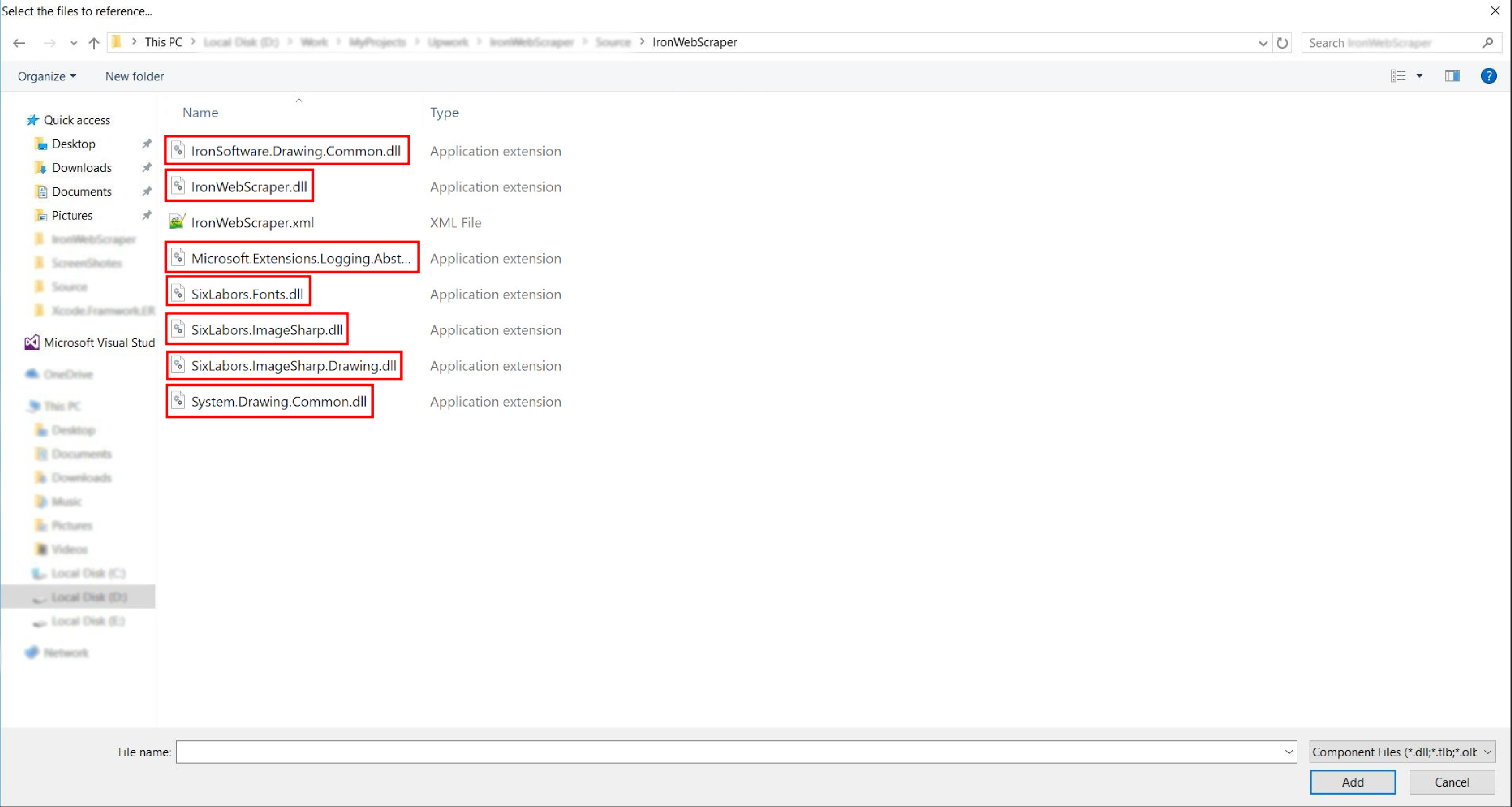
-
I gotowe!
HelloScraper - Nasz pierwszy przykład z IronWebScraper
Jak zwykle, zaczniemy od wdrożenia aplikacji Hello Scraper, aby wykonać nasz pierwszy krok przy użyciu IronWebScraper.
- Stworzyliśmy nową aplikację konsolową o nazwie "IronWebScraperSample"
Kroki tworzenia przykładu IronWebScraper
-
Utwórz folder i nazwij go "HelloScraperSample"
-
Następnie dodaj nową klasę i nazwij ją
HelloScraper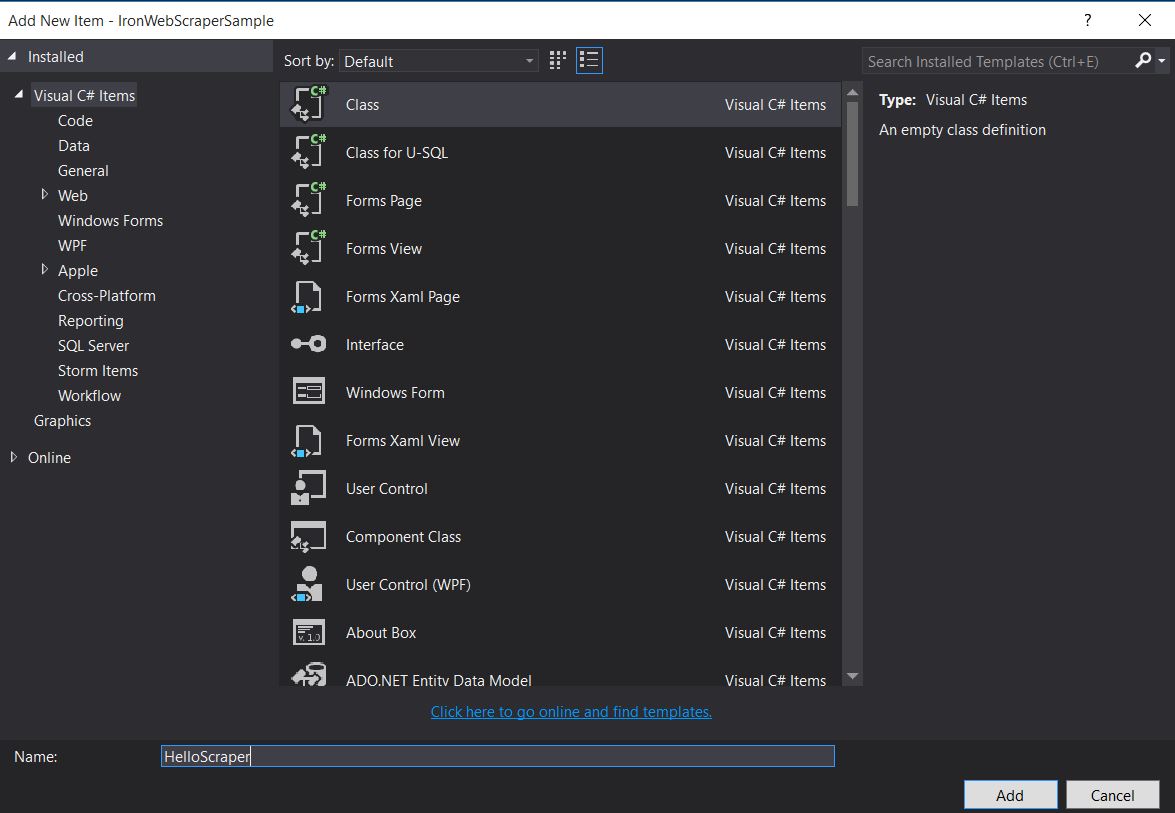
-
Dodaj następujący fragment kodu do
HelloScraperpublic class HelloScraper : WebScraper { /// <summary> /// Override this method to initialize your web scraper. /// Important tasks will be to request at least one start URL and set allowed/banned domain or URL patterns. /// </summary> public override void Init() { License.LicenseKey = "LicenseKey"; // Write License Key this.LoggingLevel = WebScraper.LogLevel.All; // Log all events this.Request("https://blog.scrapinghub.com", Parse); // Initialize a web request to the given URL } /// <summary> /// Override this method to create the default Response handler for your web scraper. /// If you have multiple page types, you can add additional similar methods. /// </summary> /// <param name="response">The HTTP Response object to parse</param> public override void Parse(Response response) { // Set working directory for the project this.WorkingDirectory = AppSetting.GetAppRoot() + @"\HelloScraperSample\Output\"; // Loop on all links foreach (var titleLink in response.Css("h2.entry-title a")) { // Read link text string title = titleLink.TextContentClean; // Save result to file Scrape(new ScrapedData() { { "Title", title } }, "HelloScraper.json"); } // Loop on all links for pagination if (response.CssExists("div.prev-post > a[href]")) { // Get next page URL var nextPage = response.Css("div.prev-post > a[href]")[0].Attributes["href"]; // Scrape next URL this.Request(nextPage, Parse); } } }Public Class HelloScraper Inherits WebScraper ''' <summary> ''' Override this method to initialize your web scraper. ''' Important tasks will be to request at least one start URL and set allowed/banned domain or URL patterns. ''' </summary> Public Overrides Sub Init() License.LicenseKey = "LicenseKey" ' Write License Key Me.LoggingLevel = WebScraper.LogLevel.All ' Log all events Me.Request("https://blog.scrapinghub.com", AddressOf Parse) ' Initialize a web request to the given URL End Sub ''' <summary> ''' Override this method to create the default Response handler for your web scraper. ''' If you have multiple page types, you can add additional similar methods. ''' </summary> ''' <param name="response">The HTTP Response object to parse</param> Public Overrides Sub Parse(ByVal response As Response) ' Set working directory for the project Me.WorkingDirectory = AppSetting.GetAppRoot() & "\HelloScraperSample\Output\" ' Loop on all links For Each titleLink In response.Css("h2.entry-title a") ' Read link text Dim title As String = titleLink.TextContentClean ' Save result to file Scrape(New ScrapedData() From { { "Title", title } }, "HelloScraper.json") Next titleLink ' Loop on all links for pagination If response.CssExists("div.prev-post > a[href]") Then ' Get next page URL Dim nextPage = response.Css("div.prev-post > a[href]")(0).Attributes("href") ' Scrape next URL Me.Request(nextPage, AddressOf Parse) End If End Sub End ClassPublic Class HelloScraper Inherits WebScraper ''' <summary> ''' Override this method to initialize your web scraper. ''' Important tasks will be to request at least one start URL and set allowed/banned domain or URL patterns. ''' </summary> Public Overrides Sub Init() License.LicenseKey = "LicenseKey" ' Write License Key Me.LoggingLevel = WebScraper.LogLevel.All ' Log all events Me.Request("https://blog.scrapinghub.com", AddressOf Parse) ' Initialize a web request to the given URL End Sub ''' <summary> ''' Override this method to create the default Response handler for your web scraper. ''' If you have multiple page types, you can add additional similar methods. ''' </summary> ''' <param name="response">The HTTP Response object to parse</param> Public Overrides Sub Parse(ByVal response As Response) ' Set working directory for the project Me.WorkingDirectory = AppSetting.GetAppRoot() & "\HelloScraperSample\Output\" ' Loop on all links For Each titleLink In response.Css("h2.entry-title a") ' Read link text Dim title As String = titleLink.TextContentClean ' Save result to file Scrape(New ScrapedData() From { { "Title", title } }, "HelloScraper.json") Next titleLink ' Loop on all links for pagination If response.CssExists("div.prev-post > a[href]") Then ' Get next page URL Dim nextPage = response.Css("div.prev-post > a[href]")(0).Attributes("href") ' Scrape next URL Me.Request(nextPage, AddressOf Parse) End If End Sub End Class -
Teraz, aby rozpocząć skrobanie, dodaj ten fragment kodu do
Mainstatic void Main(string[] args) { // Create Object From Hello Scrape class HelloScraperSample.HelloScraper scrape = new HelloScraperSample.HelloScraper(); // Start Scraping scrape.Start(); }static void Main(string[] args) { // Create Object From Hello Scrape class HelloScraperSample.HelloScraper scrape = new HelloScraperSample.HelloScraper(); // Start Scraping scrape.Start(); }Shared Sub Main(ByVal args() As String) ' Create Object From Hello Scrape class Dim scrape As New HelloScraperSample.HelloScraper() ' Start Scraping scrape.Start() End SubShared Sub Main(ByVal args() As String) ' Create Object From Hello Scrape class Dim scrape As New HelloScraperSample.HelloScraper() ' Start Scraping scrape.Start() End Sub -
Wynik zostanie zapisany w pliku w formacie
WebScraper.WorkingDirectory/classname.Json
Przegląd kodu
Scrape.Start() wyzwala logikę scrapingu w następujący sposób:
- Wywołuje metodę
Init(), aby zainicjować zmienne, scraping właściwości i atrybuty zachowania. - Ustawia zapytanie początkowej strony w
Init()zRequest("https://blog.scrapinghub.com", Parse). - Obsługuje wiele żądań HTTP i wątków równolegle, utrzymując kod synchronicznym i łatwiejszym do debugowania.
- Metoda
Parse()jest wyzwalana poInit(), aby obsłużyć odpowiedź, wyodrębniając dane za pomocą selektorów CSS i zapisując je w formacie JSON.
Funkcje i opcje biblioteki IronWebScraper
Zaktualizowaną dokumentację można znaleźć w pliku zip pobranym metodą ręcznej instalacji (IronWebScraper Documentation.chm File), lub można sprawdzić dokumentację online, aby uzyskać najnowszą aktualizację biblioteki na https://ironsoftware.com/csharp/webscraper/object-reference/.
Aby zacząć używać IronWebScraper w swoim projekcie, musisz dziedziczyć z klasy IronWebScraper.WebScraper, która rozszerza twoją bibliotekę klas i dodaje do niej funkcjonalność skrobania. Ponadto musisz zaimplementować metody Init() i Parse(Response response).
namespace IronWebScraperEngine
{
    public class NewsScraper : IronWebScraper.WebScraper
    {
        public override void Init()
        {
            throw new NotImplementedException();
        }

        public override void Parse(Response response)
        {
            throw new NotImplementedException();
        }
    }
}
namespace IronWebScraperEngine
{
public class NewsScraper : IronWebScraper.WebScraper
{
public override void Init()
{
throw new NotImplementedException();
}
public override void Parse(Response response)
{
throw new NotImplementedException();
}
}
}Namespace IronWebScraperEngine
Public Class NewsScraper
Inherits IronWebScraper.WebScraper
Public Overrides Sub Init()
Throw New NotImplementedException()
End Sub
Public Overrides Sub Parse(ByVal response As Response)
Throw New NotImplementedException()
End Sub
End Class
End NamespaceNamespace IronWebScraperEngine
Public Class NewsScraper
Inherits IronWebScraper.WebScraper
Public Overrides Sub Init()
Throw New NotImplementedException()
End Sub
Public Overrides Sub Parse(ByVal response As Response)
Throw New NotImplementedException()
End Sub
End Class
End Namespace| Właściwości \ funkcje | Typ | Opis |
|---|---|---|
Init () | Metoda | Używane do skonfigurowania skrobania |
Parse (Response response) | Metoda | Używane do zaimplementowania logiki, którą skrobak wykorzysta i jak ją przetworzy. Można zaimplementować wiele metod dla różnych zachowań lub struktur stron. |
BannedUrls, AllowedUrls, BannedDomains | Kolekcje | Uzywane do blokowania/zezwalania na URL-e i/lub domeny. Przykład: BannedUrls.Add("*.zip", "*.exe", "*.gz", "*.pdf"); Obsługuje symbole wieloznaczne i wyrażenia regularne. |
ObeyRobotsDotTxt | Boolean | Używane do włączania lub wyłączania odczytu i śledzenia dyrektyw w robots.txt. |
ObeyRobotsDotTxtForHost (string Host) | Metoda | Używane do włączania lub wyłączania odczytywania i stosowania się do dyrektyw w robots.txt dla określonej domeny. |
Scrape, ScrapeUnique | Metoda | |
ThrottleMode | Wyliczenie | Opcje Enum: ByIpAddress, ByDomainHostName. Umożliwia inteligentne dławienie żądań z szacunkiem dla adresów IP hostów lub nazw domen hostów. |
EnableWebCache, EnableWebCache (TimeSpan cacheDuration) | Metoda | Umożliwia buforowanie żądań sieciowych. |
MaxHttpConnectionLimit | Int | Ustawia łączną liczbę dozwolonych otwartych żądań HTTP (wątki). |
RateLimitPerHost | TimeSpan | Ustawia minimalne opóźnienie grzecznościowe (pauzę) między żądaniami do danej domeny lub adresu IP. |
OpenConnectionLimitPerHost | Int | Ustawia dozwoloną liczbę równoległych żądań HTTP (wątki) na nazwę hosta lub adres IP. |
WorkingDirectory | string | Ustawia ścieżkę katalogu roboczego do przechowywania danych. |
Przykłady z rzeczywistego świata i praktyka
Skrobanie strony z filmami online
Zbudujmy przykład, w którym skrapujemy stronę z filmami.
Dodaj nową klasę i nazwij ją MovieScraper:
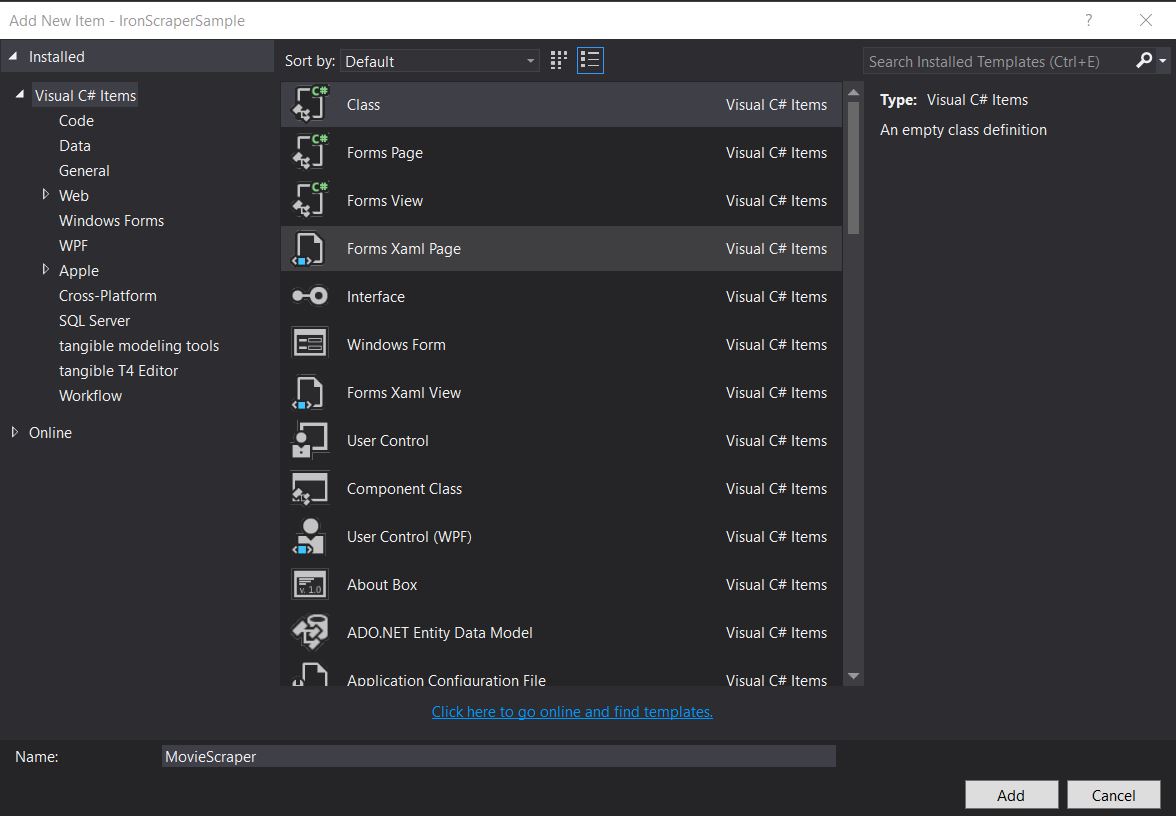
Struktura HTML
To jest fragment kodu HTML strony głównej, którą widzimy na stronie:
<div id="movie-featured" class="movies-list movies-list-full tab-pane in fade active">
    <div data-movie-id="20746" class="ml-item">
        <a href="https://website.com/film/king-arthur-legend-of-the-sword-20746/">
            <span class="mli-quality">CAM</span>
            <img data-original="https://img.gocdn.online/2017/05/16/poster/2116d6719c710eabe83b377463230fbe-king-arthur-legend-of-the-sword.jpg"
                 class="lazy thumb mli-thumb" alt="King Arthur: Legend of the Sword"
                  src="https://img.gocdn.online/2017/05/16/poster/2116d6719c710eabe83b377463230fbe-king-arthur-legend-of-the-sword.jpg"
                 style="display: inline-block;">
            <span class="mli-info"><h2>King Arthur: Legend of the Sword</h2></span>
        </a>
    </div>
    <div data-movie-id="20724" class="ml-item">
        <a href="https://website.com/film/snatched-20724/" >
            <span class="mli-quality">CAM</span>
            <img data-original="https://img.gocdn.online/2017/05/16/poster/5ef66403dc331009bdb5aa37cfe819ba-snatched.jpg"
                 class="lazy thumb mli-thumb" alt="Snatched"
                 src="https://img.gocdn.online/2017/05/16/poster/5ef66403dc331009bdb5aa37cfe819ba-snatched.jpg"
                 style="display: inline-block;">
            <span class="mli-info"><h2>Snatched</h2></span>
        </a>
    </div>
</div>Jak widać, mamy ID filmu, tytuł i link do szczegółowej strony. Zacznijmy skrapować te dane:
public class MovieScraper : WebScraper
{
    public override void Init()
    {
        License.LicenseKey = "LicenseKey";
        this.LoggingLevel = WebScraper.LogLevel.All;
        this.WorkingDirectory = AppSetting.GetAppRoot() + @"\MovieSample\Output\";
        this.Request("www.website.com", Parse);
    }

    public override void Parse(Response response)
    {
        foreach (var div in response.Css("#movie-featured > div"))
        {
            if (div.GetAttribute("class") != "clearfix")
            {
                var movieId = div.GetAttribute("data-movie-id");
                var link = div.Css("a")[0];
                var movieTitle = link.TextContentClean;
                Scrape(new ScrapedData() { { "MovieId", movieId }, { "MovieTitle", movieTitle } }, "Movie.Jsonl");
            }
        }
    }
}
public class MovieScraper : WebScraper
{
public override void Init()
{
License.LicenseKey = "LicenseKey";
this.LoggingLevel = WebScraper.LogLevel.All;
this.WorkingDirectory = AppSetting.GetAppRoot() + @"\MovieSample\Output\";
this.Request("www.website.com", Parse);
}
public override void Parse(Response response)
{
foreach (var div in response.Css("#movie-featured > div"))
{
if (div.GetAttribute("class") != "clearfix")
{
var movieId = div.GetAttribute("data-movie-id");
var link = div.Css("a")[0];
var movieTitle = link.TextContentClean;
Scrape(new ScrapedData() { { "MovieId", movieId }, { "MovieTitle", movieTitle } }, "Movie.Jsonl");
}
}
}
}Public Class MovieScraper
Inherits WebScraper
Public Overrides Sub Init()
License.LicenseKey = "LicenseKey"
Me.LoggingLevel = WebScraper.LogLevel.All
Me.WorkingDirectory = AppSetting.GetAppRoot() & "\MovieSample\Output\"
Me.Request("www.website.com", AddressOf Parse)
End Sub
Public Overrides Sub Parse(ByVal response As Response)
For Each div In response.Css("#movie-featured > div")
If div.GetAttribute("class") <> "clearfix" Then
Dim movieId = div.GetAttribute("data-movie-id")
Dim link = div.Css("a")(0)
Dim movieTitle = link.TextContentClean
Scrape(New ScrapedData() From {
{ "MovieId", movieId },
{ "MovieTitle", movieTitle }
},
"Movie.Jsonl")
End If
Next div
End Sub
End ClassPublic Class MovieScraper
Inherits WebScraper
Public Overrides Sub Init()
License.LicenseKey = "LicenseKey"
Me.LoggingLevel = WebScraper.LogLevel.All
Me.WorkingDirectory = AppSetting.GetAppRoot() & "\MovieSample\Output\"
Me.Request("www.website.com", AddressOf Parse)
End Sub
Public Overrides Sub Parse(ByVal response As Response)
For Each div In response.Css("#movie-featured > div")
If div.GetAttribute("class") <> "clearfix" Then
Dim movieId = div.GetAttribute("data-movie-id")
Dim link = div.Css("a")(0)
Dim movieTitle = link.TextContentClean
Scrape(New ScrapedData() From {
{ "MovieId", movieId },
{ "MovieTitle", movieTitle }
},
"Movie.Jsonl")
End If
Next div
End Sub
End ClassStruktura klasy Movie
Aby przechować nasze sformatowane dane, zaimplementujmy klasę filmową:
public class Movie
{
    public int Id { get; set; }
    public string Title { get; set; }
    public string URL { get; set; }
}
public class Movie
{
public int Id { get; set; }
public string Title { get; set; }
public string URL { get; set; }
}Public Class Movie
Public Property Id As Integer
Public Property Title As String
Public Property URL As String
End ClassPublic Class Movie
Public Property Id As Integer
Public Property Title As String
Public Property URL As String
End ClassTeraz zaktualizuj nasz kod, aby używać klasy Movie:
public class MovieScraper : WebScraper
{
    public override void Init()
    {
        License.LicenseKey = "LicenseKey";
        this.LoggingLevel = WebScraper.LogLevel.All;
        this.WorkingDirectory = AppSetting.GetAppRoot() + @"\MovieSample\Output\";
        this.Request("https://website.com/", Parse);
    }

    public override void Parse(Response response)
    {
        foreach (var div in response.Css("#movie-featured > div"))
        {
            if (div.GetAttribute("class") != "clearfix")
            {
                var movie = new Movie
                {
                    Id = Convert.ToInt32(div.GetAttribute("data-movie-id")),
                    Title = div.Css("a")[0].TextContentClean,
                    URL = div.Css("a")[0].Attributes["href"]
                };
                Scrape(movie, "Movie.Jsonl");
            }
        }
    }
}
public class MovieScraper : WebScraper
{
public override void Init()
{
License.LicenseKey = "LicenseKey";
this.LoggingLevel = WebScraper.LogLevel.All;
this.WorkingDirectory = AppSetting.GetAppRoot() + @"\MovieSample\Output\";
this.Request("https://website.com/", Parse);
}
public override void Parse(Response response)
{
foreach (var div in response.Css("#movie-featured > div"))
{
if (div.GetAttribute("class") != "clearfix")
{
var movie = new Movie
{
Id = Convert.ToInt32(div.GetAttribute("data-movie-id")),
Title = div.Css("a")[0].TextContentClean,
URL = div.Css("a")[0].Attributes["href"]
};
Scrape(movie, "Movie.Jsonl");
}
}
}
}Public Class MovieScraper
Inherits WebScraper
Public Overrides Sub Init()
License.LicenseKey = "LicenseKey"
Me.LoggingLevel = WebScraper.LogLevel.All
Me.WorkingDirectory = AppSetting.GetAppRoot() & "\MovieSample\Output\"
Me.Request("https://website.com/", AddressOf Parse)
End Sub
Public Overrides Sub Parse(ByVal response As Response)
For Each div In response.Css("#movie-featured > div")
If div.GetAttribute("class") <> "clearfix" Then
Dim movie As New Movie With {
.Id = Convert.ToInt32(div.GetAttribute("data-movie-id")),
.Title = div.Css("a")(0).TextContentClean,
.URL = div.Css("a")(0).Attributes("href")
}
Scrape(movie, "Movie.Jsonl")
End If
Next div
End Sub
End ClassPublic Class MovieScraper
Inherits WebScraper
Public Overrides Sub Init()
License.LicenseKey = "LicenseKey"
Me.LoggingLevel = WebScraper.LogLevel.All
Me.WorkingDirectory = AppSetting.GetAppRoot() & "\MovieSample\Output\"
Me.Request("https://website.com/", AddressOf Parse)
End Sub
Public Overrides Sub Parse(ByVal response As Response)
For Each div In response.Css("#movie-featured > div")
If div.GetAttribute("class") <> "clearfix" Then
Dim movie As New Movie With {
.Id = Convert.ToInt32(div.GetAttribute("data-movie-id")),
.Title = div.Css("a")(0).TextContentClean,
.URL = div.Css("a")(0).Attributes("href")
}
Scrape(movie, "Movie.Jsonl")
End If
Next div
End Sub
End ClassSkrobanie szczegółowej strony
Rozszerzmy naszą klasę Movie, aby zawierała nowe właściwości do szczegółowych informacji:
public class Movie
{
    public int Id { get; set; }
    public string Title { get; set; }
    public string URL { get; set; }
    public string Description { get; set; }
    public List<string> Genre { get; set; }
    public List<string> Actor { get; set; }
}
public class Movie
{
public int Id { get; set; }
public string Title { get; set; }
public string URL { get; set; }
public string Description { get; set; }
public List<string> Genre { get; set; }
public List<string> Actor { get; set; }
}Public Class Movie
Public Property Id As Integer
Public Property Title As String
Public Property URL As String
Public Property Description As String
Public Property Genre As List(Of String)
Public Property Actor As List(Of String)
End ClassPublic Class Movie
Public Property Id As Integer
Public Property Title As String
Public Property URL As String
Public Property Description As String
Public Property Genre As List(Of String)
Public Property Actor As List(Of String)
End ClassNastępnie przejdź do szczegółowej strony, aby ją skrobać, korzystając z rozszerzonych możliwości IronWebScraper:
public class MovieScraper : WebScraper
{
    public override void Init()
    {
        License.LicenseKey = "LicenseKey";
        this.LoggingLevel = WebScraper.LogLevel.All;
        this.WorkingDirectory = AppSetting.GetAppRoot() + @"\MovieSample\Output\";
        this.Request("https://domain/", Parse);
    }

    public override void Parse(Response response)
    {
        foreach (var div in response.Css("#movie-featured > div"))
        {
            if (div.GetAttribute("class") != "clearfix")
            {
                var movie = new Movie
                {
                    Id = Convert.ToInt32(div.GetAttribute("data-movie-id")),
                    Title = div.Css("a")[0].TextContentClean,
                    URL = div.Css("a")[0].Attributes["href"]
                };
                this.Request(movie.URL, ParseDetails, new MetaData() { { "movie", movie } });
            }
        }
    }

    public void ParseDetails(Response response)
    {
        var movie = response.MetaData.Get<Movie>("movie");
        var div = response.Css("div.mvic-desc")[0];
        movie.Description = div.Css("div.desc")[0].TextContentClean;
        movie.Genre = div.Css("div > p > a").Select(element => element.TextContentClean).ToList();
        movie.Actor = div.Css("div > p:nth-child(2) > a").Select(element => element.TextContentClean).ToList();

        Scrape(movie, "Movie.Jsonl");
    }
}
public class MovieScraper : WebScraper
{
public override void Init()
{
License.LicenseKey = "LicenseKey";
this.LoggingLevel = WebScraper.LogLevel.All;
this.WorkingDirectory = AppSetting.GetAppRoot() + @"\MovieSample\Output\";
this.Request("https://domain/", Parse);
}
public override void Parse(Response response)
{
foreach (var div in response.Css("#movie-featured > div"))
{
if (div.GetAttribute("class") != "clearfix")
{
var movie = new Movie
{
Id = Convert.ToInt32(div.GetAttribute("data-movie-id")),
Title = div.Css("a")[0].TextContentClean,
URL = div.Css("a")[0].Attributes["href"]
};
this.Request(movie.URL, ParseDetails, new MetaData() { { "movie", movie } });
}
}
}
public void ParseDetails(Response response)
{
var movie = response.MetaData.Get<Movie>("movie");
var div = response.Css("div.mvic-desc")[0];
movie.Description = div.Css("div.desc")[0].TextContentClean;
movie.Genre = div.Css("div > p > a").Select(element => element.TextContentClean).ToList();
movie.Actor = div.Css("div > p:nth-child(2) > a").Select(element => element.TextContentClean).ToList();
Scrape(movie, "Movie.Jsonl");
}
}Public Class MovieScraper
Inherits WebScraper
Public Overrides Sub Init()
License.LicenseKey = "LicenseKey"
Me.LoggingLevel = WebScraper.LogLevel.All
Me.WorkingDirectory = AppSetting.GetAppRoot() & "\MovieSample\Output\"
Me.Request("https://domain/", AddressOf Parse)
End Sub
Public Overrides Sub Parse(ByVal response As Response)
For Each div In response.Css("#movie-featured > div")
If div.GetAttribute("class") <> "clearfix" Then
Dim movie As New Movie With {
.Id = Convert.ToInt32(div.GetAttribute("data-movie-id")),
.Title = div.Css("a")(0).TextContentClean,
.URL = div.Css("a")(0).Attributes("href")
}
Me.Request(movie.URL, AddressOf ParseDetails, New MetaData() From {
{ "movie", movie }
})
End If
Next div
End Sub
Public Sub ParseDetails(ByVal response As Response)
Dim movie = response.MetaData.Get(Of Movie)("movie")
Dim div = response.Css("div.mvic-desc")(0)
movie.Description = div.Css("div.desc")(0).TextContentClean
movie.Genre = div.Css("div > p > a").Select(Function(element) element.TextContentClean).ToList()
movie.Actor = div.Css("div > p:nth-child(2) > a").Select(Function(element) element.TextContentClean).ToList()
Scrape(movie, "Movie.Jsonl")
End Sub
End ClassPublic Class MovieScraper
Inherits WebScraper
Public Overrides Sub Init()
License.LicenseKey = "LicenseKey"
Me.LoggingLevel = WebScraper.LogLevel.All
Me.WorkingDirectory = AppSetting.GetAppRoot() & "\MovieSample\Output\"
Me.Request("https://domain/", AddressOf Parse)
End Sub
Public Overrides Sub Parse(ByVal response As Response)
For Each div In response.Css("#movie-featured > div")
If div.GetAttribute("class") <> "clearfix" Then
Dim movie As New Movie With {
.Id = Convert.ToInt32(div.GetAttribute("data-movie-id")),
.Title = div.Css("a")(0).TextContentClean,
.URL = div.Css("a")(0).Attributes("href")
}
Me.Request(movie.URL, AddressOf ParseDetails, New MetaData() From {
{ "movie", movie }
})
End If
Next div
End Sub
Public Sub ParseDetails(ByVal response As Response)
Dim movie = response.MetaData.Get(Of Movie)("movie")
Dim div = response.Css("div.mvic-desc")(0)
movie.Description = div.Css("div.desc")(0).TextContentClean
movie.Genre = div.Css("div > p > a").Select(Function(element) element.TextContentClean).ToList()
movie.Actor = div.Css("div > p:nth-child(2) > a").Select(Function(element) element.TextContentClean).ToList()
Scrape(movie, "Movie.Jsonl")
End Sub
End ClassFunkcje biblioteki IronWebScraper
Funkcjonalność HttpIdentity
Niektóre systemy wymagają, aby użytkownik był zalogowany, aby zobaczyć treść; uzyj HttpIdentity dla poświadczen:
HttpIdentity id = new HttpIdentity
{
    NetworkUsername = "username",
    NetworkPassword = "pwd"
};
Identities.Add(id);
HttpIdentity id = new HttpIdentity
{
NetworkUsername = "username",
NetworkPassword = "pwd"
};
Identities.Add(id);Dim id As New HttpIdentity With {
.NetworkUsername = "username",
.NetworkPassword = "pwd"
}
Identities.Add(id)Dim id As New HttpIdentity With {
.NetworkUsername = "username",
.NetworkPassword = "pwd"
}
Identities.Add(id)Włącz cache sieciowy
Buforuj zażądane strony na potrzeby ponownego użycia podczas rozwoju:
public override void Init()
{
    License.LicenseKey = "LicenseKey";
    this.LoggingLevel = WebScraper.LogLevel.All;
    this.WorkingDirectory = AppSetting.GetAppRoot() + @"\ShoppingSiteSample\Output\";
    EnableWebCache();
    this.Request("http://www.WebSite.com", Parse);
}
public override void Init()
{
License.LicenseKey = "LicenseKey";
this.LoggingLevel = WebScraper.LogLevel.All;
this.WorkingDirectory = AppSetting.GetAppRoot() + @"\ShoppingSiteSample\Output\";
EnableWebCache();
this.Request("http://www.WebSite.com", Parse);
}Public Overrides Sub Init()
License.LicenseKey = "LicenseKey"
Me.LoggingLevel = WebScraper.LogLevel.All
Me.WorkingDirectory = AppSetting.GetAppRoot() & "\ShoppingSiteSample\Output\"
EnableWebCache()
Me.Request("http://www.WebSite.com", Parse)
End SubPublic Overrides Sub Init()
License.LicenseKey = "LicenseKey"
Me.LoggingLevel = WebScraper.LogLevel.All
Me.WorkingDirectory = AppSetting.GetAppRoot() & "\ShoppingSiteSample\Output\"
EnableWebCache()
Me.Request("http://www.WebSite.com", Parse)
End SubDławienie
Kontrola liczby połączeń i prędkości:
public override void Init()
{
    License.LicenseKey = "LicenseKey";
    this.LoggingLevel = WebScraper.LogLevel.All;
    this.WorkingDirectory = AppSetting.GetAppRoot() + @"\ShoppingSiteSample\Output\";
    this.MaxHttpConnectionLimit = 80;
    this.RateLimitPerHost = TimeSpan.FromMilliseconds(50);
    this.OpenConnectionLimitPerHost = 25;
    this.ObeyRobotsDotTxt = false;
    this.ThrottleMode = Throttle.ByDomainHostName;
    this.Request("https://www.Website.com", Parse);
}
public override void Init()
{
License.LicenseKey = "LicenseKey";
this.LoggingLevel = WebScraper.LogLevel.All;
this.WorkingDirectory = AppSetting.GetAppRoot() + @"\ShoppingSiteSample\Output\";
this.MaxHttpConnectionLimit = 80;
this.RateLimitPerHost = TimeSpan.FromMilliseconds(50);
this.OpenConnectionLimitPerHost = 25;
this.ObeyRobotsDotTxt = false;
this.ThrottleMode = Throttle.ByDomainHostName;
this.Request("https://www.Website.com", Parse);
}Public Overrides Sub Init()
License.LicenseKey = "LicenseKey"
Me.LoggingLevel = WebScraper.LogLevel.All
Me.WorkingDirectory = AppSetting.GetAppRoot() & "\ShoppingSiteSample\Output\"
Me.MaxHttpConnectionLimit = 80
Me.RateLimitPerHost = TimeSpan.FromMilliseconds(50)
Me.OpenConnectionLimitPerHost = 25
Me.ObeyRobotsDotTxt = False
Me.ThrottleMode = Throttle.ByDomainHostName
Me.Request("https://www.Website.com", Parse)
End SubPublic Overrides Sub Init()
License.LicenseKey = "LicenseKey"
Me.LoggingLevel = WebScraper.LogLevel.All
Me.WorkingDirectory = AppSetting.GetAppRoot() & "\ShoppingSiteSample\Output\"
Me.MaxHttpConnectionLimit = 80
Me.RateLimitPerHost = TimeSpan.FromMilliseconds(50)
Me.OpenConnectionLimitPerHost = 25
Me.ObeyRobotsDotTxt = False
Me.ThrottleMode = Throttle.ByDomainHostName
Me.Request("https://www.Website.com", Parse)
End SubWłaściwości dławienia
MaxHttpConnectionLimit
calkowita liczba dozwolonych otwartych zapytan HTTP (watekow)RateLimitPerHost
minimalne grzeczne opóznienie (przerwa) miedzy zapytaniem a dana domena lub adresem IPOpenConnectionLimitPerHost
dozwolona liczba jednoczesnych zapytań HTTP (wątek) na nazwę hosta lub adres IPThrottleMode
Sprawia, ze WebScraper inteligentnie reguluje zapytania nie tylko na podstawie nazwy hosta, ale takze po adresach IP serwerow hostów. Jest to grzeczne w przypadku, gdy wiele skrobanych domen jest hostowanych na tej samej maszynie.
Aneks
Jak utworzyć aplikację Form w Windows?
Użyj Visual Studio 2013 lub nowsze.
- Otwórz program Visual Studio.
- Plik -> Nowy -> Projekt

- Wybierz Visual C# lub VB -> Windows -> Aplikacja Forms Windows.
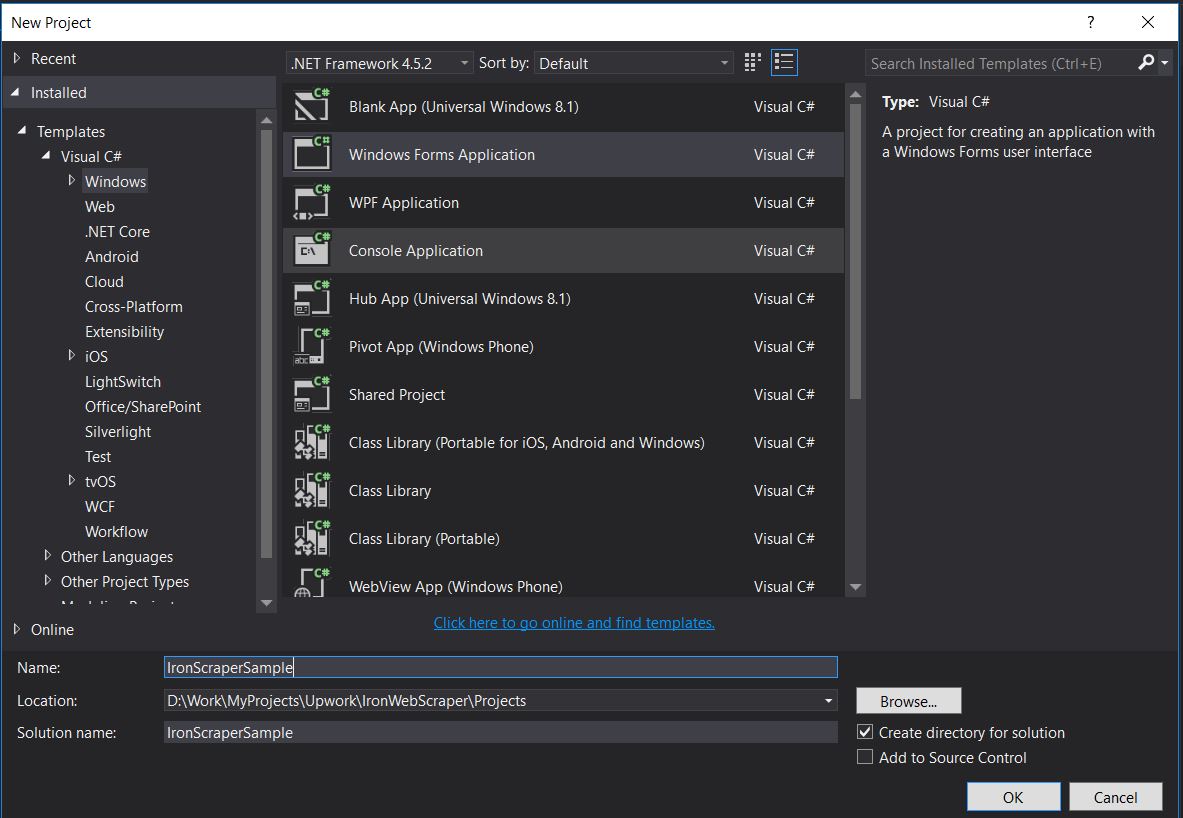
Nazwa projektu: IronScraperSample
Lokalizacja: Wybierz lokalizację na swoim dysku.
Jak utworzyć aplikację ASP.NET Web Form?
- Otwórz program Visual Studio.
- Plik -> Nowy -> Projekt
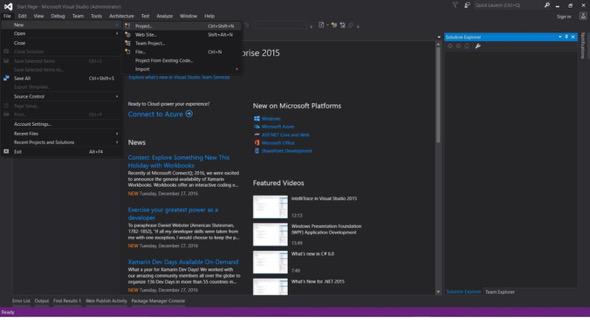
- Wybierz Visual C# lub VB -> Web -> Aplikacja Web ASP.NET (.NET Framework).
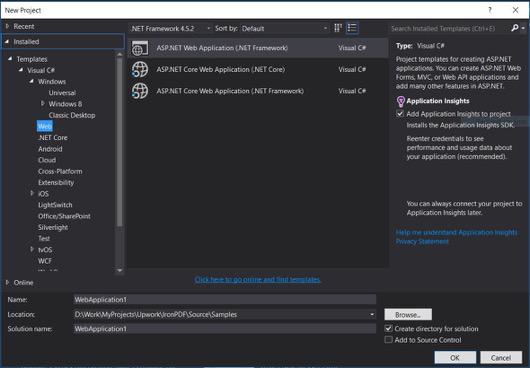
Nazwa projektu: IronScraperSample
Lokalizacja: Wybierz lokalizację na swoim dysku.
- Z szablonów ASP.NET wybierz pusty szablon i zaznacz Web Forms.
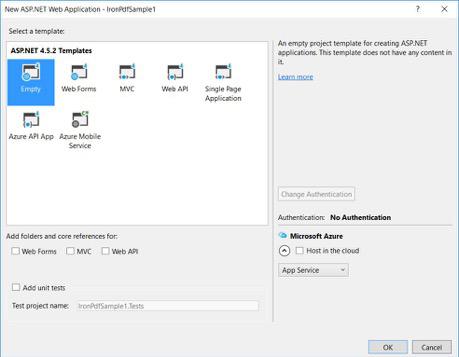
- Twój podstawowy projekt ASP.NET Web Form został utworzony.
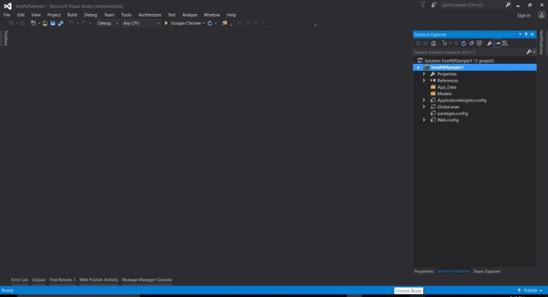
Pobierz pełny kod projektu próbki tutorialu tutaj.
Najczęściej zadawane pytania
Czym jest IronWebScraper?
IronWebScraper to biblioteka .NET przeznaczona do web scrapingu, ekstrakcji danych i analizowania treści internetowych, którą można zintegrować z projektami Microsoft Visual Studio.
Kim jest docelowa grupa odbiorców dla samouczka C# Web Scraping?
Samouczek jest skierowany do programistów o podstawowych lub zaawansowanych umiejętnościach programistycznych, którzy chcą wdrożyć rozwiązania do zaawansowanego web scrapingu, zbierania danych i analizowania treści.
Jakie umiejętności są wymagane, aby śledzić samouczek C# Web Scraping?
Wymagana jest podstawowa znajomość programowania w C# lub VB.NET, znajomość technologii webowych takich jak HTML, JavaScript, JQuery, CSS oraz zapoznanie się z DOM, XPath, HTML i CSS Selectors.
Jak mogę zainstalować IronWebScraper za pomocą NuGet?
Możesz zainstalować IronWebScraper przez NuGet, szukając 'IronWebScraper' w Menedżerze pakietów NuGet w Visual Studio i klikając opcję instalacji.
Jaki jest cel aplikacji 'HelloScraper' w samouczku?
Aplikacja 'HelloScraper' służy jako wprowadzenie dla użytkowników do nauki podstawowej implementacji IronWebScraper, demonstrując ekstrakcję danych i ich zapisywanie w formacie JSON.
Czy IronWebScraper obsługuje wiele zapytań webowych i w jaki sposób?
Tak, IronWebScraper jest w stanie obsłużyć wiele zapytań HTTP i wątków równolegle, umożliwiając synchroniczny kod, który jest łatwiejszy do debugowania.
Jakie funkcje oferuje IronWebScraper do obsługi tożsamości HTTP?
IronWebScraper udostępnia funkcję HttpIdentity, która pozwala użytkownikom określać dane uwierzytelniające sieci, umożliwiając scraping na stronach wymagających autoryzacji.
Jak IronWebScraper zapewnia grzeczny web scraping z szacunku dla obciążenia serwera?
IronWebScraper używa funkcji przyceniania takich jak MaxHttpConnectionLimit, RateLimitPerHost i OpenConnectionLimitPerHost, aby zarządzać szybkością żądań, zapewniając grzeczny i szanujący scraping przez kontrolę prędkości i liczby żądań.
Jakie narzędzia są zalecane do rozwijania z IronWebScraper?
Microsoft Visual Studio 2010 lub nowszy, wraz z rozszerzeniami dla deweloperów webowych dla przeglądarek, takimi jak web inspector dla Chrome czy Firebug dla Firefox, są zalecane do rozwoju.
Jak programiści mogą rozszerzać funkcjonalność IronWebScraper dla specyficznych potrzeb ekstrakcji danych?
Programiści mogą dziedziczyć po klasie IronWebScraper.WebScraper, aby rozszerzać funkcjonalności i implementować niestandardową logikę ekstrakcji danych, nadpisując takie metody jak Init() i Parse(Response response).

Curtis Chau posiada tytuł licencjata z informatyki (Uniwersytet Carleton) i specjalizuje się w front-endowym rozwoju, z ekspertką w Node.js, TypeScript, JavaScript i React. Pasjonuje się tworzeniem intuicyjnych i estetycznie przyjemnych interfejsów użytkownika, Curtis cieszy się pracą z nowoczesnymi frameworkami i tworzeniem dobrze zorganizowanych, atrakcyjnych wizualnie podręczników.

