
Pobieranie danych ze strony internetowej z filmami przy użyciu języka C# i biblioteki IronWebScraper

IronWebScraper pobiera dane o filmach z witryn internetowych, analizując elementy HTML, zapisując ustrukturyzowane dane w obiektach o określonym typie i przechodząc między stronami z użyciem metadanych. W ten sposób powstają pełne zestawy informacji o filmach. Ta biblioteka do pobierania danych ze stron w C# ułatwia przekształcanie nieustrukturyzowanej treści stron w uporządkowane dane gotowe do analizy.
Szybki start: Pobieranie danych o filmach w C#- Zainstalować
IronWebScraperza pomocą Menedżera pakietów NuGet - Utworzyć klasę dziedziczącą po
WebScraper - Nadpisać metodę
Init(), aby ustawić licencję i wysłać żądanie pod docelowy adres URL - Nadpisać metodę
Parse(), aby wyodrębnić dane o filmach za pomocą selektorów CSS - Użyć metody
Scrape(), aby zapisać dane w formacie JSON
-
1Zainstaluj IronWebScraper z NuGet Package Manager
-
2Skopiuj i uruchom ten fragment kodu.
using IronWebScraper; using System; public class QuickstartMovieScraper : WebScraper { public override void Init() { // Set your license key License.LicenseKey = "YOUR-LICENSE-KEY"; // Configure scraper settings this.LoggingLevel = LogLevel.All; this.WorkingDirectory = @"C:\MovieData\Output\"; // Start scraping from the homepage this.Request("https://example-movie-site.com", Parse); } public override void Parse(Response response) { // Extract movie titles using CSS selectors foreach (var movieDiv in response.Css(".movie-item")) { var title = movieDiv.Css("h2")[0].TextContentClean; var url = movieDiv.Css("a")[0].Attributes["href"]; // Save the scraped data Scrape(new { Title = title, Url = url }, "movies.json"); } } } // Run the scraper var scraper = new QuickstartMovieScraper(); scraper.Start();Imports IronWebScraper Imports System Public Class QuickstartMovieScraper Inherits WebScraper Public Overrides Sub Init() ' Set your license key License.LicenseKey = "YOUR-LICENSE-KEY" ' Configure scraper settings Me.LoggingLevel = LogLevel.All Me.WorkingDirectory = "C:\MovieData\Output\" ' Start scraping from the homepage Me.Request("https://example-movie-site.com", AddressOf Parse) End Sub Public Overrides Sub Parse(response As Response) ' Extract movie titles using CSS selectors For Each movieDiv In response.Css(".movie-item") Dim title = movieDiv.Css("h2")(0).TextContentClean Dim url = movieDiv.Css("a")(0).Attributes("href") ' Save the scraped data Scrape(New With {Key .Title = title, Key .Url = url}, "movies.json") Next End Sub End Class ' Run the scraper Dim scraper As New QuickstartMovieScraper() scraper.Start()Imports IronWebScraper Imports System Public Class QuickstartMovieScraper Inherits WebScraper Public Overrides Sub Init() ' Set your license key License.LicenseKey = "YOUR-LICENSE-KEY" ' Configure scraper settings Me.LoggingLevel = LogLevel.All Me.WorkingDirectory = "C:\MovieData\Output\" ' Start scraping from the homepage Me.Request("https://example-movie-site.com", AddressOf Parse) End Sub Public Overrides Sub Parse(response As Response) ' Extract movie titles using CSS selectors For Each movieDiv In response.Css(".movie-item") Dim title = movieDiv.Css("h2")(0).TextContentClean Dim url = movieDiv.Css("a")(0).Attributes("href") ' Save the scraped data Scrape(New With {Key .Title = title, Key .Url = url}, "movies.json") Next End Sub End Class ' Run the scraper Dim scraper As New QuickstartMovieScraper() scraper.Start() -
3Wdrożenie do testowania w środowisku produkcyjnym
Rozpocznij korzystanie z IronWebScraper w swoim projekcie już dziś z darmową wersją próbną
Jak przygotować klasę do pobierania danych o filmach?
Przykład wykorzystuje rzeczywistą witrynę filmową. Dane zostaną pobrane za pomocą technik opisanych w poradniku dotyczącym pobierania danych ze stron w C#.
Należy dodać nową klasę o nazwie MovieScraper:
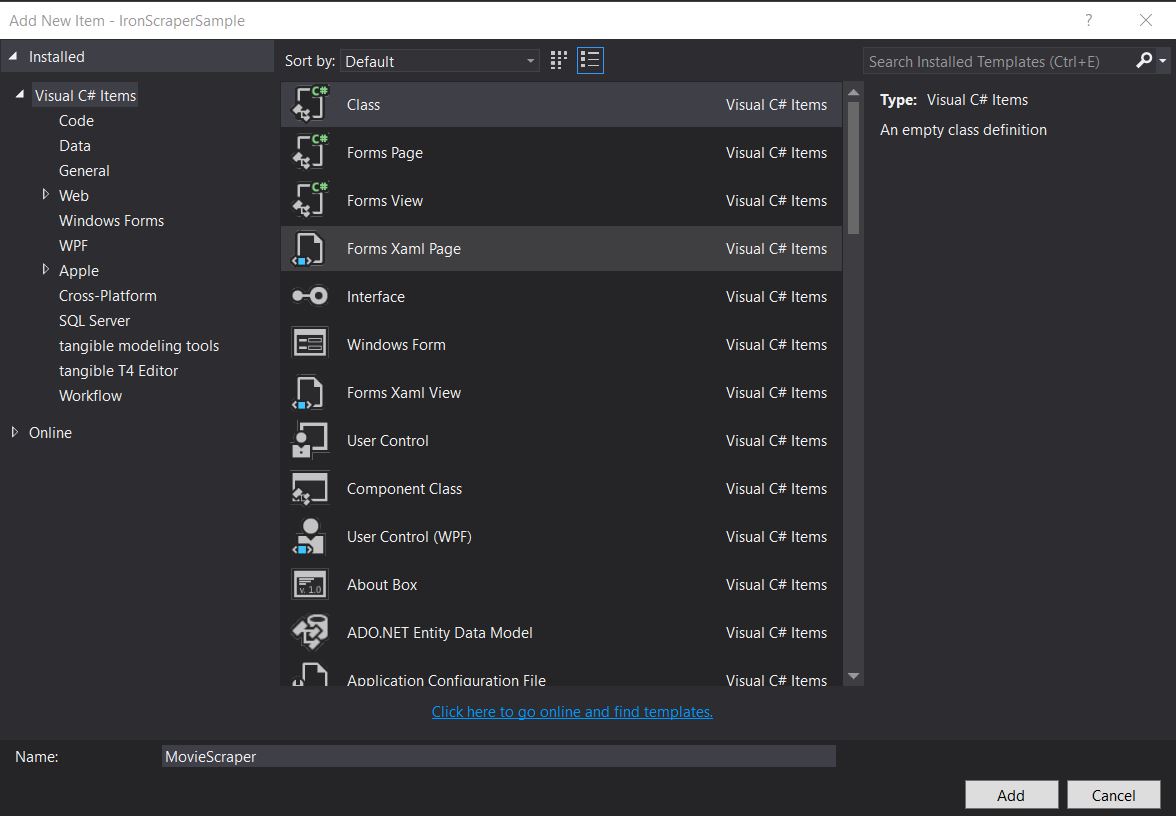
Osobna klasa do pobierania danych porządkuje kod i umożliwia jego ponowne wykorzystanie. Takie podejście jest zgodne z zasadami programowania obiektowego i ułatwia późniejszą rozbudowę funkcjonalności.
Jak wygląda struktura docelowej strony internetowej?
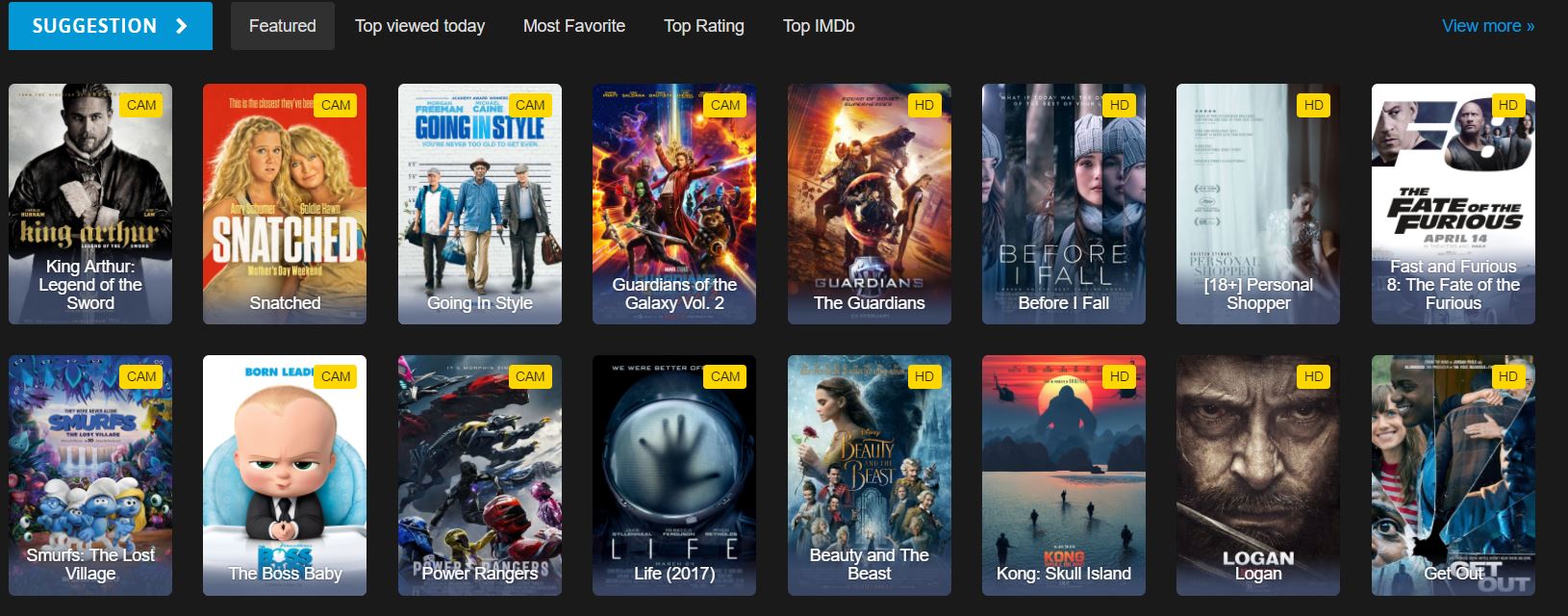
Aby skutecznie pobierać dane, należy poznać strukturę witryny. Podobnie jak w poradniku dotyczącym pobierania danych z witryny filmowej, najpierw należy przeanalizować strukturę HTML:
Które elementy HTML zawierają dane o filmach?
Poniższy fragment HTML strony głównej pomaga ustalić, których selektorów CSS należy użyć:
<div id="movie-featured" class="movies-list movies-list-full tab-pane in fade active">
    <div data-movie-id="20746" class="ml-item">
        <a href="https://website.com/film/king-arthur-legend-of-the-sword-20746/">
            <span class="mli-quality">CAM</span>
            <img data-original="https://img.gocdn.online/2017/05/16/poster/2116d6719c710eabe83b377463230fbe-king-arthur-legend-of-the-sword.jpg"
                 class="lazy thumb mli-thumb" alt="King Arthur: Legend of the Sword"
                 src="https://img.gocdn.online/2017/05/16/poster/2116d6719c710eabe83b377463230fbe-king-arthur-legend-of-the-sword.jpg"
                 style="display: inline-block;">
            <span class="mli-info"><h2>King Arthur: Legend of the Sword</h2></span>
        </a>
    </div>
    <div data-movie-id="20724" class="ml-item">
        <a href="https://website.com/film/snatched-20724/">
            <span class="mli-quality">CAM</span>
            <img data-original="https://img.gocdn.online/2017/05/16/poster/5ef66403dc331009bdb5aa37cfe819ba-snatched.jpg"
                 class="lazy thumb mli-thumb" alt="Snatched"
                 src="https://img.gocdn.online/2017/05/16/poster/5ef66403dc331009bdb5aa37cfe819ba-snatched.jpg"
                 style="display: inline-block;">
            <span class="mli-info"><h2>Snatched</h2></span>
        </a>
    </div>
</div>Dostępne są identyfikator i tytuł filmu oraz link do strony ze szczegółami. Każdy film jest reprezentowany przez element div o klasie ml-item i z unikatową wartością atrybutu data-movie-id.
Jak zaimplementować podstawowe pobieranie danych o filmach?
Przed rozpoczęciem pobierania danych należy poprawnie skonfigurować klucz licencyjny, jak pokazano poniżej:
public class MovieScraper : WebScraper
{
    public override void Init()
    {
        // Initialize scraper settings
        License.LicenseKey = "LicenseKey";
        this.LoggingLevel = WebScraper.LogLevel.All;
        this.WorkingDirectory = AppSetting.GetAppRoot() + @"\MovieSample\Output\";

        // Request homepage content for scraping
        this.Request("www.website.com", Parse);
    }

    public override void Parse(Response response)
    {
        // Iterate over each movie div within the featured movie section
        foreach (var div in response.Css("#movie-featured > div"))
        {
            if (div.Attributes["class"] != "clearfix")
            {
                var movieId = Convert.ToInt32(div.GetAttribute("data-movie-id"));
                var link = div.Css("a")[0];
                var movieTitle = link.TextContentClean;

                // Scrape and store movie data as key-value pairs
                Scrape(new ScrapedData()
                {
                    { "MovieId", movieId },
                    { "MovieTitle", movieTitle }
                }, "Movie.Jsonl");
            }
        }
    }
}
public class MovieScraper : WebScraper
{
public override void Init()
{
// Initialize scraper settings
License.LicenseKey = "LicenseKey";
this.LoggingLevel = WebScraper.LogLevel.All;
this.WorkingDirectory = AppSetting.GetAppRoot() + @"\MovieSample\Output\";
// Request homepage content for scraping
this.Request("www.website.com", Parse);
}
public override void Parse(Response response)
{
// Iterate over each movie div within the featured movie section
foreach (var div in response.Css("#movie-featured > div"))
{
if (div.Attributes["class"] != "clearfix")
{
var movieId = Convert.ToInt32(div.GetAttribute("data-movie-id"));
var link = div.Css("a")[0];
var movieTitle = link.TextContentClean;
// Scrape and store movie data as key-value pairs
Scrape(new ScrapedData()
{
{ "MovieId", movieId },
{ "MovieTitle", movieTitle }
}, "Movie.Jsonl");
}
}
}
}Public Class MovieScraper
Inherits WebScraper
Public Overrides Sub Init()
' Initialize scraper settings
License.LicenseKey = "LicenseKey"
Me.LoggingLevel = WebScraper.LogLevel.All
Me.WorkingDirectory = AppSetting.GetAppRoot() & "\MovieSample\Output\"
' Request homepage content for scraping
Me.Request("www.website.com", AddressOf Parse)
End Sub
Public Overrides Sub Parse(ByVal response As Response)
' Iterate over each movie div within the featured movie section
For Each div In response.Css("#movie-featured > div")
If div.Attributes("class") <> "clearfix" Then
Dim movieId = Convert.ToInt32(div.GetAttribute("data-movie-id"))
Dim link = div.Css("a")(0)
Dim movieTitle = link.TextContentClean
' Scrape and store movie data as key-value pairs
Scrape(New ScrapedData() From {
{"MovieId", movieId},
{"MovieTitle", movieTitle}
}, "Movie.Jsonl")
End If
Next
End Sub
End ClassPublic Class MovieScraper
Inherits WebScraper
Public Overrides Sub Init()
' Initialize scraper settings
License.LicenseKey = "LicenseKey"
Me.LoggingLevel = WebScraper.LogLevel.All
Me.WorkingDirectory = AppSetting.GetAppRoot() & "\MovieSample\Output\"
' Request homepage content for scraping
Me.Request("www.website.com", AddressOf Parse)
End Sub
Public Overrides Sub Parse(ByVal response As Response)
' Iterate over each movie div within the featured movie section
For Each div In response.Css("#movie-featured > div")
If div.Attributes("class") <> "clearfix" Then
Dim movieId = Convert.ToInt32(div.GetAttribute("data-movie-id"))
Dim link = div.Css("a")(0)
Dim movieTitle = link.TextContentClean
' Scrape and store movie data as key-value pairs
Scrape(New ScrapedData() From {
{"MovieId", movieId},
{"MovieTitle", movieTitle}
}, "Movie.Jsonl")
End If
Next
End Sub
End ClassDo czego służy właściwość katalogu roboczego?
Co nowego w tym kodzie?
Właściwość Working Directory określa główny katalog roboczy dla pobranych danych i powiązanych plików. Zebranie plików wyjściowych w jednym miejscu ułatwia zarządzanie projektami pobierania danych na dużą skalę. Jeśli katalog nie istnieje, zostanie utworzony automatycznie.
Kiedy należy używać selektorów CSS, a kiedy atrybutów?
Dodatkowe uwagi:
Selektory CSS sprawdzają się przy wybieraniu elementów na podstawie ich położenia w strukturze lub nazw klas. Bezpośredni odczyt atrybutów pozwala wyodrębnić konkretne wartości, takie jak identyfikatory lub niestandardowe atrybuty danych. W tym przykładzie selektor CSS (#movie-featured > div) wskazuje elementy w strukturze DOM, a atrybut (data-movie-id) dostarcza wartości identyfikatora.
Jak utworzyć obiekty o określonym typie dla pobranych danych?
Pobrane dane można przechowywać w obiektach o określonym typie. Silne typowanie ułatwia organizację kodu, zapewnia obsługę IntelliSense i umożliwia sprawdzanie typów w czasie kompilacji.
Należy zaimplementować klasę Movie do przechowywania danych w określonej strukturze:
public class Movie
{
    public int Id { get; set; }
    public string Title { get; set; }
    public string URL { get; set; }
}
public class Movie
{
public int Id { get; set; }
public string Title { get; set; }
public string URL { get; set; }
}Public Class Movie
Public Property Id As Integer
Public Property Title As String
Public Property URL As String
End ClassPublic Class Movie
Public Property Id As Integer
Public Property Title As String
Public Property URL As String
End ClassJak obiekty o określonym typie poprawiają organizację danych?
Należy zmienić kod tak, aby używał klasy Movie zamiast ogólnego słownika ScrapedData:
public class MovieScraper : WebScraper
{
    public override void Init()
    {
        // Initialize scraper settings
        License.LicenseKey = "LicenseKey";
        this.LoggingLevel = WebScraper.LogLevel.All;
        this.WorkingDirectory = AppSetting.GetAppRoot() + @"\MovieSample\Output\";

        // Request homepage content for scraping
        this.Request("https://website.com/", Parse);
    }

    public override void Parse(Response response)
    {
        // Iterate over each movie div within the featured movie section
        foreach (var div in response.Css("#movie-featured > div"))
        {
            if (div.Attributes["class"] != "clearfix")
            {
                var movie = new Movie
                {
                    Id = Convert.ToInt32(div.GetAttribute("data-movie-id"))
                };

                var link = div.Css("a")[0];
                movie.Title = link.TextContentClean;
                movie.URL = link.Attributes["href"];

                // Scrape and store movie object
                Scrape(movie, "Movie.Jsonl");
            }
        }
    }
}
public class MovieScraper : WebScraper
{
public override void Init()
{
// Initialize scraper settings
License.LicenseKey = "LicenseKey";
this.LoggingLevel = WebScraper.LogLevel.All;
this.WorkingDirectory = AppSetting.GetAppRoot() + @"\MovieSample\Output\";
// Request homepage content for scraping
this.Request("https://website.com/", Parse);
}
public override void Parse(Response response)
{
// Iterate over each movie div within the featured movie section
foreach (var div in response.Css("#movie-featured > div"))
{
if (div.Attributes["class"] != "clearfix")
{
var movie = new Movie
{
Id = Convert.ToInt32(div.GetAttribute("data-movie-id"))
};
var link = div.Css("a")[0];
movie.Title = link.TextContentClean;
movie.URL = link.Attributes["href"];
// Scrape and store movie object
Scrape(movie, "Movie.Jsonl");
}
}
}
}Public Class MovieScraper
Inherits WebScraper
Public Overrides Sub Init()
' Initialize scraper settings
License.LicenseKey = "LicenseKey"
Me.LoggingLevel = WebScraper.LogLevel.All
Me.WorkingDirectory = AppSetting.GetAppRoot() & "\MovieSample\Output\"
' Request homepage content for scraping
Me.Request("https://website.com/", AddressOf Parse)
End Sub
Public Overrides Sub Parse(response As Response)
' Iterate over each movie div within the featured movie section
For Each div In response.Css("#movie-featured > div")
If div.Attributes("class") <> "clearfix" Then
Dim movie As New Movie With {
.Id = Convert.ToInt32(div.GetAttribute("data-movie-id"))
}
Dim link = div.Css("a")(0)
movie.Title = link.TextContentClean
movie.URL = link.Attributes("href")
' Scrape and store movie object
Scrape(movie, "Movie.Jsonl")
End If
Next
End Sub
End ClassPublic Class MovieScraper
Inherits WebScraper
Public Overrides Sub Init()
' Initialize scraper settings
License.LicenseKey = "LicenseKey"
Me.LoggingLevel = WebScraper.LogLevel.All
Me.WorkingDirectory = AppSetting.GetAppRoot() & "\MovieSample\Output\"
' Request homepage content for scraping
Me.Request("https://website.com/", AddressOf Parse)
End Sub
Public Overrides Sub Parse(response As Response)
' Iterate over each movie div within the featured movie section
For Each div In response.Css("#movie-featured > div")
If div.Attributes("class") <> "clearfix" Then
Dim movie As New Movie With {
.Id = Convert.ToInt32(div.GetAttribute("data-movie-id"))
}
Dim link = div.Css("a")(0)
movie.Title = link.TextContentClean
movie.URL = link.Attributes("href")
' Scrape and store movie object
Scrape(movie, "Movie.Jsonl")
End If
Next
End Sub
End ClassW jakim formacie metoda Scrape zapisuje obiekty o określonym typie?
Co nowego?
- Klasa
Movieprzechowuje pobrane dane, zapewniając bezpieczeństwo typów i lepszą organizację kodu. - Obiekty reprezentujące filmy są przekazywane do metody
Scrape, która zapisuje je w formacie pokazanym poniżej:
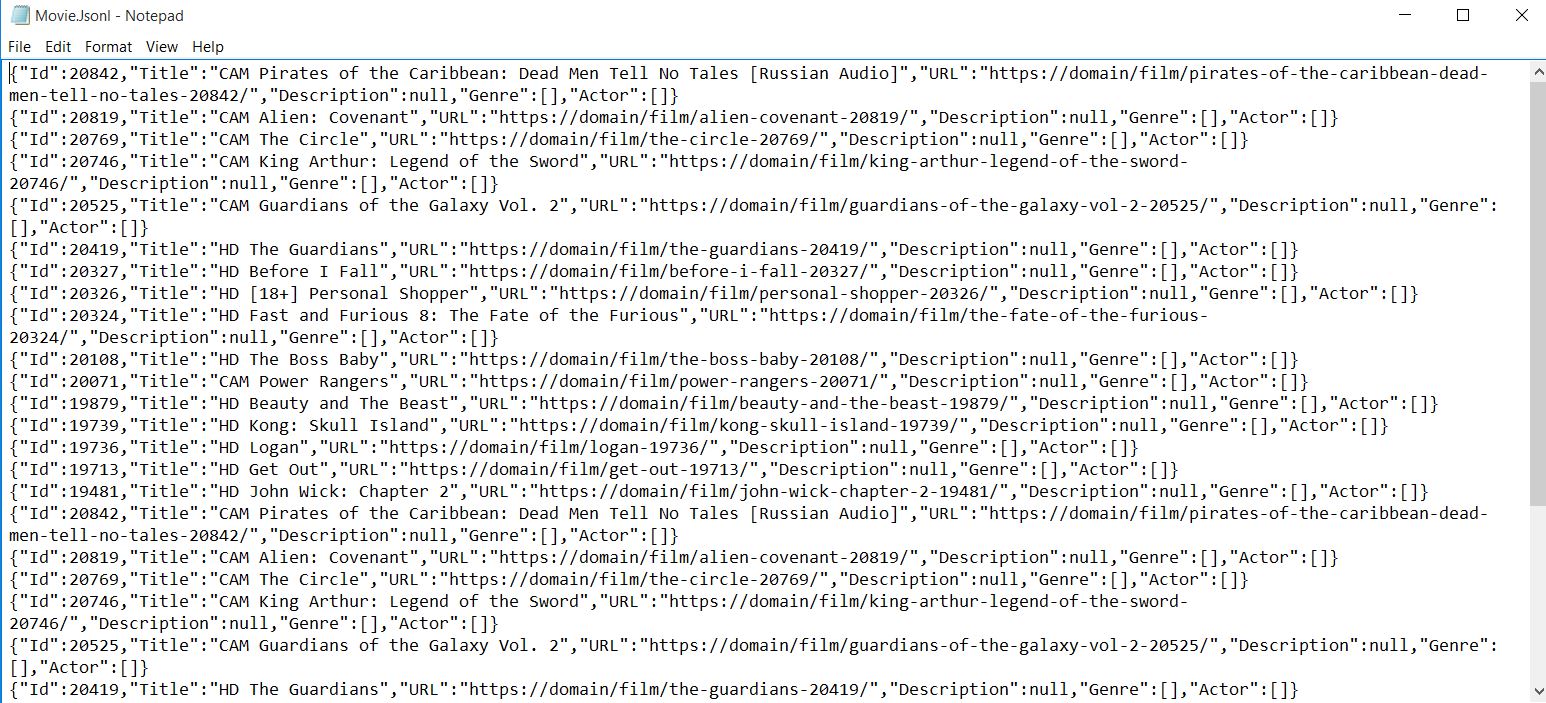
Wynik jest automatycznie serializowany do formatu JSON, co ułatwia importowanie do baz danych lub innych aplikacji.
Jak pobrać dane ze stron ze szczegółami filmów?
Kolejny krok to pobranie danych ze stron ze szczegółami filmów. Pobieranie danych z wielu stron jest częstym wymaganiem, a IronWebScraper ułatwia je dzięki łączeniu żądań w łańcuch.
Jakie dodatkowe dane można pobrać ze stron ze szczegółami filmów?
Strona ze szczegółami filmu, pokazana poniżej, zawiera rozbudowane metadane filmu:

<div class="mvi-content">
    <div class="thumb mvic-thumb"
         style="background-image: url(https://img.gocdn.online/2017/04/28/poster/5a08e94ba02118f22dc30f298c603210-guardians-of-the-galaxy-vol-2.jpg);"></div>
    <div class="mvic-desc">
        <h3>Guardians of the Galaxy Vol. 2</h3>
        <div class="desc">
            Set to the backdrop of Awesome Mixtape #2, Marvel's Guardians of the Galaxy Vol. 2 continues the team's adventures as they travel throughout the cosmos to help Peter Quill learn more about his true parentage.
        </div>
        <div class="mvic-info">
            <div class="mvici-left">
                <p>
                    <strong>Genre: </strong>
                    <a href="https://Domain/genre/action/" title="Action">Action</a>,
                    <a href="https://Domain/genre/adventure/" title="Adventure">Adventure</a>,
                    <a href="https://Domain/genre/sci-fi/" title="Sci-Fi">Sci-Fi</a>
                </p>
                <p>
                    <strong>Actor: </strong>
                    <a target="_blank" href="https://Domain/actor/chris-pratt" title="Chris Pratt">Chris Pratt</a>,
                    <a target="_blank" href="https://Domain/actor/-zoe-saldana" title="Zoe Saldana">Zoe Saldana</a>,
                    <a target="_blank" href="https://Domain/actor/-dave-bautista-" title="Dave Bautista">Dave Bautista</a>
                </p>
                <p>
                    <strong>Director: </strong>
                    <a href="#" title="James Gunn">James Gunn</a>
                </p>
                <p>
                    <strong>Country: </strong>
                    <a href="https://Domain/country/us" title="United States">United States</a>
                </p>
            </div>
            <div class="mvici-right">
                <p><strong>Duration:</strong> 136 min</p>
                <p><strong>Quality:</strong> <span class="quality">CAM</span></p>
                <p><strong>Release:</strong> 2017</p>
                <p><strong>IMDb:</strong> 8.3</p>
            </div>
            <div class="clearfix"></div>
        </div>
        <div class="clearfix"></div>
    </div>
    <div class="clearfix"></div>
</div>Jak dodać właściwości do klasy Movie?
Należy rozszerzyć klasę Movie o nowe właściwości (Description, Genre, Actor, Director, Country, Duration, IMDb Score). W tym przykładzie używane są jedynie Description, Genre i Actor. Zastosowanie List<string> dla gatunków i aktorów ułatwia obsługę wielu wartości:
using System.Collections.Generic;

public class Movie
{
    public int Id { get; set; }
    public string Title { get; set; }
    public string URL { get; set; }
    public string Description { get; set; }
    public List<string> Genre { get; set; }
    public List<string> Actor { get; set; }
}
using System.Collections.Generic;
public class Movie
{
public int Id { get; set; }
public string Title { get; set; }
public string URL { get; set; }
public string Description { get; set; }
public List<string> Genre { get; set; }
public List<string> Actor { get; set; }
}Imports System.Collections.Generic
Public Class Movie
Public Property Id() As Integer
Public Property Title() As String
Public Property URL() As String
Public Property Description() As String
Public Property Genre() As List(Of String)
Public Property Actor() As List(Of String)
End ClassImports System.Collections.Generic
Public Class Movie
Public Property Id() As Integer
Public Property Title() As String
Public Property URL() As String
Public Property Description() As String
Public Property Genre() As List(Of String)
Public Property Actor() As List(Of String)
End ClassJak przechodzić między stronami podczas pobierania danych?
Aby pobrać dane, należy przejść do strony ze szczegółami filmu. IronWebScraper automatycznie zapewnia bezpieczeństwo wątkowe, umożliwiając równoczesne przetwarzanie wielu stron.
Dlaczego warto używać osobnych funkcji analizy dla różnych typów stron?
IronWebScraper umożliwia dodanie wielu funkcji pobierających dane z różnych typów stron. Podział odpowiedzialności ułatwia utrzymanie kodu i obsługę różnych struktur stron. Każda funkcja analizy może skupić się na wyodrębnianiu danych z określonego typu strony.
W jaki sposób MetaData pomaga przekazywać obiekty między funkcjami analizy?
Mechanizm MetaData umożliwia zachowanie stanu między żądaniami. Więcej informacji o zaawansowanych funkcjach pobierania danych ze stron zawiera szczegółowy poradnik:
public class MovieScraper : WebScraper
{
    public override void Init()
    {
        // Initialize scraper settings
        License.LicenseKey = "LicenseKey";
        this.LoggingLevel = WebScraper.LogLevel.All;
        this.WorkingDirectory = AppSetting.GetAppRoot() + @"\MovieSample\Output\";

        // Request homepage content for scraping
        this.Request("https://domain/", Parse);
    }

    public override void Parse(Response response)
    {
        // Iterate over each movie div within the featured movie section
        foreach (var div in response.Css("#movie-featured > div"))
        {
            if (div.Attributes["class"] != "clearfix")
            {
                var movie = new Movie
                {
                    Id = Convert.ToInt32(div.GetAttribute("data-movie-id"))
                };

                var link = div.Css("a")[0];
                movie.Title = link.TextContentClean;
                movie.URL = link.Attributes["href"];

                // Request detailed page
                this.Request(movie.URL, ParseDetails, new MetaData() { { "movie", movie } });
            }
        }
    }

    public void ParseDetails(Response response)
    {
        // Retrieve movie object from metadata
        var movie = response.MetaData.Get<Movie>("movie");
        var div = response.Css("div.mvic-desc")[0];

        // Extract description
        movie.Description = div.Css("div.desc")[0].TextContentClean;

        // Extract genres
        movie.Genre = new List<string>(); // Initialize genre list
        foreach(var genre in div.Css("div > p > a"))
        {
            movie.Genre.Add(genre.TextContentClean);
        }

        // Extract actors
        movie.Actor = new List<string>(); // Initialize actor list
        foreach (var actor in div.Css("div > p:nth-child(2) > a"))
        {
            movie.Actor.Add(actor.TextContentClean);
        }

        // Scrape and store detailed movie data
        Scrape(movie, "Movie.Jsonl");
    }
}
public class MovieScraper : WebScraper
{
public override void Init()
{
// Initialize scraper settings
License.LicenseKey = "LicenseKey";
this.LoggingLevel = WebScraper.LogLevel.All;
this.WorkingDirectory = AppSetting.GetAppRoot() + @"\MovieSample\Output\";
// Request homepage content for scraping
this.Request("https://domain/", Parse);
}
public override void Parse(Response response)
{
// Iterate over each movie div within the featured movie section
foreach (var div in response.Css("#movie-featured > div"))
{
if (div.Attributes["class"] != "clearfix")
{
var movie = new Movie
{
Id = Convert.ToInt32(div.GetAttribute("data-movie-id"))
};
var link = div.Css("a")[0];
movie.Title = link.TextContentClean;
movie.URL = link.Attributes["href"];
// Request detailed page
this.Request(movie.URL, ParseDetails, new MetaData() { { "movie", movie } });
}
}
}
public void ParseDetails(Response response)
{
// Retrieve movie object from metadata
var movie = response.MetaData.Get<Movie>("movie");
var div = response.Css("div.mvic-desc")[0];
// Extract description
movie.Description = div.Css("div.desc")[0].TextContentClean;
// Extract genres
movie.Genre = new List<string>(); // Initialize genre list
foreach(var genre in div.Css("div > p > a"))
{
movie.Genre.Add(genre.TextContentClean);
}
// Extract actors
movie.Actor = new List<string>(); // Initialize actor list
foreach (var actor in div.Css("div > p:nth-child(2) > a"))
{
movie.Actor.Add(actor.TextContentClean);
}
// Scrape and store detailed movie data
Scrape(movie, "Movie.Jsonl");
}
}Public Class MovieScraper
Inherits WebScraper
Public Overrides Sub Init()
' Initialize scraper settings
License.LicenseKey = "LicenseKey"
Me.LoggingLevel = WebScraper.LogLevel.All
Me.WorkingDirectory = AppSetting.GetAppRoot() & "\MovieSample\Output\"
' Request homepage content for scraping
Me.Request("https://domain/", AddressOf Parse)
End Sub
Public Overrides Sub Parse(response As Response)
' Iterate over each movie div within the featured movie section
For Each div In response.Css("#movie-featured > div")
If div.Attributes("class") <> "clearfix" Then
Dim movie As New Movie With {
.Id = Convert.ToInt32(div.GetAttribute("data-movie-id"))
}
Dim link = div.Css("a")(0)
movie.Title = link.TextContentClean
movie.URL = link.Attributes("href")
' Request detailed page
Me.Request(movie.URL, AddressOf ParseDetails, New MetaData() From {{"movie", movie}})
End If
Next
End Sub
Public Sub ParseDetails(response As Response)
' Retrieve movie object from metadata
Dim movie = response.MetaData.Get(Of Movie)("movie")
Dim div = response.Css("div.mvic-desc")(0)
' Extract description
movie.Description = div.Css("div.desc")(0).TextContentClean
' Extract genres
movie.Genre = New List(Of String)() ' Initialize genre list
For Each genre In div.Css("div > p > a")
movie.Genre.Add(genre.TextContentClean)
Next
' Extract actors
movie.Actor = New List(Of String)() ' Initialize actor list
For Each actor In div.Css("div > p:nth-child(2) > a")
movie.Actor.Add(actor.TextContentClean)
Next
' Scrape and store detailed movie data
Scrape(movie, "Movie.Jsonl")
End Sub
End ClassPublic Class MovieScraper
Inherits WebScraper
Public Overrides Sub Init()
' Initialize scraper settings
License.LicenseKey = "LicenseKey"
Me.LoggingLevel = WebScraper.LogLevel.All
Me.WorkingDirectory = AppSetting.GetAppRoot() & "\MovieSample\Output\"
' Request homepage content for scraping
Me.Request("https://domain/", AddressOf Parse)
End Sub
Public Overrides Sub Parse(response As Response)
' Iterate over each movie div within the featured movie section
For Each div In response.Css("#movie-featured > div")
If div.Attributes("class") <> "clearfix" Then
Dim movie As New Movie With {
.Id = Convert.ToInt32(div.GetAttribute("data-movie-id"))
}
Dim link = div.Css("a")(0)
movie.Title = link.TextContentClean
movie.URL = link.Attributes("href")
' Request detailed page
Me.Request(movie.URL, AddressOf ParseDetails, New MetaData() From {{"movie", movie}})
End If
Next
End Sub
Public Sub ParseDetails(response As Response)
' Retrieve movie object from metadata
Dim movie = response.MetaData.Get(Of Movie)("movie")
Dim div = response.Css("div.mvic-desc")(0)
' Extract description
movie.Description = div.Css("div.desc")(0).TextContentClean
' Extract genres
movie.Genre = New List(Of String)() ' Initialize genre list
For Each genre In div.Css("div > p > a")
movie.Genre.Add(genre.TextContentClean)
Next
' Extract actors
movie.Actor = New List(Of String)() ' Initialize actor list
For Each actor In div.Css("div > p:nth-child(2) > a")
movie.Actor.Add(actor.TextContentClean)
Next
' Scrape and store detailed movie data
Scrape(movie, "Movie.Jsonl")
End Sub
End ClassJak działa pobieranie danych z wielu stron?
Co nowego?
- Dodać funkcje (np.
ParseDetails) do pobierania danych ze stron ze szczegółami filmów, podobnie jak przy pobieraniu danych ze sklepu internetowego. - Przenieść wywołanie funkcji
Scrape, która generuje pliki, do nowej funkcji, aby zapisywać dane dopiero po zebraniu wszystkich szczegółów. - Użyć mechanizmu IronWebScraper (
MetaData), aby przekazać obiekty reprezentujące filmy do nowych funkcji pobierających dane i zachować stan obiektów między żądaniami. - Pobrać dane ze stron i zapisać obiekty reprezentujące filmy w plikach zawierających komplet informacji.
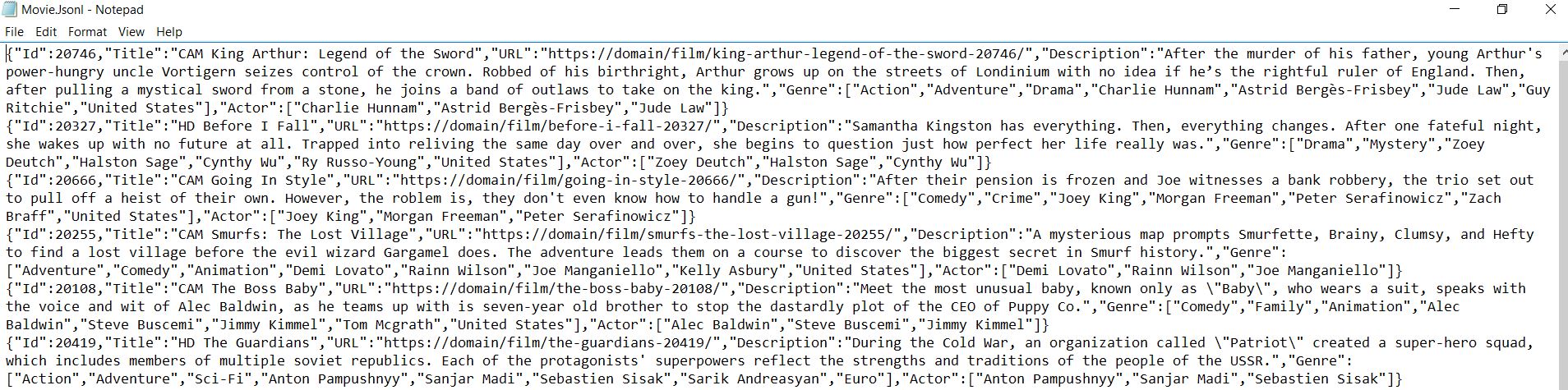
Więcej informacji o dostępnych metodach i właściwościach zawiera dokumentacja API. IronWebScraper zapewnia niezawodny mechanizm wyodrębniania ustrukturyzowanych danych z witryn internetowych, przydatny w projektach zbierania i analizy danych.
Najczęściej zadawane pytania
Do czego służy IronWebScraper w C#?
IronWebScraper służy do ekstrakcji danych filmowych ze stron internetowych poprzez parsowanie elementów HTML i tworzenie uporządkowanych zbiorów danych, co znacznie upraszcza konwersję nieustrukturyzowanej treści webowej na zorganizowane dane.
Jak zainstalować IronWebScraper w projekcie C#?
Możesz zainstalować IronWebScraper w projekcie C# za pomocą Menedżera Pakietów NuGet, co pozwala łatwo zintegrować go z projektem do zadań związanych z przeszukiwaniem stron internetowych.
Które selektory CSS są powszechnie używane do przeszukiwania stron z filmami?
Selektory CSS są używane do nawigacji i wyboru elementów w strukturze HTML strony z filmami. Na przykład klasa .movie-item może być użyta do wyboru divów zawierających informacje o filmach, takie jak tytuły czy URL-e.
Czy IronWebScraper może obsługiwać przeszukiwanie wielu stron?
Tak, IronWebScraper może skutecznie obsługiwać skrobanie wielu stron. Używa mechanizmu łańcuchowego zapytań do nawigowania między różnymi stronami i skrobania szczegółowych danych.
Jaka jest korzyść z używania obiektów typowanych w IronWebScraper?
Używanie obiektów typowanych, takich jak klasa Movie, pozwala na lepszą organizację kodu, lepsze wsparcie IntelliSense i sprawdzanie typów w czasie kompilacji podczas scrapingu danych ze stron internetowych.
Jak mogę zorganizować zebrane dane ze stron filmowych?
Zebrane dane mogą być zorganizowane w formacie JSON przy użyciu metody Scrape IronWebScraper, co pomaga w zapisywaniu danych strukturalnych w formacie łatwym do zarządzania i analizy.
Jaką rolę pełni funkcja `MetaData` w IronWebScraper?
Funkcja MetaData w IronWebScraper pomaga w utrzymaniu stanu obiektu przez wszystkie zadania, co pozwala na przekazywanie danych między wieloma funkcjami parsującymi, co jest przydatne w scrapingu wielostronicowym.
Dlaczego warto wybrać IronWebScraper do ekstrakcji danych?
IronWebScraper oferuje niezawodny framework do efektywnego i wydajnego web scrapingu z funkcjami takimi jak wielostronicowy scraping, typowane obiekty danych oraz szczegółowa dokumentacja API, co czyni go idealnym do skomplikowanych projektów zbierania danych.
Jak IronWebScraper poprawia zarządzanie plikami wyjściowymi?
IronWebScraper poprawia zarządzanie poprzez użycie katalogu roboczego do organizowania wszystkich plików wyjściowych z operacji scrapingu w jednym, wcześniej zdefiniowanym miejscu, co ułatwia projekty scrapingu na wielką skalę.
Jakie dodatkowe dane może IronWebScraper wyodrębnić ze szczegółowych stron z filmami?
IronWebScraper może wydobyć dodatkowe dane, takie jak opisy filmów, gatunki oraz aktorów ze szczegółowych stron filmowych, używając selektorów CSS oraz niestandardowych funkcji scrapingu do zebrania kompleksowych danych.

Curtis Chau posiada tytuł licencjata z informatyki (Uniwersytet Carleton) i specjalizuje się w front-endowym rozwoju, z ekspertką w Node.js, TypeScript, JavaScript i React. Pasjonuje się tworzeniem intuicyjnych i estetycznie przyjemnych interfejsów użytkownika, Curtis cieszy się pracą z nowoczesnymi frameworkami i tworzeniem dobrze zorganizowanych, atrakcyjnych wizualnie podręczników.

