
使用 C# 和 IronWebScraper 從線上電影網站擷取資料

IronWebScraper 透過解析 HTML 元素從網站擷取電影資料,並建立具明確型別的物件以儲存結構化資料。它也使用中繼資料在頁面間導覽,建立完整的電影資料集。這套 C# 網頁爬取程式庫可輕鬆將非結構化的網頁內容整理成可供分析的資料。
快速入門:使用 C# 爬取電影資料- 透過 NuGet 套件管理員安裝
IronWebScraper - 建立繼承自
WebScraper的類別 - 覆寫
Init()以設定授權並向目標 URL 發出請求 - 覆寫
Parse(),使用 CSS 選擇器擷取電影資料 - 使用
Scrape()方法以 JSON 格式儲存資料
-
1使用 IronWebScraper 安裝 NuGet Package Manager
-
2複製並運行這段程式碼。
using IronWebScraper; using System; public class QuickstartMovieScraper : WebScraper { public override void Init() { // Set your license key License.LicenseKey = "YOUR-LICENSE-KEY"; // Configure scraper settings this.LoggingLevel = LogLevel.All; this.WorkingDirectory = @"C:\MovieData\Output\"; // Start scraping from the homepage this.Request("https://example-movie-site.com", Parse); } public override void Parse(Response response) { // Extract movie titles using CSS selectors foreach (var movieDiv in response.Css(".movie-item")) { var title = movieDiv.Css("h2")[0].TextContentClean; var url = movieDiv.Css("a")[0].Attributes["href"]; // Save the scraped data Scrape(new { Title = title, Url = url }, "movies.json"); } } } // Run the scraper var scraper = new QuickstartMovieScraper(); scraper.Start();Imports IronWebScraper Imports System Public Class QuickstartMovieScraper Inherits WebScraper Public Overrides Sub Init() ' Set your license key License.LicenseKey = "YOUR-LICENSE-KEY" ' Configure scraper settings Me.LoggingLevel = LogLevel.All Me.WorkingDirectory = "C:\MovieData\Output\" ' Start scraping from the homepage Me.Request("https://example-movie-site.com", AddressOf Parse) End Sub Public Overrides Sub Parse(response As Response) ' Extract movie titles using CSS selectors For Each movieDiv In response.Css(".movie-item") Dim title = movieDiv.Css("h2")(0).TextContentClean Dim url = movieDiv.Css("a")(0).Attributes("href") ' Save the scraped data Scrape(New With {Key .Title = title, Key .Url = url}, "movies.json") Next End Sub End Class ' Run the scraper Dim scraper As New QuickstartMovieScraper() scraper.Start()Imports IronWebScraper Imports System Public Class QuickstartMovieScraper Inherits WebScraper Public Overrides Sub Init() ' Set your license key License.LicenseKey = "YOUR-LICENSE-KEY" ' Configure scraper settings Me.LoggingLevel = LogLevel.All Me.WorkingDirectory = "C:\MovieData\Output\" ' Start scraping from the homepage Me.Request("https://example-movie-site.com", AddressOf Parse) End Sub Public Overrides Sub Parse(response As Response) ' Extract movie titles using CSS selectors For Each movieDiv In response.Css(".movie-item") Dim title = movieDiv.Css("h2")(0).TextContentClean Dim url = movieDiv.Css("a")(0).Attributes("href") ' Save the scraped data Scrape(New With {Key .Title = title, Key .Url = url}, "movies.json") Next End Sub End Class ' Run the scraper Dim scraper As New QuickstartMovieScraper() scraper.Start() -
3部署到您的生產環境進行測試
立即在您的項目中開始使用 IronWebScraper,並使用 免費試用
如何建立電影資料爬取類別?
從實際網站的範例開始。我們會使用 C# 網頁爬取教學中的技巧來爬取電影網站。
新增一個類別並命名為 MovieScraper:
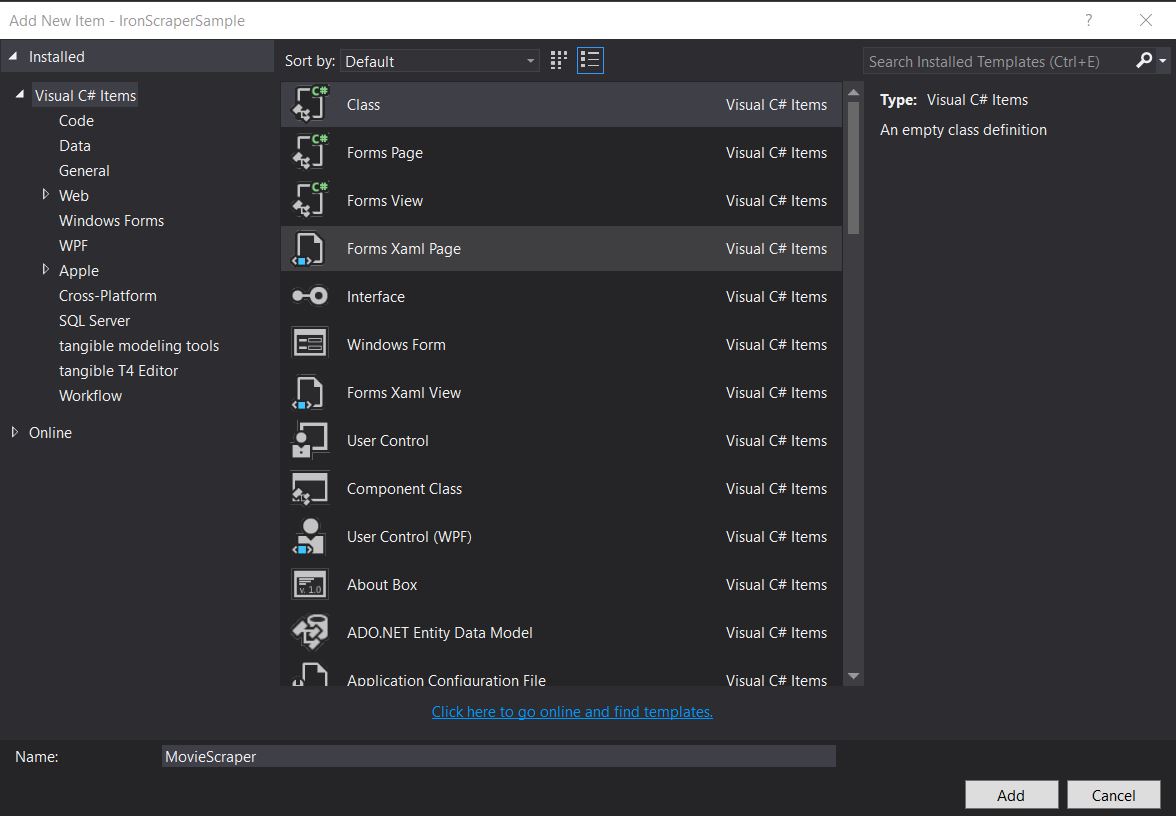
建立專用的爬取類別有助於組織程式碼並重複使用。這種做法符合物件導向原則,也方便日後擴充功能。
目標網站的結構是什麼樣的?
先檢視要爬取的網站結構。了解網站結構是有效爬取資料的關鍵。依照從線上電影網站爬取資料的指南中的做法,先分析 HTML 結構:
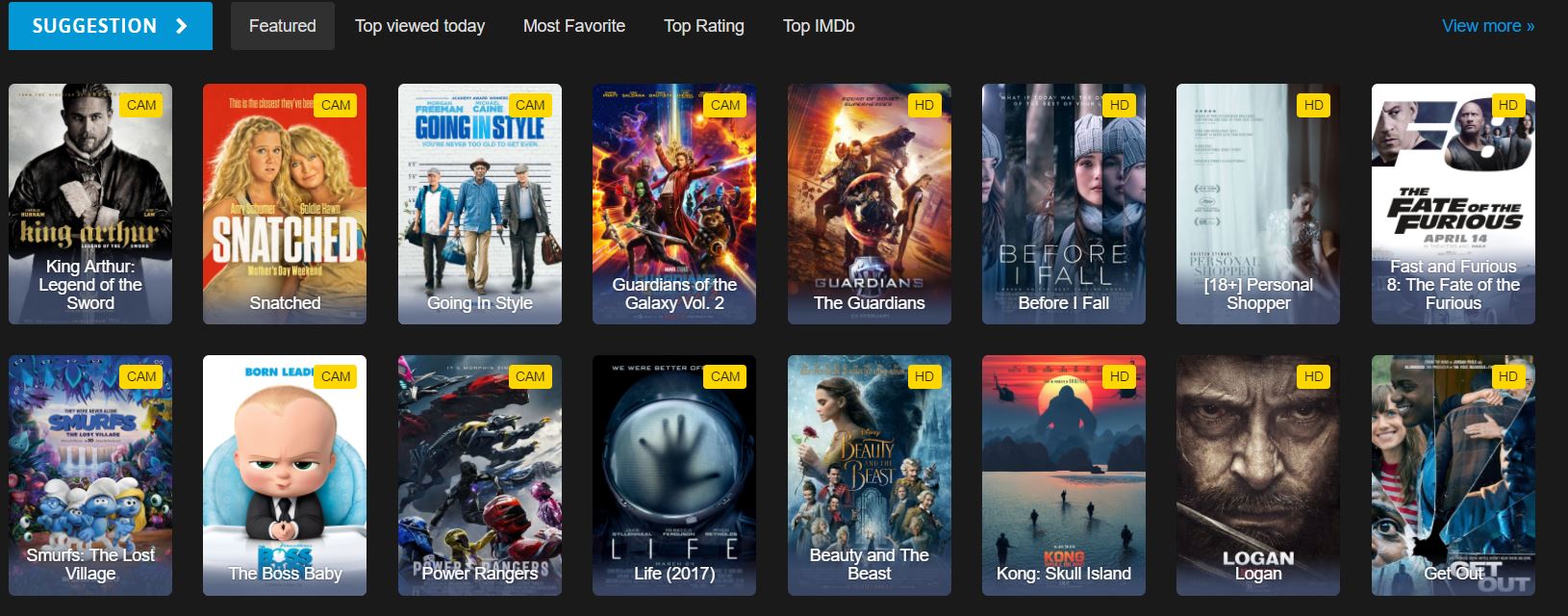
哪些HTML元素包含電影資料?
這是我們在網站上看到的首頁 HTML 的一部分。檢視 HTML 結構有助於找出要使用的正確 CSS 選擇器:
<div id="movie-featured" class="movies-list movies-list-full tab-pane in fade active">
    <div data-movie-id="20746" class="ml-item">
        <a href="https://website.com/film/king-arthur-legend-of-the-sword-20746/">
            <span class="mli-quality">CAM</span>
            <img data-original="https://img.gocdn.online/2017/05/16/poster/2116d6719c710eabe83b377463230fbe-king-arthur-legend-of-the-sword.jpg"
                 class="lazy thumb mli-thumb" alt="King Arthur: Legend of the Sword"
                 src="https://img.gocdn.online/2017/05/16/poster/2116d6719c710eabe83b377463230fbe-king-arthur-legend-of-the-sword.jpg"
                 style="display: inline-block;">
            <span class="mli-info"><h2>King Arthur: Legend of the Sword</h2></span>
        </a>
    </div>
    <div data-movie-id="20724" class="ml-item">
        <a href="https://website.com/film/snatched-20724/">
            <span class="mli-quality">CAM</span>
            <img data-original="https://img.gocdn.online/2017/05/16/poster/5ef66403dc331009bdb5aa37cfe819ba-snatched.jpg"
                 class="lazy thumb mli-thumb" alt="Snatched"
                 src="https://img.gocdn.online/2017/05/16/poster/5ef66403dc331009bdb5aa37cfe819ba-snatched.jpg"
                 style="display: inline-block;">
            <span class="mli-info"><h2>Snatched</h2></span>
        </a>
    </div>
</div>這段 HTML 包含電影 ID、片名及詳細資料頁面的連結。每部電影都位於 CSS 類別為 ml-item 的 div 元素內,並有唯一的 data-movie-id 屬性可供識別。
如何實作基本的電影資料爬取?
接著開始爬取這些資料。執行爬取程式前,請依下列範例正確設定授權金鑰:
public class MovieScraper : WebScraper
{
    public override void Init()
    {
        // Initialize scraper settings
        License.LicenseKey = "LicenseKey";
        this.LoggingLevel = WebScraper.LogLevel.All;
        this.WorkingDirectory = AppSetting.GetAppRoot() + @"\MovieSample\Output\";

        // Request homepage content for scraping
        this.Request("www.website.com", Parse);
    }

    public override void Parse(Response response)
    {
        // Iterate over each movie div within the featured movie section
        foreach (var div in response.Css("#movie-featured > div"))
        {
            if (div.Attributes["class"] != "clearfix")
            {
                var movieId = Convert.ToInt32(div.GetAttribute("data-movie-id"));
                var link = div.Css("a")[0];
                var movieTitle = link.TextContentClean;

                // Scrape and store movie data as key-value pairs
                Scrape(new ScrapedData()
                {
                    { "MovieId", movieId },
                    { "MovieTitle", movieTitle }
                }, "Movie.Jsonl");
            }
        }
    }
}
public class MovieScraper : WebScraper
{
public override void Init()
{
// Initialize scraper settings
License.LicenseKey = "LicenseKey";
this.LoggingLevel = WebScraper.LogLevel.All;
this.WorkingDirectory = AppSetting.GetAppRoot() + @"\MovieSample\Output\";
// Request homepage content for scraping
this.Request("www.website.com", Parse);
}
public override void Parse(Response response)
{
// Iterate over each movie div within the featured movie section
foreach (var div in response.Css("#movie-featured > div"))
{
if (div.Attributes["class"] != "clearfix")
{
var movieId = Convert.ToInt32(div.GetAttribute("data-movie-id"));
var link = div.Css("a")[0];
var movieTitle = link.TextContentClean;
// Scrape and store movie data as key-value pairs
Scrape(new ScrapedData()
{
{ "MovieId", movieId },
{ "MovieTitle", movieTitle }
}, "Movie.Jsonl");
}
}
}
}Public Class MovieScraper
Inherits WebScraper
Public Overrides Sub Init()
' Initialize scraper settings
License.LicenseKey = "LicenseKey"
Me.LoggingLevel = WebScraper.LogLevel.All
Me.WorkingDirectory = AppSetting.GetAppRoot() & "\MovieSample\Output\"
' Request homepage content for scraping
Me.Request("www.website.com", AddressOf Parse)
End Sub
Public Overrides Sub Parse(ByVal response As Response)
' Iterate over each movie div within the featured movie section
For Each div In response.Css("#movie-featured > div")
If div.Attributes("class") <> "clearfix" Then
Dim movieId = Convert.ToInt32(div.GetAttribute("data-movie-id"))
Dim link = div.Css("a")(0)
Dim movieTitle = link.TextContentClean
' Scrape and store movie data as key-value pairs
Scrape(New ScrapedData() From {
{"MovieId", movieId},
{"MovieTitle", movieTitle}
}, "Movie.Jsonl")
End If
Next
End Sub
End ClassPublic Class MovieScraper
Inherits WebScraper
Public Overrides Sub Init()
' Initialize scraper settings
License.LicenseKey = "LicenseKey"
Me.LoggingLevel = WebScraper.LogLevel.All
Me.WorkingDirectory = AppSetting.GetAppRoot() & "\MovieSample\Output\"
' Request homepage content for scraping
Me.Request("www.website.com", AddressOf Parse)
End Sub
Public Overrides Sub Parse(ByVal response As Response)
' Iterate over each movie div within the featured movie section
For Each div In response.Css("#movie-featured > div")
If div.Attributes("class") <> "clearfix" Then
Dim movieId = Convert.ToInt32(div.GetAttribute("data-movie-id"))
Dim link = div.Css("a")(0)
Dim movieTitle = link.TextContentClean
' Scrape and store movie data as key-value pairs
Scrape(New ScrapedData() From {
{"MovieId", movieId},
{"MovieTitle", movieTitle}
}, "Movie.Jsonl")
End If
Next
End Sub
End Class工作目錄屬性是用來做什麼的?
本程式碼的新功能是什麼?
Working Directory 屬性用來設定儲存爬取資料及相關檔案的主要工作目錄。將輸出檔案集中在同一個位置,有助於管理大型爬取專案。若目錄不存在,程式會自動建立。
什麼時候應該使用CSS選擇器而非屬性?
額外考量:
若要依元素在結構中的位置或 CSS 類別名稱找出元素,適合使用 CSS 選擇器。若要擷取 ID 或自訂資料屬性等特定值,則適合直接存取屬性。在此範例中,我們透過 CSS 選擇器(#movie-featured > div)在 DOM 結構中找出元素,再透過屬性(data-movie-id)擷取特定值。
如何建立具明確型別的物件來儲存爬取資料?
建立具明確型別的物件,以固定結構儲存爬取的資料。強型別物件有助於組織程式碼,也支援 IntelliSense 和編譯時期的型別檢查。
實作 Movie 類別以儲存結構化資料:
public class Movie
{
    public int Id { get; set; }
    public string Title { get; set; }
    public string URL { get; set; }
}
public class Movie
{
public int Id { get; set; }
public string Title { get; set; }
public string URL { get; set; }
}Public Class Movie
Public Property Id As Integer
Public Property Title As String
Public Property URL As String
End ClassPublic Class Movie
Public Property Id As Integer
Public Property Title As String
Public Property URL As String
End Class具明確型別的物件如何改善資料組織?
更新程式碼,以具明確型別的 Movie 類別取代通用的 ScrapedData 字典:
public class MovieScraper : WebScraper
{
    public override void Init()
    {
        // Initialize scraper settings
        License.LicenseKey = "LicenseKey";
        this.LoggingLevel = WebScraper.LogLevel.All;
        this.WorkingDirectory = AppSetting.GetAppRoot() + @"\MovieSample\Output\";

        // Request homepage content for scraping
        this.Request("https://website.com/", Parse);
    }

    public override void Parse(Response response)
    {
        // Iterate over each movie div within the featured movie section
        foreach (var div in response.Css("#movie-featured > div"))
        {
            if (div.Attributes["class"] != "clearfix")
            {
                var movie = new Movie
                {
                    Id = Convert.ToInt32(div.GetAttribute("data-movie-id"))
                };

                var link = div.Css("a")[0];
                movie.Title = link.TextContentClean;
                movie.URL = link.Attributes["href"];

                // Scrape and store movie object
                Scrape(movie, "Movie.Jsonl");
            }
        }
    }
}
public class MovieScraper : WebScraper
{
public override void Init()
{
// Initialize scraper settings
License.LicenseKey = "LicenseKey";
this.LoggingLevel = WebScraper.LogLevel.All;
this.WorkingDirectory = AppSetting.GetAppRoot() + @"\MovieSample\Output\";
// Request homepage content for scraping
this.Request("https://website.com/", Parse);
}
public override void Parse(Response response)
{
// Iterate over each movie div within the featured movie section
foreach (var div in response.Css("#movie-featured > div"))
{
if (div.Attributes["class"] != "clearfix")
{
var movie = new Movie
{
Id = Convert.ToInt32(div.GetAttribute("data-movie-id"))
};
var link = div.Css("a")[0];
movie.Title = link.TextContentClean;
movie.URL = link.Attributes["href"];
// Scrape and store movie object
Scrape(movie, "Movie.Jsonl");
}
}
}
}Public Class MovieScraper
Inherits WebScraper
Public Overrides Sub Init()
' Initialize scraper settings
License.LicenseKey = "LicenseKey"
Me.LoggingLevel = WebScraper.LogLevel.All
Me.WorkingDirectory = AppSetting.GetAppRoot() & "\MovieSample\Output\"
' Request homepage content for scraping
Me.Request("https://website.com/", AddressOf Parse)
End Sub
Public Overrides Sub Parse(response As Response)
' Iterate over each movie div within the featured movie section
For Each div In response.Css("#movie-featured > div")
If div.Attributes("class") <> "clearfix" Then
Dim movie As New Movie With {
.Id = Convert.ToInt32(div.GetAttribute("data-movie-id"))
}
Dim link = div.Css("a")(0)
movie.Title = link.TextContentClean
movie.URL = link.Attributes("href")
' Scrape and store movie object
Scrape(movie, "Movie.Jsonl")
End If
Next
End Sub
End ClassPublic Class MovieScraper
Inherits WebScraper
Public Overrides Sub Init()
' Initialize scraper settings
License.LicenseKey = "LicenseKey"
Me.LoggingLevel = WebScraper.LogLevel.All
Me.WorkingDirectory = AppSetting.GetAppRoot() & "\MovieSample\Output\"
' Request homepage content for scraping
Me.Request("https://website.com/", AddressOf Parse)
End Sub
Public Overrides Sub Parse(response As Response)
' Iterate over each movie div within the featured movie section
For Each div In response.Css("#movie-featured > div")
If div.Attributes("class") <> "clearfix" Then
Dim movie As New Movie With {
.Id = Convert.ToInt32(div.GetAttribute("data-movie-id"))
}
Dim link = div.Css("a")(0)
movie.Title = link.TextContentClean
movie.URL = link.Attributes("href")
' Scrape and store movie object
Scrape(movie, "Movie.Jsonl")
End If
Next
End Sub
End Class爬取方法以何種格式儲存具明確型別的物件?
有什麼新功能?
- 我們實作了
Movie類別來儲存爬取的資料,以確保型別安全並改善程式碼組織。 - 將電影物件傳給
Scrape方法。此方法會依物件的格式儲存資料,如下所示:
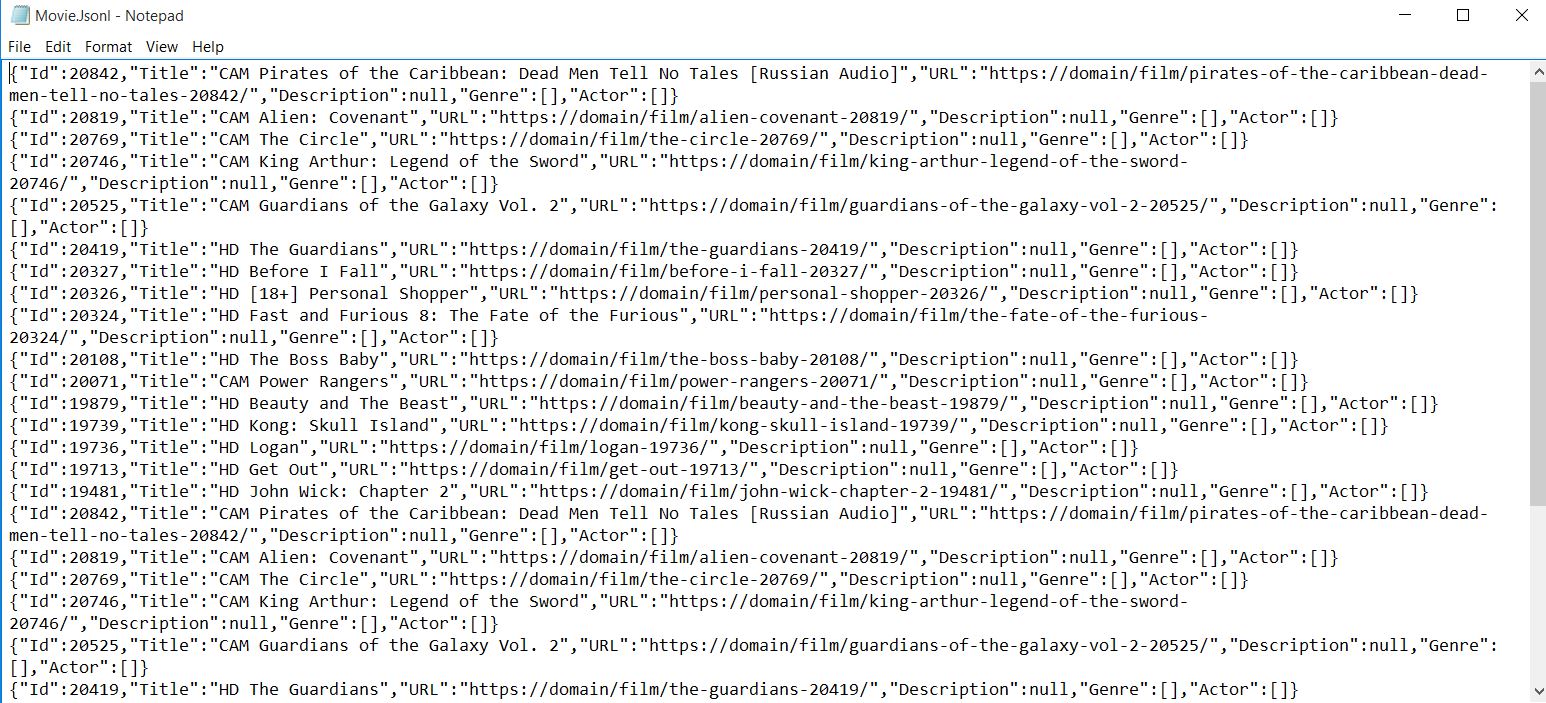
輸出內容會自動序列化為 JSON 格式,方便匯入資料庫或其他應用程式。
如何爬取電影詳細資料頁面?
接著爬取電影的詳細資料頁面。爬取多個頁面是常見的需求,IronWebScraper 的請求串接機制能簡化這項工作。
可從詳細資料頁面擷取哪些額外資料?
電影頁面如下所示,包含各部電影的豐富中繼資料:

<div class="mvi-content">
    <div class="thumb mvic-thumb"
         style="background-image: url(https://img.gocdn.online/2017/04/28/poster/5a08e94ba02118f22dc30f298c603210-guardians-of-the-galaxy-vol-2.jpg);"></div>
    <div class="mvic-desc">
        <h3>Guardians of the Galaxy Vol. 2</h3>
        <div class="desc">
            Set to the backdrop of Awesome Mixtape #2, Marvel's Guardians of the Galaxy Vol. 2 continues the team's adventures as they travel throughout the cosmos to help Peter Quill learn more about his true parentage.
        </div>
        <div class="mvic-info">
            <div class="mvici-left">
                <p>
                    <strong>Genre: </strong>
                    <a href="https://Domain/genre/action/" title="Action">Action</a>,
                    <a href="https://Domain/genre/adventure/" title="Adventure">Adventure</a>,
                    <a href="https://Domain/genre/sci-fi/" title="Sci-Fi">Sci-Fi</a>
                </p>
                <p>
                    <strong>Actor: </strong>
                    <a target="_blank" href="https://Domain/actor/chris-pratt" title="Chris Pratt">Chris Pratt</a>,
                    <a target="_blank" href="https://Domain/actor/-zoe-saldana" title="Zoe Saldana">Zoe Saldana</a>,
                    <a target="_blank" href="https://Domain/actor/-dave-bautista-" title="Dave Bautista">Dave Bautista</a>
                </p>
                <p>
                    <strong>Director: </strong>
                    <a href="#" title="James Gunn">James Gunn</a>
                </p>
                <p>
                    <strong>Country: </strong>
                    <a href="https://Domain/country/us" title="United States">United States</a>
                </p>
            </div>
            <div class="mvici-right">
                <p><strong>Duration:</strong> 136 min</p>
                <p><strong>Quality:</strong> <span class="quality">CAM</span></p>
                <p><strong>Release:</strong> 2017</p>
                <p><strong>IMDb:</strong> 8.3</p>
            </div>
            <div class="clearfix"></div>
        </div>
        <div class="clearfix"></div>
    </div>
    <div class="clearfix"></div>
</div>如何擴充電影類別以新增屬性?
擴充 Movie 類別可新增以下屬性(Description、Genre、Actor、Director、Country、Duration、IMDb Score),本範例只使用 Description、Genre 和 Actor。使用 List<string> 可儲存多種電影類型及多位演員:
using System.Collections.Generic;

public class Movie
{
    public int Id { get; set; }
    public string Title { get; set; }
    public string URL { get; set; }
    public string Description { get; set; }
    public List<string> Genre { get; set; }
    public List<string> Actor { get; set; }
}
using System.Collections.Generic;
public class Movie
{
public int Id { get; set; }
public string Title { get; set; }
public string URL { get; set; }
public string Description { get; set; }
public List<string> Genre { get; set; }
public List<string> Actor { get; set; }
}Imports System.Collections.Generic
Public Class Movie
Public Property Id() As Integer
Public Property Title() As String
Public Property URL() As String
Public Property Description() As String
Public Property Genre() As List(Of String)
Public Property Actor() As List(Of String)
End ClassImports System.Collections.Generic
Public Class Movie
Public Property Id() As Integer
Public Property Title() As String
Public Property URL() As String
Public Property Description() As String
Public Property Genre() As List(Of String)
Public Property Actor() As List(Of String)
End Class爬取時如何在頁面之間導覽?
前往詳細資料頁面以爬取資料。IronWebScraper 會自動處理執行緒安全性,因此可以同時處理多個頁面。
為何要對不同頁面類型使用多個解析函式?
IronWebScraper 允許新增多個爬取函式,以處理不同格式的頁面。將各項工作分開,可讓程式碼更容易維護,也能妥善處理不同的頁面結構。每個解析函式都能專注於擷取特定類型頁面的資料。
中繼資料如何協助在解析函式之間傳遞物件?
MetaData 可用來在請求之間保留狀態。請參閱詳細指南,了解更多進階網頁爬取功能:
public class MovieScraper : WebScraper
{
    public override void Init()
    {
        // Initialize scraper settings
        License.LicenseKey = "LicenseKey";
        this.LoggingLevel = WebScraper.LogLevel.All;
        this.WorkingDirectory = AppSetting.GetAppRoot() + @"\MovieSample\Output\";

        // Request homepage content for scraping
        this.Request("https://domain/", Parse);
    }

    public override void Parse(Response response)
    {
        // Iterate over each movie div within the featured movie section
        foreach (var div in response.Css("#movie-featured > div"))
        {
            if (div.Attributes["class"] != "clearfix")
            {
                var movie = new Movie
                {
                    Id = Convert.ToInt32(div.GetAttribute("data-movie-id"))
                };

                var link = div.Css("a")[0];
                movie.Title = link.TextContentClean;
                movie.URL = link.Attributes["href"];

                // Request detailed page
                this.Request(movie.URL, ParseDetails, new MetaData() { { "movie", movie } });
            }
        }
    }

    public void ParseDetails(Response response)
    {
        // Retrieve movie object from metadata
        var movie = response.MetaData.Get<Movie>("movie");
        var div = response.Css("div.mvic-desc")[0];

        // Extract description
        movie.Description = div.Css("div.desc")[0].TextContentClean;

        // Extract genres
        movie.Genre = new List<string>(); // Initialize genre list
        foreach(var genre in div.Css("div > p > a"))
        {
            movie.Genre.Add(genre.TextContentClean);
        }

        // Extract actors
        movie.Actor = new List<string>(); // Initialize actor list
        foreach (var actor in div.Css("div > p:nth-child(2) > a"))
        {
            movie.Actor.Add(actor.TextContentClean);
        }

        // Scrape and store detailed movie data
        Scrape(movie, "Movie.Jsonl");
    }
}
public class MovieScraper : WebScraper
{
public override void Init()
{
// Initialize scraper settings
License.LicenseKey = "LicenseKey";
this.LoggingLevel = WebScraper.LogLevel.All;
this.WorkingDirectory = AppSetting.GetAppRoot() + @"\MovieSample\Output\";
// Request homepage content for scraping
this.Request("https://domain/", Parse);
}
public override void Parse(Response response)
{
// Iterate over each movie div within the featured movie section
foreach (var div in response.Css("#movie-featured > div"))
{
if (div.Attributes["class"] != "clearfix")
{
var movie = new Movie
{
Id = Convert.ToInt32(div.GetAttribute("data-movie-id"))
};
var link = div.Css("a")[0];
movie.Title = link.TextContentClean;
movie.URL = link.Attributes["href"];
// Request detailed page
this.Request(movie.URL, ParseDetails, new MetaData() { { "movie", movie } });
}
}
}
public void ParseDetails(Response response)
{
// Retrieve movie object from metadata
var movie = response.MetaData.Get<Movie>("movie");
var div = response.Css("div.mvic-desc")[0];
// Extract description
movie.Description = div.Css("div.desc")[0].TextContentClean;
// Extract genres
movie.Genre = new List<string>(); // Initialize genre list
foreach(var genre in div.Css("div > p > a"))
{
movie.Genre.Add(genre.TextContentClean);
}
// Extract actors
movie.Actor = new List<string>(); // Initialize actor list
foreach (var actor in div.Css("div > p:nth-child(2) > a"))
{
movie.Actor.Add(actor.TextContentClean);
}
// Scrape and store detailed movie data
Scrape(movie, "Movie.Jsonl");
}
}Public Class MovieScraper
Inherits WebScraper
Public Overrides Sub Init()
' Initialize scraper settings
License.LicenseKey = "LicenseKey"
Me.LoggingLevel = WebScraper.LogLevel.All
Me.WorkingDirectory = AppSetting.GetAppRoot() & "\MovieSample\Output\"
' Request homepage content for scraping
Me.Request("https://domain/", AddressOf Parse)
End Sub
Public Overrides Sub Parse(response As Response)
' Iterate over each movie div within the featured movie section
For Each div In response.Css("#movie-featured > div")
If div.Attributes("class") <> "clearfix" Then
Dim movie As New Movie With {
.Id = Convert.ToInt32(div.GetAttribute("data-movie-id"))
}
Dim link = div.Css("a")(0)
movie.Title = link.TextContentClean
movie.URL = link.Attributes("href")
' Request detailed page
Me.Request(movie.URL, AddressOf ParseDetails, New MetaData() From {{"movie", movie}})
End If
Next
End Sub
Public Sub ParseDetails(response As Response)
' Retrieve movie object from metadata
Dim movie = response.MetaData.Get(Of Movie)("movie")
Dim div = response.Css("div.mvic-desc")(0)
' Extract description
movie.Description = div.Css("div.desc")(0).TextContentClean
' Extract genres
movie.Genre = New List(Of String)() ' Initialize genre list
For Each genre In div.Css("div > p > a")
movie.Genre.Add(genre.TextContentClean)
Next
' Extract actors
movie.Actor = New List(Of String)() ' Initialize actor list
For Each actor In div.Css("div > p:nth-child(2) > a")
movie.Actor.Add(actor.TextContentClean)
Next
' Scrape and store detailed movie data
Scrape(movie, "Movie.Jsonl")
End Sub
End ClassPublic Class MovieScraper
Inherits WebScraper
Public Overrides Sub Init()
' Initialize scraper settings
License.LicenseKey = "LicenseKey"
Me.LoggingLevel = WebScraper.LogLevel.All
Me.WorkingDirectory = AppSetting.GetAppRoot() & "\MovieSample\Output\"
' Request homepage content for scraping
Me.Request("https://domain/", AddressOf Parse)
End Sub
Public Overrides Sub Parse(response As Response)
' Iterate over each movie div within the featured movie section
For Each div In response.Css("#movie-featured > div")
If div.Attributes("class") <> "clearfix" Then
Dim movie As New Movie With {
.Id = Convert.ToInt32(div.GetAttribute("data-movie-id"))
}
Dim link = div.Css("a")(0)
movie.Title = link.TextContentClean
movie.URL = link.Attributes("href")
' Request detailed page
Me.Request(movie.URL, AddressOf ParseDetails, New MetaData() From {{"movie", movie}})
End If
Next
End Sub
Public Sub ParseDetails(response As Response)
' Retrieve movie object from metadata
Dim movie = response.MetaData.Get(Of Movie)("movie")
Dim div = response.Css("div.mvic-desc")(0)
' Extract description
movie.Description = div.Css("div.desc")(0).TextContentClean
' Extract genres
movie.Genre = New List(Of String)() ' Initialize genre list
For Each genre In div.Css("div > p > a")
movie.Genre.Add(genre.TextContentClean)
Next
' Extract actors
movie.Actor = New List(Of String)() ' Initialize actor list
For Each actor In div.Css("div > p:nth-child(2) > a")
movie.Actor.Add(actor.TextContentClean)
Next
' Scrape and store detailed movie data
Scrape(movie, "Movie.Jsonl")
End Sub
End Class這種多頁面爬取方法的關鍵功能有哪些?
有什麼新功能?
- 新增爬取函式(如
ParseDetails)以爬取詳細資料頁面,做法與從購物網站爬取資料類似。 - 將負責產生檔案的
Scrape呼叫移至新函式,等所有詳細資料都收集完畢後再儲存。 - 使用 IronWebScraper 的
MetaData功能將電影物件傳給新的爬取函式,在請求之間保留物件狀態。 - 爬取頁面,並將電影物件的完整資料儲存到檔案。
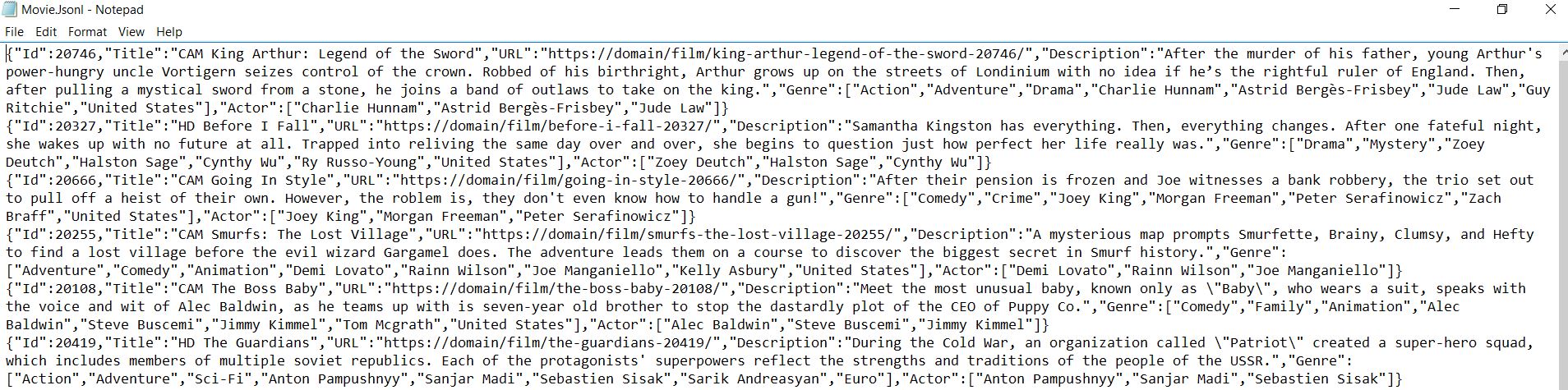
如需可用方法和屬性的詳細資訊,請參閱 API 參考文件。IronWebScraper 提供可靠的架構來擷取網站上的結構化資料,適合用於資料收集與分析專案。
常見問題
IronWebScraper 在 C# 中用於什麼?
IronWebScraper 用於從網站中提取電影數據,透過解析 HTML 元素並創建結構化數據集,極大地簡化將非結構化的網頁內容轉換為有組織的資料。
如何在 C# 專案中安裝 IronWebScraper?
您可以通過 NuGet 封裝管理器在 C# 專案中安裝 IronWebScraper,這樣能輕鬆地將其整合到您的專案中以進行網頁抓取任務。
抓取電影網站時,常用的 CSS 選擇器有哪些?
CSS 選擇器用於在電影網站的 HTML 結構中導航和選擇元素。例如,.movie-item 類可能被用於選擇包含電影信息的 div,如標題或 URL。
IronWebScraper 能夠處理多頁抓取嗎?
是的,IronWebScraper 可以高效地處理多頁抓取。它使用請求鏈接機制在不同頁面間穿梭並抓取詳細數據。
使用類型化對象在 IronWebScraper 中有何益處?
使用類型化對象,例如 Movie 類,允許更好的程式碼組織、增強的 IntelliSense 支援,以及在從網站抓取數據時的編譯時類型檢查。
如何組織從電影網站抓取的數據?
利用 IronWebScraper 的 Scrape 方法可以將抓取的數據組織為 JSON 格式,這有助於以可管理和可分析的格式保存結構化的數據。
`MetaData` 功能在 IronWebScraper 中扮演什麼角色?
IronWebScraper 中的 MetaData 功能幫助維護跨請求的對象狀態,允許數據在多個解析函數之間傳遞,這在多頁抓取中特別有用。
為何選擇 IronWebScraper 進行數據提取?
IronWebScraper 提供了可靠的框架,用於高效的網站數據抓取,具有如多頁抓取、類型化數據對象和詳細的 API 參考等功能,使其非常適合複雜的數據收集專案。
IronWebScraper 如何改善輸出文件的管理?
IronWebScraper 使用工作目錄來組織所有抓取操作的輸出文件於一個預定位置,改善管理,為大規模抓取專案提供便利。
IronWebScraper 能從詳細的電影頁面中提取其他數據嗎?
IronWebScraper 可以利用 CSS 選擇器和自定義抓取函數,從詳細的電影頁面中提取其他數據,如電影描述、類型和演員,以便收集全面的數據。

Curtis Chau 擁有卡爾頓大學計算機科學學士學位,專注於前端開發,擅長於 Node.js、TypeScript、JavaScript 和 React。Curtis 熱衷於創建直觀且美觀的用戶界面,喜歡使用現代框架並打造結構良好、視覺吸引人的手冊。

