
Scrape a Shopping Website in C#

學習如何使用C#及WebScraper框架從購物網站抓取產品類別和項目,將HTML元素中的結構化資料提取到自訂模型中。 本綜合指南將指引您使用IronWebScraper程式庫建立強大的電子商務爬蟲。
-
1Install IronWebScraper with NuGet Package Manager
-
2複製並運行這段程式碼片段。
using IronWebScraper; public class QuickShoppingScraper : WebScraper { public override void Init() { // Apply your license key License.LicenseKey = "YOUR-LICENSE-KEY"; // Set the starting URL this.Request("https://shopping-site.com", Parse); } public override void Parse(Response response) { // Extract product data foreach (var product in response.Css(".product-item")) { var item = new { Name = product.Css(".product-name").First().InnerText, Price = product.Css(".price").First().InnerText, Image = product.Css("img").First().Attributes["src"] }; Scrape(item, "products.jsonl"); } } } // Run the scraper var scraper = new QuickShoppingScraper(); scraper.Start();Imports IronWebScraper Public Class QuickShoppingScraper Inherits WebScraper Public Overrides Sub Init() ' Apply your license key License.LicenseKey = "YOUR-LICENSE-KEY" ' Set the starting URL Me.Request("https://shopping-site.com", AddressOf Parse) End Sub Public Overrides Sub Parse(response As Response) ' Extract product data For Each product In response.Css(".product-item") Dim item = New With { Key .Name = product.Css(".product-name").First().InnerText, Key .Price = product.Css(".price").First().InnerText, Key .Image = product.Css("img").First().Attributes("src") } Scrape(item, "products.jsonl") Next End Sub End Class ' Run the scraper Dim scraper As New QuickShoppingScraper() scraper.Start()Imports IronWebScraper Public Class QuickShoppingScraper Inherits WebScraper Public Overrides Sub Init() ' Apply your license key License.LicenseKey = "YOUR-LICENSE-KEY" ' Set the starting URL Me.Request("https://shopping-site.com", AddressOf Parse) End Sub Public Overrides Sub Parse(response As Response) ' Extract product data For Each product In response.Css(".product-item") Dim item = New With { Key .Name = product.Css(".product-name").First().InnerText, Key .Price = product.Css(".price").First().InnerText, Key .Image = product.Css("img").First().Attributes("src") } Scrape(item, "products.jsonl") Next End Sub End Class ' Run the scraper Dim scraper As New QuickShoppingScraper() scraper.Start() -
3部署以在您的實時環境中測試
今天就開始在您的專案中使用IronWebScraper,透過免費試用
- 組建一個新的控制台應用程式項目,命名為 "ShoppingSiteSample"。
- 新增一個名為"
WebScraper。 - 為
Product資料建立模型。 - 覆寫
Parse()方法來進行抓取。 5.執行 scraper 將類別和產品擷取至 JSONL 檔案
如何分析購物網站的 HTML 結構?
選擇一個購物網站來分析其內容結構。 了解 HTML 結構對於成功的網頁掃描至關重要。 在撰寫任何程式碼之前,請花時間使用瀏覽器開發工具分析目標網站的結構。
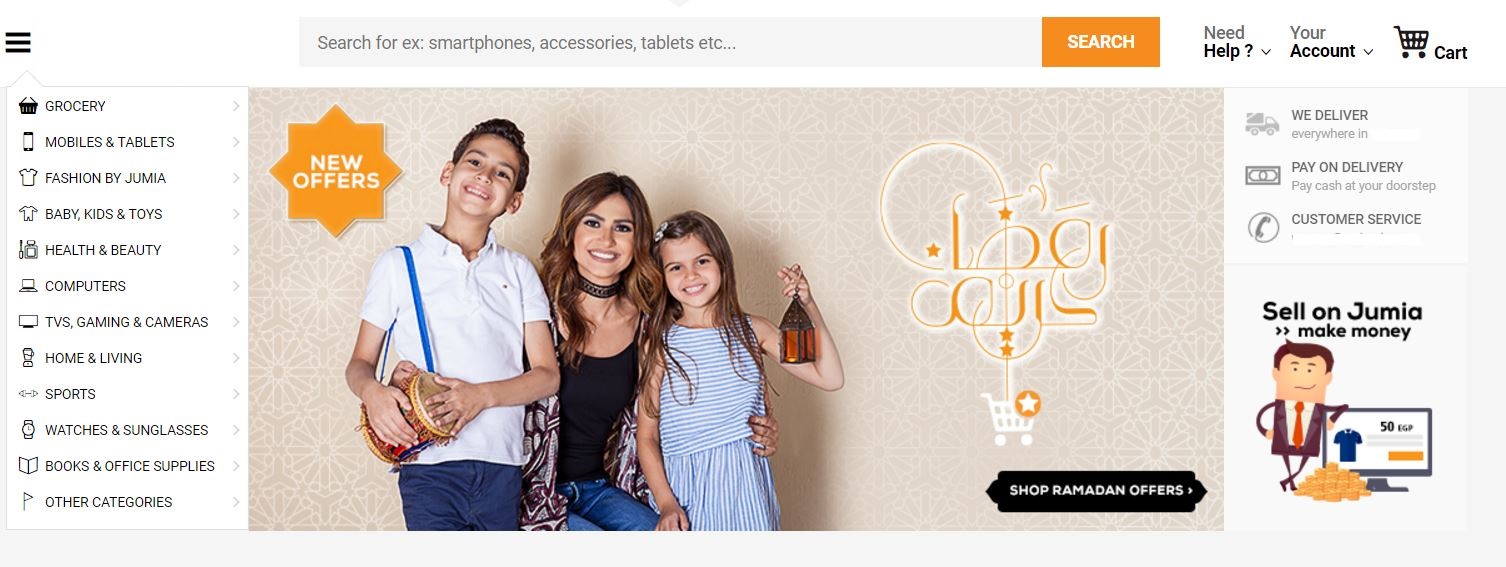
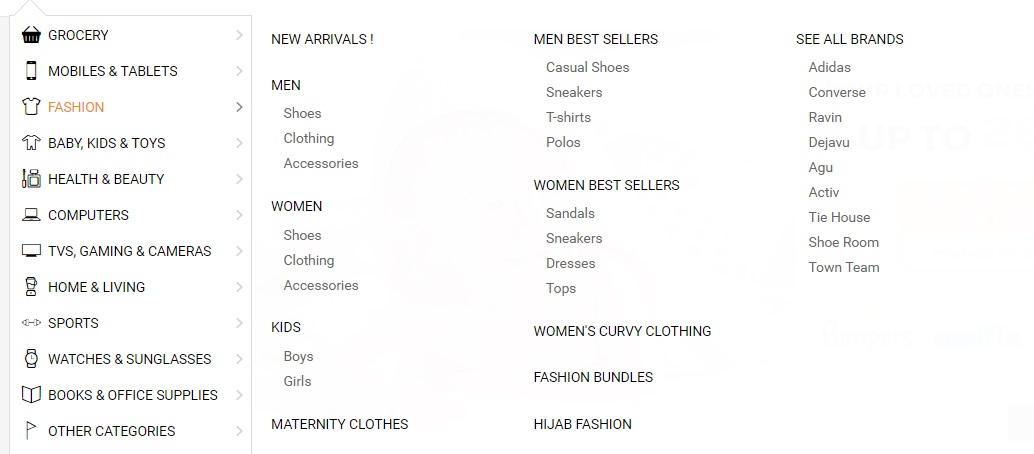
如圖所示,左側欄包含網站產品類別的連結。 第一步是調查網站的 HTML 並規劃 scraping 方法。 此分析階段對於建立有效的搜刮策略至關重要。
為什麼了解 HTML 結構很重要?
時尚網站的類別下有子類別(男裝、女裝、童裝)。 瞭解此層級結構有助於設計適當的資料模型和搜刮邏輯。 當使用 進階的網頁搜刮功能時,正確的 HTML 分析變得更加重要。
<li class="menu-item" data-id="">
<a href="https://domain.com/fashion-by-/" class="main-category">
<i class="cat-icon osh-font-fashion"></i>
<span class="nav-subTxt">FASHION </span>
<i class="osh-font-light-arrow-left"></i><i class="osh-font-light-arrow-right"></i>
</a>
<div class="navLayerWrapper" style="width: 633px; display: none;">
<div class="submenu">
<div class="column">
<div class="categories">
<a class="category" href="https://domain.com/fashion-by-/?sort=newest&dir=desc&viewType=gridView3">New Arrivals !</a>
</div>
<div class="categories">
<a class="category" href="https://domain.com/men-fashion/">Men</a>
<a class="subcategory" href="https://domain.com/mens-shoes/">Shoes</a>
<a class="subcategory" href="https://domain.com/mens-clothing/">Clothing</a>
<a class="subcategory" href="https://domain.com/mens-accessories/">Accessories</a>
</div>
<div class="categories">
<a class="category" href="https://domain.com/women-fashion/">Women</a>
<a class="subcategory" href="https://domain.com/womens-shoes/">Shoes</a>
<a class="subcategory" href="https://domain.com/womens-clothing/">Clothing</a>
<a class="subcategory" href="https://domain.com/womens-accessories/">Accessories</a>
</div>
<div class="categories">
<a class="category" href="https://domain.com/girls-boys-fashion/">Kids</a>
<a class="subcategory" href="https://domain.com/boys-fashion/">Boys</a>
<a class="subcategory" href="https://domain.com/girls/">Girls</a>
</div>
<div class="categories">
<a class="category" href="https://domain.com/maternity-clothes/">Maternity Clothes</a>
</div>
</div>
<div class="column">
<div class="categories">
<span class="category defaultCursor">Men Best Sellers</span>
<a class="subcategory" href="https://domain.com/mens-casual-shoes/">Casual Shoes</a>
<a class="subcategory" href="https://domain.com/mens-sneakers/">Sneakers</a>
<a class="subcategory" href="https://domain.com/mens-t-shirts/">T-shirts</a>
<a class="subcategory" href="https://domain.com/mens-polos/">Polos</a>
</div>
<div class="categories">
<span class="category defaultCursor">Women Best Sellers</span>
<a class="subcategory" href="https://domain.com/womens-sandals/">Sandals</a>
<a class="subcategory" href="https://domain.com/womens-sneakers/">Sneakers</a>
<a class="subcategory" href="https://domain.com/women-dresses/">Dresses</a>
<a class="subcategory" href="https://domain.com/women-tops/">Tops</a>
</div>
<div class="categories">
<a class="category" href="https://domain.com/womens-curvy-clothing/">Women's Curvy Clothing</a>
</div>
<div class="categories">
<a class="category" href="https://domain.com/fashion-bundles/v/">Fashion Bundles</a>
</div>
<div class="categories">
<a class="category" href="https://domain.com/hijab-fashion/">Hijab Fashion</a>
</div>
</div>
<div class="column">
<div class="categories">
<a class="category" href="https://domain.com/brands/fashion-by-/">SEE ALL BRANDS</a>
<a class="subcategory" href="https://domain.com/adidas/">Adidas</a>
<a class="subcategory" href="https://domain.com/converse/">Converse</a>
<a class="subcategory" href="https://domain.com/ravin/">Ravin</a>
<a class="subcategory" href="https://domain.com/dejavu/">Dejavu</a>
<a class="subcategory" href="https://domain.com/agu/">Agu</a>
<a class="subcategory" href="https://domain.com/activ/">Activ</a>
<a class="subcategory" href="https://domain.com/oxford--bellini--tie-house--milano/">Tie House</a>
<a class="subcategory" href="https://domain.com/shoe-room/">Shoe Room</a>
<a class="subcategory" href="https://domain.com/town-team/">Town Team</a>
</div>
</div>
</div>
</div>
</li>如何設定 Web Scraping 專案?
按照 C# Web scraping 的最佳實務建立專案。
- 建立新的控制台應用程式或為樣本新增新的文件夾,命名 "ShoppingSiteSample"。
- 新增一個新的類別,命名為"
ShoppingScraper"。 - 從剖析站點類別及其子類別開始。
- 透過NuGet封裝管理器或封裝管理器主控台安裝
IronWebScraper:
我應該為分類使用何種資料模型?
建立分類模型,以正確表示所發現的層級結構:
public class Category
{
    /// <summary>
    /// Gets or sets the name.
    /// </summary>
    /// <value>
    /// The name.
    /// </value>
    public string Name { get; set; }

    /// <summary>
    /// Gets or sets the URL.
    /// </summary>
    /// <value>
    /// The URL.
    /// </value>
    public string URL { get; set; }

    /// <summary>
    /// Gets or sets the subcategories.
    /// </summary>
    /// <value>
    /// The subcategories.
    /// </value>
    public List<Category> SubCategories { get; set; }

    // Additional properties for enhanced data collection
    public int ProductCount { get; set; }
    public DateTime LastScraped { get; set; }
    public string CategoryType { get; set; }
}
public class Category
{
/// <summary>
/// Gets or sets the name.
/// </summary>
/// <value>
/// The name.
/// </value>
public string Name { get; set; }
/// <summary>
/// Gets or sets the URL.
/// </summary>
/// <value>
/// The URL.
/// </value>
public string URL { get; set; }
/// <summary>
/// Gets or sets the subcategories.
/// </summary>
/// <value>
/// The subcategories.
/// </value>
public List<Category> SubCategories { get; set; }
// Additional properties for enhanced data collection
public int ProductCount { get; set; }
public DateTime LastScraped { get; set; }
public string CategoryType { get; set; }
}Public Class Category
''' <summary>
''' Gets or sets the name.
''' </summary>
''' <value>
''' The name.
''' </value>
Public Property Name As String
''' <summary>
''' Gets or sets the URL.
''' </summary>
''' <value>
''' The URL.
''' </value>
Public Property URL As String
''' <summary>
''' Gets or sets the subcategories.
''' </summary>
''' <value>
''' The subcategories.
''' </value>
Public Property SubCategories As List(Of Category)
' Additional properties for enhanced data collection
Public Property ProductCount As Integer
Public Property LastScraped As DateTime
Public Property CategoryType As String
End ClassPublic Class Category
''' <summary>
''' Gets or sets the name.
''' </summary>
''' <value>
''' The name.
''' </value>
Public Property Name As String
''' <summary>
''' Gets or sets the URL.
''' </summary>
''' <value>
''' The URL.
''' </value>
Public Property URL As String
''' <summary>
''' Gets or sets the subcategories.
''' </summary>
''' <value>
''' The subcategories.
''' </value>
Public Property SubCategories As List(Of Category)
' Additional properties for enhanced data collection
Public Property ProductCount As Integer
Public Property LastScraped As DateTime
Public Property CategoryType As String
End Class如何建立基本的 Scraper 邏輯?
建立 scraper 邏輯,記得在執行 scraper 之前套用您的授權金鑰:
public class ShoppingScraper : WebScraper
{
    /// <summary>
    /// Initialize the web scraper, setting the start URLs and allowed/banned domains or URL patterns.
    /// </summary>
    public override void Init()
    {
        // Apply your license key - get one from https://ironsoftware.com/csharp/webscraper/licensing/
        License.LicenseKey = "LicenseKey";
        this.LoggingLevel = WebScraper.LogLevel.All;
        this.WorkingDirectory = AppSetting.GetAppRoot() + @"\ShoppingSiteSample\Output\";

        // Configure request settings for better performance
        this.Request("www.webSite.com", Parse);
    }

    /// <summary>
    /// Parses the HTML document of the response to scrap the necessary data.
    /// </summary>
    /// <param name="response">The HTTP Response object to parse.</param>
    public override void Parse(Response response)
    {
        var categoryList = new List<Category>();

        // Iterate through each link in the menu and extract the category data.
        foreach (var Links in response.Css("#menuFixed > ul > li > a"))
        {
            var cat = new Category
            {
                URL = Links.Attributes["href"],
                Name = Links.InnerText,
                LastScraped = DateTime.Now
            };
            categoryList.Add(cat);
        }

        // Save the scraped data into a JSONL file.
        Scrape(categoryList, "Shopping.jsonl");
    }
}
public class ShoppingScraper : WebScraper
{
/// <summary>
/// Initialize the web scraper, setting the start URLs and allowed/banned domains or URL patterns.
/// </summary>
public override void Init()
{
// Apply your license key - get one from https://ironsoftware.com/csharp/webscraper/licensing/
License.LicenseKey = "LicenseKey";
this.LoggingLevel = WebScraper.LogLevel.All;
this.WorkingDirectory = AppSetting.GetAppRoot() + @"\ShoppingSiteSample\Output\";
// Configure request settings for better performance
this.Request("www.webSite.com", Parse);
}
/// <summary>
/// Parses the HTML document of the response to scrap the necessary data.
/// </summary>
/// <param name="response">The HTTP Response object to parse.</param>
public override void Parse(Response response)
{
var categoryList = new List<Category>();
// Iterate through each link in the menu and extract the category data.
foreach (var Links in response.Css("#menuFixed > ul > li > a"))
{
var cat = new Category
{
URL = Links.Attributes["href"],
Name = Links.InnerText,
LastScraped = DateTime.Now
};
categoryList.Add(cat);
}
// Save the scraped data into a JSONL file.
Scrape(categoryList, "Shopping.jsonl");
}
}Public Class ShoppingScraper
Inherits WebScraper
''' <summary>
''' Initialize the web scraper, setting the start URLs and allowed/banned domains or URL patterns.
''' </summary>
Public Overrides Sub Init()
' Apply your license key - get one from https://ironsoftware.com/csharp/webscraper/licensing/
License.LicenseKey = "LicenseKey"
Me.LoggingLevel = WebScraper.LogLevel.All
Me.WorkingDirectory = AppSetting.GetAppRoot() & "\ShoppingSiteSample\Output\"
' Configure request settings for better performance
Me.Request("www.webSite.com", AddressOf Parse)
End Sub
''' <summary>
''' Parses the HTML document of the response to scrap the necessary data.
''' </summary>
''' <param name="response">The HTTP Response object to parse.</param>
Public Overrides Sub Parse(response As Response)
Dim categoryList As New List(Of Category)()
' Iterate through each link in the menu and extract the category data.
For Each Links In response.Css("#menuFixed > ul > li > a")
Dim cat As New Category With {
.URL = Links.Attributes("href"),
.Name = Links.InnerText,
.LastScraped = DateTime.Now
}
categoryList.Add(cat)
Next
' Save the scraped data into a JSONL file.
Scrape(categoryList, "Shopping.jsonl")
End Sub
End ClassPublic Class ShoppingScraper
Inherits WebScraper
''' <summary>
''' Initialize the web scraper, setting the start URLs and allowed/banned domains or URL patterns.
''' </summary>
Public Overrides Sub Init()
' Apply your license key - get one from https://ironsoftware.com/csharp/webscraper/licensing/
License.LicenseKey = "LicenseKey"
Me.LoggingLevel = WebScraper.LogLevel.All
Me.WorkingDirectory = AppSetting.GetAppRoot() & "\ShoppingSiteSample\Output\"
' Configure request settings for better performance
Me.Request("www.webSite.com", AddressOf Parse)
End Sub
''' <summary>
''' Parses the HTML document of the response to scrap the necessary data.
''' </summary>
''' <param name="response">The HTTP Response object to parse.</param>
Public Overrides Sub Parse(response As Response)
Dim categoryList As New List(Of Category)()
' Iterate through each link in the menu and extract the category data.
For Each Links In response.Css("#menuFixed > ul > li > a")
Dim cat As New Category With {
.URL = Links.Attributes("href"),
.Name = Links.InnerText,
.LastScraped = DateTime.Now
}
categoryList.Add(cat)
Next
' Save the scraped data into a JSONL file.
Scrape(categoryList, "Shopping.jsonl")
End Sub
End Class我的目標是選單中的哪些元素?
從選單中抓取連結需要精確的 CSS 選擇器。 API 參考提供有關可用選擇器方法的詳細資訊:

如何同時抓取主類別和子類別?
更新程式碼,以搜刮主要類別和所有子連結。 此方法可確保完整的導覽結構捕捉:
public override void Parse(Response response)
{
    // List of Category Links (Root)
    var categoryList = new List<Category>();

    // Traverse each 'li' under the fixed menu
    foreach (var li in response.Css("#menuFixed > ul > li"))
    {
        // List of Main Links
        foreach (var Links in li.Css("a"))
        {
            var cat = new Category
            {
                URL = Links.Attributes["href"],
                Name = Links.InnerText,
                SubCategories = new List<Category>(),
                LastScraped = DateTime.Now
            };

            // List of Subcategories Links
            foreach (var subCategory in li.Css("a[class=subcategory]"))
            {
                var subcat = new Category
                {
                    URL = subCategory.Attributes["href"],
                    Name = subCategory.InnerText,
                    CategoryType = "Subcategory"
                };

                // Check if subcategory link already exists
                if (cat.SubCategories.Find(c => c.Name == subcat.Name && c.URL == subcat.URL) == null)
                {
                    // Add sublinks
                    cat.SubCategories.Add(subcat);
                }
            }

            // Update product count based on subcategories
            cat.ProductCount = cat.SubCategories.Count;

            // Add Main Category to the list
            categoryList.Add(cat);
        }
    }

    // Save the scraped data into a JSONL file.
    Scrape(categoryList, "Shopping.jsonl");
}
public override void Parse(Response response)
{
// List of Category Links (Root)
var categoryList = new List<Category>();
// Traverse each 'li' under the fixed menu
foreach (var li in response.Css("#menuFixed > ul > li"))
{
// List of Main Links
foreach (var Links in li.Css("a"))
{
var cat = new Category
{
URL = Links.Attributes["href"],
Name = Links.InnerText,
SubCategories = new List<Category>(),
LastScraped = DateTime.Now
};
// List of Subcategories Links
foreach (var subCategory in li.Css("a[class=subcategory]"))
{
var subcat = new Category
{
URL = subCategory.Attributes["href"],
Name = subCategory.InnerText,
CategoryType = "Subcategory"
};
// Check if subcategory link already exists
if (cat.SubCategories.Find(c => c.Name == subcat.Name && c.URL == subcat.URL) == null)
{
// Add sublinks
cat.SubCategories.Add(subcat);
}
}
// Update product count based on subcategories
cat.ProductCount = cat.SubCategories.Count;
// Add Main Category to the list
categoryList.Add(cat);
}
}
// Save the scraped data into a JSONL file.
Scrape(categoryList, "Shopping.jsonl");
}Public Overrides Sub Parse(response As Response)
' List of Category Links (Root)
Dim categoryList = New List(Of Category)()
' Traverse each 'li' under the fixed menu
For Each li In response.Css("#menuFixed > ul > li")
' List of Main Links
For Each Links In li.Css("a")
Dim cat = New Category With {
.URL = Links.Attributes("href"),
.Name = Links.InnerText,
.SubCategories = New List(Of Category)(),
.LastScraped = DateTime.Now
}
' List of Subcategories Links
For Each subCategory In li.Css("a[class=subcategory]")
Dim subcat = New Category With {
.URL = subCategory.Attributes("href"),
.Name = subCategory.InnerText,
.CategoryType = "Subcategory"
}
' Check if subcategory link already exists
If cat.SubCategories.Find(Function(c) c.Name = subcat.Name AndAlso c.URL = subcat.URL) Is Nothing Then
' Add sublinks
cat.SubCategories.Add(subcat)
End If
Next
' Update product count based on subcategories
cat.ProductCount = cat.SubCategories.Count
' Add Main Category to the list
categoryList.Add(cat)
Next
Next
' Save the scraped data into a JSONL file.
Scrape(categoryList, "Shopping.jsonl")
End SubPublic Overrides Sub Parse(response As Response)
' List of Category Links (Root)
Dim categoryList = New List(Of Category)()
' Traverse each 'li' under the fixed menu
For Each li In response.Css("#menuFixed > ul > li")
' List of Main Links
For Each Links In li.Css("a")
Dim cat = New Category With {
.URL = Links.Attributes("href"),
.Name = Links.InnerText,
.SubCategories = New List(Of Category)(),
.LastScraped = DateTime.Now
}
' List of Subcategories Links
For Each subCategory In li.Css("a[class=subcategory]")
Dim subcat = New Category With {
.URL = subCategory.Attributes("href"),
.Name = subCategory.InnerText,
.CategoryType = "Subcategory"
}
' Check if subcategory link already exists
If cat.SubCategories.Find(Function(c) c.Name = subcat.Name AndAlso c.URL = subcat.URL) Is Nothing Then
' Add sublinks
cat.SubCategories.Add(subcat)
End If
Next
' Update product count based on subcategories
cat.ProductCount = cat.SubCategories.Count
' Add Main Category to the list
categoryList.Add(cat)
Next
Next
' Save the scraped data into a JSONL file.
Scrape(categoryList, "Shopping.jsonl")
End Sub如何從分類頁面中萃取產品資訊?
有了所有網站類別的連結,就可以開始搜尋每個類別中的產品。 在處理產品頁面時,執行緒安全對於最佳效能變得非常重要。 導覽到任何類別並檢查內容:

產品的 HTML 架構是什麼樣子?
檢視 HTML 結構以瞭解產品組織:
<section class="products">
<div class="sku -gallery -validate-size " data-sku="AG249FA0T2PSGNAFAMZ" ft-product-sizes="41,42,43,44,45" ft-product-color="Multicolour">
<a class="link" href="http://www.WebSite.com/agu-bundle-of-2-sneakers-black-navy-blue-653884.html">
<div class="image-wrapper default-state">
<img class="lazy image -loaded" alt="Bundle Of 2 Sneakers - Black & Navy Blue" data-image-vertical="1" width="210" height="262" src="https://static.WebSite.com/p/agu-6208-488356-1-catalog_grid_3.jpg" data-sku="AG249FA0T2PSGNAFAMZ" data-src="https://static.WebSite.com/p/agu-6208-488356-1-catalog_grid_3.jpg" data-placeholder="placeholder_m_1.jpg">
<noscript><img src="https://static.WebSite.com/p/agu-6208-488356-1-catalog_grid_3.jpg" width="210" height="262" class="image" /></noscript>
</div>
<h2 class="title"></h2>
<span class="brand ">Agu </span>
<span class="name" dir="ltr">Bundle Of 2 Sneakers - Black & Navy Blue</span>
</h2>
<div class="price-container clearfix">
<span class="price-box">
<span class="price">
<span data-currency-iso="EGP">EGP</span>
<span dir="ltr" data-price="299">299</span>
</span>
<span class="price -old -no-special"></span>
</span>
</div>
<div class="rating-stars">
<div class="stars-container">
<div class="stars" style="width: 62%"></div>
</div>
<div class="total-ratings">(30)</div>
</div>
<span class="shop-first-logo-container">
<img src="http://www.WebSite.com/images/local/logos/shop_first/ShoppingSite/logo_normal.png" data-src="http://www.WebSite.com/images/local/logos/shop_first/ShoppingSite/logo_normal.png" class="lazy shop-first-logo-img -mbxs -loaded">
</span>
<span class="osh-icon -ShoppingSite-local shop_local--logo -block -mbs -mts"></span>
<div class="list -sizes" data-selected-sku="">
<span class="js-link sku-size" data-href="http://www.WebSite.com/agu-bundle-of-2-sneakers-black-navy-blue-653884.html?size=41">41</span>
<span class="js-link sku-size" data-href="http://www.WebSite.com/agu-bundle-of-2-sneakers-black-navy-blue-653884.html?size=42">42</span>
<span class="js-link sku-size" data-href="http://www.WebSite.com/agu-bundle-of-2-sneakers-black-navy-blue-653884.html?size=43">43</span>
<span class="js-link sku-size" data-href="http://www.WebSite.com/agu-bundle-of-2-sneakers-black-navy-blue-653884.html?size=44">44</span>
<span class="js-link sku-size" data-href="http://www.WebSite.com/agu-bundle-of-2-sneakers-black-navy-blue-653884.html?size=45">45</span>
</div>
</a>
</div>
<div class="sku -gallery -validate-size " data-sku="LE047FA01SRK4NAFAMZ" ft-product-sizes="110,115,120,125,130,135" ft-product-color="Black">
<a class="link" href="http://www.WebSite.com/leather-shop-genuine-leather-belt-black-712030.html">
<div class="image-wrapper default-state">
<img class="lazy image -loaded" alt="Genuine Leather Belt - Black" data-image-vertical="1" width="210" height="262" src="https://static.WebSite.com/p/leather-shop-1831-030217-1-catalog_grid_3.jpg" data-sku="LE047FA01SRK4NAFAMZ" data-src="https://static.WebSite.com/p/leather-shop-1831-030217-1-catalog_grid_3.jpg" data-placeholder="placeholder_m_1.jpg">
<noscript><img src="https://static.WebSite.com/p/leather-shop-1831-030217-1-catalog_grid_3.jpg" width="210" height="262" class="image" /></noscript>
</div>
<h2 class="title"><span class="brand ">Leather Shop </span> <span class="name" dir="ltr">Genuine Leather Belt - Black</span></h2>
<div class="price-container clearfix">
<span class="sale-flag-percent">-29%</span>
<span class="price-box">
<span class="price"><span data-currency-iso="EGP">EGP</span> <span dir="ltr" data-price="96">96</span> </span>
<span class="price -old"><span data-currency-iso="EGP">EGP</span> <span dir="ltr" data-price="135">135</span> </span>
</span>
</div>
<div class="rating-stars">
<div class="stars-container">
<div class="stars" style="width: 100%"></div>
</div>
<div class="total-ratings">(1)</div>
</div>
<span class="osh-icon -ShoppingSite-local shop_local--logo -block -mbs -mts"></span>
<div class="list -sizes" data-selected-sku="">
<span class="js-link sku-size" data-href="http://www.WebSite.com/leather-shop-genuine-leather-belt-black-712030.html?size=110">110</span>
<span class="js-link sku-size"data-href="http://www.WebSite.com/leather-shop-genuine-leather-belt-black-712030.html?size=115">115</span>
<span class="js-link sku-size"data-href="http://www.WebSite.com/leather-shop-genuine-leather-belt-black-712030.html?size=120">120</span>
<span class="js-link sku-size"data-href="http://www.WebSite.com/leather-shop-genuine-leather-belt-black-712030.html?size=125">125</span>
<span class="js-link sku-size"data-href="http://www.WebSite.com/leather-shop-genuine-leather-belt-black-712030.html?size=130">130</span>
<span class="js-link sku-size"data-href="http://www.WebSite.com/leather-shop-genuine-leather-belt-black-712030.html?size=135">135</span>
</div>
</a>
</div>
</section>我應該建立哪個產品模型?
為此內容建立產品模型。 在使用 購物網站 scraping 工作時,請擷取所有相關產品的詳細資訊:
public class Product
{
    /// <summary>
    /// Gets or sets the name.
    /// </summary>
    /// <value>
    /// The name.
    /// </value>
    public string Name { get; set; }

    /// <summary>
    /// Gets or sets the price.
    /// </summary>
    /// <value>
    /// The price.
    /// </value>
    public string Price { get; set; }

    /// <summary>
    /// Gets or sets the image.
    /// </summary>
    /// <value>
    /// The image.
    /// </value>
    public string Image { get; set; }

    // Additional properties for comprehensive data collection
    public string Brand { get; set; }
    public string OldPrice { get; set; }
    public string Discount { get; set; }
    public float Rating { get; set; }
    public int ReviewCount { get; set; }
    public List<string> AvailableSizes { get; set; }
    public string ProductUrl { get; set; }
    public string SKU { get; set; }
    public DateTime ScrapedDate { get; set; }
}
public class Product
{
/// <summary>
/// Gets or sets the name.
/// </summary>
/// <value>
/// The name.
/// </value>
public string Name { get; set; }
/// <summary>
/// Gets or sets the price.
/// </summary>
/// <value>
/// The price.
/// </value>
public string Price { get; set; }
/// <summary>
/// Gets or sets the image.
/// </summary>
/// <value>
/// The image.
/// </value>
public string Image { get; set; }
// Additional properties for comprehensive data collection
public string Brand { get; set; }
public string OldPrice { get; set; }
public string Discount { get; set; }
public float Rating { get; set; }
public int ReviewCount { get; set; }
public List<string> AvailableSizes { get; set; }
public string ProductUrl { get; set; }
public string SKU { get; set; }
public DateTime ScrapedDate { get; set; }
}Public Class Product
''' <summary>
''' Gets or sets the name.
''' </summary>
''' <value>
''' The name.
''' </value>
Public Property Name As String
''' <summary>
''' Gets or sets the price.
''' </summary>
''' <value>
''' The price.
''' </value>
Public Property Price As String
''' <summary>
''' Gets or sets the image.
''' </summary>
''' <value>
''' The image.
''' </value>
Public Property Image As String
' Additional properties for comprehensive data collection
Public Property Brand As String
Public Property OldPrice As String
Public Property Discount As String
Public Property Rating As Single
Public Property ReviewCount As Integer
Public Property AvailableSizes As List(Of String)
Public Property ProductUrl As String
Public Property SKU As String
Public Property ScrapedDate As DateTime
End ClassPublic Class Product
''' <summary>
''' Gets or sets the name.
''' </summary>
''' <value>
''' The name.
''' </value>
Public Property Name As String
''' <summary>
''' Gets or sets the price.
''' </summary>
''' <value>
''' The price.
''' </value>
Public Property Price As String
''' <summary>
''' Gets or sets the image.
''' </summary>
''' <value>
''' The image.
''' </value>
Public Property Image As String
' Additional properties for comprehensive data collection
Public Property Brand As String
Public Property OldPrice As String
Public Property Discount As String
Public Property Rating As Single
Public Property ReviewCount As Integer
Public Property AvailableSizes As List(Of String)
Public Property ProductUrl As String
Public Property SKU As String
Public Property ScrapedDate As DateTime
End Class如何新增產品搜尋功能?
要 scrape 類別頁面,請新增具有錯誤處理和資料驗證功能的 scrape 方法:
public void ParseCategory(Response response)
{
    // List of Products
    var productList = new List<Product>();

    // Iterate through product links in the product section
    foreach (var Links in response.Css("section.products > div > a"))
    {
        try
        {
            var product = new Product
            {
                Name = Links.Css("h2.title > span.name").First().InnerText,
                Brand = Links.Css("h2.title > span.brand").FirstOrDefault()?.InnerText ?? "Unknown",
                Price = Links.Css("div.price-container > span.price-box > span.price > span[data-price]").First().InnerText,
                Image = Links.Css("div.image-wrapper.default-state > img").First().Attributes["src"],
                ProductUrl = Links.Attributes["href"],
                SKU = Links.ParentNode.Attributes["data-sku"],
                ScrapedDate = DateTime.Now
            };

            // Extract old price if available
            var oldPriceElement = Links.Css("span.price.-old > span[data-price]").FirstOrDefault();
            if (oldPriceElement != null)
            {
                product.OldPrice = oldPriceElement.InnerText;
            }

            // Extract discount percentage
            var discountElement = Links.Css("span.sale-flag-percent").FirstOrDefault();
            if (discountElement != null)
            {
                product.Discount = discountElement.InnerText;
            }

            // Extract rating information
            var ratingWidth = Links.Css("div.stars").FirstOrDefault()?.Attributes["style"];
            if (!string.IsNullOrEmpty(ratingWidth))
            {
                var width = System.Text.RegularExpressions.Regex.Match(ratingWidth, @"(\d+)%").Groups[1].Value;
                if (int.TryParse(width, out int ratingPercent))
                {
                    product.Rating = ratingPercent / 20.0f; // Convert percentage to 5-star scale
                }
            }

            // Extract review count
            var reviewText = Links.Css("div.total-ratings").FirstOrDefault()?.InnerText;
            if (!string.IsNullOrEmpty(reviewText))
            {
                var reviewCount = System.Text.RegularExpressions.Regex.Match(reviewText, @"\d+").Value;
                if (int.TryParse(reviewCount, out int count))
                {
                    product.ReviewCount = count;
                }
            }

            // Extract available sizes
            product.AvailableSizes = Links.Css("div.list.-sizes > span.sku-size")
                .Select(s => s.InnerText)
                .ToList();

            productList.Add(product);
        }
        catch (Exception ex)
        {
            // Log error and continue with next product
            Console.WriteLine($"Error parsing product: {ex.Message}");
        }
    }

    // Save the scraped product data into a JSONL file.
    Scrape(productList, "Products.jsonl");

    // Handle pagination if needed
    var nextPageLink = response.Css("a.pagination-next").FirstOrDefault();
    if (nextPageLink != null)
    {
        var nextPageUrl = nextPageLink.Attributes["href"];
        this.Request(nextPageUrl, ParseCategory);
    }
}
public void ParseCategory(Response response)
{
// List of Products
var productList = new List<Product>();
// Iterate through product links in the product section
foreach (var Links in response.Css("section.products > div > a"))
{
try
{
var product = new Product
{
Name = Links.Css("h2.title > span.name").First().InnerText,
Brand = Links.Css("h2.title > span.brand").FirstOrDefault()?.InnerText ?? "Unknown",
Price = Links.Css("div.price-container > span.price-box > span.price > span[data-price]").First().InnerText,
Image = Links.Css("div.image-wrapper.default-state > img").First().Attributes["src"],
ProductUrl = Links.Attributes["href"],
SKU = Links.ParentNode.Attributes["data-sku"],
ScrapedDate = DateTime.Now
};
// Extract old price if available
var oldPriceElement = Links.Css("span.price.-old > span[data-price]").FirstOrDefault();
if (oldPriceElement != null)
{
product.OldPrice = oldPriceElement.InnerText;
}
// Extract discount percentage
var discountElement = Links.Css("span.sale-flag-percent").FirstOrDefault();
if (discountElement != null)
{
product.Discount = discountElement.InnerText;
}
// Extract rating information
var ratingWidth = Links.Css("div.stars").FirstOrDefault()?.Attributes["style"];
if (!string.IsNullOrEmpty(ratingWidth))
{
var width = System.Text.RegularExpressions.Regex.Match(ratingWidth, @"(\d+)%").Groups[1].Value;
if (int.TryParse(width, out int ratingPercent))
{
product.Rating = ratingPercent / 20.0f; // Convert percentage to 5-star scale
}
}
// Extract review count
var reviewText = Links.Css("div.total-ratings").FirstOrDefault()?.InnerText;
if (!string.IsNullOrEmpty(reviewText))
{
var reviewCount = System.Text.RegularExpressions.Regex.Match(reviewText, @"\d+").Value;
if (int.TryParse(reviewCount, out int count))
{
product.ReviewCount = count;
}
}
// Extract available sizes
product.AvailableSizes = Links.Css("div.list.-sizes > span.sku-size")
.Select(s => s.InnerText)
.ToList();
productList.Add(product);
}
catch (Exception ex)
{
// Log error and continue with next product
Console.WriteLine($"Error parsing product: {ex.Message}");
}
}
// Save the scraped product data into a JSONL file.
Scrape(productList, "Products.jsonl");
// Handle pagination if needed
var nextPageLink = response.Css("a.pagination-next").FirstOrDefault();
if (nextPageLink != null)
{
var nextPageUrl = nextPageLink.Attributes["href"];
this.Request(nextPageUrl, ParseCategory);
}
}Public Sub ParseCategory(response As Response)
' List of Products
Dim productList = New List(Of Product)()
' Iterate through product links in the product section
For Each Links In response.Css("section.products > div > a")
Try
Dim product = New Product With {
.Name = Links.Css("h2.title > span.name").First().InnerText,
.Brand = If(Links.Css("h2.title > span.brand").FirstOrDefault()?.InnerText, "Unknown"),
.Price = Links.Css("div.price-container > span.price-box > span.price > span[data-price]").First().InnerText,
.Image = Links.Css("div.image-wrapper.default-state > img").First().Attributes("src"),
.ProductUrl = Links.Attributes("href"),
.SKU = Links.ParentNode.Attributes("data-sku"),
.ScrapedDate = DateTime.Now
}
' Extract old price if available
Dim oldPriceElement = Links.Css("span.price.-old > span[data-price]").FirstOrDefault()
If oldPriceElement IsNot Nothing Then
product.OldPrice = oldPriceElement.InnerText
End If
' Extract discount percentage
Dim discountElement = Links.Css("span.sale-flag-percent").FirstOrDefault()
If discountElement IsNot Nothing Then
product.Discount = discountElement.InnerText
End If
' Extract rating information
Dim ratingWidth = Links.Css("div.stars").FirstOrDefault()?.Attributes("style")
If Not String.IsNullOrEmpty(ratingWidth) Then
Dim width = System.Text.RegularExpressions.Regex.Match(ratingWidth, "(\d+)%").Groups(1).Value
Dim ratingPercent As Integer
If Integer.TryParse(width, ratingPercent) Then
product.Rating = ratingPercent / 20.0F ' Convert percentage to 5-star scale
End If
End If
' Extract review count
Dim reviewText = Links.Css("div.total-ratings").FirstOrDefault()?.InnerText
If Not String.IsNullOrEmpty(reviewText) Then
Dim reviewCount = System.Text.RegularExpressions.Regex.Match(reviewText, "\d+").Value
Dim count As Integer
If Integer.TryParse(reviewCount, count) Then
product.ReviewCount = count
End If
End If
' Extract available sizes
product.AvailableSizes = Links.Css("div.list.-sizes > span.sku-size").Select(Function(s) s.InnerText).ToList()
productList.Add(product)
Catch ex As Exception
' Log error and continue with next product
Console.WriteLine($"Error parsing product: {ex.Message}")
End Try
Next
' Save the scraped product data into a JSONL file.
Scrape(productList, "Products.jsonl")
' Handle pagination if needed
Dim nextPageLink = response.Css("a.pagination-next").FirstOrDefault()
If nextPageLink IsNot Nothing Then
Dim nextPageUrl = nextPageLink.Attributes("href")
Me.Request(nextPageUrl, AddressOf ParseCategory)
End If
End SubPublic Sub ParseCategory(response As Response)
' List of Products
Dim productList = New List(Of Product)()
' Iterate through product links in the product section
For Each Links In response.Css("section.products > div > a")
Try
Dim product = New Product With {
.Name = Links.Css("h2.title > span.name").First().InnerText,
.Brand = If(Links.Css("h2.title > span.brand").FirstOrDefault()?.InnerText, "Unknown"),
.Price = Links.Css("div.price-container > span.price-box > span.price > span[data-price]").First().InnerText,
.Image = Links.Css("div.image-wrapper.default-state > img").First().Attributes("src"),
.ProductUrl = Links.Attributes("href"),
.SKU = Links.ParentNode.Attributes("data-sku"),
.ScrapedDate = DateTime.Now
}
' Extract old price if available
Dim oldPriceElement = Links.Css("span.price.-old > span[data-price]").FirstOrDefault()
If oldPriceElement IsNot Nothing Then
product.OldPrice = oldPriceElement.InnerText
End If
' Extract discount percentage
Dim discountElement = Links.Css("span.sale-flag-percent").FirstOrDefault()
If discountElement IsNot Nothing Then
product.Discount = discountElement.InnerText
End If
' Extract rating information
Dim ratingWidth = Links.Css("div.stars").FirstOrDefault()?.Attributes("style")
If Not String.IsNullOrEmpty(ratingWidth) Then
Dim width = System.Text.RegularExpressions.Regex.Match(ratingWidth, "(\d+)%").Groups(1).Value
Dim ratingPercent As Integer
If Integer.TryParse(width, ratingPercent) Then
product.Rating = ratingPercent / 20.0F ' Convert percentage to 5-star scale
End If
End If
' Extract review count
Dim reviewText = Links.Css("div.total-ratings").FirstOrDefault()?.InnerText
If Not String.IsNullOrEmpty(reviewText) Then
Dim reviewCount = System.Text.RegularExpressions.Regex.Match(reviewText, "\d+").Value
Dim count As Integer
If Integer.TryParse(reviewCount, count) Then
product.ReviewCount = count
End If
End If
' Extract available sizes
product.AvailableSizes = Links.Css("div.list.-sizes > span.sku-size").Select(Function(s) s.InnerText).ToList()
productList.Add(product)
Catch ex As Exception
' Log error and continue with next product
Console.WriteLine($"Error parsing product: {ex.Message}")
End Try
Next
' Save the scraped product data into a JSONL file.
Scrape(productList, "Products.jsonl")
' Handle pagination if needed
Dim nextPageLink = response.Css("a.pagination-next").FirstOrDefault()
If nextPageLink IsNot Nothing Then
Dim nextPageUrl = nextPageLink.Attributes("href")
Me.Request(nextPageUrl, AddressOf ParseCategory)
End If
End Sub這種全面的搜刮購物網站方法可確保擷取所有相關的產品資訊,同時優雅地處理錯誤。 如需更高級的場景,請探索IronWebScraper中提供的高級網頁抓取功能。
常見問題
如何在 C# 中從購物網站提取產品資料?
IronWebScraper 使您能夠輕鬆使用 CSS 選擇器從購物網站中提取產品資料。您可以建立一個 WebScraper 類別,覆寫 Parse 方法,並使用 response.Css() 來定位特定的 HTML 元素,如產品名稱、價格和圖像。提取的資料可以保存為包括 JSON 和 JSONL 文件在內的各種格式。
建立購物網站提取器的基本步驟是什麼?
要使用 IronWebScraper 建立購物網站提取器:1) 建立一個控制台應用程式專案,2) 新增一個繼承自 WebScraper 的類別,3) 為類別和產品建立資料模型,4) 覆寫 Init() 方法以設置起始 URL,5) 覆寫 Parse() 方法以使用 CSS 選擇器提取資料,6) 運行提取器以保存資料到您喜歡的格式。
如何在提取電子商務網站資料時處理層級式類別結構?
IronWebScraper 允許您通過建立適當的資料模型來處理反映父子關係(如時尚 > 男性 > 鞋類)的層級結構。您可以使用 CSS 選擇器遍歷巢狀的 HTML 元素,並編程構建類別樹結構,這在使用 IronWebScraper 的高級功能時特別有用。
提取購物網站的 HTML 結構前,最佳分析方法是什麼?
在使用 IronWebScraper 提取購物網站時,使用瀏覽器開發工具檢查 HTML 結構。尋找 CSS 類別和元素層級中的一致模式。此分析有助於識別在您的 IronWebScraper Parse() 方法中使用的正確 CSS 選擇器,以準確定位產品資訊、類別和其他資料元素。
我可以從同一頁面提取產品列表和類別導航嗎?
是的,IronWebScraper 使您能夠從單個頁面提取多種資料。在您的 Parse() 方法中,您可以使用不同的 CSS 選擇器同時定位類別連結(如 '.category-item')和產品列表(如 '.product-item'),然後將它們保存到單獨的輸出文件或資料結構。
如何將提取的產品資料保存到文件中?
IronWebScraper 提供內建的 Scrape() 方法,會自動保存提取的資料。只需要將您的資料物件和文件名稱傳遞給 Scrape(item, "products.jsonl")。該程式庫支持包括 JSON、JSONL 和 CSV 等多種輸出格式,使您可以輕鬆地將提取的電子商務資料匯出進行進一步處理。
How does `IronWebScraper` improve the efficiency of a web scraping project?
IronWebScraper enhances web scraping efficiency through features like concurrent requests, CSS selectors for targeted scraping, and harvesting data into structured formats, making the scraping process faster and more organized.
How do I ensure thread safety when scraping product pages?
To ensure thread safety when scraping product pages, you should manage concurrent requests and resource sharing carefully, using the advanced features of IronWebScraper designed to handle multi-threaded operations efficiently.
What are common elements targeted when scraping e-commerce categories?
Common elements targeted when scraping e-commerce categories include category names, URLs, subcategory links, and sometimes metadata like product counts or last updated timestamps.
How do I scrape subcategories along with main categories?
You can scrape subcategories along with main categories by iterating through each main category's HTML structure, identifying subcategory links, and extracting their respective names and URLs using IronWebScraper.

Curtis Chau擁有Carleton大學的電腦科學學士學位,專精於前端開發,擁有Node.js、TypeScript、JavaScript和React的專業知識。Curtis熱衷於建立直觀且美觀的使用者介面,喜愛使用現代框架並建立結構良好、視覺吸引力的手冊。



