
Extraer datos de un sitio web de compras en C#

Aprende cómo extraer categorías de productos y artículos de sitios web de compras usando C# con el marco WebScraper, extrayendo datos estructurados de elementos HTML en modelos personalizados. Esta guía te lleva a través de la construcción de un extractor de comercio electrónico confiable usando la biblioteca IronWebScraper.
-
1Instalar IronWebScraper con NuGet Package Manager
-
2Copie y ejecute este fragmento de código.
using IronWebScraper; public class QuickShoppingScraper : WebScraper { public override void Init() { // Apply your license key License.LicenseKey = "YOUR-LICENSE-KEY"; // Set the starting URL this.Request("https://shopping-site.com", Parse); } public override void Parse(Response response) { // Extract product data foreach (var product in response.Css(".product-item")) { var item = new { Name = product.Css(".product-name").First().InnerText, Price = product.Css(".price").First().InnerText, Image = product.Css("img").First().Attributes["src"] }; Scrape(item, "products.jsonl"); } } } // Run the scraper var scraper = new QuickShoppingScraper(); scraper.Start();Imports IronWebScraper Public Class QuickShoppingScraper Inherits WebScraper Public Overrides Sub Init() ' Apply your license key License.LicenseKey = "YOUR-LICENSE-KEY" ' Set the starting URL Me.Request("https://shopping-site.com", AddressOf Parse) End Sub Public Overrides Sub Parse(response As Response) ' Extract product data For Each product In response.Css(".product-item") Dim item = New With { Key .Name = product.Css(".product-name").First().InnerText, Key .Price = product.Css(".price").First().InnerText, Key .Image = product.Css("img").First().Attributes("src") } Scrape(item, "products.jsonl") Next End Sub End Class ' Run the scraper Dim scraper As New QuickShoppingScraper() scraper.Start()Imports IronWebScraper Public Class QuickShoppingScraper Inherits WebScraper Public Overrides Sub Init() ' Apply your license key License.LicenseKey = "YOUR-LICENSE-KEY" ' Set the starting URL Me.Request("https://shopping-site.com", AddressOf Parse) End Sub Public Overrides Sub Parse(response As Response) ' Extract product data For Each product In response.Css(".product-item") Dim item = New With { Key .Name = product.Css(".product-name").First().InnerText, Key .Price = product.Css(".price").First().InnerText, Key .Image = product.Css("img").First().Attributes("src") } Scrape(item, "products.jsonl") Next End Sub End Class ' Run the scraper Dim scraper As New QuickShoppingScraper() scraper.Start() -
3Despliegue para probar en su entorno real
Empiece a usar IronWebScraper en su proyecto hoy con una prueba gratuita
- Cree un nuevo proyecto de aplicación de consola llamado "ShoppingSiteSample"
- Agrega una clase llamada "
ShoppingScraper" que hereda deWebScraper - Crea modelos para los datos
CategoryyProduct - Sobrescribe
Init()para establecer la URL de inicio y el métodoParse()para la extracción - Ejecute el scraper para extraer categorías y productos a archivos JSONL
¿Cómo analizo la estructura HTML del sitio de compras?
Seleccione un sitio de compras para analizar su estructura de contenidos. La comprensión de la estructura HTML es crucial para el éxito del web scraping. Antes de escribir cualquier código, dedique tiempo a analizar la estructura del sitio web de destino utilizando las herramientas de desarrollo del navegador.
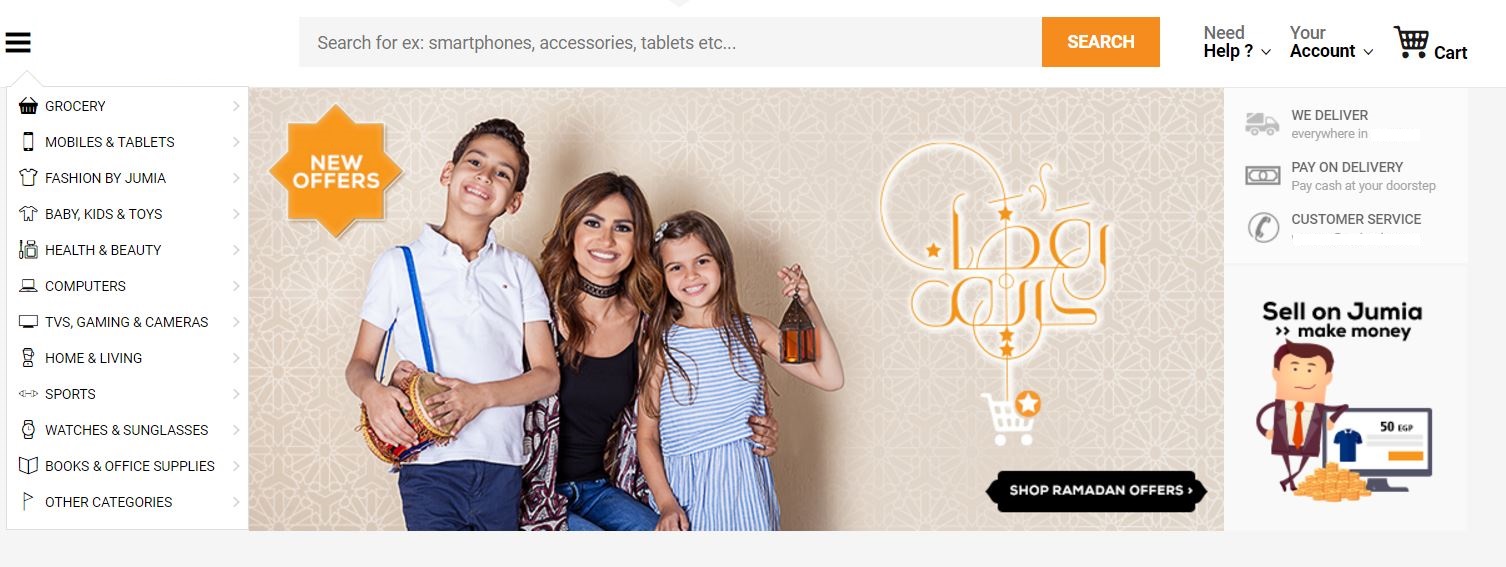
Como se muestra en la imagen, la barra lateral izquierda contiene enlaces a las categorías de productos del sitio. El primer paso consiste en investigar el código HTML del sitio y planificar el método de scraping. Esta fase de análisis es esencial para elaborar una estrategia de scraping eficaz.
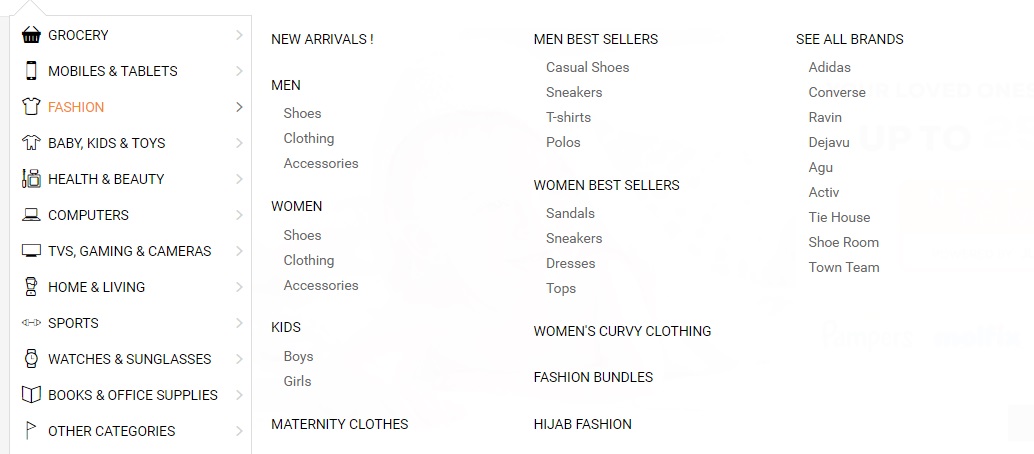
¿Por qué es importante entender la estructura HTML?
Las categorías del sitio de moda tienen subcategorías (Hombres, Mujeres, Niños). Comprender esta estructura jerárquica ayuda a diseñar modelos de datos y lógica de scraping adecuados. Al trabajar con funciones avanzadas de extracción web, el análisis adecuado de HTML se vuelve aún más crítico.
<li class="menu-item" data-id="">
<a href="https://domain.com/fashion-by-/" class="main-category">
<i class="cat-icon osh-font-fashion"></i>
<span class="nav-subTxt">FASHION </span>
<i class="osh-font-light-arrow-left"></i><i class="osh-font-light-arrow-right"></i>
</a>
<div class="navLayerWrapper" style="width: 633px; display: none;">
<div class="submenu">
<div class="column">
<div class="categories">
<a class="category" href="https://domain.com/fashion-by-/?sort=newest&dir=desc&viewType=gridView3">New Arrivals !</a>
</div>
<div class="categories">
<a class="category" href="https://domain.com/men-fashion/">Men</a>
<a class="subcategory" href="https://domain.com/mens-shoes/">Shoes</a>
<a class="subcategory" href="https://domain.com/mens-clothing/">Clothing</a>
<a class="subcategory" href="https://domain.com/mens-accessories/">Accessories</a>
</div>
<div class="categories">
<a class="category" href="https://domain.com/women-fashion/">Women</a>
<a class="subcategory" href="https://domain.com/womens-shoes/">Shoes</a>
<a class="subcategory" href="https://domain.com/womens-clothing/">Clothing</a>
<a class="subcategory" href="https://domain.com/womens-accessories/">Accessories</a>
</div>
<div class="categories">
<a class="category" href="https://domain.com/girls-boys-fashion/">Kids</a>
<a class="subcategory" href="https://domain.com/boys-fashion/">Boys</a>
<a class="subcategory" href="https://domain.com/girls/">Girls</a>
</div>
<div class="categories">
<a class="category" href="https://domain.com/maternity-clothes/">Maternity Clothes</a>
</div>
</div>
<div class="column">
<div class="categories">
<span class="category defaultCursor">Men Best Sellers</span>
<a class="subcategory" href="https://domain.com/mens-casual-shoes/">Casual Shoes</a>
<a class="subcategory" href="https://domain.com/mens-sneakers/">Sneakers</a>
<a class="subcategory" href="https://domain.com/mens-t-shirts/">T-shirts</a>
<a class="subcategory" href="https://domain.com/mens-polos/">Polos</a>
</div>
<div class="categories">
<span class="category defaultCursor">Women Best Sellers</span>
<a class="subcategory" href="https://domain.com/womens-sandals/">Sandals</a>
<a class="subcategory" href="https://domain.com/womens-sneakers/">Sneakers</a>
<a class="subcategory" href="https://domain.com/women-dresses/">Dresses</a>
<a class="subcategory" href="https://domain.com/women-tops/">Tops</a>
</div>
<div class="categories">
<a class="category" href="https://domain.com/womens-curvy-clothing/">Women's Curvy Clothing</a>
</div>
<div class="categories">
<a class="category" href="https://domain.com/fashion-bundles/v/">Fashion Bundles</a>
</div>
<div class="categories">
<a class="category" href="https://domain.com/hijab-fashion/">Hijab Fashion</a>
</div>
</div>
<div class="column">
<div class="categories">
<a class="category" href="https://domain.com/brands/fashion-by-/">SEE ALL BRANDS</a>
<a class="subcategory" href="https://domain.com/adidas/">Adidas</a>
<a class="subcategory" href="https://domain.com/converse/">Converse</a>
<a class="subcategory" href="https://domain.com/ravin/">Ravin</a>
<a class="subcategory" href="https://domain.com/dejavu/">Dejavu</a>
<a class="subcategory" href="https://domain.com/agu/">Agu</a>
<a class="subcategory" href="https://domain.com/activ/">Activ</a>
<a class="subcategory" href="https://domain.com/oxford--bellini--tie-house--milano/">Tie House</a>
<a class="subcategory" href="https://domain.com/shoe-room/">Shoe Room</a>
<a class="subcategory" href="https://domain.com/town-team/">Town Team</a>
</div>
</div>
</div>
</div>
</li>¿Cómo configuro el proyecto de Web Scraping?
Configura un proyecto siguiendo las mejores prácticas para extracción web en C#.
- Cree una nueva aplicación de consola o agregue una nueva carpeta para el ejemplo llamado "ShoppingSiteSample"
- Agrega una nueva clase llamada "
ShoppingScraper" - Comenzar scrapping de categorías del sitio y sus subcategorías
- Instala
IronWebScrapera través de NuGet Package Manager o la Consola del Administrador de Paquetes:
¿Qué modelo de datos debo utilizar para las categorías?
Crear un modelo de categorías que represente adecuadamente la estructura jerárquica descubierta:
public class Category
{
    /// <summary>
    /// Gets or sets the name.
    /// </summary>
    /// <value>
    /// The name.
    /// </value>
    public string Name { get; set; }

    /// <summary>
    /// Gets or sets the URL.
    /// </summary>
    /// <value>
    /// The URL.
    /// </value>
    public string URL { get; set; }

    /// <summary>
    /// Gets or sets the subcategories.
    /// </summary>
    /// <value>
    /// The subcategories.
    /// </value>
    public List<Category> SubCategories { get; set; }

    // Additional properties for enhanced data collection
    public int ProductCount { get; set; }
    public DateTime LastScraped { get; set; }
    public string CategoryType { get; set; }
}
public class Category
{
/// <summary>
/// Gets or sets the name.
/// </summary>
/// <value>
/// The name.
/// </value>
public string Name { get; set; }
/// <summary>
/// Gets or sets the URL.
/// </summary>
/// <value>
/// The URL.
/// </value>
public string URL { get; set; }
/// <summary>
/// Gets or sets the subcategories.
/// </summary>
/// <value>
/// The subcategories.
/// </value>
public List<Category> SubCategories { get; set; }
// Additional properties for enhanced data collection
public int ProductCount { get; set; }
public DateTime LastScraped { get; set; }
public string CategoryType { get; set; }
}Public Class Category
''' <summary>
''' Gets or sets the name.
''' </summary>
''' <value>
''' The name.
''' </value>
Public Property Name As String
''' <summary>
''' Gets or sets the URL.
''' </summary>
''' <value>
''' The URL.
''' </value>
Public Property URL As String
''' <summary>
''' Gets or sets the subcategories.
''' </summary>
''' <value>
''' The subcategories.
''' </value>
Public Property SubCategories As List(Of Category)
' Additional properties for enhanced data collection
Public Property ProductCount As Integer
Public Property LastScraped As DateTime
Public Property CategoryType As String
End ClassPublic Class Category
''' <summary>
''' Gets or sets the name.
''' </summary>
''' <value>
''' The name.
''' </value>
Public Property Name As String
''' <summary>
''' Gets or sets the URL.
''' </summary>
''' <value>
''' The URL.
''' </value>
Public Property URL As String
''' <summary>
''' Gets or sets the subcategories.
''' </summary>
''' <value>
''' The subcategories.
''' </value>
Public Property SubCategories As List(Of Category)
' Additional properties for enhanced data collection
Public Property ProductCount As Integer
Public Property LastScraped As DateTime
Public Property CategoryType As String
End Class¿Cómo construyo la lógica básica del raspador?
Construye la lógica del extractor, recordando aplicar tu clave de licencia antes de ejecutar el extractor:
public class ShoppingScraper : WebScraper
{
    /// <summary>
    /// Initialize the web scraper, setting the start URLs and allowed/banned domains or URL patterns.
    /// </summary>
    public override void Init()
    {
        // Apply your license key - get one from https://ironsoftware.com/csharp/webscraper/licensing/
        License.LicenseKey = "LicenseKey";
        this.LoggingLevel = WebScraper.LogLevel.All;
        this.WorkingDirectory = AppSetting.GetAppRoot() + @"\ShoppingSiteSample\Output\";

        // Configure request settings for better performance
        this.Request("www.webSite.com", Parse);
    }

    /// <summary>
    /// Parses the HTML document of the response to scrap the necessary data.
    /// </summary>
    /// <param name="response">The HTTP Response object to parse.</param>
    public override void Parse(Response response)
    {
        var categoryList = new List<Category>();

        // Iterate through each link in the menu and extract the category data.
        foreach (var Links in response.Css("#menuFixed > ul > li > a"))
        {
            var cat = new Category
            {
                URL = Links.Attributes["href"],
                Name = Links.InnerText,
                LastScraped = DateTime.Now
            };
            categoryList.Add(cat);
        }

        // Save the scraped data into a JSONL file.
        Scrape(categoryList, "Shopping.jsonl");
    }
}
public class ShoppingScraper : WebScraper
{
/// <summary>
/// Initialize the web scraper, setting the start URLs and allowed/banned domains or URL patterns.
/// </summary>
public override void Init()
{
// Apply your license key - get one from https://ironsoftware.com/csharp/webscraper/licensing/
License.LicenseKey = "LicenseKey";
this.LoggingLevel = WebScraper.LogLevel.All;
this.WorkingDirectory = AppSetting.GetAppRoot() + @"\ShoppingSiteSample\Output\";
// Configure request settings for better performance
this.Request("www.webSite.com", Parse);
}
/// <summary>
/// Parses the HTML document of the response to scrap the necessary data.
/// </summary>
/// <param name="response">The HTTP Response object to parse.</param>
public override void Parse(Response response)
{
var categoryList = new List<Category>();
// Iterate through each link in the menu and extract the category data.
foreach (var Links in response.Css("#menuFixed > ul > li > a"))
{
var cat = new Category
{
URL = Links.Attributes["href"],
Name = Links.InnerText,
LastScraped = DateTime.Now
};
categoryList.Add(cat);
}
// Save the scraped data into a JSONL file.
Scrape(categoryList, "Shopping.jsonl");
}
}Public Class ShoppingScraper
Inherits WebScraper
''' <summary>
''' Initialize the web scraper, setting the start URLs and allowed/banned domains or URL patterns.
''' </summary>
Public Overrides Sub Init()
' Apply your license key - get one from https://ironsoftware.com/csharp/webscraper/licensing/
License.LicenseKey = "LicenseKey"
Me.LoggingLevel = WebScraper.LogLevel.All
Me.WorkingDirectory = AppSetting.GetAppRoot() & "\ShoppingSiteSample\Output\"
' Configure request settings for better performance
Me.Request("www.webSite.com", AddressOf Parse)
End Sub
''' <summary>
''' Parses the HTML document of the response to scrap the necessary data.
''' </summary>
''' <param name="response">The HTTP Response object to parse.</param>
Public Overrides Sub Parse(response As Response)
Dim categoryList As New List(Of Category)()
' Iterate through each link in the menu and extract the category data.
For Each Links In response.Css("#menuFixed > ul > li > a")
Dim cat As New Category With {
.URL = Links.Attributes("href"),
.Name = Links.InnerText,
.LastScraped = DateTime.Now
}
categoryList.Add(cat)
Next
' Save the scraped data into a JSONL file.
Scrape(categoryList, "Shopping.jsonl")
End Sub
End ClassPublic Class ShoppingScraper
Inherits WebScraper
''' <summary>
''' Initialize the web scraper, setting the start URLs and allowed/banned domains or URL patterns.
''' </summary>
Public Overrides Sub Init()
' Apply your license key - get one from https://ironsoftware.com/csharp/webscraper/licensing/
License.LicenseKey = "LicenseKey"
Me.LoggingLevel = WebScraper.LogLevel.All
Me.WorkingDirectory = AppSetting.GetAppRoot() & "\ShoppingSiteSample\Output\"
' Configure request settings for better performance
Me.Request("www.webSite.com", AddressOf Parse)
End Sub
''' <summary>
''' Parses the HTML document of the response to scrap the necessary data.
''' </summary>
''' <param name="response">The HTTP Response object to parse.</param>
Public Overrides Sub Parse(response As Response)
Dim categoryList As New List(Of Category)()
' Iterate through each link in the menu and extract the category data.
For Each Links In response.Css("#menuFixed > ul > li > a")
Dim cat As New Category With {
.URL = Links.Attributes("href"),
.Name = Links.InnerText,
.LastScraped = DateTime.Now
}
categoryList.Add(cat)
Next
' Save the scraped data into a JSONL file.
Scrape(categoryList, "Shopping.jsonl")
End Sub
End Class¿A qué elementos del menú me dirijo?
El raspado de los enlaces del menú requiere selectores CSS precisos. La referencia de API proporciona información detallada sobre los métodos de selector disponibles:

¿Cómo raspar tanto las categorías principales como las subcategorías?
Actualizar el código para raspar las categorías principales y todos los subenlaces. Este enfoque garantiza la captura completa de la estructura de navegación:
public override void Parse(Response response)
{
    // List of Category Links (Root)
    var categoryList = new List<Category>();

    // Traverse each 'li' under the fixed menu
    foreach (var li in response.Css("#menuFixed > ul > li"))
    {
        // List of Main Links
        foreach (var Links in li.Css("a"))
        {
            var cat = new Category
            {
                URL = Links.Attributes["href"],
                Name = Links.InnerText,
                SubCategories = new List<Category>(),
                LastScraped = DateTime.Now
            };

            // List of Subcategories Links
            foreach (var subCategory in li.Css("a[class=subcategory]"))
            {
                var subcat = new Category
                {
                    URL = subCategory.Attributes["href"],
                    Name = subCategory.InnerText,
                    CategoryType = "Subcategory"
                };

                // Check if subcategory link already exists
                if (cat.SubCategories.Find(c => c.Name == subcat.Name && c.URL == subcat.URL) == null)
                {
                    // Add sublinks
                    cat.SubCategories.Add(subcat);
                }
            }

            // Update product count based on subcategories
            cat.ProductCount = cat.SubCategories.Count;

            // Add Main Category to the list
            categoryList.Add(cat);
        }
    }

    // Save the scraped data into a JSONL file.
    Scrape(categoryList, "Shopping.jsonl");
}
public override void Parse(Response response)
{
// List of Category Links (Root)
var categoryList = new List<Category>();
// Traverse each 'li' under the fixed menu
foreach (var li in response.Css("#menuFixed > ul > li"))
{
// List of Main Links
foreach (var Links in li.Css("a"))
{
var cat = new Category
{
URL = Links.Attributes["href"],
Name = Links.InnerText,
SubCategories = new List<Category>(),
LastScraped = DateTime.Now
};
// List of Subcategories Links
foreach (var subCategory in li.Css("a[class=subcategory]"))
{
var subcat = new Category
{
URL = subCategory.Attributes["href"],
Name = subCategory.InnerText,
CategoryType = "Subcategory"
};
// Check if subcategory link already exists
if (cat.SubCategories.Find(c => c.Name == subcat.Name && c.URL == subcat.URL) == null)
{
// Add sublinks
cat.SubCategories.Add(subcat);
}
}
// Update product count based on subcategories
cat.ProductCount = cat.SubCategories.Count;
// Add Main Category to the list
categoryList.Add(cat);
}
}
// Save the scraped data into a JSONL file.
Scrape(categoryList, "Shopping.jsonl");
}Public Overrides Sub Parse(response As Response)
' List of Category Links (Root)
Dim categoryList = New List(Of Category)()
' Traverse each 'li' under the fixed menu
For Each li In response.Css("#menuFixed > ul > li")
' List of Main Links
For Each Links In li.Css("a")
Dim cat = New Category With {
.URL = Links.Attributes("href"),
.Name = Links.InnerText,
.SubCategories = New List(Of Category)(),
.LastScraped = DateTime.Now
}
' List of Subcategories Links
For Each subCategory In li.Css("a[class=subcategory]")
Dim subcat = New Category With {
.URL = subCategory.Attributes("href"),
.Name = subCategory.InnerText,
.CategoryType = "Subcategory"
}
' Check if subcategory link already exists
If cat.SubCategories.Find(Function(c) c.Name = subcat.Name AndAlso c.URL = subcat.URL) Is Nothing Then
' Add sublinks
cat.SubCategories.Add(subcat)
End If
Next
' Update product count based on subcategories
cat.ProductCount = cat.SubCategories.Count
' Add Main Category to the list
categoryList.Add(cat)
Next
Next
' Save the scraped data into a JSONL file.
Scrape(categoryList, "Shopping.jsonl")
End SubPublic Overrides Sub Parse(response As Response)
' List of Category Links (Root)
Dim categoryList = New List(Of Category)()
' Traverse each 'li' under the fixed menu
For Each li In response.Css("#menuFixed > ul > li")
' List of Main Links
For Each Links In li.Css("a")
Dim cat = New Category With {
.URL = Links.Attributes("href"),
.Name = Links.InnerText,
.SubCategories = New List(Of Category)(),
.LastScraped = DateTime.Now
}
' List of Subcategories Links
For Each subCategory In li.Css("a[class=subcategory]")
Dim subcat = New Category With {
.URL = subCategory.Attributes("href"),
.Name = subCategory.InnerText,
.CategoryType = "Subcategory"
}
' Check if subcategory link already exists
If cat.SubCategories.Find(Function(c) c.Name = subcat.Name AndAlso c.URL = subcat.URL) Is Nothing Then
' Add sublinks
cat.SubCategories.Add(subcat)
End If
Next
' Update product count based on subcategories
cat.ProductCount = cat.SubCategories.Count
' Add Main Category to the list
categoryList.Add(cat)
Next
Next
' Save the scraped data into a JSONL file.
Scrape(categoryList, "Shopping.jsonl")
End Sub¿Cómo extraer información de productos de páginas de categorías?
Con los enlaces a todas las categorías del sitio disponibles, empieza a buscar productos dentro de cada categoría. Al trabajar con páginas de productos, la seguridad de hilos se vuelve importante para un rendimiento óptimo. Navegue hasta cualquier categoría y examine el contenido:

¿Cómo es la estructura HTML del producto?
Examine la estructura HTML para comprender la organización del producto:
<section class="products">
<div class="sku -gallery -validate-size " data-sku="AG249FA0T2PSGNAFAMZ" ft-product-sizes="41,42,43,44,45" ft-product-color="Multicolour">
<a class="link" href="http://www.WebSite.com/agu-bundle-of-2-sneakers-black-navy-blue-653884.html">
<div class="image-wrapper default-state">
<img class="lazy image -loaded" alt="Bundle Of 2 Sneakers - Black & Navy Blue" data-image-vertical="1" width="210" height="262" src="https://static.WebSite.com/p/agu-6208-488356-1-catalog_grid_3.jpg" data-sku="AG249FA0T2PSGNAFAMZ" data-src="https://static.WebSite.com/p/agu-6208-488356-1-catalog_grid_3.jpg" data-placeholder="placeholder_m_1.jpg">
<noscript><img src="https://static.WebSite.com/p/agu-6208-488356-1-catalog_grid_3.jpg" width="210" height="262" class="image" /></noscript>
</div>
<h2 class="title">
<span class="brand ">Agu </span>
<span class="name" dir="ltr">Bundle Of 2 Sneakers - Black & Navy Blue</span>
</h2>
<div class="price-container clearfix">
<span class="price-box">
<span class="price">
<span data-currency-iso="EGP">EGP</span>
<span dir="ltr" data-price="299">299</span>
</span>
<span class="price -old -no-special"></span>
</span>
</div>
<div class="rating-stars">
<div class="stars-container">
<div class="stars" style="width: 62%"></div>
</div>
<div class="total-ratings">(30)</div>
</div>
<span class="shop-first-logo-container">
<img src="http://www.WebSite.com/images/local/logos/shop_first/ShoppingSite/logo_normal.png" data-src="http://www.WebSite.com/images/local/logos/shop_first/ShoppingSite/logo_normal.png" class="lazy shop-first-logo-img -mbxs -loaded">
</span>
<span class="osh-icon -ShoppingSite-local shop_local--logo -block -mbs -mts"></span>
<div class="list -sizes" data-selected-sku="">
<span class="js-link sku-size" data-href="http://www.WebSite.com/agu-bundle-of-2-sneakers-black-navy-blue-653884.html?size=41">41</span>
<span class="js-link sku-size" data-href="http://www.WebSite.com/agu-bundle-of-2-sneakers-black-navy-blue-653884.html?size=42">42</span>
<span class="js-link sku-size" data-href="http://www.WebSite.com/agu-bundle-of-2-sneakers-black-navy-blue-653884.html?size=43">43</span>
<span class="js-link sku-size" data-href="http://www.WebSite.com/agu-bundle-of-2-sneakers-black-navy-blue-653884.html?size=44">44</span>
<span class="js-link sku-size" data-href="http://www.WebSite.com/agu-bundle-of-2-sneakers-black-navy-blue-653884.html?size=45">45</span>
</div>
</a>
</div>
<div class="sku -gallery -validate-size " data-sku="LE047FA01SRK4NAFAMZ" ft-product-sizes="110,115,120,125,130,135" ft-product-color="Black">
<a class="link" href="http://www.WebSite.com/leather-shop-genuine-leather-belt-black-712030.html">
<div class="image-wrapper default-state">
<img class="lazy image -loaded" alt="Genuine Leather Belt - Black" data-image-vertical="1" width="210" height="262" src="https://static.WebSite.com/p/leather-shop-1831-030217-1-catalog_grid_3.jpg" data-sku="LE047FA01SRK4NAFAMZ" data-src="https://static.WebSite.com/p/leather-shop-1831-030217-1-catalog_grid_3.jpg" data-placeholder="placeholder_m_1.jpg">
<noscript><img src="https://static.WebSite.com/p/leather-shop-1831-030217-1-catalog_grid_3.jpg" width="210" height="262" class="image" /></noscript>
</div>
<h2 class="title"><span class="brand ">Leather Shop </span> <span class="name" dir="ltr">Genuine Leather Belt - Black</span></h2>
<div class="price-container clearfix">
<span class="sale-flag-percent">-29%</span>
<span class="price-box">
<span class="price"><span data-currency-iso="EGP">EGP</span> <span dir="ltr" data-price="96">96</span> </span>
<span class="price -old"><span data-currency-iso="EGP">EGP</span> <span dir="ltr" data-price="135">135</span> </span>
</span>
</div>
<div class="rating-stars">
<div class="stars-container">
<div class="stars" style="width: 100%"></div>
</div>
<div class="total-ratings">(1)</div>
</div>
<span class="osh-icon -ShoppingSite-local shop_local--logo -block -mbs -mts"></span>
<div class="list -sizes" data-selected-sku="">
<span class="js-link sku-size" data-href="http://www.WebSite.com/leather-shop-genuine-leather-belt-black-712030.html?size=110">110</span>
<span class="js-link sku-size"data-href="http://www.WebSite.com/leather-shop-genuine-leather-belt-black-712030.html?size=115">115</span>
<span class="js-link sku-size"data-href="http://www.WebSite.com/leather-shop-genuine-leather-belt-black-712030.html?size=120">120</span>
<span class="js-link sku-size"data-href="http://www.WebSite.com/leather-shop-genuine-leather-belt-black-712030.html?size=125">125</span>
<span class="js-link sku-size"data-href="http://www.WebSite.com/leather-shop-genuine-leather-belt-black-712030.html?size=130">130</span>
<span class="js-link sku-size"data-href="http://www.WebSite.com/leather-shop-genuine-leather-belt-black-712030.html?size=135">135</span>
</div>
</a>
</div>
</section>¿Qué modelo de producto debo crear?
Construye un modelo de producto para este contenido. Al trabajar con extracción de sitios web de compras, captura todos los detalles relevantes del producto:
public class Product
{
    /// <summary>
    /// Gets or sets the name.
    /// </summary>
    /// <value>
    /// The name.
    /// </value>
    public string Name { get; set; }

    /// <summary>
    /// Gets or sets the price.
    /// </summary>
    /// <value>
    /// The price.
    /// </value>
    public string Price { get; set; }

    /// <summary>
    /// Gets or sets the image.
    /// </summary>
    /// <value>
    /// The image.
    /// </value>
    public string Image { get; set; }

    // Additional properties for comprehensive data collection
    public string Brand { get; set; }
    public string OldPrice { get; set; }
    public string Discount { get; set; }
    public float Rating { get; set; }
    public int ReviewCount { get; set; }
    public List<string> AvailableSizes { get; set; }
    public string ProductUrl { get; set; }
    public string SKU { get; set; }
    public DateTime ScrapedDate { get; set; }
}
public class Product
{
/// <summary>
/// Gets or sets the name.
/// </summary>
/// <value>
/// The name.
/// </value>
public string Name { get; set; }
/// <summary>
/// Gets or sets the price.
/// </summary>
/// <value>
/// The price.
/// </value>
public string Price { get; set; }
/// <summary>
/// Gets or sets the image.
/// </summary>
/// <value>
/// The image.
/// </value>
public string Image { get; set; }
// Additional properties for comprehensive data collection
public string Brand { get; set; }
public string OldPrice { get; set; }
public string Discount { get; set; }
public float Rating { get; set; }
public int ReviewCount { get; set; }
public List<string> AvailableSizes { get; set; }
public string ProductUrl { get; set; }
public string SKU { get; set; }
public DateTime ScrapedDate { get; set; }
}Public Class Product
''' <summary>
''' Gets or sets the name.
''' </summary>
''' <value>
''' The name.
''' </value>
Public Property Name As String
''' <summary>
''' Gets or sets the price.
''' </summary>
''' <value>
''' The price.
''' </value>
Public Property Price As String
''' <summary>
''' Gets or sets the image.
''' </summary>
''' <value>
''' The image.
''' </value>
Public Property Image As String
' Additional properties for comprehensive data collection
Public Property Brand As String
Public Property OldPrice As String
Public Property Discount As String
Public Property Rating As Single
Public Property ReviewCount As Integer
Public Property AvailableSizes As List(Of String)
Public Property ProductUrl As String
Public Property SKU As String
Public Property ScrapedDate As DateTime
End ClassPublic Class Product
''' <summary>
''' Gets or sets the name.
''' </summary>
''' <value>
''' The name.
''' </value>
Public Property Name As String
''' <summary>
''' Gets or sets the price.
''' </summary>
''' <value>
''' The price.
''' </value>
Public Property Price As String
''' <summary>
''' Gets or sets the image.
''' </summary>
''' <value>
''' The image.
''' </value>
Public Property Image As String
' Additional properties for comprehensive data collection
Public Property Brand As String
Public Property OldPrice As String
Public Property Discount As String
Public Property Rating As Single
Public Property ReviewCount As Integer
Public Property AvailableSizes As List(Of String)
Public Property ProductUrl As String
Public Property SKU As String
Public Property ScrapedDate As DateTime
End Class¿Cómo añado la funcionalidad de raspado de productos?
Para raspar páginas de categorías, añada un nuevo método de raspado con gestión de errores y validación de datos:
public void ParseCategory(Response response)
{
    // List of Products
    var productList = new List<Product>();

    // Iterate through product links in the product section
    foreach (var Links in response.Css("section.products > div > a"))
    {
        try
        {
            var product = new Product
            {
                Name = Links.Css("h2.title > span.name").First().InnerText,
                Brand = Links.Css("h2.title > span.brand").FirstOrDefault()?.InnerText ?? "Unknown",
                Price = Links.Css("div.price-container > span.price-box > span.price > span[data-price]").First().InnerText,
                Image = Links.Css("div.image-wrapper.default-state > img").First().Attributes["src"],
                ProductUrl = Links.Attributes["href"],
                SKU = Links.ParentNode.Attributes["data-sku"],
                ScrapedDate = DateTime.Now
            };

            // Extract old price if available
            var oldPriceElement = Links.Css("span.price.-old > span[data-price]").FirstOrDefault();
            if (oldPriceElement != null)
            {
                product.OldPrice = oldPriceElement.InnerText;
            }

            // Extract discount percentage
            var discountElement = Links.Css("span.sale-flag-percent").FirstOrDefault();
            if (discountElement != null)
            {
                product.Discount = discountElement.InnerText;
            }

            // Extract rating information
            var ratingWidth = Links.Css("div.stars").FirstOrDefault()?.Attributes["style"];
            if (!string.IsNullOrEmpty(ratingWidth))
            {
                var width = System.Text.RegularExpressions.Regex.Match(ratingWidth, @"(\d+)%").Groups[1].Value;
                if (int.TryParse(width, out int ratingPercent))
                {
                    product.Rating = ratingPercent / 20.0f; // Convert percentage to 5-star scale
                }
            }

            // Extract review count
            var reviewText = Links.Css("div.total-ratings").FirstOrDefault()?.InnerText;
            if (!string.IsNullOrEmpty(reviewText))
            {
                var reviewCount = System.Text.RegularExpressions.Regex.Match(reviewText, @"\d+").Value;
                if (int.TryParse(reviewCount, out int count))
                {
                    product.ReviewCount = count;
                }
            }

            // Extract available sizes
            product.AvailableSizes = Links.Css("div.list.-sizes > span.sku-size")
                .Select(s => s.InnerText)
                .ToList();

            productList.Add(product);
        }
        catch (Exception ex)
        {
            // Log error and continue with next product
            Console.WriteLine($"Error parsing product: {ex.Message}");
        }
    }

    // Save the scraped product data into a JSONL file.
    Scrape(productList, "Products.jsonl");

    // Handle pagination if needed
    var nextPageLink = response.Css("a.pagination-next").FirstOrDefault();
    if (nextPageLink != null)
    {
        var nextPageUrl = nextPageLink.Attributes["href"];
        this.Request(nextPageUrl, ParseCategory);
    }
}
public void ParseCategory(Response response)
{
// List of Products
var productList = new List<Product>();
// Iterate through product links in the product section
foreach (var Links in response.Css("section.products > div > a"))
{
try
{
var product = new Product
{
Name = Links.Css("h2.title > span.name").First().InnerText,
Brand = Links.Css("h2.title > span.brand").FirstOrDefault()?.InnerText ?? "Unknown",
Price = Links.Css("div.price-container > span.price-box > span.price > span[data-price]").First().InnerText,
Image = Links.Css("div.image-wrapper.default-state > img").First().Attributes["src"],
ProductUrl = Links.Attributes["href"],
SKU = Links.ParentNode.Attributes["data-sku"],
ScrapedDate = DateTime.Now
};
// Extract old price if available
var oldPriceElement = Links.Css("span.price.-old > span[data-price]").FirstOrDefault();
if (oldPriceElement != null)
{
product.OldPrice = oldPriceElement.InnerText;
}
// Extract discount percentage
var discountElement = Links.Css("span.sale-flag-percent").FirstOrDefault();
if (discountElement != null)
{
product.Discount = discountElement.InnerText;
}
// Extract rating information
var ratingWidth = Links.Css("div.stars").FirstOrDefault()?.Attributes["style"];
if (!string.IsNullOrEmpty(ratingWidth))
{
var width = System.Text.RegularExpressions.Regex.Match(ratingWidth, @"(\d+)%").Groups[1].Value;
if (int.TryParse(width, out int ratingPercent))
{
product.Rating = ratingPercent / 20.0f; // Convert percentage to 5-star scale
}
}
// Extract review count
var reviewText = Links.Css("div.total-ratings").FirstOrDefault()?.InnerText;
if (!string.IsNullOrEmpty(reviewText))
{
var reviewCount = System.Text.RegularExpressions.Regex.Match(reviewText, @"\d+").Value;
if (int.TryParse(reviewCount, out int count))
{
product.ReviewCount = count;
}
}
// Extract available sizes
product.AvailableSizes = Links.Css("div.list.-sizes > span.sku-size")
.Select(s => s.InnerText)
.ToList();
productList.Add(product);
}
catch (Exception ex)
{
// Log error and continue with next product
Console.WriteLine($"Error parsing product: {ex.Message}");
}
}
// Save the scraped product data into a JSONL file.
Scrape(productList, "Products.jsonl");
// Handle pagination if needed
var nextPageLink = response.Css("a.pagination-next").FirstOrDefault();
if (nextPageLink != null)
{
var nextPageUrl = nextPageLink.Attributes["href"];
this.Request(nextPageUrl, ParseCategory);
}
}Public Sub ParseCategory(response As Response)
' List of Products
Dim productList = New List(Of Product)()
' Iterate through product links in the product section
For Each Links In response.Css("section.products > div > a")
Try
Dim product = New Product With {
.Name = Links.Css("h2.title > span.name").First().InnerText,
.Brand = If(Links.Css("h2.title > span.brand").FirstOrDefault()?.InnerText, "Unknown"),
.Price = Links.Css("div.price-container > span.price-box > span.price > span[data-price]").First().InnerText,
.Image = Links.Css("div.image-wrapper.default-state > img").First().Attributes("src"),
.ProductUrl = Links.Attributes("href"),
.SKU = Links.ParentNode.Attributes("data-sku"),
.ScrapedDate = DateTime.Now
}
' Extract old price if available
Dim oldPriceElement = Links.Css("span.price.-old > span[data-price]").FirstOrDefault()
If oldPriceElement IsNot Nothing Then
product.OldPrice = oldPriceElement.InnerText
End If
' Extract discount percentage
Dim discountElement = Links.Css("span.sale-flag-percent").FirstOrDefault()
If discountElement IsNot Nothing Then
product.Discount = discountElement.InnerText
End If
' Extract rating information
Dim ratingWidth = Links.Css("div.stars").FirstOrDefault()?.Attributes("style")
If Not String.IsNullOrEmpty(ratingWidth) Then
Dim width = System.Text.RegularExpressions.Regex.Match(ratingWidth, "(\d+)%").Groups(1).Value
Dim ratingPercent As Integer
If Integer.TryParse(width, ratingPercent) Then
product.Rating = ratingPercent / 20.0F ' Convert percentage to 5-star scale
End If
End If
' Extract review count
Dim reviewText = Links.Css("div.total-ratings").FirstOrDefault()?.InnerText
If Not String.IsNullOrEmpty(reviewText) Then
Dim reviewCount = System.Text.RegularExpressions.Regex.Match(reviewText, "\d+").Value
Dim count As Integer
If Integer.TryParse(reviewCount, count) Then
product.ReviewCount = count
End If
End If
' Extract available sizes
product.AvailableSizes = Links.Css("div.list.-sizes > span.sku-size").Select(Function(s) s.InnerText).ToList()
productList.Add(product)
Catch ex As Exception
' Log error and continue with next product
Console.WriteLine($"Error parsing product: {ex.Message}")
End Try
Next
' Save the scraped product data into a JSONL file.
Scrape(productList, "Products.jsonl")
' Handle pagination if needed
Dim nextPageLink = response.Css("a.pagination-next").FirstOrDefault()
If nextPageLink IsNot Nothing Then
Dim nextPageUrl = nextPageLink.Attributes("href")
Me.Request(nextPageUrl, AddressOf ParseCategory)
End If
End SubPublic Sub ParseCategory(response As Response)
' List of Products
Dim productList = New List(Of Product)()
' Iterate through product links in the product section
For Each Links In response.Css("section.products > div > a")
Try
Dim product = New Product With {
.Name = Links.Css("h2.title > span.name").First().InnerText,
.Brand = If(Links.Css("h2.title > span.brand").FirstOrDefault()?.InnerText, "Unknown"),
.Price = Links.Css("div.price-container > span.price-box > span.price > span[data-price]").First().InnerText,
.Image = Links.Css("div.image-wrapper.default-state > img").First().Attributes("src"),
.ProductUrl = Links.Attributes("href"),
.SKU = Links.ParentNode.Attributes("data-sku"),
.ScrapedDate = DateTime.Now
}
' Extract old price if available
Dim oldPriceElement = Links.Css("span.price.-old > span[data-price]").FirstOrDefault()
If oldPriceElement IsNot Nothing Then
product.OldPrice = oldPriceElement.InnerText
End If
' Extract discount percentage
Dim discountElement = Links.Css("span.sale-flag-percent").FirstOrDefault()
If discountElement IsNot Nothing Then
product.Discount = discountElement.InnerText
End If
' Extract rating information
Dim ratingWidth = Links.Css("div.stars").FirstOrDefault()?.Attributes("style")
If Not String.IsNullOrEmpty(ratingWidth) Then
Dim width = System.Text.RegularExpressions.Regex.Match(ratingWidth, "(\d+)%").Groups(1).Value
Dim ratingPercent As Integer
If Integer.TryParse(width, ratingPercent) Then
product.Rating = ratingPercent / 20.0F ' Convert percentage to 5-star scale
End If
End If
' Extract review count
Dim reviewText = Links.Css("div.total-ratings").FirstOrDefault()?.InnerText
If Not String.IsNullOrEmpty(reviewText) Then
Dim reviewCount = System.Text.RegularExpressions.Regex.Match(reviewText, "\d+").Value
Dim count As Integer
If Integer.TryParse(reviewCount, count) Then
product.ReviewCount = count
End If
End If
' Extract available sizes
product.AvailableSizes = Links.Css("div.list.-sizes > span.sku-size").Select(Function(s) s.InnerText).ToList()
productList.Add(product)
Catch ex As Exception
' Log error and continue with next product
Console.WriteLine($"Error parsing product: {ex.Message}")
End Try
Next
' Save the scraped product data into a JSONL file.
Scrape(productList, "Products.jsonl")
' Handle pagination if needed
Dim nextPageLink = response.Css("a.pagination-next").FirstOrDefault()
If nextPageLink IsNot Nothing Then
Dim nextPageUrl = nextPageLink.Attributes("href")
Me.Request(nextPageUrl, AddressOf ParseCategory)
End If
End SubEste enfoque integral del scraping de sitios web de compras garantiza la captura de toda la información relevante sobre los productos al tiempo que gestiona los errores con elegancia. Para escenarios más avanzados, explora las funciones avanzadas de extracción web disponibles en IronWebScraper.
Preguntas frecuentes
¿Cómo puedo comenzar a hacer web scraping en un sitio web de compras usando C#?
Para comenzar a hacer web scraping en un sitio web de compras usando C#, debes crear un nuevo proyecto de aplicación de consola, agregar una clase que herede de WebScraper y configurar el scraper para establecer una URL de inicio y métodos de análisis utilizando la biblioteca IronWebScraper.
¿Cuáles son los pasos principales para configurar un proyecto de web scraping en C#?
Los pasos principales para configurar un proyecto de web scraping en C# incluyen crear una aplicación de consola, instalar IronWebScraper a través de NuGet, configurar modelos de datos para categorías y productos, y sobrescribir los métodos Init() y Parse() dentro de su clase scraper.
¿Por qué es importante entender la estructura HTML para el web scraping?
Entender la estructura HTML es crucial para el web scraping porque le permite diseñar modelos de datos y lógica adecuados para extraer efectivamente los elementos necesarios como nombres de productos, precios, e imágenes de las páginas web.
¿Cómo extraigo datos de productos de un sitio de compras usando `IronWebScraper`?
Puede extraer datos de productos usando IronWebScraper iterando a través de elementos HTML con selectores CSS en el método Parse(), organizándolos en modelos de datos personalizados y guardando los datos scrapeados en un archivo JSONL.
¿Qué modelos de datos debo usar para raspar sitios de comercio electrónico?
Para raspar sitios de comercio electrónico, debes usar modelos de datos como Category y Product para representar estructuras jerárquicas y detalles individuales de productos, capturando campos como nombre, precio, URL, imagen, y más.
¿Puede `IronWebScraper` manejar la paginación mientras se hace scraping?
Sí, IronWebScraper puede manejar la paginación solicitando la URL de la siguiente página encontrada en los enlaces de paginación y continuar scrapeando a través de páginas hasta recoger todos los datos necesarios.
¿Cómo mejora `IronWebScraper` la eficiencia de un proyecto de web scraping?
IronWebScraper mejora la eficiencia del web scraping a través de características como solicitudes concurrentes, selectores CSS para un scraping específico y la recolección de datos en formatos estructurados, haciendo el proceso de scraping más rápido y organizado.
¿Cómo aseguro la seguridad de los hilos al raspar páginas de productos?
Para asegurar la seguridad de los hilos al raspar páginas de productos, debes manejar cuidadosamente las solicitudes concurrentes y el uso compartido de recursos, utilizando las características avanzadas de IronWebScraper diseñadas para manejar operaciones con múltiples hilos eficientemente.
¿Cuáles son los elementos comunes dirigidos al raspar categorías de comercio electrónico?
Los elementos comunes dirigidos al raspar categorías de comercio electrónico incluyen nombres de categoría, URLs, enlaces a subcategorías, y a veces metadatos como conteos de productos o marcas de tiempo de última actualización.
¿Cómo raspo subcategorías junto con categorías principales?
Puede raspar subcategorías junto con categorías principales iterando a través de la estructura HTML de cada categoría principal, identificando los enlaces de subcategorías y extrayendo sus nombres y URLs respectivos usando IronWebScraper.

Curtis Chau tiene una licenciatura en Ciencias de la Computación (Carleton University) y se especializa en el desarrollo front-end con experiencia en Node.js, TypeScript, JavaScript y React. Apasionado por crear interfaces de usuario intuitivas y estéticamente agradables, disfruta trabajando con frameworks modernos y creando manuales bien estructurados y visualmente atractivos.

