
Scrapowanie sklepu internetowego w C#

Naucz się, jak za pomocą C# i frameworku WebScraper pobierać kategorie produktów i przedmioty z witryn zakupowych, przekształcając dane strukturalne z elementów HTML w niestandardowe modele. Ten przewodnik przeprowadzi cię przez budowę niezawodnego skryptu e-commerce przy użyciu biblioteki IronWebScraper.
-
1Zainstaluj IronWebScraper z NuGet Package Manager
-
2Skopiuj i uruchom ten fragment kodu.
using IronWebScraper; public class QuickShoppingScraper : WebScraper { public override void Init() { // Apply your license key License.LicenseKey = "YOUR-LICENSE-KEY"; // Set the starting URL this.Request("https://shopping-site.com", Parse); } public override void Parse(Response response) { // Extract product data foreach (var product in response.Css(".product-item")) { var item = new { Name = product.Css(".product-name").First().InnerText, Price = product.Css(".price").First().InnerText, Image = product.Css("img").First().Attributes["src"] }; Scrape(item, "products.jsonl"); } } } // Run the scraper var scraper = new QuickShoppingScraper(); scraper.Start();Imports IronWebScraper Public Class QuickShoppingScraper Inherits WebScraper Public Overrides Sub Init() ' Apply your license key License.LicenseKey = "YOUR-LICENSE-KEY" ' Set the starting URL Me.Request("https://shopping-site.com", AddressOf Parse) End Sub Public Overrides Sub Parse(response As Response) ' Extract product data For Each product In response.Css(".product-item") Dim item = New With { Key .Name = product.Css(".product-name").First().InnerText, Key .Price = product.Css(".price").First().InnerText, Key .Image = product.Css("img").First().Attributes("src") } Scrape(item, "products.jsonl") Next End Sub End Class ' Run the scraper Dim scraper As New QuickShoppingScraper() scraper.Start()Imports IronWebScraper Public Class QuickShoppingScraper Inherits WebScraper Public Overrides Sub Init() ' Apply your license key License.LicenseKey = "YOUR-LICENSE-KEY" ' Set the starting URL Me.Request("https://shopping-site.com", AddressOf Parse) End Sub Public Overrides Sub Parse(response As Response) ' Extract product data For Each product In response.Css(".product-item") Dim item = New With { Key .Name = product.Css(".product-name").First().InnerText, Key .Price = product.Css(".price").First().InnerText, Key .Image = product.Css("img").First().Attributes("src") } Scrape(item, "products.jsonl") Next End Sub End Class ' Run the scraper Dim scraper As New QuickShoppingScraper() scraper.Start() -
3Wdrożenie do testowania w środowisku produkcyjnym
Rozpocznij korzystanie z IronWebScraper w swoim projekcie już dziś z darmową wersją próbną
- Utwórz nowy projekt Console App o nazwie "ShoppingSiteSample"
- Dodaj klasę o nazwie "
ShoppingScraper", która dziedziczy zWebScraper - Utwórz modele dla danych
CategoryiProduct - Przesłoń
Init(), aby ustawić początkowy URL i metodęParse()dla pobierania - Uruchom zeskrobywacz, aby wyodrębnić kategorie i produkty do plików JSONL
Jak analizować strukturę HTML witryny zakupowej?
Wybierz witrynę zakupową, aby analizować strukturę jej treści. Zrozumienie struktury HTML jest kluczowe dla skutecznego zeskrobywania stron internetowych. Przed napisaniem jakiegokolwiek kodu poświęć trochę czasu na analizę struktury docelowej strony internetowej przy użyciu narzędzi programistycznych przeglądarki.
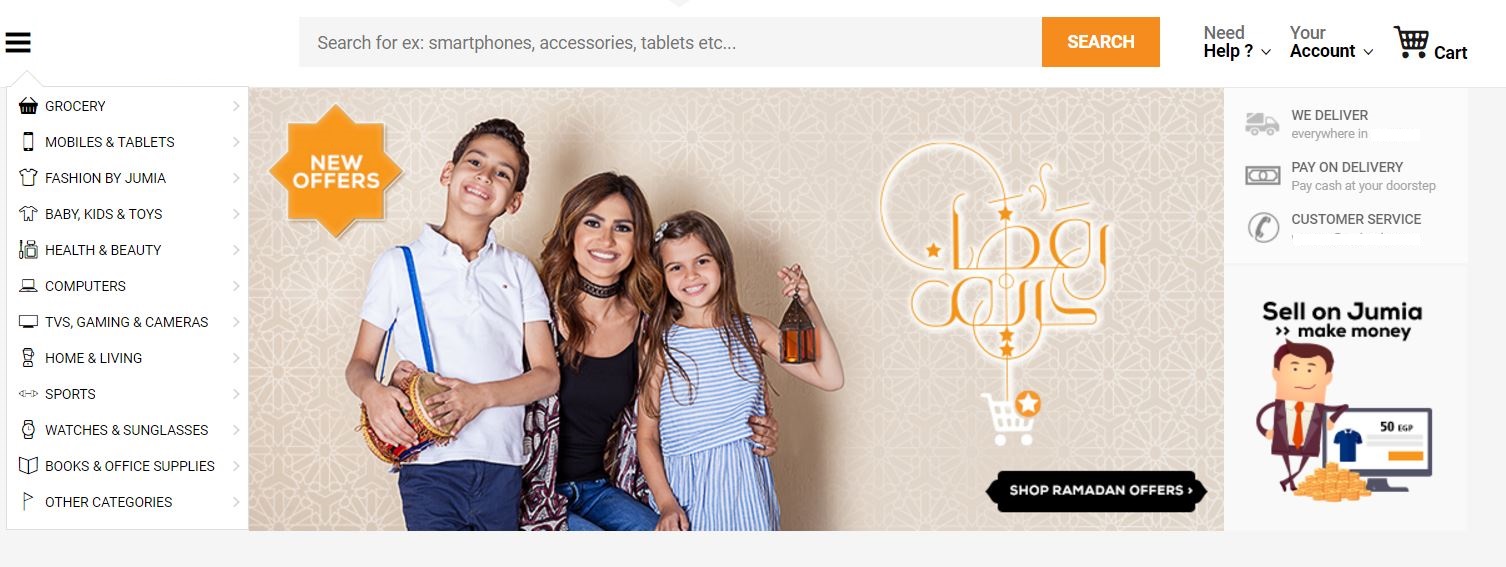
Jak widać na obrazku, lewy pasek boczny zawiera linki do kategorii produktów na stronie. Pierwszym krokiem jest zbadanie kodu HTML strony i zaplanowanie strategii scrapingu. Ta faza analizy jest niezbędna do stworzenia skutecznej strategii scrapingu.
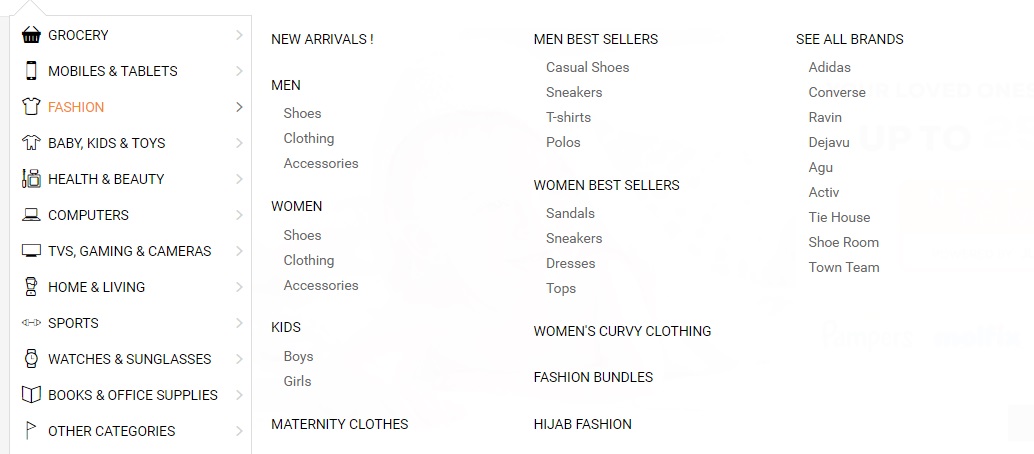
Dłączego zrozumienie struktury HTML ma znaczenie?
Kategorie serwisu modowego mają podkategorie (Mężczyźni, Kobiety, Dzieci). Zrozumienie tej struktury hierarchicznej pomaga w projektowaniu odpowiednich modeli danych i logiki scrapingu. Podczas pracy z zaawansowanymi funkcjami web scrapingu, właściwa analiza HTML staje się jeszcze bardziej istotna.
<li class="menu-item" data-id="">
<a href="https://domain.com/fashion-by-/" class="main-category">
<i class="cat-icon osh-font-fashion"></i>
<span class="nav-subTxt">FASHION </span>
<i class="osh-font-light-arrow-left"></i><i class="osh-font-light-arrow-right"></i>
</a>
<div class="navLayerWrapper" style="width: 633px; display: none;">
<div class="submenu">
<div class="column">
<div class="categories">
<a class="category" href="https://domain.com/fashion-by-/?sort=newest&dir=desc&viewType=gridView3">New Arrivals !</a>
</div>
<div class="categories">
<a class="category" href="https://domain.com/men-fashion/">Men</a>
<a class="subcategory" href="https://domain.com/mens-shoes/">Shoes</a>
<a class="subcategory" href="https://domain.com/mens-clothing/">Clothing</a>
<a class="subcategory" href="https://domain.com/mens-accessories/">Accessories</a>
</div>
<div class="categories">
<a class="category" href="https://domain.com/women-fashion/">Women</a>
<a class="subcategory" href="https://domain.com/womens-shoes/">Shoes</a>
<a class="subcategory" href="https://domain.com/womens-clothing/">Clothing</a>
<a class="subcategory" href="https://domain.com/womens-accessories/">Accessories</a>
</div>
<div class="categories">
<a class="category" href="https://domain.com/girls-boys-fashion/">Kids</a>
<a class="subcategory" href="https://domain.com/boys-fashion/">Boys</a>
<a class="subcategory" href="https://domain.com/girls/">Girls</a>
</div>
<div class="categories">
<a class="category" href="https://domain.com/maternity-clothes/">Maternity Clothes</a>
</div>
</div>
<div class="column">
<div class="categories">
<span class="category defaultCursor">Men Best Sellers</span>
<a class="subcategory" href="https://domain.com/mens-casual-shoes/">Casual Shoes</a>
<a class="subcategory" href="https://domain.com/mens-sneakers/">Sneakers</a>
<a class="subcategory" href="https://domain.com/mens-t-shirts/">T-shirts</a>
<a class="subcategory" href="https://domain.com/mens-polos/">Polos</a>
</div>
<div class="categories">
<span class="category defaultCursor">Women Best Sellers</span>
<a class="subcategory" href="https://domain.com/womens-sandals/">Sandals</a>
<a class="subcategory" href="https://domain.com/womens-sneakers/">Sneakers</a>
<a class="subcategory" href="https://domain.com/women-dresses/">Dresses</a>
<a class="subcategory" href="https://domain.com/women-tops/">Tops</a>
</div>
<div class="categories">
<a class="category" href="https://domain.com/womens-curvy-clothing/">Women's Curvy Clothing</a>
</div>
<div class="categories">
<a class="category" href="https://domain.com/fashion-bundles/v/">Fashion Bundles</a>
</div>
<div class="categories">
<a class="category" href="https://domain.com/hijab-fashion/">Hijab Fashion</a>
</div>
</div>
<div class="column">
<div class="categories">
<a class="category" href="https://domain.com/brands/fashion-by-/">SEE ALL BRANDS</a>
<a class="subcategory" href="https://domain.com/adidas/">Adidas</a>
<a class="subcategory" href="https://domain.com/converse/">Converse</a>
<a class="subcategory" href="https://domain.com/ravin/">Ravin</a>
<a class="subcategory" href="https://domain.com/dejavu/">Dejavu</a>
<a class="subcategory" href="https://domain.com/agu/">Agu</a>
<a class="subcategory" href="https://domain.com/activ/">Activ</a>
<a class="subcategory" href="https://domain.com/oxford--bellini--tie-house--milano/">Tie House</a>
<a class="subcategory" href="https://domain.com/shoe-room/">Shoe Room</a>
<a class="subcategory" href="https://domain.com/town-team/">Town Team</a>
</div>
</div>
</div>
</div>
</li>Jak skonfigurować projekt pobierania danych z sieci?
Skonfiguruj projekt zgodnie z najlepszymi praktykami dla web scrapingu w C#.
- Utwórz nową aplikację Console App lub dodaj nowy folder dla przykładu o nazwie "ShoppingSiteSample"
- Dodaj nową klasę o nazwie "
ShoppingScraper" - Zacznij od skrobania kategorii witryny i ich podkategorii
- Zainstaluj
IronWebScraperza pomocą Menedżera pakietów NuGet lub konsoli Menedżera pakietów:
Jakiego modelu danych powinienem użyć dla kategorii?
Utwórz model kategorii, który prawidłowo odzwierciedla odkrytą strukturę hierarchiczną:
public class Category
{
    /// <summary>
    /// Gets or sets the name.
    /// </summary>
    /// <value>
    /// The name.
    /// </value>
    public string Name { get; set; }

    /// <summary>
    /// Gets or sets the URL.
    /// </summary>
    /// <value>
    /// The URL.
    /// </value>
    public string URL { get; set; }

    /// <summary>
    /// Gets or sets the subcategories.
    /// </summary>
    /// <value>
    /// The subcategories.
    /// </value>
    public List<Category> SubCategories { get; set; }

    // Additional properties for enhanced data collection
    public int ProductCount { get; set; }
    public DateTime LastScraped { get; set; }
    public string CategoryType { get; set; }
}
public class Category
{
/// <summary>
/// Gets or sets the name.
/// </summary>
/// <value>
/// The name.
/// </value>
public string Name { get; set; }
/// <summary>
/// Gets or sets the URL.
/// </summary>
/// <value>
/// The URL.
/// </value>
public string URL { get; set; }
/// <summary>
/// Gets or sets the subcategories.
/// </summary>
/// <value>
/// The subcategories.
/// </value>
public List<Category> SubCategories { get; set; }
// Additional properties for enhanced data collection
public int ProductCount { get; set; }
public DateTime LastScraped { get; set; }
public string CategoryType { get; set; }
}Public Class Category
''' <summary>
''' Gets or sets the name.
''' </summary>
''' <value>
''' The name.
''' </value>
Public Property Name As String
''' <summary>
''' Gets or sets the URL.
''' </summary>
''' <value>
''' The URL.
''' </value>
Public Property URL As String
''' <summary>
''' Gets or sets the subcategories.
''' </summary>
''' <value>
''' The subcategories.
''' </value>
Public Property SubCategories As List(Of Category)
' Additional properties for enhanced data collection
Public Property ProductCount As Integer
Public Property LastScraped As DateTime
Public Property CategoryType As String
End ClassPublic Class Category
''' <summary>
''' Gets or sets the name.
''' </summary>
''' <value>
''' The name.
''' </value>
Public Property Name As String
''' <summary>
''' Gets or sets the URL.
''' </summary>
''' <value>
''' The URL.
''' </value>
Public Property URL As String
''' <summary>
''' Gets or sets the subcategories.
''' </summary>
''' <value>
''' The subcategories.
''' </value>
Public Property SubCategories As List(Of Category)
' Additional properties for enhanced data collection
Public Property ProductCount As Integer
Public Property LastScraped As DateTime
Public Property CategoryType As String
End ClassJak zbudować podstawową logikę scrapera?
Zbuduj logikę scrapera, pamiętając, aby zastosować klucz licencyjny przed uruchomieniem scrapera:
public class ShoppingScraper : WebScraper
{
    /// <summary>
    /// Initialize the web scraper, setting the start URLs and allowed/banned domains or URL patterns.
    /// </summary>
    public override void Init()
    {
        // Apply your license key - get one from https://ironsoftware.com/csharp/webscraper/licensing/
        License.LicenseKey = "LicenseKey";
        this.LoggingLevel = WebScraper.LogLevel.All;
        this.WorkingDirectory = AppSetting.GetAppRoot() + @"\ShoppingSiteSample\Output\";

        // Configure request settings for better performance
        this.Request("www.webSite.com", Parse);
    }

    /// <summary>
    /// Parses the HTML document of the response to scrap the necessary data.
    /// </summary>
    /// <param name="response">The HTTP Response object to parse.</param>
    public override void Parse(Response response)
    {
        var categoryList = new List<Category>();

        // Iterate through each link in the menu and extract the category data.
        foreach (var Links in response.Css("#menuFixed > ul > li > a"))
        {
            var cat = new Category
            {
                URL = Links.Attributes["href"],
                Name = Links.InnerText,
                LastScraped = DateTime.Now
            };
            categoryList.Add(cat);
        }

        // Save the scraped data into a JSONL file.
        Scrape(categoryList, "Shopping.jsonl");
    }
}
public class ShoppingScraper : WebScraper
{
/// <summary>
/// Initialize the web scraper, setting the start URLs and allowed/banned domains or URL patterns.
/// </summary>
public override void Init()
{
// Apply your license key - get one from https://ironsoftware.com/csharp/webscraper/licensing/
License.LicenseKey = "LicenseKey";
this.LoggingLevel = WebScraper.LogLevel.All;
this.WorkingDirectory = AppSetting.GetAppRoot() + @"\ShoppingSiteSample\Output\";
// Configure request settings for better performance
this.Request("www.webSite.com", Parse);
}
/// <summary>
/// Parses the HTML document of the response to scrap the necessary data.
/// </summary>
/// <param name="response">The HTTP Response object to parse.</param>
public override void Parse(Response response)
{
var categoryList = new List<Category>();
// Iterate through each link in the menu and extract the category data.
foreach (var Links in response.Css("#menuFixed > ul > li > a"))
{
var cat = new Category
{
URL = Links.Attributes["href"],
Name = Links.InnerText,
LastScraped = DateTime.Now
};
categoryList.Add(cat);
}
// Save the scraped data into a JSONL file.
Scrape(categoryList, "Shopping.jsonl");
}
}Public Class ShoppingScraper
Inherits WebScraper
''' <summary>
''' Initialize the web scraper, setting the start URLs and allowed/banned domains or URL patterns.
''' </summary>
Public Overrides Sub Init()
' Apply your license key - get one from https://ironsoftware.com/csharp/webscraper/licensing/
License.LicenseKey = "LicenseKey"
Me.LoggingLevel = WebScraper.LogLevel.All
Me.WorkingDirectory = AppSetting.GetAppRoot() & "\ShoppingSiteSample\Output\"
' Configure request settings for better performance
Me.Request("www.webSite.com", AddressOf Parse)
End Sub
''' <summary>
''' Parses the HTML document of the response to scrap the necessary data.
''' </summary>
''' <param name="response">The HTTP Response object to parse.</param>
Public Overrides Sub Parse(response As Response)
Dim categoryList As New List(Of Category)()
' Iterate through each link in the menu and extract the category data.
For Each Links In response.Css("#menuFixed > ul > li > a")
Dim cat As New Category With {
.URL = Links.Attributes("href"),
.Name = Links.InnerText,
.LastScraped = DateTime.Now
}
categoryList.Add(cat)
Next
' Save the scraped data into a JSONL file.
Scrape(categoryList, "Shopping.jsonl")
End Sub
End ClassPublic Class ShoppingScraper
Inherits WebScraper
''' <summary>
''' Initialize the web scraper, setting the start URLs and allowed/banned domains or URL patterns.
''' </summary>
Public Overrides Sub Init()
' Apply your license key - get one from https://ironsoftware.com/csharp/webscraper/licensing/
License.LicenseKey = "LicenseKey"
Me.LoggingLevel = WebScraper.LogLevel.All
Me.WorkingDirectory = AppSetting.GetAppRoot() & "\ShoppingSiteSample\Output\"
' Configure request settings for better performance
Me.Request("www.webSite.com", AddressOf Parse)
End Sub
''' <summary>
''' Parses the HTML document of the response to scrap the necessary data.
''' </summary>
''' <param name="response">The HTTP Response object to parse.</param>
Public Overrides Sub Parse(response As Response)
Dim categoryList As New List(Of Category)()
' Iterate through each link in the menu and extract the category data.
For Each Links In response.Css("#menuFixed > ul > li > a")
Dim cat As New Category With {
.URL = Links.Attributes("href"),
.Name = Links.InnerText,
.LastScraped = DateTime.Now
}
categoryList.Add(cat)
Next
' Save the scraped data into a JSONL file.
Scrape(categoryList, "Shopping.jsonl")
End Sub
End ClassNa jakie elementy w menu mam zwrócić uwagę?
Pobieranie linków z menu wymaga precyzyjnych selektorów CSS. Dokumentacja API zawiera szczegółowe informacje o dostępnych metodach selektorów:

Jak zebrać dane zarówno z głównych kategorii, jak i podkategorii?
Zaktualizuj kod, aby pobierać główne kategorie i wszystkie podlinki. Takie podejście zapewnia pełne odwzorowanie struktury nawigacji:
public override void Parse(Response response)
{
    // List of Category Links (Root)
    var categoryList = new List<Category>();

    // Traverse each 'li' under the fixed menu
    foreach (var li in response.Css("#menuFixed > ul > li"))
    {
        // List of Main Links
        foreach (var Links in li.Css("a"))
        {
            var cat = new Category
            {
                URL = Links.Attributes["href"],
                Name = Links.InnerText,
                SubCategories = new List<Category>(),
                LastScraped = DateTime.Now
            };

            // List of Subcategories Links
            foreach (var subCategory in li.Css("a[class=subcategory]"))
            {
                var subcat = new Category
                {
                    URL = subCategory.Attributes["href"],
                    Name = subCategory.InnerText,
                    CategoryType = "Subcategory"
                };

                // Check if subcategory link already exists
                if (cat.SubCategories.Find(c => c.Name == subcat.Name && c.URL == subcat.URL) == null)
                {
                    // Add sublinks
                    cat.SubCategories.Add(subcat);
                }
            }

            // Update product count based on subcategories
            cat.ProductCount = cat.SubCategories.Count;

            // Add Main Category to the list
            categoryList.Add(cat);
        }
    }

    // Save the scraped data into a JSONL file.
    Scrape(categoryList, "Shopping.jsonl");
}
public override void Parse(Response response)
{
// List of Category Links (Root)
var categoryList = new List<Category>();
// Traverse each 'li' under the fixed menu
foreach (var li in response.Css("#menuFixed > ul > li"))
{
// List of Main Links
foreach (var Links in li.Css("a"))
{
var cat = new Category
{
URL = Links.Attributes["href"],
Name = Links.InnerText,
SubCategories = new List<Category>(),
LastScraped = DateTime.Now
};
// List of Subcategories Links
foreach (var subCategory in li.Css("a[class=subcategory]"))
{
var subcat = new Category
{
URL = subCategory.Attributes["href"],
Name = subCategory.InnerText,
CategoryType = "Subcategory"
};
// Check if subcategory link already exists
if (cat.SubCategories.Find(c => c.Name == subcat.Name && c.URL == subcat.URL) == null)
{
// Add sublinks
cat.SubCategories.Add(subcat);
}
}
// Update product count based on subcategories
cat.ProductCount = cat.SubCategories.Count;
// Add Main Category to the list
categoryList.Add(cat);
}
}
// Save the scraped data into a JSONL file.
Scrape(categoryList, "Shopping.jsonl");
}Public Overrides Sub Parse(response As Response)
' List of Category Links (Root)
Dim categoryList = New List(Of Category)()
' Traverse each 'li' under the fixed menu
For Each li In response.Css("#menuFixed > ul > li")
' List of Main Links
For Each Links In li.Css("a")
Dim cat = New Category With {
.URL = Links.Attributes("href"),
.Name = Links.InnerText,
.SubCategories = New List(Of Category)(),
.LastScraped = DateTime.Now
}
' List of Subcategories Links
For Each subCategory In li.Css("a[class=subcategory]")
Dim subcat = New Category With {
.URL = subCategory.Attributes("href"),
.Name = subCategory.InnerText,
.CategoryType = "Subcategory"
}
' Check if subcategory link already exists
If cat.SubCategories.Find(Function(c) c.Name = subcat.Name AndAlso c.URL = subcat.URL) Is Nothing Then
' Add sublinks
cat.SubCategories.Add(subcat)
End If
Next
' Update product count based on subcategories
cat.ProductCount = cat.SubCategories.Count
' Add Main Category to the list
categoryList.Add(cat)
Next
Next
' Save the scraped data into a JSONL file.
Scrape(categoryList, "Shopping.jsonl")
End SubPublic Overrides Sub Parse(response As Response)
' List of Category Links (Root)
Dim categoryList = New List(Of Category)()
' Traverse each 'li' under the fixed menu
For Each li In response.Css("#menuFixed > ul > li")
' List of Main Links
For Each Links In li.Css("a")
Dim cat = New Category With {
.URL = Links.Attributes("href"),
.Name = Links.InnerText,
.SubCategories = New List(Of Category)(),
.LastScraped = DateTime.Now
}
' List of Subcategories Links
For Each subCategory In li.Css("a[class=subcategory]")
Dim subcat = New Category With {
.URL = subCategory.Attributes("href"),
.Name = subCategory.InnerText,
.CategoryType = "Subcategory"
}
' Check if subcategory link already exists
If cat.SubCategories.Find(Function(c) c.Name = subcat.Name AndAlso c.URL = subcat.URL) Is Nothing Then
' Add sublinks
cat.SubCategories.Add(subcat)
End If
Next
' Update product count based on subcategories
cat.ProductCount = cat.SubCategories.Count
' Add Main Category to the list
categoryList.Add(cat)
Next
Next
' Save the scraped data into a JSONL file.
Scrape(categoryList, "Shopping.jsonl")
End SubJak wyodrębnić informacje o produkcie ze stron kategorii?
Korzystając z linków do wszystkich kategorii witryny, zacznij zbierać produkty w każdej z nich. Podczas obsługi stron produktów bezpieczeństwo wątków staje się ważne dla optymalnej wydajności. Przejdź do dowolnej kategorii i zapoznaj się z treścią:

Jak wygląda struktura HTML produktu?
Zapoznaj się ze strukturą HTML, aby zrozumieć organizację produktu:
<section class="products">
<div class="sku -gallery -validate-size " data-sku="AG249FA0T2PSGNAFAMZ" ft-product-sizes="41,42,43,44,45" ft-product-color="Multicolour">
<a class="link" href="http://www.WebSite.com/agu-bundle-of-2-sneakers-black-navy-blue-653884.html">
<div class="image-wrapper default-state">
<img class="lazy image -loaded" alt="Bundle Of 2 Sneakers - Black & Navy Blue" data-image-vertical="1" width="210" height="262" src="https://static.WebSite.com/p/agu-6208-488356-1-catalog_grid_3.jpg" data-sku="AG249FA0T2PSGNAFAMZ" data-src="https://static.WebSite.com/p/agu-6208-488356-1-catalog_grid_3.jpg" data-placeholder="placeholder_m_1.jpg">
<noscript><img src="https://static.WebSite.com/p/agu-6208-488356-1-catalog_grid_3.jpg" width="210" height="262" class="image" /></noscript>
</div>
<h2 class="title">
<span class="brand ">Agu </span>
<span class="name" dir="ltr">Bundle Of 2 Sneakers - Black & Navy Blue</span>
</h2>
<div class="price-container clearfix">
<span class="price-box">
<span class="price">
<span data-currency-iso="EGP">EGP</span>
<span dir="ltr" data-price="299">299</span>
</span>
<span class="price -old -no-special"></span>
</span>
</div>
<div class="rating-stars">
<div class="stars-container">
<div class="stars" style="width: 62%"></div>
</div>
<div class="total-ratings">(30)</div>
</div>
<span class="shop-first-logo-container">
<img src="http://www.WebSite.com/images/local/logos/shop_first/ShoppingSite/logo_normal.png" data-src="http://www.WebSite.com/images/local/logos/shop_first/ShoppingSite/logo_normal.png" class="lazy shop-first-logo-img -mbxs -loaded">
</span>
<span class="osh-icon -ShoppingSite-local shop_local--logo -block -mbs -mts"></span>
<div class="list -sizes" data-selected-sku="">
<span class="js-link sku-size" data-href="http://www.WebSite.com/agu-bundle-of-2-sneakers-black-navy-blue-653884.html?size=41">41</span>
<span class="js-link sku-size" data-href="http://www.WebSite.com/agu-bundle-of-2-sneakers-black-navy-blue-653884.html?size=42">42</span>
<span class="js-link sku-size" data-href="http://www.WebSite.com/agu-bundle-of-2-sneakers-black-navy-blue-653884.html?size=43">43</span>
<span class="js-link sku-size" data-href="http://www.WebSite.com/agu-bundle-of-2-sneakers-black-navy-blue-653884.html?size=44">44</span>
<span class="js-link sku-size" data-href="http://www.WebSite.com/agu-bundle-of-2-sneakers-black-navy-blue-653884.html?size=45">45</span>
</div>
</a>
</div>
<div class="sku -gallery -validate-size " data-sku="LE047FA01SRK4NAFAMZ" ft-product-sizes="110,115,120,125,130,135" ft-product-color="Black">
<a class="link" href="http://www.WebSite.com/leather-shop-genuine-leather-belt-black-712030.html">
<div class="image-wrapper default-state">
<img class="lazy image -loaded" alt="Genuine Leather Belt - Black" data-image-vertical="1" width="210" height="262" src="https://static.WebSite.com/p/leather-shop-1831-030217-1-catalog_grid_3.jpg" data-sku="LE047FA01SRK4NAFAMZ" data-src="https://static.WebSite.com/p/leather-shop-1831-030217-1-catalog_grid_3.jpg" data-placeholder="placeholder_m_1.jpg">
<noscript><img src="https://static.WebSite.com/p/leather-shop-1831-030217-1-catalog_grid_3.jpg" width="210" height="262" class="image" /></noscript>
</div>
<h2 class="title"><span class="brand ">Leather Shop </span> <span class="name" dir="ltr">Genuine Leather Belt - Black</span></h2>
<div class="price-container clearfix">
<span class="sale-flag-percent">-29%</span>
<span class="price-box">
<span class="price"><span data-currency-iso="EGP">EGP</span> <span dir="ltr" data-price="96">96</span> </span>
<span class="price -old"><span data-currency-iso="EGP">EGP</span> <span dir="ltr" data-price="135">135</span> </span>
</span>
</div>
<div class="rating-stars">
<div class="stars-container">
<div class="stars" style="width: 100%"></div>
</div>
<div class="total-ratings">(1)</div>
</div>
<span class="osh-icon -ShoppingSite-local shop_local--logo -block -mbs -mts"></span>
<div class="list -sizes" data-selected-sku="">
<span class="js-link sku-size" data-href="http://www.WebSite.com/leather-shop-genuine-leather-belt-black-712030.html?size=110">110</span>
<span class="js-link sku-size"data-href="http://www.WebSite.com/leather-shop-genuine-leather-belt-black-712030.html?size=115">115</span>
<span class="js-link sku-size"data-href="http://www.WebSite.com/leather-shop-genuine-leather-belt-black-712030.html?size=120">120</span>
<span class="js-link sku-size"data-href="http://www.WebSite.com/leather-shop-genuine-leather-belt-black-712030.html?size=125">125</span>
<span class="js-link sku-size"data-href="http://www.WebSite.com/leather-shop-genuine-leather-belt-black-712030.html?size=130">130</span>
<span class="js-link sku-size"data-href="http://www.WebSite.com/leather-shop-genuine-leather-belt-black-712030.html?size=135">135</span>
</div>
</a>
</div>
</section>Który model produktu powinienem stworzyć?
Stwórz model produktu dla tej treści. Pracując z web scrapingiem stron zakupowych, uchwyć wszystkie istotne szczegóły produktu:
public class Product
{
    /// <summary>
    /// Gets or sets the name.
    /// </summary>
    /// <value>
    /// The name.
    /// </value>
    public string Name { get; set; }

    /// <summary>
    /// Gets or sets the price.
    /// </summary>
    /// <value>
    /// The price.
    /// </value>
    public string Price { get; set; }

    /// <summary>
    /// Gets or sets the image.
    /// </summary>
    /// <value>
    /// The image.
    /// </value>
    public string Image { get; set; }

    // Additional properties for comprehensive data collection
    public string Brand { get; set; }
    public string OldPrice { get; set; }
    public string Discount { get; set; }
    public float Rating { get; set; }
    public int ReviewCount { get; set; }
    public List<string> AvailableSizes { get; set; }
    public string ProductUrl { get; set; }
    public string SKU { get; set; }
    public DateTime ScrapedDate { get; set; }
}
public class Product
{
/// <summary>
/// Gets or sets the name.
/// </summary>
/// <value>
/// The name.
/// </value>
public string Name { get; set; }
/// <summary>
/// Gets or sets the price.
/// </summary>
/// <value>
/// The price.
/// </value>
public string Price { get; set; }
/// <summary>
/// Gets or sets the image.
/// </summary>
/// <value>
/// The image.
/// </value>
public string Image { get; set; }
// Additional properties for comprehensive data collection
public string Brand { get; set; }
public string OldPrice { get; set; }
public string Discount { get; set; }
public float Rating { get; set; }
public int ReviewCount { get; set; }
public List<string> AvailableSizes { get; set; }
public string ProductUrl { get; set; }
public string SKU { get; set; }
public DateTime ScrapedDate { get; set; }
}Public Class Product
''' <summary>
''' Gets or sets the name.
''' </summary>
''' <value>
''' The name.
''' </value>
Public Property Name As String
''' <summary>
''' Gets or sets the price.
''' </summary>
''' <value>
''' The price.
''' </value>
Public Property Price As String
''' <summary>
''' Gets or sets the image.
''' </summary>
''' <value>
''' The image.
''' </value>
Public Property Image As String
' Additional properties for comprehensive data collection
Public Property Brand As String
Public Property OldPrice As String
Public Property Discount As String
Public Property Rating As Single
Public Property ReviewCount As Integer
Public Property AvailableSizes As List(Of String)
Public Property ProductUrl As String
Public Property SKU As String
Public Property ScrapedDate As DateTime
End ClassPublic Class Product
''' <summary>
''' Gets or sets the name.
''' </summary>
''' <value>
''' The name.
''' </value>
Public Property Name As String
''' <summary>
''' Gets or sets the price.
''' </summary>
''' <value>
''' The price.
''' </value>
Public Property Price As String
''' <summary>
''' Gets or sets the image.
''' </summary>
''' <value>
''' The image.
''' </value>
Public Property Image As String
' Additional properties for comprehensive data collection
Public Property Brand As String
Public Property OldPrice As String
Public Property Discount As String
Public Property Rating As Single
Public Property ReviewCount As Integer
Public Property AvailableSizes As List(Of String)
Public Property ProductUrl As String
Public Property SKU As String
Public Property ScrapedDate As DateTime
End ClassJak dodać funkcję pobierania danych o produktach?
Aby zebrać dane ze stron kategorii, dodaj nową metodę zbierania danych z obsługą błędów i walidacją danych:
public void ParseCategory(Response response)
{
    // List of Products
    var productList = new List<Product>();

    // Iterate through product links in the product section
    foreach (var Links in response.Css("section.products > div > a"))
    {
        try
        {
            var product = new Product
            {
                Name = Links.Css("h2.title > span.name").First().InnerText,
                Brand = Links.Css("h2.title > span.brand").FirstOrDefault()?.InnerText ?? "Unknown",
                Price = Links.Css("div.price-container > span.price-box > span.price > span[data-price]").First().InnerText,
                Image = Links.Css("div.image-wrapper.default-state > img").First().Attributes["src"],
                ProductUrl = Links.Attributes["href"],
                SKU = Links.ParentNode.Attributes["data-sku"],
                ScrapedDate = DateTime.Now
            };

            // Extract old price if available
            var oldPriceElement = Links.Css("span.price.-old > span[data-price]").FirstOrDefault();
            if (oldPriceElement != null)
            {
                product.OldPrice = oldPriceElement.InnerText;
            }

            // Extract discount percentage
            var discountElement = Links.Css("span.sale-flag-percent").FirstOrDefault();
            if (discountElement != null)
            {
                product.Discount = discountElement.InnerText;
            }

            // Extract rating information
            var ratingWidth = Links.Css("div.stars").FirstOrDefault()?.Attributes["style"];
            if (!string.IsNullOrEmpty(ratingWidth))
            {
                var width = System.Text.RegularExpressions.Regex.Match(ratingWidth, @"(\d+)%").Groups[1].Value;
                if (int.TryParse(width, out int ratingPercent))
                {
                    product.Rating = ratingPercent / 20.0f; // Convert percentage to 5-star scale
                }
            }

            // Extract review count
            var reviewText = Links.Css("div.total-ratings").FirstOrDefault()?.InnerText;
            if (!string.IsNullOrEmpty(reviewText))
            {
                var reviewCount = System.Text.RegularExpressions.Regex.Match(reviewText, @"\d+").Value;
                if (int.TryParse(reviewCount, out int count))
                {
                    product.ReviewCount = count;
                }
            }

            // Extract available sizes
            product.AvailableSizes = Links.Css("div.list.-sizes > span.sku-size")
                .Select(s => s.InnerText)
                .ToList();

            productList.Add(product);
        }
        catch (Exception ex)
        {
            // Log error and continue with next product
            Console.WriteLine($"Error parsing product: {ex.Message}");
        }
    }

    // Save the scraped product data into a JSONL file.
    Scrape(productList, "Products.jsonl");

    // Handle pagination if needed
    var nextPageLink = response.Css("a.pagination-next").FirstOrDefault();
    if (nextPageLink != null)
    {
        var nextPageUrl = nextPageLink.Attributes["href"];
        this.Request(nextPageUrl, ParseCategory);
    }
}
public void ParseCategory(Response response)
{
// List of Products
var productList = new List<Product>();
// Iterate through product links in the product section
foreach (var Links in response.Css("section.products > div > a"))
{
try
{
var product = new Product
{
Name = Links.Css("h2.title > span.name").First().InnerText,
Brand = Links.Css("h2.title > span.brand").FirstOrDefault()?.InnerText ?? "Unknown",
Price = Links.Css("div.price-container > span.price-box > span.price > span[data-price]").First().InnerText,
Image = Links.Css("div.image-wrapper.default-state > img").First().Attributes["src"],
ProductUrl = Links.Attributes["href"],
SKU = Links.ParentNode.Attributes["data-sku"],
ScrapedDate = DateTime.Now
};
// Extract old price if available
var oldPriceElement = Links.Css("span.price.-old > span[data-price]").FirstOrDefault();
if (oldPriceElement != null)
{
product.OldPrice = oldPriceElement.InnerText;
}
// Extract discount percentage
var discountElement = Links.Css("span.sale-flag-percent").FirstOrDefault();
if (discountElement != null)
{
product.Discount = discountElement.InnerText;
}
// Extract rating information
var ratingWidth = Links.Css("div.stars").FirstOrDefault()?.Attributes["style"];
if (!string.IsNullOrEmpty(ratingWidth))
{
var width = System.Text.RegularExpressions.Regex.Match(ratingWidth, @"(\d+)%").Groups[1].Value;
if (int.TryParse(width, out int ratingPercent))
{
product.Rating = ratingPercent / 20.0f; // Convert percentage to 5-star scale
}
}
// Extract review count
var reviewText = Links.Css("div.total-ratings").FirstOrDefault()?.InnerText;
if (!string.IsNullOrEmpty(reviewText))
{
var reviewCount = System.Text.RegularExpressions.Regex.Match(reviewText, @"\d+").Value;
if (int.TryParse(reviewCount, out int count))
{
product.ReviewCount = count;
}
}
// Extract available sizes
product.AvailableSizes = Links.Css("div.list.-sizes > span.sku-size")
.Select(s => s.InnerText)
.ToList();
productList.Add(product);
}
catch (Exception ex)
{
// Log error and continue with next product
Console.WriteLine($"Error parsing product: {ex.Message}");
}
}
// Save the scraped product data into a JSONL file.
Scrape(productList, "Products.jsonl");
// Handle pagination if needed
var nextPageLink = response.Css("a.pagination-next").FirstOrDefault();
if (nextPageLink != null)
{
var nextPageUrl = nextPageLink.Attributes["href"];
this.Request(nextPageUrl, ParseCategory);
}
}Public Sub ParseCategory(response As Response)
' List of Products
Dim productList = New List(Of Product)()
' Iterate through product links in the product section
For Each Links In response.Css("section.products > div > a")
Try
Dim product = New Product With {
.Name = Links.Css("h2.title > span.name").First().InnerText,
.Brand = If(Links.Css("h2.title > span.brand").FirstOrDefault()?.InnerText, "Unknown"),
.Price = Links.Css("div.price-container > span.price-box > span.price > span[data-price]").First().InnerText,
.Image = Links.Css("div.image-wrapper.default-state > img").First().Attributes("src"),
.ProductUrl = Links.Attributes("href"),
.SKU = Links.ParentNode.Attributes("data-sku"),
.ScrapedDate = DateTime.Now
}
' Extract old price if available
Dim oldPriceElement = Links.Css("span.price.-old > span[data-price]").FirstOrDefault()
If oldPriceElement IsNot Nothing Then
product.OldPrice = oldPriceElement.InnerText
End If
' Extract discount percentage
Dim discountElement = Links.Css("span.sale-flag-percent").FirstOrDefault()
If discountElement IsNot Nothing Then
product.Discount = discountElement.InnerText
End If
' Extract rating information
Dim ratingWidth = Links.Css("div.stars").FirstOrDefault()?.Attributes("style")
If Not String.IsNullOrEmpty(ratingWidth) Then
Dim width = System.Text.RegularExpressions.Regex.Match(ratingWidth, "(\d+)%").Groups(1).Value
Dim ratingPercent As Integer
If Integer.TryParse(width, ratingPercent) Then
product.Rating = ratingPercent / 20.0F ' Convert percentage to 5-star scale
End If
End If
' Extract review count
Dim reviewText = Links.Css("div.total-ratings").FirstOrDefault()?.InnerText
If Not String.IsNullOrEmpty(reviewText) Then
Dim reviewCount = System.Text.RegularExpressions.Regex.Match(reviewText, "\d+").Value
Dim count As Integer
If Integer.TryParse(reviewCount, count) Then
product.ReviewCount = count
End If
End If
' Extract available sizes
product.AvailableSizes = Links.Css("div.list.-sizes > span.sku-size").Select(Function(s) s.InnerText).ToList()
productList.Add(product)
Catch ex As Exception
' Log error and continue with next product
Console.WriteLine($"Error parsing product: {ex.Message}")
End Try
Next
' Save the scraped product data into a JSONL file.
Scrape(productList, "Products.jsonl")
' Handle pagination if needed
Dim nextPageLink = response.Css("a.pagination-next").FirstOrDefault()
If nextPageLink IsNot Nothing Then
Dim nextPageUrl = nextPageLink.Attributes("href")
Me.Request(nextPageUrl, AddressOf ParseCategory)
End If
End SubPublic Sub ParseCategory(response As Response)
' List of Products
Dim productList = New List(Of Product)()
' Iterate through product links in the product section
For Each Links In response.Css("section.products > div > a")
Try
Dim product = New Product With {
.Name = Links.Css("h2.title > span.name").First().InnerText,
.Brand = If(Links.Css("h2.title > span.brand").FirstOrDefault()?.InnerText, "Unknown"),
.Price = Links.Css("div.price-container > span.price-box > span.price > span[data-price]").First().InnerText,
.Image = Links.Css("div.image-wrapper.default-state > img").First().Attributes("src"),
.ProductUrl = Links.Attributes("href"),
.SKU = Links.ParentNode.Attributes("data-sku"),
.ScrapedDate = DateTime.Now
}
' Extract old price if available
Dim oldPriceElement = Links.Css("span.price.-old > span[data-price]").FirstOrDefault()
If oldPriceElement IsNot Nothing Then
product.OldPrice = oldPriceElement.InnerText
End If
' Extract discount percentage
Dim discountElement = Links.Css("span.sale-flag-percent").FirstOrDefault()
If discountElement IsNot Nothing Then
product.Discount = discountElement.InnerText
End If
' Extract rating information
Dim ratingWidth = Links.Css("div.stars").FirstOrDefault()?.Attributes("style")
If Not String.IsNullOrEmpty(ratingWidth) Then
Dim width = System.Text.RegularExpressions.Regex.Match(ratingWidth, "(\d+)%").Groups(1).Value
Dim ratingPercent As Integer
If Integer.TryParse(width, ratingPercent) Then
product.Rating = ratingPercent / 20.0F ' Convert percentage to 5-star scale
End If
End If
' Extract review count
Dim reviewText = Links.Css("div.total-ratings").FirstOrDefault()?.InnerText
If Not String.IsNullOrEmpty(reviewText) Then
Dim reviewCount = System.Text.RegularExpressions.Regex.Match(reviewText, "\d+").Value
Dim count As Integer
If Integer.TryParse(reviewCount, count) Then
product.ReviewCount = count
End If
End If
' Extract available sizes
product.AvailableSizes = Links.Css("div.list.-sizes > span.sku-size").Select(Function(s) s.InnerText).ToList()
productList.Add(product)
Catch ex As Exception
' Log error and continue with next product
Console.WriteLine($"Error parsing product: {ex.Message}")
End Try
Next
' Save the scraped product data into a JSONL file.
Scrape(productList, "Products.jsonl")
' Handle pagination if needed
Dim nextPageLink = response.Css("a.pagination-next").FirstOrDefault()
If nextPageLink IsNot Nothing Then
Dim nextPageUrl = nextPageLink.Attributes("href")
Me.Request(nextPageUrl, AddressOf ParseCategory)
End If
End SubTo kompleksowe podejście do scrapingu stron internetowych sklepów zapewnia przechwycenie wszystkich istotnych informacji o produktach przy jednoczesnym płynnym radzeniu sobie z błędami. W przypadku bardziej zaawansowanych scenariuszy, eksploruj zaawansowane funkcje web scrapingu dostępne w IronWebScraper.
Najczęściej zadawane pytania
Jak mogę rozpocząć scraping na stronie zakupowej używając C#?
Aby rozpocząć scraping na stronie zakupowej używając C#, musisz utworzyć nowy projekt aplikacji konsolowej, dodać klasę, która dziedziczy po WebScraper, i skonfigurować scraper do ustawienia początkowego URL i metod parsowania używając biblioteki IronWebScraper.
Jakie są główne kroki do skonfigurowania projektu scrapingu w C#?
Główne kroki do skonfigurowania projektu scrapingu w C# obejmują utworzenie aplikacji konsolowej, zainstalowanie IronWebScraper poprzez NuGet, skonfigurowanie modeli danych dla kategorii i produktów oraz nadpisanie metod Init() i Parse() w klasie scraper.
Dlaczego zrozumienie struktury HTML jest ważne dla scrapingu?
Zrozumienie struktury HTML jest kluczowe dla scrapingu, ponieważ pozwala zaprojektować odpowiednie modele danych i logikę do skutecznego wyodrębniania niezbędnych elementów takich jak nazwy produktów, ceny i obrazy ze stron internetowych.
Jak wyodrębnić dane produktów z witryny zakupowej używając `IronWebScraper`?
Możesz wyodrębnić dane produktów używając IronWebScraper poprzez iterację przez elementy HTML za pomocą selektorów CSS w metodzie Parse(), organizując je w niestandardowe modele danych oraz zapisując zebrane dane do pliku JSONL.
Jakie modele danych powinienem używać do scrapingu serwisów e-commerce?
Dla scrapingu serwisów e-commerce powinieneś używać modeli danych takich jak Category i Product, aby reprezentować struktury hierarchiczne i szczegóły pojedynczych produktów, zawierające pola takie jak nazwa, cena, URL, obraz i inne.
Czy `IronWebScraper` obsługuje paginację podczas scrapingu?
Tak, IronWebScraper obsługuje paginację poprzez wysyłanie żądania kolejnego URL strony znalezionego w linkach paginacji i kontynuowanie scrapingu na kolejnych stronach, aż do zebrania wszystkich niezbędnych danych.
Jak `IronWebScraper` poprawia efektywność projektu scrapingu?
IronWebScraper zwiększa efektywność scrapingu dzięki funkcjom takim jak równoczesne żądania, selektory CSS do ukierunkowanego scrapingu oraz gromadzenie danych w ustrukturyzowanych formatach, co sprawia, że proces scrapingu jest szybszy i bardziej zorganizowany.
Jak zapewnić bezpieczeństwo wątków podczas scrapingu stron produktów?
Aby zapewnić bezpieczeństwo wątków podczas scrapingu stron produktów, należy ostrożnie zarządzać jednoczesnymi żądaniami i współdzieleniem zasobów, wykorzystując zaawansowane funkcje IronWebScraper zaprojektowane do efektywnego obsługiwania operacji wielowątkowych.
Jakie są wspólne elementy docelowe podczas scrapingu kategorii e-commerce?
Wspólne elementy docelowe podczas scrapingu kategorii e-commerce obejmują nazwy kategorii, URL-e, linki do podkategorii oraz czasami metadane jak liczba produktów lub znaczniki czasu ostatniej aktualizacji.
Jak wyodrębnić podkategorie wraz z głównymi kategoriami?
Możesz wyodrębnić podkategorie wraz z głównymi kategoriami poprzez iterację przez strukturę HTML każdej głównej kategorii, identyfikowanie linków do podkategorii oraz wyodrębnianie ich nazw i URL-ów za pomocą IronWebScraper.

Curtis Chau posiada tytuł licencjata z informatyki (Uniwersytet Carleton) i specjalizuje się w front-endowym rozwoju, z ekspertką w Node.js, TypeScript, JavaScript i React. Pasjonuje się tworzeniem intuicyjnych i estetycznie przyjemnych interfejsów użytkownika, Curtis cieszy się pracą z nowoczesnymi frameworkami i tworzeniem dobrze zorganizowanych, atrakcyjnych wizualnie podręczników.

