
C#과 IronWebScraper로 온라인 영화 웹사이트에서 데이터 스크래핑하기

IronWebScraper는 웹사이트의 HTML 요소를 파싱하여 영화 데이터를 추출하고, 형식이 지정된 객체를 만들어 구조화된 데이터를 저장하며, 메타데이터로 페이지 간을 이동하여 종합적인 영화 정보 데이터 세트를 구축합니다. 이 C# 웹 스크래퍼 라이브러리를 사용하면 비정형 웹 콘텐츠를 체계적으로 정리해 분석 가능한 데이터로 쉽게 변환할 수 있습니다.
빠른 시작: C#으로 영화 데이터 스크래핑하기- NuGet 패키지 관리자를 통해
IronWebScraper설치 WebScraper에서 상속받는 클래스를 생성Init()를 재정의하여 라이선스를 설정하고 대상 URL을 요청- CSS 선택자를 사용하여 영화 데이터를 추출하기 위해
Parse()를 재정의 - 데이터를 JSON 형식으로 저장하기 위해
Scrape()메서드 사용
-
1IronWebScraper를 NuGet Package Manager로 설치하십시오
-
2다음 코드 조각을 복사하여 실행하세요.
using IronWebScraper; using System; public class QuickstartMovieScraper : WebScraper { public override void Init() { // Set your license key License.LicenseKey = "YOUR-LICENSE-KEY"; // Configure scraper settings this.LoggingLevel = LogLevel.All; this.WorkingDirectory = @"C:\MovieData\Output\"; // Start scraping from the homepage this.Request("https://example-movie-site.com", Parse); } public override void Parse(Response response) { // Extract movie titles using CSS selectors foreach (var movieDiv in response.Css(".movie-item")) { var title = movieDiv.Css("h2")[0].TextContentClean; var url = movieDiv.Css("a")[0].Attributes["href"]; // Save the scraped data Scrape(new { Title = title, Url = url }, "movies.json"); } } } // Run the scraper var scraper = new QuickstartMovieScraper(); scraper.Start();Imports IronWebScraper Imports System Public Class QuickstartMovieScraper Inherits WebScraper Public Overrides Sub Init() ' Set your license key License.LicenseKey = "YOUR-LICENSE-KEY" ' Configure scraper settings Me.LoggingLevel = LogLevel.All Me.WorkingDirectory = "C:\MovieData\Output\" ' Start scraping from the homepage Me.Request("https://example-movie-site.com", AddressOf Parse) End Sub Public Overrides Sub Parse(response As Response) ' Extract movie titles using CSS selectors For Each movieDiv In response.Css(".movie-item") Dim title = movieDiv.Css("h2")(0).TextContentClean Dim url = movieDiv.Css("a")(0).Attributes("href") ' Save the scraped data Scrape(New With {Key .Title = title, Key .Url = url}, "movies.json") Next End Sub End Class ' Run the scraper Dim scraper As New QuickstartMovieScraper() scraper.Start()Imports IronWebScraper Imports System Public Class QuickstartMovieScraper Inherits WebScraper Public Overrides Sub Init() ' Set your license key License.LicenseKey = "YOUR-LICENSE-KEY" ' Configure scraper settings Me.LoggingLevel = LogLevel.All Me.WorkingDirectory = "C:\MovieData\Output\" ' Start scraping from the homepage Me.Request("https://example-movie-site.com", AddressOf Parse) End Sub Public Overrides Sub Parse(response As Response) ' Extract movie titles using CSS selectors For Each movieDiv In response.Css(".movie-item") Dim title = movieDiv.Css("h2")(0).TextContentClean Dim url = movieDiv.Css("a")(0).Attributes("href") ' Save the scraped data Scrape(New With {Key .Title = title, Key .Url = url}, "movies.json") Next End Sub End Class ' Run the scraper Dim scraper As New QuickstartMovieScraper() scraper.Start() -
3실제 운영 환경에서 테스트할 수 있도록 배포하세요.
오늘 프로젝트에서 IronWebScraper 사용을 시작해보세요 무료 체험
영화 스크래퍼 클래스는 어떻게 만드나요?
실제 웹사이트를 예로 들어 보겠습니다. C# 웹 스크래핑 튜토리얼에서 소개한 기법으로 영화 웹사이트를 스크래핑합니다.
새로운 클래스를 추가하고 이름을 MovieScraper로 지정합니다:
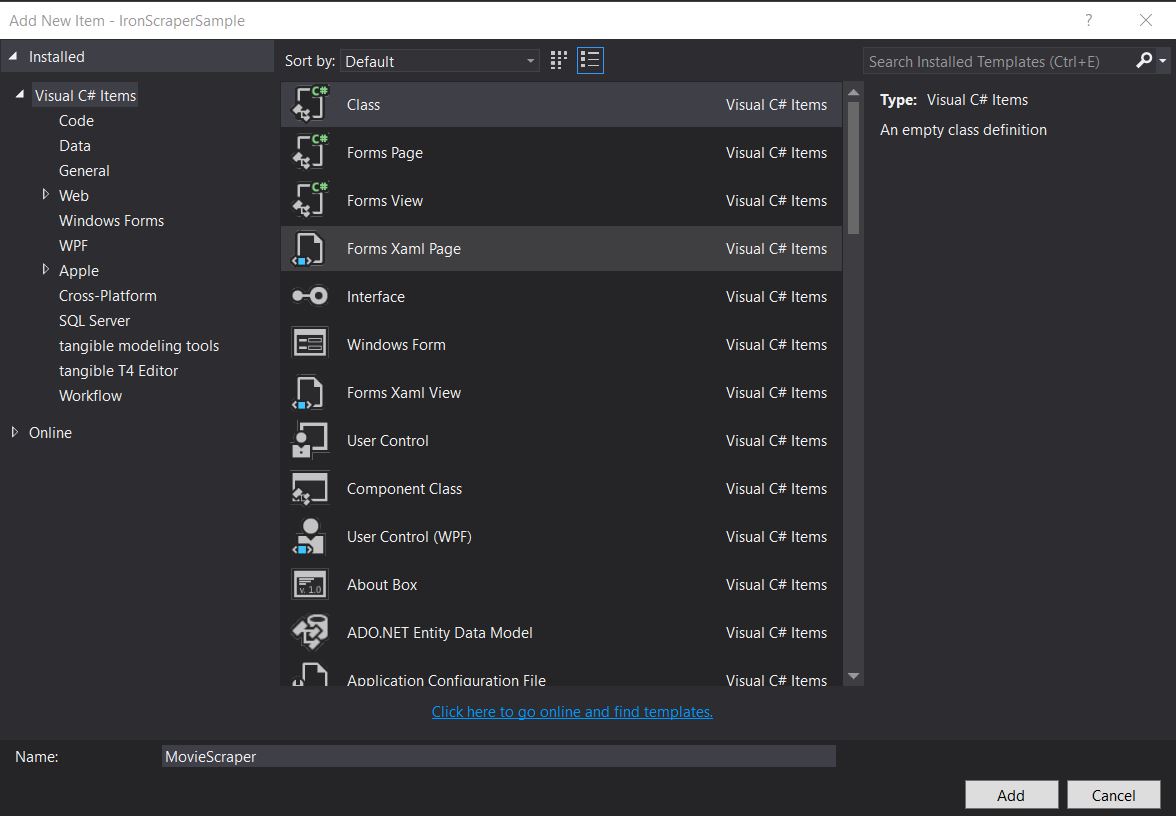
스크래핑 전용 클래스를 만들면 코드를 체계적으로 정리하고 재사용성을 높일 수 있습니다. 이 접근 방식은 객체 지향 원칙을 따르며, 나중에 기능을 쉽게 확장할 수 있도록 해줍니다.
대상 웹사이트의 구조는 어떻게 생겼나요?
효과적으로 웹 스크래핑을 하려면 대상 웹사이트의 구조를 이해해야 합니다. 온라인 영화 웹사이트에서 데이터 스크래핑하기 가이드와 마찬가지로 HTML 구조부터 분석합니다.
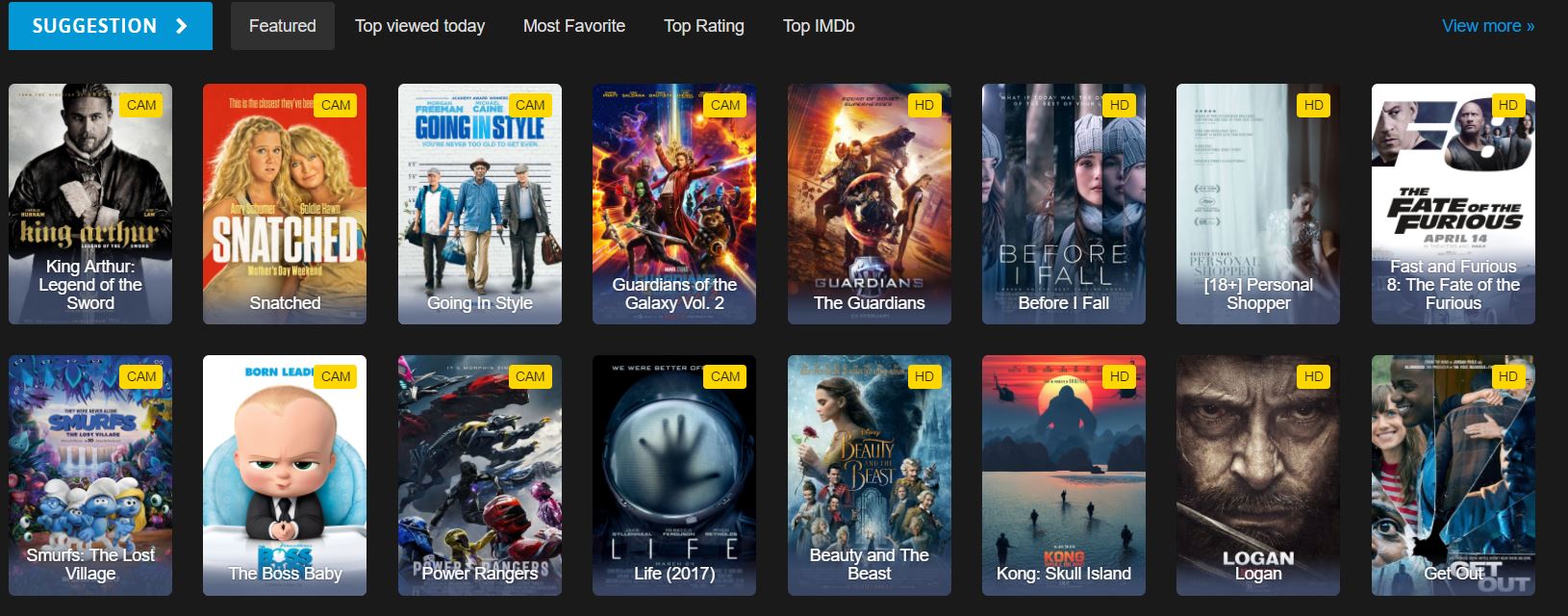
영화 데이터가 포함된 HTML 요소는 무엇입니까?
이는 웹사이트 홈페이지에서 볼 수 있는 HTML의 일부입니다. HTML 구조를 살펴보면 사용해야 할 올바른 CSS 선택자를 식별하는 데 도움이 됩니다.
<div id="movie-featured" class="movies-list movies-list-full tab-pane in fade active">
    <div data-movie-id="20746" class="ml-item">
        <a href="https://website.com/film/king-arthur-legend-of-the-sword-20746/">
            <span class="mli-quality">CAM</span>
            <img data-original="https://img.gocdn.online/2017/05/16/poster/2116d6719c710eabe83b377463230fbe-king-arthur-legend-of-the-sword.jpg"
                 class="lazy thumb mli-thumb" alt="King Arthur: Legend of the Sword"
                 src="https://img.gocdn.online/2017/05/16/poster/2116d6719c710eabe83b377463230fbe-king-arthur-legend-of-the-sword.jpg"
                 style="display: inline-block;">
            <span class="mli-info"><h2>King Arthur: Legend of the Sword</h2></span>
        </a>
    </div>
    <div data-movie-id="20724" class="ml-item">
        <a href="https://website.com/film/snatched-20724/">
            <span class="mli-quality">CAM</span>
            <img data-original="https://img.gocdn.online/2017/05/16/poster/5ef66403dc331009bdb5aa37cfe819ba-snatched.jpg"
                 class="lazy thumb mli-thumb" alt="Snatched"
                 src="https://img.gocdn.online/2017/05/16/poster/5ef66403dc331009bdb5aa37cfe819ba-snatched.jpg"
                 style="display: inline-block;">
            <span class="mli-info"><h2>Snatched</h2></span>
        </a>
    </div>
</div>HTML에서 영화 ID, 제목, 상세 페이지 링크를 확인할 수 있습니다. 각 영화 항목은 클래스가 ml-item인 div 요소에 있으며, 영화를 식별하는 고유한 data-movie-id 속성을 갖습니다.
기본적인 영화 웹 스크래핑은 어떻게 구현하나요?
이 데이터 세트를 스크래핑합니다. 스크래퍼를 실행하기 전에 아래 예제처럼 라이선스 키를 올바르게 설정했는지 확인하세요.
public class MovieScraper : WebScraper
{
    public override void Init()
    {
        // Initialize scraper settings
        License.LicenseKey = "LicenseKey";
        this.LoggingLevel = WebScraper.LogLevel.All;
        this.WorkingDirectory = AppSetting.GetAppRoot() + @"\MovieSample\Output\";

        // Request homepage content for scraping
        this.Request("www.website.com", Parse);
    }

    public override void Parse(Response response)
    {
        // Iterate over each movie div within the featured movie section
        foreach (var div in response.Css("#movie-featured > div"))
        {
            if (div.Attributes["class"] != "clearfix")
            {
                var movieId = Convert.ToInt32(div.GetAttribute("data-movie-id"));
                var link = div.Css("a")[0];
                var movieTitle = link.TextContentClean;

                // Scrape and store movie data as key-value pairs
                Scrape(new ScrapedData()
                {
                    { "MovieId", movieId },
                    { "MovieTitle", movieTitle }
                }, "Movie.Jsonl");
            }
        }
    }
}
public class MovieScraper : WebScraper
{
public override void Init()
{
// Initialize scraper settings
License.LicenseKey = "LicenseKey";
this.LoggingLevel = WebScraper.LogLevel.All;
this.WorkingDirectory = AppSetting.GetAppRoot() + @"\MovieSample\Output\";
// Request homepage content for scraping
this.Request("www.website.com", Parse);
}
public override void Parse(Response response)
{
// Iterate over each movie div within the featured movie section
foreach (var div in response.Css("#movie-featured > div"))
{
if (div.Attributes["class"] != "clearfix")
{
var movieId = Convert.ToInt32(div.GetAttribute("data-movie-id"));
var link = div.Css("a")[0];
var movieTitle = link.TextContentClean;
// Scrape and store movie data as key-value pairs
Scrape(new ScrapedData()
{
{ "MovieId", movieId },
{ "MovieTitle", movieTitle }
}, "Movie.Jsonl");
}
}
}
}Public Class MovieScraper
Inherits WebScraper
Public Overrides Sub Init()
' Initialize scraper settings
License.LicenseKey = "LicenseKey"
Me.LoggingLevel = WebScraper.LogLevel.All
Me.WorkingDirectory = AppSetting.GetAppRoot() & "\MovieSample\Output\"
' Request homepage content for scraping
Me.Request("www.website.com", AddressOf Parse)
End Sub
Public Overrides Sub Parse(ByVal response As Response)
' Iterate over each movie div within the featured movie section
For Each div In response.Css("#movie-featured > div")
If div.Attributes("class") <> "clearfix" Then
Dim movieId = Convert.ToInt32(div.GetAttribute("data-movie-id"))
Dim link = div.Css("a")(0)
Dim movieTitle = link.TextContentClean
' Scrape and store movie data as key-value pairs
Scrape(New ScrapedData() From {
{"MovieId", movieId},
{"MovieTitle", movieTitle}
}, "Movie.Jsonl")
End If
Next
End Sub
End ClassPublic Class MovieScraper
Inherits WebScraper
Public Overrides Sub Init()
' Initialize scraper settings
License.LicenseKey = "LicenseKey"
Me.LoggingLevel = WebScraper.LogLevel.All
Me.WorkingDirectory = AppSetting.GetAppRoot() & "\MovieSample\Output\"
' Request homepage content for scraping
Me.Request("www.website.com", AddressOf Parse)
End Sub
Public Overrides Sub Parse(ByVal response As Response)
' Iterate over each movie div within the featured movie section
For Each div In response.Css("#movie-featured > div")
If div.Attributes("class") <> "clearfix" Then
Dim movieId = Convert.ToInt32(div.GetAttribute("data-movie-id"))
Dim link = div.Css("a")(0)
Dim movieTitle = link.TextContentClean
' Scrape and store movie data as key-value pairs
Scrape(New ScrapedData() From {
{"MovieId", movieId},
{"MovieTitle", movieTitle}
}, "Movie.Jsonl")
End If
Next
End Sub
End Class작업 디렉터리 속성은 어떤 용도로 사용하나요?
이 코드에서 새로워진 부분은 무엇인가요?
Working Directory 속성은 스크래핑한 데이터와 관련 파일을 저장할 기본 작업 디렉터리를 지정합니다. 모든 출력 파일이 한곳에 모여 대규모 스크래핑 프로젝트를 관리하기가 쉬워집니다. 디렉터리가 없으면 자동으로 생성됩니다.
CSS 선택자와 속성은 언제 사용해야 할까요?
추가 고려 사항:
CSS 선택자는 구조상 위치나 클래스 이름으로 요소를 선택하는 데 적합합니다. ID나 사용자 지정 데이터 속성처럼 특정 값이 필요할 때는 속성에 직접 접근하는 편이 적합합니다. 이 예제에서는 CSS 선택자(#movie-featured > div)로 DOM 구조를 탐색하고 속성(data-movie-id)에서 값을 추출합니다.
스크래핑한 데이터를 저장할 형식이 지정된 객체는 어떻게 만드나요?
스크래핑한 데이터를 구조화하여 저장할 수 있도록 형식이 지정된 객체를 만듭니다. 강력한 형식 지정이 적용된 객체를 사용하면 코드를 체계적으로 구성할 수 있으며 IntelliSense 지원과 컴파일 시 형식 검사의 이점도 얻을 수 있습니다.
형식화된 데이터를 담는 Movie 클래스를 구현합니다:
public class Movie
{
    public int Id { get; set; }
    public string Title { get; set; }
    public string URL { get; set; }
}
public class Movie
{
public int Id { get; set; }
public string Title { get; set; }
public string URL { get; set; }
}Public Class Movie
Public Property Id As Integer
Public Property Title As String
Public Property URL As String
End ClassPublic Class Movie
Public Property Id As Integer
Public Property Title As String
Public Property URL As String
End Class형식이 지정된 객체를 사용하면 데이터 구성이 어떻게 개선되나요?
기존의 범용 ScrapedData 딕셔너리 대신 형식이 지정된 Movie 클래스를 사용하도록 코드를 변경합니다.
public class MovieScraper : WebScraper
{
    public override void Init()
    {
        // Initialize scraper settings
        License.LicenseKey = "LicenseKey";
        this.LoggingLevel = WebScraper.LogLevel.All;
        this.WorkingDirectory = AppSetting.GetAppRoot() + @"\MovieSample\Output\";

        // Request homepage content for scraping
        this.Request("https://website.com/", Parse);
    }

    public override void Parse(Response response)
    {
        // Iterate over each movie div within the featured movie section
        foreach (var div in response.Css("#movie-featured > div"))
        {
            if (div.Attributes["class"] != "clearfix")
            {
                var movie = new Movie
                {
                    Id = Convert.ToInt32(div.GetAttribute("data-movie-id"))
                };

                var link = div.Css("a")[0];
                movie.Title = link.TextContentClean;
                movie.URL = link.Attributes["href"];

                // Scrape and store movie object
                Scrape(movie, "Movie.Jsonl");
            }
        }
    }
}
public class MovieScraper : WebScraper
{
public override void Init()
{
// Initialize scraper settings
License.LicenseKey = "LicenseKey";
this.LoggingLevel = WebScraper.LogLevel.All;
this.WorkingDirectory = AppSetting.GetAppRoot() + @"\MovieSample\Output\";
// Request homepage content for scraping
this.Request("https://website.com/", Parse);
}
public override void Parse(Response response)
{
// Iterate over each movie div within the featured movie section
foreach (var div in response.Css("#movie-featured > div"))
{
if (div.Attributes["class"] != "clearfix")
{
var movie = new Movie
{
Id = Convert.ToInt32(div.GetAttribute("data-movie-id"))
};
var link = div.Css("a")[0];
movie.Title = link.TextContentClean;
movie.URL = link.Attributes["href"];
// Scrape and store movie object
Scrape(movie, "Movie.Jsonl");
}
}
}
}Public Class MovieScraper
Inherits WebScraper
Public Overrides Sub Init()
' Initialize scraper settings
License.LicenseKey = "LicenseKey"
Me.LoggingLevel = WebScraper.LogLevel.All
Me.WorkingDirectory = AppSetting.GetAppRoot() & "\MovieSample\Output\"
' Request homepage content for scraping
Me.Request("https://website.com/", AddressOf Parse)
End Sub
Public Overrides Sub Parse(response As Response)
' Iterate over each movie div within the featured movie section
For Each div In response.Css("#movie-featured > div")
If div.Attributes("class") <> "clearfix" Then
Dim movie As New Movie With {
.Id = Convert.ToInt32(div.GetAttribute("data-movie-id"))
}
Dim link = div.Css("a")(0)
movie.Title = link.TextContentClean
movie.URL = link.Attributes("href")
' Scrape and store movie object
Scrape(movie, "Movie.Jsonl")
End If
Next
End Sub
End ClassPublic Class MovieScraper
Inherits WebScraper
Public Overrides Sub Init()
' Initialize scraper settings
License.LicenseKey = "LicenseKey"
Me.LoggingLevel = WebScraper.LogLevel.All
Me.WorkingDirectory = AppSetting.GetAppRoot() & "\MovieSample\Output\"
' Request homepage content for scraping
Me.Request("https://website.com/", AddressOf Parse)
End Sub
Public Overrides Sub Parse(response As Response)
' Iterate over each movie div within the featured movie section
For Each div In response.Css("#movie-featured > div")
If div.Attributes("class") <> "clearfix" Then
Dim movie As New Movie With {
.Id = Convert.ToInt32(div.GetAttribute("data-movie-id"))
}
Dim link = div.Css("a")(0)
movie.Title = link.TextContentClean
movie.URL = link.Attributes("href")
' Scrape and store movie object
Scrape(movie, "Movie.Jsonl")
End If
Next
End Sub
End ClassScrape 메서드는 형식이 지정된 객체를 어떤 형식으로 저장하나요?
새로운 점은 무엇인가요?
- 스크래핑한 데이터를 저장할
Movie클래스를 구현하면 형식 안전성을 확보하고 코드를 체계적으로 구성할 수 있습니다. - 영화 객체를
Scrape메서드에 전달하면 메서드가 지정한 형식에 따라 아래와 같이 저장합니다.
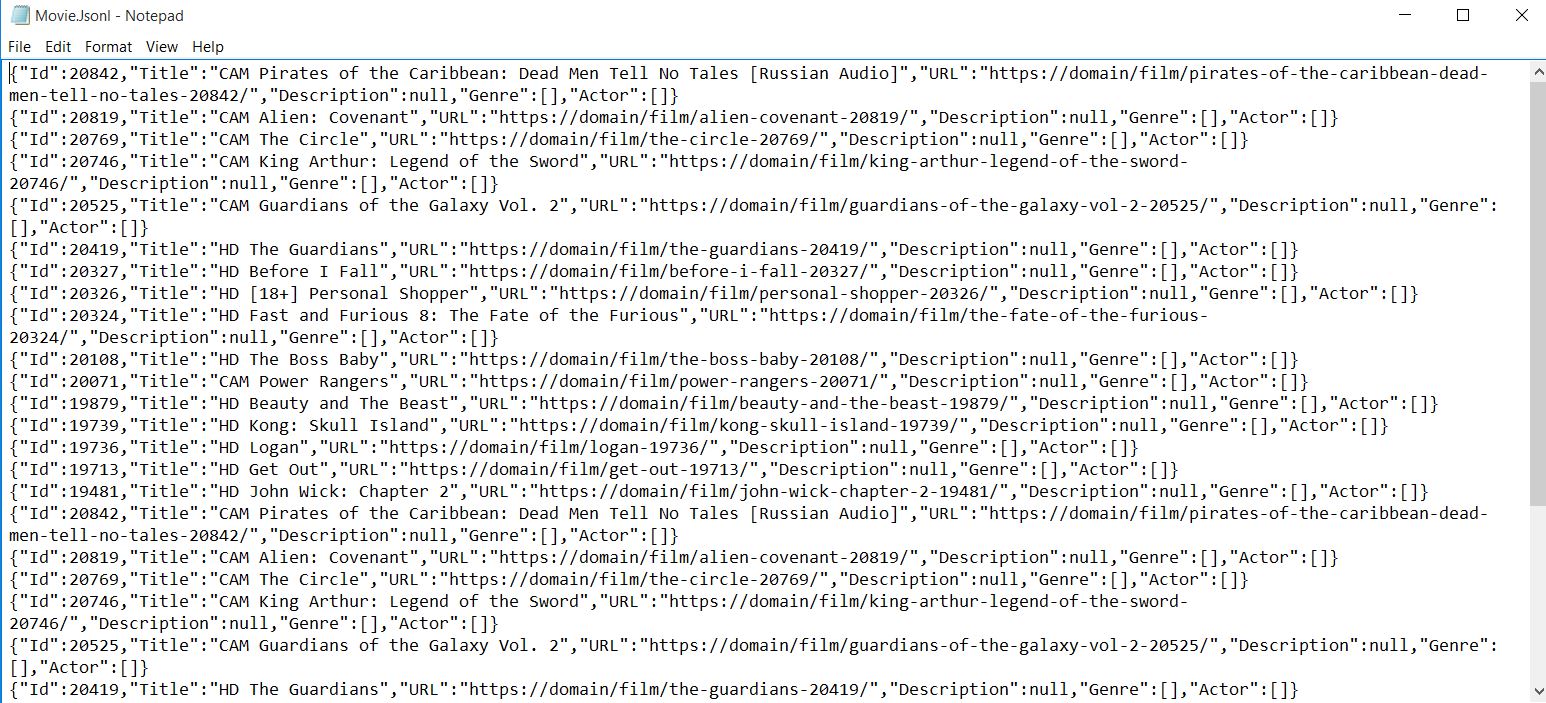
출력 결과는 자동으로 JSON 형식으로 직렬화되므로 데이터베이스나 다른 애플리케이션으로 쉽게 가져올 수 있습니다.
영화 상세 페이지는 어떻게 스크래핑하나요?
이제 영화 상세 페이지를 스크래핑합니다. 여러 페이지를 스크래핑해야 하는 경우가 많으며, IronWebScraper에서는 요청을 연쇄적으로 보내 이를 쉽게 처리할 수 있습니다.
상세 페이지에서 어떤 추가 데이터를 추출할 수 있나요?
아래 영화 상세 페이지에는 영화별로 다양한 메타데이터가 포함되어 있습니다.

<div class="mvi-content">
    <div class="thumb mvic-thumb"
         style="background-image: url(https://img.gocdn.online/2017/04/28/poster/5a08e94ba02118f22dc30f298c603210-guardians-of-the-galaxy-vol-2.jpg);"></div>
    <div class="mvic-desc">
        <h3>Guardians of the Galaxy Vol. 2</h3>
        <div class="desc">
            Set to the backdrop of Awesome Mixtape #2, Marvel's Guardians of the Galaxy Vol. 2 continues the team's adventures as they travel throughout the cosmos to help Peter Quill learn more about his true parentage.
        </div>
        <div class="mvic-info">
            <div class="mvici-left">
                <p>
                    <strong>Genre: </strong>
                    <a href="https://Domain/genre/action/" title="Action">Action</a>,
                    <a href="https://Domain/genre/adventure/" title="Adventure">Adventure</a>,
                    <a href="https://Domain/genre/sci-fi/" title="Sci-Fi">Sci-Fi</a>
                </p>
                <p>
                    <strong>Actor: </strong>
                    <a target="_blank" href="https://Domain/actor/chris-pratt" title="Chris Pratt">Chris Pratt</a>,
                    <a target="_blank" href="https://Domain/actor/-zoe-saldana" title="Zoe Saldana">Zoe Saldana</a>,
                    <a target="_blank" href="https://Domain/actor/-dave-bautista-" title="Dave Bautista">Dave Bautista</a>
                </p>
                <p>
                    <strong>Director: </strong>
                    <a href="#" title="James Gunn">James Gunn</a>
                </p>
                <p>
                    <strong>Country: </strong>
                    <a href="https://Domain/country/us" title="United States">United States</a>
                </p>
            </div>
            <div class="mvici-right">
                <p><strong>Duration:</strong> 136 min</p>
                <p><strong>Quality:</strong> <span class="quality">CAM</span></p>
                <p><strong>Release:</strong> 2017</p>
                <p><strong>IMDb:</strong> 8.3</p>
            </div>
            <div class="clearfix"></div>
        </div>
        <div class="clearfix"></div>
    </div>
    <div class="clearfix"></div>
</div>추가 속성을 위해 영화 클래스를 어떻게 확장해야 할까요?
새 속성(Description, Genre, Actor, Director, Country, Duration, IMDb Score)을 추가해 Movie 클래스를 확장할 수 있습니다. 이 예제에서는 Description, Genre, Actor만 사용합니다. 장르와 출연진에는 List<string>을 사용해 여러 값을 간편하게 처리할 수 있습니다.
using System.Collections.Generic;

public class Movie
{
    public int Id { get; set; }
    public string Title { get; set; }
    public string URL { get; set; }
    public string Description { get; set; }
    public List<string> Genre { get; set; }
    public List<string> Actor { get; set; }
}
using System.Collections.Generic;
public class Movie
{
public int Id { get; set; }
public string Title { get; set; }
public string URL { get; set; }
public string Description { get; set; }
public List<string> Genre { get; set; }
public List<string> Actor { get; set; }
}Imports System.Collections.Generic
Public Class Movie
Public Property Id() As Integer
Public Property Title() As String
Public Property URL() As String
Public Property Description() As String
Public Property Genre() As List(Of String)
Public Property Actor() As List(Of String)
End ClassImports System.Collections.Generic
Public Class Movie
Public Property Id() As Integer
Public Property Title() As String
Public Property URL() As String
Public Property Description() As String
Public Property Genre() As List(Of String)
Public Property Actor() As List(Of String)
End Class웹 스크래핑 중에 페이지 간 이동은 어떻게 하나요?
상세 페이지로 이동하여 데이터를 추출합니다. IronWebScraper는 스레드 안전성을 자동으로 관리하므로 여러 페이지를 동시에 처리할 수 있습니다.
페이지 유형별로 여러 개의 구문 분석 함수를 사용하는 이유는 무엇일까요?
IronWebScraper는 다양한 페이지 형식을 처리하기 위해 여러 스크래핑 함수를 추가할 수 있도록 지원합니다. 관심사 분리를 통해 코드 유지 관리가 더욱 쉬워지고 다양한 페이지 구조를 적절하게 처리할 수 있습니다. 각 구문 분석 함수는 특정 페이지 유형에서 데이터를 추출하는 데 집중할 수 있습니다.
메타데이터는 구문 분석 함수 간에 객체를 전달하는 데 어떻게 도움이 되나요?
MetaData 기능을 사용하면 요청 간에 상태를 유지할 수 있습니다. 더 자세한 내용은 고급 웹 스크래핑 기능 가이드를 참조하세요.
public class MovieScraper : WebScraper
{
    public override void Init()
    {
        // Initialize scraper settings
        License.LicenseKey = "LicenseKey";
        this.LoggingLevel = WebScraper.LogLevel.All;
        this.WorkingDirectory = AppSetting.GetAppRoot() + @"\MovieSample\Output\";

        // Request homepage content for scraping
        this.Request("https://domain/", Parse);
    }

    public override void Parse(Response response)
    {
        // Iterate over each movie div within the featured movie section
        foreach (var div in response.Css("#movie-featured > div"))
        {
            if (div.Attributes["class"] != "clearfix")
            {
                var movie = new Movie
                {
                    Id = Convert.ToInt32(div.GetAttribute("data-movie-id"))
                };

                var link = div.Css("a")[0];
                movie.Title = link.TextContentClean;
                movie.URL = link.Attributes["href"];

                // Request detailed page
                this.Request(movie.URL, ParseDetails, new MetaData() { { "movie", movie } });
            }
        }
    }

    public void ParseDetails(Response response)
    {
        // Retrieve movie object from metadata
        var movie = response.MetaData.Get<Movie>("movie");
        var div = response.Css("div.mvic-desc")[0];

        // Extract description
        movie.Description = div.Css("div.desc")[0].TextContentClean;

        // Extract genres
        movie.Genre = new List<string>(); // Initialize genre list
        foreach(var genre in div.Css("div > p > a"))
        {
            movie.Genre.Add(genre.TextContentClean);
        }

        // Extract actors
        movie.Actor = new List<string>(); // Initialize actor list
        foreach (var actor in div.Css("div > p:nth-child(2) > a"))
        {
            movie.Actor.Add(actor.TextContentClean);
        }

        // Scrape and store detailed movie data
        Scrape(movie, "Movie.Jsonl");
    }
}
public class MovieScraper : WebScraper
{
public override void Init()
{
// Initialize scraper settings
License.LicenseKey = "LicenseKey";
this.LoggingLevel = WebScraper.LogLevel.All;
this.WorkingDirectory = AppSetting.GetAppRoot() + @"\MovieSample\Output\";
// Request homepage content for scraping
this.Request("https://domain/", Parse);
}
public override void Parse(Response response)
{
// Iterate over each movie div within the featured movie section
foreach (var div in response.Css("#movie-featured > div"))
{
if (div.Attributes["class"] != "clearfix")
{
var movie = new Movie
{
Id = Convert.ToInt32(div.GetAttribute("data-movie-id"))
};
var link = div.Css("a")[0];
movie.Title = link.TextContentClean;
movie.URL = link.Attributes["href"];
// Request detailed page
this.Request(movie.URL, ParseDetails, new MetaData() { { "movie", movie } });
}
}
}
public void ParseDetails(Response response)
{
// Retrieve movie object from metadata
var movie = response.MetaData.Get<Movie>("movie");
var div = response.Css("div.mvic-desc")[0];
// Extract description
movie.Description = div.Css("div.desc")[0].TextContentClean;
// Extract genres
movie.Genre = new List<string>(); // Initialize genre list
foreach(var genre in div.Css("div > p > a"))
{
movie.Genre.Add(genre.TextContentClean);
}
// Extract actors
movie.Actor = new List<string>(); // Initialize actor list
foreach (var actor in div.Css("div > p:nth-child(2) > a"))
{
movie.Actor.Add(actor.TextContentClean);
}
// Scrape and store detailed movie data
Scrape(movie, "Movie.Jsonl");
}
}Public Class MovieScraper
Inherits WebScraper
Public Overrides Sub Init()
' Initialize scraper settings
License.LicenseKey = "LicenseKey"
Me.LoggingLevel = WebScraper.LogLevel.All
Me.WorkingDirectory = AppSetting.GetAppRoot() & "\MovieSample\Output\"
' Request homepage content for scraping
Me.Request("https://domain/", AddressOf Parse)
End Sub
Public Overrides Sub Parse(response As Response)
' Iterate over each movie div within the featured movie section
For Each div In response.Css("#movie-featured > div")
If div.Attributes("class") <> "clearfix" Then
Dim movie As New Movie With {
.Id = Convert.ToInt32(div.GetAttribute("data-movie-id"))
}
Dim link = div.Css("a")(0)
movie.Title = link.TextContentClean
movie.URL = link.Attributes("href")
' Request detailed page
Me.Request(movie.URL, AddressOf ParseDetails, New MetaData() From {{"movie", movie}})
End If
Next
End Sub
Public Sub ParseDetails(response As Response)
' Retrieve movie object from metadata
Dim movie = response.MetaData.Get(Of Movie)("movie")
Dim div = response.Css("div.mvic-desc")(0)
' Extract description
movie.Description = div.Css("div.desc")(0).TextContentClean
' Extract genres
movie.Genre = New List(Of String)() ' Initialize genre list
For Each genre In div.Css("div > p > a")
movie.Genre.Add(genre.TextContentClean)
Next
' Extract actors
movie.Actor = New List(Of String)() ' Initialize actor list
For Each actor In div.Css("div > p:nth-child(2) > a")
movie.Actor.Add(actor.TextContentClean)
Next
' Scrape and store detailed movie data
Scrape(movie, "Movie.Jsonl")
End Sub
End ClassPublic Class MovieScraper
Inherits WebScraper
Public Overrides Sub Init()
' Initialize scraper settings
License.LicenseKey = "LicenseKey"
Me.LoggingLevel = WebScraper.LogLevel.All
Me.WorkingDirectory = AppSetting.GetAppRoot() & "\MovieSample\Output\"
' Request homepage content for scraping
Me.Request("https://domain/", AddressOf Parse)
End Sub
Public Overrides Sub Parse(response As Response)
' Iterate over each movie div within the featured movie section
For Each div In response.Css("#movie-featured > div")
If div.Attributes("class") <> "clearfix" Then
Dim movie As New Movie With {
.Id = Convert.ToInt32(div.GetAttribute("data-movie-id"))
}
Dim link = div.Css("a")(0)
movie.Title = link.TextContentClean
movie.URL = link.Attributes("href")
' Request detailed page
Me.Request(movie.URL, AddressOf ParseDetails, New MetaData() From {{"movie", movie}})
End If
Next
End Sub
Public Sub ParseDetails(response As Response)
' Retrieve movie object from metadata
Dim movie = response.MetaData.Get(Of Movie)("movie")
Dim div = response.Css("div.mvic-desc")(0)
' Extract description
movie.Description = div.Css("div.desc")(0).TextContentClean
' Extract genres
movie.Genre = New List(Of String)() ' Initialize genre list
For Each genre In div.Css("div > p > a")
movie.Genre.Add(genre.TextContentClean)
Next
' Extract actors
movie.Actor = New List(Of String)() ' Initialize actor list
For Each actor In div.Css("div > p:nth-child(2) > a")
movie.Actor.Add(actor.TextContentClean)
Next
' Scrape and store detailed movie data
Scrape(movie, "Movie.Jsonl")
End Sub
End Class이 다중 페이지 스크래핑 방식의 주요 특징은 무엇인가요?
새로운 점은 무엇인가요?
- 쇼핑 웹사이트에서 스크래핑할 때와 마찬가지로 상세 페이지를 처리할 스크래핑 함수(예:
ParseDetails)를 추가합니다. - 모든 세부 정보를 수집한 뒤에만 데이터를 저장하도록 파일을 생성하는
Scrape함수를 새 함수로 옮깁니다. - IronWebScraper의
MetaData기능으로 영화 객체를 새 스크래핑 함수에 전달하여 요청 간에 객체 상태를 유지합니다. - 각 페이지에서 데이터를 추출한 뒤 세부 정보가 모두 채워진 영화 객체를 파일에 저장합니다.
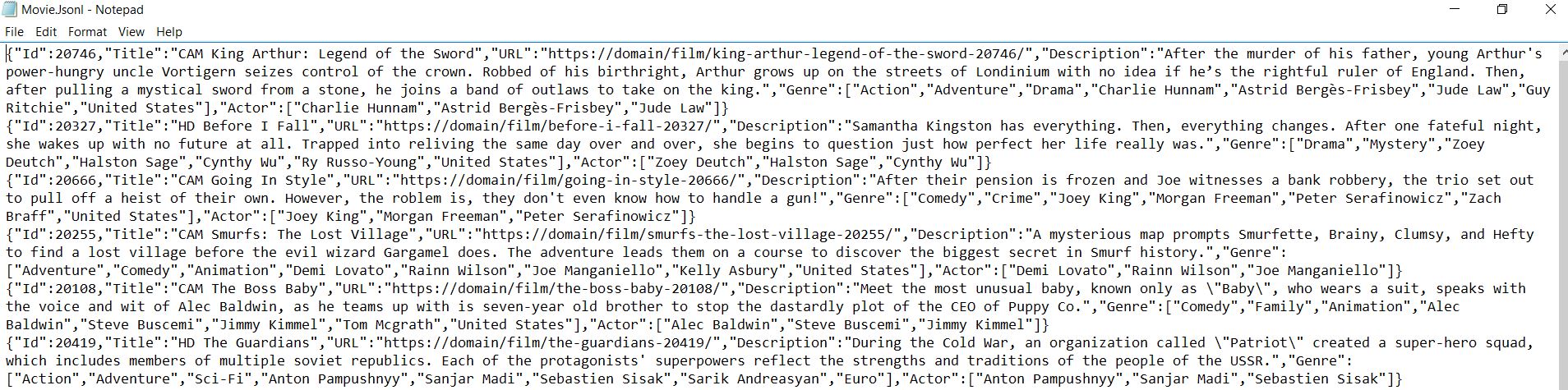
사용 가능한 메서드와 속성에 대한 더 많은 정보는 API 레퍼런스를 참조하십시오. IronWebScraper는 웹사이트에서 구조화된 데이터를 추출하기 위한 신뢰할 수 있는 프레임워크를 제공하여 데이터 수집 및 분석 프로젝트에 필수적인 도구입니다.
자주 묻는 질문
C#에서 IronWebScraper는 무엇을 위해 사용되나요?
IronWebScraper는 HTML 요소를 구문 분석하고 구조화된 데이터를 생성하여 웹사이트에서 영화 데이터를 추출하는 데 사용됩니다. 이는 비구조화된 웹 콘텐츠를 체계적인 데이터로 변환하는 작업을 크게 단순화합니다.
C# 프로젝트에 IronWebScraper를 설치하려면 어떻게 해야 하나요?
NuGet 패키지 관리자를 통해 C# 프로젝트에 IronWebScraper를 설치할 수 있습니다. 이를 통해 웹 스크래핑 작업을 위해 프로젝트에 쉽게 통합할 수 있습니다.
영화 웹사이트를 스크래핑할 때 일반적으로 사용되는 CSS 선택자는 무엇인가요?
CSS 선택자는 영화 웹사이트의 HTML 구조 내에서 요소를 탐색하고 선택하는 데 사용됩니다. 예를 들어, .movie-item 클래스는 제목 또는 URL과 같은 영화 정보를 포함하는 div를 선택하는 데 사용될 수 있습니다.
IronWebScraper는 다중 페이지 스크래핑을 처리할 수 있나요?
네, IronWebScraper는 다중 페이지 스크래핑을 효율적으로 처리할 수 있습니다. 이는 요청 체인 메커니즘을 사용하여 서로 다른 페이지를 탐색하고 상세 데이터를 스크래핑합니다.
IronWebScraper에서 형식화된 객체를 사용하는 이점은 무엇인가요?
Movie 클래스와 같은 형식화된 객체를 사용하면 웹사이트에서 데이터를 스크래핑할 때 코드 조직이 더 잘 되고, IntelliSense 지원이 향상되며, 컴파일 타임 타입 검사가 가능합니다.
영화 웹사이트에서 스크래핑한 데이터를 어떻게 조직할 수 있나요?
스크래핑한 데이터는 IronWebScraper의 Scrape 메서드를 사용하여 JSON 형식으로 조직할 수 있으며, 이는 데이터를 관리 가능하고 분석 가능한 형식으로 저장하는 데 도움이 됩니다.
IronWebScraper에서 `MetaData` 기능은 어떤 역할을 합니까?
IronWebScraper의 MetaData 기능은 요청 간에 객체 상태를 유지하는 데 도움을 주어 여러 구문 분석 함수 간에 데이터를 전달할 수 있습니다. 이는 다중 페이지 스크래핑에 유용합니다.
데이터 추출을 위해 IronWebScraper를 선택하는 이유는 무엇인가요?
IronWebScraper는 다중 페이지 스크래핑, 형식화된 데이터 객체 및 상세한 API 참조와 같은 기능을 제공하여 효과적이고 효율적인 웹 스크래핑을 위한 신뢰할 수 있는 프레임워크를 제공합니다. 이는 복잡한 데이터 수집 프로젝트에 적합합니다.
IronWebScraper가 출력 파일의 관리를 어떻게 개선하나요?
IronWebScraper는 스크래핑 작업의 모든 출력 파일을 단일 미리 정의된 위치에 조직하기 위해 작업 디렉터리를 사용하여 관리를 개선하며, 대규모 스크래핑 프로젝트를 용이하게 합니다.
IronWebScraper가 상세한 영화 페이지에서 추출할 수 있는 추가 데이터는 무엇인가요?
IronWebScraper는 CSS 선택자 및 사용자 정의 스크래핑 함수를 사용하여 영화 설명, 장르 및 배우와 같은 추가 데이터를 상세한 영화 페이지에서 추출할 수 있습니다.

커티스 차우는 칼턴 대학교에서 컴퓨터 과학 학사 학위를 취득했으며, Node.js, TypeScript, JavaScript, React를 전문으로 하는 프론트엔드 개발자입니다. 직관적이고 미적으로 뛰어난 사용자 인터페이스를 만드는 데 열정을 가진 그는 최신 프레임워크를 활용하고, 잘 구성되고 시각적으로 매력적인 매뉴얼을 제작하는 것을 즐깁니다.

