

OCR in .NET Core
- .NET Optical Character Recognition (OCR) Component
- Read text from images and OCR PDFs in C# & VB .NET
- OCR for .NET in multiple international languages
Get started with .NET OCR samples
 AutoOcr
using IronOcr;
string imageText = new IronTesseract().Read(@"images\image.png").Text;
Imports IronOcr

Dim imageText As String = New IronTesseract().Read("images\image.png").Text

Human Support Directly From Our Development Team
Whether it's product, integration or licensing queries, the Iron product development team is on hand to support all of your questions. Get in touch and start a dialog with Iron to make the most of our library in your project.
Optical Character Recognition (OCR) Reading Engine — Image to Text in OCR .NET SDK
IronOCR (Optical Character Recognition) library enables developers quick and efficient results when converting Images to Text. IronOCR works with .NET, VB .NET, and C#. Our top .NET applications for .NET frameworks, which are specifically designed for you — the developer, to support you in achieving optimal performance for your projects.
OCR receives and recognizes text files, barcodes, QR content, and more. However, IronOCR also provides numerous methods that allow you to add OCR reading and text from images into the web, windows desktop, or console .NET projects with support for virtually unlimited image formats and files, such as JPG, PNG, GIF, TIFF, BMP, JPEG or PDF.
Under the Hood - IronOCR Provides Perfect Results
Although the recognition results of plain text, characters, lines, and paragraphs from image output may not seem straightforward, you'll find that under the hood of IronOCR results are in fact easier than you may have initially thought. IronOCR scans the image for alignment, employs its noise removal and filters to check quality and resolution. It looks at its properties, optimizes the OCR engine, and uses a trained artificial intelligence network to then recognize text (from images) as well as any human.
OCR is not a simple process even for a computer. However, IronOCR makes the overall process of creating searchable documents quicker and more straightforward, with 100% accuracy and minimal lines of code.

Works with Multiple International Languages
Software is not limited to geographical boundaries — businesses function across borders and rely upon multiple languages to achieve their results. Similarly, an optical character recognition (OCR) tool that only performs document recognition in a single language is a major NO in every respect!
What does multilingual OCR support mean for you?
With a multilingual OCR library that provides multiple OCR functionalities, you benefit from creating a searchable PDF document from a scanned PDF or scanned image in multiple languages (from French to Chinese!). Your time and effort are streamlined with a dynamic, word-searchable PDF document that you, your clients, or your organization can use and reuse without limits.
With a strong focus on you, your business, and your OCR needs, whether in-built or on request, the IronOCR library has a wide array of supported languages. Your next .NET project can be free from language compatibility worries!
Whether Arabic, Spanish, French, German, Hebrew, Italian, Japanese, Simplified Chinese, Traditional Chinese (Mandarin), Danish, English, Finnish, Portuguese, Russian, Spanish or Swedish, you simply name the languages and we provide them for you! You can download your preferred language packs or contact our 24/7 support for more languages.
The first step is to use our NuGet package installer for Windows Visual Studio.
Image Processing for Accurate Reading of Imperfect Scans
How does IronOCR differ from its competitors? In addition to letting you easily add OCR functionalities, extract text and scan rotated images, it also has the ability to perform OCR from imperfect scans! In contrast, many of the various ready-to-use products on the market today are often rigid and inaccurate, destined to fail in real-world individual and corporate applications as the majority of them work with machine-printed, high-resolution, and perfectly-adjusted text.
IronOCR extends the capabilities of Google Tesseract with its powerful IronTesseract DLL — a native C# OCR library with improved stability and higher accuracy than the free Tesseract library.
Proceed without worries - IronOCR has you covered!
With the best tool in your hands, even if you have a less than perfect scanned image or a stored image in your storage folder — IronOCR's image processing library conversion cleans up noise, rotates, reduces distortion and skewed alignment, and improves resolution and contrast. The advanced Optical Character Recognition (OCR) settings give you — the coders — the tools and the code to generate the best possible searchable results, time after time.
Search for the words you need and never be disappointed with the 99.8-100% accurate results and the unlimited support for PDF Documents, multiFrame TIFF files, JPEG & JPEG2000, GIF, PNG, BMP, WBMP, System.Drawing.Image, System.Drawing.Bitmap, System.IO.Streams of images, binary image data (byte[]), and everything beyond!

Fast and Accurate — from Scanned PDFs to Scanned Rotated Images
Unlike other .NET applications in .NET framework, you'll find that the advanced Optical Character Recognition, within IronOCR's package manager console and recognized text console, gives your users the ability to read multiple word fonts (from Times New Roman to anything fancy or supposedly difficult to understand), weights, and styles for accurate text reading from a whole image or scanned images. Our ability to select certain areas of an image helps to improve speed and accuracy. Multithreading from a few lines to a few paragraphs speeds up the OCR engine and allows for the reading of multiple documents on multi-core machines.
Backed with Performance from Beginning to End
Our claims to speed and accuracy are not limited to the process of character recognition. Rather, the improvements start right from the point of installation as IronOCR's .NET OCR engine is an easy-to-install, complete, and well-documented .NET software library. There is a single NuGet package manager installation for Visual Studio, and multithreading compatibility with MVC, WebApp, Desktop, Console, and Server Applications.
You can achieve 99.8-100% OCR accuracy without any external web services, ongoing fees, or having to send confidential documents over the internet. Without the cumbersome C++ coding, IronOCR is the clear choice to make when you're in need of full PDF OCR support for multiple characters, words, lines, paragraphs, text, and documents.
We offer the best options for developers seeking to perfect their coding, as IronOCR works out of the box with zero need for performance-tuning or to heavily modify input images. The latest IronOCR version works amazingly fast — up to ten times faster, and makes over 250% fewer errors than previous builds. We upgrade our own builds to support your goals by providing the perfect platform for OCR!

Export OCR Result Data Directly to Your Application
Even when using mobile devices, our perfect .NET OCR library enables developers to code 'free from worries' as IronOCR supports exporting content as a simple set of straightforward and complex text, machine-encoded text, barcode data, or structured object model data. You can split the content paragraphs, lines, words, characters, and image string results for direct use inside your .NET apps.
Export Comfortably to your Target Application and Formats — XHTML, Searchable Document, HOCR, and HTML
From source code to the final result — the resulting data would be useless if you weren't able to export it to your application. IronOCR understands this and allows you to export the OCR result to XHTML in order to be able to work with a sustainable format across a broader range of applications and with integration into complex websites, not to mention quicker loading times!
However, the support does not end there. The ability to export OCR to searchable PDF documents makes it easy for you, your clients and organizations to store and retrieve PDF documents whenever required! This is especially beneficial when you have a 30-page contract that you can search for in your database with a few keywords, and also enables you to present your company as compliance-friendly, given that searchable PDF documents are proven to be beneficial for the visually impaired.
In addition to the above, you can export your results to the OCR format that represents your OCR output, layout information, and style information, and embeds the related information in standard HTML.
Supports:





Licensing & Pricing
Free community development licenses. Commercial licenses from $999.
View Full License Options




OCR Tutorials From Our .NET Community
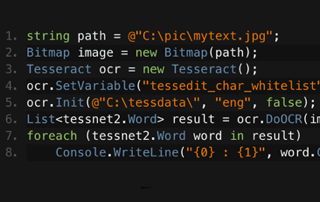

IronOCR & Tesseract Comparison in .NET
Jim has been a leading figure in development of IronOCR. Jim designs and builds image processing algorithms and reading methods for OCR.
See Comparison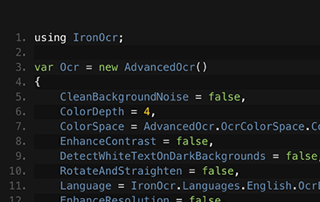

Text from Images for .NET
Learn how Gemma's team use IronOCR to read text from images for their archiving software. Gemma shares her own code samples.
Image to Text .NET TutorialThousands of developers use IronOcr for...
Accounting and Finance Systems
- # Receipts
- # Reporting
- # Invoice Printing

Business Digitization
- # Documentation
- # Ordering & Labelling
- # Paper Replacement

Enterprise Content Management
- # Content Production
- # Document Management
- # Content Distribution

Data and Reporting Applications
- # Performance Tracking
- # Trend Mapping
- # Reports



Thousands of corporations, governments, SMEs and developers alike trust Iron software products.
Iron's team have over 10 years experience in the .NET software component market.






The OCR Solution for your .NET Applications...





IronOCR is a part of IRONSUITE
10 .NET API products for your office documents
Product Links
- - Create, read, and edit PDFs. HTML to PDF for .NET.

- - Edit DOCX Word Files. No Office Interop required.

- - Edit Excel & CSV files. No Office Interop required.

- - Create, read, and edit presentations. No Office Interop required.

- - OCR (extract text from images) in 125 languages.

- - Read and write QR & Barcodes.

- - Read and write QR codes.

- - Zip and unzip archives.

- - Print documents in .NET applications.

- - Scrape structured data from websites.

Ready to Get Started?
Nuget Downloads 6,236,385|Version:2026.9just released

Tesseract OCR in the languages you need, We support 125+.

