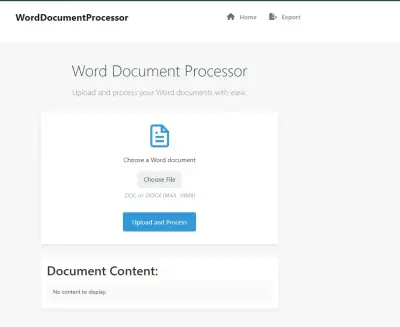
using IronWord;
using IronWord.Models;

// Load docx
WordDocument doc = new WordDocument("document.docx");

// Add text
doc.AddText("Add text using IronWord");

// Export docx
doc.SaveAs("save_document.docx");
using IronWord;using IronWord.Models;// Load docxWordDocument doc = new WordDocument("document.docx");// Add textdoc.AddText("Add text using IronWord");// Export docxdoc.SaveAs("save_document.docx");
PM >Install-Package IronWord
Install-Package IronWord
USING IRONWORD
How to Create Word Document Programmatically in VB .NET
Microsoft Word files, commonly known as DOCX files, are integral to document creation and communication in various industries. The ability to programmatically generate and manipulate Word documents is crucial for developers in Visual Basic.
In this article, we'll explore the importance of creating Microsoft Word files in C# applications and introduce the IronWord library as a powerful tool to generate Word Documents programmatically.
How to Create Word Document Programmatically in VB .NET
Create a Visual Basic project in Visual Studio
Install the IronWord Library from the NuGet Package Manager
Create a TextRun and Paragraph
Create a WordDocument ClassObject
Add TextRun and Paragraph to WordDocument Object
Export as a DOCX file using the SaveAs method
IronWord Library
IronWord is a feature-rich C# DOCX library developed by Iron Software. It empowers developers to build, edit, and export Word documents without needing Microsoft Office or Word Interop. Supporting a range of .NET versions, IronWord provides a versatile solution for working with Word files in diverse project types and environments.
Key Features:
IronWord offers a comprehensive set of features, making it a go-to library for Word document manipulation in C#. Some key features include:
Cross-Platform Support: Designed for C#, F#, and VB.NET, IronWord runs on various .NET versions, including 8, 7, 6, 5, Core, Standard, or Framework. It also caters to web, mobile, desktop, and console applications.
Document Structure Manipulation: IronWord allows developers to read and edit Word documents, extract text and images, customize page setup, and add paragraphs, text runs, images, shapes, and tables.
Styling and Formatting: The library supports styling options such as font family and size, color, bold, italic, underline, superscript, subscript, alignments, background color, and bullet/numbering lists.
Cross-Platform Compatibility: IronWord seamlessly works across different operating systems, including Windows, Linux, macOS, iOS, and Android.
Steps to Create a C# Console Project in Visual Studio
Open Visual Studio.
Create a new C# Console .NET Application.
Name your project and choose a location.
From Additional Information, select the latest version of the .NET Framework. IronWord supports the latest 8.0 .NET Core Framework.
Click "Create" to generate the project.
Installing IronWord
To incorporate IronWord into your project to create a simple Word document, follow these steps:
Using the NuGet Package Manager
Right-click on your project in Solution Explorer.
Select "Manage NuGet Packages for Solution."
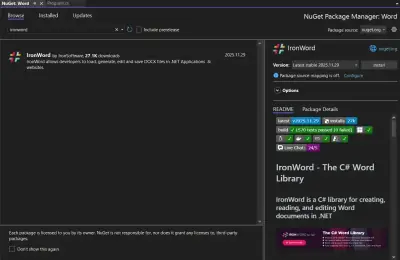
Search for "IronWord" in the NuGet Package Manager browse tab.
Click "Install" to add the IronWord library to your project.
Using Package Manager Console
Run the following command in the Package Manager Console:
PM > Install-Package IronWord
Install-Package IronWord
Creating a Word Document in VB.NET
Let's go through a simple example to demonstrate how to create a Word document using IronWord in VB.NET:
ImportsIronWordImportsIronWord.ModelsModuleProgram Sub Main() ' Create a text run containing the desired content Dim textRun As New TextRun("Sample text") ' Create a paragraph and add the text run to it Dim paragraph As New Paragraph() paragraph.AddTextRun(textRun) ' Create a new Word document containing the paragraph Dim document As New WordDocument(paragraph) ' Export the document as a DOCX file with the name "document.docx" document.SaveAs("document.docx") End SubEndModule
Imports IronWord
Imports IronWord.Models

Module Program
    Sub Main()
        ' Create a text run containing the desired content
        Dim textRun As New TextRun("Sample text")

        ' Create a paragraph and add the text run to it
        Dim paragraph As New Paragraph()
        paragraph.AddTextRun(textRun)

        ' Create a new Word document containing the paragraph
        Dim document As New WordDocument(paragraph)

        ' Export the document as a DOCX file with the name "document.docx"
        document.SaveAs("document.docx")
    End Sub
End Module
These lines import the necessary namespaces from the IronWord library to use the classes and Word document model in your VB.NET code.
Creating a TextRun and Paragraph:
Dim textRun As New TextRun("Sample text")Dim paragraph As New Paragraph()paragraph.AddTextRun(textRun)
Dim textRun As New TextRun("Sample text")
Dim paragraph As New Paragraph()
paragraph.AddTextRun(textRun)
VB
Here, a TextRun is created with the content "Sample text," and a Paragraph is created to hold the TextRun. This sets up the document with the content structure of the Word document.
Creating a Word Document:
The following code creates a new document object and adds a text paragraph to it:
Dim document As New WordDocument(paragraph)
Dim document As New WordDocument(paragraph)
VB
An instance of the WordDocument class is created, and the Paragraph is passed to its constructor. This initializes the Word document with the specified content.
Exporting the Document:
document.SaveAs("document.docx")
document.SaveAs("document.docx")
VB
Finally, the SaveAs method is used to export the Word document as a DOCX file with the filename "document.docx."
Output:
Upon running the program, a Word File named "document.docx" will be generated in the project directory. Open this document to view the added content.
IronWord provides simplicity and allows one to edit and manipulate specific paragraphs. To get more information on the methods involved in the document class, please visit this code examples page.
Conclusion
In this article, we explored the importance of creating Microsoft Word files in C# applications and introduced the IronWord library as a powerful tool for achieving this task. With its rich feature set, cross-platform support, and ease of integration into Visual Studio projects, IronWord simplifies the process of handling Word documents programmatically. Developers can leverage IronWord to enhance document processing capabilities and streamline creating and manipulating Word files in their C# applications.
For more detailed information about IronWord VB.NET and its capabilities, please visit its documentation page on IronWord's official website.
IronWord is free for development purposes and can be licensed to test out its complete functionality in commercial mode before deciding. Download the library from here and give it a try.
In this article, we explored the importance of creating Microsoft Word files in C# applications and introduced the IronWord library as a powerful tool for achieving this task. With its rich feature set, cross-platform support, and ease of integration into Visual Studio projects, IronWord simplifies the process of handling Word documents programmatically. Developers can leverage IronWord to enhance document processing capabilities and streamline creating and manipulating Word files in their C# applications.
Curtis Chau holds a Bachelor’s degree in Computer Science (Carleton University) and specializes in front-end development with expertise in Node.js, TypeScript, JavaScript, and React. Passionate about crafting intuitive and aesthetically pleasing user interfaces, Curtis enjoys working with modern frameworks and creating well-structured, visually appealing manuals.