
C# Guide: Using IronOCR Image Filters for Better OCR

IronOCR 提供读取图像所需的工具,这些图像可能需要以滤镜的形式进行预处理。 您可以从各种各样的滤镜中进行选择,这些滤镜可以处理您的图像,使其可以进行后续处理。
快速启动:应用滤镜清理OCR图像只需一个简单的调用链,您即可应用Deskew过滤器,在OCR之前改善扫描清晰度。 本示例展示了使用 IronOCR 的内置滤镜增强图像是多么容易,并且可以立即上手。
-
1Install IronOCR with NuGet Package Manager
-
2复制并运行这段代码。
using var input = new IronOcr.OcrInput(); input.LoadImage("scan.jpg"); input.DeNoise(true).Binarize().Deskew(45); var result = new IronOcr.IronTesseract().Read(input);Using input As New IronOcr.OcrInput() input.LoadImage("scan.jpg") input.DeNoise(True).Binarize().Deskew(45) Dim result = New IronOcr.IronTesseract().Read(input) End Using -
3部署到您的生产环境中进行测试
通过免费试用立即在您的项目中开始使用IronOCR
OCR图像过滤器列表
以下图像滤镜可以显著提升性能:
Filters to change the Image OrientationRotate- 将图像顺时针旋转一定角度。逆时针使用负数。Deskew- 旋转图像使其摆正并垂直。 这对于 OCR 非常有用,因为 Tesseract 对倾斜扫描的容忍度可以低至 5 度。Scale- 按比例缩放OCR输入页。
Filters to manipulate Image ColorsBinarize- 此图像过滤器将每个像素变成黑色或白色,没有中间地带。 这可以提高文本与背景对比度非常低时的 OCR 性能。ToGrayScale- 此图像过滤器将每个像素转换为灰色阴影。 不太可能提高OCR识别准确率,但可能会提高速度。Invert- 反转每种颜色。 例如,白色变成黑色,反之亦然。ReplaceColor- 在某个阈值内将图像中的颜色替换为另一种颜色。
Filters to improve Contrast in an ImageContrast- 自动增加对比度。 该滤镜通常可以提高低对比度扫描图像的 OCR 速度和准确性。Dilate- 高级形态学。 膨胀操作是指在图像中对象的边界上添加像素。 与侵蚀相反。Erode- 高级形态学。 腐蚀会从物体边界移除像素。 与扩张相反。
Filters to reduce Image NoiseSharpen- 锐化模糊的OCR文档并将alpha通道展平为白色。DeNoise- 移除数字噪声。此过滤器应仅用于可能存在噪声的场景。EnhanceResolution- 增强低质量图像的分辨率。 此过滤器通常不需要,因为_OcrInput.TargetDPI_会自动捕获并解决低分辨率输入。
过滤器示例及用法
下面的示例将演示如何在代码中应用过滤器。
using IronOcr;
using System;

var ocr = new IronTesseract();
using var input = new OcrInput();
input.LoadImage("my_image.png");
input.Deskew();

var result = ocr.Read(input);
Console.WriteLine(result.Text);Imports IronOcr
Imports System
Private ocr = New IronTesseract()
Private input = New OcrInput()
input.LoadImage("my_image.png")
input.Deskew()
Dim result = ocr.Read(input)
Console.WriteLine(result.Text)调试过滤器/过滤器正在执行什么操作?
如果您在程序中读取图像或条形码时遇到困难,可以保存筛选结果的图像。 这样,你就可以进行调试,并准确地看到每个滤镜的作用以及它是如何处理图像的。
using IronOcr;
using System;

var file = "skewed_image.tiff";
var ocr = new IronTesseract();
using var input = new OcrInput();
var pageindices = new int[] { 1, 2 };
input.LoadImageFrames(file, pageindices);
// Here we apply the filter: Deskew
input.Deskew();

// Save the input with filter(s) applied
input.SaveAsImages("my_deskewed");

// We read, then print the text to the console
var result = ocr.Read(input);
Console.WriteLine(result.Text);Imports IronOcr
Imports System
Private file = "skewed_image.tiff"
Private ocr = New IronTesseract()
Private input = New OcrInput()
Private pageindices = New Integer() { 1, 2 }
input.LoadImageFrames(file, pageindices)
' Here we apply the filter: Deskew
input.Deskew()
' Save the input with filter(s) applied
input.SaveAsImages("my_deskewed")
' We read, then print the text to the console
Dim result = ocr.Read(input)
Console.WriteLine(result.Text)过滤器使用案例
旋转
筛选说明
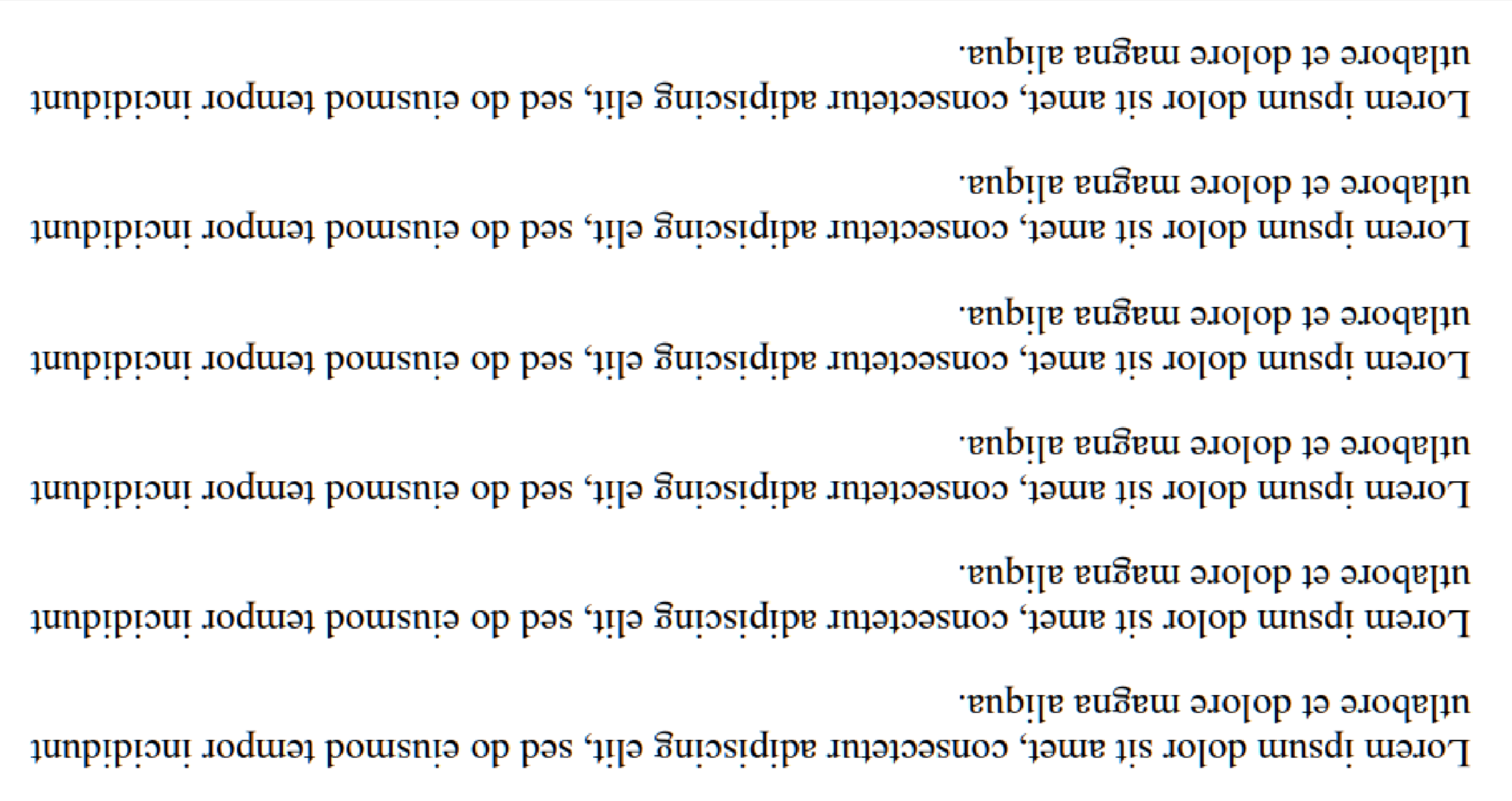
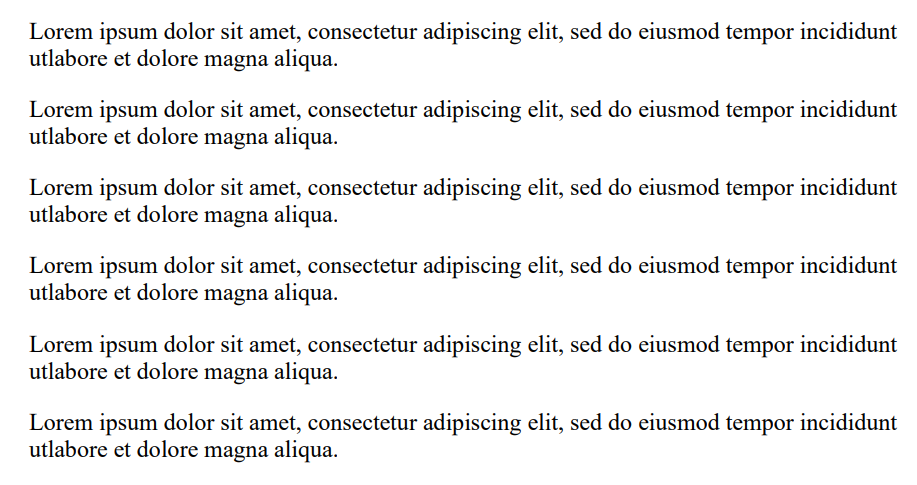
旋转滤镜用于手动设置图像的已知旋转角度,使其尽可能接近直线。 IronOCR具有运行Deskew()的功能,然而,对于此功能的容忍度相当狭窄,最适用于几乎完美直的图像(约15度以内)。 对于偏差90度或颠倒的输入图像,我们应调用Rotate()。
用例代码示例
这是调用Rotate()以纠正颠倒图像的示例:
using IronOcr;
using System;

var image = "screenshot.png";
var ocr = new IronTesseract();
using var input = new OcrInput();
// Load at least one image
input.LoadImage(image);

// Rotate 180 degrees because image is upside-down
input.Rotate(180);

// Read image into variable: result
var result = ocr.Read(input);

// Example print to console
Console.WriteLine(result.Text);Imports IronOcr
Imports System
Private image = "screenshot.png"
Private ocr = New IronTesseract()
Private input = New OcrInput()
' Load at least one image
input.LoadImage(image)
' Rotate 180 degrees because image is upside-down
input.Rotate(180)
' Read image into variable: result
Dim result = ocr.Read(input)
' Example print to console
Console.WriteLine(result.Text)之前 Input.Rotate(180) | 之后 Input.Rotate(180) |
|---|---|
 |  |
去歪
筛选说明
使用霍夫变换来尝试在一定容差范围内矫正图像。 对于不完全水平的图像来说,这一点很重要,因为倾斜的文档可能会导致误读。
用例代码示例
这是调用Deskew()以纠正倾斜图像的示例:
using IronOcr;
using System;

var image = @"paragraph_skewed.png";
var ocr = new IronTesseract();
using var input = new OcrInput();
// Load at least one image
input.LoadImage(image);

// Apply deskew with 15 degree snap
bool didDeskew = input.Deskew(15);
if (didDeskew)
{
    // Read image into variable: result
    var result = ocr.Read(input);
    Console.WriteLine(result.Text);
}
else
{
    Console.WriteLine("Deskew not applied because Image Orientation could not be determined.");
}Imports IronOcr
Imports System
Private image = "paragraph_skewed.png"
Private ocr = New IronTesseract()
Private input = New OcrInput()
' Load at least one image
input.LoadImage(image)
' Apply deskew with 15 degree snap
Dim didDeskew As Boolean = input.Deskew(15)
If didDeskew Then
' Read image into variable: result
Dim result = ocr.Read(input)
Console.WriteLine(result.Text)
Else
Console.WriteLine("Deskew not applied because Image Orientation could not be determined.")
End If规模
筛选说明
缩放是一个有用的图像处理滤镜,可以利用已有的像素来调整图像大小。 当条形码无法扫描时,可以使用此方法,因为图像只有十几像素宽,每个条形都是一个像素,或者如果文本太小且没有抗锯齿效果时。
1000px x 1000px的最佳位置应注重考虑,如果您的条形码未被找到。
用例代码示例
这是调用Scale()以展开条形码中的间隙以供扫描的示例:
using IronOcr;
using System;

var image = @"small_barcode.png";
var ocr = new IronTesseract();

// Optional: This example uses a barcode
ocr.Configuration.ReadBarCodes = true;

using var input = new OcrInput();
// Load at least one image
input.LoadImage(image);

// Apply scale
input.Scale(400); // 400% is 4 times larger

// Read image into variable: result
var result = ocr.Read(input);

// Example print to console
Console.WriteLine(result.Text);Imports IronOcr
Imports System
Private image = "small_barcode.png"
Private ocr = New IronTesseract()
' Optional: This example uses a barcode
ocr.Configuration.ReadBarCodes = True
Dim input = New OcrInput()
' Load at least one image
input.LoadImage(image)
' Apply scale
input.Scale(400) ' 400% is 4 times larger
' Read image into variable: result
Dim result = ocr.Read(input)
' Example print to console
Console.WriteLine(result.Text)二值化
筛选说明
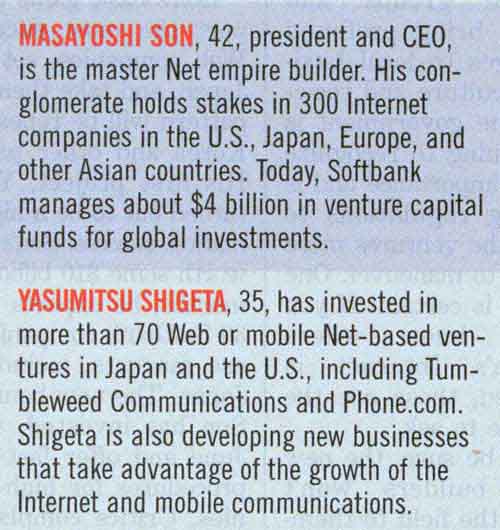
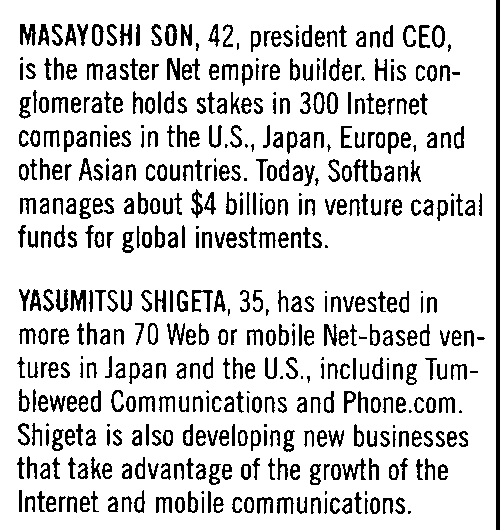
二值化滤波器根据自适应算法将图像中的所有像素分类为黑色或白色。 这会移除所有颜色,并将背景变成纯白色,所有被识别为文本的部分都会变成全黑色,以便于阅读。
用例代码示例
这是调用Binarize()以对齐彩色文本并移除背景颜色和噪声的示例:
using IronOcr;
using System;

var image = @"no-binarize.jpg";
var ocr = new IronTesseract();

using var input = new OcrInput();
// Load at least one image
input.LoadImage(image);

// Apply Binarize
input.Binarize();

// Read image into variable: result
var result = ocr.Read(input);

// Example print to console
Console.WriteLine(result.Text);Imports IronOcr
Imports System
Private image = "no-binarize.jpg"
Private ocr = New IronTesseract()
Private input = New OcrInput()
' Load at least one image
input.LoadImage(image)
' Apply Binarize
input.Binarize()
' Read image into variable: result
Dim result = ocr.Read(input)
' Example print to console
Console.WriteLine(result.Text)之前 Binarize() | 之后 Binarize() |
|---|---|
 |  |
倒置
筛选说明
IronOCR读取最佳图像black text on a white background。 Invert过滤器用于通过反转图像上的所有颜色来实现这一点。
用例代码示例
这是调用Invert()将白色转化为黑色的示例:
using IronOcr;
using System;

var image = @"before-invert.png";
var ocr = new IronTesseract();

using var input = new OcrInput();
// Load at least one image
input.LoadImage(image);

// Apply Invert
input.Invert(true);

// Read image into variable: result
var result = ocr.Read(input);

// Example print to console
Console.WriteLine(result.Text);Imports IronOcr
Imports System
Private image = "before-invert.png"
Private ocr = New IronTesseract()
Private input = New OcrInput()
' Load at least one image
input.LoadImage(image)
' Apply Invert
input.Invert(True)
' Read image into variable: result
Dim result = ocr.Read(input)
' Example print to console
Console.WriteLine(result.Text)Before | After |
|---|---|
 |  |
常见问题解答
图像过滤器如何提高C#中的OCR精度?
IronOCR中的图像过滤器可以预处理图像以增强其质量,从而提高OCR精度。诸如二值化和对比度等过滤器通过调整颜色和对比度增加可读性,而旋转和去斜则可以纠正图像方向。
有哪些过滤器可用于纠正图像方向?
IronOCR提供旋转和去斜过滤器来纠正图像方向问题。旋转允许手动调整图像角度,而去斜则自动矫正轻微倾斜的图像。
二值化过滤器如何影响图像预处理?
IronOCR中的二值化过滤器将图像像素转为黑白,去除背景色,增强文本可见性,特别在低对比度条件下提高OCR精度。
何时适合使用去噪过滤器?
去噪过滤器如锐化和去噪应在图像中存在数字噪声时使用。这些过滤器清理图像,使文本更加清晰,以获得更好的IronOCR结果。
提高图像分辨率是否会影响OCR性能?
是的,使用增强分辨率过滤器可以通过增加低质量图像的分辨率来提高OCR性能。虽然IronOCR的默认MinimumDPI和TargetDPI设置通常已经足够,过滤器在需要时可以提供额外的分辨率增强。
颜色操作过滤器在OCR中扮演什么角色?
IronOCR中的颜色操作过滤器如反转、转灰度和二值化调整图像颜色以增强文本可读性。反转改变配色方案,转灰度将图像转为灰度,二值化将图像减少为黑白。
对比度和锐化过滤器有什么区别?
IronOCR中的对比度过滤器增加了明暗区域之间的差异,提升了文本清晰度,而锐化过滤器则增强了边缘,使文本更清晰,两者都帮助更好地进行OCR识别。
如何在IronOCR中保存和调试过滤后的图像?
在IronOCR中过滤后可以使用SaveAsImages功能保存和调试图像。这有助于可视化过滤器效果,确保预处理步骤已经提升了OCR的图像质量。
IronOCR有哪些高级形态学过滤器?
IronOCR提供高级形态学过滤器如膨胀和腐蚀。膨胀向对象边界添加像素以增强特征,而腐蚀则去掉像素,两者均用于清晰化图像细节以提高OCR准确性。
How do the Dilate and Erode filters function in IronOCR?
Dilate and Erode are advanced morphology filters. Dilate adds pixels to object boundaries, while Erode removes them. These filters can be used to refine image details and enhance OCR results depending on specific image characteristics.

Curtis Chau 拥有卡尔顿大学的计算机科学学士学位,专注于前端开发,精通 Node.js、TypeScript、JavaScript 和 React。他热衷于打造直观且美观的用户界面,喜欢使用现代框架并创建结构良好、视觉吸引力强的手册。



