


How to Scrape Data from Websites in C

IronWebScraperはウェブスクレイピング、ウェブデータ抽出、ウェブコンテンツ解析のため for .NETライブラリです。 これは、開発と生産において使用するためにMicrosoft Visual Studioプロジェクトに追加できる使いやすいライブラリです。
IronWebScraperは多くのユニークな機能と能力を持ち、許可または禁止されたページ、オブジェクト、メディアなどを管理でき、複数のアイデンティティ、ウェブキャッシュ、そしてこのチュートリアルで取り扱う多くの他の機能の管理も可能です。
IronWebScraperで始めましょう
今日あなたのプロジェクトでIronWebScraperを無料トライアルで使用開始。

対象読者
このチュートリアルは、ウェブスクレイピング機能のためのソリューションを構築および実装したい基本または高度なプログラミングスキルを持つソフトウェア開発者を対象としています(ウェブサイトのスクレイピング、ウェブサイトデータの収集と抽出、ウェブサイトコンテンツの解析、ウェブハーベスティング)。

必要なスキル
- C#またはVB.NETなどのMicrosoftのプログラミング言語を使用する基本的なプログラミングの基礎
- Web技術(HTML、JavaScript、JQuery、CSSなど)の基本的な理解とその動作理解
- DOM、XPath、HTML、CSSセレクタの基本的な知識
ツール
- Microsoft Visual Studio 2010以上
- ChromeのウェブインスペクターやFirefoxのFirebugなど、ブラウザ用のウェブ開発者拡張機能
なぜスクレイピングを行うのか? (Reasons and Concepts)
次の能力を備えた製品やソリューションを構築したい場合:
- ウェブサイトデータ抽出
- 複数のウェブサイトからのコンテンツ、価格、機能の比較
- ウェブサイトコンテンツのスキャンとキャッシュ
上記の理由が1つ以上ある場合、IronWebScraperはニーズに合った優れたライブラリです
IronWebScraperのインストール方法
IronWebScraperライブラリを追加できます。
NuGetを使用したインストール
NuGetを使用してプロジェクトにIronWebScraperライブラリを追加するには、視覚的なインターフェース(NuGetパッケージマネージャー)またはパッケージマネージャーコンソールを使用したコマンドで行うことができます。
NuGetパッケージマネージャーを使用
- マウスを使用 -> プロジェクト名を右クリック -> NuGetパッケージの管理を選択
- ブラウズタブから ->
IronWebScraperを検索 -> インストール - Okをクリック
- 完了です
NuGetパッケージコンソールを使用
- ツールから -> NuGetパッケージマネージャー -> パッケージマネージャーコンソール
- クラスライブラリプロジェクトをデフォルトプロジェクトとして選択
- コマンドを実行 ->
Install-Package IronWebScraper
手動でインストール
- https://ironsoftware.comにアクセス
- IronWebScraperをクリックするか、次のURLを直接訪問します https://ironsoftware.com/csharp/webscraper/
- DLLをダウンロード
- ダウンロードした圧縮ファイルを解凍
- Visual Studioでプロジェクトを右クリック -> 追加 -> 参照 -> ブラウズ
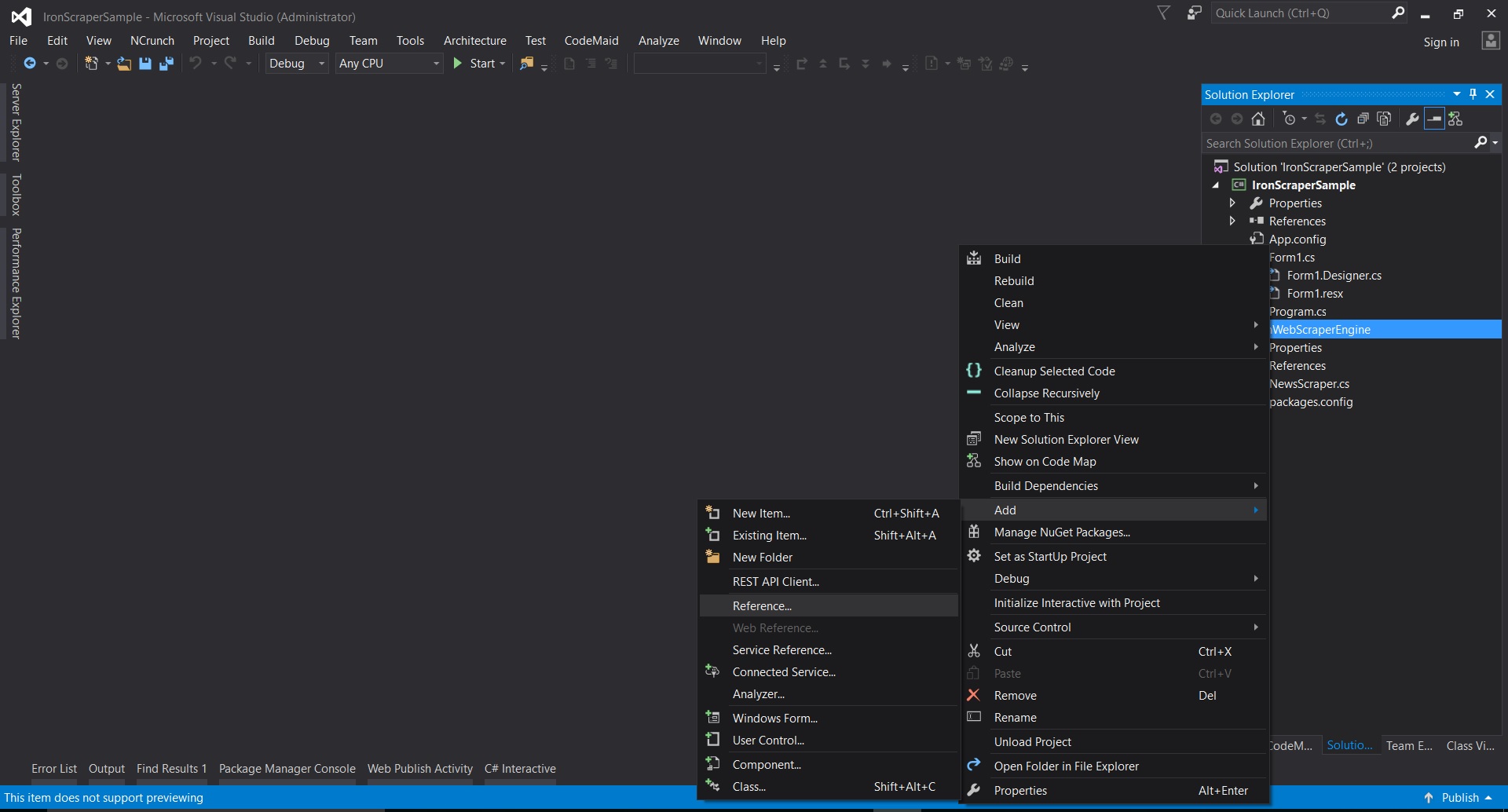
- 抽出したフォルダに移動 ->
netstandard2.0-> すべての.dllファイルを選択
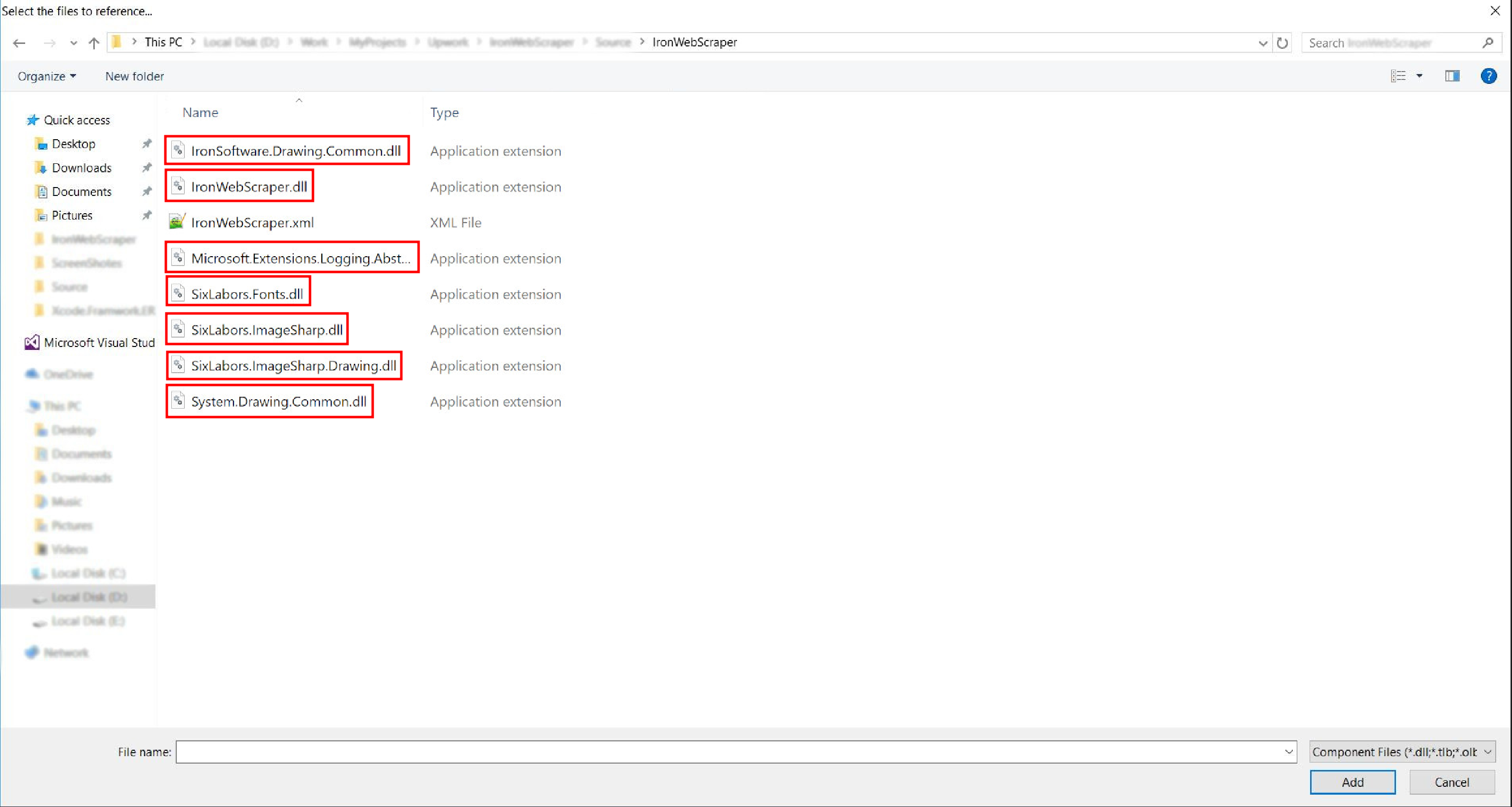
- そして完了です!
HelloScraper - 最初のIronWebScraperサンプル
通常通り、Hello Scraperアプリの実装から始めて、IronWebScraperを使用する第一歩を踏み出しましょう。
- "IronWebScraperSample"という名前の新しいコンソールアプリケーションを作成しました
IronWebScraperサンプルを作成する手順
- フォルダーを作成し、"HelloScraperSample"という名前を付けます
-
新しいクラスを追加し、それに
HelloScraperという名前を付けます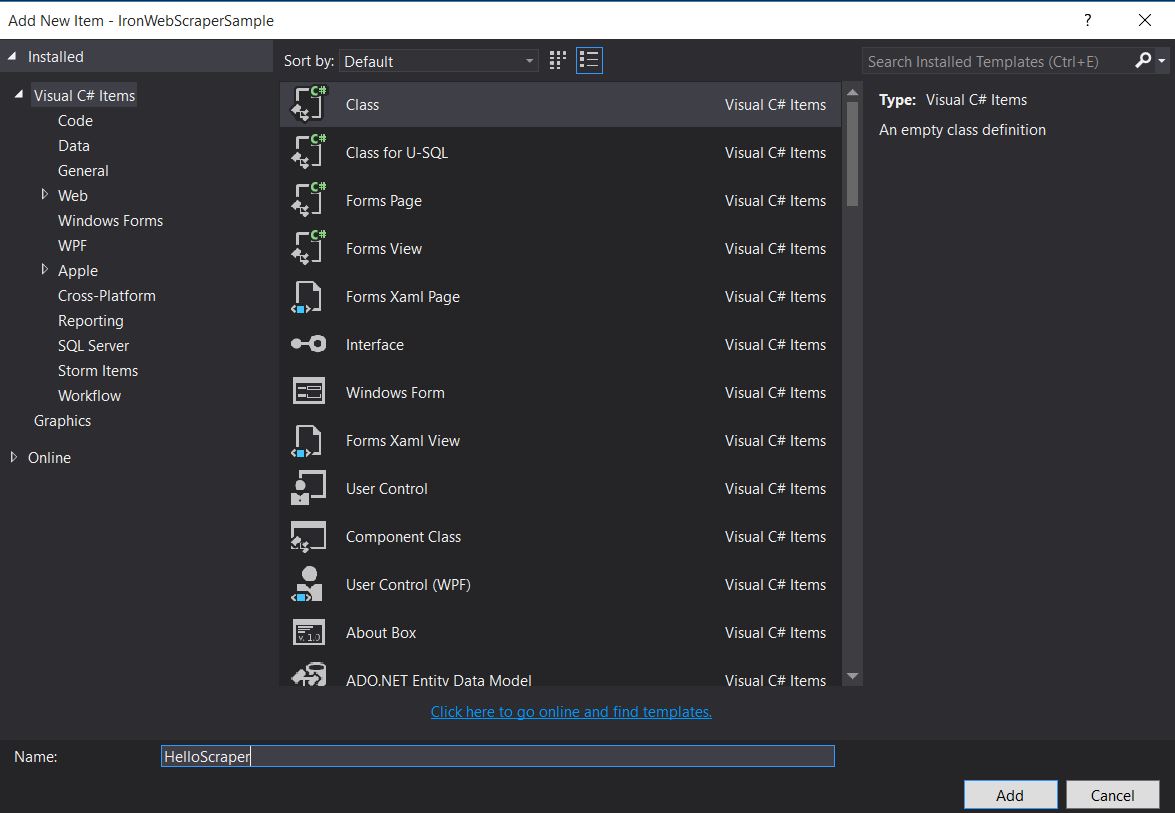
-
このコードスニペットを
HelloScraperに追加しますpublic class HelloScraper : WebScraper { /// <summary> /// Override this method to initialize your web scraper. /// Important tasks will be to request at least one start URL and set allowed/banned domain or URL patterns. /// </summary> public override void Init() { License.LicenseKey = "LicenseKey"; // Write License Key this.LoggingLevel = WebScraper.LogLevel.All; // Log all events this.Request("https://blog.scrapinghub.com", Parse); // Initialize a web request to the given URL } /// <summary> /// Override this method to create the default Response handler for your web scraper. /// If you have multiple page types, you can add additional similar methods. /// </summary> /// <param name="response">The HTTP Response object to parse</param> public override void Parse(Response response) { // Set working directory for the project this.WorkingDirectory = AppSetting.GetAppRoot() + @"\HelloScraperSample\Output\"; // Loop on all links foreach (var titleLink in response.Css("h2.entry-title a")) { // Read link text string title = titleLink.TextContentClean; // Save result to file Scrape(new ScrapedData() { { "Title", title } }, "HelloScraper.json"); } // Loop on all links for pagination if (response.CssExists("div.prev-post > a[href]")) { // Get next page URL var nextPage = response.Css("div.prev-post > a[href]")[0].Attributes["href"]; // Scrape next URL this.Request(nextPage, Parse); } } }public class HelloScraper : WebScraper { /// <summary> /// Override this method to initialize your web scraper. /// Important tasks will be to request at least one start URL and set allowed/banned domain or URL patterns. /// </summary> public override void Init() { License.LicenseKey = "LicenseKey"; // Write License Key this.LoggingLevel = WebScraper.LogLevel.All; // Log all events this.Request("https://blog.scrapinghub.com", Parse); // Initialize a web request to the given URL } /// <summary> /// Override this method to create the default Response handler for your web scraper. /// If you have multiple page types, you can add additional similar methods. /// </summary> /// <param name="response">The HTTP Response object to parse</param> public override void Parse(Response response) { // Set working directory for the project this.WorkingDirectory = AppSetting.GetAppRoot() + @"\HelloScraperSample\Output\"; // Loop on all links foreach (var titleLink in response.Css("h2.entry-title a")) { // Read link text string title = titleLink.TextContentClean; // Save result to file Scrape(new ScrapedData() { { "Title", title } }, "HelloScraper.json"); } // Loop on all links for pagination if (response.CssExists("div.prev-post > a[href]")) { // Get next page URL var nextPage = response.Css("div.prev-post > a[href]")[0].Attributes["href"]; // Scrape next URL this.Request(nextPage, Parse); } } }Public Class HelloScraper Inherits WebScraper ''' <summary> ''' Override this method to initialize your web scraper. ''' Important tasks will be to request at least one start URL and set allowed/banned domain or URL patterns. ''' </summary> Public Overrides Sub Init() License.LicenseKey = "LicenseKey" ' Write License Key Me.LoggingLevel = WebScraper.LogLevel.All ' Log all events Me.Request("https://blog.scrapinghub.com", AddressOf Parse) ' Initialize a web request to the given URL End Sub ''' <summary> ''' Override this method to create the default Response handler for your web scraper. ''' If you have multiple page types, you can add additional similar methods. ''' </summary> ''' <param name="response">The HTTP Response object to parse</param> Public Overrides Sub Parse(ByVal response As Response) ' Set working directory for the project Me.WorkingDirectory = AppSetting.GetAppRoot() & "\HelloScraperSample\Output\" ' Loop on all links For Each titleLink In response.Css("h2.entry-title a") ' Read link text Dim title As String = titleLink.TextContentClean ' Save result to file Scrape(New ScrapedData() From { { "Title", title } }, "HelloScraper.json") Next titleLink ' Loop on all links for pagination If response.CssExists("div.prev-post > a[href]") Then ' Get next page URL Dim nextPage = response.Css("div.prev-post > a[href]")(0).Attributes("href") ' Scrape next URL Me.Request(nextPage, AddressOf Parse) End If End Sub End Class$vbLabelText $csharpLabel -
スクレイピングを開始するために、このコードスニペットを
Mainに追加しますstatic void Main(string[] args) { // Create Object From Hello Scrape class HelloScraperSample.HelloScraper scrape = new HelloScraperSample.HelloScraper(); // Start Scraping scrape.Start(); }static void Main(string[] args) { // Create Object From Hello Scrape class HelloScraperSample.HelloScraper scrape = new HelloScraperSample.HelloScraper(); // Start Scraping scrape.Start(); }Shared Sub Main(ByVal args() As String) ' Create Object From Hello Scrape class Dim scrape As New HelloScraperSample.HelloScraper() ' Start Scraping scrape.Start() End Sub$vbLabelText $csharpLabel - 結果は
WebScraper.WorkingDirectory/classname.Json形式のファイルに保存されます
コード概要
Scrape.Start()は以下のようにスクレイピングロジックをトリガーします:
Init()メソッドを呼び出して、変数、スクレイププロパティ、および動作属性を初期化します。Request("https://blog.scrapinghub.com", Parse)の開始ページリクエストを設定します。- 複数のHTTPリクエストとスレッドを並行して処理しながら、コードを同期的に保ち、デバッグしやすくします。
Init()の後にトリガーされ、CSSセレクタを使用してデータを抽出し、JSON形式で保存します。
IronWebScraperライブラリの機能とオプション
更新されたドキュメントは、手動インストール方法でダウンロードされたzipファイル内にあります(IronWebScraper Documentation.chm File)。または、ライブラリの最新の更新についてのオンラインドキュメントをhttps://ironsoftware.com/csharp/webscraper/object-reference/で確認することができます。
プロジェクトでIronWebScraper.WebScraperクラスから継承する必要があります。これによりクラスライブラリが拡張され、スクレイピング機能が追加されます。 また、Parse(Response response)メソッドを実装する必要があります。
namespace IronWebScraperEngine
{
    public class NewsScraper : IronWebScraper.WebScraper
    {
        public override void Init()
        {
            throw new NotImplementedException();
        }

        public override void Parse(Response response)
        {
            throw new NotImplementedException();
        }
    }
}
namespace IronWebScraperEngine
{
public class NewsScraper : IronWebScraper.WebScraper
{
public override void Init()
{
throw new NotImplementedException();
}
public override void Parse(Response response)
{
throw new NotImplementedException();
}
}
}Namespace IronWebScraperEngine
Public Class NewsScraper
Inherits IronWebScraper.WebScraper
Public Overrides Sub Init()
Throw New NotImplementedException()
End Sub
Public Overrides Sub Parse(ByVal response As Response)
Throw New NotImplementedException()
End Sub
End Class
End Namespace| プロパティ \ 関数 | タイプ | 説明 |
|---|---|---|
Init () |
メソッド | スクレイパーをセットアップするために使用されます |
Parse (Response response) |
メソッド | スクレイパーが使用するロジックとその処理方法を実装するために使用します。 異なるページの動作や構造に対して複数のメソッドを実装可能。 |
BannedUrls, AllowedUrls, BannedDomains |
コレクション | URL やドメインを禁止/許可するために使用。 例: BannedUrls.Add("*.zip", "*.exe", "*.gz", "*.pdf"); ワイルドカードと正規表現をサポートします。 |
ObeyRobotsDotTxt |
Boolean | robots.txtの指示を読み取り、従うかを有効または無効にするために使用します。 |
ObeyRobotsDotTxtForHost (string Host) |
メソッド | 特定のドメインについて、robots.txtの指示を読み取り、従うかを有効または無効にするために使用します。 |
Scrape, ScrapeUnique |
メソッド | |
ThrottleMode |
列挙型 | 列挙オプション: ByIpAddress, ByDomainHostName。 ホストIPアドレスやドメインホスト名を尊重して、インテリジェントなリクエストスロットリングを有効化します。 |
EnableWebCache, EnableWebCache (TimeSpan cacheDuration) |
メソッド | ウェブリクエストのキャッシュを有効にします。 |
MaxHttpConnectionLimit |
Int | 許可されるオープンHTTPリクエスト(スレッド)の合計数を設定します。 |
RateLimitPerHost |
TimeSpan | 指定されたドメインまたはIPアドレスへのリクエストの間の遅延(ポーズ)の最小礼儀定義を設定します。 |
OpenConnectionLimitPerHost |
Int | 指定されたホスト名またはIPアドレスごとの同時HTTPリクエスト(スレッド)の許可数を設定します。 |
WorkingDirectory |
string | データを保存する作業ディレクトリパスを設定します。 |
実世界のサンプルと実践
オンラインムービーサイトのスクレイピング
映画のウェブサイトをスクレイピングする例を作ってみましょう。
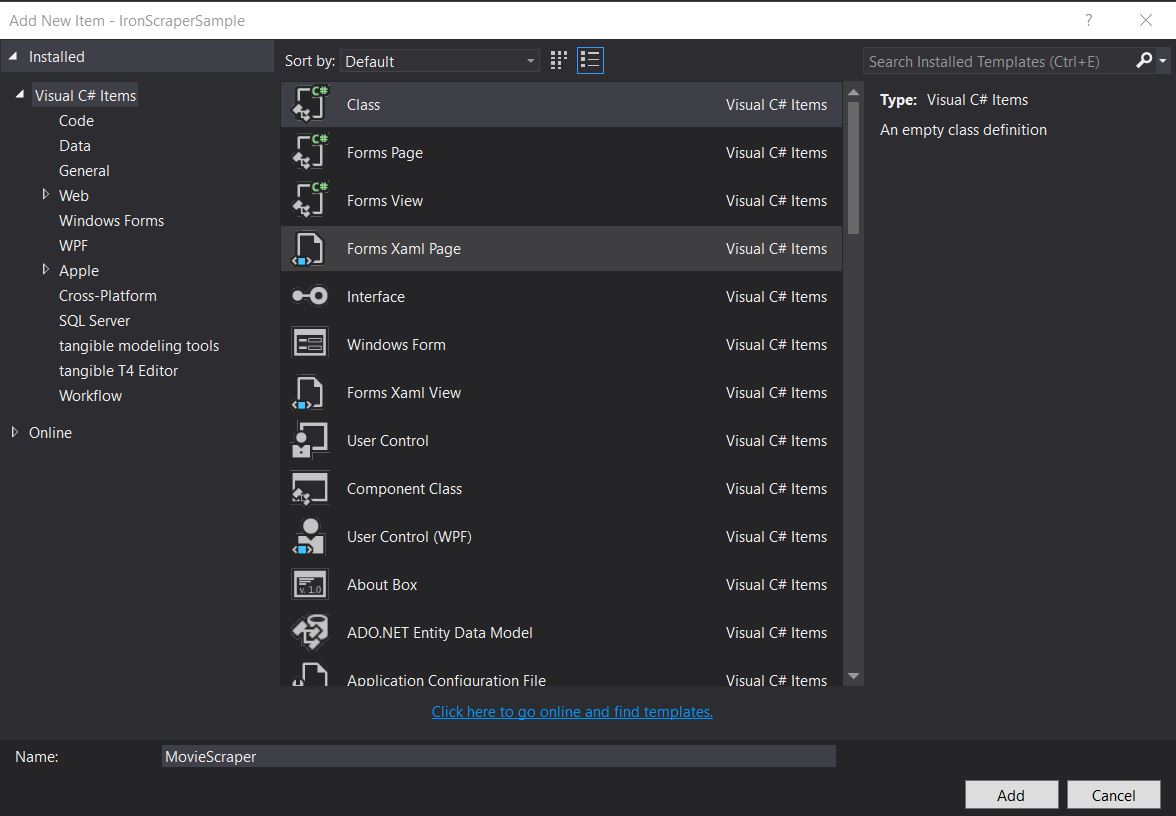
新しいクラスを追加し、その名前をMovieScraperにします:
HTML構造
これはウェブサイトのホームページHTMLの一部です:
<div id="movie-featured" class="movies-list movies-list-full tab-pane in fade active">
    <div data-movie-id="20746" class="ml-item">
        <a href="https://website.com/film/king-arthur-legend-of-the-sword-20746/">
            <span class="mli-quality">CAM</span>
            <img data-original="https://img.gocdn.online/2017/05/16/poster/2116d6719c710eabe83b377463230fbe-king-arthur-legend-of-the-sword.jpg"
                 class="lazy thumb mli-thumb" alt="キング・アーサー: 聖剣無双"
                  src="https://img.gocdn.online/2017/05/16/poster/2116d6719c710eabe83b377463230fbe-king-arthur-legend-of-the-sword.jpg"
                 style="display: inline-block;">
            <span class="mli-info"><h2>King Arthur: Legend of the Sword</h2></span>
        </a>
    </div>
    <div data-movie-id="20724" class="ml-item">
        <a href="https://website.com/film/snatched-20724/" >
            <span class="mli-quality">CAM</span>
            <img data-original="https://img.gocdn.online/2017/05/16/poster/5ef66403dc331009bdb5aa37cfe819ba-snatched.jpg"
                 class="lazy thumb mli-thumb" alt="Snatched"
                 src="https://img.gocdn.online/2017/05/16/poster/5ef66403dc331009bdb5aa37cfe819ba-snatched.jpg"
                 style="display: inline-block;">
            <span class="mli-info"><h2>Snatched</h2></span>
        </a>
    </div>
</div>
<div id="movie-featured" class="movies-list movies-list-full tab-pane in fade active">
<div data-movie-id="20746" class="ml-item">
<a href="https://website.com/film/king-arthur-legend-of-the-sword-20746/">
<span class="mli-quality">CAM</span>
<img data-original="https://img.gocdn.online/2017/05/16/poster/2116d6719c710eabe83b377463230fbe-king-arthur-legend-of-the-sword.jpg"
class="lazy thumb mli-thumb" alt="キング・アーサー: 聖剣無双"
src="https://img.gocdn.online/2017/05/16/poster/2116d6719c710eabe83b377463230fbe-king-arthur-legend-of-the-sword.jpg"
style="display: inline-block;">
<span class="mli-info"><h2>King Arthur: Legend of the Sword</h2></span>
</a>
</div>
<div data-movie-id="20724" class="ml-item">
<a href="https://website.com/film/snatched-20724/" >
<span class="mli-quality">CAM</span>
<img data-original="https://img.gocdn.online/2017/05/16/poster/5ef66403dc331009bdb5aa37cfe819ba-snatched.jpg"
class="lazy thumb mli-thumb" alt="Snatched"
src="https://img.gocdn.online/2017/05/16/poster/5ef66403dc331009bdb5aa37cfe819ba-snatched.jpg"
style="display: inline-block;">
<span class="mli-info"><h2>Snatched</h2></span>
</a>
</div>
</div>ムービーID、タイトル、および詳細ページへのリンクがあります。 このデータのスクレイピングを始めましょう:
public class MovieScraper : WebScraper
{
    public override void Init()
    {
        License.LicenseKey = "LicenseKey";
        this.LoggingLevel = WebScraper.LogLevel.All;
        this.WorkingDirectory = AppSetting.GetAppRoot() + @"\MovieSample\Output\";
        this.Request("www.website.com", Parse);
    }

    public override void Parse(Response response)
    {
        foreach (var div in response.Css("#movie-featured > div"))
        {
            if (div.GetAttribute("class") != "clearfix")
            {
                var movieId = div.GetAttribute("data-movie-id");
                var link = div.Css("a")[0];
                var movieTitle = link.TextContentClean;
                Scrape(new ScrapedData() { { "MovieId", movieId }, { "MovieTitle", movieTitle } }, "Movie.Jsonl");
            }
        }
    }
}
public class MovieScraper : WebScraper
{
public override void Init()
{
License.LicenseKey = "LicenseKey";
this.LoggingLevel = WebScraper.LogLevel.All;
this.WorkingDirectory = AppSetting.GetAppRoot() + @"\MovieSample\Output\";
this.Request("www.website.com", Parse);
}
public override void Parse(Response response)
{
foreach (var div in response.Css("#movie-featured > div"))
{
if (div.GetAttribute("class") != "clearfix")
{
var movieId = div.GetAttribute("data-movie-id");
var link = div.Css("a")[0];
var movieTitle = link.TextContentClean;
Scrape(new ScrapedData() { { "MovieId", movieId }, { "MovieTitle", movieTitle } }, "Movie.Jsonl");
}
}
}
}Public Class MovieScraper
Inherits WebScraper
Public Overrides Sub Init()
License.LicenseKey = "LicenseKey"
Me.LoggingLevel = WebScraper.LogLevel.All
Me.WorkingDirectory = AppSetting.GetAppRoot() & "\MovieSample\Output\"
Me.Request("www.website.com", AddressOf Parse)
End Sub
Public Overrides Sub Parse(ByVal response As Response)
For Each div In response.Css("#movie-featured > div")
If div.GetAttribute("class") <> "clearfix" Then
Dim movieId = div.GetAttribute("data-movie-id")
Dim link = div.Css("a")(0)
Dim movieTitle = link.TextContentClean
Scrape(New ScrapedData() From {
{ "MovieId", movieId },
{ "MovieTitle", movieTitle }
},
"Movie.Jsonl")
End If
Next div
End Sub
End Class構造化ムービークラス
フォーマットされたデータを保持するために、ムービークラスを実装しましょう:
public class Movie
{
    public int Id { get; set; }
    public string Title { get; set; }
    public string URL { get; set; }
}
public class Movie
{
public int Id { get; set; }
public string Title { get; set; }
public string URL { get; set; }
}Public Class Movie
Public Property Id As Integer
Public Property Title As String
Public Property URL As String
End Class今、コードを更新してMovieクラスを使用します:
public class MovieScraper : WebScraper
{
    public override void Init()
    {
        License.LicenseKey = "LicenseKey";
        this.LoggingLevel = WebScraper.LogLevel.All;
        this.WorkingDirectory = AppSetting.GetAppRoot() + @"\MovieSample\Output\";
        this.Request("https://website.com/", Parse);
    }

    public override void Parse(Response response)
    {
        foreach (var div in response.Css("#movie-featured > div"))
        {
            if (div.GetAttribute("class") != "clearfix")
            {
                var movie = new Movie
                {
                    Id = Convert.ToInt32(div.GetAttribute("data-movie-id")),
                    Title = div.Css("a")[0].TextContentClean,
                    URL = div.Css("a")[0].Attributes["href"]
                };
                Scrape(movie, "Movie.Jsonl");
            }
        }
    }
}
public class MovieScraper : WebScraper
{
public override void Init()
{
License.LicenseKey = "LicenseKey";
this.LoggingLevel = WebScraper.LogLevel.All;
this.WorkingDirectory = AppSetting.GetAppRoot() + @"\MovieSample\Output\";
this.Request("https://website.com/", Parse);
}
public override void Parse(Response response)
{
foreach (var div in response.Css("#movie-featured > div"))
{
if (div.GetAttribute("class") != "clearfix")
{
var movie = new Movie
{
Id = Convert.ToInt32(div.GetAttribute("data-movie-id")),
Title = div.Css("a")[0].TextContentClean,
URL = div.Css("a")[0].Attributes["href"]
};
Scrape(movie, "Movie.Jsonl");
}
}
}
}Public Class MovieScraper
Inherits WebScraper
Public Overrides Sub Init()
License.LicenseKey = "LicenseKey"
Me.LoggingLevel = WebScraper.LogLevel.All
Me.WorkingDirectory = AppSetting.GetAppRoot() & "\MovieSample\Output\"
Me.Request("https://website.com/", AddressOf Parse)
End Sub
Public Overrides Sub Parse(ByVal response As Response)
For Each div In response.Css("#movie-featured > div")
If div.GetAttribute("class") <> "clearfix" Then
Dim movie As New Movie With {
.Id = Convert.ToInt32(div.GetAttribute("data-movie-id")),
.Title = div.Css("a")(0).TextContentClean,
.URL = div.Css("a")(0).Attributes("href")
}
Scrape(movie, "Movie.Jsonl")
End If
Next div
End Sub
End Class詳細ページのスクレイピング
より詳細な情報を得るために、Movieクラスを拡張しましょう:
public class Movie
{
    public int Id { get; set; }
    public string Title { get; set; }
    public string URL { get; set; }
    public string Description { get; set; }
    public List<string> Genre { get; set; }
    public List<string> Actor { get; set; }
}
public class Movie
{
public int Id { get; set; }
public string Title { get; set; }
public string URL { get; set; }
public string Description { get; set; }
public List<string> Genre { get; set; }
public List<string> Actor { get; set; }
}Public Class Movie
Public Property Id As Integer
Public Property Title As String
Public Property URL As String
Public Property Description As String
Public Property Genre As List(Of String)
Public Property Actor As List(Of String)
End Classその後、拡張されたIronWebScraperの機能を使用して、詳細ページに移動してスクレイピングします:
public class MovieScraper : WebScraper
{
    public override void Init()
    {
        License.LicenseKey = "LicenseKey";
        this.LoggingLevel = WebScraper.LogLevel.All;
        this.WorkingDirectory = AppSetting.GetAppRoot() + @"\MovieSample\Output\";
        this.Request("https://domain/", Parse);
    }

    public override void Parse(Response response)
    {
        foreach (var div in response.Css("#movie-featured > div"))
        {
            if (div.GetAttribute("class") != "clearfix")
            {
                var movie = new Movie
                {
                    Id = Convert.ToInt32(div.GetAttribute("data-movie-id")),
                    Title = div.Css("a")[0].TextContentClean,
                    URL = div.Css("a")[0].Attributes["href"]
                };
                this.Request(movie.URL, ParseDetails, new MetaData() { { "movie", movie } });
            }
        }
    }

    public void ParseDetails(Response response)
    {
        var movie = response.MetaData.Get<Movie>("movie");
        var div = response.Css("div.mvic-desc")[0];
        movie.Description = div.Css("div.desc")[0].TextContentClean;
        movie.Genre = div.Css("div > p > a").Select(element => element.TextContentClean).ToList();
        movie.Actor = div.Css("div > p:nth-child(2) > a").Select(element => element.TextContentClean).ToList();

        Scrape(movie, "Movie.Jsonl");
    }
}
public class MovieScraper : WebScraper
{
public override void Init()
{
License.LicenseKey = "LicenseKey";
this.LoggingLevel = WebScraper.LogLevel.All;
this.WorkingDirectory = AppSetting.GetAppRoot() + @"\MovieSample\Output\";
this.Request("https://domain/", Parse);
}
public override void Parse(Response response)
{
foreach (var div in response.Css("#movie-featured > div"))
{
if (div.GetAttribute("class") != "clearfix")
{
var movie = new Movie
{
Id = Convert.ToInt32(div.GetAttribute("data-movie-id")),
Title = div.Css("a")[0].TextContentClean,
URL = div.Css("a")[0].Attributes["href"]
};
this.Request(movie.URL, ParseDetails, new MetaData() { { "movie", movie } });
}
}
}
public void ParseDetails(Response response)
{
var movie = response.MetaData.Get<Movie>("movie");
var div = response.Css("div.mvic-desc")[0];
movie.Description = div.Css("div.desc")[0].TextContentClean;
movie.Genre = div.Css("div > p > a").Select(element => element.TextContentClean).ToList();
movie.Actor = div.Css("div > p:nth-child(2) > a").Select(element => element.TextContentClean).ToList();
Scrape(movie, "Movie.Jsonl");
}
}Public Class MovieScraper
Inherits WebScraper
Public Overrides Sub Init()
License.LicenseKey = "LicenseKey"
Me.LoggingLevel = WebScraper.LogLevel.All
Me.WorkingDirectory = AppSetting.GetAppRoot() & "\MovieSample\Output\"
Me.Request("https://domain/", AddressOf Parse)
End Sub
Public Overrides Sub Parse(ByVal response As Response)
For Each div In response.Css("#movie-featured > div")
If div.GetAttribute("class") <> "clearfix" Then
Dim movie As New Movie With {
.Id = Convert.ToInt32(div.GetAttribute("data-movie-id")),
.Title = div.Css("a")(0).TextContentClean,
.URL = div.Css("a")(0).Attributes("href")
}
Me.Request(movie.URL, AddressOf ParseDetails, New MetaData() From {
{ "movie", movie }
})
End If
Next div
End Sub
Public Sub ParseDetails(ByVal response As Response)
Dim movie = response.MetaData.Get(Of Movie)("movie")
Dim div = response.Css("div.mvic-desc")(0)
movie.Description = div.Css("div.desc")(0).TextContentClean
movie.Genre = div.Css("div > p > a").Select(Function(element) element.TextContentClean).ToList()
movie.Actor = div.Css("div > p:nth-child(2) > a").Select(Function(element) element.TextContentClean).ToList()
Scrape(movie, "Movie.Jsonl")
End Sub
End ClassIronWebScraperライブラリの特徴
HttpIdentity機能
一部のシステムはコンテンツを閲覧するためにユーザーのログインを要求します; 資格情報にはHttpIdentityを使用してください:
HttpIdentity id = new HttpIdentity
{
    NetworkUsername = "username",
    NetworkPassword = "pwd"
};
Identities.Add(id);
HttpIdentity id = new HttpIdentity
{
NetworkUsername = "username",
NetworkPassword = "pwd"
};
Identities.Add(id);Dim id As New HttpIdentity With {
.NetworkUsername = "username",
.NetworkPassword = "pwd"
}
Identities.Add(id)Webキャッシュの有効化
開発中に再利用するために要求されたページをキャッシュします:
public override void Init()
{
    License.LicenseKey = "LicenseKey";
    this.LoggingLevel = WebScraper.LogLevel.All;
    this.WorkingDirectory = AppSetting.GetAppRoot() + @"\ShoppingSiteSample\Output\";
    EnableWebCache();
    this.Request("http://www.WebSite.com", Parse);
}
public override void Init()
{
License.LicenseKey = "LicenseKey";
this.LoggingLevel = WebScraper.LogLevel.All;
this.WorkingDirectory = AppSetting.GetAppRoot() + @"\ShoppingSiteSample\Output\";
EnableWebCache();
this.Request("http://www.WebSite.com", Parse);
}Public Overrides Sub Init()
License.LicenseKey = "LicenseKey"
Me.LoggingLevel = WebScraper.LogLevel.All
Me.WorkingDirectory = AppSetting.GetAppRoot() & "\ShoppingSiteSample\Output\"
EnableWebCache()
Me.Request("http://www.WebSite.com", Parse)
End Subスロットリング
接続数および速度を制御します:
public override void Init()
{
    License.LicenseKey = "LicenseKey";
    this.LoggingLevel = WebScraper.LogLevel.All;
    this.WorkingDirectory = AppSetting.GetAppRoot() + @"\ShoppingSiteSample\Output\";
    this.MaxHttpConnectionLimit = 80;
    this.RateLimitPerHost = TimeSpan.FromMilliseconds(50);
    this.OpenConnectionLimitPerHost = 25;
    this.ObeyRobotsDotTxt = false;
    this.ThrottleMode = Throttle.ByDomainHostName;
    this.Request("https://www.Website.com", Parse);
}
public override void Init()
{
License.LicenseKey = "LicenseKey";
this.LoggingLevel = WebScraper.LogLevel.All;
this.WorkingDirectory = AppSetting.GetAppRoot() + @"\ShoppingSiteSample\Output\";
this.MaxHttpConnectionLimit = 80;
this.RateLimitPerHost = TimeSpan.FromMilliseconds(50);
this.OpenConnectionLimitPerHost = 25;
this.ObeyRobotsDotTxt = false;
this.ThrottleMode = Throttle.ByDomainHostName;
this.Request("https://www.Website.com", Parse);
}Public Overrides Sub Init()
License.LicenseKey = "LicenseKey"
Me.LoggingLevel = WebScraper.LogLevel.All
Me.WorkingDirectory = AppSetting.GetAppRoot() & "\ShoppingSiteSample\Output\"
Me.MaxHttpConnectionLimit = 80
Me.RateLimitPerHost = TimeSpan.FromMilliseconds(50)
Me.OpenConnectionLimitPerHost = 25
Me.ObeyRobotsDotTxt = False
Me.ThrottleMode = Throttle.ByDomainHostName
Me.Request("https://www.Website.com", Parse)
End Subスロットリングプロパティ
MaxHttpConnectionLimit
許可されたオープンHTTPリクエスト(スレッド)の総数RateLimitPerHost
特定のドメインまたはIPアドレスへのリクエスト間の最小ポリート遅延(ポーズ)OpenConnectionLimitPerHost
ホスト名またはIPアドレスごとに許可された同時HTTPリクエスト(スレッド)の数ThrottleMode
WebScraperは単にホスト名だけでなく、ホストサーバーのIPアドレスによって賢くリクエストを抑制します。 これにより、一つのマシンにホストされている複数のスクレイピングしたドメインに対して礼儀正しくなります。
付録
Windowsフォームアプリケーションを作成する方法?
Visual Studio 2013以上を使用します。
- Visual Studioを開きます。
-
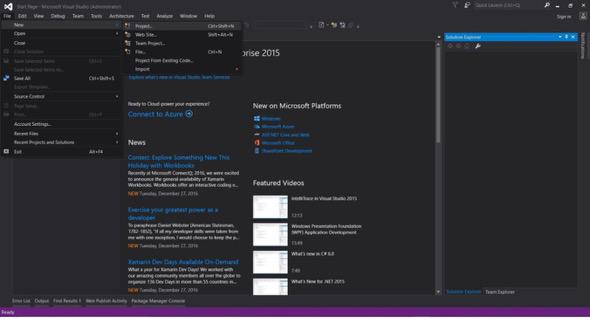
ファイル -> 新規 -> プロジェクト
- Visual C#またはVB -> Windows -> Windowsフォームアプリケーションを選択。
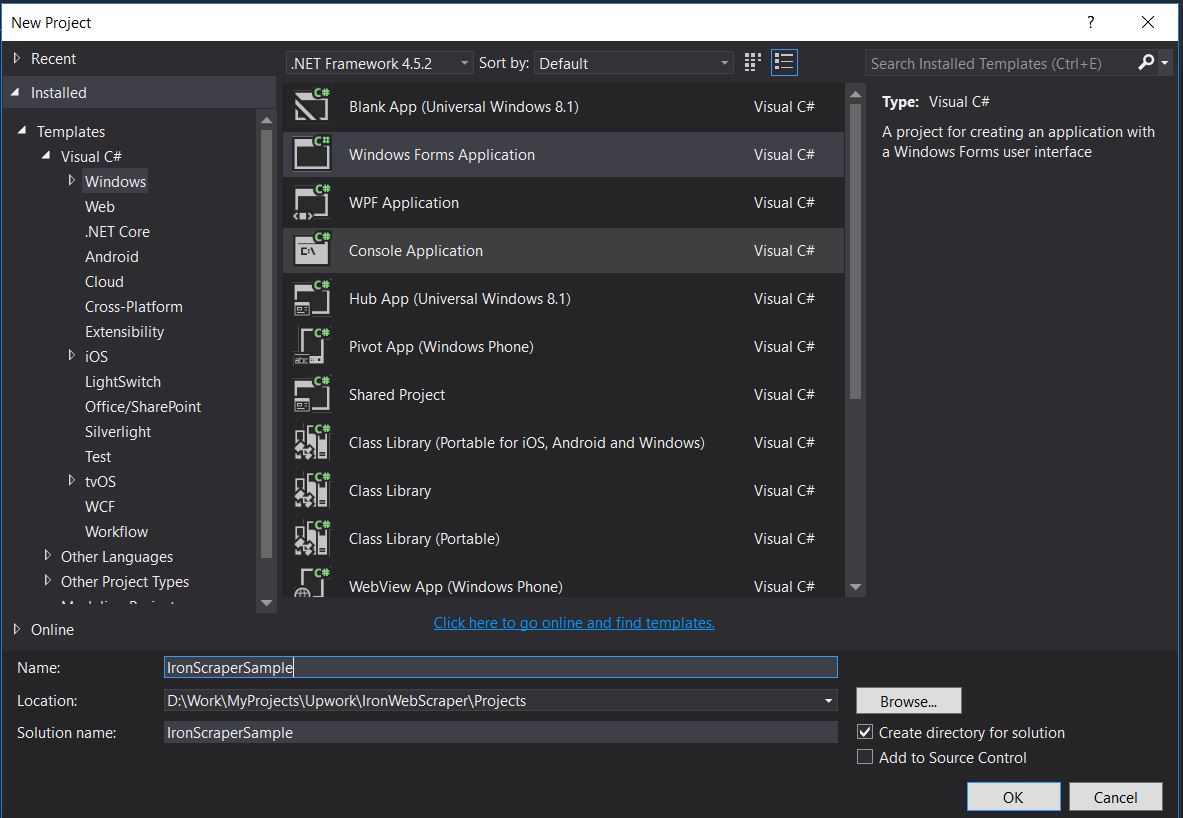
プロジェクト名: IronScraperSample
場所: ディスク上の場所を選択。
ASP.NET Webフォームアプリケーションを作成する方法?
-
Visual Studioを開きます。
-
ファイル -> 新規 -> プロジェクト
- Visual C#またはVB -> Web -> ASP.NET Webアプリケーション(.NET Framework)を選択。
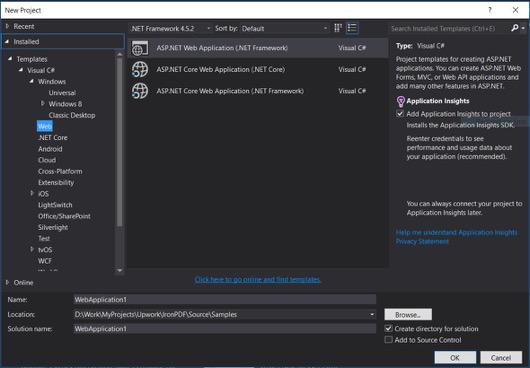
プロジェクト名: IronScraperSample
場所: ディスク上の場所を選択。
-
ASP.NETテンプレートから、空のテンプレートを選択しWebフォームをチェックします。
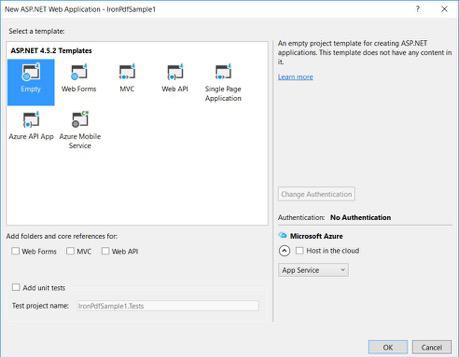
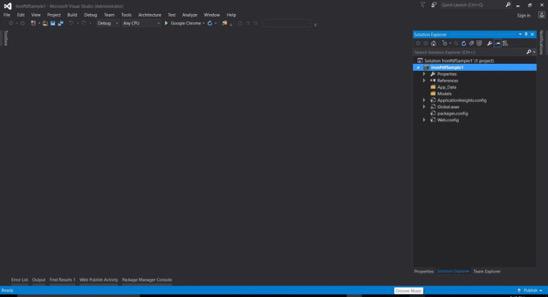
- 基本的なASP.NET Webフォームプロジェクトが作成されます。
よくある質問
C#でWebサイトからデータをスクレイピングする方法は?
IronWebScraperを使用して、C#でWebサイトからデータをスクレイピングできます。まずNuGet経由でライブラリをインストールし、基本的なコンソールアプリケーションを設定して、効率的にWebデータを抽出し始めましょう。
C#でウェブスクレイピングを行うための前提条件は何ですか?
C#でウェブスクレイピングを行うには、C#またはVB.NETの基本的なプログラミングスキルを持ち、HTML、JavaScript、CSSなどのWeb技術を理解し、DOM、XPath、CSSセレクターに精通している必要があります。
どのように.NETプロジェクトにウェブスクレイピングライブラリをインストールできますか?
IronWebScraperを.NETプロジェクトにインストールするには、NuGetパッケージマネージャーコンソールでInstall-Package IronWebScraperコマンドを使用するか、Visual StudioのNuGetパッケージマネージャーインターフェイスを通じてインストールしてください。
自分のウェブスクレイパーにリクエストスロットリングを実装するにはどうすればいいですか?
IronWebScraperを使用すると、サーバーへのリクエストの頻度を管理するためにリクエストスロットリングを実装することができます。MaxHttpConnectionLimit、RateLimitPerHost、OpenConnectionLimitPerHostなどの設定を使用して構成できます。
ウェブスクレイピングでウェブキャッシュを有効にする目的は何ですか?
ウェブスクレイピングでウェブキャッシュを有効にすると、以前の応答を保存して再利用することで、サーバーに送信されるリクエストの数を減少させるのに役立ちます。IronWebScraperではEnableWebCacheメソッドを使用して設定できます。
Webスクレイピングで認証を処理する方法は?
IronWebScraperを使用すると、HttpIdentityを使用して認証を管理し、ログインフォームや制限された領域の背後にあるコンテンツにアクセスできるようにし、保護されたリソースのスクレイピングを可能にします。
C#でのウェブスクレイパーの簡単な例は何ですか?
『HelloScraper』はチュートリアルで提供されるシンプルな例です。IronWebScraperを使用して基本的なウェブスクレイパーを設定し、リクエストを開始し、応答を解析する方法を示しています。
複雑なページ構造を処理するためにウェブスクレイパーをどのように拡張できますか?
IronWebScraperを使用すると、さまざまなページタイプを処理するためにParseメソッドをカスタマイズし、フレキシブルなデータ抽出戦略を可能にすることで、複雑なページ構造を処理するためにスクレイパーを拡張することができます。
ウェブスクレイピングライブラリを使用する利点は何ですか?
IronWebScraperのようなウェブスクレイピングライブラリを使用することで、データ抽出の効率化、ドメイン管理、リクエストスロットリング、キャッシュ、認証対応のサポートなどの利点があり、ウェブスクレイピングタスクの効率的な処理が可能になります。


まだスクロールしていますか?
すぐに証拠が欲しいですか? PM > Install-Package IronWebScraper
サンプルを実行する ターゲットサイトが構造化データになるのを見る。






 無料で始めましょう
 無料で始めましょう
 無料ライブデモを予約
















