


How to Scrape Data from Websites in C

IronWebScraper是一个用于网页抓取、网路数据提取和网页内容解析的.NET库。 它是一个易于使用的库,可以添加到 Microsoft Visual Studio 项目中,用于开发和生产。
IronWebScraper具有许多独特的功能和能力,例如控制允许和禁止的页面、对象、媒体等。它还允许管理多个身份、网页缓存和许多其他功能,我们将在本教程中介绍。
开始使用IronWebScraper
今天在您的项目中使用 IronWebScraper,免费试用。

目标受众
本教程针对具有基本或高级编程技能的软件开发人员,他们希望构建和实现高级抓取功能的解决方案(网站抓取、网站数据收集和提取、网站内容解析、网络捕获)。

所需技能
- 使用 Microsoft 编程语言(如 C# 或 VB.NET)的基本编程基础
- 对 Web 技术(HTML、JavaScript、JQuery、CSS 等)及其工作原理的基本理解
- 具备对 DOM、XPath、HTML 和 CSS 选择器的基本知识
工具
- Microsoft Visual Studio 2010 或更高版本
- 针对如 Chrome 浏览器的 web inspector 或 Firefox 的 Firebug 等浏览器的 Web 开发者扩展
为何进行抓取? (Reasons and Concepts)
如果你想构建具备以下功能的产品或解决方案:
- 提取网站数据
- 比较来自多个网站的内容、价格、功能等
- 扫描和缓存网站内容
如果您有一个或多个上述理由,那么IronWebScraper是一个适合您需求的优秀库
如何安装 IronWebScraper?
在您IronWebScraper库添加到您的项目中。
使用 NuGet 安装
要通过NuGet将IronWebScraper库添加到我们的项目中,可以使用可视化界面(NuGet包管理器)或通过包管理器控制台命令来完成。
使用 NuGet 包管理器
- 使用鼠标 -> 右键单击项目名称 -> 选择管理 NuGet 包
- 从浏览选项卡 -> 搜索
IronWebScraper-> 安装 - 点击确定
- 我们完成了
使用 NuGet 包控制台
- 从工具 -> NuGet 包管理器 -> 包管理器控制台
- 选择类库项目作为默认项目
- 运行命令 ->
Install-Package IronWebScraper
手动安装
- 前往 https://ironsoftware.com
- 点击 IronWebScraper 或直接通过 URL 访问其页面 https://ironsoftware.com/csharp/webscraper/
- 点击下载 DLL。
- 提取下载的压缩文件
- 在 Visual Studio 中右键单击项目 -> 添加 -> 引用 -> 浏览
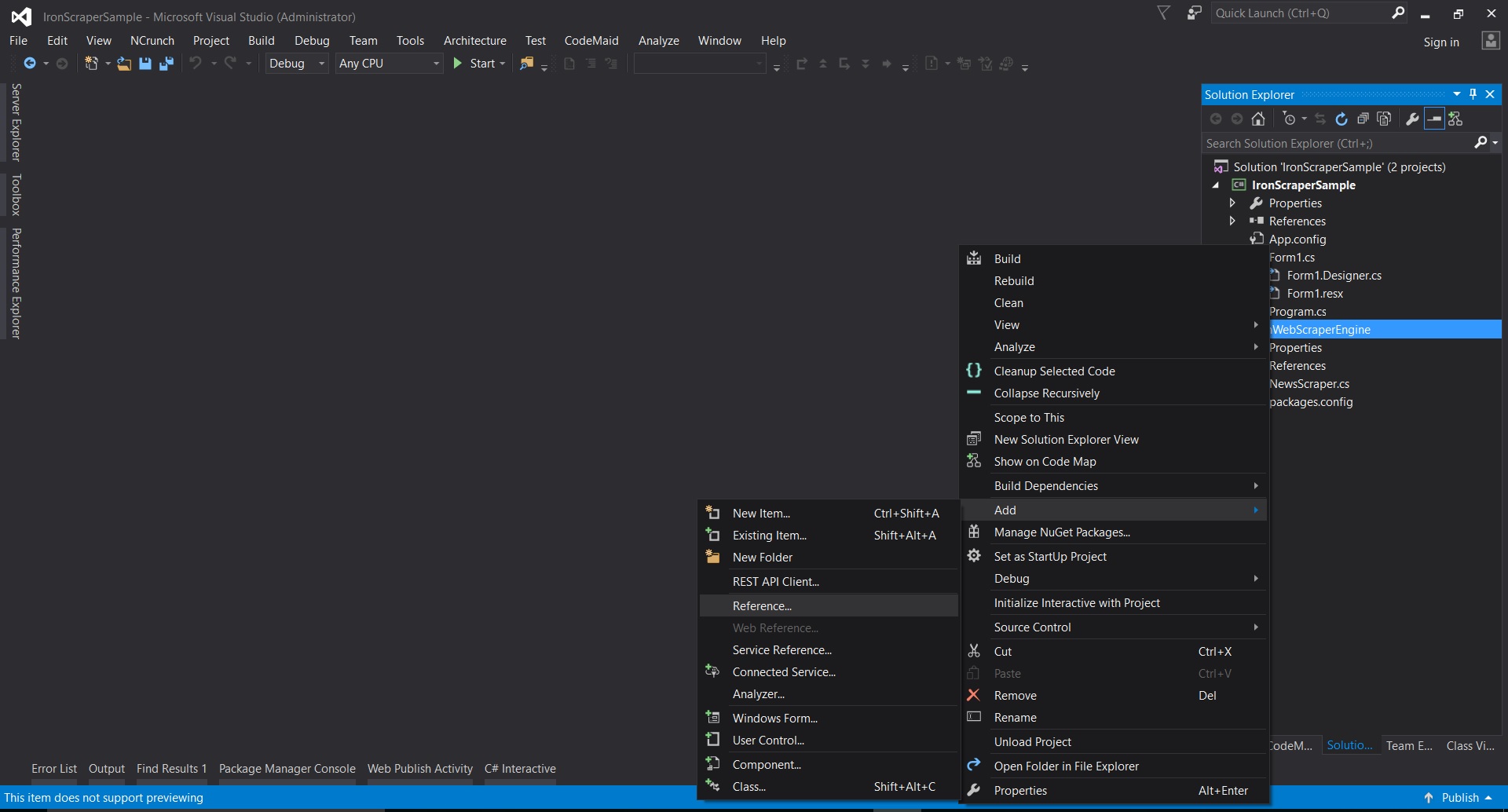
- 转到提取的文件夹 ->
netstandard2.0-> 并选择所有.dll文件
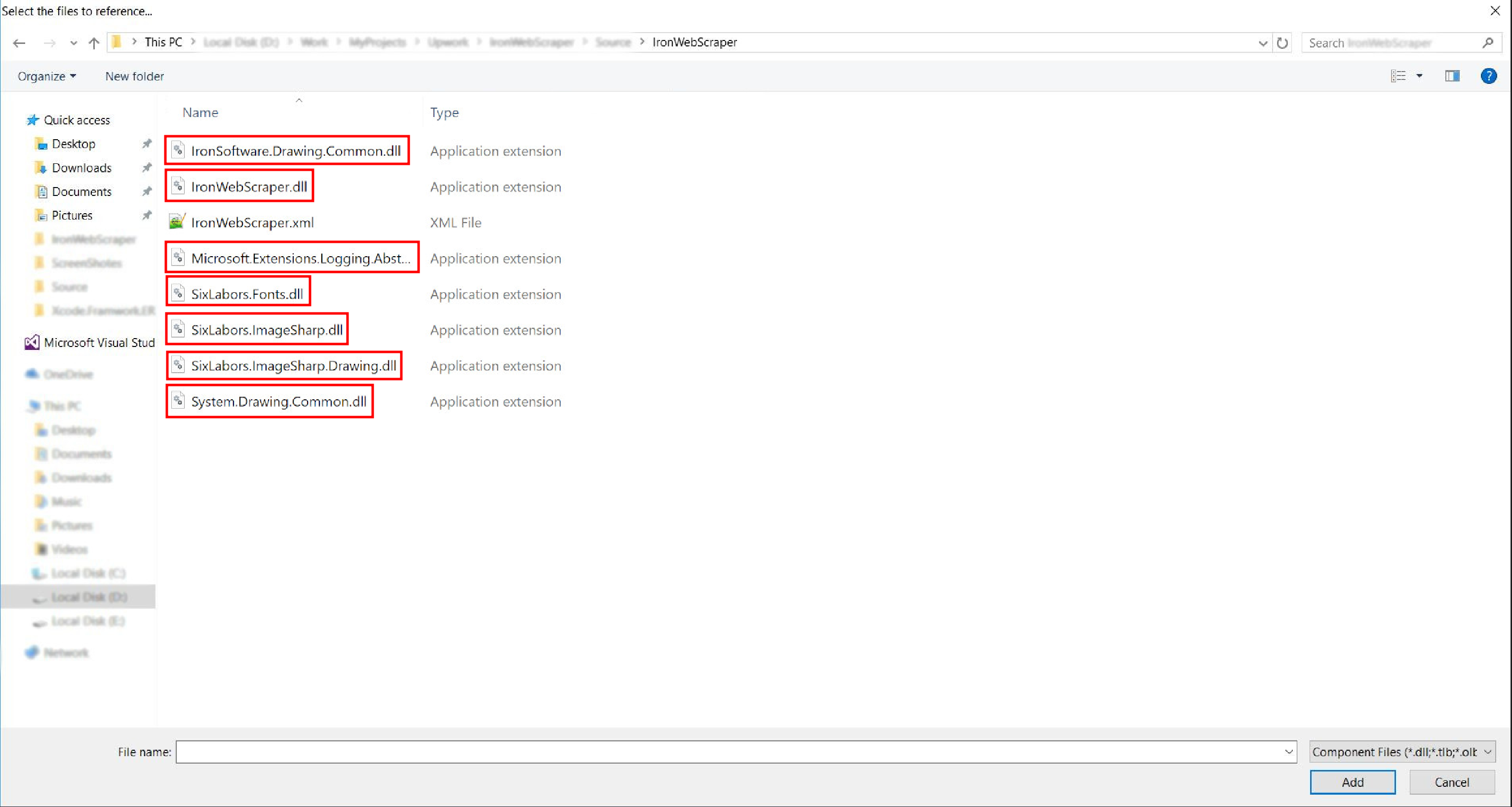
- 完成了!
HelloScraper - 我们的第一个 IronWebScraper 示例
像往常一样,我们将从实现 Hello Scraper 应用程序开始,以使用 IronWebScraper 迈出我们的第一步。
- 我们已经创建了一个名为 "IronWebScraperSample" 的新控制台应用程序
创建 IronWebScraper 示例的步骤
- 创建一个文件夹,并命名为 "HelloScraperSample"
-
然后添加一个新类并命名为
HelloScraper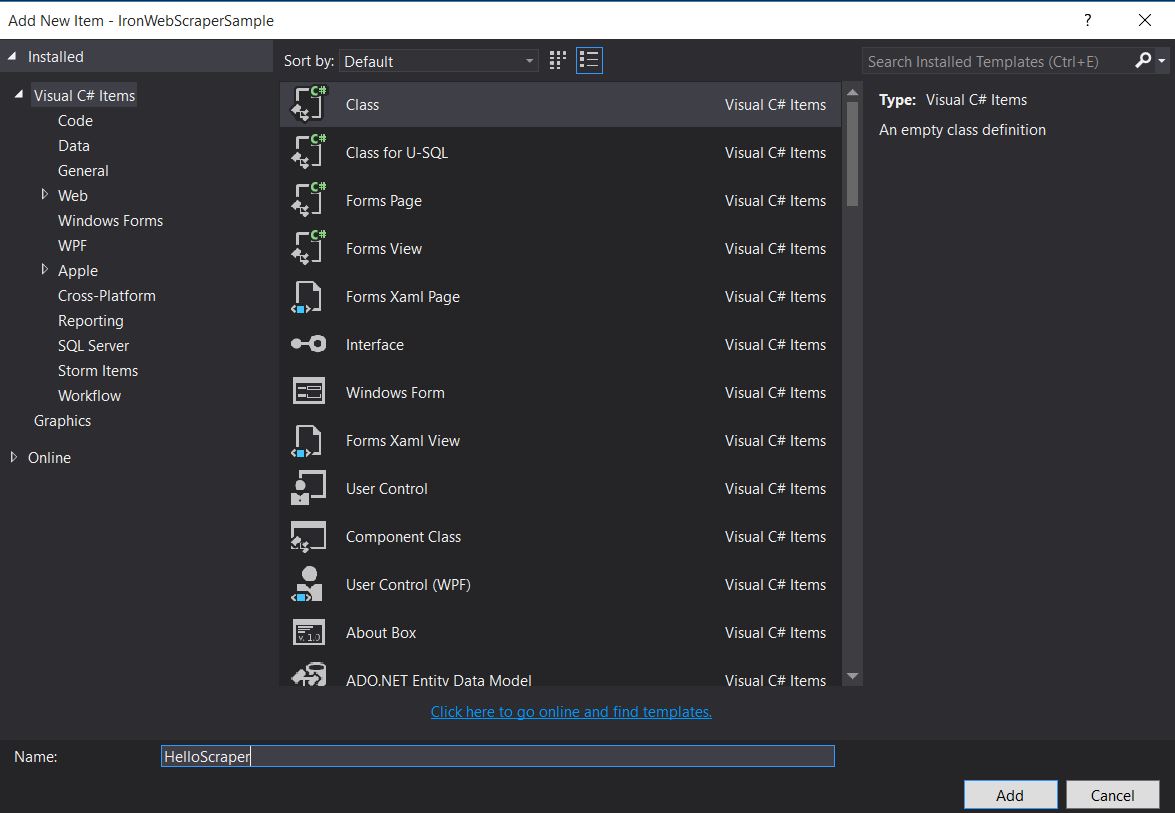
-
将此代码片段添加到
HelloScraperpublic class HelloScraper : WebScraper { /// <summary> /// Override this method to initialize your web scraper. /// Important tasks will be to request at least one start URL and set allowed/banned domain or URL patterns. /// </summary> public override void Init() { License.LicenseKey = "LicenseKey"; // Write License Key this.LoggingLevel = WebScraper.LogLevel.All; // Log all events this.Request("https://blog.scrapinghub.com", Parse); // Initialize a web request to the given URL } /// <summary> /// Override this method to create the default Response handler for your web scraper. /// If you have multiple page types, you can add additional similar methods. /// </summary> /// <param name="response">The HTTP Response object to parse</param> public override void Parse(Response response) { // Set working directory for the project this.WorkingDirectory = AppSetting.GetAppRoot() + @"\HelloScraperSample\Output\"; // Loop on all links foreach (var titleLink in response.Css("h2.entry-title a")) { // Read link text string title = titleLink.TextContentClean; // Save result to file Scrape(new ScrapedData() { { "Title", title } }, "HelloScraper.json"); } // Loop on all links for pagination if (response.CssExists("div.prev-post > a[href]")) { // Get next page URL var nextPage = response.Css("div.prev-post > a[href]")[0].Attributes["href"]; // Scrape next URL this.Request(nextPage, Parse); } } }public class HelloScraper : WebScraper { /// <summary> /// Override this method to initialize your web scraper. /// Important tasks will be to request at least one start URL and set allowed/banned domain or URL patterns. /// </summary> public override void Init() { License.LicenseKey = "LicenseKey"; // Write License Key this.LoggingLevel = WebScraper.LogLevel.All; // Log all events this.Request("https://blog.scrapinghub.com", Parse); // Initialize a web request to the given URL } /// <summary> /// Override this method to create the default Response handler for your web scraper. /// If you have multiple page types, you can add additional similar methods. /// </summary> /// <param name="response">The HTTP Response object to parse</param> public override void Parse(Response response) { // Set working directory for the project this.WorkingDirectory = AppSetting.GetAppRoot() + @"\HelloScraperSample\Output\"; // Loop on all links foreach (var titleLink in response.Css("h2.entry-title a")) { // Read link text string title = titleLink.TextContentClean; // Save result to file Scrape(new ScrapedData() { { "Title", title } }, "HelloScraper.json"); } // Loop on all links for pagination if (response.CssExists("div.prev-post > a[href]")) { // Get next page URL var nextPage = response.Css("div.prev-post > a[href]")[0].Attributes["href"]; // Scrape next URL this.Request(nextPage, Parse); } } }Public Class HelloScraper Inherits WebScraper ''' <summary> ''' Override this method to initialize your web scraper. ''' Important tasks will be to request at least one start URL and set allowed/banned domain or URL patterns. ''' </summary> Public Overrides Sub Init() License.LicenseKey = "LicenseKey" ' Write License Key Me.LoggingLevel = WebScraper.LogLevel.All ' Log all events Me.Request("https://blog.scrapinghub.com", AddressOf Parse) ' Initialize a web request to the given URL End Sub ''' <summary> ''' Override this method to create the default Response handler for your web scraper. ''' If you have multiple page types, you can add additional similar methods. ''' </summary> ''' <param name="response">The HTTP Response object to parse</param> Public Overrides Sub Parse(ByVal response As Response) ' Set working directory for the project Me.WorkingDirectory = AppSetting.GetAppRoot() & "\HelloScraperSample\Output\" ' Loop on all links For Each titleLink In response.Css("h2.entry-title a") ' Read link text Dim title As String = titleLink.TextContentClean ' Save result to file Scrape(New ScrapedData() From { { "Title", title } }, "HelloScraper.json") Next titleLink ' Loop on all links for pagination If response.CssExists("div.prev-post > a[href]") Then ' Get next page URL Dim nextPage = response.Css("div.prev-post > a[href]")(0).Attributes("href") ' Scrape next URL Me.Request(nextPage, AddressOf Parse) End If End Sub End Class$vbLabelText $csharpLabel -
现在要开始抓取,将此代码片段添加到
Mainstatic void Main(string[] args) { // Create Object From Hello Scrape class HelloScraperSample.HelloScraper scrape = new HelloScraperSample.HelloScraper(); // Start Scraping scrape.Start(); }static void Main(string[] args) { // Create Object From Hello Scrape class HelloScraperSample.HelloScraper scrape = new HelloScraperSample.HelloScraper(); // Start Scraping scrape.Start(); }Shared Sub Main(ByVal args() As String) ' Create Object From Hello Scrape class Dim scrape As New HelloScraperSample.HelloScraper() ' Start Scraping scrape.Start() End Sub$vbLabelText $csharpLabel - 结果将保存在格式为
WebScraper.WorkingDirectory/classname.Json的文件中
代码概述
Scrape.Start()触发抓取逻辑如下:
- 调用
Init()方法初始化变量、抓取属性和行为属性。 - 在
Request("https://blog.scrapinghub.com", Parse)。 - 在并行中处理多个 HTTP 请求和线程,保持代码同步且更易于调试。
- 在
Parse()方法以处理响应,使用CSS选择器提取数据并以JSON格式保存。
IronWebScraper 库功能和选项
更新过的文档可以在使用手动安装方法下载的zip文件中找到(IronWebScraper Documentation.chm File),或者您可以查看https://ironsoftware.com/csharp/webscraper/object-reference/在线文档以获取库的最新更新。
要在您的项目中开始使用IronWebScraper.WebScraper类,该类扩展了您的类库并为其添加了抓取功能。 此外,您必须实现Parse(Response response)方法。
namespace IronWebScraperEngine
{
    public class NewsScraper : IronWebScraper.WebScraper
    {
        public override void Init()
        {
            throw new NotImplementedException();
        }

        public override void Parse(Response response)
        {
            throw new NotImplementedException();
        }
    }
}
namespace IronWebScraperEngine
{
public class NewsScraper : IronWebScraper.WebScraper
{
public override void Init()
{
throw new NotImplementedException();
}
public override void Parse(Response response)
{
throw new NotImplementedException();
}
}
}Namespace IronWebScraperEngine
Public Class NewsScraper
Inherits IronWebScraper.WebScraper
Public Overrides Sub Init()
Throw New NotImplementedException()
End Sub
Public Overrides Sub Parse(ByVal response As Response)
Throw New NotImplementedException()
End Sub
End Class
End Namespace| 属性\函数 | 类型 | 描述 |
|---|---|---|
Init () |
方法 | 用于设置刮刀 |
Parse (Response response) |
方法 | 用于实现抓取器将使用的逻辑以及它将如何处理。 可以实现多个方法以处理不同的页面行为或结构。 |
BannedUrls, AllowedUrls, BannedDomains |
收集 | 用于禁止/允许 URL 和/或域。 例如:BannedUrls.Add("*.zip", "*.exe", "*.gz", "*.pdf");支持通配符和正则表达式。 |
ObeyRobotsDotTxt |
布尔值 | 用于启用或禁用读取和遵循robots.txt中的指令。 |
ObeyRobotsDotTxtForHost (string Host) |
方法 | 用于启用或禁用读取和遵循某一域中的robots.txt指令。 |
Scrape, ScrapeUnique |
方法 | |
ThrottleMode |
枚举 | 枚举选项:ByIpAddress, ByDomainHostName。 启用智能请求限流,对主机 IP 地址或域名表现出尊重。 |
EnableWebCache, EnableWebCache (TimeSpan cacheDuration) |
方法 | 启用 Web 请求缓存。 |
MaxHttpConnectionLimit |
整数 | 设置允许打开的 HTTP 请求(线程)的总数。 |
RateLimitPerHost |
时间间隔 | 设置对特定域或 IP 地址的最小礼貌延迟(暂停)。 |
OpenConnectionLimitPerHost |
整数 | 设置每个主机名或 IP 地址允许的并发 HTTP 请求(线程)数。 |
WorkingDirectory |
string | 设置用于存储数据的工作目录路径。 |
实际样本和练习
抓取在线电影网站
让我们举一个例子,在这个例子中,我们要抓取一个电影网站。
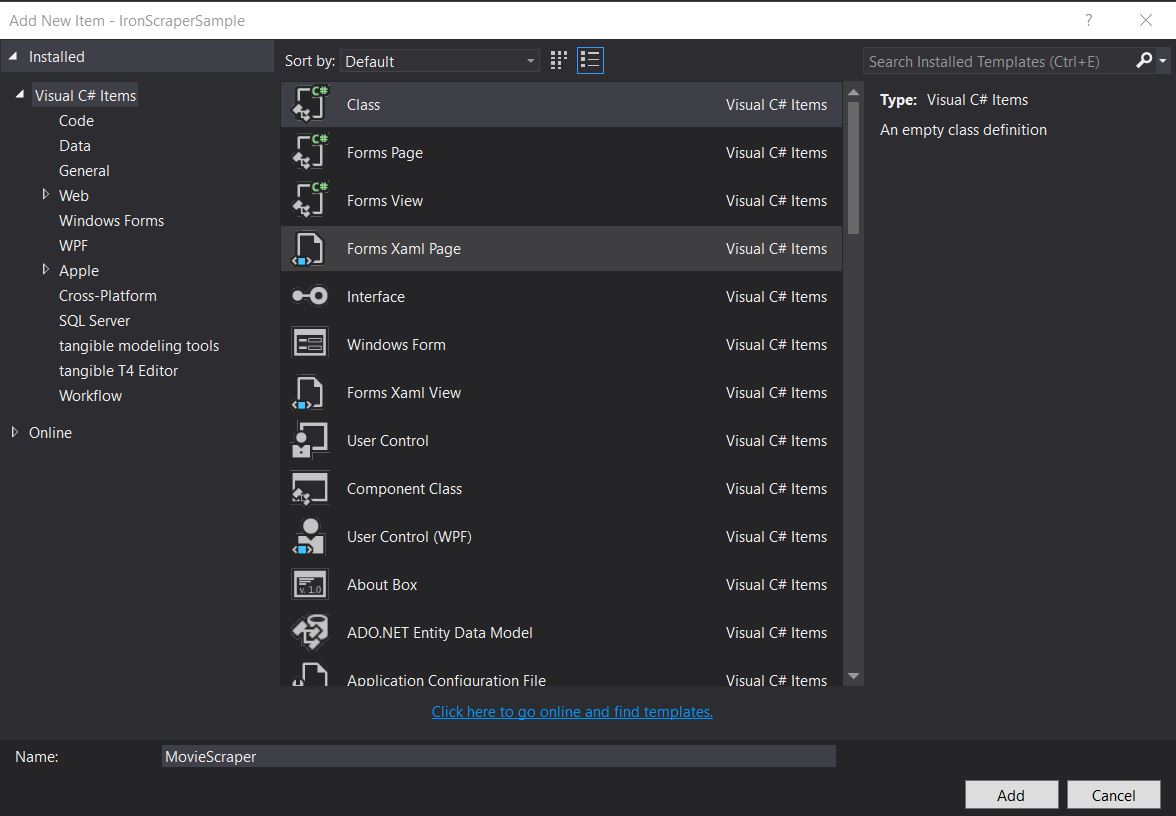
添加一个新类并命名为MovieScraper:
HTML 结构
这是我们在网站上看到的主页 HTML 的一部分:
<div id="movie-featured" class="movies-list movies-list-full tab-pane in fade active">
    <div data-movie-id="20746" class="ml-item">
        <a href="https://website.com/film/king-arthur-legend-of-the-sword-20746/">
            <span class="mli-quality">CAM</span>
            <img data-original="https://img.gocdn.online/2017/05/16/poster/2116d6719c710eabe83b377463230fbe-king-arthur-legend-of-the-sword.jpg"
                 class="lazy thumb mli-thumb" alt="King Arthur: Legend of the Sword"
                  src="https://img.gocdn.online/2017/05/16/poster/2116d6719c710eabe83b377463230fbe-king-arthur-legend-of-the-sword.jpg"
                 style="display: inline-block;">
            <span class="mli-info"><h2>King Arthur: Legend of the Sword</h2></span>
        </a>
    </div>
    <div data-movie-id="20724" class="ml-item">
        <a href="https://website.com/film/snatched-20724/" >
            <span class="mli-quality">CAM</span>
            <img data-original="https://img.gocdn.online/2017/05/16/poster/5ef66403dc331009bdb5aa37cfe819ba-snatched.jpg"
                 class="lazy thumb mli-thumb" alt="Snatched"
                 src="https://img.gocdn.online/2017/05/16/poster/5ef66403dc331009bdb5aa37cfe819ba-snatched.jpg"
                 style="display: inline-block;">
            <span class="mli-info"><h2>Snatched</h2></span>
        </a>
    </div>
</div>
<div id="movie-featured" class="movies-list movies-list-full tab-pane in fade active">
<div data-movie-id="20746" class="ml-item">
<a href="https://website.com/film/king-arthur-legend-of-the-sword-20746/">
<span class="mli-quality">CAM</span>
<img data-original="https://img.gocdn.online/2017/05/16/poster/2116d6719c710eabe83b377463230fbe-king-arthur-legend-of-the-sword.jpg"
class="lazy thumb mli-thumb" alt="King Arthur: Legend of the Sword"
src="https://img.gocdn.online/2017/05/16/poster/2116d6719c710eabe83b377463230fbe-king-arthur-legend-of-the-sword.jpg"
style="display: inline-block;">
<span class="mli-info"><h2>King Arthur: Legend of the Sword</h2></span>
</a>
</div>
<div data-movie-id="20724" class="ml-item">
<a href="https://website.com/film/snatched-20724/" >
<span class="mli-quality">CAM</span>
<img data-original="https://img.gocdn.online/2017/05/16/poster/5ef66403dc331009bdb5aa37cfe819ba-snatched.jpg"
class="lazy thumb mli-thumb" alt="Snatched"
src="https://img.gocdn.online/2017/05/16/poster/5ef66403dc331009bdb5aa37cfe819ba-snatched.jpg"
style="display: inline-block;">
<span class="mli-info"><h2>Snatched</h2></span>
</a>
</div>
</div>正如我们所看到的,我们有一个电影 ID、标题和一个指向详细页面的链接。 让我们开始搜索这些数据:
public class MovieScraper : WebScraper
{
    public override void Init()
    {
        License.LicenseKey = "LicenseKey";
        this.LoggingLevel = WebScraper.LogLevel.All;
        this.WorkingDirectory = AppSetting.GetAppRoot() + @"\MovieSample\Output\";
        this.Request("www.website.com", Parse);
    }

    public override void Parse(Response response)
    {
        foreach (var div in response.Css("#movie-featured > div"))
        {
            if (div.GetAttribute("class") != "clearfix")
            {
                var movieId = div.GetAttribute("data-movie-id");
                var link = div.Css("a")[0];
                var movieTitle = link.TextContentClean;
                Scrape(new ScrapedData() { { "MovieId", movieId }, { "MovieTitle", movieTitle } }, "Movie.Jsonl");
            }
        }
    }
}
public class MovieScraper : WebScraper
{
public override void Init()
{
License.LicenseKey = "LicenseKey";
this.LoggingLevel = WebScraper.LogLevel.All;
this.WorkingDirectory = AppSetting.GetAppRoot() + @"\MovieSample\Output\";
this.Request("www.website.com", Parse);
}
public override void Parse(Response response)
{
foreach (var div in response.Css("#movie-featured > div"))
{
if (div.GetAttribute("class") != "clearfix")
{
var movieId = div.GetAttribute("data-movie-id");
var link = div.Css("a")[0];
var movieTitle = link.TextContentClean;
Scrape(new ScrapedData() { { "MovieId", movieId }, { "MovieTitle", movieTitle } }, "Movie.Jsonl");
}
}
}
}Public Class MovieScraper
Inherits WebScraper
Public Overrides Sub Init()
License.LicenseKey = "LicenseKey"
Me.LoggingLevel = WebScraper.LogLevel.All
Me.WorkingDirectory = AppSetting.GetAppRoot() & "\MovieSample\Output\"
Me.Request("www.website.com", AddressOf Parse)
End Sub
Public Overrides Sub Parse(ByVal response As Response)
For Each div In response.Css("#movie-featured > div")
If div.GetAttribute("class") <> "clearfix" Then
Dim movieId = div.GetAttribute("data-movie-id")
Dim link = div.Css("a")(0)
Dim movieTitle = link.TextContentClean
Scrape(New ScrapedData() From {
{ "MovieId", movieId },
{ "MovieTitle", movieTitle }
},
"Movie.Jsonl")
End If
Next div
End Sub
End Class结构化电影类
为了保存我们的格式化数据,让我们实现一个电影类:
public class Movie
{
    public int Id { get; set; }
    public string Title { get; set; }
    public string URL { get; set; }
}
public class Movie
{
public int Id { get; set; }
public string Title { get; set; }
public string URL { get; set; }
}Public Class Movie
Public Property Id As Integer
Public Property Title As String
Public Property URL As String
End Class现在更新我们的代码以使用Movie类:
public class MovieScraper : WebScraper
{
    public override void Init()
    {
        License.LicenseKey = "LicenseKey";
        this.LoggingLevel = WebScraper.LogLevel.All;
        this.WorkingDirectory = AppSetting.GetAppRoot() + @"\MovieSample\Output\";
        this.Request("https://website.com/", Parse);
    }

    public override void Parse(Response response)
    {
        foreach (var div in response.Css("#movie-featured > div"))
        {
            if (div.GetAttribute("class") != "clearfix")
            {
                var movie = new Movie
                {
                    Id = Convert.ToInt32(div.GetAttribute("data-movie-id")),
                    Title = div.Css("a")[0].TextContentClean,
                    URL = div.Css("a")[0].Attributes["href"]
                };
                Scrape(movie, "Movie.Jsonl");
            }
        }
    }
}
public class MovieScraper : WebScraper
{
public override void Init()
{
License.LicenseKey = "LicenseKey";
this.LoggingLevel = WebScraper.LogLevel.All;
this.WorkingDirectory = AppSetting.GetAppRoot() + @"\MovieSample\Output\";
this.Request("https://website.com/", Parse);
}
public override void Parse(Response response)
{
foreach (var div in response.Css("#movie-featured > div"))
{
if (div.GetAttribute("class") != "clearfix")
{
var movie = new Movie
{
Id = Convert.ToInt32(div.GetAttribute("data-movie-id")),
Title = div.Css("a")[0].TextContentClean,
URL = div.Css("a")[0].Attributes["href"]
};
Scrape(movie, "Movie.Jsonl");
}
}
}
}Public Class MovieScraper
Inherits WebScraper
Public Overrides Sub Init()
License.LicenseKey = "LicenseKey"
Me.LoggingLevel = WebScraper.LogLevel.All
Me.WorkingDirectory = AppSetting.GetAppRoot() & "\MovieSample\Output\"
Me.Request("https://website.com/", AddressOf Parse)
End Sub
Public Overrides Sub Parse(ByVal response As Response)
For Each div In response.Css("#movie-featured > div")
If div.GetAttribute("class") <> "clearfix" Then
Dim movie As New Movie With {
.Id = Convert.ToInt32(div.GetAttribute("data-movie-id")),
.Title = div.Css("a")(0).TextContentClean,
.URL = div.Css("a")(0).Attributes("href")
}
Scrape(movie, "Movie.Jsonl")
End If
Next div
End Sub
End Class详细页面抓取
让我们扩展我们的Movie类,以便拥有新属性获取详细信息:
public class Movie
{
    public int Id { get; set; }
    public string Title { get; set; }
    public string URL { get; set; }
    public string Description { get; set; }
    public List<string> Genre { get; set; }
    public List<string> Actor { get; set; }
}
public class Movie
{
public int Id { get; set; }
public string Title { get; set; }
public string URL { get; set; }
public string Description { get; set; }
public List<string> Genre { get; set; }
public List<string> Actor { get; set; }
}Public Class Movie
Public Property Id As Integer
Public Property Title As String
Public Property URL As String
Public Property Description As String
Public Property Genre As List(Of String)
Public Property Actor As List(Of String)
End Class然后导航到详细页面进行抓取,使用 IronWebScraper 的扩展功能:
public class MovieScraper : WebScraper
{
    public override void Init()
    {
        License.LicenseKey = "LicenseKey";
        this.LoggingLevel = WebScraper.LogLevel.All;
        this.WorkingDirectory = AppSetting.GetAppRoot() + @"\MovieSample\Output\";
        this.Request("https://domain/", Parse);
    }

    public override void Parse(Response response)
    {
        foreach (var div in response.Css("#movie-featured > div"))
        {
            if (div.GetAttribute("class") != "clearfix")
            {
                var movie = new Movie
                {
                    Id = Convert.ToInt32(div.GetAttribute("data-movie-id")),
                    Title = div.Css("a")[0].TextContentClean,
                    URL = div.Css("a")[0].Attributes["href"]
                };
                this.Request(movie.URL, ParseDetails, new MetaData() { { "movie", movie } });
            }
        }
    }

    public void ParseDetails(Response response)
    {
        var movie = response.MetaData.Get<Movie>("movie");
        var div = response.Css("div.mvic-desc")[0];
        movie.Description = div.Css("div.desc")[0].TextContentClean;
        movie.Genre = div.Css("div > p > a").Select(element => element.TextContentClean).ToList();
        movie.Actor = div.Css("div > p:nth-child(2) > a").Select(element => element.TextContentClean).ToList();

        Scrape(movie, "Movie.Jsonl");
    }
}
public class MovieScraper : WebScraper
{
public override void Init()
{
License.LicenseKey = "LicenseKey";
this.LoggingLevel = WebScraper.LogLevel.All;
this.WorkingDirectory = AppSetting.GetAppRoot() + @"\MovieSample\Output\";
this.Request("https://domain/", Parse);
}
public override void Parse(Response response)
{
foreach (var div in response.Css("#movie-featured > div"))
{
if (div.GetAttribute("class") != "clearfix")
{
var movie = new Movie
{
Id = Convert.ToInt32(div.GetAttribute("data-movie-id")),
Title = div.Css("a")[0].TextContentClean,
URL = div.Css("a")[0].Attributes["href"]
};
this.Request(movie.URL, ParseDetails, new MetaData() { { "movie", movie } });
}
}
}
public void ParseDetails(Response response)
{
var movie = response.MetaData.Get<Movie>("movie");
var div = response.Css("div.mvic-desc")[0];
movie.Description = div.Css("div.desc")[0].TextContentClean;
movie.Genre = div.Css("div > p > a").Select(element => element.TextContentClean).ToList();
movie.Actor = div.Css("div > p:nth-child(2) > a").Select(element => element.TextContentClean).ToList();
Scrape(movie, "Movie.Jsonl");
}
}Public Class MovieScraper
Inherits WebScraper
Public Overrides Sub Init()
License.LicenseKey = "LicenseKey"
Me.LoggingLevel = WebScraper.LogLevel.All
Me.WorkingDirectory = AppSetting.GetAppRoot() & "\MovieSample\Output\"
Me.Request("https://domain/", AddressOf Parse)
End Sub
Public Overrides Sub Parse(ByVal response As Response)
For Each div In response.Css("#movie-featured > div")
If div.GetAttribute("class") <> "clearfix" Then
Dim movie As New Movie With {
.Id = Convert.ToInt32(div.GetAttribute("data-movie-id")),
.Title = div.Css("a")(0).TextContentClean,
.URL = div.Css("a")(0).Attributes("href")
}
Me.Request(movie.URL, AddressOf ParseDetails, New MetaData() From {
{ "movie", movie }
})
End If
Next div
End Sub
Public Sub ParseDetails(ByVal response As Response)
Dim movie = response.MetaData.Get(Of Movie)("movie")
Dim div = response.Css("div.mvic-desc")(0)
movie.Description = div.Css("div.desc")(0).TextContentClean
movie.Genre = div.Css("div > p > a").Select(Function(element) element.TextContentClean).ToList()
movie.Actor = div.Css("div > p:nth-child(2) > a").Select(Function(element) element.TextContentClean).ToList()
Scrape(movie, "Movie.Jsonl")
End Sub
End ClassIronWebScraper 库功能
HttpIdentity 功能
有些系统需要用户登录才能查看内容; 使用HttpIdentity作为凭证:
HttpIdentity id = new HttpIdentity
{
    NetworkUsername = "username",
    NetworkPassword = "pwd"
};
Identities.Add(id);
HttpIdentity id = new HttpIdentity
{
NetworkUsername = "username",
NetworkPassword = "pwd"
};
Identities.Add(id);Dim id As New HttpIdentity With {
.NetworkUsername = "username",
.NetworkPassword = "pwd"
}
Identities.Add(id)启用 Web 缓存
缓存请求的页面以便在开发过程中重复使用:
public override void Init()
{
    License.LicenseKey = "LicenseKey";
    this.LoggingLevel = WebScraper.LogLevel.All;
    this.WorkingDirectory = AppSetting.GetAppRoot() + @"\ShoppingSiteSample\Output\";
    EnableWebCache();
    this.Request("http://www.WebSite.com", Parse);
}
public override void Init()
{
License.LicenseKey = "LicenseKey";
this.LoggingLevel = WebScraper.LogLevel.All;
this.WorkingDirectory = AppSetting.GetAppRoot() + @"\ShoppingSiteSample\Output\";
EnableWebCache();
this.Request("http://www.WebSite.com", Parse);
}Public Overrides Sub Init()
License.LicenseKey = "LicenseKey"
Me.LoggingLevel = WebScraper.LogLevel.All
Me.WorkingDirectory = AppSetting.GetAppRoot() & "\ShoppingSiteSample\Output\"
EnableWebCache()
Me.Request("http://www.WebSite.com", Parse)
End Sub限流
控制连接数量和速度:
public override void Init()
{
    License.LicenseKey = "LicenseKey";
    this.LoggingLevel = WebScraper.LogLevel.All;
    this.WorkingDirectory = AppSetting.GetAppRoot() + @"\ShoppingSiteSample\Output\";
    this.MaxHttpConnectionLimit = 80;
    this.RateLimitPerHost = TimeSpan.FromMilliseconds(50);
    this.OpenConnectionLimitPerHost = 25;
    this.ObeyRobotsDotTxt = false;
    this.ThrottleMode = Throttle.ByDomainHostName;
    this.Request("https://www.Website.com", Parse);
}
public override void Init()
{
License.LicenseKey = "LicenseKey";
this.LoggingLevel = WebScraper.LogLevel.All;
this.WorkingDirectory = AppSetting.GetAppRoot() + @"\ShoppingSiteSample\Output\";
this.MaxHttpConnectionLimit = 80;
this.RateLimitPerHost = TimeSpan.FromMilliseconds(50);
this.OpenConnectionLimitPerHost = 25;
this.ObeyRobotsDotTxt = false;
this.ThrottleMode = Throttle.ByDomainHostName;
this.Request("https://www.Website.com", Parse);
}Public Overrides Sub Init()
License.LicenseKey = "LicenseKey"
Me.LoggingLevel = WebScraper.LogLevel.All
Me.WorkingDirectory = AppSetting.GetAppRoot() & "\ShoppingSiteSample\Output\"
Me.MaxHttpConnectionLimit = 80
Me.RateLimitPerHost = TimeSpan.FromMilliseconds(50)
Me.OpenConnectionLimitPerHost = 25
Me.ObeyRobotsDotTxt = False
Me.ThrottleMode = Throttle.ByDomainHostName
Me.Request("https://www.Website.com", Parse)
End Sub限流属性
MaxHttpConnectionLimit
允许的HTTP请求(线程)打开总数RateLimitPerHost
给定域名或IP地址间请求的最小礼貌延迟(暂停)OpenConnectionLimitPerHost
每个主机名或IP地址允许的并发HTTP请求(线程)数ThrottleMode
使WebScraper智能节流请求不仅通过主机名,还通过主机服务器的IP地址。 在多个抓取的域托管在同一台机器上的情况下,这样做是礼貌的。
附录
如何创建 Windows 窗体应用程序?
using Visual Studio 2013 或更高版本。
- 打开 Visual Studio。
-
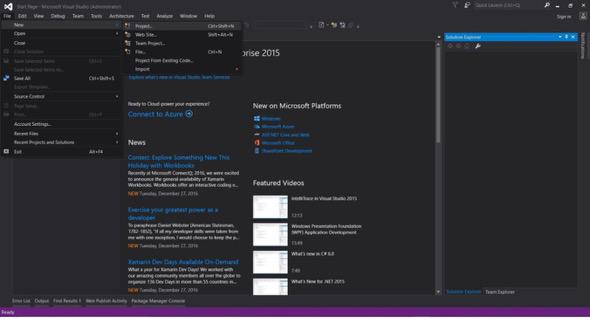
文件 -> 新建 -> 项目
- 选择 Visual C# 或 VB -> Windows -> Windows Forms 应用程序。
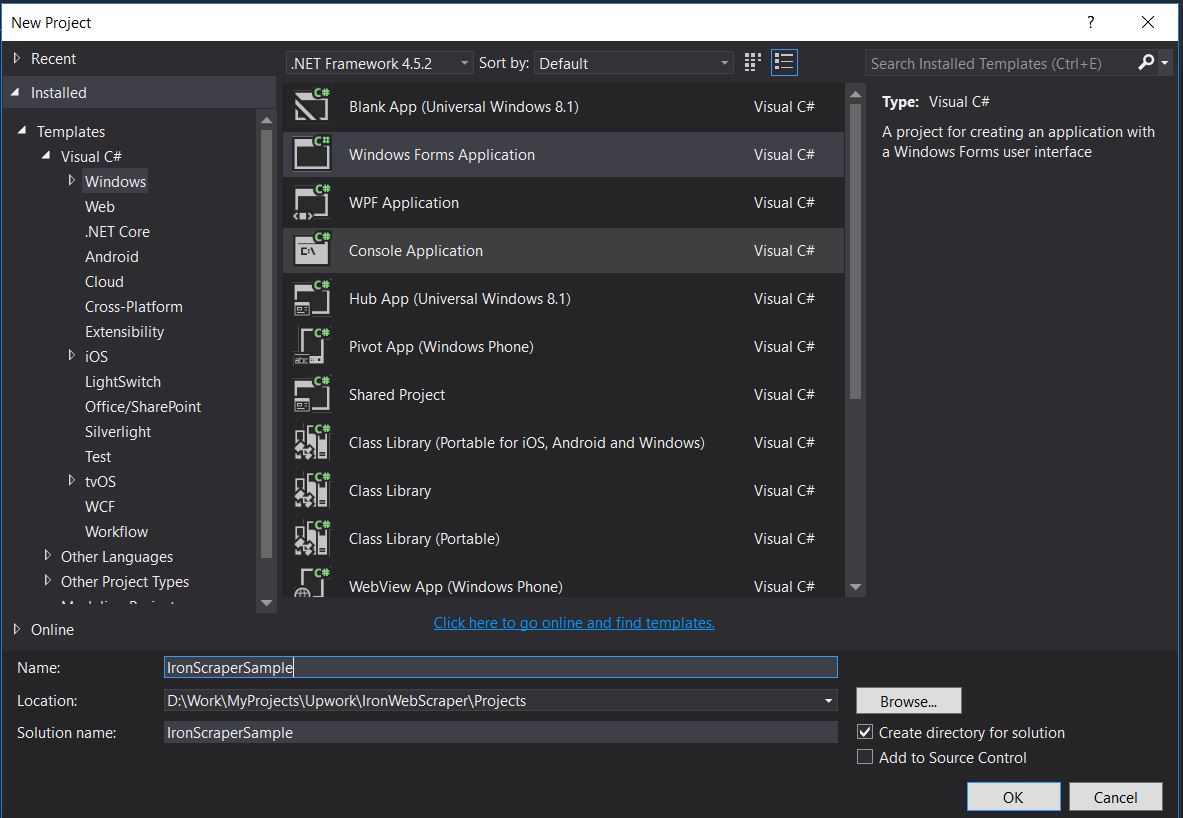
项目名称:IronScraperSample
位置: 选择你磁盘上的一个位置。
如何创建 ASP.NET Web 窗体应用程序?
-
打开 Visual Studio。
-
文件 -> 新建 -> 项目
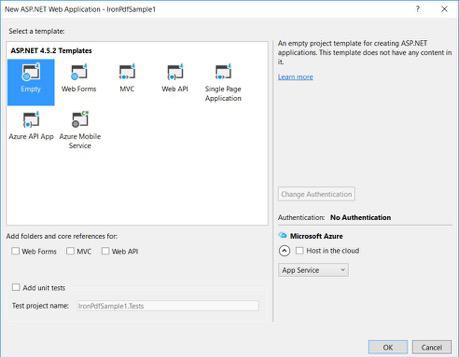
- 选择 Visual C# 或 VB -> Web -> ASP.NET Web 应用程序 (.NET Framework)。
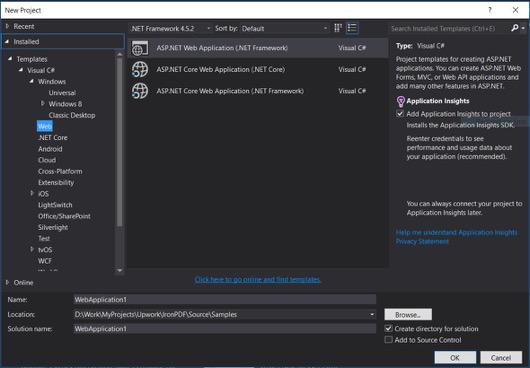
项目名称:IronScraperSample
位置: 选择你磁盘上的一个位置。
-
从你的 ASP.NET 模板中,选择一个空模板并勾选 Web 窗体。
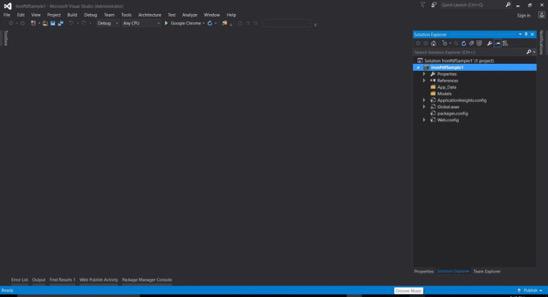
- 你的基本 ASP.NET Web 窗体项目已创建。
常见问题解答
如何在 C# 中抓取网站上的数据?
您可以使用 IronWebScraper 在 C# 中从网站抓取数据。首先通过 NuGet 安装库,并设置一个基本的控制台应用程序以有效地开始提取网页数据。
C# 网页抓取的前提条件是什么?
要在 C# 中执行网页抓取,您应具备 C# 或 VB.NET 的基本编程技能,并理解诸如 HTML、JavaScript 和 CSS 的网页技术,同时熟悉 DOM、XPath 和 CSS 选择器。
如何在 .NET 项目中安装网页抓取库?
要在 .NET 项目中安装 IronWebScraper,使用 NuGet 包管理控制台中的命令Install-Package IronWebScraper,或者在 Visual Studio 中通过 NuGet 包管理器界面进行导航。
如何在我的网页抓取器中实施请求调节?
IronWebScraper 允许您实施请求调节以管理发送到服务器的请求频率。这可以通过设置如MaxHttpConnectionLimit、RateLimitPerHost和OpenConnectionLimitPerHost进行配置。
启用网页缓存功能的目的是什么?
在网页抓取中启用网页缓存有助于通过存储和重用先前的响应来减少发送到服务器的请求数量。这可以通过使用 IronWebScraper 的 EnableWebCache 方法进行设置。
如何在网页抓取中处理身份验证?
using IronWebScraper,您可以使用HttpIdentity来管理身份验证,允许访问登录表单或限制区域后的内容,从而使受保护资源的抓取成为可能。
什么是 C# 中网页抓取器的简单示例?
'HelloScraper' 是教程中提供的一个简单示例。它展示了如何使用 IronWebScraper 设置一个基本的网页抓取器,包括如何发起请求和解析响应。
如何扩展我的网页抓取器以处理复杂的页面结构?
using IronWebScraper,您可以通过自定义Parse方法来扩展抓取器以处理复杂页面结构,从而允许灵活的数据提取策略。
使用网页抓取库的好处是什么?
使用像 IronWebScraper 这样的网页抓取库的好处包括精简的数据提取、域管理、请求调节、缓存以及对身份验证的支持,使网页抓取任务的处理更为高效。


还在滚动吗?
想快速获得证据? PM > Install-Package IronWebScraper
运行示例 观看您的目标网站成为结构化数据。






 免费开始
免费开始 免费开始
免费开始 预定免费现场演示
















