


C#とIronWebscraperを使ってオンライン映画サイトをスクレイピングする

IronWebScraperは、HTML要素を解析してウェブサイトから映画データを抽出し、構造化データストレージのために型付きオブジェクトを作成し、メタデータを使用してページ間をナビゲートして包括的な映画情報データセットを構築します。 この C# Web Scraper ライブラリは、構造化されていない Web コンテンツを整理された分析可能なデータに変換することを簡素化します。
クイックスタート:C#で映画をスクレイピング
- NuGetパッケージマネージャーを使用して
IronWebScraperをインストールします WebScraperを継承するクラスを作成しますInit()をオーバーライドしてライセンスを設定し、ターゲットURLをリクエストします- CSSセレクタを使用して映画データを抽出するために
Parse()をオーバーライドします Scrape()メソッドを使用してデータをJSON形式で保存します
-
IronWebScraper をNuGetパッケージマネージャでインストール
-
このコード スニペットをコピーして実行します。
using IronWebScraper; using System; public class QuickstartMovieScraper : WebScraper { public override void Init() { // Set your license key License.LicenseKey = "YOUR-LICENSE-KEY"; // Configure scraper settings this.LoggingLevel = LogLevel.All; this.WorkingDirectory = @"C:\MovieData\Output\"; // Start scraping from the homepage this.Request("https://example-movie-site.com", Parse); } public override void Parse(Response response) { // Extract movie titles using CSS selectors foreach (var movieDiv in response.Css(".movie-item")) { var title = movieDiv.Css("h2")[0].TextContentClean; var url = movieDiv.Css("a")[0].Attributes["href"]; // Save the scraped data Scrape(new { Title = title, Url = url }, "movies.json"); } } } // Run the scraper var scraper = new QuickstartMovieScraper(); scraper.Start(); -
実際の環境でテストするためにデプロイする
今日プロジェクトで IronWebScraper を使い始めましょう無料トライアル

どのようにムービースクレーパークラスをセットアップしますか?
実際のウェブサイトの例から始めます。 Webscraping in C# チュートリアルで説明したテクニックを使って、映画のウェブサイトをスクレイピングします。
新しいクラスを追加し、それをMovieScraperと命名します:
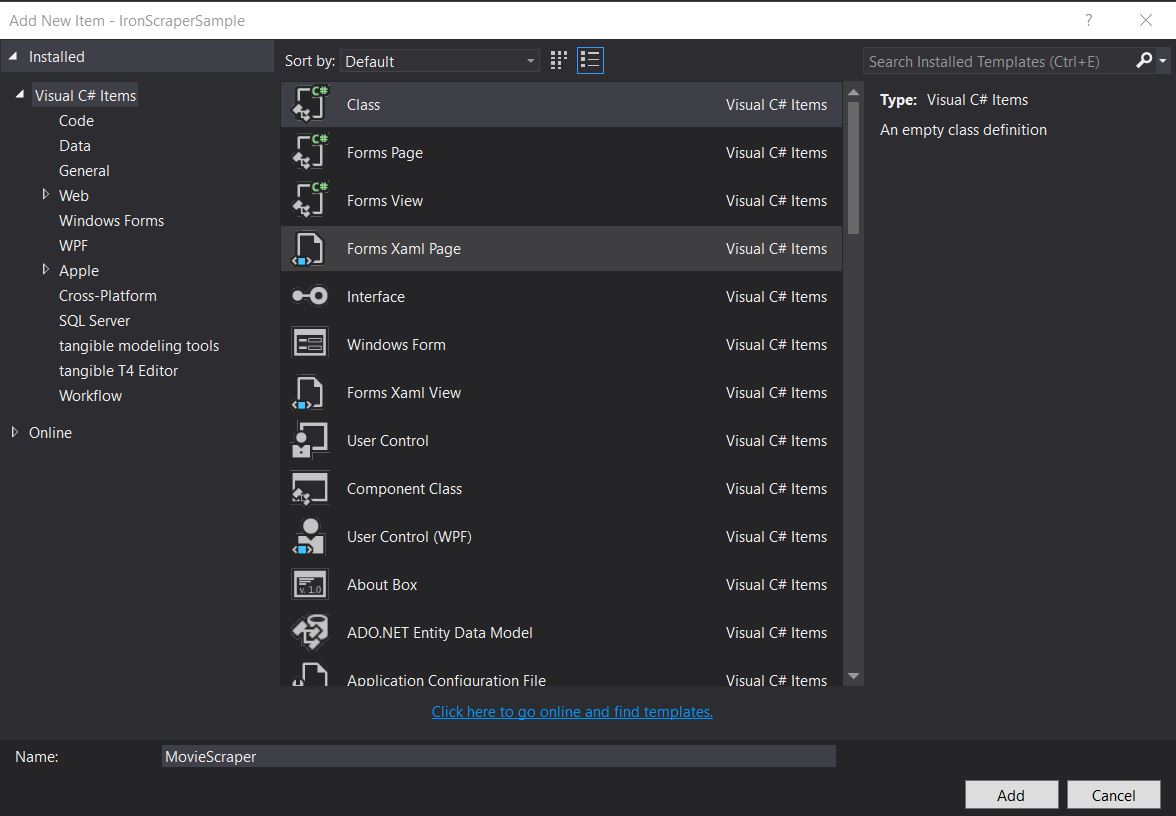
専用のスクレーパークラスを作成することで、コードを整理し、再利用可能にすることができます。 このアプローチは、オブジェクト指向の原則に従い、後で簡単に機能を拡張することができます。
ターゲットとなるウェブサイトの構造はどのようなものですか?
スクレイピングのためにサイト構造を調べます。 効果的なウェブスクレイピングには、ウェブサイトの構造を理解することが重要です。 オンライン映画ウェブサイトからのスクレイピングのガイドと同様に、最初にHTML構造を分析します:
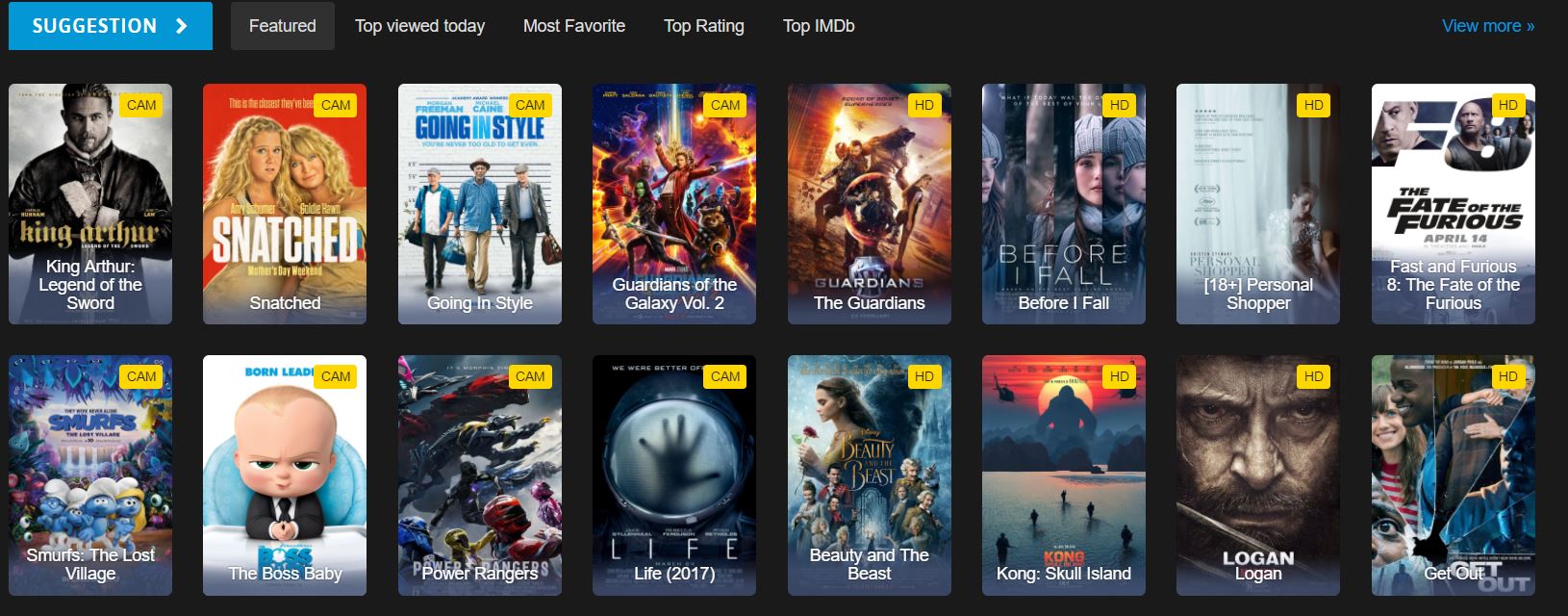
どの HTML 要素にムービー データが含まれていますか?
これは、ウェブサイト上で見られるホームページのHTMLの一部です。HTMLの構造を調べることで、使用すべき正しいCSSセレクタを特定することができます:
<div id="movie-featured" class="movies-list movies-list-full tab-pane in fade active">
    <div data-movie-id="20746" class="ml-item">
        <a href="https://website.com/film/king-arthur-legend-of-the-sword-20746/">
            <span class="mli-quality">CAM</span>
            <img data-original="https://img.gocdn.online/2017/05/16/poster/2116d6719c710eabe83b377463230fbe-king-arthur-legend-of-the-sword.jpg"
                 class="lazy thumb mli-thumb" alt="キング・アーサー: 聖剣無双"
                 src="https://img.gocdn.online/2017/05/16/poster/2116d6719c710eabe83b377463230fbe-king-arthur-legend-of-the-sword.jpg"
                 style="display: inline-block;">
            <span class="mli-info"><h2>King Arthur: Legend of the Sword</h2></span>
        </a>
    </div>
    <div data-movie-id="20724" class="ml-item">
        <a href="https://website.com/film/snatched-20724/">
            <span class="mli-quality">CAM</span>
            <img data-original="https://img.gocdn.online/2017/05/16/poster/5ef66403dc331009bdb5aa37cfe819ba-snatched.jpg"
                 class="lazy thumb mli-thumb" alt="Snatched"
                 src="https://img.gocdn.online/2017/05/16/poster/5ef66403dc331009bdb5aa37cfe819ba-snatched.jpg"
                 style="display: inline-block;">
            <span class="mli-info"><h2>Snatched</h2></span>
        </a>
    </div>
</div>
<div id="movie-featured" class="movies-list movies-list-full tab-pane in fade active">
<div data-movie-id="20746" class="ml-item">
<a href="https://website.com/film/king-arthur-legend-of-the-sword-20746/">
<span class="mli-quality">CAM</span>
<img data-original="https://img.gocdn.online/2017/05/16/poster/2116d6719c710eabe83b377463230fbe-king-arthur-legend-of-the-sword.jpg"
class="lazy thumb mli-thumb" alt="キング・アーサー: 聖剣無双"
src="https://img.gocdn.online/2017/05/16/poster/2116d6719c710eabe83b377463230fbe-king-arthur-legend-of-the-sword.jpg"
style="display: inline-block;">
<span class="mli-info"><h2>King Arthur: Legend of the Sword</h2></span>
</a>
</div>
<div data-movie-id="20724" class="ml-item">
<a href="https://website.com/film/snatched-20724/">
<span class="mli-quality">CAM</span>
<img data-original="https://img.gocdn.online/2017/05/16/poster/5ef66403dc331009bdb5aa37cfe819ba-snatched.jpg"
class="lazy thumb mli-thumb" alt="Snatched"
src="https://img.gocdn.online/2017/05/16/poster/5ef66403dc331009bdb5aa37cfe819ba-snatched.jpg"
style="display: inline-block;">
<span class="mli-info"><h2>Snatched</h2></span>
</a>
</div>
</div>ムービーID、タイトル、詳細ページへのリンクがあります。 各映画はdata-movie-id属性を含みます。
基本的なムービースクレイピングを実装するには?
このデータセットのスクレイピングを開始します。 スクレイパーを実行する前に、以下に示すようにライセンスキーが適切に設定されていることを確認してください:
public class MovieScraper : WebScraper
{
    public override void Init()
    {
        // Initialize scraper settings
        License.LicenseKey = "LicenseKey";
        this.LoggingLevel = WebScraper.LogLevel.All;
        this.WorkingDirectory = AppSetting.GetAppRoot() + @"\MovieSample\Output\";

        // Request homepage content for scraping
        this.Request("www.website.com", Parse);
    }

    public override void Parse(Response response)
    {
        // Iterate over each movie div within the featured movie section
        foreach (var div in response.Css("#movie-featured > div"))
        {
            if (div.Attributes["class"] != "clearfix")
            {
                var movieId = Convert.ToInt32(div.GetAttribute("data-movie-id"));
                var link = div.Css("a")[0];
                var movieTitle = link.TextContentClean;

                // Scrape and store movie data as key-value pairs
                Scrape(new ScrapedData()
                {
                    { "MovieId", movieId },
                    { "MovieTitle", movieTitle }
                }, "Movie.Jsonl");
            }
        }
    }
}
public class MovieScraper : WebScraper
{
public override void Init()
{
// Initialize scraper settings
License.LicenseKey = "LicenseKey";
this.LoggingLevel = WebScraper.LogLevel.All;
this.WorkingDirectory = AppSetting.GetAppRoot() + @"\MovieSample\Output\";
// Request homepage content for scraping
this.Request("www.website.com", Parse);
}
public override void Parse(Response response)
{
// Iterate over each movie div within the featured movie section
foreach (var div in response.Css("#movie-featured > div"))
{
if (div.Attributes["class"] != "clearfix")
{
var movieId = Convert.ToInt32(div.GetAttribute("data-movie-id"));
var link = div.Css("a")[0];
var movieTitle = link.TextContentClean;
// Scrape and store movie data as key-value pairs
Scrape(new ScrapedData()
{
{ "MovieId", movieId },
{ "MovieTitle", movieTitle }
}, "Movie.Jsonl");
}
}
}
}Public Class MovieScraper
Inherits WebScraper
Public Overrides Sub Init()
' Initialize scraper settings
License.LicenseKey = "LicenseKey"
Me.LoggingLevel = WebScraper.LogLevel.All
Me.WorkingDirectory = AppSetting.GetAppRoot() & "\MovieSample\Output\"
' Request homepage content for scraping
Me.Request("www.website.com", AddressOf Parse)
End Sub
Public Overrides Sub Parse(ByVal response As Response)
' Iterate over each movie div within the featured movie section
For Each div In response.Css("#movie-featured > div")
If div.Attributes("class") <> "clearfix" Then
Dim movieId = Convert.ToInt32(div.GetAttribute("data-movie-id"))
Dim link = div.Css("a")(0)
Dim movieTitle = link.TextContentClean
' Scrape and store movie data as key-value pairs
Scrape(New ScrapedData() From {
{ "MovieId", movieId },
{ "MovieTitle", movieTitle }
},
"Movie.Jsonl")
End If
Next div
End Sub
End Class作業ディレクトリ プロパティは何のためですか?
このコードの新機能は何ですか?
Working Directoryプロパティにより、スクレープされたデータおよび関連ファイル用の主作業ディレクトリが設定されます。 これにより、すべての出力ファイルが単一の場所に整理され、大規模なスクレイピングプロジェクトの管理が容易になります。 ディレクトリが存在しない場合は、自動的に作成されます。
どのような場合に CSS セレクタと属性を使い分ける必要がありますか?
その他の考慮事項
CSSセレクタは、構造的な位置やクラス名で要素をターゲットにする場合に理想的ですが、IDやカスタムデータ属性のような特定の値を抽出するには、属性への直接アクセスが適しています。 私たちの例では、CSSセレクタ(data-movie-id)をつかって特定の値を抽出します。
スクレイピングされたデータ用に型付きオブジェクトを作成するにはどうすればよいですか?
スクレイピングされたデータをフォーマットされたオブジェクトに保持するための型付きオブジェクトを構築する。 強く型付けされたオブジェクトを使用することで、より良いコード構成、インテリセンスのサポート、コンパイル時の型チェックを提供します。
フォーマットされたデータを保持するMovieクラスを実装します:
public class Movie
{
    public int Id { get; set; }
    public string Title { get; set; }
    public string URL { get; set; }
}
public class Movie
{
public int Id { get; set; }
public string Title { get; set; }
public string URL { get; set; }
}Public Class Movie
Public Property Id As Integer
Public Property Title As String
Public Property URL As String
End Class型付きオブジェクトの使用はどのようにデータ整理を改善しますか?
コードを更新して、ジェネリックなMovieクラスを使用します:
public class MovieScraper : WebScraper
{
    public override void Init()
    {
        // Initialize scraper settings
        License.LicenseKey = "LicenseKey";
        this.LoggingLevel = WebScraper.LogLevel.All;
        this.WorkingDirectory = AppSetting.GetAppRoot() + @"\MovieSample\Output\";

        // Request homepage content for scraping
        this.Request("https://website.com/", Parse);
    }

    public override void Parse(Response response)
    {
        // Iterate over each movie div within the featured movie section
        foreach (var div in response.Css("#movie-featured > div"))
        {
            if (div.Attributes["class"] != "clearfix")
            {
                var movie = new Movie
                {
                    Id = Convert.ToInt32(div.GetAttribute("data-movie-id"))
                };

                var link = div.Css("a")[0];
                movie.Title = link.TextContentClean;
                movie.URL = link.Attributes["href"];

                // Scrape and store movie object
                Scrape(movie, "Movie.Jsonl");
            }
        }
    }
}
public class MovieScraper : WebScraper
{
public override void Init()
{
// Initialize scraper settings
License.LicenseKey = "LicenseKey";
this.LoggingLevel = WebScraper.LogLevel.All;
this.WorkingDirectory = AppSetting.GetAppRoot() + @"\MovieSample\Output\";
// Request homepage content for scraping
this.Request("https://website.com/", Parse);
}
public override void Parse(Response response)
{
// Iterate over each movie div within the featured movie section
foreach (var div in response.Css("#movie-featured > div"))
{
if (div.Attributes["class"] != "clearfix")
{
var movie = new Movie
{
Id = Convert.ToInt32(div.GetAttribute("data-movie-id"))
};
var link = div.Css("a")[0];
movie.Title = link.TextContentClean;
movie.URL = link.Attributes["href"];
// Scrape and store movie object
Scrape(movie, "Movie.Jsonl");
}
}
}
}Public Class MovieScraper
Inherits WebScraper
Public Overrides Sub Init()
' Initialize scraper settings
License.LicenseKey = "LicenseKey"
Me.LoggingLevel = WebScraper.LogLevel.All
Me.WorkingDirectory = AppSetting.GetAppRoot() & "\MovieSample\Output\"
' Request homepage content for scraping
Me.Request("https://website.com/", AddressOf Parse)
End Sub
Public Overrides Sub Parse(ByVal response As Response)
' Iterate over each movie div within the featured movie section
For Each div In response.Css("#movie-featured > div")
If div.Attributes("class") <> "clearfix" Then
Dim movie As New Movie With {.Id = Convert.ToInt32(div.GetAttribute("data-movie-id"))}
Dim link = div.Css("a")(0)
movie.Title = link.TextContentClean
movie.URL = link.Attributes("href")
' Scrape and store movie object
Scrape(movie, "Movie.Jsonl")
End If
Next div
End Sub
End Classスクレイプメソッドは型付きオブジェクトに対してどのようなフォーマットを使用しますか?
新機能は何ですか?
- スクレイプされたデータを保持するための
Movieクラスを実装し、型安全性とより良いコード組織を提供しました。 - 映画オブジェクトを
Scrapeメソッドに渡し、私たちのフォーマットを理解して以下のように保存します:
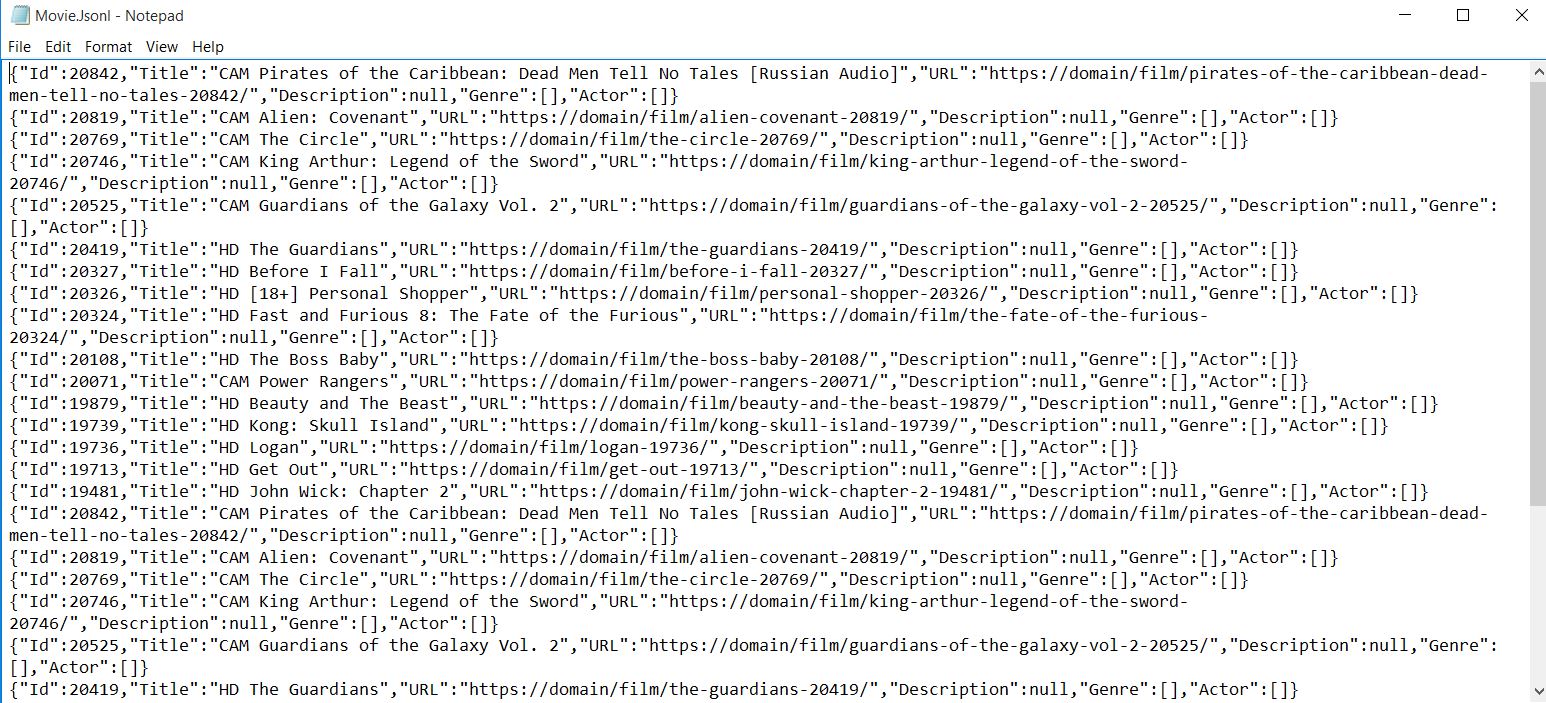
出力は自動的にJSON形式にシリアライズされるため、データベースや他のアプリケーションに簡単にインポートできます。
詳細なムービーページをスクレイピングするには?
より詳細なページのスクレイピングを開始します。 複数ページのスクレイピングは一般的な要件であり、IronWebScraperはリクエスト・チェイニング・メカニズムによってそれを簡単にします。
詳細ページからどのような追加データを抽出できますか?
ムービーページはこのようになっており、各作品に関する豊富なメタデータが含まれています:

<div class="mvi-content">
    <div class="thumb mvic-thumb"
         style="background-image: url(https://img.gocdn.online/2017/04/28/poster/5a08e94ba02118f22dc30f298c603210-guardians-of-the-galaxy-vol-2.jpg);"></div>
    <div class="mvic-desc">
        <h3>Guardians of the Galaxy Vol. 2</h3>
        <div class="desc">
            Set to the backdrop of Awesome Mixtape #2, Marvel's Guardians of the Galaxy Vol. 2 continues the team's adventures as they travel throughout the cosmos to help Peter Quill learn more about his true parentage.
        </div>
        <div class="mvic-info">
            <div class="mvici-left">
                <p>
                    <strong>Genre: </strong>
                    <a href="https://Domain/genre/action/" title="Action">Action</a>,
                    <a href="https://Domain/genre/adventure/" title="Adventure">Adventure</a>,
                    <a href="https://Domain/genre/sci-fi/" title="Sci-Fi">Sci-Fi</a>
                </p>
                <p>
                    <strong>Actor: </strong>
                    <a target="_blank" href="https://Domain/actor/chris-pratt" title="Chris Pratt">Chris Pratt</a>,
                    <a target="_blank" href="https://Domain/actor/-zoe-saldana" title="Zoe Saldana">Zoe Saldana</a>,
                    <a target="_blank" href="https://Domain/actor/-dave-bautista-" title="Dave Bautista">Dave Bautista</a>
                </p>
                <p>
                    <strong>Director: </strong>
                    <a href="#" title="James Gunn">James Gunn</a>
                </p>
                <p>
                    <strong>Country: </strong>
                    <a href="https://Domain/country/us" title="United States">United States</a>
                </p>
            </div>
            <div class="mvici-right">
                <p><strong>Duration:</strong> 136 min</p>
                <p><strong>Quality:</strong> <span class="quality">CAM</span></p>
                <p><strong>Release:</strong> 2017</p>
                <p><strong>IMDb:</strong> 8.3</p>
            </div>
            <div class="clearfix"></div>
        </div>
        <div class="clearfix"></div>
    </div>
    <div class="clearfix"></div>
</div>
<div class="mvi-content">
<div class="thumb mvic-thumb"
style="background-image: url(https://img.gocdn.online/2017/04/28/poster/5a08e94ba02118f22dc30f298c603210-guardians-of-the-galaxy-vol-2.jpg);"></div>
<div class="mvic-desc">
<h3>Guardians of the Galaxy Vol. 2</h3>
<div class="desc">
Set to the backdrop of Awesome Mixtape #2, Marvel's Guardians of the Galaxy Vol. 2 continues the team's adventures as they travel throughout the cosmos to help Peter Quill learn more about his true parentage.
</div>
<div class="mvic-info">
<div class="mvici-left">
<p>
<strong>Genre: </strong>
<a href="https://Domain/genre/action/" title="Action">Action</a>,
<a href="https://Domain/genre/adventure/" title="Adventure">Adventure</a>,
<a href="https://Domain/genre/sci-fi/" title="Sci-Fi">Sci-Fi</a>
</p>
<p>
<strong>Actor: </strong>
<a target="_blank" href="https://Domain/actor/chris-pratt" title="Chris Pratt">Chris Pratt</a>,
<a target="_blank" href="https://Domain/actor/-zoe-saldana" title="Zoe Saldana">Zoe Saldana</a>,
<a target="_blank" href="https://Domain/actor/-dave-bautista-" title="Dave Bautista">Dave Bautista</a>
</p>
<p>
<strong>Director: </strong>
<a href="#" title="James Gunn">James Gunn</a>
</p>
<p>
<strong>Country: </strong>
<a href="https://Domain/country/us" title="United States">United States</a>
</p>
</div>
<div class="mvici-right">
<p><strong>Duration:</strong> 136 min</p>
<p><strong>Quality:</strong> <span class="quality">CAM</span></p>
<p><strong>Release:</strong> 2017</p>
<p><strong>IMDb:</strong> 8.3</p>
</div>
<div class="clearfix"></div>
</div>
<div class="clearfix"></div>
</div>
<div class="clearfix"></div>
</div>追加プロパティのためにムービークラスをどのように拡張すればよいですか?
新しいプロパティ(Actorのみを使用します。 ジャンルや俳優にList<string>を使うことで、複数の値をうまく扱うことができます:
using System.Collections.Generic;

public class Movie
{
    public int Id { get; set; }
    public string Title { get; set; }
    public string URL { get; set; }
    public string Description { get; set; }
    public List<string> Genre { get; set; }
    public List<string> Actor { get; set; }
}
using System.Collections.Generic;
public class Movie
{
public int Id { get; set; }
public string Title { get; set; }
public string URL { get; set; }
public string Description { get; set; }
public List<string> Genre { get; set; }
public List<string> Actor { get; set; }
}Imports System.Collections.Generic
Public Class Movie
Public Property Id() As Integer
Public Property Title() As String
Public Property URL() As String
Public Property Description() As String
Public Property Genre() As List(Of String)
Public Property Actor() As List(Of String)
End Classスクレイピング中にページ間を移動するにはどうすればよいですか?
詳細ページに移動してスクレイピングしてください。 IronWebScraperはスレッドセーフを自動的に処理し、複数のページを同時に処理できるようにします。
なぜ異なるページ タイプに複数の解析関数を使用するのですか
IronWebScraperは、異なるページフォーマットを扱うために複数のスクレイプ関数を追加することができます。 このように関係性を分離することで、コードの保守性が高まり、さまざまなページ構造を適切に扱うことができます。 各解析関数は、特定のページタイプからデータを抽出することに焦点を当てることができます。
メタデータは構文解析関数間でオブジェクトを渡すのにどのように役立ちますか?
MetaData機能はリクエスト間の状態を維持するために非常に重要です。 高度なウェブスクレイピング機能については、詳細ガイドをご覧ください:
public class MovieScraper : WebScraper
{
    public override void Init()
    {
        // Initialize scraper settings
        License.LicenseKey = "LicenseKey";
        this.LoggingLevel = WebScraper.LogLevel.All;
        this.WorkingDirectory = AppSetting.GetAppRoot() + @"\MovieSample\Output\";

        // Request homepage content for scraping
        this.Request("https://domain/", Parse);
    }

    public override void Parse(Response response)
    {
        // Iterate over each movie div within the featured movie section
        foreach (var div in response.Css("#movie-featured > div"))
        {
            if (div.Attributes["class"] != "clearfix")
            {
                var movie = new Movie
                {
                    Id = Convert.ToInt32(div.GetAttribute("data-movie-id"))
                };

                var link = div.Css("a")[0];
                movie.Title = link.TextContentClean;
                movie.URL = link.Attributes["href"];

                // Request detailed page
                this.Request(movie.URL, ParseDetails, new MetaData() { { "movie", movie } });
            }
        }
    }

    public void ParseDetails(Response response)
    {
        // Retrieve movie object from metadata
        var movie = response.MetaData.Get<Movie>("movie");
        var div = response.Css("div.mvic-desc")[0];

        // Extract description
        movie.Description = div.Css("div.desc")[0].TextContentClean;

        // Extract genres
        movie.Genre = new List<string>(); // Initialize genre list
        foreach(var genre in div.Css("div > p > a"))
        {
            movie.Genre.Add(genre.TextContentClean);
        }

        // Extract actors
        movie.Actor = new List<string>(); // Initialize actor list
        foreach (var actor in div.Css("div > p:nth-child(2) > a"))
        {
            movie.Actor.Add(actor.TextContentClean);
        }

        // Scrape and store detailed movie data
        Scrape(movie, "Movie.Jsonl");
    }
}
public class MovieScraper : WebScraper
{
public override void Init()
{
// Initialize scraper settings
License.LicenseKey = "LicenseKey";
this.LoggingLevel = WebScraper.LogLevel.All;
this.WorkingDirectory = AppSetting.GetAppRoot() + @"\MovieSample\Output\";
// Request homepage content for scraping
this.Request("https://domain/", Parse);
}
public override void Parse(Response response)
{
// Iterate over each movie div within the featured movie section
foreach (var div in response.Css("#movie-featured > div"))
{
if (div.Attributes["class"] != "clearfix")
{
var movie = new Movie
{
Id = Convert.ToInt32(div.GetAttribute("data-movie-id"))
};
var link = div.Css("a")[0];
movie.Title = link.TextContentClean;
movie.URL = link.Attributes["href"];
// Request detailed page
this.Request(movie.URL, ParseDetails, new MetaData() { { "movie", movie } });
}
}
}
public void ParseDetails(Response response)
{
// Retrieve movie object from metadata
var movie = response.MetaData.Get<Movie>("movie");
var div = response.Css("div.mvic-desc")[0];
// Extract description
movie.Description = div.Css("div.desc")[0].TextContentClean;
// Extract genres
movie.Genre = new List<string>(); // Initialize genre list
foreach(var genre in div.Css("div > p > a"))
{
movie.Genre.Add(genre.TextContentClean);
}
// Extract actors
movie.Actor = new List<string>(); // Initialize actor list
foreach (var actor in div.Css("div > p:nth-child(2) > a"))
{
movie.Actor.Add(actor.TextContentClean);
}
// Scrape and store detailed movie data
Scrape(movie, "Movie.Jsonl");
}
}Public Class MovieScraper
Inherits WebScraper
Public Overrides Sub Init()
' Initialize scraper settings
License.LicenseKey = "LicenseKey"
Me.LoggingLevel = WebScraper.LogLevel.All
Me.WorkingDirectory = AppSetting.GetAppRoot() & "\MovieSample\Output\"
' Request homepage content for scraping
Me.Request("https://domain/", AddressOf Parse)
End Sub
Public Overrides Sub Parse(ByVal response As Response)
' Iterate over each movie div within the featured movie section
For Each div In response.Css("#movie-featured > div")
If div.Attributes("class") <> "clearfix" Then
Dim movie As New Movie With {.Id = Convert.ToInt32(div.GetAttribute("data-movie-id"))}
Dim link = div.Css("a")(0)
movie.Title = link.TextContentClean
movie.URL = link.Attributes("href")
' Request detailed page
Me.Request(movie.URL, AddressOf ParseDetails, New MetaData() From {
{ "movie", movie }
})
End If
Next div
End Sub
Public Sub ParseDetails(ByVal response As Response)
' Retrieve movie object from metadata
Dim movie = response.MetaData.Get(Of Movie)("movie")
Dim div = response.Css("div.mvic-desc")(0)
' Extract description
movie.Description = div.Css("div.desc")(0).TextContentClean
' Extract genres
movie.Genre = New List(Of String)() ' Initialize genre list
For Each genre In div.Css("div > p > a")
movie.Genre.Add(genre.TextContentClean)
Next genre
' Extract actors
movie.Actor = New List(Of String)() ' Initialize actor list
For Each actor In div.Css("div > p:nth-child(2) > a")
movie.Actor.Add(actor.TextContentClean)
Next actor
' Scrape and store detailed movie data
Scrape(movie, "Movie.Jsonl")
End Sub
End Classこのマルチページスクレイピングアプローチの主な特徴は何ですか?
新機能は何ですか?
- 詳細ページをスクレイプするためのスクレイプ関数(例:
ParseDetails)を追加し、ショッピングウェブサイトのスクレイプと同様の技術を使用します。 - ファイルを生成する
Scrape関数を新しい関数に移動し、すべての詳細が集められた後にのみデータが保存されることを確認します。 - IronWebScraper機能(
MetaData)を使って映画オブジェクトを新たなスクレイプ関数に渡し、リクエスト間でオブジェクト状態を維持します。 4.ページをスクレイピングし、ムービーオブジェクトデータを完全な情報でファイルに保存します。
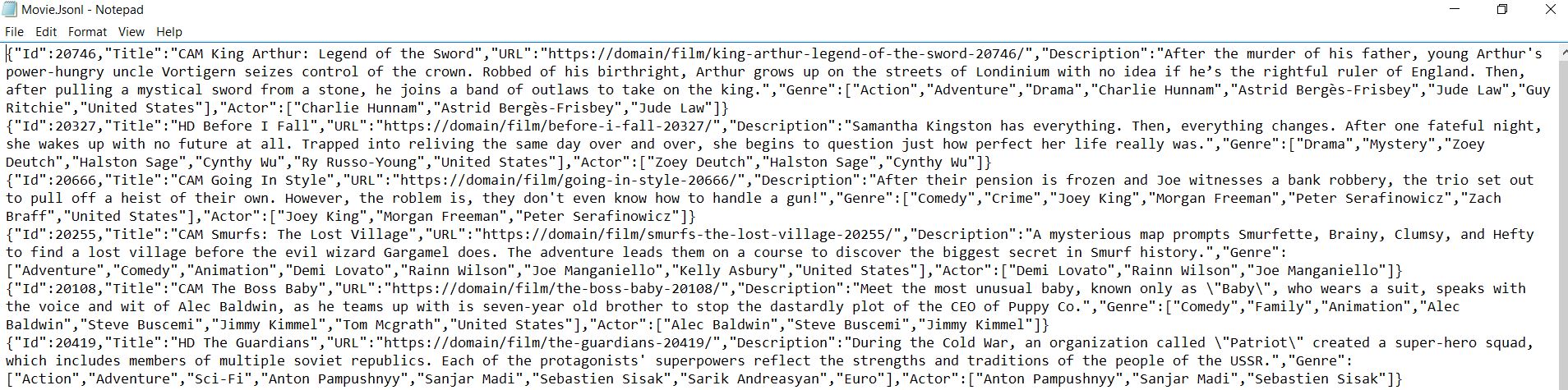
利用可能なメソッドやプロパティの詳細については、API Referenceを参照してください。 IronWebscraperは、ウェブサイトから構造化データを抽出するための堅牢なフレームワークを提供し、データ収集や分析プロジェクトに不可欠なツールとなっています。
よくある質問
C#を使ってHTMLから映画のタイトルを抽出するには?
IronWebscraperは、HTMLから映画のタイトルを抽出するためのCSSセレクタメソッドを提供します。タイトル要素をターゲットにするには、'.movie-item h2'のような適切なセレクタでresponse.Css()メソッドを使用し、クリーンテキストの値を取得するためにTextContentCleanプロパティにアクセスします。
複数のムービーページをナビゲートするベストな方法は?
IronWebScraperはRequest()メソッドを通してページナビゲーションを処理します。CSSセレクタを使ってページネーションリンクを抽出し、複数のページからデータをスクレイピングするためにそれぞれのURLでRequest()を呼び出し、包括的なムービーデータセットを自動的に構築することができます。
スクレイピングしたムービーデータを構造化フォーマットで保存するには?
IronWebScraperのScrape()メソッドを使ってJSON形式でデータを保存する。タイトル、URL、レーティングのようなムービーのプロパティを含む匿名オブジェクトまたは型付きクラスを作成し、それらをファイル名とともにScrape()に渡すと、自動的にシリアライズしてデータを保存します。
ムービー情報を抽出するには、どの CSS セレクタを使用すればよいですか?
IronWebscraperは標準的なCSSセレクタをサポートしています。映画サイトの場合、コンテナには'.movie-item'、タイトルには'h2'、リンクには'a[href]'、レーティングやジャンルには特定のクラス名などのセレクタを使用します。Css()メソッドは、繰り返し処理できるコレクションを返します。
スクレイピングされたデータの「CAM」のようなムービーの品質指標はどのように扱えばよいですか?
IronWebScraperは、特定のHTML要素をターゲットとして品質指標を抽出し、処理することができます。CSSセレクタを使って品質バッジやテキストを見つけ、それらをスクレイピングされたデータオブジェクトのプロパティとして含めることで、包括的なムービー情報を得ることができます。
ムービーのスクレイピング操作にロギングを設定できますか?
はい、IronWebscraperはロギング機能を内蔵しています。Init()メソッドでLoggingLevelプロパティをLogLevel.Allに設定することで、すべてのスクレイピングアクティビティ、エラー、進捗状況を追跡し、ムービーデータ抽出のデバッグや監視に役立ちます。
スクレイピングされたデータの作業ディレクトリを設定する適切な方法は?
IronWebScraperでは、Init()メソッドでWorkingDirectoryプロパティを設定できます。スクレイピングされたムービーデータファイルが保存される「C# ∕MovieData∕Output∕」のようなパスを指定する。これにより、出力を一元管理し、データを整理することができる。
WebScraper クラスを正しく継承するにはどうすればよいですか?
IronWebscraperのWebScraper基底クラスを継承した新しいクラスを作成します。設定のためのInit()メソッドとデータ抽出ロジックのためのParse()メソッドをオーバーライドします。このオブジェクト指向のアプローチによって、あなたのムービースクレーパーは再利用可能で保守しやすくなります。


まだスクロールしていますか?
すぐに証拠が欲しいですか? PM > Install-Package IronWebScraper
サンプルを実行する ターゲットサイトが構造化データになるのを見る。






 無料で始めましょう
 無料で始めましょう
 無料ライブデモを予約
















