


C#과 IronWebScraper를 사용하여 온라인 영화 웹사이트에서 데이터 스크래핑하기

IronWebScraper는 HTML 요소를 파싱하여 웹사이트에서 영화 데이터를 추출하고, 구조화된 데이터 저장을 위한 형식 객체를 만들며, 메타데이터를 사용하여 종합적인 영화 정보 세트를 구축하기 위해 페이지 간 탐색합니다. 이 C# 웹 스크래퍼 라이브러리는 구조화되지 않은 웹 콘텐츠를 구조화되고 분석 가능한 데이터로 변환하는 과정을 간소화합니다.
빠른 시작: C#에서 동영상 스크래핑
- NuGet 패키지 관리자를 통해
IronWebScraper설치 WebScraper을(를) 상속하는 클래스를 생성합니다.Init()를 재정의하여 라이선스를 설정하고 대상 URL을 요청합니다- CSS 선택자를 사용하여 영화 데이터를 추출하기 위해
Parse()를 재정의하십시오. - JSON 형식으로 데이터를 저장하려면
Scrape()메소드를 사용하세요.
-
NuGet 패키지 관리자를 사용하여 https://www.nuget.org/packages/IronWebScraper 설치하기
-
다음 코드 조각을 복사하여 실행하세요.
using IronWebScraper; using System; public class QuickstartMovieScraper : WebScraper { public override void Init() { // Set your license key License.LicenseKey = "YOUR-LICENSE-KEY"; // Configure scraper settings this.LoggingLevel = LogLevel.All; this.WorkingDirectory = @"C:\MovieData\Output\"; // Start scraping from the homepage this.Request("https://example-movie-site.com", Parse); } public override void Parse(Response response) { // Extract movie titles using CSS selectors foreach (var movieDiv in response.Css(".movie-item")) { var title = movieDiv.Css("h2")[0].TextContentClean; var url = movieDiv.Css("a")[0].Attributes["href"]; // Save the scraped data Scrape(new { Title = title, Url = url }, "movies.json"); } } } // Run the scraper var scraper = new QuickstartMovieScraper(); scraper.Start(); -
실제 운영 환경에서 테스트할 수 있도록 배포하세요.
무료 체험판으로 오늘 프로젝트에서 IronWebScraper 사용 시작하기

무비 스크래퍼 강좌는 어떻게 개설하나요?
실제 웹사이트 사례부터 시작해 보겠습니다. C# 웹 스크래핑 튜토리얼에서 설명한 기술을 사용하여 영화 웹사이트에서 데이터를 추출해 보겠습니다.
새 클래스를 추가하고 이름을 MovieScraper로 지정하세요:
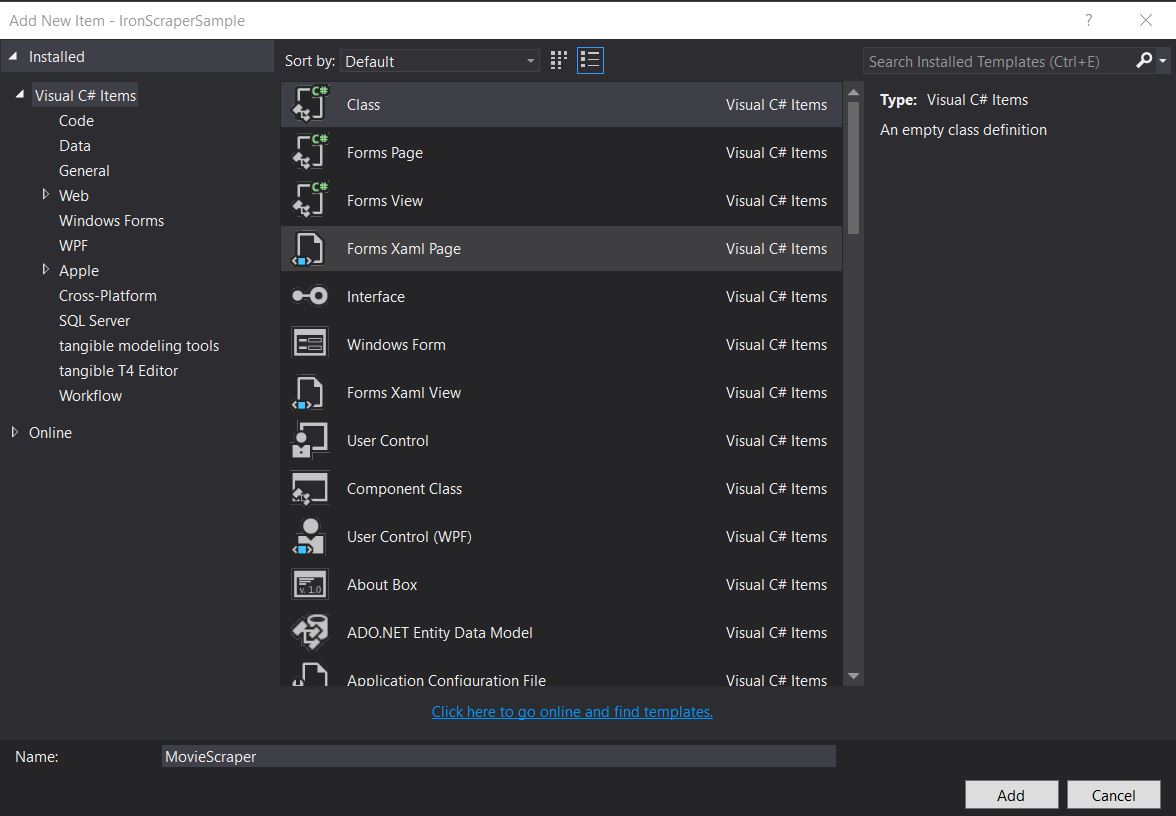
스크래핑 전용 클래스를 만들면 코드를 체계적으로 정리하고 재사용성을 높일 수 있습니다. 이 접근 방식은 객체 지향 원칙을 따르며, 나중에 기능을 쉽게 확장할 수 있도록 해줍니다.
대상 웹사이트의 구조는 어떻게 생겼나요?
스크래핑을 위해 사이트 구조를 살펴보세요. 웹 스크래핑을 효과적으로 수행하려면 웹사이트의 구조를 이해하는 것이 매우 중요합니다. 온라인 영화 웹사이트에서 데이터를 스크래핑하는 방법 에 대한 가이드와 마찬가지로, 먼저 HTML 구조를 분석하세요.
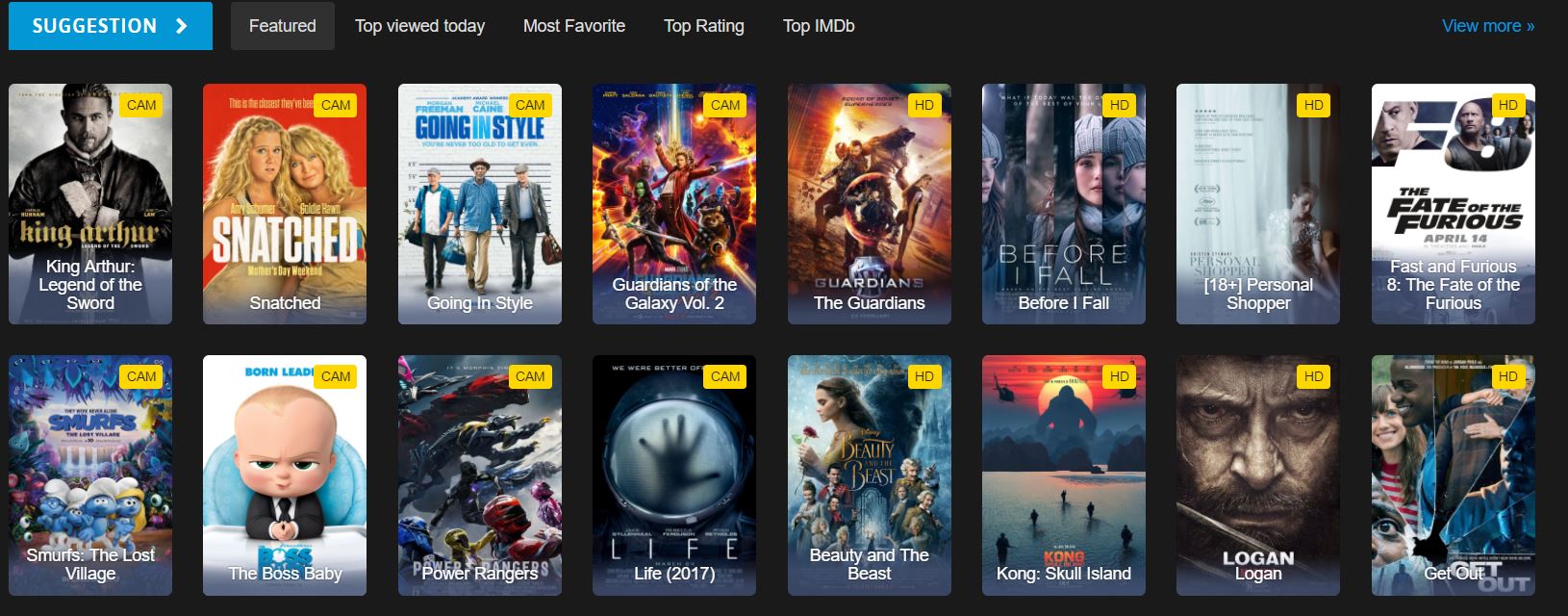
영화 데이터가 포함된 HTML 요소는 무엇입니까?
이는 웹사이트 홈페이지에서 볼 수 있는 HTML의 일부입니다. HTML 구조를 살펴보면 사용해야 할 올바른 CSS 선택자를 식별하는 데 도움이 됩니다.
<div id="movie-featured" class="movies-list movies-list-full tab-pane in fade active">
    <div data-movie-id="20746" class="ml-item">
        <a href="https://website.com/film/king-arthur-legend-of-the-sword-20746/">
            <span class="mli-quality">CAM</span>
            <img data-original="https://img.gocdn.online/2017/05/16/poster/2116d6719c710eabe83b377463230fbe-king-arthur-legend-of-the-sword.jpg"
                 class="lazy thumb mli-thumb" alt="King Arthur: Legend of the Sword"
                 src="https://img.gocdn.online/2017/05/16/poster/2116d6719c710eabe83b377463230fbe-king-arthur-legend-of-the-sword.jpg"
                 style="display: inline-block;">
            <span class="mli-info"><h2>King Arthur: Legend of the Sword</h2></span>
        </a>
    </div>
    <div data-movie-id="20724" class="ml-item">
        <a href="https://website.com/film/snatched-20724/">
            <span class="mli-quality">CAM</span>
            <img data-original="https://img.gocdn.online/2017/05/16/poster/5ef66403dc331009bdb5aa37cfe819ba-snatched.jpg"
                 class="lazy thumb mli-thumb" alt="Snatched"
                 src="https://img.gocdn.online/2017/05/16/poster/5ef66403dc331009bdb5aa37cfe819ba-snatched.jpg"
                 style="display: inline-block;">
            <span class="mli-info"><h2>Snatched</h2></span>
        </a>
    </div>
</div>
<div id="movie-featured" class="movies-list movies-list-full tab-pane in fade active">
<div data-movie-id="20746" class="ml-item">
<a href="https://website.com/film/king-arthur-legend-of-the-sword-20746/">
<span class="mli-quality">CAM</span>
<img data-original="https://img.gocdn.online/2017/05/16/poster/2116d6719c710eabe83b377463230fbe-king-arthur-legend-of-the-sword.jpg"
class="lazy thumb mli-thumb" alt="King Arthur: Legend of the Sword"
src="https://img.gocdn.online/2017/05/16/poster/2116d6719c710eabe83b377463230fbe-king-arthur-legend-of-the-sword.jpg"
style="display: inline-block;">
<span class="mli-info"><h2>King Arthur: Legend of the Sword</h2></span>
</a>
</div>
<div data-movie-id="20724" class="ml-item">
<a href="https://website.com/film/snatched-20724/">
<span class="mli-quality">CAM</span>
<img data-original="https://img.gocdn.online/2017/05/16/poster/5ef66403dc331009bdb5aa37cfe819ba-snatched.jpg"
class="lazy thumb mli-thumb" alt="Snatched"
src="https://img.gocdn.online/2017/05/16/poster/5ef66403dc331009bdb5aa37cfe819ba-snatched.jpg"
style="display: inline-block;">
<span class="mli-info"><h2>Snatched</h2></span>
</a>
</div>
</div>영화 ID, 제목, 그리고 상세 페이지 링크를 가지고 있습니다. 각 영화는 div 요소 내에 ml-item 클래스를 가지고 포함되어 있으며, 식별을 위한 고유한 data-movie-id 속성을 포함합니다.
기본적인 영화 웹 스크래핑은 어떻게 구현하나요?
이 데이터 세트 스크래핑을 시작하세요. 스크래퍼를 실행하기 전에 아래와 같이 라이선스 키를 올바르게 구성했는지 확인하십시오.
public class MovieScraper : WebScraper
{
    public override void Init()
    {
        // Initialize scraper settings
        License.LicenseKey = "LicenseKey";
        this.LoggingLevel = WebScraper.LogLevel.All;
        this.WorkingDirectory = AppSetting.GetAppRoot() + @"\MovieSample\Output\";

        // Request homepage content for scraping
        this.Request("www.website.com", Parse);
    }

    public override void Parse(Response response)
    {
        // Iterate over each movie div within the featured movie section
        foreach (var div in response.Css("#movie-featured > div"))
        {
            if (div.Attributes["class"] != "clearfix")
            {
                var movieId = Convert.ToInt32(div.GetAttribute("data-movie-id"));
                var link = div.Css("a")[0];
                var movieTitle = link.TextContentClean;

                // Scrape and store movie data as key-value pairs
                Scrape(new ScrapedData()
                {
                    { "MovieId", movieId },
                    { "MovieTitle", movieTitle }
                }, "Movie.Jsonl");
            }
        }
    }
}
public class MovieScraper : WebScraper
{
public override void Init()
{
// Initialize scraper settings
License.LicenseKey = "LicenseKey";
this.LoggingLevel = WebScraper.LogLevel.All;
this.WorkingDirectory = AppSetting.GetAppRoot() + @"\MovieSample\Output\";
// Request homepage content for scraping
this.Request("www.website.com", Parse);
}
public override void Parse(Response response)
{
// Iterate over each movie div within the featured movie section
foreach (var div in response.Css("#movie-featured > div"))
{
if (div.Attributes["class"] != "clearfix")
{
var movieId = Convert.ToInt32(div.GetAttribute("data-movie-id"));
var link = div.Css("a")[0];
var movieTitle = link.TextContentClean;
// Scrape and store movie data as key-value pairs
Scrape(new ScrapedData()
{
{ "MovieId", movieId },
{ "MovieTitle", movieTitle }
}, "Movie.Jsonl");
}
}
}
}Public Class MovieScraper
Inherits WebScraper
Public Overrides Sub Init()
' Initialize scraper settings
License.LicenseKey = "LicenseKey"
Me.LoggingLevel = WebScraper.LogLevel.All
Me.WorkingDirectory = AppSetting.GetAppRoot() & "\MovieSample\Output\"
' Request homepage content for scraping
Me.Request("www.website.com", AddressOf Parse)
End Sub
Public Overrides Sub Parse(ByVal response As Response)
' Iterate over each movie div within the featured movie section
For Each div In response.Css("#movie-featured > div")
If div.Attributes("class") <> "clearfix" Then
Dim movieId = Convert.ToInt32(div.GetAttribute("data-movie-id"))
Dim link = div.Css("a")(0)
Dim movieTitle = link.TextContentClean
' Scrape and store movie data as key-value pairs
Scrape(New ScrapedData() From {
{ "MovieId", movieId },
{ "MovieTitle", movieTitle }
},
"Movie.Jsonl")
End If
Next div
End Sub
End Class작업 디렉터리 속성은 무엇에 사용되는가?
이 코드에서 새로워진 부분은 무엇인가요?
Working Directory 속성은 모든 스크랩된 데이터 및 관련 파일의 주요 작업 디렉토리를 설정합니다. 이렇게 하면 모든 출력 파일이 한 곳에 정리되어 대규모 스크래핑 프로젝트를 더 쉽게 관리할 수 있습니다. 해당 디렉터리가 존재하지 않으면 자동으로 생성됩니다.
CSS 선택자와 속성은 언제 사용해야 할까요?
추가 고려 사항:
CSS 선택자는 구조적 위치나 클래스 이름을 기준으로 요소를 선택할 때 이상적이며, 직접 속성 접근은 ID나 사용자 지정 데이터 속성과 같은 특정 값을 추출하는 데 더 적합합니다. 우리의 예제에서는 CSS 선택자(#movie-featured > div)를 사용하여 DOM 구조를 탐색하고 속성(data-movie-id)을 통해 특정 값을 추출합니다.
스크래핑한 데이터에 대한 타입이 지정된 객체를 어떻게 생성하나요?
스크랩한 데이터를 형식화된 객체에 저장할 수 있도록 형식화된 객체를 생성합니다. 강력한 형식의 객체를 사용하면 코드 구성이 향상되고, IntelliSense를 지원하며, 컴파일 시간 형식 검사를 수행할 수 있습니다.
Movie 클래스를 구현하여 서식이 지정된 데이터를 보관합니다:
public class Movie
{
    public int Id { get; set; }
    public string Title { get; set; }
    public string URL { get; set; }
}
public class Movie
{
public int Id { get; set; }
public string Title { get; set; }
public string URL { get; set; }
}Public Class Movie
Public Property Id As Integer
Public Property Title As String
Public Property URL As String
End Class타입이 지정된 객체를 사용하면 데이터 구성이 어떻게 개선됩니까?
코드를 업데이트하여 일반적인 ScrapedData 사전 대신에 타입이 지정된 Movie 클래스를 사용하세요:
public class MovieScraper : WebScraper
{
    public override void Init()
    {
        // Initialize scraper settings
        License.LicenseKey = "LicenseKey";
        this.LoggingLevel = WebScraper.LogLevel.All;
        this.WorkingDirectory = AppSetting.GetAppRoot() + @"\MovieSample\Output\";

        // Request homepage content for scraping
        this.Request("https://website.com/", Parse);
    }

    public override void Parse(Response response)
    {
        // Iterate over each movie div within the featured movie section
        foreach (var div in response.Css("#movie-featured > div"))
        {
            if (div.Attributes["class"] != "clearfix")
            {
                var movie = new Movie
                {
                    Id = Convert.ToInt32(div.GetAttribute("data-movie-id"))
                };

                var link = div.Css("a")[0];
                movie.Title = link.TextContentClean;
                movie.URL = link.Attributes["href"];

                // Scrape and store movie object
                Scrape(movie, "Movie.Jsonl");
            }
        }
    }
}
public class MovieScraper : WebScraper
{
public override void Init()
{
// Initialize scraper settings
License.LicenseKey = "LicenseKey";
this.LoggingLevel = WebScraper.LogLevel.All;
this.WorkingDirectory = AppSetting.GetAppRoot() + @"\MovieSample\Output\";
// Request homepage content for scraping
this.Request("https://website.com/", Parse);
}
public override void Parse(Response response)
{
// Iterate over each movie div within the featured movie section
foreach (var div in response.Css("#movie-featured > div"))
{
if (div.Attributes["class"] != "clearfix")
{
var movie = new Movie
{
Id = Convert.ToInt32(div.GetAttribute("data-movie-id"))
};
var link = div.Css("a")[0];
movie.Title = link.TextContentClean;
movie.URL = link.Attributes["href"];
// Scrape and store movie object
Scrape(movie, "Movie.Jsonl");
}
}
}
}Public Class MovieScraper
Inherits WebScraper
Public Overrides Sub Init()
' Initialize scraper settings
License.LicenseKey = "LicenseKey"
Me.LoggingLevel = WebScraper.LogLevel.All
Me.WorkingDirectory = AppSetting.GetAppRoot() & "\MovieSample\Output\"
' Request homepage content for scraping
Me.Request("https://website.com/", AddressOf Parse)
End Sub
Public Overrides Sub Parse(ByVal response As Response)
' Iterate over each movie div within the featured movie section
For Each div In response.Css("#movie-featured > div")
If div.Attributes("class") <> "clearfix" Then
Dim movie As New Movie With {.Id = Convert.ToInt32(div.GetAttribute("data-movie-id"))}
Dim link = div.Css("a")(0)
movie.Title = link.TextContentClean
movie.URL = link.Attributes("href")
' Scrape and store movie object
Scrape(movie, "Movie.Jsonl")
End If
Next div
End Sub
End ClassScrape 메서드는 형식화된 객체에 대해 어떤 형식을 사용합니까?
새로운 점은 무엇인가요?
- 우리는 스크랩된 데이터를 보관하기 위해
Movie클래스를 구현하여 타입 안전성과 더 나은 코드 구성을 제공합니다. - 우리는 영화 객체를
Scrape메서드에 전달합니다. 이 메서드는 우리의 형식을 이해하고 아래에 표시된 대로 정의된 방식으로 저장합니다:
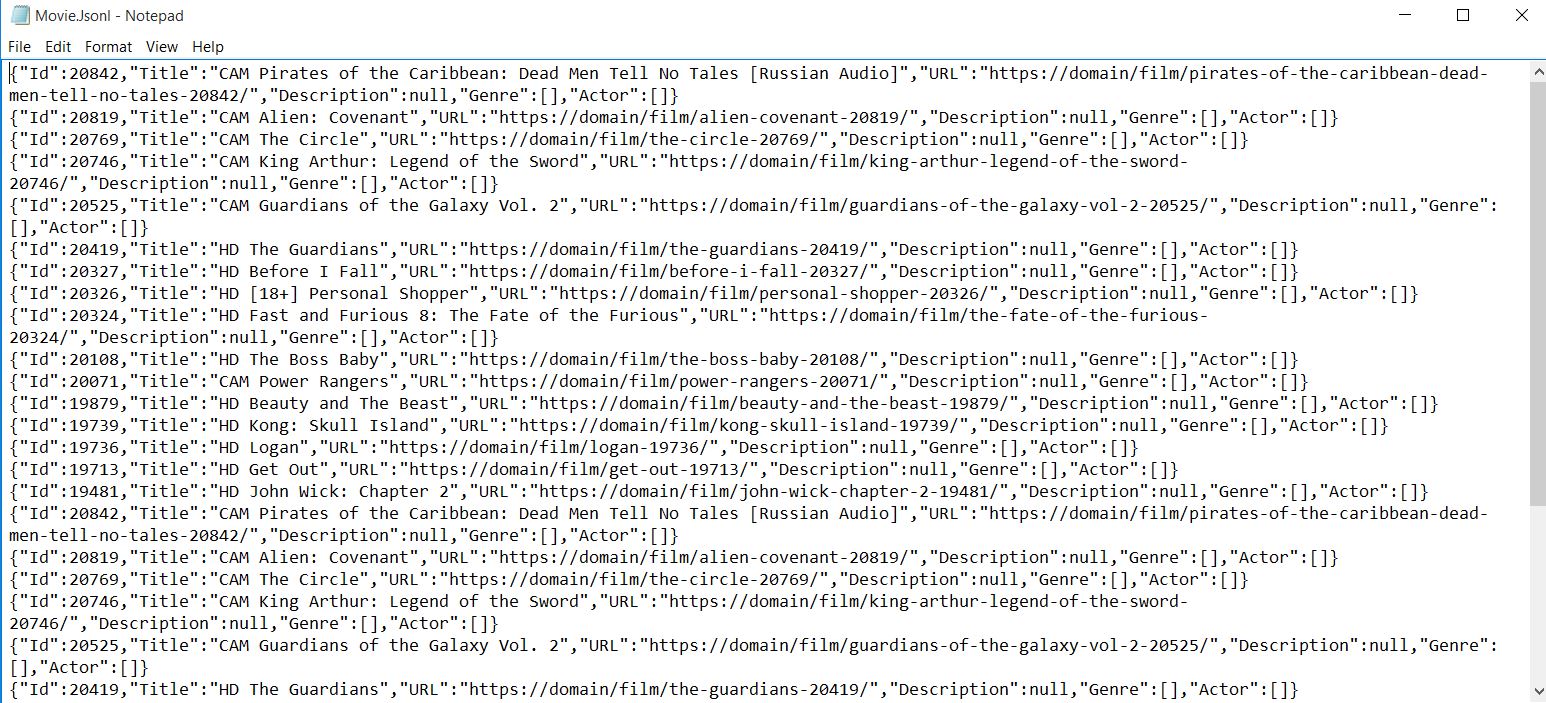
출력 결과는 자동으로 JSON 형식으로 직렬화되므로 데이터베이스나 다른 애플리케이션으로 쉽게 가져올 수 있습니다.
상세 영화 페이지를 어떻게 스크래핑하나요?
더 자세한 페이지를 스크래핑하기 시작하세요. 여러 페이지를 스크래핑하는 것은 흔히 요구되는 사항이며, IronWebScraper는 요청 체이닝 메커니즘을 통해 이를 간편하게 수행할 수 있도록 해줍니다.
상세 페이지에서 어떤 추가 데이터를 추출할 수 있나요?
영화 페이지는 다음과 같이 생겼으며, 각 영화에 대한 풍부한 메타데이터를 포함하고 있습니다.

<div class="mvi-content">
    <div class="thumb mvic-thumb"
         style="background-image: url(https://img.gocdn.online/2017/04/28/poster/5a08e94ba02118f22dc30f298c603210-guardians-of-the-galaxy-vol-2.jpg);"></div>
    <div class="mvic-desc">
        <h3>Guardians of the Galaxy Vol. 2</h3>
        <div class="desc">
            Set to the backdrop of Awesome Mixtape #2, Marvel's Guardians of the Galaxy Vol. 2 continues the team's adventures as they travel throughout the cosmos to help Peter Quill learn more about his true parentage.
        </div>
        <div class="mvic-info">
            <div class="mvici-left">
                <p>
                    <strong>Genre: </strong>
                    <a href="https://Domain/genre/action/" title="Action">Action</a>,
                    <a href="https://Domain/genre/adventure/" title="Adventure">Adventure</a>,
                    <a href="https://Domain/genre/sci-fi/" title="Sci-Fi">Sci-Fi</a>
                </p>
                <p>
                    <strong>Actor: </strong>
                    <a target="_blank" href="https://Domain/actor/chris-pratt" title="Chris Pratt">Chris Pratt</a>,
                    <a target="_blank" href="https://Domain/actor/-zoe-saldana" title="Zoe Saldana">Zoe Saldana</a>,
                    <a target="_blank" href="https://Domain/actor/-dave-bautista-" title="Dave Bautista">Dave Bautista</a>
                </p>
                <p>
                    <strong>Director: </strong>
                    <a href="#" title="James Gunn">James Gunn</a>
                </p>
                <p>
                    <strong>Country: </strong>
                    <a href="https://Domain/country/us" title="United States">United States</a>
                </p>
            </div>
            <div class="mvici-right">
                <p><strong>Duration:</strong> 136 min</p>
                <p><strong>Quality:</strong> <span class="quality">CAM</span></p>
                <p><strong>Release:</strong> 2017</p>
                <p><strong>IMDb:</strong> 8.3</p>
            </div>
            <div class="clearfix"></div>
        </div>
        <div class="clearfix"></div>
    </div>
    <div class="clearfix"></div>
</div>
<div class="mvi-content">
<div class="thumb mvic-thumb"
style="background-image: url(https://img.gocdn.online/2017/04/28/poster/5a08e94ba02118f22dc30f298c603210-guardians-of-the-galaxy-vol-2.jpg);"></div>
<div class="mvic-desc">
<h3>Guardians of the Galaxy Vol. 2</h3>
<div class="desc">
Set to the backdrop of Awesome Mixtape #2, Marvel's Guardians of the Galaxy Vol. 2 continues the team's adventures as they travel throughout the cosmos to help Peter Quill learn more about his true parentage.
</div>
<div class="mvic-info">
<div class="mvici-left">
<p>
<strong>Genre: </strong>
<a href="https://Domain/genre/action/" title="Action">Action</a>,
<a href="https://Domain/genre/adventure/" title="Adventure">Adventure</a>,
<a href="https://Domain/genre/sci-fi/" title="Sci-Fi">Sci-Fi</a>
</p>
<p>
<strong>Actor: </strong>
<a target="_blank" href="https://Domain/actor/chris-pratt" title="Chris Pratt">Chris Pratt</a>,
<a target="_blank" href="https://Domain/actor/-zoe-saldana" title="Zoe Saldana">Zoe Saldana</a>,
<a target="_blank" href="https://Domain/actor/-dave-bautista-" title="Dave Bautista">Dave Bautista</a>
</p>
<p>
<strong>Director: </strong>
<a href="#" title="James Gunn">James Gunn</a>
</p>
<p>
<strong>Country: </strong>
<a href="https://Domain/country/us" title="United States">United States</a>
</p>
</div>
<div class="mvici-right">
<p><strong>Duration:</strong> 136 min</p>
<p><strong>Quality:</strong> <span class="quality">CAM</span></p>
<p><strong>Release:</strong> 2017</p>
<p><strong>IMDb:</strong> 8.3</p>
</div>
<div class="clearfix"></div>
</div>
<div class="clearfix"></div>
</div>
<div class="clearfix"></div>
</div>추가 속성을 위해 영화 클래스를 어떻게 확장해야 할까요?
Movie 클래스를 새로운 속성으로 확장하세요 (Description, Genre, Actor, Director, Country, Duration, IMDb Score). 이 샘플에는 Description, Genre, Actor만 사용하세요. List<string>를 장르와 배우에 사용하면 여러 값을 우아하게 처리할 수 있습니다:
using System.Collections.Generic;

public class Movie
{
    public int Id { get; set; }
    public string Title { get; set; }
    public string URL { get; set; }
    public string Description { get; set; }
    public List<string> Genre { get; set; }
    public List<string> Actor { get; set; }
}
using System.Collections.Generic;
public class Movie
{
public int Id { get; set; }
public string Title { get; set; }
public string URL { get; set; }
public string Description { get; set; }
public List<string> Genre { get; set; }
public List<string> Actor { get; set; }
}Imports System.Collections.Generic
Public Class Movie
Public Property Id() As Integer
Public Property Title() As String
Public Property URL() As String
Public Property Description() As String
Public Property Genre() As List(Of String)
Public Property Actor() As List(Of String)
End Class웹 스크래핑 중에 페이지 간 이동은 어떻게 하나요?
상세 페이지로 이동하여 데이터를 추출하세요. IronWebScraper는 자동으로 스레드 안전성을 처리하여 여러 페이지를 동시에 처리할 수 있습니다.
페이지 유형별로 여러 개의 구문 분석 함수를 사용하는 이유는 무엇일까요?
IronWebScraper는 다양한 페이지 형식을 처리하기 위해 여러 스크래핑 함수를 추가할 수 있도록 지원합니다. 관심사 분리를 통해 코드 유지 관리가 더욱 쉬워지고 다양한 페이지 구조를 적절하게 처리할 수 있습니다. 각 구문 분석 함수는 특정 페이지 유형에서 데이터를 추출하는 데 집중할 수 있습니다.
메타데이터는 구문 분석 함수 간에 객체를 전달하는 데 어떻게 도움이 되나요?
MetaData 기능은 요청 간 상태를 유지하는 데 매우 중요합니다. 더욱 고급 웹 스크래핑 기능 에 대해서는 자세한 가이드를 참조하세요.
public class MovieScraper : WebScraper
{
    public override void Init()
    {
        // Initialize scraper settings
        License.LicenseKey = "LicenseKey";
        this.LoggingLevel = WebScraper.LogLevel.All;
        this.WorkingDirectory = AppSetting.GetAppRoot() + @"\MovieSample\Output\";

        // Request homepage content for scraping
        this.Request("https://domain/", Parse);
    }

    public override void Parse(Response response)
    {
        // Iterate over each movie div within the featured movie section
        foreach (var div in response.Css("#movie-featured > div"))
        {
            if (div.Attributes["class"] != "clearfix")
            {
                var movie = new Movie
                {
                    Id = Convert.ToInt32(div.GetAttribute("data-movie-id"))
                };

                var link = div.Css("a")[0];
                movie.Title = link.TextContentClean;
                movie.URL = link.Attributes["href"];

                // Request detailed page
                this.Request(movie.URL, ParseDetails, new MetaData() { { "movie", movie } });
            }
        }
    }

    public void ParseDetails(Response response)
    {
        // Retrieve movie object from metadata
        var movie = response.MetaData.Get<Movie>("movie");
        var div = response.Css("div.mvic-desc")[0];

        // Extract description
        movie.Description = div.Css("div.desc")[0].TextContentClean;

        // Extract genres
        movie.Genre = new List<string>(); // Initialize genre list
        foreach(var genre in div.Css("div > p > a"))
        {
            movie.Genre.Add(genre.TextContentClean);
        }

        // Extract actors
        movie.Actor = new List<string>(); // Initialize actor list
        foreach (var actor in div.Css("div > p:nth-child(2) > a"))
        {
            movie.Actor.Add(actor.TextContentClean);
        }

        // Scrape and store detailed movie data
        Scrape(movie, "Movie.Jsonl");
    }
}
public class MovieScraper : WebScraper
{
public override void Init()
{
// Initialize scraper settings
License.LicenseKey = "LicenseKey";
this.LoggingLevel = WebScraper.LogLevel.All;
this.WorkingDirectory = AppSetting.GetAppRoot() + @"\MovieSample\Output\";
// Request homepage content for scraping
this.Request("https://domain/", Parse);
}
public override void Parse(Response response)
{
// Iterate over each movie div within the featured movie section
foreach (var div in response.Css("#movie-featured > div"))
{
if (div.Attributes["class"] != "clearfix")
{
var movie = new Movie
{
Id = Convert.ToInt32(div.GetAttribute("data-movie-id"))
};
var link = div.Css("a")[0];
movie.Title = link.TextContentClean;
movie.URL = link.Attributes["href"];
// Request detailed page
this.Request(movie.URL, ParseDetails, new MetaData() { { "movie", movie } });
}
}
}
public void ParseDetails(Response response)
{
// Retrieve movie object from metadata
var movie = response.MetaData.Get<Movie>("movie");
var div = response.Css("div.mvic-desc")[0];
// Extract description
movie.Description = div.Css("div.desc")[0].TextContentClean;
// Extract genres
movie.Genre = new List<string>(); // Initialize genre list
foreach(var genre in div.Css("div > p > a"))
{
movie.Genre.Add(genre.TextContentClean);
}
// Extract actors
movie.Actor = new List<string>(); // Initialize actor list
foreach (var actor in div.Css("div > p:nth-child(2) > a"))
{
movie.Actor.Add(actor.TextContentClean);
}
// Scrape and store detailed movie data
Scrape(movie, "Movie.Jsonl");
}
}Public Class MovieScraper
Inherits WebScraper
Public Overrides Sub Init()
' Initialize scraper settings
License.LicenseKey = "LicenseKey"
Me.LoggingLevel = WebScraper.LogLevel.All
Me.WorkingDirectory = AppSetting.GetAppRoot() & "\MovieSample\Output\"
' Request homepage content for scraping
Me.Request("https://domain/", AddressOf Parse)
End Sub
Public Overrides Sub Parse(ByVal response As Response)
' Iterate over each movie div within the featured movie section
For Each div In response.Css("#movie-featured > div")
If div.Attributes("class") <> "clearfix" Then
Dim movie As New Movie With {.Id = Convert.ToInt32(div.GetAttribute("data-movie-id"))}
Dim link = div.Css("a")(0)
movie.Title = link.TextContentClean
movie.URL = link.Attributes("href")
' Request detailed page
Me.Request(movie.URL, AddressOf ParseDetails, New MetaData() From {
{ "movie", movie }
})
End If
Next div
End Sub
Public Sub ParseDetails(ByVal response As Response)
' Retrieve movie object from metadata
Dim movie = response.MetaData.Get(Of Movie)("movie")
Dim div = response.Css("div.mvic-desc")(0)
' Extract description
movie.Description = div.Css("div.desc")(0).TextContentClean
' Extract genres
movie.Genre = New List(Of String)() ' Initialize genre list
For Each genre In div.Css("div > p > a")
movie.Genre.Add(genre.TextContentClean)
Next genre
' Extract actors
movie.Actor = New List(Of String)() ' Initialize actor list
For Each actor In div.Css("div > p:nth-child(2) > a")
movie.Actor.Add(actor.TextContentClean)
Next actor
' Scrape and store detailed movie data
Scrape(movie, "Movie.Jsonl")
End Sub
End Class이 다중 페이지 스크래핑 방식의 주요 특징은 무엇인가요?
새로운 점은 무엇인가요?
- 쇼핑 웹사이트에서 스크랩할 때 사용하는 기법과 유사하게 세부 페이지를 스크랩하기 위해 스크랩 함수(예:
ParseDetails)를 추가하십시오. - 파일을 생성하는
Scrape함수를 새로운 함수로 이동하여 모든 세부사항이 수집된 후에만 데이터가 저장되도록 합니다. - IronWebScraper 기능(
MetaData)을 사용하여 영화 객체를 새로운 스크랩 함수에 전달하고, 요청 간 객체 상태를 유지하세요. - 웹페이지에서 데이터를 추출하여 영화 객체 데이터를 완전한 정보가 담긴 파일로 저장합니다.
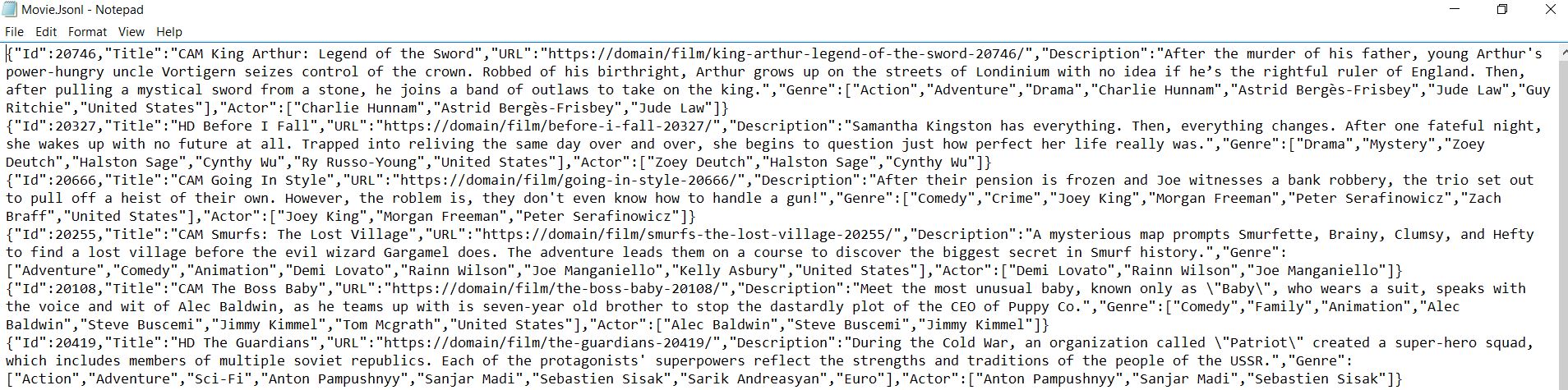
using 가능한 메서드 및 속성에 대한 자세한 내용은 API 참조를 참조하십시오. IronWebScraper는 웹사이트에서 구조화된 데이터를 추출하기 위한 강력한 프레임워크를 제공하므로 데이터 수집 및 분석 프로젝트에 필수적인 도구입니다.
자주 묻는 질문
C#을 사용하여 HTML에서 영화 제목을 어떻게 추출할 수 있습니까?
IronWebScraper는 HTML에서 영화 제목을 추출하기 위한 CSS 선택자 메서드를 제공합니다. 적절한 선택자('.movie-item h2')를 사용하여 제목 요소를 타겟하고, TextContentClean 속성을 사용하여 깨끗한 텍스트 값을 얻습니다.
여러 영화 페이지 간을 탐색하는 가장 좋은 방법은 무엇입니까?
IronWebScraper는 Request() 메서드를 통해 페이지 탐색을 처리합니다. CSS 선택자를 사용하여 페이지 네비게이션 링크를 추출한 후에 각 URL로 Request()를 호출하여 여러 페이지의 데이터를 스크래핑하여 자동으로 종합적인 영화 데이터 세트를 구축할 수 있습니다.
스크래핑된 영화 데이터를 구조화된 형식으로 어떻게 저장할 수 있습니까?
IronWebScraper의 Scrape() 메서드를 사용하여 데이터를 JSON 형식으로 저장합니다. 제목, URL, 등급과 같은 영화 속성을 포함하는 익명 객체나 유형 클래스를 작성한 후, 이를 파일 이름과 함께 Scrape()에 전달하여 데이터를 자동으로 직렬화하고 저장합니다.
영화 정보를 추출하기 위해 어떤 CSS 선택자를 사용해야 합니까?
IronWebScraper는 표준 CSS 선택자를 지원합니다. 영화 웹사이트의 경우, 컨테이너에는 '.movie-item', 제목에는 'h2', 링크에는 'a[href]', 평점이나 장르에는 특정 클래스 이름을 선택자로 사용하십시오. Css() 메서드는 반복할 수 있는 컬렉션을 반환합니다.
스크랩된 데이터에서 'CAM'과 같은 영화 품질 지표를 어떻게 처리합니까?
IronWebScraper를 사용하여 특정 HTML 요소를 타겟으로 하여 품질 지표를 추출하고 처리할 수 있습니다. 품질 배지 또는 텍스트를 찾기 위해 CSS 선택자를 사용한 다음, 스크랩된 데이터 객체에 속성으로 포함하여 포괄적인 영화 정보를 얻으십시오.
내 영화 스크래핑 작업에 로그 설정을 할 수 있습니까?
예, IronWebScraper에는 내장된 로깅 기능이 포함되어 있습니다. Init() 메서드에서 LoggingLevel 속성을 LogLevel.All로 설정하여 모든 스크래핑 활동, 오류 및 진행 상황을 추적하십시오. 이는 영화 데이터 추출을 디버그하고 모니터링하는 데 유리합니다.
스크랩된 데이터의 작업 디렉터리를 올바르게 구성하는 방법은 무엇입니까?
IronWebScraper는 Init() 메서드에서 WorkingDirectory 속성을 설정할 수 있게 합니다. 'C:\MovieData\Output\'와 같은 경로를 지정하여 스크랩된 영화 데이터 파일이 저장되도록 하십시오. 이는 출력 관리의 중심을 잡고 데이터를 조직적으로 유지하게 합니다.
WebScraper 클래스로부터 올바르게 상속받는 방법은 무엇입니까?
IronWebScraper의 WebScraper 기본 클래스에서 상속받는 새 클래스를 만드십시오. 구성에 대한 Init() 메서드와 데이터 추출 논리를 위한 Parse() 메서드를 재정의하십시오. 이 객체 지향적 접근법은 영화 스크래퍼를 재사용 가능하고 유지 관리 가능하게 만듭니다.


아직도 스크롤하고 계신가요?
빠른 증거를 원하시나요? PM > Install-Package IronWebScraper
샘플 실행 대상 사이트가 구조화된 데이터로 변환됩니다.






 무료로 시작하세요
 무료로 시작하세요
 무료 라이브 데모 예약하기
















