


How to Scrape Data from Websites in C

IronWebScraper는 웹 스크래핑, 웹 데이터 추출 및 웹 콘텐츠 파싱 for .NET 라이브러리입니다. 이 라이브러리는 사용하기 쉽고 Microsoft Visual Studio 프로젝트에 추가하여 개발 및 프로덕션 환경에서 사용할 수 있습니다.
IronWebScraper는 허용 및 금지된 페이지, 객체, 미디어 등을 제어하는 것과 같은 다양한 고유 기능과 기능을 가지고 있습니다. 또한, 여러 ID, 웹 캐시 및 이 튜토리얼에서 다루게 될 많은 다른 기능들을 관리할 수 있습니다.
IronWebScraper로 시작하세요
지금 바로 무료 체험판을 통해 IronWebScraper을 프로젝트에서 사용해 보세요.

타겟 고객
이 튜토리얼은 웹 스크래핑(웹사이트 스크래핑, 웹사이트 데이터 수집 및 추출, 웹사이트 콘텐츠 분석, 웹 하베스팅) 기능을 위한 솔루션을 구축하고 구현하고자 하는 기초 또는 고급 프로그래밍 기술을 보유한 소프트웨어 개발자를 대상으로 합니다.

필요한 기술
- C# 또는 VB.NET과 같은 한 가지 이상의 Microsoft 프로그래밍 언어를 사용하는 기본 프로그래밍 기초
- 웹 기술(HTML, JavaScript, jQuery, CSS 등)에 대한 기본 이해와 작동 방식
- DOM, XPath, HTML 및 CSS 선택자에 대한 기본 지식
도구
- Microsoft Visual Studio 2010 이상
- 웹 개발자용 브라우저 확장 프로그램(예: Chrome용 웹 인스펙터 또는 파이어폭스용 파이어버그)
왜 긁어내야 할까요? (Reasons and Concepts)
다음과 같은 기능을 갖춘 제품이나 솔루션을 개발하고 싶다면:
- 웹사이트 데이터 추출
- 여러 웹사이트의 콘텐츠, 가격, 기능 등을 비교
- 웹사이트 콘텐츠 스캔 및 캐싱
위의 이유 중 하나 이상이 있는 경우, IronWebScraper가 당신의 요구에 맞는 훌륭한 라이브러리입니다
IronWebScraper를 설치하는 방법은 무엇인가요?
Appendix A를 Create a New Project 후 NuGet을 사용하여 라이브러리를 자동으로 삽입하거나 DLL을 수동으로 설치하여 프로젝트에 IronWebScraper 라이브러리를 추가할 수 있습니다.
NuGet 사용하여 설치하세요
NuGet를 사용하여 프로젝트에 IronWebScraper 라이브러리를 추가하려면 시각적 인터페이스(NuGet 패키지 관리자)를 통해서나 패키지 관리자 콘솔을 사용하여 명령으로 수행할 수 있습니다.
NuGet 패키지 관리자 사용
- 마우스 사용 -> 프로젝트 이름을 오른쪽 클릭 -> NuGet 패키지 관리 선택
- 탐색 탭에서 ->
IronWebScraper검색 -> 설치 - 확인 클릭
- 이제 끝났습니다.
NuGet 패키지 콘솔 사용
- 도구에서 -> NuGet 패키지 관리자 -> 패키지 관리자 콘솔
- 기본 프로젝트로 클래스 라이브러리 프로젝트 선택
- 명령 실행 ->
Install-Package IronWebScraper
수동 설치
- https://ironsoftware.com로 이동
- IronWebScraper를 클릭하거나 URL https://ironsoftware.com/csharp/webscraper/을 사용하여 직접 페이지로 이동
- DLL 다운로드를 클릭하세요.
- 다운로드한 압축 파일 해제
- Visual Studio에서 프로젝트를 마우스 오른쪽 버튼으로 클릭 -> 추가 -> 참조 -> 찾아보기
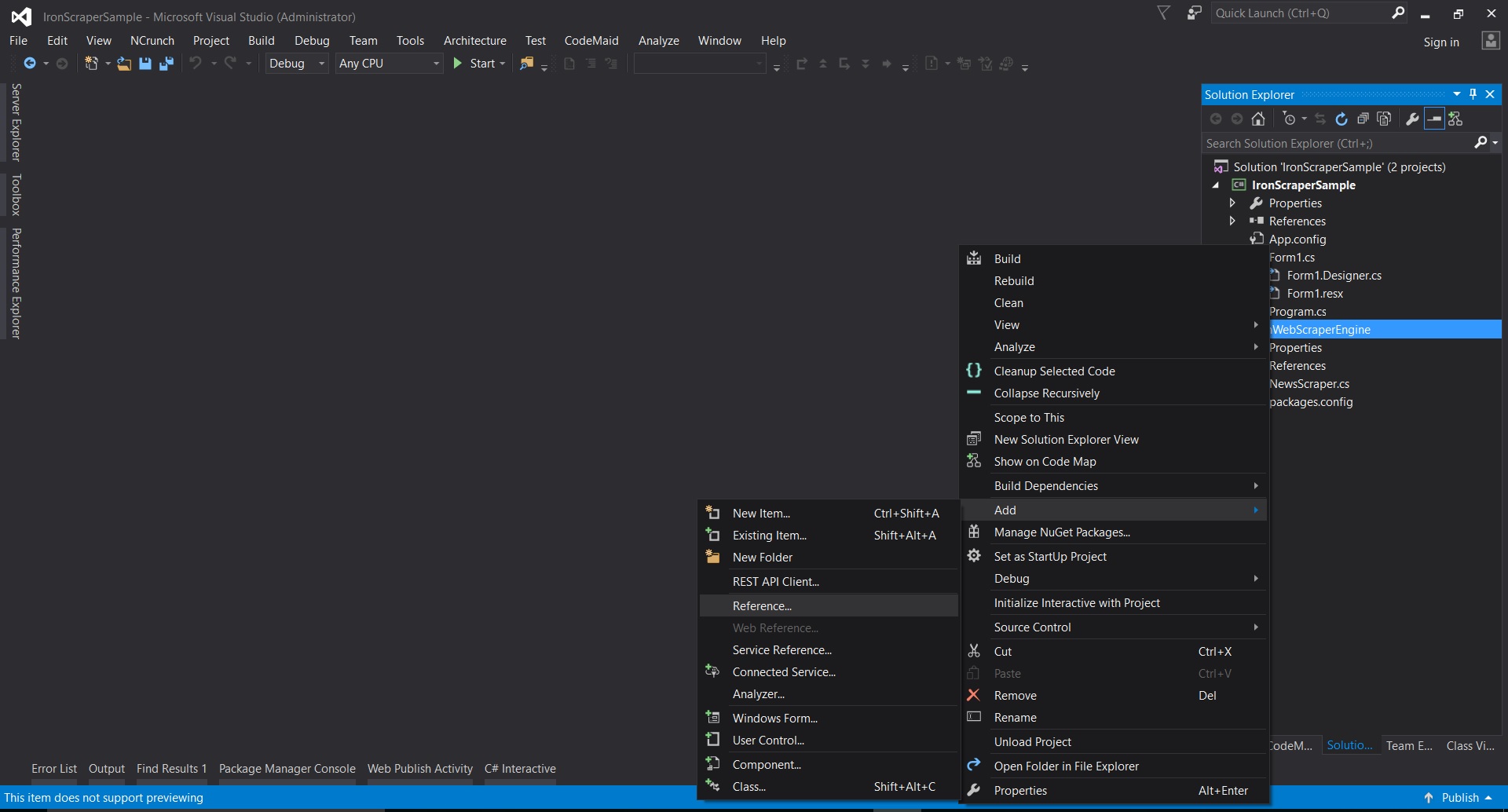
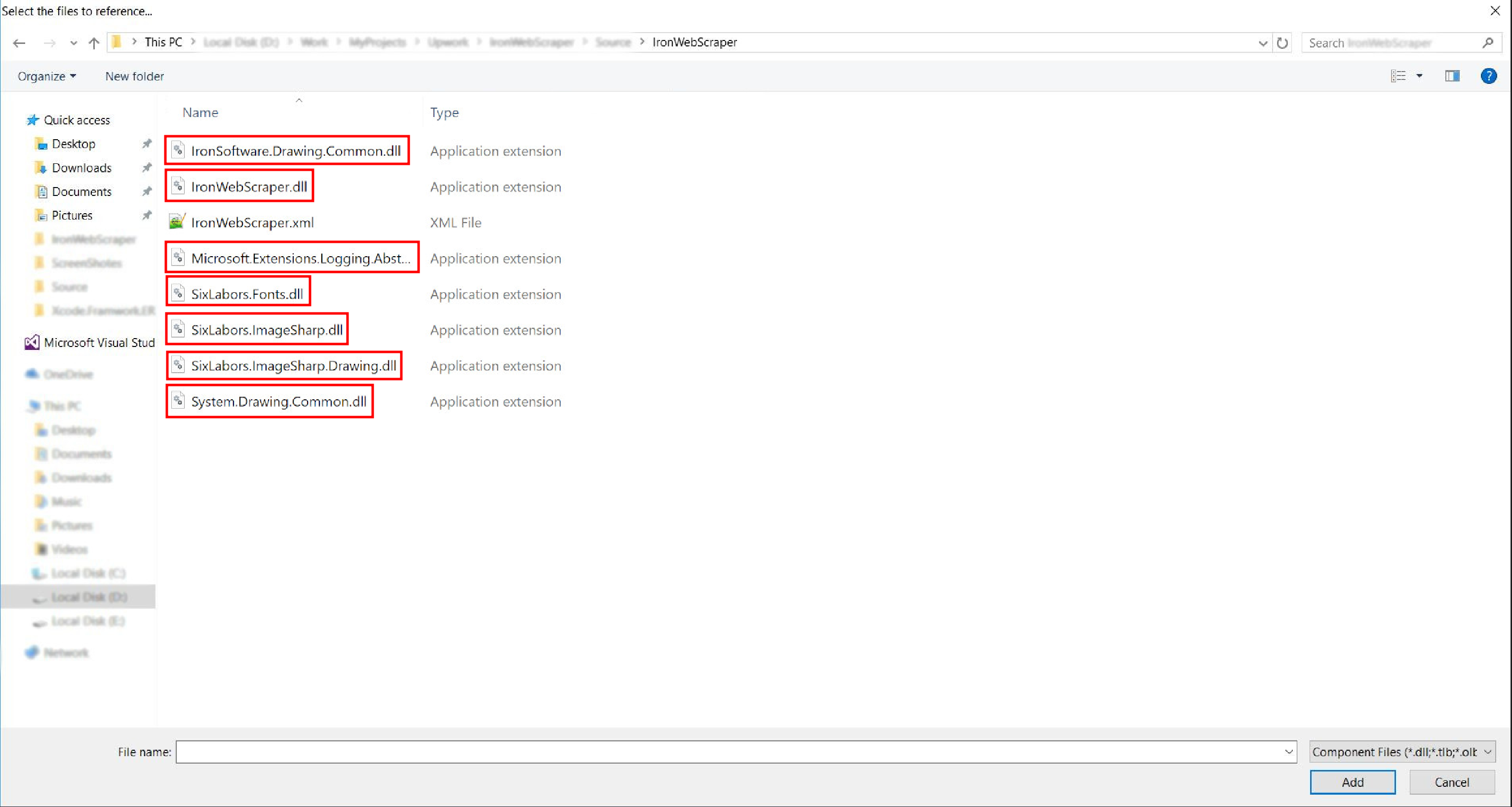
- 압축을 푼 폴더로 이동하여 ->
netstandard2.0-> 모든.dll파일을 선택하세요.
- 이제 끝났습니다!
HelloScraper - IronWebScraper 첫 번째 샘플
평소와 마찬가지로 IronWebScraper를 사용하는 첫 단계로 Hello Scraper 앱을 구현하는 것부터 시작하겠습니다.
- "IronWebScraperSample"이라는 이름의 새 콘솔 애플리케이션을 생성했습니다.
IronWebScraper 샘플 생성 단계
- 폴더를 만들고 이름을 'HelloScraperSample'로 지정
-
그런 다음 새 클래스를 추가하고 이름을
HelloScraper로 지정하세요.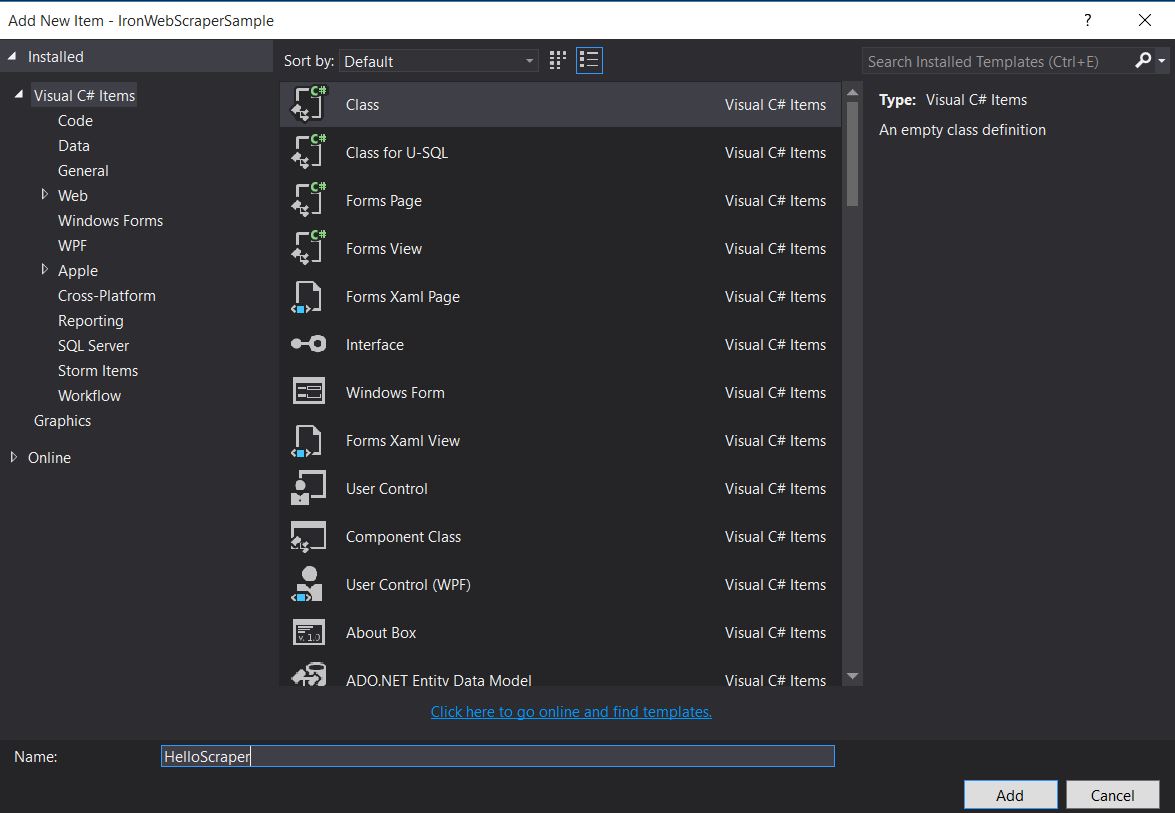
-
이 코드 스니펫을
HelloScraper에 추가하세요public class HelloScraper : WebScraper { /// <summary> /// Override this method to initialize your web scraper. /// Important tasks will be to request at least one start URL and set allowed/banned domain or URL patterns. /// </summary> public override void Init() { License.LicenseKey = "LicenseKey"; // Write License Key this.LoggingLevel = WebScraper.LogLevel.All; // Log all events this.Request("https://blog.scrapinghub.com", Parse); // Initialize a web request to the given URL } /// <summary> /// Override this method to create the default Response handler for your web scraper. /// If you have multiple page types, you can add additional similar methods. /// </summary> /// <param name="response">The HTTP Response object to parse</param> public override void Parse(Response response) { // Set working directory for the project this.WorkingDirectory = AppSetting.GetAppRoot() + @"\HelloScraperSample\Output\"; // Loop on all links foreach (var titleLink in response.Css("h2.entry-title a")) { // Read link text string title = titleLink.TextContentClean; // Save result to file Scrape(new ScrapedData() { { "Title", title } }, "HelloScraper.json"); } // Loop on all links for pagination if (response.CssExists("div.prev-post > a[href]")) { // Get next page URL var nextPage = response.Css("div.prev-post > a[href]")[0].Attributes["href"]; // Scrape next URL this.Request(nextPage, Parse); } } }public class HelloScraper : WebScraper { /// <summary> /// Override this method to initialize your web scraper. /// Important tasks will be to request at least one start URL and set allowed/banned domain or URL patterns. /// </summary> public override void Init() { License.LicenseKey = "LicenseKey"; // Write License Key this.LoggingLevel = WebScraper.LogLevel.All; // Log all events this.Request("https://blog.scrapinghub.com", Parse); // Initialize a web request to the given URL } /// <summary> /// Override this method to create the default Response handler for your web scraper. /// If you have multiple page types, you can add additional similar methods. /// </summary> /// <param name="response">The HTTP Response object to parse</param> public override void Parse(Response response) { // Set working directory for the project this.WorkingDirectory = AppSetting.GetAppRoot() + @"\HelloScraperSample\Output\"; // Loop on all links foreach (var titleLink in response.Css("h2.entry-title a")) { // Read link text string title = titleLink.TextContentClean; // Save result to file Scrape(new ScrapedData() { { "Title", title } }, "HelloScraper.json"); } // Loop on all links for pagination if (response.CssExists("div.prev-post > a[href]")) { // Get next page URL var nextPage = response.Css("div.prev-post > a[href]")[0].Attributes["href"]; // Scrape next URL this.Request(nextPage, Parse); } } }Public Class HelloScraper Inherits WebScraper ''' <summary> ''' Override this method to initialize your web scraper. ''' Important tasks will be to request at least one start URL and set allowed/banned domain or URL patterns. ''' </summary> Public Overrides Sub Init() License.LicenseKey = "LicenseKey" ' Write License Key Me.LoggingLevel = WebScraper.LogLevel.All ' Log all events Me.Request("https://blog.scrapinghub.com", AddressOf Parse) ' Initialize a web request to the given URL End Sub ''' <summary> ''' Override this method to create the default Response handler for your web scraper. ''' If you have multiple page types, you can add additional similar methods. ''' </summary> ''' <param name="response">The HTTP Response object to parse</param> Public Overrides Sub Parse(ByVal response As Response) ' Set working directory for the project Me.WorkingDirectory = AppSetting.GetAppRoot() & "\HelloScraperSample\Output\" ' Loop on all links For Each titleLink In response.Css("h2.entry-title a") ' Read link text Dim title As String = titleLink.TextContentClean ' Save result to file Scrape(New ScrapedData() From { { "Title", title } }, "HelloScraper.json") Next titleLink ' Loop on all links for pagination If response.CssExists("div.prev-post > a[href]") Then ' Get next page URL Dim nextPage = response.Css("div.prev-post > a[href]")(0).Attributes("href") ' Scrape next URL Me.Request(nextPage, AddressOf Parse) End If End Sub End Class$vbLabelText $csharpLabel -
이제 스크랩을 시작하려면, 다음 코드 스니펫을
Main에 추가하십시오.static void Main(string[] args) { // Create Object From Hello Scrape class HelloScraperSample.HelloScraper scrape = new HelloScraperSample.HelloScraper(); // Start Scraping scrape.Start(); }static void Main(string[] args) { // Create Object From Hello Scrape class HelloScraperSample.HelloScraper scrape = new HelloScraperSample.HelloScraper(); // Start Scraping scrape.Start(); }Shared Sub Main(ByVal args() As String) ' Create Object From Hello Scrape class Dim scrape As New HelloScraperSample.HelloScraper() ' Start Scraping scrape.Start() End Sub$vbLabelText $csharpLabel - 결과는
WebScraper.WorkingDirectory/classname.Json형식의 파일에 저장됩니다.
코드 개요
Scrape.Start()는 다음과 같이 스크래핑 로직을 트리거합니다:
- 변수를 초기화하고, 속성을 스크랩하며, 동작 속성을 설정하기 위해
Init()메서드를 호출합니다. - 시작 페이지 요청을
Init()로Request("https://blog.scrapinghub.com", Parse)에서 설정합니다. - 여러 HTTP 요청과 스레드를 병렬로 처리하여 코드를 동기적으로 유지하고 디버깅을 용이하게 합니다.
Parse()메서드는Init()후에 트리거되어 응답을 처리하고, CSS 선택자를 사용하여 데이터를 추출하고 JSON 형식으로 저장합니다.
IronWebScraper 라이브러리 기능 및 옵션
업데이트된 문서는 매뉴얼 설치 방법으로 다운로드한 zip 파일 내에서 찾을 수 있으며(IronWebScraper Documentation.chm File), 또는 라이브러리의 최신 업데이트를 위해 온라인 문서를 https://ironsoftware.com/csharp/webscraper/object-reference/에서 확인할 수 있습니다.
프로젝트에서 IronWebScraper를 사용하기 시작하려면 IronWebScraper.WebScraper 클래스를 상속해야 합니다. 이 클래스는 클래스 라이브러리를 확장하고 스크래핑 기능을 추가합니다. 또한, 반드시 Init() 및 Parse(Response response) 메서드를 구현해야 합니다.
namespace IronWebScraperEngine
{
    public class NewsScraper : IronWebScraper.WebScraper
    {
        public override void Init()
        {
            throw new NotImplementedException();
        }

        public override void Parse(Response response)
        {
            throw new NotImplementedException();
        }
    }
}
namespace IronWebScraperEngine
{
public class NewsScraper : IronWebScraper.WebScraper
{
public override void Init()
{
throw new NotImplementedException();
}
public override void Parse(Response response)
{
throw new NotImplementedException();
}
}
}Namespace IronWebScraperEngine
Public Class NewsScraper
Inherits IronWebScraper.WebScraper
Public Overrides Sub Init()
Throw New NotImplementedException()
End Sub
Public Overrides Sub Parse(ByVal response As Response)
Throw New NotImplementedException()
End Sub
End Class
End Namespace| 속성 \ 함수 | 유형 | 설명 |
|---|---|---|
Init () |
방법 | 스크레이퍼를 설치하는 데 사용됩니다. |
Parse (Response response) |
방법 | 스크래퍼가 사용할 로직과 처리 방식을 구현하는 데 사용됩니다. 페이지의 동작이나 구조에 따라 여러 가지 방법을 구현할 수 있습니다. |
BannedUrls, AllowedUrls, BannedDomains |
컬렉션 | URL 및/또는 도메인을 차단/허용하는 데 사용됩니다. 예: BannedUrls.Add("*.zip", "*.exe", "*.gz", "*.pdf"); 와일드카드와 정규 표현식을 지원합니다. |
ObeyRobotsDotTxt |
부울 | robots.txt의 지시 사항을 읽고 따르는 것을 활성화하거나 비활성화하는 데 사용됩니다. |
ObeyRobotsDotTxtForHost (string Host) |
방법 | 특정 도메인에 대해 robots.txt의 지시 사항을 읽고 따르는 기능을 활성화하거나 비활성화하는 데 사용됩니다. |
Scrape, ScrapeUnique |
방법 | |
ThrottleMode |
열거 | 열거형 옵션: ByIpAddress, ByDomainHostName. 호스트 IP 주소 또는 도메인 호스트 이름을 고려하여 지능형 요청 속도 제한을 활성화합니다. |
EnableWebCache, EnableWebCache (TimeSpan cacheDuration) |
방법 | 웹 요청에 대한 캐싱을 활성화합니다. |
MaxHttpConnectionLimit |
인터 | 허용되는 총 HTTP 요청 수(스레드 수)를 설정합니다. |
RateLimitPerHost |
시간 범위 | 지정된 도메인 또는 IP 주소에 대한 요청 간 최소 지연 시간(일시 정지)을 설정합니다. |
OpenConnectionLimitPerHost |
인터 | 호스트 이름 또는 IP 주소별로 허용되는 동시 HTTP 요청(스레드) 수를 설정합니다. |
WorkingDirectory |
string | 데이터를 저장할 작업 디렉터리 경로를 설정합니다. |
실제 사례 및 실습
온라인 영화 웹사이트 스크래핑
영화 웹사이트에서 데이터를 추출하는 예제를 만들어 보겠습니다.
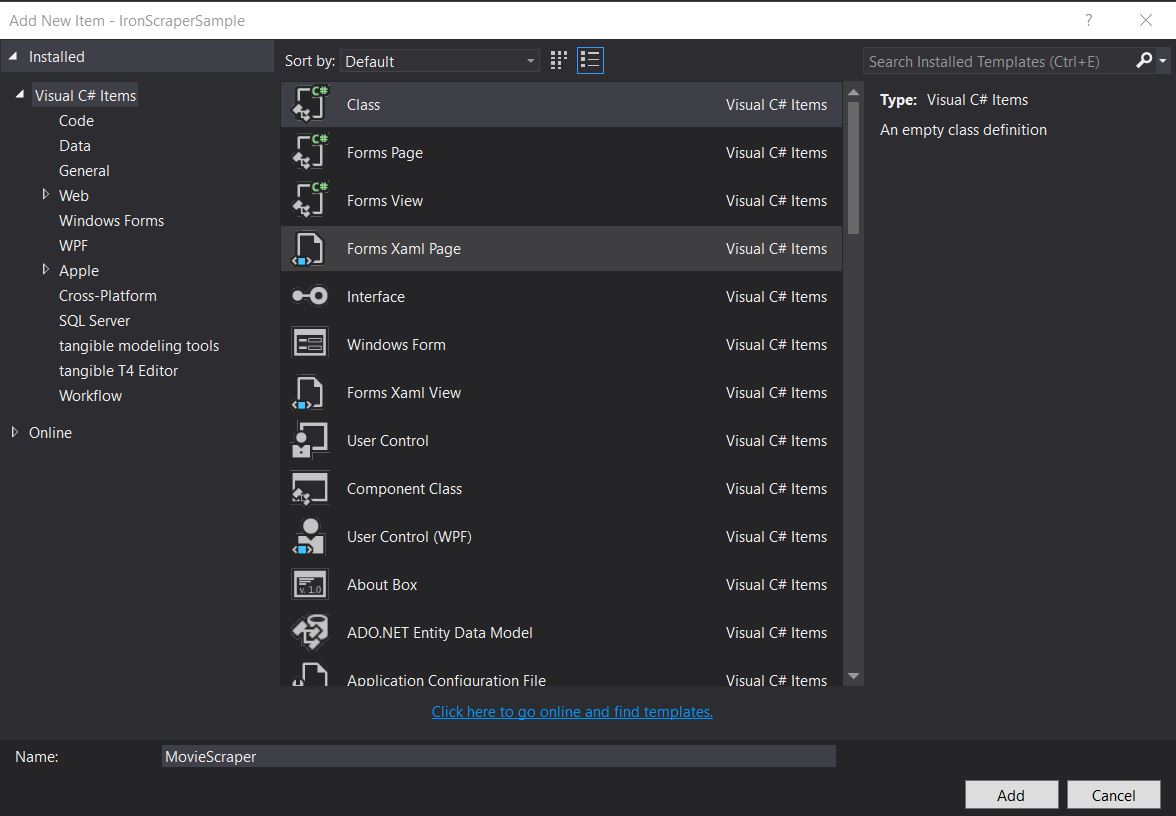
새 클래스 추가하고 이름을 MovieScraper로 지정합니다:
HTML 구조
이것은 웹사이트 홈페이지에서 볼 수 있는 HTML의 일부입니다.
<div id="movie-featured" class="movies-list movies-list-full tab-pane in fade active">
    <div data-movie-id="20746" class="ml-item">
        <a href="https://website.com/film/king-arthur-legend-of-the-sword-20746/">
            <span class="mli-quality">CAM</span>
            <img data-original="https://img.gocdn.online/2017/05/16/poster/2116d6719c710eabe83b377463230fbe-king-arthur-legend-of-the-sword.jpg"
                 class="lazy thumb mli-thumb" alt="King Arthur: Legend of the Sword"
                  src="https://img.gocdn.online/2017/05/16/poster/2116d6719c710eabe83b377463230fbe-king-arthur-legend-of-the-sword.jpg"
                 style="display: inline-block;">
            <span class="mli-info"><h2>King Arthur: Legend of the Sword</h2></span>
        </a>
    </div>
    <div data-movie-id="20724" class="ml-item">
        <a href="https://website.com/film/snatched-20724/" >
            <span class="mli-quality">CAM</span>
            <img data-original="https://img.gocdn.online/2017/05/16/poster/5ef66403dc331009bdb5aa37cfe819ba-snatched.jpg"
                 class="lazy thumb mli-thumb" alt="Snatched"
                 src="https://img.gocdn.online/2017/05/16/poster/5ef66403dc331009bdb5aa37cfe819ba-snatched.jpg"
                 style="display: inline-block;">
            <span class="mli-info"><h2>Snatched</h2></span>
        </a>
    </div>
</div>
<div id="movie-featured" class="movies-list movies-list-full tab-pane in fade active">
<div data-movie-id="20746" class="ml-item">
<a href="https://website.com/film/king-arthur-legend-of-the-sword-20746/">
<span class="mli-quality">CAM</span>
<img data-original="https://img.gocdn.online/2017/05/16/poster/2116d6719c710eabe83b377463230fbe-king-arthur-legend-of-the-sword.jpg"
class="lazy thumb mli-thumb" alt="King Arthur: Legend of the Sword"
src="https://img.gocdn.online/2017/05/16/poster/2116d6719c710eabe83b377463230fbe-king-arthur-legend-of-the-sword.jpg"
style="display: inline-block;">
<span class="mli-info"><h2>King Arthur: Legend of the Sword</h2></span>
</a>
</div>
<div data-movie-id="20724" class="ml-item">
<a href="https://website.com/film/snatched-20724/" >
<span class="mli-quality">CAM</span>
<img data-original="https://img.gocdn.online/2017/05/16/poster/5ef66403dc331009bdb5aa37cfe819ba-snatched.jpg"
class="lazy thumb mli-thumb" alt="Snatched"
src="https://img.gocdn.online/2017/05/16/poster/5ef66403dc331009bdb5aa37cfe819ba-snatched.jpg"
style="display: inline-block;">
<span class="mli-info"><h2>Snatched</h2></span>
</a>
</div>
</div>보시는 바와 같이 영화 ID, 제목, 그리고 상세 페이지 링크가 있습니다. 이제 이 데이터를 수집해 보겠습니다.
public class MovieScraper : WebScraper
{
    public override void Init()
    {
        License.LicenseKey = "LicenseKey";
        this.LoggingLevel = WebScraper.LogLevel.All;
        this.WorkingDirectory = AppSetting.GetAppRoot() + @"\MovieSample\Output\";
        this.Request("www.website.com", Parse);
    }

    public override void Parse(Response response)
    {
        foreach (var div in response.Css("#movie-featured > div"))
        {
            if (div.GetAttribute("class") != "clearfix")
            {
                var movieId = div.GetAttribute("data-movie-id");
                var link = div.Css("a")[0];
                var movieTitle = link.TextContentClean;
                Scrape(new ScrapedData() { { "MovieId", movieId }, { "MovieTitle", movieTitle } }, "Movie.Jsonl");
            }
        }
    }
}
public class MovieScraper : WebScraper
{
public override void Init()
{
License.LicenseKey = "LicenseKey";
this.LoggingLevel = WebScraper.LogLevel.All;
this.WorkingDirectory = AppSetting.GetAppRoot() + @"\MovieSample\Output\";
this.Request("www.website.com", Parse);
}
public override void Parse(Response response)
{
foreach (var div in response.Css("#movie-featured > div"))
{
if (div.GetAttribute("class") != "clearfix")
{
var movieId = div.GetAttribute("data-movie-id");
var link = div.Css("a")[0];
var movieTitle = link.TextContentClean;
Scrape(new ScrapedData() { { "MovieId", movieId }, { "MovieTitle", movieTitle } }, "Movie.Jsonl");
}
}
}
}Public Class MovieScraper
Inherits WebScraper
Public Overrides Sub Init()
License.LicenseKey = "LicenseKey"
Me.LoggingLevel = WebScraper.LogLevel.All
Me.WorkingDirectory = AppSetting.GetAppRoot() & "\MovieSample\Output\"
Me.Request("www.website.com", AddressOf Parse)
End Sub
Public Overrides Sub Parse(ByVal response As Response)
For Each div In response.Css("#movie-featured > div")
If div.GetAttribute("class") <> "clearfix" Then
Dim movieId = div.GetAttribute("data-movie-id")
Dim link = div.Css("a")(0)
Dim movieTitle = link.TextContentClean
Scrape(New ScrapedData() From {
{ "MovieId", movieId },
{ "MovieTitle", movieTitle }
},
"Movie.Jsonl")
End If
Next div
End Sub
End Class체계적인 영화 수업
형식화된 데이터를 저장하기 위해 영화 클래스를 구현해 보겠습니다.
public class Movie
{
    public int Id { get; set; }
    public string Title { get; set; }
    public string URL { get; set; }
}
public class Movie
{
public int Id { get; set; }
public string Title { get; set; }
public string URL { get; set; }
}Public Class Movie
Public Property Id As Integer
Public Property Title As String
Public Property URL As String
End Class이제 Movie 클래스를 사용하도록 코드를 업데이트하세요:
public class MovieScraper : WebScraper
{
    public override void Init()
    {
        License.LicenseKey = "LicenseKey";
        this.LoggingLevel = WebScraper.LogLevel.All;
        this.WorkingDirectory = AppSetting.GetAppRoot() + @"\MovieSample\Output\";
        this.Request("https://website.com/", Parse);
    }

    public override void Parse(Response response)
    {
        foreach (var div in response.Css("#movie-featured > div"))
        {
            if (div.GetAttribute("class") != "clearfix")
            {
                var movie = new Movie
                {
                    Id = Convert.ToInt32(div.GetAttribute("data-movie-id")),
                    Title = div.Css("a")[0].TextContentClean,
                    URL = div.Css("a")[0].Attributes["href"]
                };
                Scrape(movie, "Movie.Jsonl");
            }
        }
    }
}
public class MovieScraper : WebScraper
{
public override void Init()
{
License.LicenseKey = "LicenseKey";
this.LoggingLevel = WebScraper.LogLevel.All;
this.WorkingDirectory = AppSetting.GetAppRoot() + @"\MovieSample\Output\";
this.Request("https://website.com/", Parse);
}
public override void Parse(Response response)
{
foreach (var div in response.Css("#movie-featured > div"))
{
if (div.GetAttribute("class") != "clearfix")
{
var movie = new Movie
{
Id = Convert.ToInt32(div.GetAttribute("data-movie-id")),
Title = div.Css("a")[0].TextContentClean,
URL = div.Css("a")[0].Attributes["href"]
};
Scrape(movie, "Movie.Jsonl");
}
}
}
}Public Class MovieScraper
Inherits WebScraper
Public Overrides Sub Init()
License.LicenseKey = "LicenseKey"
Me.LoggingLevel = WebScraper.LogLevel.All
Me.WorkingDirectory = AppSetting.GetAppRoot() & "\MovieSample\Output\"
Me.Request("https://website.com/", AddressOf Parse)
End Sub
Public Overrides Sub Parse(ByVal response As Response)
For Each div In response.Css("#movie-featured > div")
If div.GetAttribute("class") <> "clearfix" Then
Dim movie As New Movie With {
.Id = Convert.ToInt32(div.GetAttribute("data-movie-id")),
.Title = div.Css("a")(0).TextContentClean,
.URL = div.Css("a")(0).Attributes("href")
}
Scrape(movie, "Movie.Jsonl")
End If
Next div
End Sub
End Class상세 페이지 스크래핑
Movie 클래스를 확장하여 상세 정보를 위한 새로운 속성을 추가해 봅시다:
public class Movie
{
    public int Id { get; set; }
    public string Title { get; set; }
    public string URL { get; set; }
    public string Description { get; set; }
    public List<string> Genre { get; set; }
    public List<string> Actor { get; set; }
}
public class Movie
{
public int Id { get; set; }
public string Title { get; set; }
public string URL { get; set; }
public string Description { get; set; }
public List<string> Genre { get; set; }
public List<string> Actor { get; set; }
}Public Class Movie
Public Property Id As Integer
Public Property Title As String
Public Property URL As String
Public Property Description As String
Public Property Genre As List(Of String)
Public Property Actor As List(Of String)
End Class그런 다음 상세 페이지로 이동하여 IronWebScraper의 확장된 기능을 사용하여 데이터를 스크래핑합니다.
public class MovieScraper : WebScraper
{
    public override void Init()
    {
        License.LicenseKey = "LicenseKey";
        this.LoggingLevel = WebScraper.LogLevel.All;
        this.WorkingDirectory = AppSetting.GetAppRoot() + @"\MovieSample\Output\";
        this.Request("https://domain/", Parse);
    }

    public override void Parse(Response response)
    {
        foreach (var div in response.Css("#movie-featured > div"))
        {
            if (div.GetAttribute("class") != "clearfix")
            {
                var movie = new Movie
                {
                    Id = Convert.ToInt32(div.GetAttribute("data-movie-id")),
                    Title = div.Css("a")[0].TextContentClean,
                    URL = div.Css("a")[0].Attributes["href"]
                };
                this.Request(movie.URL, ParseDetails, new MetaData() { { "movie", movie } });
            }
        }
    }

    public void ParseDetails(Response response)
    {
        var movie = response.MetaData.Get<Movie>("movie");
        var div = response.Css("div.mvic-desc")[0];
        movie.Description = div.Css("div.desc")[0].TextContentClean;
        movie.Genre = div.Css("div > p > a").Select(element => element.TextContentClean).ToList();
        movie.Actor = div.Css("div > p:nth-child(2) > a").Select(element => element.TextContentClean).ToList();

        Scrape(movie, "Movie.Jsonl");
    }
}
public class MovieScraper : WebScraper
{
public override void Init()
{
License.LicenseKey = "LicenseKey";
this.LoggingLevel = WebScraper.LogLevel.All;
this.WorkingDirectory = AppSetting.GetAppRoot() + @"\MovieSample\Output\";
this.Request("https://domain/", Parse);
}
public override void Parse(Response response)
{
foreach (var div in response.Css("#movie-featured > div"))
{
if (div.GetAttribute("class") != "clearfix")
{
var movie = new Movie
{
Id = Convert.ToInt32(div.GetAttribute("data-movie-id")),
Title = div.Css("a")[0].TextContentClean,
URL = div.Css("a")[0].Attributes["href"]
};
this.Request(movie.URL, ParseDetails, new MetaData() { { "movie", movie } });
}
}
}
public void ParseDetails(Response response)
{
var movie = response.MetaData.Get<Movie>("movie");
var div = response.Css("div.mvic-desc")[0];
movie.Description = div.Css("div.desc")[0].TextContentClean;
movie.Genre = div.Css("div > p > a").Select(element => element.TextContentClean).ToList();
movie.Actor = div.Css("div > p:nth-child(2) > a").Select(element => element.TextContentClean).ToList();
Scrape(movie, "Movie.Jsonl");
}
}Public Class MovieScraper
Inherits WebScraper
Public Overrides Sub Init()
License.LicenseKey = "LicenseKey"
Me.LoggingLevel = WebScraper.LogLevel.All
Me.WorkingDirectory = AppSetting.GetAppRoot() & "\MovieSample\Output\"
Me.Request("https://domain/", AddressOf Parse)
End Sub
Public Overrides Sub Parse(ByVal response As Response)
For Each div In response.Css("#movie-featured > div")
If div.GetAttribute("class") <> "clearfix" Then
Dim movie As New Movie With {
.Id = Convert.ToInt32(div.GetAttribute("data-movie-id")),
.Title = div.Css("a")(0).TextContentClean,
.URL = div.Css("a")(0).Attributes("href")
}
Me.Request(movie.URL, AddressOf ParseDetails, New MetaData() From {
{ "movie", movie }
})
End If
Next div
End Sub
Public Sub ParseDetails(ByVal response As Response)
Dim movie = response.MetaData.Get(Of Movie)("movie")
Dim div = response.Css("div.mvic-desc")(0)
movie.Description = div.Css("div.desc")(0).TextContentClean
movie.Genre = div.Css("div > p > a").Select(Function(element) element.TextContentClean).ToList()
movie.Actor = div.Css("div > p:nth-child(2) > a").Select(Function(element) element.TextContentClean).ToList()
Scrape(movie, "Movie.Jsonl")
End Sub
End ClassIronWebScraper 라이브러리 기능
HttpIdentity 기능
일부 시스템에서는 콘텐츠를 보려면 사용자가 로그인해야 합니다. HttpIdentity를 자격 증명에 사용하십시오:
HttpIdentity id = new HttpIdentity
{
    NetworkUsername = "username",
    NetworkPassword = "pwd"
};
Identities.Add(id);
HttpIdentity id = new HttpIdentity
{
NetworkUsername = "username",
NetworkPassword = "pwd"
};
Identities.Add(id);Dim id As New HttpIdentity With {
.NetworkUsername = "username",
.NetworkPassword = "pwd"
}
Identities.Add(id)웹 캐시 활성화
개발 중 재사용을 위해 요청된 페이지를 캐시합니다.
public override void Init()
{
    License.LicenseKey = "LicenseKey";
    this.LoggingLevel = WebScraper.LogLevel.All;
    this.WorkingDirectory = AppSetting.GetAppRoot() + @"\ShoppingSiteSample\Output\";
    EnableWebCache();
    this.Request("http://www.WebSite.com", Parse);
}
public override void Init()
{
License.LicenseKey = "LicenseKey";
this.LoggingLevel = WebScraper.LogLevel.All;
this.WorkingDirectory = AppSetting.GetAppRoot() + @"\ShoppingSiteSample\Output\";
EnableWebCache();
this.Request("http://www.WebSite.com", Parse);
}Public Overrides Sub Init()
License.LicenseKey = "LicenseKey"
Me.LoggingLevel = WebScraper.LogLevel.All
Me.WorkingDirectory = AppSetting.GetAppRoot() & "\ShoppingSiteSample\Output\"
EnableWebCache()
Me.Request("http://www.WebSite.com", Parse)
End Sub스로틀링
연결 수와 속도를 제어합니다.
public override void Init()
{
    License.LicenseKey = "LicenseKey";
    this.LoggingLevel = WebScraper.LogLevel.All;
    this.WorkingDirectory = AppSetting.GetAppRoot() + @"\ShoppingSiteSample\Output\";
    this.MaxHttpConnectionLimit = 80;
    this.RateLimitPerHost = TimeSpan.FromMilliseconds(50);
    this.OpenConnectionLimitPerHost = 25;
    this.ObeyRobotsDotTxt = false;
    this.ThrottleMode = Throttle.ByDomainHostName;
    this.Request("https://www.Website.com", Parse);
}
public override void Init()
{
License.LicenseKey = "LicenseKey";
this.LoggingLevel = WebScraper.LogLevel.All;
this.WorkingDirectory = AppSetting.GetAppRoot() + @"\ShoppingSiteSample\Output\";
this.MaxHttpConnectionLimit = 80;
this.RateLimitPerHost = TimeSpan.FromMilliseconds(50);
this.OpenConnectionLimitPerHost = 25;
this.ObeyRobotsDotTxt = false;
this.ThrottleMode = Throttle.ByDomainHostName;
this.Request("https://www.Website.com", Parse);
}Public Overrides Sub Init()
License.LicenseKey = "LicenseKey"
Me.LoggingLevel = WebScraper.LogLevel.All
Me.WorkingDirectory = AppSetting.GetAppRoot() & "\ShoppingSiteSample\Output\"
Me.MaxHttpConnectionLimit = 80
Me.RateLimitPerHost = TimeSpan.FromMilliseconds(50)
Me.OpenConnectionLimitPerHost = 25
Me.ObeyRobotsDotTxt = False
Me.ThrottleMode = Throttle.ByDomainHostName
Me.Request("https://www.Website.com", Parse)
End Sub스로틀링 속성
MaxHttpConnectionLimit
허용된 열린 HTTP 요청(스레드)의 총 수
RateLimitPerHost
특정 도메인 또는 IP 주소에 대한 요청 간의 최소 정중한 지연(일시 정지)OpenConnectionLimitPerHost
호스트 이름 또는 IP 주소당 허용되는 동시 HTTP 요청(스레드) 수ThrottleMode
WebScraper가 요청을 지능적으로 제한하도록 하여 호스트 이름뿐만 아니라 호스트 서버의 IP 주소에 의해서도 제한합니다. 이는 동일한 머신에 여러 개의 스크랩된 도메인이 호스팅되는 경우를 대비한 예의입니다.
충수
윈도우 폼 애플리케이션을 만드는 방법은 무엇인가요?
Visual Studio 2013 이상 버전을 사용하십시오.
- Visual Studio를 엽니다.
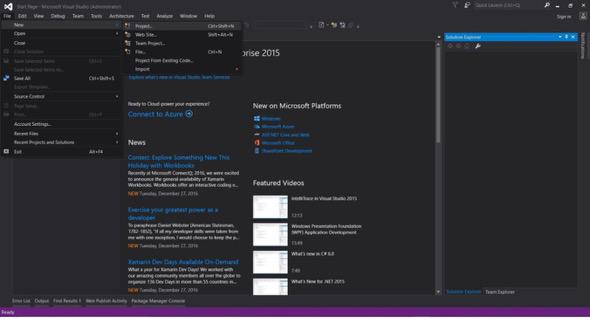
-
파일 -> 새로 만들기 -> 프로젝트
- Visual C# 또는 VB -> Windows -> Windows Forms 애플리케이션을 선택합니다.
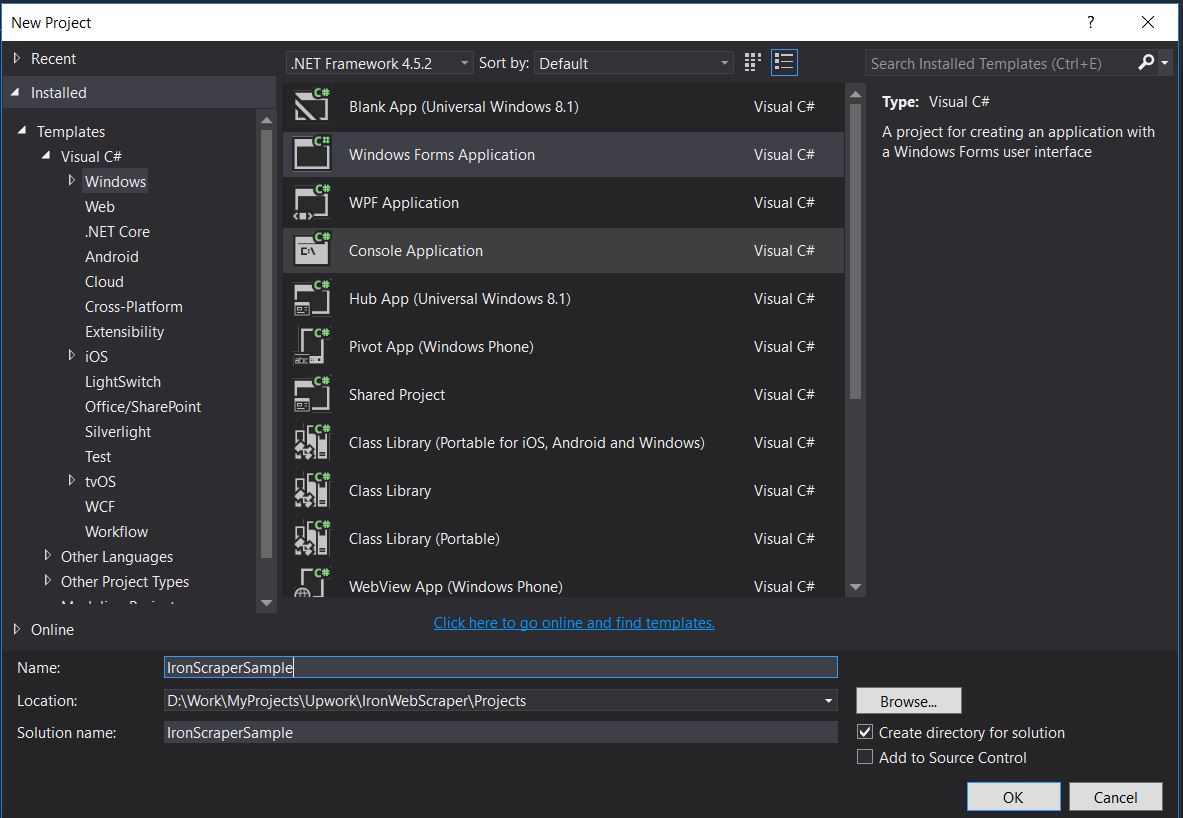
프로젝트 이름: IronScraperSample
위치 : 디스크에서 저장할 위치를 선택하세요.
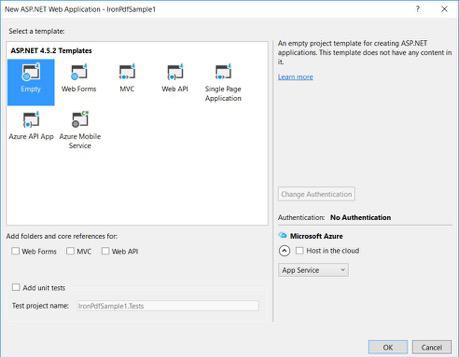
ASP.NET 웹 폼 애플리케이션을 만드는 방법은 무엇인가요?
-
Visual Studio를 엽니다.
-
파일 -> 새로 만들기 -> 프로젝트
- Visual C# 또는 VB -> 웹 -> ASP.NET 웹 애플리케이션(.NET Framework)을 선택합니다.
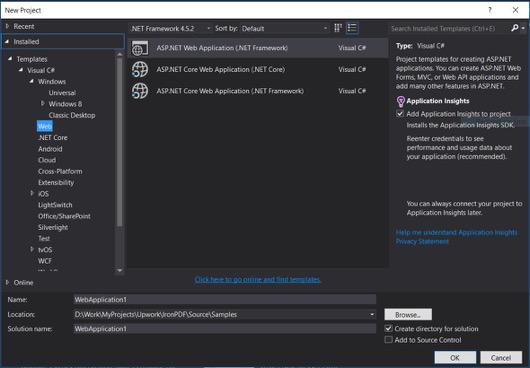
프로젝트 이름: IronScraperSample
위치 : 디스크에서 저장할 위치를 선택하세요.
-
ASP.NET 템플릿에서 빈 템플릿을 선택하고 웹 폼을 선택합니다.
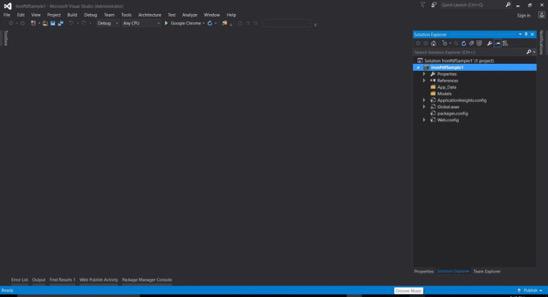
- 기본 ASP.NET 웹 폼 프로젝트가 생성되었습니다.
자주 묻는 질문
C#에서 웹사이트에서 데이터를 어떻게 스크래핑할 수 있나요?
IronWebScraper를 사용하여 C#에서 웹사이트에서 데이터를 스크래핑할 수 있습니다. NuGet을 통해 라이브러리를 설치하고 기본 콘솔 애플리케이션을 설정하여 웹 데이터를 효율적으로 추출하십시오.
C#에서 웹 스크래핑을 위한 필수 조건은 무엇입니까?
C#에서 웹 스크래핑을 수행하려면 C# 또는 VB.NET의 기본 프로그래밍 기술을 가지고 있어야 하며, HTML, JavaScript 및 CSS와 같은 웹 기술에 대한 이해와 함께 DOM, XPath 및 CSS 선택기에 대한 친숙함이 필요합니다.
.NET 프로젝트에서 웹 스크래핑 라이브러리를 어떻게 설치할 수 있습니까?
.NET 프로젝트에서 IronWebScraper를 설치하려면 Install-Package IronWebScraper 명령어와 함께 NuGet 패키지 관리자 콘솔을 사용하거나 Visual Studio의 NuGet 패키지 관리자 인터페이스를 통해 탐색하십시오.
내 웹 스크래퍼에서 요청 속도 제한을 어떻게 구현할 수 있습니까?
IronWebScraper를 사용하면 서버에 보내는 요청의 빈도를 관리하기 위해 요청 속도 제한을 구현할 수 있습니다. MaxHttpConnectionLimit, RateLimitPerHost, OpenConnectionLimitPerHost와 같은 설정을 사용하여 이를 구성할 수 있습니다.
웹 스크래핑에서 웹 캐시를 활성화하는 목적은 무엇입니까?
웹 스크래핑에서 웹 캐시를 활성화하면 이전 응답을 저장하고 재사용하여 서버에 보내는 요청 수를 줄이는 데 도움이 됩니다. IronWebScraper에서 EnableWebCache 메소드를 사용하여 이를 설정할 수 있습니다.
웹 스크래핑에서 인증은 어떻게 처리할 수 있습니까?
IronWebScraper와 함께 HttpIdentity를 사용하여 인증을 관리함으로써 로그인 양식 뒤의 콘텐츠나 제한된 영역에 대한 접근을 허용하여 보호된 리소스를 스크래핑할 수 있습니다.
C#의 웹 스크래퍼에 대한 간단한 예제는 무엇입니까?
'HelloScraper'는 튜토리얼에서 제공되는 간단한 예제입니다. 이는 IronWebScraper를 사용하여 기본 웹 스크래퍼를 설정하는 방법을 시연하며, 요청을 시작하고 응답을 구문 분석하는 방법을 포함합니다.
복잡한 페이지 구조를 처리하도록 내 웹 스크래퍼를 어떻게 확장할 수 있습니까?
IronWebScraper를 사용하여 서로 다른 페이지 유형을 처리하도록 Parse 메소드를 사용자 정의하여 복잡한 페이지 구조를 처리하도록 스크래퍼를 확장할 수 있으며, 유연한 데이터 추출 전략을 가능하게 합니다.
웹 스크래핑 라이브러리를 사용하면 어떤 이점이 있습니까?
IronWebScraper와 같은 웹 스크래핑 라이브러리를 사용하면 데이터 추출, 도메인 관리, 요청 속도 제한, 캐싱 및 인증에 대한 지원 등 웹 스크래핑 작업을 효율적으로 처리할 수 있는 이점을 제공합니다.


아직도 스크롤하고 계신가요?
빠른 증거를 원하시나요? PM > Install-Package IronWebScraper
샘플 실행 대상 사이트가 구조화된 데이터로 변환됩니다.






 무료로 시작하세요
 무료로 시작하세요
 무료 라이브 데모 예약하기
















