


How to Scrape Data from Websites in C

IronWebScraper é uma biblioteca .NET para coleta de dados na web, extração de dados na web e análise de conteúdo da web. É uma biblioteca fácil de usar que pode ser adicionada a projetos do Microsoft Visual Studio para uso em desenvolvimento e produção.
IronWebScraper tem muitos recursos e capacidades únicos, como controlar páginas permitidas e proibidas, objetos, mídia, etc. Também permite o gerenciamento de múltiplas identidades, cache da web e muitos outros recursos que cobriremos neste tutorial.
Comece com IronWebScraper
Comece a usar IronWebScraper no seu projeto hoje mesmo com um teste gratuito.

Público-alvo
Este tutorial destina-se a desenvolvedores de software com habilidades básicas ou avançadas de programação, que desejam criar e implementar soluções para recursos avançados de raspagem de dados (raspagem de sites, coleta e extração de dados de sites, análise de conteúdo de sites, coleta de dados da web).

Habilidades necessárias
- Fundamentos básicos de programação com habilidades usando uma das linguagens de programação da Microsoft, como C# ou VB.NET
- Entendimento básico de Tecnologias Web (HTML, JavaScript, JQuery, CSS, etc.) e como elas funcionam
- Conhecimento básico de seletores DOM, XPath, HTML e CSS.
Ferramentas
- Microsoft Visual Studio 2010 ou superior
- Extensões para desenvolvedores web para navegadores como o inspetor web para Chrome ou o Firebug para Firefox.
Por que usar a técnica de web scraping? (Reasons and Concepts)
Se você deseja criar um produto ou solução que tenha as seguintes capacidades:
- Extrair dados do site
- Comparar conteúdos, preços, recursos, etc. de vários sites
- Análise e armazenamento em cache do conteúdo do site
Se você tem um ou mais motivos dos acima mencionados, então o IronWebScraper é uma excelente biblioteca para atender suas necessidades
Como instalar o IronWebScraper?
Depois que você Create a New Project (ver Apêndice A) você pode adicionar a biblioteca IronWebScraper ao seu projeto inserindo automaticamente a biblioteca usando o NuGet ou instalando manualmente o DLL.
Instale usando o NuGet.
Para adicionar a biblioteca IronWebScraper ao nosso projeto usando o NuGet, podemos fazê-lo usando a interface visual (Gerenciador de Pacotes NuGet) ou por comando usando o Console do Gerenciador de Pacotes.
Usando o Gerenciador de Pacotes NuGet
- Usando o mouse -> clique com o botão direito no nome do projeto -> Selecionar gerenciar Pacote NuGet
- Na guia de navegação -> procure por
IronWebScraper-> Instalar - Clique em Ok
- E terminamos.
Usando o Console de Pacotes NuGet
- De ferramentas -> Gerenciador de Pacotes NuGet -> Console do Gerenciador de Pacotes
- Escolha Projeto de Biblioteca de Classes como Projeto Padrão
- Execute o comando ->
Install-Package IronWebScraper
Instalar manualmente
- Vá para https://ironsoftware.com
- Clique em IronWebScraper ou visite sua página diretamente usando o URL https://ironsoftware.com/csharp/webscraper/
- Clique em Baixar DLL.
- Extraia o arquivo compactado baixado
-
No Visual Studio, clique com o botão direito no projeto -> adicionar -> referência -> procurar
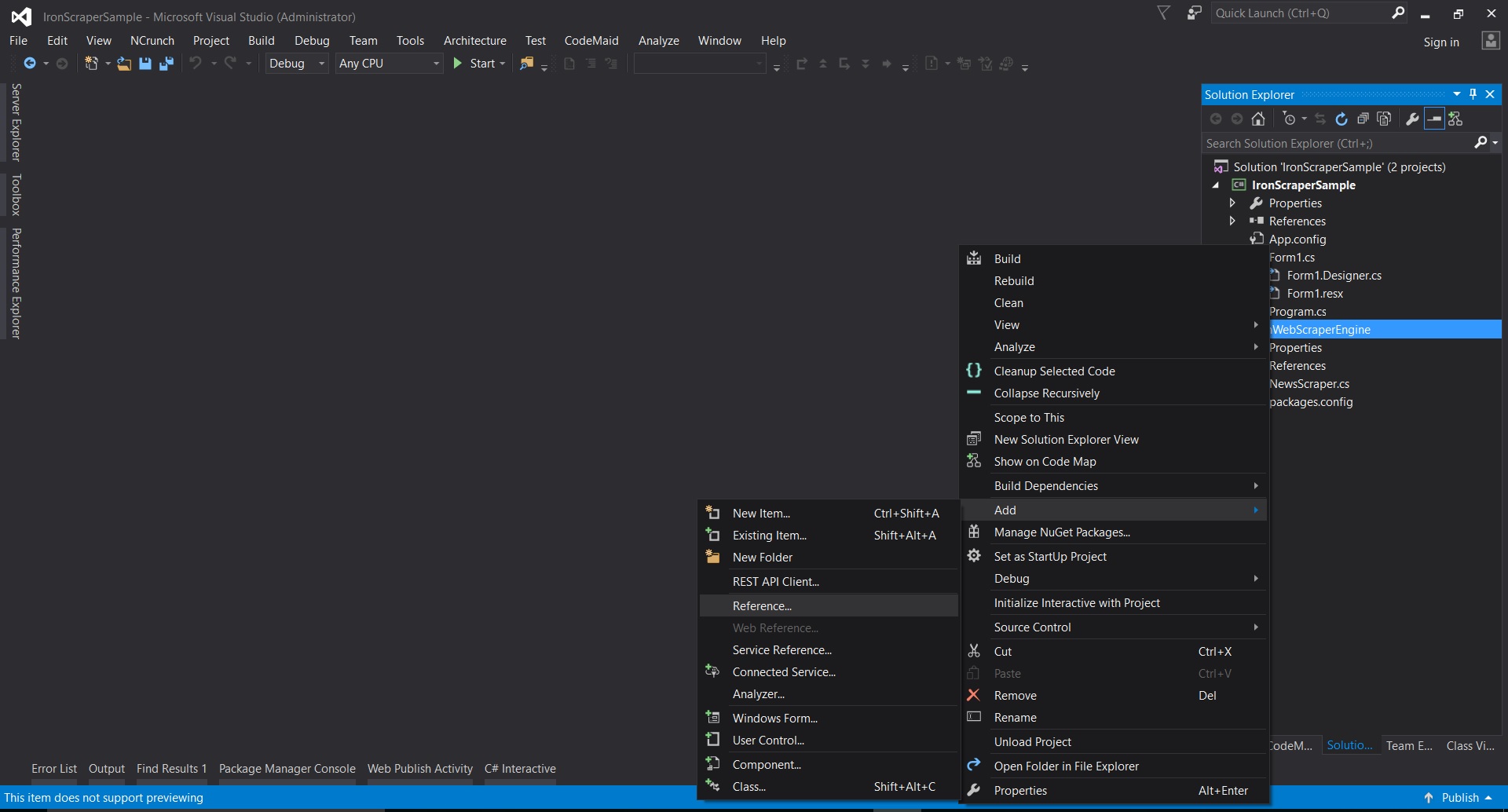
-
Vá para a pasta extraída ->
netstandard2.0-> e selecione todos os arquivos.dll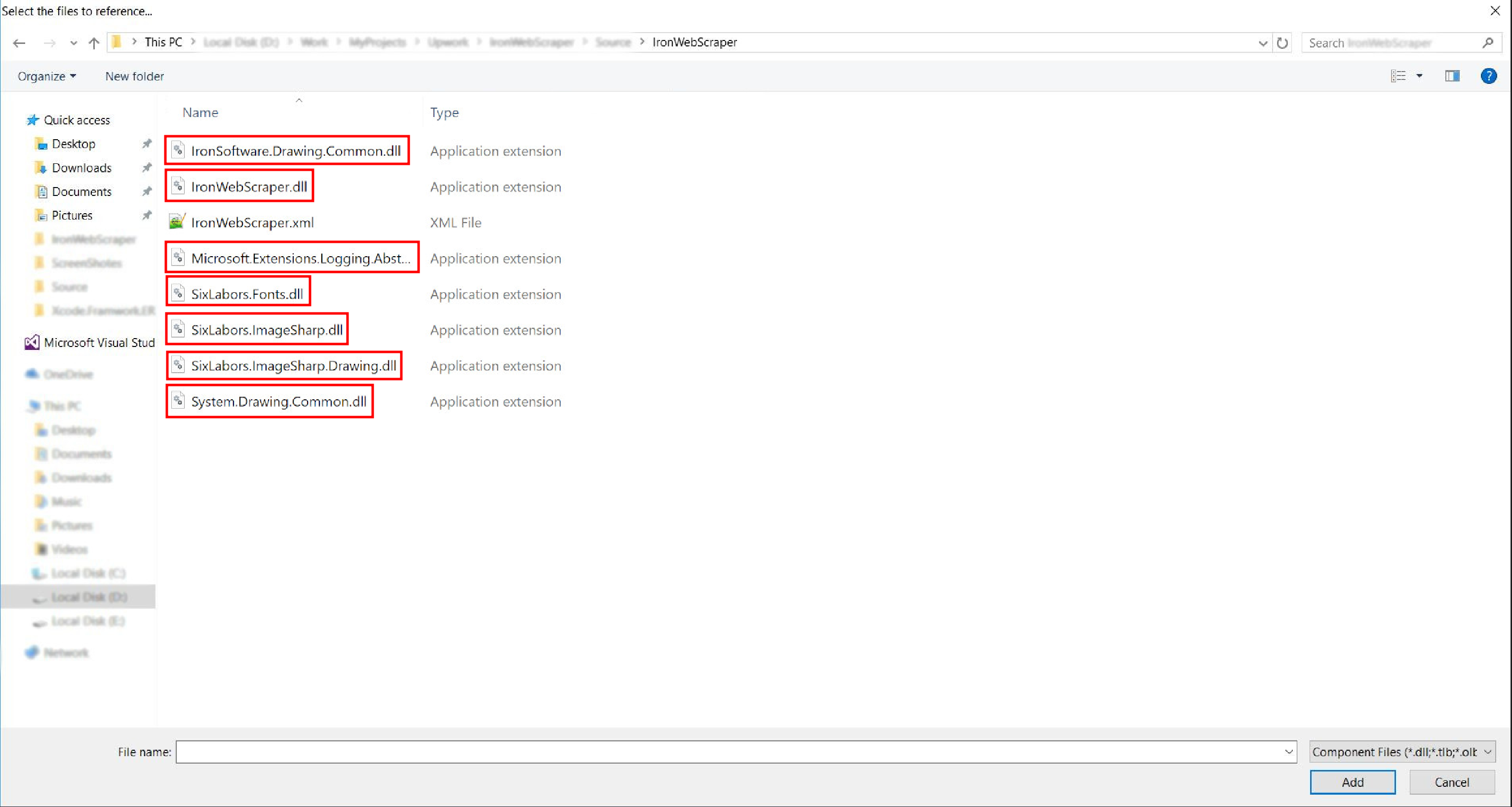
- E está feito!
HelloScraper - Nosso primeiro exemplo de IronWebScraper
Como de costume, começaremos implementando o aplicativo Hello Scraper para dar nosso primeiro passo usando o IronWebScraper.
- Criamos um novo aplicativo de console com o nome "IronWebScraperSample"
Passos para criar um exemplo de IronWebScraper
- Crie uma pasta e nomeie-a como "HelloScraperSample"
-
Em seguida, adicione uma nova classe e nomeie-a
HelloScraper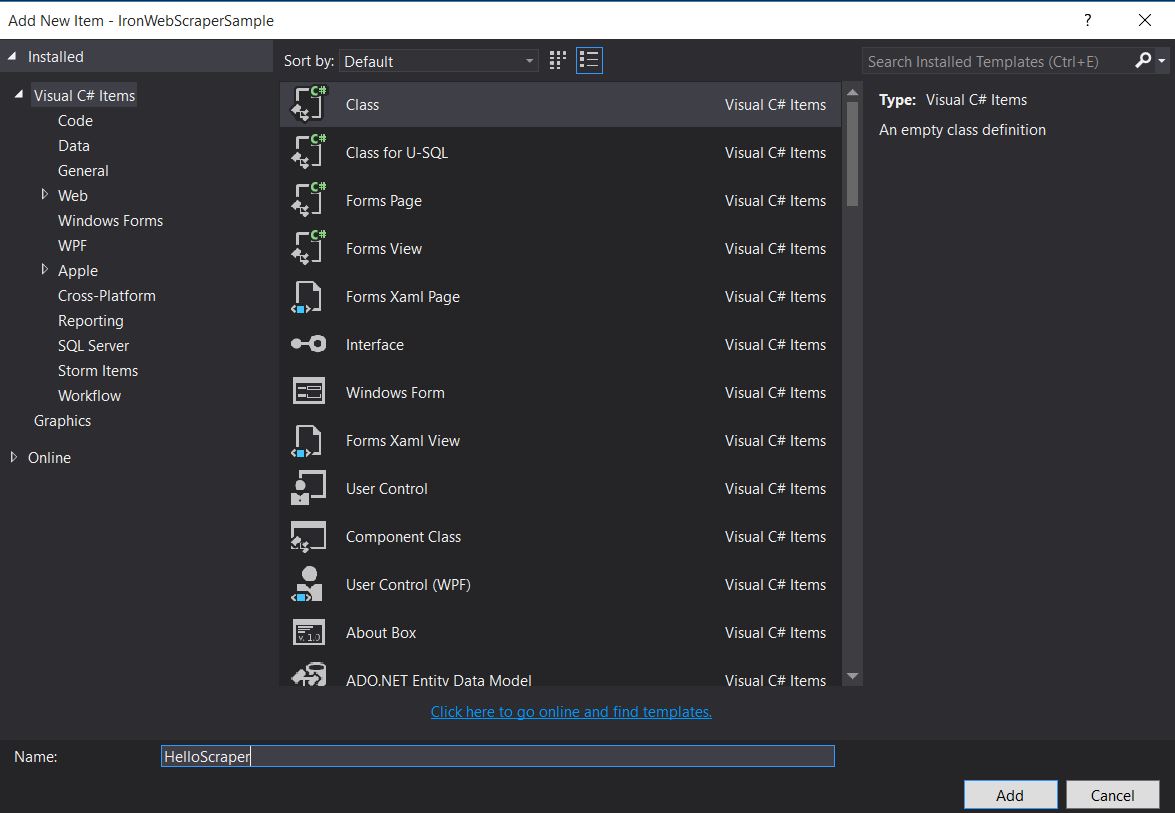
-
Adicione este trecho de código a
HelloScraperpublic class HelloScraper : WebScraper { /// <summary> /// Override this method to initialize your web scraper. /// Important tasks will be to request at least one start URL and set allowed/banned domain or URL patterns. /// </summary> public override void Init() { License.LicenseKey = "LicenseKey"; // Write License Key this.LoggingLevel = WebScraper.LogLevel.All; // Log all events this.Request("https://blog.scrapinghub.com", Parse); // Initialize a web request to the given URL } /// <summary> /// Override this method to create the default Response handler for your web scraper. /// If you have multiple page types, you can add additional similar methods. /// </summary> /// <param name="response">The HTTP Response object to parse</param> public override void Parse(Response response) { // Set working directory for the project this.WorkingDirectory = AppSetting.GetAppRoot() + @"\HelloScraperSample\Output\"; // Loop on all links foreach (var titleLink in response.Css("h2.entry-title a")) { // Read link text string title = titleLink.TextContentClean; // Save result to file Scrape(new ScrapedData() { { "Title", title } }, "HelloScraper.json"); } // Loop on all links for pagination if (response.CssExists("div.prev-post > a[href]")) { // Get next page URL var nextPage = response.Css("div.prev-post > a[href]")[0].Attributes["href"]; // Scrape next URL this.Request(nextPage, Parse); } } }public class HelloScraper : WebScraper { /// <summary> /// Override this method to initialize your web scraper. /// Important tasks will be to request at least one start URL and set allowed/banned domain or URL patterns. /// </summary> public override void Init() { License.LicenseKey = "LicenseKey"; // Write License Key this.LoggingLevel = WebScraper.LogLevel.All; // Log all events this.Request("https://blog.scrapinghub.com", Parse); // Initialize a web request to the given URL } /// <summary> /// Override this method to create the default Response handler for your web scraper. /// If you have multiple page types, you can add additional similar methods. /// </summary> /// <param name="response">The HTTP Response object to parse</param> public override void Parse(Response response) { // Set working directory for the project this.WorkingDirectory = AppSetting.GetAppRoot() + @"\HelloScraperSample\Output\"; // Loop on all links foreach (var titleLink in response.Css("h2.entry-title a")) { // Read link text string title = titleLink.TextContentClean; // Save result to file Scrape(new ScrapedData() { { "Title", title } }, "HelloScraper.json"); } // Loop on all links for pagination if (response.CssExists("div.prev-post > a[href]")) { // Get next page URL var nextPage = response.Css("div.prev-post > a[href]")[0].Attributes["href"]; // Scrape next URL this.Request(nextPage, Parse); } } }Public Class HelloScraper Inherits WebScraper ''' <summary> ''' Override this method to initialize your web scraper. ''' Important tasks will be to request at least one start URL and set allowed/banned domain or URL patterns. ''' </summary> Public Overrides Sub Init() License.LicenseKey = "LicenseKey" ' Write License Key Me.LoggingLevel = WebScraper.LogLevel.All ' Log all events Me.Request("https://blog.scrapinghub.com", AddressOf Parse) ' Initialize a web request to the given URL End Sub ''' <summary> ''' Override this method to create the default Response handler for your web scraper. ''' If you have multiple page types, you can add additional similar methods. ''' </summary> ''' <param name="response">The HTTP Response object to parse</param> Public Overrides Sub Parse(ByVal response As Response) ' Set working directory for the project Me.WorkingDirectory = AppSetting.GetAppRoot() & "\HelloScraperSample\Output\" ' Loop on all links For Each titleLink In response.Css("h2.entry-title a") ' Read link text Dim title As String = titleLink.TextContentClean ' Save result to file Scrape(New ScrapedData() From { { "Title", title } }, "HelloScraper.json") Next titleLink ' Loop on all links for pagination If response.CssExists("div.prev-post > a[href]") Then ' Get next page URL Dim nextPage = response.Css("div.prev-post > a[href]")(0).Attributes("href") ' Scrape next URL Me.Request(nextPage, AddressOf Parse) End If End Sub End Class$vbLabelText $csharpLabel -
Agora, para iniciar a raspagem, adicione este trecho de código a
Mainstatic void Main(string[] args) { // Create Object From Hello Scrape class HelloScraperSample.HelloScraper scrape = new HelloScraperSample.HelloScraper(); // Start Scraping scrape.Start(); }static void Main(string[] args) { // Create Object From Hello Scrape class HelloScraperSample.HelloScraper scrape = new HelloScraperSample.HelloScraper(); // Start Scraping scrape.Start(); }Shared Sub Main(ByVal args() As String) ' Create Object From Hello Scrape class Dim scrape As New HelloScraperSample.HelloScraper() ' Start Scraping scrape.Start() End Sub$vbLabelText $csharpLabel - O resultado será salvo em um arquivo com o formato
WebScraper.WorkingDirectory/classname.Json
Visão geral do código
Scrape.Start() aciona a lógica de raspagem da seguinte maneira:
- Chama o método
Init()para iniciar variáveis, propriedades de raspagem e atributos de comportamento. - Define a solicitação de página inicial em
Init()comRequest("https://blog.scrapinghub.com", Parse). - Processa múltiplas requisições HTTP e threads em paralelo, mantendo o código síncrono e facilitando a depuração.
- O método
Parse()é acionado apósInit()para manipular a resposta, extraindo dados usando seletores CSS e salvando-os em formato JSON.
Funções e opções da biblioteca IronWebScraper
A documentação atualizada pode ser encontrada dentro do arquivo zip baixado com o método de instalação manual (IronWebScraper Documentation.chm File), ou você pode verificar a documentação online para a última atualização da biblioteca em https://ironsoftware.com/csharp/webscraper/object-reference/.
Para começar a usar IronWebScraper em seu projeto, você deve herdar da classe IronWebScraper.WebScraper, que estende sua biblioteca de classes e adiciona funcionalidade de raspagem a ela. Além disso, você deve implementar os métodos Init() e Parse(Response response).
namespace IronWebScraperEngine
{
    public class NewsScraper : IronWebScraper.WebScraper
    {
        public override void Init()
        {
            throw new NotImplementedException();
        }

        public override void Parse(Response response)
        {
            throw new NotImplementedException();
        }
    }
}
namespace IronWebScraperEngine
{
public class NewsScraper : IronWebScraper.WebScraper
{
public override void Init()
{
throw new NotImplementedException();
}
public override void Parse(Response response)
{
throw new NotImplementedException();
}
}
}Namespace IronWebScraperEngine
Public Class NewsScraper
Inherits IronWebScraper.WebScraper
Public Overrides Sub Init()
Throw New NotImplementedException()
End Sub
Public Overrides Sub Parse(ByVal response As Response)
Throw New NotImplementedException()
End Sub
End Class
End Namespace| Propriedades \ funções | Tipo | Descrição |
|---|---|---|
Init () |
Método | Utilizado para configurar o raspador. |
Parse (Response response) |
Método | Utilizado para implementar a lógica que o scraper usará e como ele processará os dados. É possível implementar vários métodos para diferentes comportamentos ou estruturas de página. |
BannedUrls, AllowedUrls, BannedDomains |
Coleções | Utilizado para bloquear/permitir URLs e/ou domínios. Ex: BannedUrls.Add("*.zip", "*.exe", "*.gz", "*.pdf"); Suporta curingas e expressões regulares. |
ObeyRobotsDotTxt |
Booleano | Usado para habilitar ou desabilitar a leitura e o cumprimento das diretrizes em robots.txt. |
ObeyRobotsDotTxtForHost (string Host) |
Método | Usado para habilitar ou desabilitar a leitura e o cumprimento das diretrizes em robots.txt para um determinado domínio. |
Scrape, ScrapeUnique |
Método | |
ThrottleMode |
Enumeração | Opções de Enum: ByIpAddress, ByDomainHostName. Permite a limitação inteligente de solicitações, respeitando os endereços IP do host ou os nomes de domínio do host. |
EnableWebCache, EnableWebCache (TimeSpan cacheDuration) |
Método | Habilita o armazenamento em cache para solicitações da web. |
MaxHttpConnectionLimit |
Int | Define o número total de requisições HTTP abertas permitidas (threads). |
RateLimitPerHost |
Período de tempo | Define o atraso mínimo (pausa) entre solicitações para um determinado domínio ou endereço IP. |
OpenConnectionLimitPerHost |
Int | Define o número permitido de requisições HTTP simultâneas (threads) por nome de host ou endereço IP. |
WorkingDirectory |
string | Define o caminho do diretório de trabalho para armazenamento de dados. |
Exemplos e prática no mundo real
Extraindo dados de um site de filmes online
Vamos criar um exemplo onde extraímos dados de um site de filmes.
Adicione uma nova classe e nomeie-a MovieScraper:
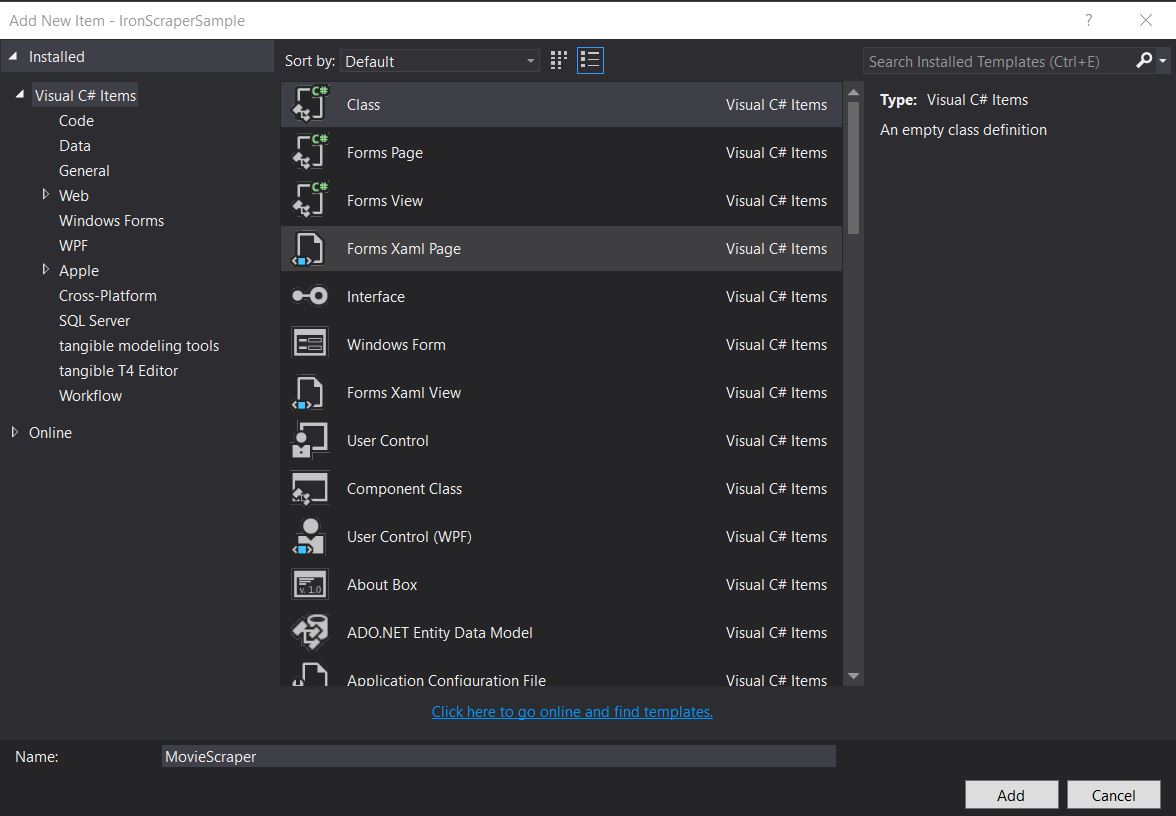
Estrutura HTML
Esta é uma parte do HTML da página inicial que vemos no site:
<div id="movie-featured" class="movies-list movies-list-full tab-pane in fade active">
    <div data-movie-id="20746" class="ml-item">
        <a href="https://website.com/film/king-arthur-legend-of-the-sword-20746/">
            <span class="mli-quality">CAM</span>
            <img data-original="https://img.gocdn.online/2017/05/16/poster/2116d6719c710eabe83b377463230fbe-king-arthur-legend-of-the-sword.jpg"
                 class="lazy thumb mli-thumb" alt="King Arthur: Legend of the Sword"
                  src="https://img.gocdn.online/2017/05/16/poster/2116d6719c710eabe83b377463230fbe-king-arthur-legend-of-the-sword.jpg"
                 style="display: inline-block;">
            <span class="mli-info"><h2>King Arthur: Legend of the Sword</h2></span>
        </a>
    </div>
    <div data-movie-id="20724" class="ml-item">
        <a href="https://website.com/film/snatched-20724/" >
            <span class="mli-quality">CAM</span>
            <img data-original="https://img.gocdn.online/2017/05/16/poster/5ef66403dc331009bdb5aa37cfe819ba-snatched.jpg"
                 class="lazy thumb mli-thumb" alt="Snatched"
                 src="https://img.gocdn.online/2017/05/16/poster/5ef66403dc331009bdb5aa37cfe819ba-snatched.jpg"
                 style="display: inline-block;">
            <span class="mli-info"><h2>Snatched</h2></span>
        </a>
    </div>
</div>
<div id="movie-featured" class="movies-list movies-list-full tab-pane in fade active">
<div data-movie-id="20746" class="ml-item">
<a href="https://website.com/film/king-arthur-legend-of-the-sword-20746/">
<span class="mli-quality">CAM</span>
<img data-original="https://img.gocdn.online/2017/05/16/poster/2116d6719c710eabe83b377463230fbe-king-arthur-legend-of-the-sword.jpg"
class="lazy thumb mli-thumb" alt="King Arthur: Legend of the Sword"
src="https://img.gocdn.online/2017/05/16/poster/2116d6719c710eabe83b377463230fbe-king-arthur-legend-of-the-sword.jpg"
style="display: inline-block;">
<span class="mli-info"><h2>King Arthur: Legend of the Sword</h2></span>
</a>
</div>
<div data-movie-id="20724" class="ml-item">
<a href="https://website.com/film/snatched-20724/" >
<span class="mli-quality">CAM</span>
<img data-original="https://img.gocdn.online/2017/05/16/poster/5ef66403dc331009bdb5aa37cfe819ba-snatched.jpg"
class="lazy thumb mli-thumb" alt="Snatched"
src="https://img.gocdn.online/2017/05/16/poster/5ef66403dc331009bdb5aa37cfe819ba-snatched.jpg"
style="display: inline-block;">
<span class="mli-info"><h2>Snatched</h2></span>
</a>
</div>
</div>Como podemos ver, temos o ID do filme, o título e um link para uma página detalhada. Vamos começar a extrair esses dados:
public class MovieScraper : WebScraper
{
    public override void Init()
    {
        License.LicenseKey = "LicenseKey";
        this.LoggingLevel = WebScraper.LogLevel.All;
        this.WorkingDirectory = AppSetting.GetAppRoot() + @"\MovieSample\Output\";
        this.Request("www.website.com", Parse);
    }

    public override void Parse(Response response)
    {
        foreach (var div in response.Css("#movie-featured > div"))
        {
            if (div.GetAttribute("class") != "clearfix")
            {
                var movieId = div.GetAttribute("data-movie-id");
                var link = div.Css("a")[0];
                var movieTitle = link.TextContentClean;
                Scrape(new ScrapedData() { { "MovieId", movieId }, { "MovieTitle", movieTitle } }, "Movie.Jsonl");
            }
        }
    }
}
public class MovieScraper : WebScraper
{
public override void Init()
{
License.LicenseKey = "LicenseKey";
this.LoggingLevel = WebScraper.LogLevel.All;
this.WorkingDirectory = AppSetting.GetAppRoot() + @"\MovieSample\Output\";
this.Request("www.website.com", Parse);
}
public override void Parse(Response response)
{
foreach (var div in response.Css("#movie-featured > div"))
{
if (div.GetAttribute("class") != "clearfix")
{
var movieId = div.GetAttribute("data-movie-id");
var link = div.Css("a")[0];
var movieTitle = link.TextContentClean;
Scrape(new ScrapedData() { { "MovieId", movieId }, { "MovieTitle", movieTitle } }, "Movie.Jsonl");
}
}
}
}Public Class MovieScraper
Inherits WebScraper
Public Overrides Sub Init()
License.LicenseKey = "LicenseKey"
Me.LoggingLevel = WebScraper.LogLevel.All
Me.WorkingDirectory = AppSetting.GetAppRoot() & "\MovieSample\Output\"
Me.Request("www.website.com", AddressOf Parse)
End Sub
Public Overrides Sub Parse(ByVal response As Response)
For Each div In response.Css("#movie-featured > div")
If div.GetAttribute("class") <> "clearfix" Then
Dim movieId = div.GetAttribute("data-movie-id")
Dim link = div.Css("a")(0)
Dim movieTitle = link.TextContentClean
Scrape(New ScrapedData() From {
{ "MovieId", movieId },
{ "MovieTitle", movieTitle }
},
"Movie.Jsonl")
End If
Next div
End Sub
End ClassAula de Cinema Estruturada
Para armazenar nossos dados formatados, vamos implementar uma classe de filme:
public class Movie
{
    public int Id { get; set; }
    public string Title { get; set; }
    public string URL { get; set; }
}
public class Movie
{
public int Id { get; set; }
public string Title { get; set; }
public string URL { get; set; }
}Public Class Movie
Public Property Id As Integer
Public Property Title As String
Public Property URL As String
End ClassAgora atualize nosso código para usar a classe Movie:
public class MovieScraper : WebScraper
{
    public override void Init()
    {
        License.LicenseKey = "LicenseKey";
        this.LoggingLevel = WebScraper.LogLevel.All;
        this.WorkingDirectory = AppSetting.GetAppRoot() + @"\MovieSample\Output\";
        this.Request("https://website.com/", Parse);
    }

    public override void Parse(Response response)
    {
        foreach (var div in response.Css("#movie-featured > div"))
        {
            if (div.GetAttribute("class") != "clearfix")
            {
                var movie = new Movie
                {
                    Id = Convert.ToInt32(div.GetAttribute("data-movie-id")),
                    Title = div.Css("a")[0].TextContentClean,
                    URL = div.Css("a")[0].Attributes["href"]
                };
                Scrape(movie, "Movie.Jsonl");
            }
        }
    }
}
public class MovieScraper : WebScraper
{
public override void Init()
{
License.LicenseKey = "LicenseKey";
this.LoggingLevel = WebScraper.LogLevel.All;
this.WorkingDirectory = AppSetting.GetAppRoot() + @"\MovieSample\Output\";
this.Request("https://website.com/", Parse);
}
public override void Parse(Response response)
{
foreach (var div in response.Css("#movie-featured > div"))
{
if (div.GetAttribute("class") != "clearfix")
{
var movie = new Movie
{
Id = Convert.ToInt32(div.GetAttribute("data-movie-id")),
Title = div.Css("a")[0].TextContentClean,
URL = div.Css("a")[0].Attributes["href"]
};
Scrape(movie, "Movie.Jsonl");
}
}
}
}Public Class MovieScraper
Inherits WebScraper
Public Overrides Sub Init()
License.LicenseKey = "LicenseKey"
Me.LoggingLevel = WebScraper.LogLevel.All
Me.WorkingDirectory = AppSetting.GetAppRoot() & "\MovieSample\Output\"
Me.Request("https://website.com/", AddressOf Parse)
End Sub
Public Overrides Sub Parse(ByVal response As Response)
For Each div In response.Css("#movie-featured > div")
If div.GetAttribute("class") <> "clearfix" Then
Dim movie As New Movie With {
.Id = Convert.ToInt32(div.GetAttribute("data-movie-id")),
.Title = div.Css("a")(0).TextContentClean,
.URL = div.Css("a")(0).Attributes("href")
}
Scrape(movie, "Movie.Jsonl")
End If
Next div
End Sub
End ClassExtração detalhada de páginas
Vamos estender nossa classe Movie para ter novas propriedades para as informações detalhadas:
public class Movie
{
    public int Id { get; set; }
    public string Title { get; set; }
    public string URL { get; set; }
    public string Description { get; set; }
    public List<string> Genre { get; set; }
    public List<string> Actor { get; set; }
}
public class Movie
{
public int Id { get; set; }
public string Title { get; set; }
public string URL { get; set; }
public string Description { get; set; }
public List<string> Genre { get; set; }
public List<string> Actor { get; set; }
}Public Class Movie
Public Property Id As Integer
Public Property Title As String
Public Property URL As String
Public Property Description As String
Public Property Genre As List(Of String)
Public Property Actor As List(Of String)
End ClassEm seguida, navegue até a página de detalhes para extrair os dados, utilizando os recursos avançados do IronWebScraper:
public class MovieScraper : WebScraper
{
    public override void Init()
    {
        License.LicenseKey = "LicenseKey";
        this.LoggingLevel = WebScraper.LogLevel.All;
        this.WorkingDirectory = AppSetting.GetAppRoot() + @"\MovieSample\Output\";
        this.Request("https://domain/", Parse);
    }

    public override void Parse(Response response)
    {
        foreach (var div in response.Css("#movie-featured > div"))
        {
            if (div.GetAttribute("class") != "clearfix")
            {
                var movie = new Movie
                {
                    Id = Convert.ToInt32(div.GetAttribute("data-movie-id")),
                    Title = div.Css("a")[0].TextContentClean,
                    URL = div.Css("a")[0].Attributes["href"]
                };
                this.Request(movie.URL, ParseDetails, new MetaData() { { "movie", movie } });
            }
        }
    }

    public void ParseDetails(Response response)
    {
        var movie = response.MetaData.Get<Movie>("movie");
        var div = response.Css("div.mvic-desc")[0];
        movie.Description = div.Css("div.desc")[0].TextContentClean;
        movie.Genre = div.Css("div > p > a").Select(element => element.TextContentClean).ToList();
        movie.Actor = div.Css("div > p:nth-child(2) > a").Select(element => element.TextContentClean).ToList();

        Scrape(movie, "Movie.Jsonl");
    }
}
public class MovieScraper : WebScraper
{
public override void Init()
{
License.LicenseKey = "LicenseKey";
this.LoggingLevel = WebScraper.LogLevel.All;
this.WorkingDirectory = AppSetting.GetAppRoot() + @"\MovieSample\Output\";
this.Request("https://domain/", Parse);
}
public override void Parse(Response response)
{
foreach (var div in response.Css("#movie-featured > div"))
{
if (div.GetAttribute("class") != "clearfix")
{
var movie = new Movie
{
Id = Convert.ToInt32(div.GetAttribute("data-movie-id")),
Title = div.Css("a")[0].TextContentClean,
URL = div.Css("a")[0].Attributes["href"]
};
this.Request(movie.URL, ParseDetails, new MetaData() { { "movie", movie } });
}
}
}
public void ParseDetails(Response response)
{
var movie = response.MetaData.Get<Movie>("movie");
var div = response.Css("div.mvic-desc")[0];
movie.Description = div.Css("div.desc")[0].TextContentClean;
movie.Genre = div.Css("div > p > a").Select(element => element.TextContentClean).ToList();
movie.Actor = div.Css("div > p:nth-child(2) > a").Select(element => element.TextContentClean).ToList();
Scrape(movie, "Movie.Jsonl");
}
}Public Class MovieScraper
Inherits WebScraper
Public Overrides Sub Init()
License.LicenseKey = "LicenseKey"
Me.LoggingLevel = WebScraper.LogLevel.All
Me.WorkingDirectory = AppSetting.GetAppRoot() & "\MovieSample\Output\"
Me.Request("https://domain/", AddressOf Parse)
End Sub
Public Overrides Sub Parse(ByVal response As Response)
For Each div In response.Css("#movie-featured > div")
If div.GetAttribute("class") <> "clearfix" Then
Dim movie As New Movie With {
.Id = Convert.ToInt32(div.GetAttribute("data-movie-id")),
.Title = div.Css("a")(0).TextContentClean,
.URL = div.Css("a")(0).Attributes("href")
}
Me.Request(movie.URL, AddressOf ParseDetails, New MetaData() From {
{ "movie", movie }
})
End If
Next div
End Sub
Public Sub ParseDetails(ByVal response As Response)
Dim movie = response.MetaData.Get(Of Movie)("movie")
Dim div = response.Css("div.mvic-desc")(0)
movie.Description = div.Css("div.desc")(0).TextContentClean
movie.Genre = div.Css("div > p > a").Select(Function(element) element.TextContentClean).ToList()
movie.Actor = div.Css("div > p:nth-child(2) > a").Select(Function(element) element.TextContentClean).ToList()
Scrape(movie, "Movie.Jsonl")
End Sub
End ClassRecursos da biblioteca IronWebScraper
Recurso HttpIdentity
Alguns sistemas exigem que o usuário faça login para visualizar o conteúdo; use HttpIdentity para credenciais:
HttpIdentity id = new HttpIdentity
{
    NetworkUsername = "username",
    NetworkPassword = "pwd"
};
Identities.Add(id);
HttpIdentity id = new HttpIdentity
{
NetworkUsername = "username",
NetworkPassword = "pwd"
};
Identities.Add(id);Dim id As New HttpIdentity With {
.NetworkUsername = "username",
.NetworkPassword = "pwd"
}
Identities.Add(id)Ativar cache da Web
Armazene em cache as páginas solicitadas para reutilização durante o desenvolvimento:
public override void Init()
{
    License.LicenseKey = "LicenseKey";
    this.LoggingLevel = WebScraper.LogLevel.All;
    this.WorkingDirectory = AppSetting.GetAppRoot() + @"\ShoppingSiteSample\Output\";
    EnableWebCache();
    this.Request("http://www.WebSite.com", Parse);
}
public override void Init()
{
License.LicenseKey = "LicenseKey";
this.LoggingLevel = WebScraper.LogLevel.All;
this.WorkingDirectory = AppSetting.GetAppRoot() + @"\ShoppingSiteSample\Output\";
EnableWebCache();
this.Request("http://www.WebSite.com", Parse);
}Public Overrides Sub Init()
License.LicenseKey = "LicenseKey"
Me.LoggingLevel = WebScraper.LogLevel.All
Me.WorkingDirectory = AppSetting.GetAppRoot() & "\ShoppingSiteSample\Output\"
EnableWebCache()
Me.Request("http://www.WebSite.com", Parse)
End SubLimitação de velocidade
Controle o número de conexões e a velocidade:
public override void Init()
{
    License.LicenseKey = "LicenseKey";
    this.LoggingLevel = WebScraper.LogLevel.All;
    this.WorkingDirectory = AppSetting.GetAppRoot() + @"\ShoppingSiteSample\Output\";
    this.MaxHttpConnectionLimit = 80;
    this.RateLimitPerHost = TimeSpan.FromMilliseconds(50);
    this.OpenConnectionLimitPerHost = 25;
    this.ObeyRobotsDotTxt = false;
    this.ThrottleMode = Throttle.ByDomainHostName;
    this.Request("https://www.Website.com", Parse);
}
public override void Init()
{
License.LicenseKey = "LicenseKey";
this.LoggingLevel = WebScraper.LogLevel.All;
this.WorkingDirectory = AppSetting.GetAppRoot() + @"\ShoppingSiteSample\Output\";
this.MaxHttpConnectionLimit = 80;
this.RateLimitPerHost = TimeSpan.FromMilliseconds(50);
this.OpenConnectionLimitPerHost = 25;
this.ObeyRobotsDotTxt = false;
this.ThrottleMode = Throttle.ByDomainHostName;
this.Request("https://www.Website.com", Parse);
}Public Overrides Sub Init()
License.LicenseKey = "LicenseKey"
Me.LoggingLevel = WebScraper.LogLevel.All
Me.WorkingDirectory = AppSetting.GetAppRoot() & "\ShoppingSiteSample\Output\"
Me.MaxHttpConnectionLimit = 80
Me.RateLimitPerHost = TimeSpan.FromMilliseconds(50)
Me.OpenConnectionLimitPerHost = 25
Me.ObeyRobotsDotTxt = False
Me.ThrottleMode = Throttle.ByDomainHostName
Me.Request("https://www.Website.com", Parse)
End SubPropriedades de estrangulamento
MaxHttpConnectionLimit
número total de solicitações HTTP abertas permitidas (threads)RateLimitPerHost
atraso cortês mínimo (pausa) entre solicitações para um determinado domínio ou endereço IPOpenConnectionLimitPerHost
número permitido de solicitações HTTP simultâneas (threads) por nome de host ou endereço IPThrottleMode
Faz com que o WebScraper controle inteligentemente as solicitações não apenas por nome de host, mas também por endereços IP dos servidores de hospedagem. Isso é uma medida de cortesia caso vários domínios coletados estejam hospedados na mesma máquina.
Apêndice
Como criar um aplicativo Windows Forms?
Utilize o Visual Studio 2013 ou superior.
- Abra o Visual Studio.
-
Arquivo -> Novo -> Projeto
- Escolha Visual C# ou VB -> Windows -> Aplicativo Windows Forms.
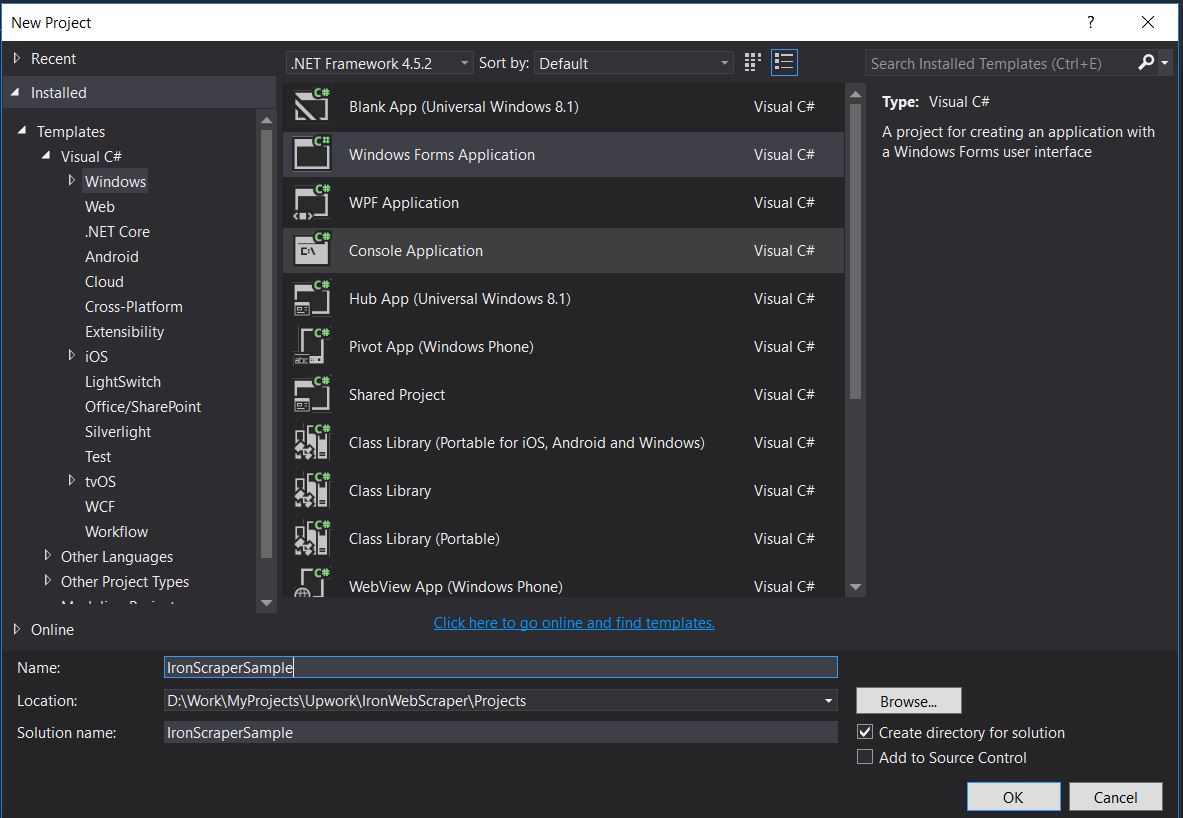
Nome do Projeto: IronScraperSample
Localização : Selecione um local no seu disco.
Como criar uma aplicação web ASP.NET ?
-
Abra o Visual Studio.
-
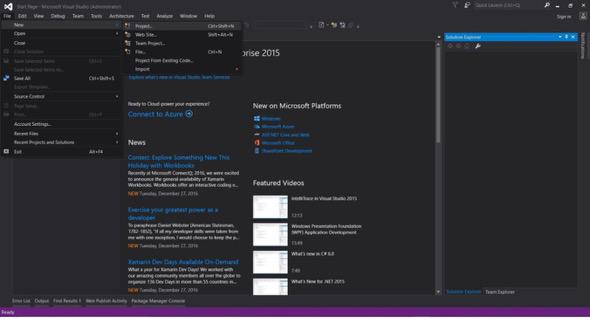
Arquivo -> Novo -> Projeto
- Escolha Visual C# ou VB -> Web -> Aplicativo Web ASP.NET (.NET Framework).
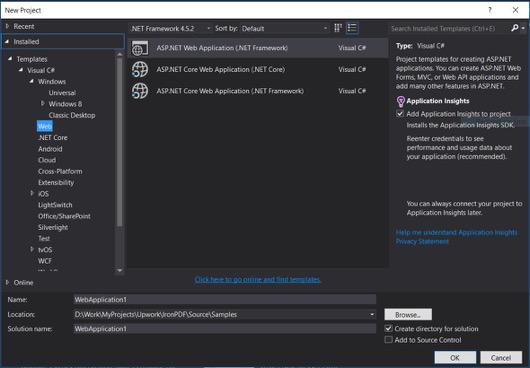
Nome do Projeto: IronScraperSample
Localização : Selecione um local no seu disco.
-
Nos seus modelos ASP.NET , selecione um modelo vazio e marque a opção Formulários Web.
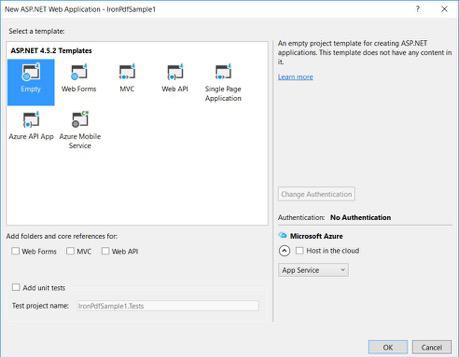
- Seu projeto básico de formulário Web ASP.NET foi criado.
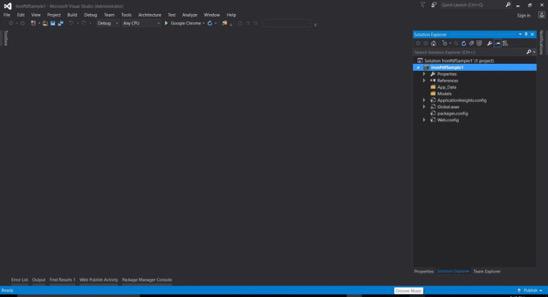
Baixe aqui o código completo do projeto de exemplo do tutorial .
Perguntas frequentes
Como extrair dados de sites em C#?
Você pode usar o IronWebScraper para extrair dados de sites em C#. Comece instalando a biblioteca via NuGet e configure um aplicativo de console básico para começar a extrair dados da web de forma eficiente.
Quais são os pré-requisitos para web scraping em C#?
Para realizar web scraping em C#, você deve ter conhecimentos básicos de programação em C# ou VB.NET e entender tecnologias web como HTML, JavaScript e CSS, além de estar familiarizado com DOM, XPath e seletores CSS.
Como posso instalar uma biblioteca de web scraping em um projeto .NET?
Para instalar o IronWebScraper em um projeto .NET, use o console do gerenciador de pacotes NuGet com o comando Install-Package IronWebScraper ou navegue pela interface do Gerenciador de Pacotes NuGet no Visual Studio.
Como posso implementar a limitação de requisições no meu web scraper?
O IronWebScraper permite implementar a limitação de requisições para gerenciar a frequência de solicitações feitas a um servidor. Isso pode ser configurado usando parâmetros como MaxHttpConnectionLimit , RateLimitPerHost e OpenConnectionLimitPerHost .
Qual a finalidade de habilitar o cache da web na extração de dados da web?
Habilitar o cache web em web scraping ajuda a reduzir o número de requisições enviadas a um servidor, armazenando e reutilizando respostas anteriores. Isso pode ser configurado no IronWebScraper usando o método EnableWebCache .
Como lidar com a autenticação em web scraping?
Com o IronWebScraper, você pode usar HttpIdentity para gerenciar a autenticação, permitindo o acesso a conteúdo protegido por formulários de login ou áreas restritas, possibilitando assim a extração de dados de recursos protegidos.
Qual é um exemplo simples de um web scraper em C#?
O 'HelloScraper' é um exemplo simples fornecido no tutorial. Ele demonstra a configuração de um web scraper básico usando o IronWebScraper, incluindo como iniciar requisições e analisar respostas.
Como posso estender meu web scraper para lidar com estruturas de página complexas?
Com o IronWebScraper, você pode estender seu scraper para lidar com estruturas de página complexas, personalizando os métodos Parse para processar diferentes tipos de página, permitindo estratégias flexíveis de extração de dados.
Quais são os benefícios de usar uma biblioteca de web scraping?
Utilizar uma biblioteca de web scraping como o IronWebScraper oferece benefícios como extração de dados simplificada, gerenciamento de domínio, limitação de requisições, armazenamento em cache e suporte para autenticação, permitindo o processamento eficiente de tarefas de web scraping.


Ainda está rolando a tela?
Quer provas rápidas? PM > Install-Package IronWebScraper
executar um exemplo Observe como seu site alvo se transforma em dados estruturados.






 Comece GRATUITAMENTE
 Comece GRATUITAMENTE
 Agende uma demonstração ao vivo gratuita
















