
How to Scrape Data from Websites in C#

IronWebScraper to biblioteka .NET do scrapingu toles i zawartych treści WWW. Jest to łatwa w użyciu biblioteka, którą można dodać do projektów Microsoft Visual Studio w celu wykorzystania w rozwoju oraz produkcji.
IronWebScraper ma wiele unikalnych cech i funkcji, takich jak kontrolowanie dozwolonych i zabronionych stron, obiektów, mediów itp. Pozwala również na zarządzanie wieloma tożsamościami, pamięcią podręczną sieci oraz wiele innych funkcji, które omówimy w tym tutorialu.
Rozpocznij korzystanie z IronWebScraper
Start using IronWebScraper in your project today with a free trial.

Docelowa grupa odbiorców
Ten samouczek jest skierowany do programistów o podstawowych lub zaawansowanych umiejętnościach programistycznych, którzy chcą budować i wdrażać rozwiązania dla zaawansowanych możliwości skrobania (skrobanie stron internetowych, zbieranie i ekstrakcja danych z witryn, parsowanie zawartości stron, pozyskiwanie danych z sieci).

Wymagane umiejętności
- Podstawy programowania z umiejętnościami korzystania z jednego z języków programowania Microsoft, takich jak C# lub VB.NET
- Podstawowe zrozumienie technologii sieciowych (HTML, JavaScript, JQuery, CSS, itp.) i tego, jak działają
- Podstawowa wiedza na temat DOM, XPath, HTML i CSS Selectors
Narzędzia
- Microsoft Visual Studio 2010 lub nowszy
- Rozszerzenia dla deweloperów stron internetowych dla przeglądarek, takie jak web inspector dla Chrome lub Firebug dla Firefox
Dlaczego skrobać? (Reasons and Concepts)
Jeśli chcesz zbudować produkt lub rozwiązanie, które ma możliwości:
- Ekstrakcja danych ze strony internetowej
- Porównanie treści, cen, cech, itp. z różnych stron internetowych
- Skanowanie i buforowanie treści stron internetowych
Jeśli masz jeden lub więcej powodów z powyższego, IronWebScraper to doskonała biblioteka do spełniania twoich potrzeb
Jak zainstalować IronWebScraper?
Po wykonaniu Create a New Project (Patrz Załącznik A) można dodać bibliotekę IronWebScraper do projektu, automatycznie wprowadzając bibliotekę za pomocą NuGet lub ręcznie instalując DLL.
Instalacja przy użyciu NuGet
Aby dodać bibliotekę IronWebScraper do naszego projektu za pomocą NuGet, możemy to zrobić używając interfejsu wizualnego (Menadżer pakietów NuGet) lub polecenia używając konsoli Menedżera pakietów.
Korzystanie z menedżera pakietów NuGet
- Korzystanie z myszy -> prawy klik na nazwę projektu -> Wybierz Manage NuGet Package
- Z zakładki przeglądania -> wyszukaj
IronWebScraper-> Zainstaluj - Kliknij OK
- I gotowe
Używanie konsoli NuGet Package
- Z narzędzi -> Menedżer pakietów NuGet -> Konsola Menedżera pakietów
- Wybierz projekt Class Library Project jako projekt domyślny
- Uruchom polecenie ->
Install-Package IronWebScraper
Instalacja ręczna
-
Przejdź do https://ironsoftware.com
-
Kliknij IronWebScraper lub odwiedź jego stronę bezpośrednio używając URL https://ironsoftware.com/csharp/webscraper/
-
Kliknij Pobierz DLL.
-
Rozpakuj pobrany skompresowany plik
-
W Visual Studio kliknij prawym przyciskiem myszy na projekt -> dodaj -> referencja -> przeglądaj
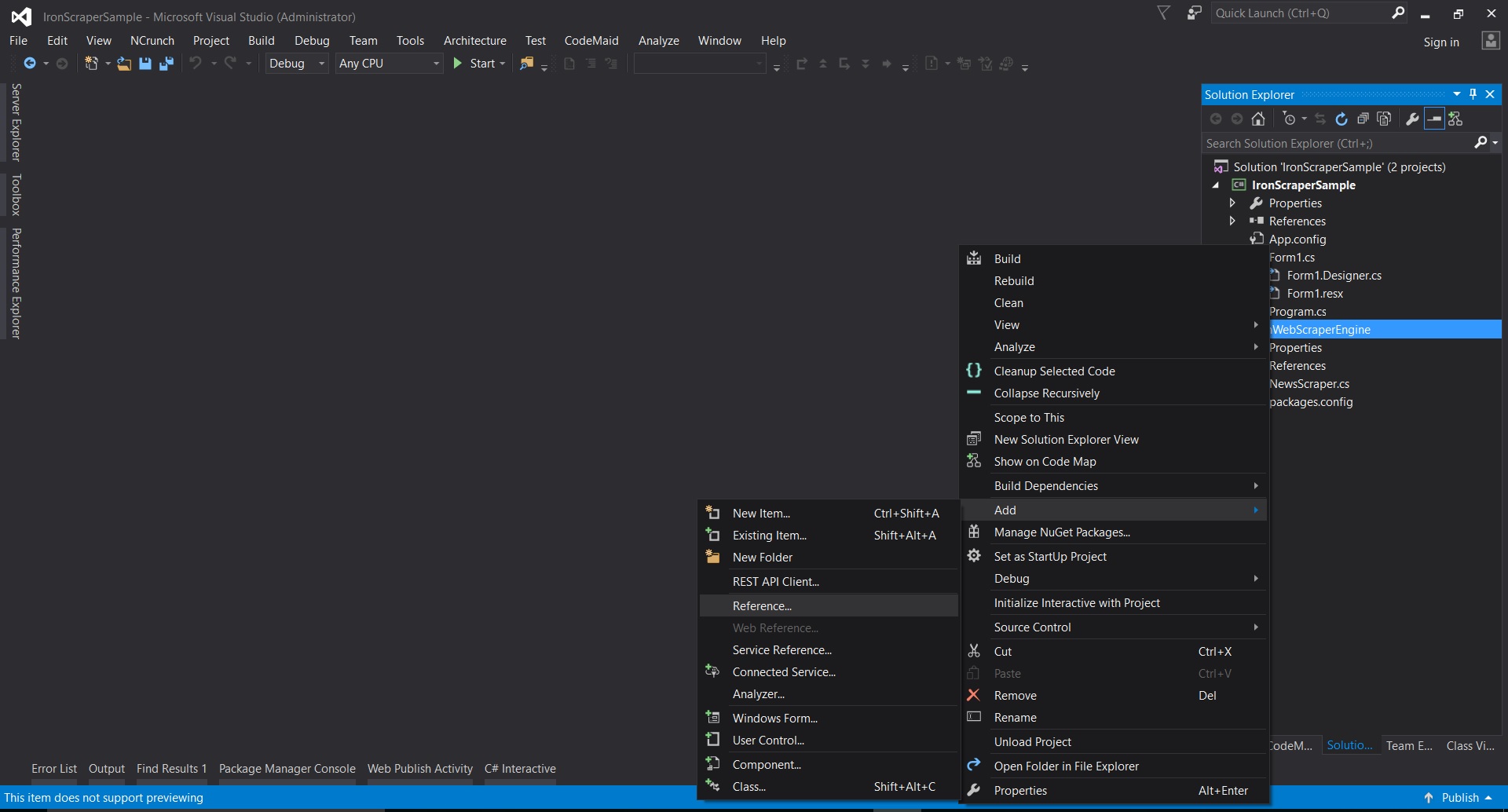
-
Przejdź do wypakowanego folderu ->
netstandard2.0-> i wybierz wszystkie pliki.dll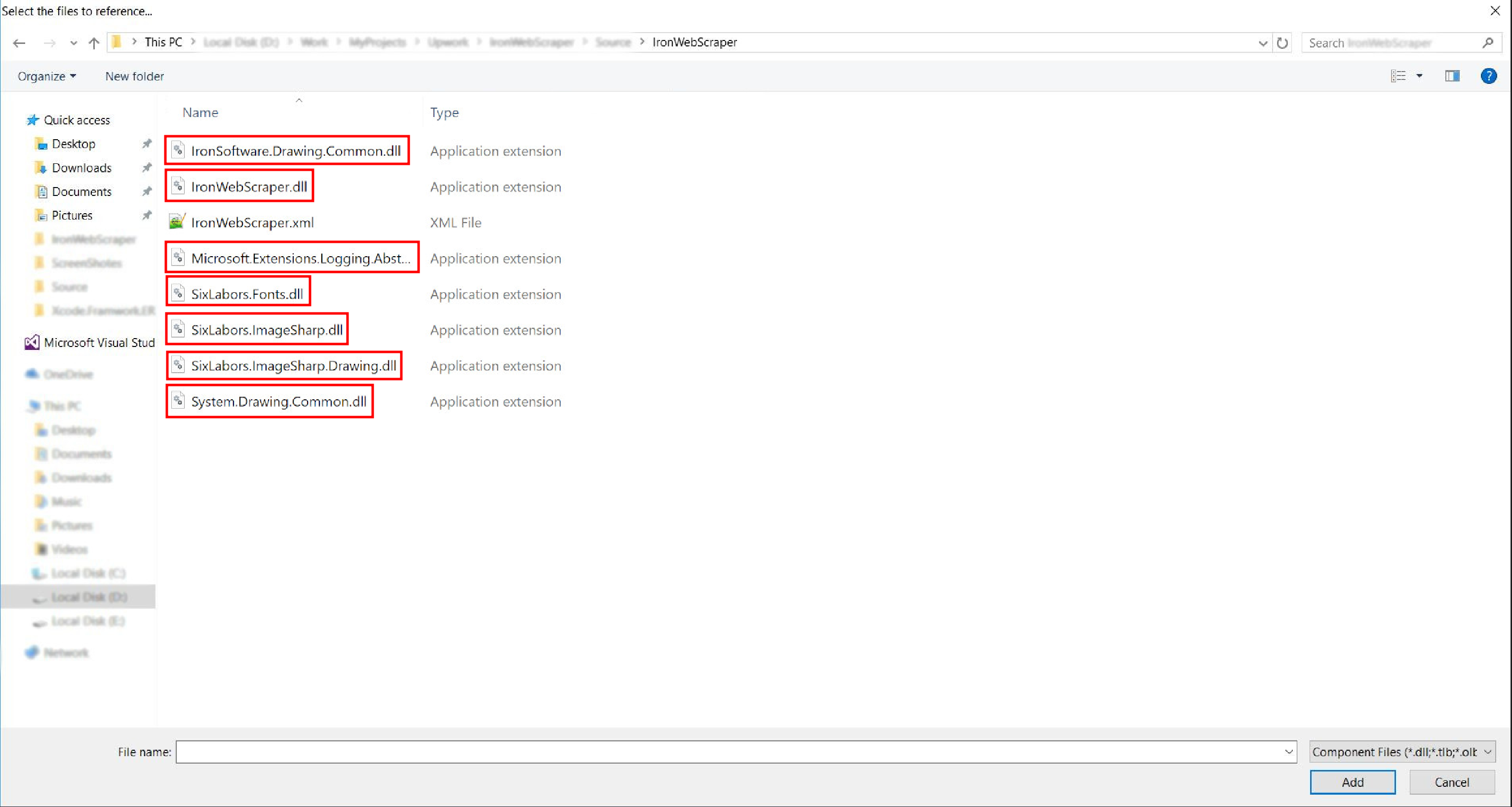
-
I gotowe!
HelloScraper - Nasz pierwszy przykład z IronWebScraper
Jak zwykle, zaczniemy od wdrożenia aplikacji Hello Scraper, aby wykonać nasz pierwszy krok przy użyciu IronWebScraper.
- Utworzyliśmy nową aplikację konsolową z nazwą "IronWebScraperSample"
Kroki tworzenia przykładu IronWebScraper
-
Utwórz folder i nazwij go "HelloScraperSample"
-
Następnie dodaj nową klasę i nazwij ją
HelloScraper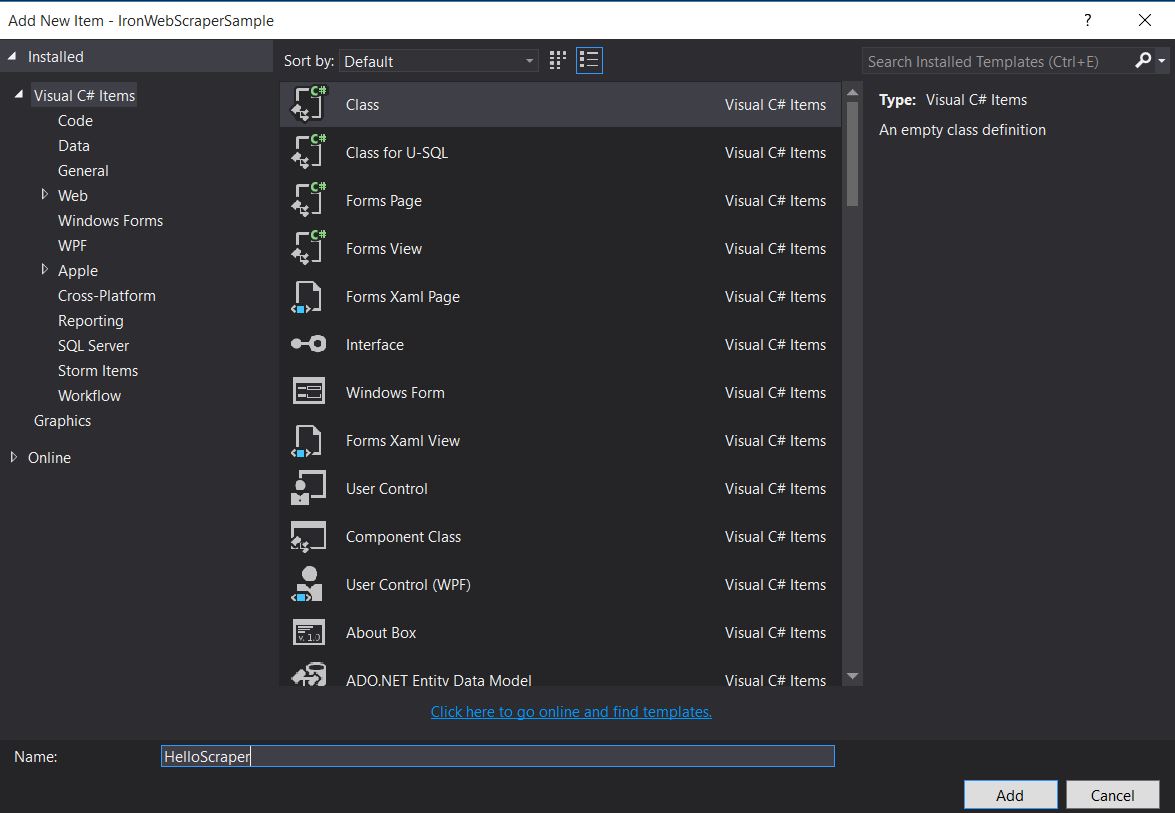
-
Dodaj ten fragment kodu do
HelloScraperpublic class HelloScraper : WebScraper { /// <summary> /// Override this method to initialize your web scraper. /// Important tasks will be to request at least one start URL and set allowed/banned domain or URL patterns. /// </summary> public override void Init() { License.LicenseKey = "LicenseKey"; // Write License Key this.LoggingLevel = WebScraper.LogLevel.All; // Log all events this.Request("https://blog.scrapinghub.com", Parse); // Initialize a web request to the given URL } /// <summary> /// Override this method to create the default Response handler for your web scraper. /// If you have multiple page types, you can add additional similar methods. /// </summary> /// <param name="response">The HTTP Response object to parse</param> public override void Parse(Response response) { // Set working directory for the project this.WorkingDirectory = AppSetting.GetAppRoot() + @"\HelloScraperSample\Output\"; // Loop on all links foreach (var titleLink in response.Css("h2.entry-title a")) { // Read link text string title = titleLink.TextContentClean; // Save result to file Scrape(new ScrapedData() { { "Title", title } }, "HelloScraper.json"); } // Loop on all links for pagination if (response.CssExists("div.prev-post > a[href]")) { // Get next page URL var nextPage = response.Css("div.prev-post > a[href]")[0].Attributes["href"]; // Scrape next URL this.Request(nextPage, Parse); } } }Public Class HelloScraper Inherits WebScraper ''' <summary> ''' Override this method to initialize your web scraper. ''' Important tasks will be to request at least one start URL and set allowed/banned domain or URL patterns. ''' </summary> Public Overrides Sub Init() License.LicenseKey = "LicenseKey" ' Write License Key Me.LoggingLevel = WebScraper.LogLevel.All ' Log all events Me.Request("https://blog.scrapinghub.com", AddressOf Parse) ' Initialize a web request to the given URL End Sub ''' <summary> ''' Override this method to create the default Response handler for your web scraper. ''' If you have multiple page types, you can add additional similar methods. ''' </summary> ''' <param name="response">The HTTP Response object to parse</param> Public Overrides Sub Parse(ByVal response As Response) ' Set working directory for the project Me.WorkingDirectory = AppSetting.GetAppRoot() & "\HelloScraperSample\Output\" ' Loop on all links For Each titleLink In response.Css("h2.entry-title a") ' Read link text Dim title As String = titleLink.TextContentClean ' Save result to file Scrape(New ScrapedData() From { { "Title", title } }, "HelloScraper.json") Next titleLink ' Loop on all links for pagination If response.CssExists("div.prev-post > a[href]") Then ' Get next page URL Dim nextPage = response.Css("div.prev-post > a[href]")(0).Attributes("href") ' Scrape next URL Me.Request(nextPage, AddressOf Parse) End If End Sub End Class -
Teraz, aby rozpocząć Scrape, dodaj ten fragment kodu do
Mainstatic void Main(string[] args) { // Create Object From Hello Scrape class HelloScraperSample.HelloScraper scrape = new HelloScraperSample.HelloScraper(); // Start Scraping scrape.Start(); }Shared Sub Main(ByVal args() As String) ' Create Object From Hello Scrape class Dim scrape As New HelloScraperSample.HelloScraper() ' Start Scraping scrape.Start() End Sub -
Wynik zostanie zapisany w pliku w formacie
WebScraper.WorkingDirectory/classname.Json
Przegląd kodu
Scrape.Start() uruchamia logikę scrapingu w następujący sposób:
- Wywołuje metodę
Init()w celu zainicjowania zmiennych, właściwości scrapingu i atrybutów zachowania. - Ustawia żądanie strony początkowej w
Init()zRequest("https://blog.scrapinghub.com", Parse). - Obsługuje wiele żądań HTTP i wątków równolegle, utrzymując kod synchronicznym i łatwiejszym do debugowania.
- Metoda
Parse()jest uruchamiana poInit(), aby obsłużyć odpowiedź, wyodrębniając dane za pomocą selektorów CSS i zapisując je w formacie JSON.
Funkcje i opcje biblioteki IronWebScraper
Zaktualizowaną dokumentację można znaleźć wewnątrz pliku zip pobranego metodą ręcznej instalacji (IronWebScraper Documentation.chm File), lub można sprawdzić dokumentację online z najnowszą aktualizacją biblioteki na https://ironsoftware.com/csharp/webscraper/object-reference/.
Aby rozpocząć używanie IronWebScraper w swoim projekcie, musisz dziedziczyć po klasie IronWebScraper.WebScraper, która rozszerza twoją bibliotekę klas i dodaje jej funkcjonalność scrapingu. Również musisz zaimplementować metody Init() i Parse(Response response).
namespace IronWebScraperEngine
{
    public class NewsScraper : IronWebScraper.WebScraper
    {
        public override void Init()
        {
            throw new NotImplementedException();
        }

        public override void Parse(Response response)
        {
            throw new NotImplementedException();
        }
    }
}Namespace IronWebScraperEngine
Public Class NewsScraper
Inherits IronWebScraper.WebScraper
Public Overrides Sub Init()
Throw New NotImplementedException()
End Sub
Public Overrides Sub Parse(ByVal response As Response)
Throw New NotImplementedException()
End Sub
End Class
End Namespace| Właściwości \ funkcje | Typ | Opis |
|---|---|---|
Init () | Metoda | Używane do skonfigurowania skrobania |
Parse (Response response) | Metoda | Używane do zaimplementowania logiki, którą skrobak wykorzysta i jak ją przetworzy. Można zaimplementować wiele metod dla różnych zachowań lub struktur stron. |
BannedUrls, AllowedUrls, BannedDomains | Kolekcje | Używane do blokowania/dozwalania URLi i/lub domen. Np.: BannedUrls.Add("*.zip", "*.exe", "*.gz", "*.pdf"); Obsługuje symbole wieloznaczne i wyrażenia regularne. |
ObeyRobotsDotTxt | Boolean | Służy do włączania lub wyłączania czytania i przestrzegania dyrektyw w robots.txt. |
ObeyRobotsDotTxtForHost (string Host) | Metoda | Służy do włączania lub wyłączania czytania i przestrzegania dyrektyw w robots.txt dla określonej domeny. |
Scrape, ScrapeUnique | Metoda | |
ThrottleMode | Wyliczenie | Opcje enum: ByIpAddress, ByDomainHostName. Umożliwia inteligentne dławienie żądań z szacunkiem dla adresów IP hostów lub nazw domen hostów. |
EnableWebCache, EnableWebCache (TimeSpan cacheDuration) | Metoda | Umożliwia buforowanie żądań sieciowych. |
MaxHttpConnectionLimit | Int | Ustawia łączną liczbę dozwolonych otwartych żądań HTTP (wątki). |
RateLimitPerHost | TimeSpan | Ustawia minimalne opóźnienie grzecznościowe (pauzę) między żądaniami do danej domeny lub adresu IP. |
OpenConnectionLimitPerHost | Int | Ustawia dozwoloną liczbę równoległych żądań HTTP (wątki) na nazwę hosta lub adres IP. |
WorkingDirectory | string | Ustawia ścieżkę katalogu roboczego do przechowywania danych. |
Przykłady z rzeczywistego świata i praktyka
Skrobanie strony z filmami online
Zbudujmy przykład, w którym skrobiemy stronę filmową.
Dodaj nową klasę i nazwij ją MovieScraper:
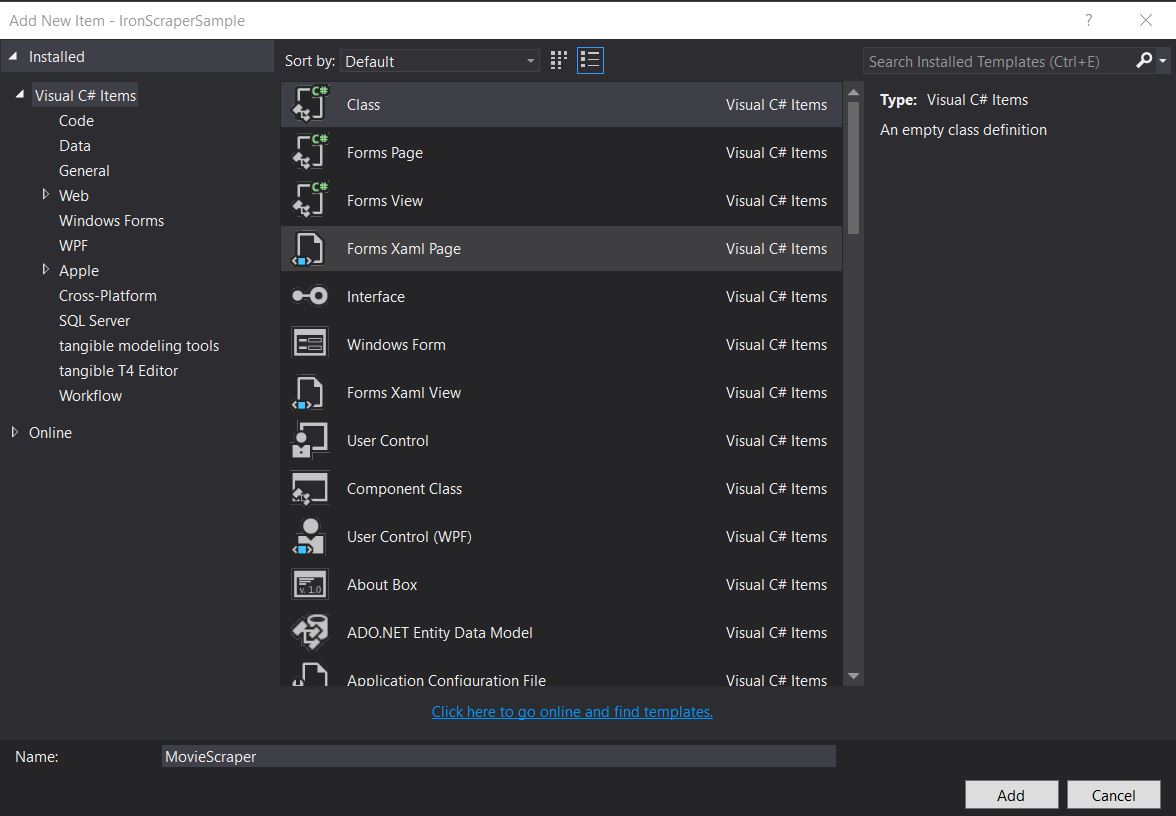
Struktura HTML
To jest fragment kodu HTML strony głównej, którą widzimy na stronie:
<div id="movie-featured" class="movies-list movies-list-full tab-pane in fade active">
    <div data-movie-id="20746" class="ml-item">
        <a href="https://website.com/film/king-arthur-legend-of-the-sword-20746/">
            <span class="mli-quality">CAM</span>
            <img data-original="https://img.gocdn.online/2017/05/16/poster/2116d6719c710eabe83b377463230fbe-king-arthur-legend-of-the-sword.jpg"
                 class="lazy thumb mli-thumb" alt="King Arthur: Legend of the Sword"
                  src="https://img.gocdn.online/2017/05/16/poster/2116d6719c710eabe83b377463230fbe-king-arthur-legend-of-the-sword.jpg"
                 style="display: inline-block;">
            <span class="mli-info"><h2>King Arthur: Legend of the Sword</h2></span>
        </a>
    </div>
    <div data-movie-id="20724" class="ml-item">
        <a href="https://website.com/film/snatched-20724/" >
            <span class="mli-quality">CAM</span>
            <img data-original="https://img.gocdn.online/2017/05/16/poster/5ef66403dc331009bdb5aa37cfe819ba-snatched.jpg"
                 class="lazy thumb mli-thumb" alt="Snatched"
                 src="https://img.gocdn.online/2017/05/16/poster/5ef66403dc331009bdb5aa37cfe819ba-snatched.jpg"
                 style="display: inline-block;">
            <span class="mli-info"><h2>Snatched</h2></span>
        </a>
    </div>
</div>Jak widać, mamy ID filmu, tytuł i link do szczegółowej strony. Zacznijmy skrobać te dane:
public class MovieScraper : WebScraper
{
    public override void Init()
    {
        License.LicenseKey = "LicenseKey";
        this.LoggingLevel = WebScraper.LogLevel.All;
        this.WorkingDirectory = AppSetting.GetAppRoot() + @"\MovieSample\Output\";
        this.Request("www.website.com", Parse);
    }

    public override void Parse(Response response)
    {
        foreach (var div in response.Css("#movie-featured > div"))
        {
            if (div.GetAttribute("class") != "clearfix")
            {
                var movieId = div.GetAttribute("data-movie-id");
                var link = div.Css("a")[0];
                var movieTitle = link.TextContentClean;
                Scrape(new ScrapedData() { { "MovieId", movieId }, { "MovieTitle", movieTitle } }, "Movie.Jsonl");
            }
        }
    }
}Public Class MovieScraper
Inherits WebScraper
Public Overrides Sub Init()
License.LicenseKey = "LicenseKey"
Me.LoggingLevel = WebScraper.LogLevel.All
Me.WorkingDirectory = AppSetting.GetAppRoot() & "\MovieSample\Output\"
Me.Request("www.website.com", AddressOf Parse)
End Sub
Public Overrides Sub Parse(ByVal response As Response)
For Each div In response.Css("#movie-featured > div")
If div.GetAttribute("class") <> "clearfix" Then
Dim movieId = div.GetAttribute("data-movie-id")
Dim link = div.Css("a")(0)
Dim movieTitle = link.TextContentClean
Scrape(New ScrapedData() From {
{ "MovieId", movieId },
{ "MovieTitle", movieTitle }
},
"Movie.Jsonl")
End If
Next div
End Sub
End ClassStruktura klasy Movie
Aby przechowywać nasze sformatowane dane, zaimplementujmy klasę filmu:
public class Movie
{
    public int Id { get; set; }
    public string Title { get; set; }
    public string URL { get; set; }
}Public Class Movie
Public Property Id As Integer
Public Property Title As String
Public Property URL As String
End ClassTeraz zaktualizuj nasz kod, aby używać klasy Movie:
public class MovieScraper : WebScraper
{
    public override void Init()
    {
        License.LicenseKey = "LicenseKey";
        this.LoggingLevel = WebScraper.LogLevel.All;
        this.WorkingDirectory = AppSetting.GetAppRoot() + @"\MovieSample\Output\";
        this.Request("https://website.com/", Parse);
    }

    public override void Parse(Response response)
    {
        foreach (var div in response.Css("#movie-featured > div"))
        {
            if (div.GetAttribute("class") != "clearfix")
            {
                var movie = new Movie
                {
                    Id = Convert.ToInt32(div.GetAttribute("data-movie-id")),
                    Title = div.Css("a")[0].TextContentClean,
                    URL = div.Css("a")[0].Attributes["href"]
                };
                Scrape(movie, "Movie.Jsonl");
            }
        }
    }
}Public Class MovieScraper
Inherits WebScraper
Public Overrides Sub Init()
License.LicenseKey = "LicenseKey"
Me.LoggingLevel = WebScraper.LogLevel.All
Me.WorkingDirectory = AppSetting.GetAppRoot() & "\MovieSample\Output\"
Me.Request("https://website.com/", AddressOf Parse)
End Sub
Public Overrides Sub Parse(ByVal response As Response)
For Each div In response.Css("#movie-featured > div")
If div.GetAttribute("class") <> "clearfix" Then
Dim movie As New Movie With {
.Id = Convert.ToInt32(div.GetAttribute("data-movie-id")),
.Title = div.Css("a")(0).TextContentClean,
.URL = div.Css("a")(0).Attributes("href")
}
Scrape(movie, "Movie.Jsonl")
End If
Next div
End Sub
End ClassSkrobanie szczegółowej strony
Rozszerzmy naszą klasę Movie, aby miała nowe właściwości dotyczące szczegółowych informacji:
public class Movie
{
    public int Id { get; set; }
    public string Title { get; set; }
    public string URL { get; set; }
    public string Description { get; set; }
    public List<string> Genre { get; set; }
    public List<string> Actor { get; set; }
}Public Class Movie
Public Property Id As Integer
Public Property Title As String
Public Property URL As String
Public Property Description As String
Public Property Genre As List(Of String)
Public Property Actor As List(Of String)
End ClassNastępnie przejdź do szczegółowej strony, aby ją skrobać, korzystając z rozszerzonych możliwości IronWebScraper:
public class MovieScraper : WebScraper
{
    public override void Init()
    {
        License.LicenseKey = "LicenseKey";
        this.LoggingLevel = WebScraper.LogLevel.All;
        this.WorkingDirectory = AppSetting.GetAppRoot() + @"\MovieSample\Output\";
        this.Request("https://domain/", Parse);
    }

    public override void Parse(Response response)
    {
        foreach (var div in response.Css("#movie-featured > div"))
        {
            if (div.GetAttribute("class") != "clearfix")
            {
                var movie = new Movie
                {
                    Id = Convert.ToInt32(div.GetAttribute("data-movie-id")),
                    Title = div.Css("a")[0].TextContentClean,
                    URL = div.Css("a")[0].Attributes["href"]
                };
                this.Request(movie.URL, ParseDetails, new MetaData() { { "movie", movie } });
            }
        }
    }

    public void ParseDetails(Response response)
    {
        var movie = response.MetaData.Get<Movie>("movie");
        var div = response.Css("div.mvic-desc")[0];
        movie.Description = div.Css("div.desc")[0].TextContentClean;
        movie.Genre = div.Css("div > p > a").Select(element => element.TextContentClean).ToList();
        movie.Actor = div.Css("div > p:nth-child(2) > a").Select(element => element.TextContentClean).ToList();

        Scrape(movie, "Movie.Jsonl");
    }
}Public Class MovieScraper
Inherits WebScraper
Public Overrides Sub Init()
License.LicenseKey = "LicenseKey"
Me.LoggingLevel = WebScraper.LogLevel.All
Me.WorkingDirectory = AppSetting.GetAppRoot() & "\MovieSample\Output\"
Me.Request("https://domain/", AddressOf Parse)
End Sub
Public Overrides Sub Parse(ByVal response As Response)
For Each div In response.Css("#movie-featured > div")
If div.GetAttribute("class") <> "clearfix" Then
Dim movie As New Movie With {
.Id = Convert.ToInt32(div.GetAttribute("data-movie-id")),
.Title = div.Css("a")(0).TextContentClean,
.URL = div.Css("a")(0).Attributes("href")
}
Me.Request(movie.URL, AddressOf ParseDetails, New MetaData() From {
{ "movie", movie }
})
End If
Next div
End Sub
Public Sub ParseDetails(ByVal response As Response)
Dim movie = response.MetaData.Get(Of Movie)("movie")
Dim div = response.Css("div.mvic-desc")(0)
movie.Description = div.Css("div.desc")(0).TextContentClean
movie.Genre = div.Css("div > p > a").Select(Function(element) element.TextContentClean).ToList()
movie.Actor = div.Css("div > p:nth-child(2) > a").Select(Function(element) element.TextContentClean).ToList()
Scrape(movie, "Movie.Jsonl")
End Sub
End ClassFunkcje biblioteki IronWebScraper
Funkcjonalność HttpIdentity
Niektóre systemy wymagają, aby użytkownik był zalogowany, aby zobaczyć treść; użyj HttpIdentity dla poświadczeń:
HttpIdentity id = new HttpIdentity
{
    NetworkUsername = "username",
    NetworkPassword = "pwd"
};
Identities.Add(id);Dim id As New HttpIdentity With {
.NetworkUsername = "username",
.NetworkPassword = "pwd"
}
Identities.Add(id)Włącz cache sieciowy
Buforuj zażądane strony na potrzeby ponownego użycia podczas rozwoju:
public override void Init()
{
    License.LicenseKey = "LicenseKey";
    this.LoggingLevel = WebScraper.LogLevel.All;
    this.WorkingDirectory = AppSetting.GetAppRoot() + @"\ShoppingSiteSample\Output\";
    EnableWebCache();
    this.Request("http://www.WebSite.com", Parse);
}Public Overrides Sub Init()
License.LicenseKey = "LicenseKey"
Me.LoggingLevel = WebScraper.LogLevel.All
Me.WorkingDirectory = AppSetting.GetAppRoot() & "\ShoppingSiteSample\Output\"
EnableWebCache()
Me.Request("http://www.WebSite.com", Parse)
End SubDławienie
Kontrola liczby połączeń i prędkości:
public override void Init()
{
    License.LicenseKey = "LicenseKey";
    this.LoggingLevel = WebScraper.LogLevel.All;
    this.WorkingDirectory = AppSetting.GetAppRoot() + @"\ShoppingSiteSample\Output\";
    this.MaxHttpConnectionLimit = 80;
    this.RateLimitPerHost = TimeSpan.FromMilliseconds(50);
    this.OpenConnectionLimitPerHost = 25;
    this.ObeyRobotsDotTxt = false;
    this.ThrottleMode = Throttle.ByDomainHostName;
    this.Request("https://www.Website.com", Parse);
}Public Overrides Sub Init()
License.LicenseKey = "LicenseKey"
Me.LoggingLevel = WebScraper.LogLevel.All
Me.WorkingDirectory = AppSetting.GetAppRoot() & "\ShoppingSiteSample\Output\"
Me.MaxHttpConnectionLimit = 80
Me.RateLimitPerHost = TimeSpan.FromMilliseconds(50)
Me.OpenConnectionLimitPerHost = 25
Me.ObeyRobotsDotTxt = False
Me.ThrottleMode = Throttle.ByDomainHostName
Me.Request("https://www.Website.com", Parse)
End SubWłaściwości dławienia
MaxHttpConnectionLimit
łączna liczba dozwolonych otwartych żądań HTTP (wątków)RateLimitPerHost
minimalne kurtuazyjne opóźnienie (przerwa) między żądaniami do danej domeny lub adresu IPOpenConnectionLimitPerHost
dozwolona liczba równoległych żądań HTTP (wątków) na nazwę hosta lub adres IPThrottleMode
Sprawia, że WebScraper inteligentnie reguluje żądania nie tylko według nazwy hosta, ale także przez adresy IP serwerów hostów. Jest to grzeczne w przypadku, gdy wiele skrobanych domen jest hostowanych na tej samej maszynie.
Aneks
Jak utworzyć aplikację Form w Windows?
Użyj Visual Studio 2013 lub nowsze.
-
Otwórz program Visual Studio.
-
Plik -> Nowy -> Projekt

-
Wybierz Visual C# lub VB -> Windows -> Aplikacja Forms Windows.
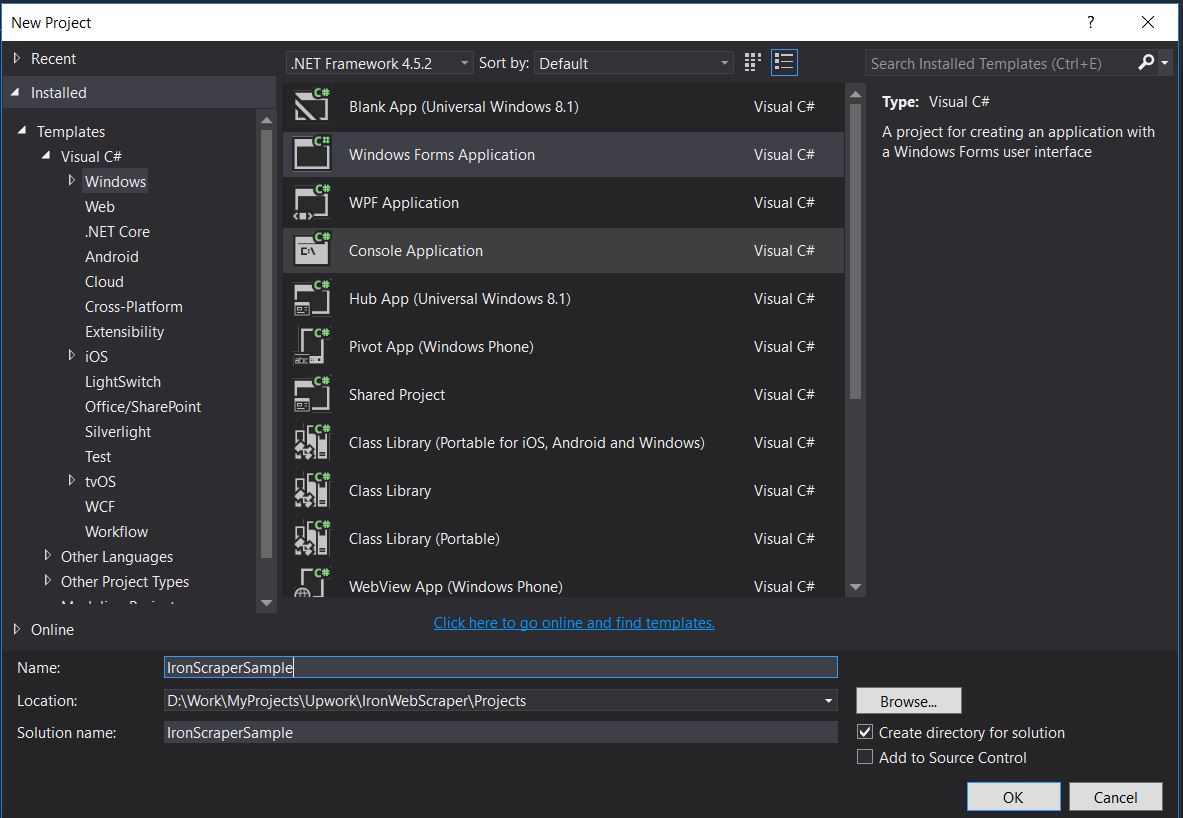
Nazwa projektu: IronScraperSample
Lokalizacja: Wybierz lokalizację na swoim dysku.
Jak utworzyć aplikację ASP.NET Web Form?
-
Otwórz program Visual Studio.
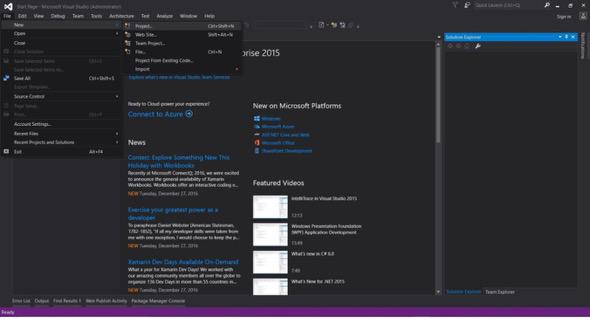
-
Plik -> Nowy -> Projekt
-
Wybierz Visual C# lub VB -> Web -> Aplikacja Web ASP.NET (.NET Framework).
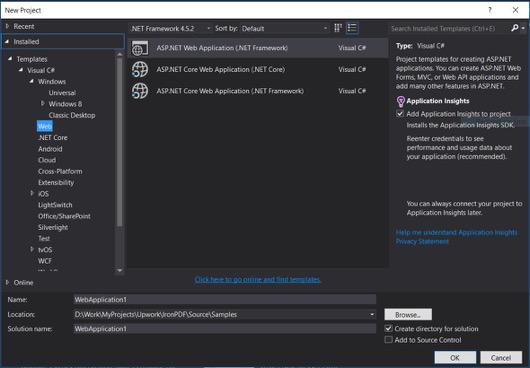
Nazwa projektu: IronScraperSample
Lokalizacja: Wybierz lokalizację na swoim dysku.
-
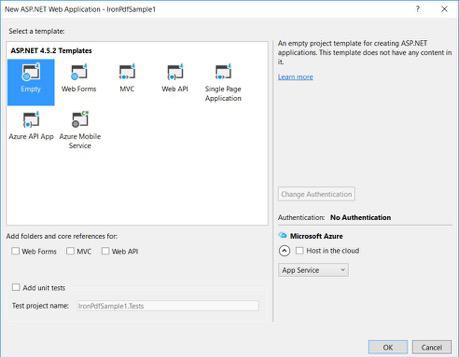
Z szablonów ASP.NET wybierz pusty szablon i zaznacz Web Forms.
-
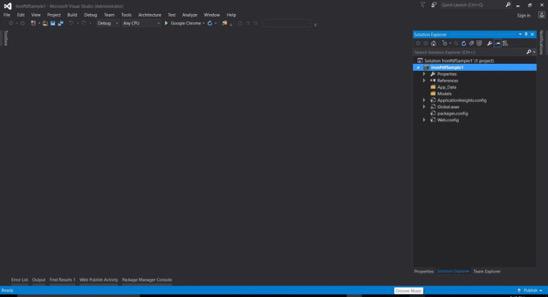
Twój podstawowy projekt ASP.NET Web Form został utworzony.
Pobierz pełny kod projektu przykładowego samouczka tutaj.
Często Zadawane Pytania
Jak pobierać dane ze stron internetowych w języku C#?
Możesz użyć IronWebscraper do pobierania danych ze stron internetowych w języku C#. Zacznij od zainstalowania biblioteki za pośrednictwem NuGet i skonfiguruj podstawową aplikację konsolową, aby rozpocząć wydajne pozyskiwanie danych z sieci.
Jakie są warunki wstępne do scrapingu stron internetowych w języku C#?
Aby wykonywać web scraping w języku C#, należy posiadać podstawowe umiejętności programistyczne w języku C# lub VB.NET oraz rozumieć technologie internetowe, takie jak HTML, JavaScript i CSS, a także znać DOM, XPath i selektory CSS.
Jak zainstalować bibliotekę do scrapingu stron internetowych w projekcie .NET?
Aby zainstalować IronWebscraper w projekcie .NET, należy użyć konsoli menedżera pakietów NuGet, wpisując polecenie Install-Package IronWebscraper, lub przejść do interfejsu menedżera pakietów NuGet w programie Visual Studio.
Jak mogę zaimplementować ograniczanie liczby żądań w moim narzędziu do scrapingu stron internetowych?
IronWebscraper pozwala na wdrożenie ograniczania żądań w celu zarządzania częstotliwością żądań wysyłanych do serwera. Można to skonfigurować za pomocą ustawień takich jak MaxHttpConnectionLimit, RateLimitPerHost i OpenConnectionLimitPerHost.
Jaki jest cel włączenia pamięci podręcznej w procesie scrapingu stron internetowych?
Włączenie pamięci podręcznej w web scrapingu pomaga zmniejszyć liczbę żądań wysyłanych do serwera poprzez przechowywanie i ponowne wykorzystywanie poprzednich odpowiedzi. Można to skonfigurować w IronWebscraper za pomocą metody EnableWebCache.
Jak można rozwiązać kwestię uwierzytelniania podczas scrapingu stron internetowych?
Dzięki IronWebscraper możesz używać HttpIdentity do zarządzania uwierzytelnianiem, co pozwala na dostęp do treści za formularzami logowania lub w obszarach o ograniczonym dostępie, umożliwiając w ten sposób pobieranie zasobów chronionych.
Jaki jest prosty przykład narzędzia do scrapingu stron internetowych w języku C#?
„HelloScraper” to prosty przykład podany w samouczku. Pokazuje on konfigurację podstawowego narzędzia do scrapingu stron internetowych przy użyciu IronWebscraper, w tym sposób inicjowania żądań i analizowania odpowiedzi.
Jak mogę rozszerzyć mój web scraper, aby obsługiwał złożone struktury stron?
Korzystając z IronWebscraper, możesz rozszerzyć swój scraper, aby obsługiwał złożone struktury stron, dostosowując metody Parse do przetwarzania różnych typów stron, co pozwala na elastyczne strategie pozyskiwania danych.
Jakie są zalety korzystania z biblioteki do scrapingu stron internetowych?
Korzystanie z biblioteki do scrapingu stron internetowych, takiej jak IronWebscraper, oferuje korzyści, takie jak usprawnione pozyskiwanie danych, zarządzanie domenami, ograniczanie liczby żądań, buforowanie oraz obsługa uwierzytelniania, co umożliwia wydajną obsługę zadań związanych ze scrapingiem stron internetowych.
How can developers extend the functionality of IronWebScraper for specific data extraction needs?
Developers can inherit from the IronWebScraper.WebScraper class to extend functionality and implement custom data extraction logic by overriding methods like Init() and Parse(Response response).

Curtis Chau posiada tytuł licencjata z informatyki (Uniwersytet Carleton) i specjalizuje się w front-endowym rozwoju, z ekspertką w Node.js, TypeScript, JavaScript i React. Pasjonuje się tworzeniem intuicyjnych i estetycznie przyjemnych interfejsów użytkownika, Curtis cieszy się pracą z nowoczesnymi frameworkami i tworzeniem dobrze zorganizowanych, atrakcyjnych wizualnie podręczników.













