


使用C#和IronWebScraper爬取線上電影網站

IronWebScraper通過解析HTML元素從網站中提取電影資料,建立型別化物件以進行結構化資料儲存,並使用元資料在頁面間導航,以構建全面的電影資訊資料集。 這個C# Web Scraper程式庫簡化了將非結構化的網站內容轉換為有組織的、可分析的資料的過程。
快速入門:在C#中爬取電影
- 通過NuGet Package Manager安裝
IronWebScraper - 建立一個繼承自
WebScraper的類 - 重寫
Init()以設置授權並請求目標URL - 重寫
Parse()以使用CSS選擇器提取電影資料 - 使用
Scrape()方法以JSON格式保存資料
-
使用NuGet套件管理器安裝https://www.nuget.org/packages/IronWebScraper
-
複製並運行這段程式碼片段。
using IronWebScraper; using System; public class QuickstartMovieScraper : WebScraper { public override void Init() { // Set your license key License.LicenseKey = "YOUR-LICENSE-KEY"; // Configure scraper settings this.LoggingLevel = LogLevel.All; this.WorkingDirectory = @"C:\MovieData\Output\"; // Start scraping from the homepage this.Request("https://example-movie-site.com", Parse); } public override void Parse(Response response) { // Extract movie titles using CSS selectors foreach (var movieDiv in response.Css(".movie-item")) { var title = movieDiv.Css("h2")[0].TextContentClean; var url = movieDiv.Css("a")[0].Attributes["href"]; // Save the scraped data Scrape(new { Title = title, Url = url }, "movies.json"); } } } // Run the scraper var scraper = new QuickstartMovieScraper(); scraper.Start(); -
部署以在您的實時環境中測試
今天就開始在您的專案中使用IronWebScraper,透過免費試用

如何設置電影爬蟲類?
從一個真實的網站範例開始。 我們將使用在C#中的網站爬蟲教程中列出的技術來爬取一個電影網站。
新增一個類並命名它為MovieScraper:
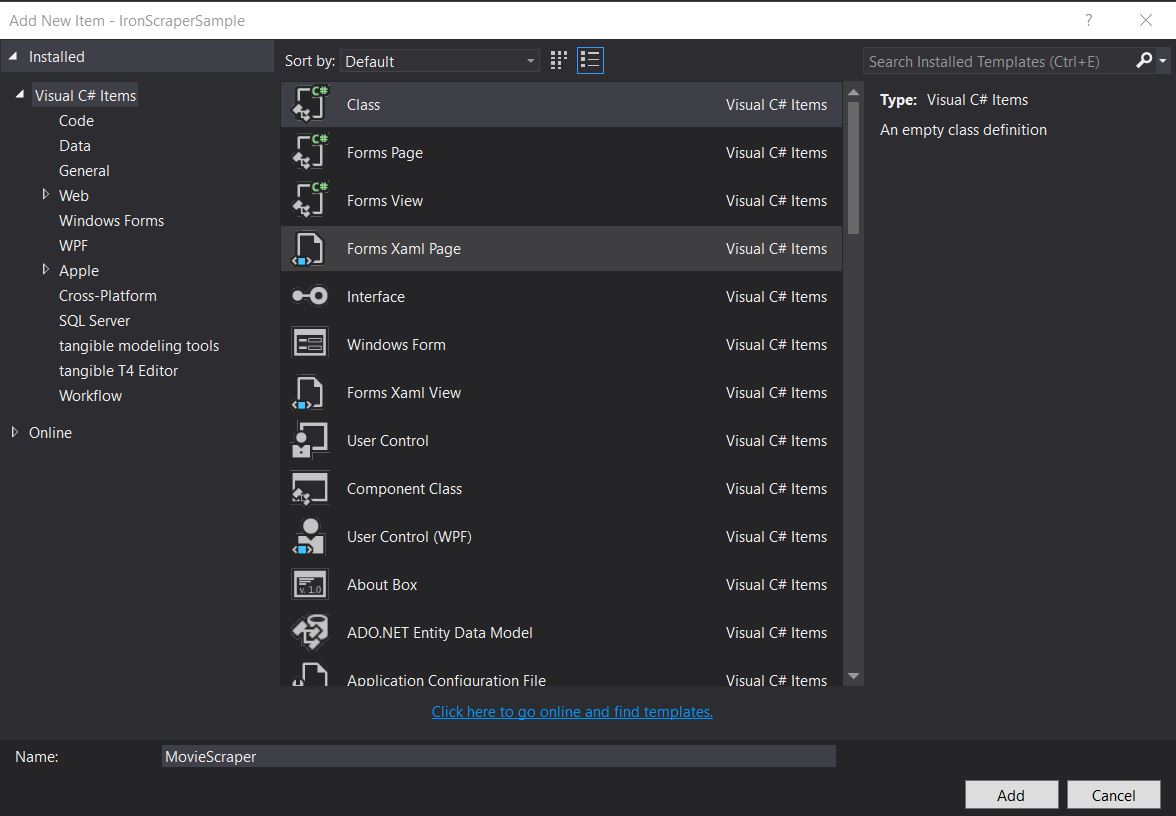
建立一個專用的爬蟲類有助於組織程式碼並使其可重用。 此方法遵循面向物件的原則,允許您在之後輕鬆擴展功能。
目標網站結構是什麼樣的?
檢查要爬取的網站結構。 了解網站的結構對有效的網站爬取至關重要。 類似於我們的從線上電影網站爬取資料指南,首先分析HTML結構:
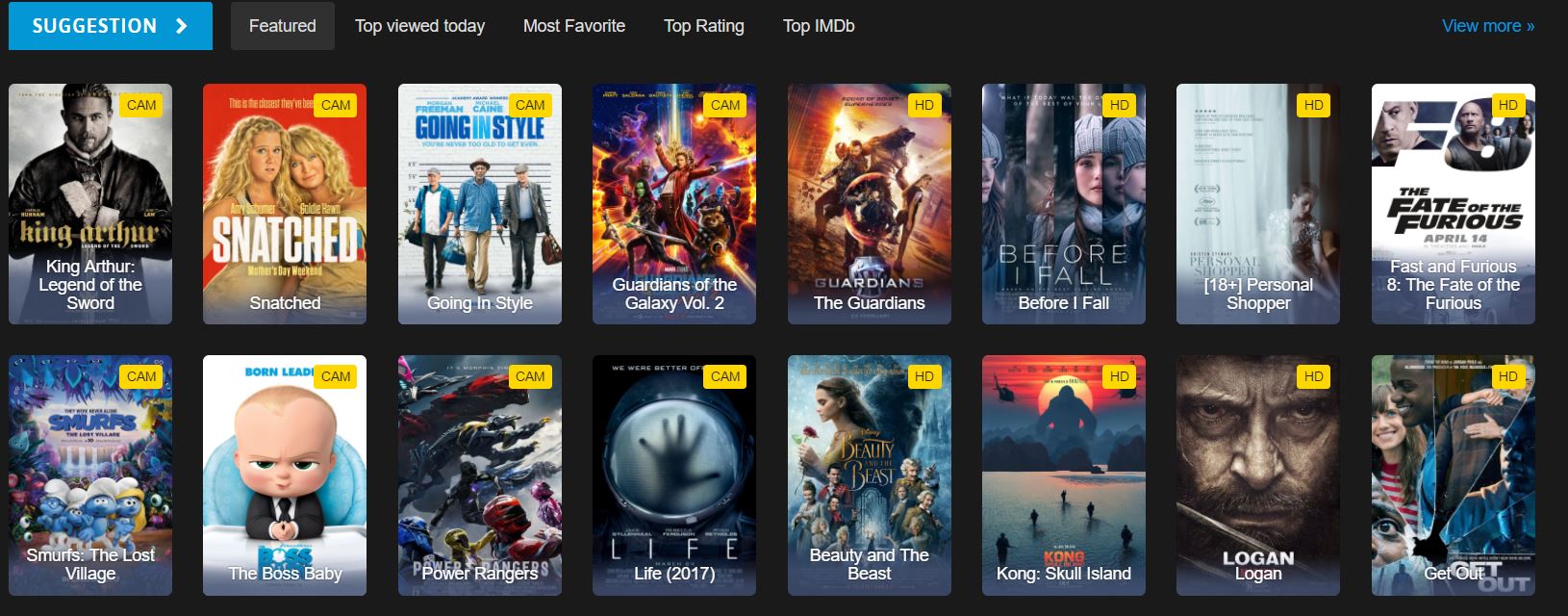
哪些HTML元素包含電影資料?
這是我們在網站上看到的首頁HTML的一部分。檢查HTML結構有助於識別要使用的正確CSS選擇器:
<div id="movie-featured" class="movies-list movies-list-full tab-pane in fade active">
    <div data-movie-id="20746" class="ml-item">
        <a href="https://website.com/film/king-arthur-legend-of-the-sword-20746/">
            <span class="mli-quality">CAM</span>
            <img data-original="https://img.gocdn.online/2017/05/16/poster/2116d6719c710eabe83b377463230fbe-king-arthur-legend-of-the-sword.jpg"
                 class="lazy thumb mli-thumb" alt="King Arthur: Legend of the Sword"
                 src="https://img.gocdn.online/2017/05/16/poster/2116d6719c710eabe83b377463230fbe-king-arthur-legend-of-the-sword.jpg"
                 style="display: inline-block;">
            <span class="mli-info"><h2>King Arthur: Legend of the Sword</h2></span>
        </a>
    </div>
    <div data-movie-id="20724" class="ml-item">
        <a href="https://website.com/film/snatched-20724/">
            <span class="mli-quality">CAM</span>
            <img data-original="https://img.gocdn.online/2017/05/16/poster/5ef66403dc331009bdb5aa37cfe819ba-snatched.jpg"
                 class="lazy thumb mli-thumb" alt="Snatched"
                 src="https://img.gocdn.online/2017/05/16/poster/5ef66403dc331009bdb5aa37cfe819ba-snatched.jpg"
                 style="display: inline-block;">
            <span class="mli-info"><h2>Snatched</h2></span>
        </a>
    </div>
</div>
<div id="movie-featured" class="movies-list movies-list-full tab-pane in fade active">
<div data-movie-id="20746" class="ml-item">
<a href="https://website.com/film/king-arthur-legend-of-the-sword-20746/">
<span class="mli-quality">CAM</span>
<img data-original="https://img.gocdn.online/2017/05/16/poster/2116d6719c710eabe83b377463230fbe-king-arthur-legend-of-the-sword.jpg"
class="lazy thumb mli-thumb" alt="King Arthur: Legend of the Sword"
src="https://img.gocdn.online/2017/05/16/poster/2116d6719c710eabe83b377463230fbe-king-arthur-legend-of-the-sword.jpg"
style="display: inline-block;">
<span class="mli-info"><h2>King Arthur: Legend of the Sword</h2></span>
</a>
</div>
<div data-movie-id="20724" class="ml-item">
<a href="https://website.com/film/snatched-20724/">
<span class="mli-quality">CAM</span>
<img data-original="https://img.gocdn.online/2017/05/16/poster/5ef66403dc331009bdb5aa37cfe819ba-snatched.jpg"
class="lazy thumb mli-thumb" alt="Snatched"
src="https://img.gocdn.online/2017/05/16/poster/5ef66403dc331009bdb5aa37cfe819ba-snatched.jpg"
style="display: inline-block;">
<span class="mli-info"><h2>Snatched</h2></span>
</a>
</div>
</div>我們有一個電影ID、標題以及指向詳細頁面的連結。 每部電影都包含在一個data-movie-id屬性以進行識別。
如何實施基礎的電影爬取?
開始爬取該資料集。 在運行任何爬蟲之前,請確保已經正確配置了您的授權密鑰,如下所示:
public class MovieScraper : WebScraper
{
    public override void Init()
    {
        // Initialize scraper settings
        License.LicenseKey = "LicenseKey";
        this.LoggingLevel = WebScraper.LogLevel.All;
        this.WorkingDirectory = AppSetting.GetAppRoot() + @"\MovieSample\Output\";

        // Request homepage content for scraping
        this.Request("www.website.com", Parse);
    }

    public override void Parse(Response response)
    {
        // Iterate over each movie div within the featured movie section
        foreach (var div in response.Css("#movie-featured > div"))
        {
            if (div.Attributes["class"] != "clearfix")
            {
                var movieId = Convert.ToInt32(div.GetAttribute("data-movie-id"));
                var link = div.Css("a")[0];
                var movieTitle = link.TextContentClean;

                // Scrape and store movie data as key-value pairs
                Scrape(new ScrapedData()
                {
                    { "MovieId", movieId },
                    { "MovieTitle", movieTitle }
                }, "Movie.Jsonl");
            }
        }
    }
}
public class MovieScraper : WebScraper
{
public override void Init()
{
// Initialize scraper settings
License.LicenseKey = "LicenseKey";
this.LoggingLevel = WebScraper.LogLevel.All;
this.WorkingDirectory = AppSetting.GetAppRoot() + @"\MovieSample\Output\";
// Request homepage content for scraping
this.Request("www.website.com", Parse);
}
public override void Parse(Response response)
{
// Iterate over each movie div within the featured movie section
foreach (var div in response.Css("#movie-featured > div"))
{
if (div.Attributes["class"] != "clearfix")
{
var movieId = Convert.ToInt32(div.GetAttribute("data-movie-id"));
var link = div.Css("a")[0];
var movieTitle = link.TextContentClean;
// Scrape and store movie data as key-value pairs
Scrape(new ScrapedData()
{
{ "MovieId", movieId },
{ "MovieTitle", movieTitle }
}, "Movie.Jsonl");
}
}
}
}Public Class MovieScraper
Inherits WebScraper
Public Overrides Sub Init()
' Initialize scraper settings
License.LicenseKey = "LicenseKey"
Me.LoggingLevel = WebScraper.LogLevel.All
Me.WorkingDirectory = AppSetting.GetAppRoot() & "\MovieSample\Output\"
' Request homepage content for scraping
Me.Request("www.website.com", AddressOf Parse)
End Sub
Public Overrides Sub Parse(ByVal response As Response)
' Iterate over each movie div within the featured movie section
For Each div In response.Css("#movie-featured > div")
If div.Attributes("class") <> "clearfix" Then
Dim movieId = Convert.ToInt32(div.GetAttribute("data-movie-id"))
Dim link = div.Css("a")(0)
Dim movieTitle = link.TextContentClean
' Scrape and store movie data as key-value pairs
Scrape(New ScrapedData() From {
{ "MovieId", movieId },
{ "MovieTitle", movieTitle }
},
"Movie.Jsonl")
End If
Next div
End Sub
End Class工作目錄屬性是用來做什麼的?
這段程式碼有什麼新的?
Working Directory屬性設置了所有爬取資料和相關文件的主要工作目錄。 這確保所有輸出文件都組織在一個位置,便於管理大規模的爬取項目。 如果目錄不存在,將自動建立。
何時應使用CSS選擇器與屬性?
其他考慮:
CSS選擇器在按照結構位置或類名定位元素時是理想的,而直接存取屬性對於提取特定值如ID或自定義資料屬性更為有效。 在我們的範例中,我們使用CSS選擇器(data-movie-id)來提取特定值。
如何為爬取的資料建立型別化物件?
建立型別化物件以保存格式化的爬取資料。 使用強型別物件提供更好的程式碼組織,IntelliSense支持和編譯時型別檢查。
實現一個Movie類以保存格式化資料:
public class Movie
{
    public int Id { get; set; }
    public string Title { get; set; }
    public string URL { get; set; }
}
public class Movie
{
public int Id { get; set; }
public string Title { get; set; }
public string URL { get; set; }
}Public Class Movie
Public Property Id As Integer
Public Property Title As String
Public Property URL As String
End Class使用型別化物件如何改善資料組織?
更新程式碼以使用型別化ScrapedData字典:
public class MovieScraper : WebScraper
{
    public override void Init()
    {
        // Initialize scraper settings
        License.LicenseKey = "LicenseKey";
        this.LoggingLevel = WebScraper.LogLevel.All;
        this.WorkingDirectory = AppSetting.GetAppRoot() + @"\MovieSample\Output\";

        // Request homepage content for scraping
        this.Request("https://website.com/", Parse);
    }

    public override void Parse(Response response)
    {
        // Iterate over each movie div within the featured movie section
        foreach (var div in response.Css("#movie-featured > div"))
        {
            if (div.Attributes["class"] != "clearfix")
            {
                var movie = new Movie
                {
                    Id = Convert.ToInt32(div.GetAttribute("data-movie-id"))
                };

                var link = div.Css("a")[0];
                movie.Title = link.TextContentClean;
                movie.URL = link.Attributes["href"];

                // Scrape and store movie object
                Scrape(movie, "Movie.Jsonl");
            }
        }
    }
}
public class MovieScraper : WebScraper
{
public override void Init()
{
// Initialize scraper settings
License.LicenseKey = "LicenseKey";
this.LoggingLevel = WebScraper.LogLevel.All;
this.WorkingDirectory = AppSetting.GetAppRoot() + @"\MovieSample\Output\";
// Request homepage content for scraping
this.Request("https://website.com/", Parse);
}
public override void Parse(Response response)
{
// Iterate over each movie div within the featured movie section
foreach (var div in response.Css("#movie-featured > div"))
{
if (div.Attributes["class"] != "clearfix")
{
var movie = new Movie
{
Id = Convert.ToInt32(div.GetAttribute("data-movie-id"))
};
var link = div.Css("a")[0];
movie.Title = link.TextContentClean;
movie.URL = link.Attributes["href"];
// Scrape and store movie object
Scrape(movie, "Movie.Jsonl");
}
}
}
}Public Class MovieScraper
Inherits WebScraper
Public Overrides Sub Init()
' Initialize scraper settings
License.LicenseKey = "LicenseKey"
Me.LoggingLevel = WebScraper.LogLevel.All
Me.WorkingDirectory = AppSetting.GetAppRoot() & "\MovieSample\Output\"
' Request homepage content for scraping
Me.Request("https://website.com/", AddressOf Parse)
End Sub
Public Overrides Sub Parse(ByVal response As Response)
' Iterate over each movie div within the featured movie section
For Each div In response.Css("#movie-featured > div")
If div.Attributes("class") <> "clearfix" Then
Dim movie As New Movie With {.Id = Convert.ToInt32(div.GetAttribute("data-movie-id"))}
Dim link = div.Css("a")(0)
movie.Title = link.TextContentClean
movie.URL = link.Attributes("href")
' Scrape and store movie object
Scrape(movie, "Movie.Jsonl")
End If
Next div
End Sub
End Class爬取方法使用哪種格式來處理型別化物件?
有什麼新的?
- 我們實現了一個
Movie類來保存爬取的資料,提供了型別安全和更好的程式碼組織。 - 我們將電影物件傳遞給
Scrape方法,該方法理解我們的格式並以定義的方式保存,如下所示:
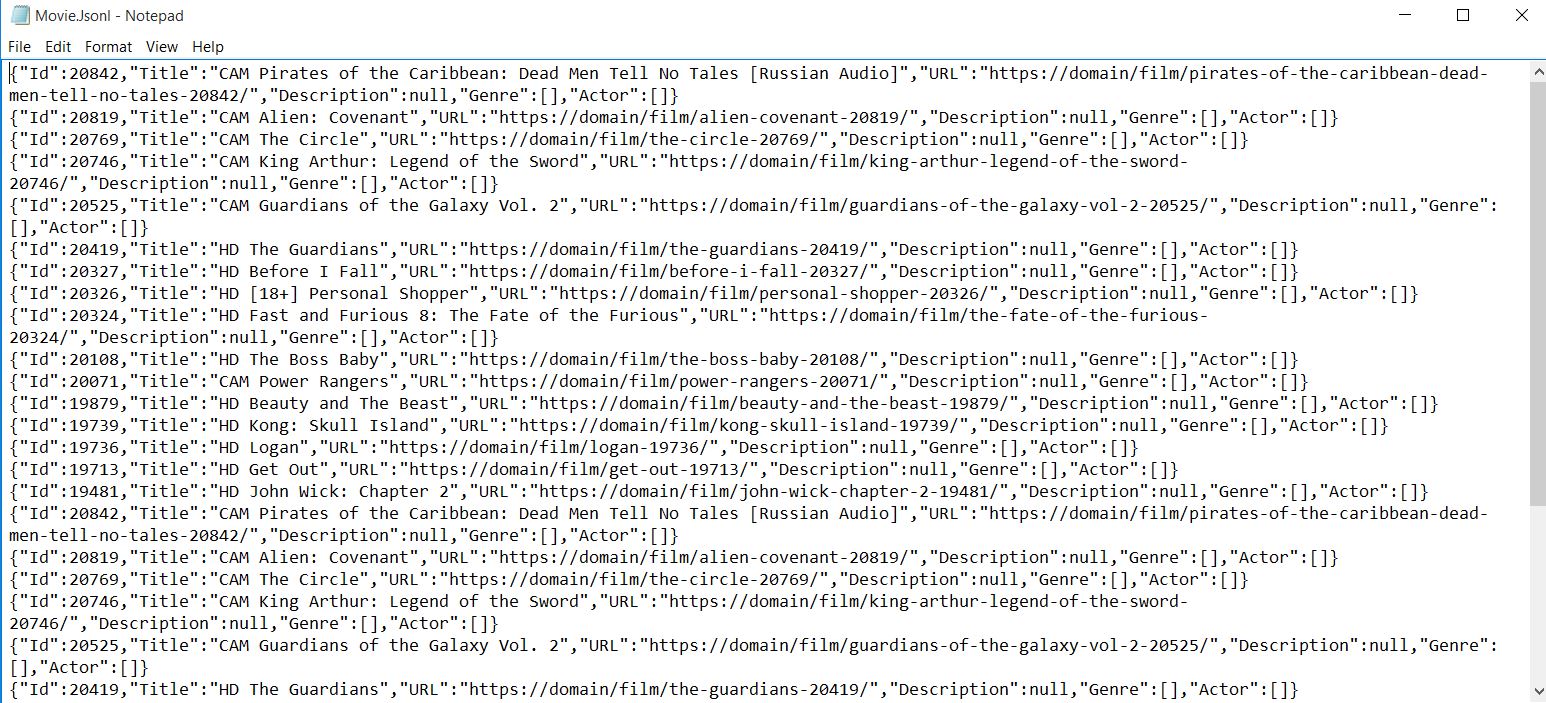
輸出會自動序列化為JSON格式,便於導入到資料庫或其他應用中。
如何爬取詳細的電影頁面?
開始爬取更詳細的頁面。 多頁爬取是一項常見需求,而IronWebScraper通過其請求鏈機制使之變得簡單。
我能從詳細頁面中提取哪些額外資料?
電影頁面大致如下,包含每部影片的豐富元資料:

<div class="mvi-content">
    <div class="thumb mvic-thumb"
         style="background-image: url(https://img.gocdn.online/2017/04/28/poster/5a08e94ba02118f22dc30f298c603210-guardians-of-the-galaxy-vol-2.jpg);"></div>
    <div class="mvic-desc">
        <h3>Guardians of the Galaxy Vol. 2</h3>
        <div class="desc">
            Set to the backdrop of Awesome Mixtape #2, Marvel's Guardians of the Galaxy Vol. 2 continues the team's adventures as they travel throughout the cosmos to help Peter Quill learn more about his true parentage.
        </div>
        <div class="mvic-info">
            <div class="mvici-left">
                <p>
                    <strong>Genre: </strong>
                    <a href="https://Domain/genre/action/" title="Action">Action</a>,
                    <a href="https://Domain/genre/adventure/" title="Adventure">Adventure</a>,
                    <a href="https://Domain/genre/sci-fi/" title="Sci-Fi">Sci-Fi</a>
                </p>
                <p>
                    <strong>Actor: </strong>
                    <a target="_blank" href="https://Domain/actor/chris-pratt" title="Chris Pratt">Chris Pratt</a>,
                    <a target="_blank" href="https://Domain/actor/-zoe-saldana" title="Zoe Saldana">Zoe Saldana</a>,
                    <a target="_blank" href="https://Domain/actor/-dave-bautista-" title="Dave Bautista">Dave Bautista</a>
                </p>
                <p>
                    <strong>Director: </strong>
                    <a href="#" title="James Gunn">James Gunn</a>
                </p>
                <p>
                    <strong>Country: </strong>
                    <a href="https://Domain/country/us" title="United States">United States</a>
                </p>
            </div>
            <div class="mvici-right">
                <p><strong>Duration:</strong> 136 min</p>
                <p><strong>Quality:</strong> <span class="quality">CAM</span></p>
                <p><strong>Release:</strong> 2017</p>
                <p><strong>IMDb:</strong> 8.3</p>
            </div>
            <div class="clearfix"></div>
        </div>
        <div class="clearfix"></div>
    </div>
    <div class="clearfix"></div>
</div>
<div class="mvi-content">
<div class="thumb mvic-thumb"
style="background-image: url(https://img.gocdn.online/2017/04/28/poster/5a08e94ba02118f22dc30f298c603210-guardians-of-the-galaxy-vol-2.jpg);"></div>
<div class="mvic-desc">
<h3>Guardians of the Galaxy Vol. 2</h3>
<div class="desc">
Set to the backdrop of Awesome Mixtape #2, Marvel's Guardians of the Galaxy Vol. 2 continues the team's adventures as they travel throughout the cosmos to help Peter Quill learn more about his true parentage.
</div>
<div class="mvic-info">
<div class="mvici-left">
<p>
<strong>Genre: </strong>
<a href="https://Domain/genre/action/" title="Action">Action</a>,
<a href="https://Domain/genre/adventure/" title="Adventure">Adventure</a>,
<a href="https://Domain/genre/sci-fi/" title="Sci-Fi">Sci-Fi</a>
</p>
<p>
<strong>Actor: </strong>
<a target="_blank" href="https://Domain/actor/chris-pratt" title="Chris Pratt">Chris Pratt</a>,
<a target="_blank" href="https://Domain/actor/-zoe-saldana" title="Zoe Saldana">Zoe Saldana</a>,
<a target="_blank" href="https://Domain/actor/-dave-bautista-" title="Dave Bautista">Dave Bautista</a>
</p>
<p>
<strong>Director: </strong>
<a href="#" title="James Gunn">James Gunn</a>
</p>
<p>
<strong>Country: </strong>
<a href="https://Domain/country/us" title="United States">United States</a>
</p>
</div>
<div class="mvici-right">
<p><strong>Duration:</strong> 136 min</p>
<p><strong>Quality:</strong> <span class="quality">CAM</span></p>
<p><strong>Release:</strong> 2017</p>
<p><strong>IMDb:</strong> 8.3</p>
</div>
<div class="clearfix"></div>
</div>
<div class="clearfix"></div>
</div>
<div class="clearfix"></div>
</div>如何擴展我的電影類以增加額外屬性?
擴展Description, Genre, Actor, Director, Country, Duration, Description, Actor。 使用List<string>處理型別和演員,允許優雅地處理多個值:
using System.Collections.Generic;

public class Movie
{
    public int Id { get; set; }
    public string Title { get; set; }
    public string URL { get; set; }
    public string Description { get; set; }
    public List<string> Genre { get; set; }
    public List<string> Actor { get; set; }
}
using System.Collections.Generic;
public class Movie
{
public int Id { get; set; }
public string Title { get; set; }
public string URL { get; set; }
public string Description { get; set; }
public List<string> Genre { get; set; }
public List<string> Actor { get; set; }
}Imports System.Collections.Generic
Public Class Movie
Public Property Id() As Integer
Public Property Title() As String
Public Property URL() As String
Public Property Description() As String
Public Property Genre() As List(Of String)
Public Property Actor() As List(Of String)
End Class如何在爬取時導航頁面之間?
導航到詳細頁以爬取它。 IronWebScraper自動處理執行緒安全,允許多頁面同時處理。
為什麼要針對不同頁面型別使用多個解析函式?
IronWebScraper允許新增多個爬取函式以處理不同的頁面格式。 這種關注點分離使程式碼更易於維護,並允許合適地處理不同的頁面結構。 每個解析函式可以專注於從特定的頁面型別中提取資料。
元資料如何幫助在解析函式之間傳遞物件?
MetaData功能對於在請求之間保持狀態至關重要。 如需更多進階網站爬取功能,請查閱我們的詳細指南:
public class MovieScraper : WebScraper
{
    public override void Init()
    {
        // Initialize scraper settings
        License.LicenseKey = "LicenseKey";
        this.LoggingLevel = WebScraper.LogLevel.All;
        this.WorkingDirectory = AppSetting.GetAppRoot() + @"\MovieSample\Output\";

        // Request homepage content for scraping
        this.Request("https://domain/", Parse);
    }

    public override void Parse(Response response)
    {
        // Iterate over each movie div within the featured movie section
        foreach (var div in response.Css("#movie-featured > div"))
        {
            if (div.Attributes["class"] != "clearfix")
            {
                var movie = new Movie
                {
                    Id = Convert.ToInt32(div.GetAttribute("data-movie-id"))
                };

                var link = div.Css("a")[0];
                movie.Title = link.TextContentClean;
                movie.URL = link.Attributes["href"];

                // Request detailed page
                this.Request(movie.URL, ParseDetails, new MetaData() { { "movie", movie } });
            }
        }
    }

    public void ParseDetails(Response response)
    {
        // Retrieve movie object from metadata
        var movie = response.MetaData.Get<Movie>("movie");
        var div = response.Css("div.mvic-desc")[0];

        // Extract description
        movie.Description = div.Css("div.desc")[0].TextContentClean;

        // Extract genres
        movie.Genre = new List<string>(); // Initialize genre list
        foreach(var genre in div.Css("div > p > a"))
        {
            movie.Genre.Add(genre.TextContentClean);
        }

        // Extract actors
        movie.Actor = new List<string>(); // Initialize actor list
        foreach (var actor in div.Css("div > p:nth-child(2) > a"))
        {
            movie.Actor.Add(actor.TextContentClean);
        }

        // Scrape and store detailed movie data
        Scrape(movie, "Movie.Jsonl");
    }
}
public class MovieScraper : WebScraper
{
public override void Init()
{
// Initialize scraper settings
License.LicenseKey = "LicenseKey";
this.LoggingLevel = WebScraper.LogLevel.All;
this.WorkingDirectory = AppSetting.GetAppRoot() + @"\MovieSample\Output\";
// Request homepage content for scraping
this.Request("https://domain/", Parse);
}
public override void Parse(Response response)
{
// Iterate over each movie div within the featured movie section
foreach (var div in response.Css("#movie-featured > div"))
{
if (div.Attributes["class"] != "clearfix")
{
var movie = new Movie
{
Id = Convert.ToInt32(div.GetAttribute("data-movie-id"))
};
var link = div.Css("a")[0];
movie.Title = link.TextContentClean;
movie.URL = link.Attributes["href"];
// Request detailed page
this.Request(movie.URL, ParseDetails, new MetaData() { { "movie", movie } });
}
}
}
public void ParseDetails(Response response)
{
// Retrieve movie object from metadata
var movie = response.MetaData.Get<Movie>("movie");
var div = response.Css("div.mvic-desc")[0];
// Extract description
movie.Description = div.Css("div.desc")[0].TextContentClean;
// Extract genres
movie.Genre = new List<string>(); // Initialize genre list
foreach(var genre in div.Css("div > p > a"))
{
movie.Genre.Add(genre.TextContentClean);
}
// Extract actors
movie.Actor = new List<string>(); // Initialize actor list
foreach (var actor in div.Css("div > p:nth-child(2) > a"))
{
movie.Actor.Add(actor.TextContentClean);
}
// Scrape and store detailed movie data
Scrape(movie, "Movie.Jsonl");
}
}Public Class MovieScraper
Inherits WebScraper
Public Overrides Sub Init()
' Initialize scraper settings
License.LicenseKey = "LicenseKey"
Me.LoggingLevel = WebScraper.LogLevel.All
Me.WorkingDirectory = AppSetting.GetAppRoot() & "\MovieSample\Output\"
' Request homepage content for scraping
Me.Request("https://domain/", AddressOf Parse)
End Sub
Public Overrides Sub Parse(ByVal response As Response)
' Iterate over each movie div within the featured movie section
For Each div In response.Css("#movie-featured > div")
If div.Attributes("class") <> "clearfix" Then
Dim movie As New Movie With {.Id = Convert.ToInt32(div.GetAttribute("data-movie-id"))}
Dim link = div.Css("a")(0)
movie.Title = link.TextContentClean
movie.URL = link.Attributes("href")
' Request detailed page
Me.Request(movie.URL, AddressOf ParseDetails, New MetaData() From {
{ "movie", movie }
})
End If
Next div
End Sub
Public Sub ParseDetails(ByVal response As Response)
' Retrieve movie object from metadata
Dim movie = response.MetaData.Get(Of Movie)("movie")
Dim div = response.Css("div.mvic-desc")(0)
' Extract description
movie.Description = div.Css("div.desc")(0).TextContentClean
' Extract genres
movie.Genre = New List(Of String)() ' Initialize genre list
For Each genre In div.Css("div > p > a")
movie.Genre.Add(genre.TextContentClean)
Next genre
' Extract actors
movie.Actor = New List(Of String)() ' Initialize actor list
For Each actor In div.Css("div > p:nth-child(2) > a")
movie.Actor.Add(actor.TextContentClean)
Next actor
' Scrape and store detailed movie data
Scrape(movie, "Movie.Jsonl")
End Sub
End Class這個多頁面爬取方法的關鍵特徵是什麼?
有什麼新的?
- 新增爬取函式(e.g.,
ParseDetails)以爬取詳細頁面,類似於我們在從購物網站爬取資料時使用的技術。 - 將生成文件的
Scrape功能移至新功能,以確保所有細節收集完畢後才保存資料。 - 使用IronWebScraper功能(
MetaData)將電影物件傳遞給新的爬取函式,在請求之間保持物件狀態。 - 爬取頁面並將電影物件資料連同完整資訊一起保存到文件中。
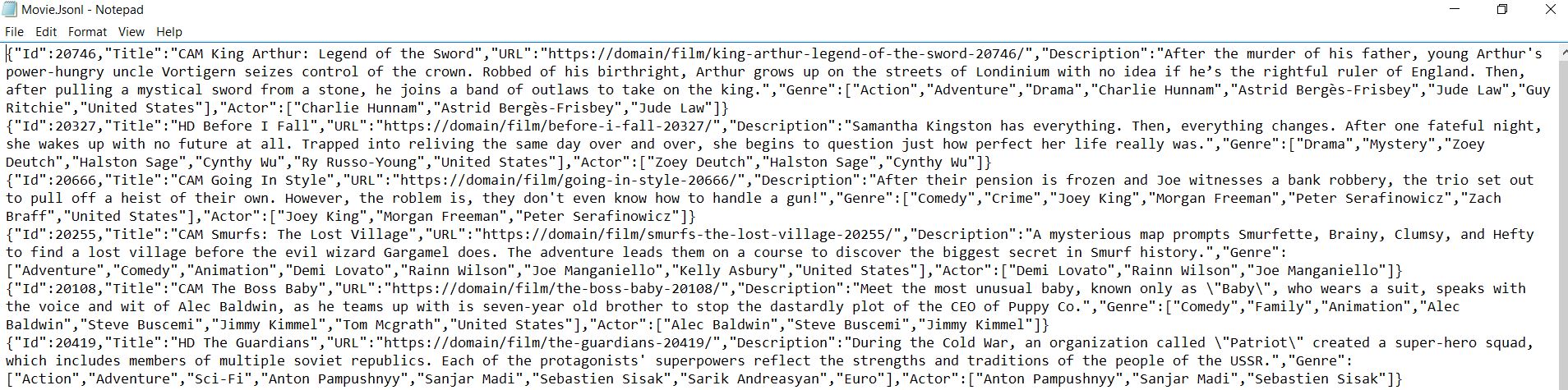
有關可用方法和屬性的更多資訊,請查閱API參考。 IronWebScraper提供了一個強大的框架,用於從網站提取結構化資料,使其成為資料收集和分析項目的重要工具。
常見問題
如何使用 C# 從 HTML 中提取電影名稱?
IronWebScraper 提供 CSS 選擇器方法從 HTML 提取電影名稱。使用 response.Css() 方法並選擇適當的選擇器,如 '.movie-item h2' 來定位標題元素,然後存取 TextContentClean 屬性以獲取乾淨的文字值。
導航多個電影頁面的最佳方法是什麼?
IronWebScraper 通過 Request() 方法處理頁面導航。您可以使用 CSS 選擇器提取分頁連結,然後使用每個 URL 調用 Request() 以從多個頁面擷取資料,並自動建立全面的電影資料集。
如何將擷取的電影資料保存為結構化格式?
using IronWebScraper 的 Scrape() 方法以 JSON 格式保存資料。建立匿名物件或型別化類別,包含電影屬性如標題、URL 和評分,然後將它們傳遞給 Scrape() 並新增文件名,以自動序列化並保存資料。
應使用哪些 CSS 選擇器以提取電影資訊?
IronWebScraper 支持標準 CSS 選擇器。對於電影網站,使用選擇器如 '.movie-item' 用於容器,'h2' 用於標題,'a[href]' 用於連結,以及特定類名稱用於評分或型別。Css() 方法返回您可以遍歷的集合。
如何處理擷取資料中像 'CAM' 的電影質量指示符?
IronWebScraper 允許您藉由定位其特定 HTML 元素提取和處理質量指示符。使用 CSS 選擇器找到質量標記或文字,然後將其作為屬性包含在您的擷取資料物件中,以獲取詳細的電影資訊。
我可以為電影擷取操作設置記錄嗎?
可以,IronWebScraper 包含內建的日誌記錄功能。在您的 Init() 方法中設置 LoggingLevel 屬性為 LogLevel.All,以追蹤所有擷取活動、錯誤和進度,以助於除錯和監控您的電影資料擷取。
配置擷取資料的工作目錄的正確方法是什麼?
IronWebScraper 讓您在 Init() 方法中設置 WorkingDirectory 屬性。指定一個路徑如 'C:\MovieData\Output\',那裡的擷取電影資料文件將被保存。這樣集中化管理輸出,保持資料井然有序。
如何正確從 WebScraper 類繼承?
建立一個新類別,繼承自 IronWebScraper 的 WebScraper 基類。重寫 Init() 方法進行配置和 Parse() 方法以執行資料擷取邏輯。這種面向物件的方法使您的電影擷取器可重用並易於維護。


還在捲動嗎?
想快速獲得證明嗎? PM > Install-Package IronWebScraper
執行一個範例 看您的目標網站變成結構化資料。






 免費開始
免費開始 免費開始
免費開始 預訂免費直播演示
















