




已更新 2026年6月28日
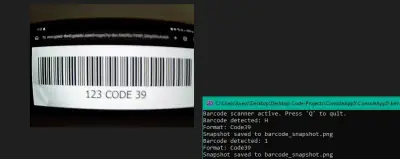
using C# 和網路攝影機建立條碼掃描器
using IronBarcode,用 C# 和網路攝影機建立一個條碼掃描器。即時擷取視訊幀,解碼條碼和二維碼。包含完整原始碼。
閱讀更多

這篇教學將示範如何在C#命令列應用程式與.NET Windows Forms應用程式中使用IronBarcode程式庫來掃描QR碼與條碼。
使用IronBarcode程式庫,可以同時掃描和讀取多個條碼,並且還可以成功掃描不完美的圖像。 讓我們先釐清條碼掃描器是什麼。
條碼是一種由不同寬度的平行黑線和白空間組成的方形或矩形圖像。 條碼掃描器或條碼閱讀器是一種可以讀取印刷條碼、解碼條碼中包含的資料並將其傳送到電腦的裝置。
以下的步驟將介紹如何利用IronBarcode程式庫建立條碼掃描器。
打開Visual Studio > 點擊建立新專案 > 選擇Windows Forms Application Template > 按下下一步 > 為專案命名 > 按下下一步 > 選擇您的目標.NET Framework > 點擊建立按鈕。
建立專案後,從Visual Studio工具箱中設計下面的表單:PictureBox、Label、TextBox和Button控制項。
 條碼掃描器
條碼掃描器
條碼程式庫可以透過以下三種方法之一安裝:
在套件管理器主控台中輸入以下命令。 它會為您下載並安裝該套件。
您也可以使用NuGet軟體包解決方案來安裝條碼程式庫。 只需遵循以下步驟:
點擊 工具 > NuGet 套件管理器 > 為解決方案管理 NuGet 套件。
這將為您打開 NuGet 套件管理器。 點擊瀏覽並搜尋條碼,然後安裝這個類別程式庫。
作為替代方案,可以下載IronBarCode.Dll,並作為參考新增到您的專案中。
下載完成後,將以下引用新增到您的條碼閱讀器專案中。
using IronBarCode;Imports IronBarCodeImports IronBarCode使用IronBarcode程式庫中的.NET Barcode Reader,在.NET中讀取條碼或QR碼是非常簡單的。
在您的專案中,瀏覽您希望讀取的圖像。 它將在PictureBox中打開; 現在點擊"掃描程式碼"。 文字將出現在文字框中。
這是"瀏覽"按鈕以開啟圖像的程式碼:
// Open file dialog
OpenFileDialog open = new OpenFileDialog();
// Image filters
open.Filter = "Image Files(*.jpg; *.png; *.jpeg; *.gif; *.bmp)|*.jpg;*.png;*.jpeg;*.gif;*.bmp";
if (open.ShowDialog() == DialogResult.OK) {
    // Display image in PictureBox
    pictureBox1.Image = new Bitmap(open.FileName);
    // Store image file path in class data member. Initialize it as string ImageFileName;
    ImageFileName = open.FileName;
}
// Open file dialog
OpenFileDialog open = new OpenFileDialog();
// Image filters
open.Filter = "Image Files(*.jpg; *.png; *.jpeg; *.gif; *.bmp)|*.jpg;*.png;*.jpeg;*.gif;*.bmp";
if (open.ShowDialog() == DialogResult.OK) {
// Display image in PictureBox
pictureBox1.Image = new Bitmap(open.FileName);
// Store image file path in class data member. Initialize it as string ImageFileName;
ImageFileName = open.FileName;
}' Open file dialog
Dim open As New OpenFileDialog()
' Image filters
open.Filter = "Image Files(*.jpg; *.png; *.jpeg; *.gif; *.bmp)|*.jpg;*.png;*.jpeg;*.gif;*.bmp"
If open.ShowDialog() = DialogResult.OK Then
' Display image in PictureBox
pictureBox1.Image = New Bitmap(open.FileName)
' Store image file path in class data member. Initialize it as string ImageFileName;
ImageFileName = open.FileName
End If' Open file dialog
Dim open As New OpenFileDialog()
' Image filters
open.Filter = "Image Files(*.jpg; *.png; *.jpeg; *.gif; *.bmp)|*.jpg;*.png;*.jpeg;*.gif;*.bmp"
If open.ShowDialog() = DialogResult.OK Then
' Display image in PictureBox
pictureBox1.Image = New Bitmap(open.FileName)
' Store image file path in class data member. Initialize it as string ImageFileName;
ImageFileName = open.FileName
End If"掃描程式碼"按鈕的程式碼:
// Read the barcode from the image file path
BarcodeResult Result = BarcodeReader.Read(ImageFileName);
// Display the decoded text in TextBox
textBox1.Text = Result.Text;
// Read the barcode from the image file path
BarcodeResult Result = BarcodeReader.Read(ImageFileName);
// Display the decoded text in TextBox
textBox1.Text = Result.Text;' Read the barcode from the image file path
Dim Result As BarcodeResult = BarcodeReader.Read(ImageFileName)
' Display the decoded text in TextBox
textBox1.Text = Result.Text' Read the barcode from the image file path
Dim Result As BarcodeResult = BarcodeReader.Read(ImageFileName)
' Display the decoded text in TextBox
textBox1.Text = Result.Text條碼掃描器會在文字框中顯示條碼資料如下:
 C#掃描的條碼圖像
在本節中,IronBarcode程式庫能夠有效處理涉及偏斜QR碼的真實情境。 雖然Read方法可以處理並讀取偏斜角度的QR碼,但可能需要花比較多的時間解決。 IronBarcode程式庫提供了一種定制化方式,利用BarcodeReaderOptions作為額外的參數來處理這些圖像輸入。 程式碼如下所示:
// Define a collection of image filters to apply
var filtersToApply = new ImageFilterCollection() {
    new SharpenFilter(),
    new InvertFilter(),
    new ContrastFilter(),
    new BrightnessFilter(),
    new AdaptiveThresholdFilter(),
    new BinaryThresholdFilter()
};

// Configure barcode reader options with specified filters
BarcodeReaderOptions myOptionsExample = new BarcodeReaderOptions() {
    ImageFilters = filtersToApply,
    ExpectBarcodeTypes = BarcodeEncoding.QRCode | BarcodeEncoding.Code128,
};

// Read the barcode/QR code with custom options and display result
BarcodeResult Result = BarcodeReader.Read(ImageFileName, myOptionsExample);
textBox1.Text = Result.Text;
// Define a collection of image filters to apply
var filtersToApply = new ImageFilterCollection() {
new SharpenFilter(),
new InvertFilter(),
new ContrastFilter(),
new BrightnessFilter(),
new AdaptiveThresholdFilter(),
new BinaryThresholdFilter()
};
// Configure barcode reader options with specified filters
BarcodeReaderOptions myOptionsExample = new BarcodeReaderOptions() {
ImageFilters = filtersToApply,
ExpectBarcodeTypes = BarcodeEncoding.QRCode | BarcodeEncoding.Code128,
};
// Read the barcode/QR code with custom options and display result
BarcodeResult Result = BarcodeReader.Read(ImageFileName, myOptionsExample);
textBox1.Text = Result.Text;' Define a collection of image filters to apply
Dim filtersToApply = New ImageFilterCollection() From {
New SharpenFilter(),
New InvertFilter(),
New ContrastFilter(),
New BrightnessFilter(),
New AdaptiveThresholdFilter(),
New BinaryThresholdFilter()
}
' Configure barcode reader options with specified filters
Dim myOptionsExample As New BarcodeReaderOptions() With {
.ImageFilters = filtersToApply,
.ExpectBarcodeTypes = BarcodeEncoding.QRCode Or BarcodeEncoding.Code128
}
' Read the barcode/QR code with custom options and display result
Dim Result As BarcodeResult = BarcodeReader.Read(ImageFileName, myOptionsExample)
textBox1.Text = Result.Text' Define a collection of image filters to apply
Dim filtersToApply = New ImageFilterCollection() From {
New SharpenFilter(),
New InvertFilter(),
New ContrastFilter(),
New BrightnessFilter(),
New AdaptiveThresholdFilter(),
New BinaryThresholdFilter()
}
' Configure barcode reader options with specified filters
Dim myOptionsExample As New BarcodeReaderOptions() With {
.ImageFilters = filtersToApply,
.ExpectBarcodeTypes = BarcodeEncoding.QRCode Or BarcodeEncoding.Code128
}
' Read the barcode/QR code with custom options and display result
Dim Result As BarcodeResult = BarcodeReader.Read(ImageFileName, myOptionsExample)
textBox1.Text = Result.Text在打開偏斜QR碼圖像後,輸出將如下:
 偏斜QR碼圖像
可以從PDF文件中掃描條碼圖像,並將每個結果按需求適當顯示。 以下範例程式碼允許您從PDF文件中讀取多個條碼。
// Scan for multiple barcodes within a PDF document
BarcodeResult[] PDFResults = BarcodeReader.ReadPdf("MultipleBarcodes.pdf");

// Work with the results found
foreach (var PageResult in PDFResults) {
    string Value = PageResult.Value;
    int PageNum = PageResult.PageNumber;
    System.Drawing.Bitmap Img = PageResult.BarcodeImage;
    BarcodeEncoding BarcodeType = PageResult.BarcodeType;
    byte[] Binary = PageResult.BinaryValue;
    Console.WriteLine(PageResult.Value + " on page " + PageNum);
}
// Scan for multiple barcodes within a PDF document
BarcodeResult[] PDFResults = BarcodeReader.ReadPdf("MultipleBarcodes.pdf");
// Work with the results found
foreach (var PageResult in PDFResults) {
string Value = PageResult.Value;
int PageNum = PageResult.PageNumber;
System.Drawing.Bitmap Img = PageResult.BarcodeImage;
BarcodeEncoding BarcodeType = PageResult.BarcodeType;
byte[] Binary = PageResult.BinaryValue;
Console.WriteLine(PageResult.Value + " on page " + PageNum);
}' Scan for multiple barcodes within a PDF document
Dim PDFResults() As BarcodeResult = BarcodeReader.ReadPdf("MultipleBarcodes.pdf")
' Work with the results found
For Each PageResult In PDFResults
Dim Value As String = PageResult.Value
Dim PageNum As Integer = PageResult.PageNumber
Dim Img As System.Drawing.Bitmap = PageResult.BarcodeImage
Dim BarcodeType As BarcodeEncoding = PageResult.BarcodeType
Dim Binary() As Byte = PageResult.BinaryValue
Console.WriteLine(PageResult.Value & " on page " & PageNum)
Next PageResult' Scan for multiple barcodes within a PDF document
Dim PDFResults() As BarcodeResult = BarcodeReader.ReadPdf("MultipleBarcodes.pdf")
' Work with the results found
For Each PageResult In PDFResults
Dim Value As String = PageResult.Value
Dim PageNum As Integer = PageResult.PageNumber
Dim Img As System.Drawing.Bitmap = PageResult.BarcodeImage
Dim BarcodeType As BarcodeEncoding = PageResult.BarcodeType
Dim Binary() As Byte = PageResult.BinaryValue
Console.WriteLine(PageResult.Value & " on page " & PageNum)
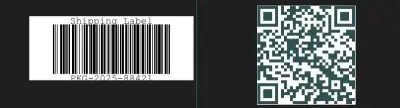
Next PageResultPDF文件中存在的條碼和QR碼:
 C# - 從PDF結果讀取條碼
在實際使用情境中,條碼經常在圖像、掃描、縮略圖或照片中不完美,可能包含數字噪音或偏斜。 本節將展示如何從縮略圖中讀取條碼資料。
IronBarcode程式庫使用C# 條碼生成器,它甚至能夠讀取損壞的條碼縮略圖。
 自動條碼縮略圖尺寸校正。 可使用IronBarcode在C#中讀取的文件
它會自動檢測條碼圖像過小而不足以合理表示實際條碼,然後放大並清除與縮略相關的所有數字噪音,從而使它們能夠再次可讀。
// Small or 'Thumbnail' barcode images are automatically detected by IronBarCode and corrected for wherever possible even if they have much digital noise.
BarcodeResult SmallResult = BarcodeReader.Read("ThumbnailOfBarcode.gif");
// Small or 'Thumbnail' barcode images are automatically detected by IronBarCode and corrected for wherever possible even if they have much digital noise.
BarcodeResult SmallResult = BarcodeReader.Read("ThumbnailOfBarcode.gif");' Small or 'Thumbnail' barcode images are automatically detected by IronBarCode and corrected for wherever possible even if they have much digital noise.
Dim SmallResult As BarcodeResult = BarcodeReader.Read("ThumbnailOfBarcode.gif")' Small or 'Thumbnail' barcode images are automatically detected by IronBarCode and corrected for wherever possible even if they have much digital noise.
Dim SmallResult As BarcodeResult = BarcodeReader.Read("ThumbnailOfBarcode.gif")IronBarcode是一個多功能的.NET軟體程式庫和C# QR碼生成器,它可用於掃描和讀取多種型別的條碼圖像格式,無論這些條碼是完美的螢幕截圖還是實際的照片、掃描或其他不完美的真實場景圖像。 此外,IronBarcode提供了多種客製化選項以提高條碼閱讀速度,例如裁剪範圍或多執行緒,以及ML模型的準確性。 請造訪官方文件頁面,以獲取更多關於IronBarcode的資訊。
目前,如果您購買完整的Iron Suite,即可用兩個的價格獲得五個程式庫。
Curtis Chau擁有Carleton大學的電腦科學學士學位,專精於前端開發,擁有Node.js、TypeScript、JavaScript和React的專業知識。Curtis熱衷於建立直觀且美觀的使用者介面,喜愛使用現代框架並建立結構良好、視覺吸引力的手冊。


IronBarcode 是 IRONSUITE 的一部分
10 款適用於辦公室文件的 .NET API 產品

當您需要快速讀取、寫入和樣式化條形碼。


