


Earn More by Sharing What You Love
Do you create content for developers working with .NET, C#, Java, Python, or Node.js? Turn your expertise into extra income!

Tim Corey
10m 19s
在C#中,一個強大的但常常未充分利用的資料結構是字典。 Dictionary類別是位於System.Collections.Generic命名空間中的泛型集合。 在他的影片中,"The Dictionary Data Structure in C# in 10 Minutes or Less",Tim Corey 提供了一個簡明且實用的指南,教您如何在您的C#應用程式中有效地使用字典。 這篇文章拆解了Tim的解釋和範例,旨在幫助您輕鬆掌握C#字典的精髓。
Tim開始介紹C#中的字典概念。 他將其比作現實生活中的字典,您查找一個詞(鍵)以找到它的定義(值)。 在C#中,字典是由鍵值對組成的集合,其中每個鍵都是唯一的且不能為空。
在C#中,字典是使用Dictionary<TKey, TValue>語法聲明的,允許通過鍵值對進行有效的資料儲存和檢索。 字典在初始化時設置了預設的初始容量,可以在新增元素時動態調整。
在(0:28),Tim從一個基本的控制台應用程式開始示範如何建立字典。 他使用以下程式碼來初始化一個以整數為鍵、字串為值的字典:
// Declare a dictionary with integer keys and string values
Dictionary<int, string> rookieOfTheYear = new Dictionary<int, string>();' Declare a dictionary with integer keys and string values
Dim rookieOfTheYear As New Dictionary(Of Integer, String)()在這裡,string)。 變數rookieOfTheYear是字典實例的名稱。 您還可以通過設定鍵型別為string來使用字串鍵。
Tim現在在(2:08)向字典中新增元素。 他展示瞭如何使用Add方法來新增鍵值對:
// Add entries to the dictionary
rookieOfTheYear.Add(2000, "Mike Miller");
rookieOfTheYear.Add(2001, "Jane Doe");
rookieOfTheYear.Add(2002, "Jane Doe");
rookieOfTheYear.Add(2003, "John Smith");' Add entries to the dictionary
rookieOfTheYear.Add(2000, "Mike Miller")
rookieOfTheYear.Add(2001, "Jane Doe")
rookieOfTheYear.Add(2002, "Jane Doe")
rookieOfTheYear.Add(2003, "John Smith")在這個例子中:
"Mike Miller"。
同樣,鍵2001, 2002 和"Jane Doe", "Jane Doe" 和"John Smith"。
他指出,儘管值可以重複,但鍵必須是唯一的。 嘗試新增重複鍵會導致異常:
rookieOfTheYear.Add(2001, "Jane Doe"); // This will throw an exceptionrookieOfTheYear.Add(2001, "Jane Doe") ' This will throw an exception此異常發生是因為鍵2001已經存在於字典中。
為了演示值的檢索,Tim在(3:45)使用了以下程式碼行:
// Accessing a value with a specific key
Console.WriteLine(rookieOfTheYear[2002]); // Outputs: Jane Doe' Accessing a value with a specific key
Console.WriteLine(rookieOfTheYear(2002)) ' Outputs: Jane Doe在這裡,2002相關聯的值。 這是一種基於鍵查詢值的非常有效的方法。

在(4:29),Tim討論了如何使用ContainsKey方法檢查字典中是否存在一個鍵:
// Check if a key exists before accessing its value
if (rookieOfTheYear.ContainsKey(2002))
{
    Console.WriteLine(rookieOfTheYear[2002]);
}' Check if a key exists before accessing its value
If rookieOfTheYear.ContainsKey(2002) Then
Console.WriteLine(rookieOfTheYear(2002))
End If在上述範例中,2002是否存在於字典中。 如果存在,則列印出對應的值("Jane Doe")。
如果鍵不存在,字典不會有輸出,從而防止存取不存在鍵時出現錯誤。
Tim在(5:33)擴展了字典功能,建立了一個將字串映射到字串列表的更複雜的例子:
// Declare a dictionary with string keys and List<string> as values
Dictionary<string, List<string>> wishList = new();

// Add entries to the dictionary with lists as values
wishList.Add("Tim Corey", new List<string> { "Xbox", "Tesla", "Pizza" });
wishList.Add("Billy Bob", new List<string> { "PS5", "Ford", "Hoagie" });
wishList.Add("Mary Jane", new List<string> { "House", "Car", "Sub" });' Declare a dictionary with string keys and List(Of String) as values
Dim wishList As New Dictionary(Of String, List(Of String))()
' Add entries to the dictionary with lists as values
wishList.Add("Tim Corey", New List(Of String) From {"Xbox", "Tesla", "Pizza"})
wishList.Add("Billy Bob", New List(Of String) From {"PS5", "Ford", "Hoagie"})
wishList.Add("Mary Jane", New List(Of String) From {"House", "Car", "Sub"})在這裡:
鍵是字串(例如,"Tim Corey","Billy Bob","Mary Jane")。
值是字串列表,代表每個人的願望清單。
在(7:24),Tim示範了如何使用foreach迴圈遍歷字典:
// Iterate over each key-value pair in the dictionary
foreach (var (key, value) in wishList)
{
    Console.WriteLine($"{key}'s wish list:");
    // Iterate over each item in the list of values
    foreach (var item in value)
    {
        Console.WriteLine($"\t{item}");
    }
}' Iterate over each key-value pair in the dictionary
For Each kvp In wishList
Dim key = kvp.Key
Dim value = kvp.Value
Console.WriteLine($"{key}'s wish list:")
' Iterate over each item in the list of values
For Each item In value
Console.WriteLine(vbTab & item)
Next
Next在這個例子中:
wishList字典中的每個鍵值對。
key指的是鍵(例如,"Tim Corey")。
value指的是與該鍵相關聯的值列表。
內層迴圈遍歷列表中的每一個項目並列印出來。
這允許通過迴圈存取字典元素一個一個地用指定的鍵及其相應的值來列印所有元素。 以下是輸出:
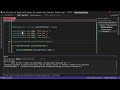
Tim還展示了如何在(8:26)中使用指定的索引顯式存取字典中的更複雜的值:
// Access the first item in the list of values for the specified key
Console.WriteLine(wishList["Tim Corey"][0]); // Outputs: Xbox' Access the first item in the list of values for the specified key
Console.WriteLine(wishList("Tim Corey")(0)) ' Outputs: Xbox在這裡,[0]檢索該列表中的第一個項目。
Tim在(9:00)強調理解字典的重要性來結束講解。 他指出,儘管字典可能不經常使用,但它們對於需要唯一鍵和有效查找的場景非常有用。
建立字典:了解如何使用不同的資料型別來初始化字典。
新增元素:學習唯一鍵的重要性以及如何處理重複鍵異常。
存取值:使用鍵有效地檢索值。
檢查鍵的存在性:在存取值之前檢查鍵的存在以防止錯誤。
進階用法:實現更複雜的字典,例如那些以列表作為值的字典。
遍歷:使用迴圈存取並顯示字典中的所有元素。
通過遵循Tim Corey的影片,您可以掌握C#中字典的使用,增強您的編程工具組,爲需要高效資料檢索和儲存的場景做準備。 查看Tim的頻道以獲得更多關於C#的資訊性影片。
Do you create content for developers working with .NET, C#, Java, Python, or Node.js? Turn your expertise into extra income!
Join our newsletter, you’ll get exclusive access on article updates. We value your privacy

