


更新日 2026年4月21日
実際に有用なデータを抽出するC#の領収書OCR APIを構築する
IronOCRを使用してC#でレシートOCR APIを構築する。レシート画像から構造化されたデータをローカルで正確に抽出するためのコード例によるステップバイステップのチュートリアルです。
詳しく読む

レシートスキャンAPIは、OCR技術を使用してレシートからのデータ抽出を自動化し、手入力によるエラーを大幅に削減し、処理速度を向上させます。 このガイドでは、 IronOCRをC#で使用して、レシート画像からベンダー名、日付、商品、価格、合計金額を正確に抽出する方法を示します。画像の前処理機能が組み込まれており、複数のフォーマットにも対応しています。
IronOCRは、スキャンした文書、画像、PDFから信頼性の高いテキスト抽出を提供する、柔軟性の高いOCRライブラリです。 IronOCRは、高度なアルゴリズム、コンピュータビジョン、機械学習モデルを活用することで、困難な状況下でも高い精度を保証します。 このライブラリは複数の言語とフォントスタイルをサポートしているため、グローバルなアプリケーションに適しています。 IronOCRをアプリケーションに組み込むことで、データ入力とテキスト分析を自動化し、生産性を向上させることができます。
IronOCRは、文書、写真、スクリーンショット、ライブカメラ映像からテキストを抽出し、JSON形式のレスポンスとして出力します。 IronOCRは、高度なアルゴリズムと機械学習を用いて画像データを分析し、文字を認識して、機械が読み取り可能なテキストに変換します。 この図書館は、独自の改良を加えたTesseract 5テクノロジーを採用しており、優れた精度を実現しています。
IronOCRは、低品質のスキャン画像、さまざまなレシート形式、および異なる向きの処理に優れています。 内蔵の画像前処理フィルターが処理前に自動的に画質を向上させるため、しわくちゃになったり色あせたりしたレシートでも最適な結果が得られます。
IronOCRを使用する前に、以下の前提条件が満たされていることを確認してください。
1.開発環境:Visual Studioなどの適切なIDEをインストールしてください。 IronOCRは、 Windows 、 Linux 、 macOS 、 Azure 、およびAWSをサポートしています。
4.ライセンスキー(オプション) :無料トライアルあり。 実運用にはライセンスが必要です。
Visual Studio を開いて [ファイル] に移動し、[新規] にマウスを移動して [プロジェクト] をクリックします。
 新しいプロジェクト画像
"コンソールアプリケーション"を選択し、"次へ"をクリックします。 このテンプレートは、Webアプリケーションに実装する前にIronOCRを学習するのに最適です。
 コンソールアプリケーション
プロジェクト名と場所を入力し、"次へ"をクリックしてください。 "ReceiptScannerAPI"のような説明的な名前を選んでください。
 プロジェクト設定
最適な互換性を確保するには、 .NET 5.0以降を選択し、"作成"をクリックしてください。
 ターゲットフレームワーク
インストール方法は2種類あります。
ツール> NuGetパッケージ マネージャー>ソリューションのNuGetパッケージの管理に移動します。
 NuGetパッケージマネージャー
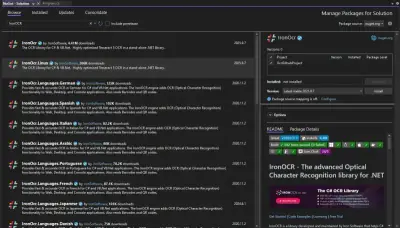
IronOCRを検索してパッケージをインストールしてください。 英語以外のレシートについては、言語固有のパッケージをインストールしてください。
 IronOCR
[ツール] > [NuGetパッケージ マネージャー] > [パッケージ マネージャー コンソール]に移動します。
次のコマンドを入力してください。
 パッケージマネージャーコンソール
わずか数行のコードでレシートデータを抽出できます。
using IronOcr;
using System;

var ocr = new IronTesseract();

// Configure for receipt scanning
ocr.Configuration.ReadBarCodes = true;
ocr.Configuration.WhiteListCharacters = "0123456789.$,ABCDEFGHIJKLMNOPQRSTUVWXYZabcdefghijklmnopqrstuvwxyz% ";

using (var input = new OcrInput(@"receipt.jpg"))
{
    // Apply automatic image enhancement
    input.DeNoise();
    input.Deskew();
    input.EnhanceResolution(225);

    // Extract text from receipt
    var result = ocr.Read(input);

    // Display extracted text and confidence
    Console.WriteLine($"Extracted Text:\n{result.Text}");
    Console.WriteLine($"\nConfidence: {result.Confidence}%");
}Imports IronOcr
Imports System
Dim ocr = New IronTesseract()
' Configure for receipt scanning
ocr.Configuration.ReadBarCodes = True
ocr.Configuration.WhiteListCharacters = "0123456789.$,ABCDEFGHIJKLMNOPQRSTUVWXYZabcdefghijklmnopqrstuvwxyz% "
Using input = New OcrInput("receipt.jpg")
' Apply automatic image enhancement
input.DeNoise()
input.Deskew()
input.EnhanceResolution(225)
' Extract text from receipt
Dim result = ocr.Read(input)
' Display extracted text and confidence
Console.WriteLine($"Extracted Text:{vbCrLf}{result.Text}")
Console.WriteLine($"{vbCrLf}Confidence: {result.Confidence}%")
End UsingImports IronOcr
Imports System
Dim ocr = New IronTesseract()
' Configure for receipt scanning
ocr.Configuration.ReadBarCodes = True
ocr.Configuration.WhiteListCharacters = "0123456789.$,ABCDEFGHIJKLMNOPQRSTUVWXYZabcdefghijklmnopqrstuvwxyz% "
Using input = New OcrInput("receipt.jpg")
' Apply automatic image enhancement
input.DeNoise()
input.Deskew()
input.EnhanceResolution(225)
' Extract text from receipt
Dim result = ocr.Read(input)
' Display extracted text and confidence
Console.WriteLine($"Extracted Text:{vbCrLf}{result.Text}")
Console.WriteLine($"{vbCrLf}Confidence: {result.Confidence}%")
End Using
IronOCRは、様々な種類の文書から明細項目、価格、税金、合計金額を抽出します。このライブラリは、 PDF 、複数ページのTIFFファイル、および様々な画像フォーマットに対応しています。
using IronOcr;
using System;
using System.Collections.Generic;
using System.Text.RegularExpressions;

class ReceiptScanner
{
    static void Main()
    {
        var ocr = new IronTesseract();

        // Configure OCR for optimal receipt reading
        ocr.Configuration.WhiteListCharacters = "0123456789.$,ABCDEFGHIJKLMNOPQRSTUVWXYZabcdefghijklmnopqrstuvwxyz% ";
        ocr.Configuration.BlackListCharacters = "~`@#*_}{][|\\";
        ocr.Configuration.TesseractVersion = TesseractVersion.Tesseract5;

        // Load the image of the receipt
        using (var input = new OcrInput(@"r2.png"))
        {
            // Apply image enhancement filters
            input.Deskew(); // Fix image rotation
            input.EnhanceResolution(225); // Optimal DPI for receipts
            input.DeNoise(); // Remove background noise
            input.Sharpen(); // Improve text clarity

            // Perform OCR on the input image
            var result = ocr.Read(input);

            // Regular expression patterns to extract relevant details from the OCR result
            var descriptionPattern = @"\w+\s+(.*?)\s+(\d+\.\d+)\s+Units\s+(\d+\.\d+)\s+Tax15%\s+\$(\d+\.\d+)";
            var pricePattern = @"\$\d+(\.\d{2})?";
            var datePattern = @"\d{1,2}[/-]\d{1,2}[/-]\d{2,4}";

            // Variables to store extracted data
            var descriptions = new List<string>();
            var unitPrices = new List<decimal>();
            var taxes = new List<decimal>();
            var amounts = new List<decimal>();

            var lines = result.Text.Split('\n');
            foreach (var line in lines)
            {
                // Match each line against the description pattern
                var descriptionMatch = Regex.Match(line, descriptionPattern);
                if (descriptionMatch.Success)
                {
                    descriptions.Add(descriptionMatch.Groups[1].Value.Trim());
                    unitPrices.Add(decimal.Parse(descriptionMatch.Groups[2].Value));

                    // Calculate tax and total amount for each item
                    var tax = unitPrices[unitPrices.Count - 1] * 0.15m;
                    taxes.Add(tax);
                    amounts.Add(unitPrices[unitPrices.Count - 1] + tax);
                }

                // Extract date if found
                var dateMatch = Regex.Match(line, datePattern);
                if (dateMatch.Success)
                {
                    Console.WriteLine($"Receipt Date: {dateMatch.Value}");
                }
            }

            // Output the extracted data
            for (int i = 0; i < descriptions.Count; i++)
            {
                Console.WriteLine($"Description: {descriptions[i]}");
                Console.WriteLine($"Quantity: 1.00 Units");
                Console.WriteLine($"Unit Price: ${unitPrices[i]:0.00}");
                Console.WriteLine($"Taxes: ${taxes[i]:0.00}");
                Console.WriteLine($"Amount: ${amounts[i]:0.00}");
                Console.WriteLine("-----------------------");
            }

            // Calculate and display totals
            var subtotal = unitPrices.Sum();
            var totalTax = taxes.Sum();
            var grandTotal = amounts.Sum();

            Console.WriteLine($"\nSubtotal: ${subtotal:0.00}");
            Console.WriteLine($"Total Tax: ${totalTax:0.00}");
            Console.WriteLine($"Grand Total: ${grandTotal:0.00}");
        }
    }
}
using IronOcr;
using System;
using System.Collections.Generic;
using System.Text.RegularExpressions;
class ReceiptScanner
{
static void Main()
{
var ocr = new IronTesseract();
// Configure OCR for optimal receipt reading
ocr.Configuration.WhiteListCharacters = "0123456789.$,ABCDEFGHIJKLMNOPQRSTUVWXYZabcdefghijklmnopqrstuvwxyz% ";
ocr.Configuration.BlackListCharacters = "~`@#*_}{][|\\";
ocr.Configuration.TesseractVersion = TesseractVersion.Tesseract5;
// Load the image of the receipt
using (var input = new OcrInput(@"r2.png"))
{
// Apply image enhancement filters
input.Deskew(); // Fix image rotation
input.EnhanceResolution(225); // Optimal DPI for receipts
input.DeNoise(); // Remove background noise
input.Sharpen(); // Improve text clarity
// Perform OCR on the input image
var result = ocr.Read(input);
// Regular expression patterns to extract relevant details from the OCR result
var descriptionPattern = @"\w+\s+(.*?)\s+(\d+\.\d+)\s+Units\s+(\d+\.\d+)\s+Tax15%\s+\$(\d+\.\d+)";
var pricePattern = @"\$\d+(\.\d{2})?";
var datePattern = @"\d{1,2}[/-]\d{1,2}[/-]\d{2,4}";
// Variables to store extracted data
var descriptions = new List<string>();
var unitPrices = new List<decimal>();
var taxes = new List<decimal>();
var amounts = new List<decimal>();
var lines = result.Text.Split('\n');
foreach (var line in lines)
{
// Match each line against the description pattern
var descriptionMatch = Regex.Match(line, descriptionPattern);
if (descriptionMatch.Success)
{
descriptions.Add(descriptionMatch.Groups[1].Value.Trim());
unitPrices.Add(decimal.Parse(descriptionMatch.Groups[2].Value));
// Calculate tax and total amount for each item
var tax = unitPrices[unitPrices.Count - 1] * 0.15m;
taxes.Add(tax);
amounts.Add(unitPrices[unitPrices.Count - 1] + tax);
}
// Extract date if found
var dateMatch = Regex.Match(line, datePattern);
if (dateMatch.Success)
{
Console.WriteLine($"Receipt Date: {dateMatch.Value}");
}
}
// Output the extracted data
for (int i = 0; i < descriptions.Count; i++)
{
Console.WriteLine($"Description: {descriptions[i]}");
Console.WriteLine($"Quantity: 1.00 Units");
Console.WriteLine($"Unit Price: ${unitPrices[i]:0.00}");
Console.WriteLine($"Taxes: ${taxes[i]:0.00}");
Console.WriteLine($"Amount: ${amounts[i]:0.00}");
Console.WriteLine("-----------------------");
}
// Calculate and display totals
var subtotal = unitPrices.Sum();
var totalTax = taxes.Sum();
var grandTotal = amounts.Sum();
Console.WriteLine($"\nSubtotal: ${subtotal:0.00}");
Console.WriteLine($"Total Tax: ${totalTax:0.00}");
Console.WriteLine($"Grand Total: ${grandTotal:0.00}");
}
}
}Imports IronOcr
Imports System
Imports System.Collections.Generic
Imports System.Text.RegularExpressions
Class ReceiptScanner
Shared Sub Main()
Dim ocr = New IronTesseract()
' Configure OCR for optimal receipt reading
ocr.Configuration.WhiteListCharacters = "0123456789.$,ABCDEFGHIJKLMNOPQRSTUVWXYZabcdefghijklmnopqrstuvwxyz% "
ocr.Configuration.BlackListCharacters = "~`@#*_}{][|\"
ocr.Configuration.TesseractVersion = TesseractVersion.Tesseract5
' Load the image of the receipt
Using input = New OcrInput("r2.png")
' Apply image enhancement filters
input.Deskew() ' Fix image rotation
input.EnhanceResolution(225) ' Optimal DPI for receipts
input.DeNoise() ' Remove background noise
input.Sharpen() ' Improve text clarity
' Perform OCR on the input image
Dim result = ocr.Read(input)
' Regular expression patterns to extract relevant details from the OCR result
Dim descriptionPattern = "\w+\s+(.*?)\s+(\d+\.\d+)\s+Units\s+(\d+\.\d+)\s+Tax15%\s+\$(\d+\.\d+)"
Dim pricePattern = "\$\d+(\.\d{2})?"
Dim datePattern = "\d{1,2}[/-]\d{1,2}[/-]\d{2,4}"
' Variables to store extracted data
Dim descriptions = New List(Of String)()
Dim unitPrices = New List(Of Decimal)()
Dim taxes = New List(Of Decimal)()
Dim amounts = New List(Of Decimal)()
Dim lines = result.Text.Split(ControlChars.Lf)
For Each line In lines
' Match each line against the description pattern
Dim descriptionMatch = Regex.Match(line, descriptionPattern)
If descriptionMatch.Success Then
descriptions.Add(descriptionMatch.Groups(1).Value.Trim())
unitPrices.Add(Decimal.Parse(descriptionMatch.Groups(2).Value))
' Calculate tax and total amount for each item
Dim tax = unitPrices(unitPrices.Count - 1) * 0.15D
taxes.Add(tax)
amounts.Add(unitPrices(unitPrices.Count - 1) + tax)
End If
' Extract date if found
Dim dateMatch = Regex.Match(line, datePattern)
If dateMatch.Success Then
Console.WriteLine($"Receipt Date: {dateMatch.Value}")
End If
Next
' Output the extracted data
For i As Integer = 0 To descriptions.Count - 1
Console.WriteLine($"Description: {descriptions(i)}")
Console.WriteLine("Quantity: 1.00 Units")
Console.WriteLine($"Unit Price: ${unitPrices(i):0.00}")
Console.WriteLine($"Taxes: ${taxes(i):0.00}")
Console.WriteLine($"Amount: ${amounts(i):0.00}")
Console.WriteLine("-----------------------")
Next
' Calculate and display totals
Dim subtotal = unitPrices.Sum()
Dim totalTax = taxes.Sum()
Dim grandTotal = amounts.Sum()
Console.WriteLine(vbCrLf & $"Subtotal: ${subtotal:0.00}")
Console.WriteLine($"Total Tax: ${totalTax:0.00}")
Console.WriteLine($"Grand Total: ${grandTotal:0.00}")
End Using
End Sub
End ClassImports IronOcr
Imports System
Imports System.Collections.Generic
Imports System.Text.RegularExpressions
Class ReceiptScanner
Shared Sub Main()
Dim ocr = New IronTesseract()
' Configure OCR for optimal receipt reading
ocr.Configuration.WhiteListCharacters = "0123456789.$,ABCDEFGHIJKLMNOPQRSTUVWXYZabcdefghijklmnopqrstuvwxyz% "
ocr.Configuration.BlackListCharacters = "~`@#*_}{][|\"
ocr.Configuration.TesseractVersion = TesseractVersion.Tesseract5
' Load the image of the receipt
Using input = New OcrInput("r2.png")
' Apply image enhancement filters
input.Deskew() ' Fix image rotation
input.EnhanceResolution(225) ' Optimal DPI for receipts
input.DeNoise() ' Remove background noise
input.Sharpen() ' Improve text clarity
' Perform OCR on the input image
Dim result = ocr.Read(input)
' Regular expression patterns to extract relevant details from the OCR result
Dim descriptionPattern = "\w+\s+(.*?)\s+(\d+\.\d+)\s+Units\s+(\d+\.\d+)\s+Tax15%\s+\$(\d+\.\d+)"
Dim pricePattern = "\$\d+(\.\d{2})?"
Dim datePattern = "\d{1,2}[/-]\d{1,2}[/-]\d{2,4}"
' Variables to store extracted data
Dim descriptions = New List(Of String)()
Dim unitPrices = New List(Of Decimal)()
Dim taxes = New List(Of Decimal)()
Dim amounts = New List(Of Decimal)()
Dim lines = result.Text.Split(ControlChars.Lf)
For Each line In lines
' Match each line against the description pattern
Dim descriptionMatch = Regex.Match(line, descriptionPattern)
If descriptionMatch.Success Then
descriptions.Add(descriptionMatch.Groups(1).Value.Trim())
unitPrices.Add(Decimal.Parse(descriptionMatch.Groups(2).Value))
' Calculate tax and total amount for each item
Dim tax = unitPrices(unitPrices.Count - 1) * 0.15D
taxes.Add(tax)
amounts.Add(unitPrices(unitPrices.Count - 1) + tax)
End If
' Extract date if found
Dim dateMatch = Regex.Match(line, datePattern)
If dateMatch.Success Then
Console.WriteLine($"Receipt Date: {dateMatch.Value}")
End If
Next
' Output the extracted data
For i As Integer = 0 To descriptions.Count - 1
Console.WriteLine($"Description: {descriptions(i)}")
Console.WriteLine("Quantity: 1.00 Units")
Console.WriteLine($"Unit Price: ${unitPrices(i):0.00}")
Console.WriteLine($"Taxes: ${taxes(i):0.00}")
Console.WriteLine($"Amount: ${amounts(i):0.00}")
Console.WriteLine("-----------------------")
Next
' Calculate and display totals
Dim subtotal = unitPrices.Sum()
Dim totalTax = taxes.Sum()
Dim grandTotal = amounts.Sum()
Console.WriteLine(vbCrLf & $"Subtotal: ${subtotal:0.00}")
Console.WriteLine($"Total Tax: ${totalTax:0.00}")
Console.WriteLine($"Grand Total: ${grandTotal:0.00}")
End Using
End Sub
End Class正確なレシートスキャンを実現するための重要なテクニック: -文字ホワイトリスト:認識対象を想定される文字に限定します -画像前処理:傾き補正、解像度向上、ノイズ除去を使用 -パターンマッチング:正規表現を使用して構造化データを抽出します -信頼度スコアリング:認識の信頼度に基づいて結果を検証します
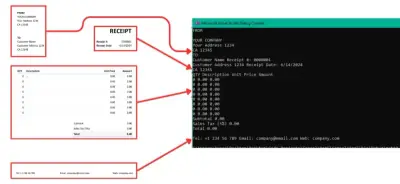
 出力
書式を保持したまま、領収書の全内容を抽出します。
using IronOcr;
using System;
using System.Linq;

class WholeReceiptExtractor
{
    static void Main()
    {
        var ocr = new IronTesseract();

        // Configure for receipt scanning
        ocr.Configuration.ReadBarCodes = true; // Enable barcode detection
        ocr.Configuration.TesseractVersion = TesseractVersion.Tesseract5; // Use latest engine
        ocr.Configuration.EngineMode = TesseractEngineMode.TesseractAndLstm; // Best accuracy

        using (var input = new OcrInput(@"r3.png"))
        {
            // Apply automatic image correction
            input.WithTitle("Receipt Scan");

            // Use computer vision to find text regions
            var textRegions = input.FindTextRegions();
            Console.WriteLine($"Found {textRegions.Count()} text regions");

            // Apply optimal filters for receipt processing
            input.ApplyOcrInputFilters();

            // Perform OCR on the entire receipt
            var result = ocr.Read(input);

            // Display extracted text
            Console.WriteLine("=== EXTRACTED RECEIPT TEXT ===");
            Console.WriteLine(result.Text);

            // Get detailed results
            Console.WriteLine($"\n=== OCR STATISTICS ===");
            Console.WriteLine($"OCR Confidence: {result.Confidence:F2}%");
            Console.WriteLine($"Pages Processed: {result.Pages.Length}");
            Console.WriteLine($"Paragraphs Found: {result.Paragraphs.Length}");
            Console.WriteLine($"Lines Detected: {result.Lines.Length}");
            Console.WriteLine($"Words Recognized: {result.Words.Length}");

            // Extract any barcodes found
            if (result.Barcodes.Any())
            {
                Console.WriteLine("\n=== BARCODES DETECTED ===");
                foreach(var barcode in result.Barcodes)
                {
                    Console.WriteLine($"Type: {barcode.Type}");
                    Console.WriteLine($"Value: {barcode.Value}");
                    Console.WriteLine($"Location: X={barcode.X}, Y={barcode.Y}");
                }
            }

            // Save as searchable PDF
            result.SaveAsSearchablePdf("receipt_searchable.pdf");
            Console.WriteLine("\nSearchable PDF saved as: receipt_searchable.pdf");

            // Export as hOCR for preservation
            result.SaveAsHocrFile("receipt_hocr.html");
            Console.WriteLine("hOCR file saved as: receipt_hocr.html");
        }
    }
}
using IronOcr;
using System;
using System.Linq;
class WholeReceiptExtractor
{
static void Main()
{
var ocr = new IronTesseract();
// Configure for receipt scanning
ocr.Configuration.ReadBarCodes = true; // Enable barcode detection
ocr.Configuration.TesseractVersion = TesseractVersion.Tesseract5; // Use latest engine
ocr.Configuration.EngineMode = TesseractEngineMode.TesseractAndLstm; // Best accuracy
using (var input = new OcrInput(@"r3.png"))
{
// Apply automatic image correction
input.WithTitle("Receipt Scan");
// Use computer vision to find text regions
var textRegions = input.FindTextRegions();
Console.WriteLine($"Found {textRegions.Count()} text regions");
// Apply optimal filters for receipt processing
input.ApplyOcrInputFilters();
// Perform OCR on the entire receipt
var result = ocr.Read(input);
// Display extracted text
Console.WriteLine("=== EXTRACTED RECEIPT TEXT ===");
Console.WriteLine(result.Text);
// Get detailed results
Console.WriteLine($"\n=== OCR STATISTICS ===");
Console.WriteLine($"OCR Confidence: {result.Confidence:F2}%");
Console.WriteLine($"Pages Processed: {result.Pages.Length}");
Console.WriteLine($"Paragraphs Found: {result.Paragraphs.Length}");
Console.WriteLine($"Lines Detected: {result.Lines.Length}");
Console.WriteLine($"Words Recognized: {result.Words.Length}");
// Extract any barcodes found
if (result.Barcodes.Any())
{
Console.WriteLine("\n=== BARCODES DETECTED ===");
foreach(var barcode in result.Barcodes)
{
Console.WriteLine($"Type: {barcode.Type}");
Console.WriteLine($"Value: {barcode.Value}");
Console.WriteLine($"Location: X={barcode.X}, Y={barcode.Y}");
}
}
// Save as searchable PDF
result.SaveAsSearchablePdf("receipt_searchable.pdf");
Console.WriteLine("\nSearchable PDF saved as: receipt_searchable.pdf");
// Export as hOCR for preservation
result.SaveAsHocrFile("receipt_hocr.html");
Console.WriteLine("hOCR file saved as: receipt_hocr.html");
}
}
}Imports IronOcr
Imports System
Imports System.Linq
Class WholeReceiptExtractor
Shared Sub Main()
Dim ocr = New IronTesseract()
' Configure for receipt scanning
ocr.Configuration.ReadBarCodes = True ' Enable barcode detection
ocr.Configuration.TesseractVersion = TesseractVersion.Tesseract5 ' Use latest engine
ocr.Configuration.EngineMode = TesseractEngineMode.TesseractAndLstm ' Best accuracy
Using input = New OcrInput("r3.png")
' Apply automatic image correction
input.WithTitle("Receipt Scan")
' Use computer vision to find text regions
Dim textRegions = input.FindTextRegions()
Console.WriteLine($"Found {textRegions.Count()} text regions")
' Apply optimal filters for receipt processing
input.ApplyOcrInputFilters()
' Perform OCR on the entire receipt
Dim result = ocr.Read(input)
' Display extracted text
Console.WriteLine("=== EXTRACTED RECEIPT TEXT ===")
Console.WriteLine(result.Text)
' Get detailed results
Console.WriteLine(vbCrLf & "=== OCR STATISTICS ===")
Console.WriteLine($"OCR Confidence: {result.Confidence:F2}%")
Console.WriteLine($"Pages Processed: {result.Pages.Length}")
Console.WriteLine($"Paragraphs Found: {result.Paragraphs.Length}")
Console.WriteLine($"Lines Detected: {result.Lines.Length}")
Console.WriteLine($"Words Recognized: {result.Words.Length}")
' Extract any barcodes found
If result.Barcodes.Any() Then
Console.WriteLine(vbCrLf & "=== BARCODES DETECTED ===")
For Each barcode In result.Barcodes
Console.WriteLine($"Type: {barcode.Type}")
Console.WriteLine($"Value: {barcode.Value}")
Console.WriteLine($"Location: X={barcode.X}, Y={barcode.Y}")
Next
End If
' Save as searchable PDF
result.SaveAsSearchablePdf("receipt_searchable.pdf")
Console.WriteLine(vbCrLf & "Searchable PDF saved as: receipt_searchable.pdf")
' Export as hOCR for preservation
result.SaveAsHocrFile("receipt_hocr.html")
Console.WriteLine("hOCR file saved as: receipt_hocr.html")
End Using
End Sub
End ClassImports IronOcr
Imports System
Imports System.Linq
Class WholeReceiptExtractor
Shared Sub Main()
Dim ocr = New IronTesseract()
' Configure for receipt scanning
ocr.Configuration.ReadBarCodes = True ' Enable barcode detection
ocr.Configuration.TesseractVersion = TesseractVersion.Tesseract5 ' Use latest engine
ocr.Configuration.EngineMode = TesseractEngineMode.TesseractAndLstm ' Best accuracy
Using input = New OcrInput("r3.png")
' Apply automatic image correction
input.WithTitle("Receipt Scan")
' Use computer vision to find text regions
Dim textRegions = input.FindTextRegions()
Console.WriteLine($"Found {textRegions.Count()} text regions")
' Apply optimal filters for receipt processing
input.ApplyOcrInputFilters()
' Perform OCR on the entire receipt
Dim result = ocr.Read(input)
' Display extracted text
Console.WriteLine("=== EXTRACTED RECEIPT TEXT ===")
Console.WriteLine(result.Text)
' Get detailed results
Console.WriteLine(vbCrLf & "=== OCR STATISTICS ===")
Console.WriteLine($"OCR Confidence: {result.Confidence:F2}%")
Console.WriteLine($"Pages Processed: {result.Pages.Length}")
Console.WriteLine($"Paragraphs Found: {result.Paragraphs.Length}")
Console.WriteLine($"Lines Detected: {result.Lines.Length}")
Console.WriteLine($"Words Recognized: {result.Words.Length}")
' Extract any barcodes found
If result.Barcodes.Any() Then
Console.WriteLine(vbCrLf & "=== BARCODES DETECTED ===")
For Each barcode In result.Barcodes
Console.WriteLine($"Type: {barcode.Type}")
Console.WriteLine($"Value: {barcode.Value}")
Console.WriteLine($"Location: X={barcode.X}, Y={barcode.Y}")
Next
End If
' Save as searchable PDF
result.SaveAsSearchablePdf("receipt_searchable.pdf")
Console.WriteLine(vbCrLf & "Searchable PDF saved as: receipt_searchable.pdf")
' Export as hOCR for preservation
result.SaveAsHocrFile("receipt_hocr.html")
Console.WriteLine("hOCR file saved as: receipt_hocr.html")
End Using
End Sub
End Class 領収書スキャンAPI出力
IronOCRは、レシートのスキャン精度を大幅に向上させる高度な機能を複数提供しています。
1.多言語対応: 125以上の言語で領収書を処理したり、 1つの文書で複数の言語を処理したりできます。
2.バーコード読み取り:バーコードとQRコードを自動的に検出して読み取ります。
3.コンピュータビジョン:高度なテキスト検出を使用して、OCRの前にテキスト領域を特定します。
4.カスタムトレーニング:特殊なレシートフォーマットに対応したカスタムフォントのトレーニング。
5.パフォーマンスの最適化:大量処理に対して マルチスレッドと非同期処理を実装する。
// Example: Async receipt processing for high-volume scenarios
using IronOcr;
using System;
using System.Threading.Tasks;
using System.Collections.Generic;
using System.IO;

class BulkReceiptProcessor
{
    static async Task Main()
    {
        var ocr = new IronTesseract();

        // Configure for optimal performance
        ocr.Configuration.TesseractVersion = TesseractVersion.Tesseract5;
        ocr.Configuration.UseMultiThreading = true;
        ocr.Configuration.ProcessorCount = Environment.ProcessorCount;

        // Process multiple receipts asynchronously
        var receiptFiles = Directory.GetFiles(@"C:\Receipts\", "*.jpg");
        var tasks = new List<Task<OcrResult>>();

        foreach (var file in receiptFiles)
        {
            tasks.Add(ProcessReceiptAsync(ocr, file));
        }

        // Wait for all receipts to be processed
        var results = await Task.WhenAll(tasks);

        // Aggregate results
        decimal totalAmount = 0;
        foreach (var result in results)
        {
            // Extract total from each receipt
            var match = System.Text.RegularExpressions.Regex.Match(
                result.Text, @"Total:?\s*\$?(\d+\.\d{2})");

            if (match.Success && decimal.TryParse(match.Groups[1].Value, out var amount))
            {
                totalAmount += amount;
            }
        }

        Console.WriteLine($"Processed {results.Length} receipts");
        Console.WriteLine($"Combined total: ${totalAmount:F2}");
    }

    static async Task<OcrResult> ProcessReceiptAsync(IronTesseract ocr, string filePath)
    {
        using (var input = new OcrInput(filePath))
        {
            // Apply preprocessing
            input.DeNoise();
            input.Deskew();
            input.EnhanceResolution(200);

            // Process asynchronously
            return await ocr.ReadAsync(input);
        }
    }
}
// Example: Async receipt processing for high-volume scenarios
using IronOcr;
using System;
using System.Threading.Tasks;
using System.Collections.Generic;
using System.IO;
class BulkReceiptProcessor
{
static async Task Main()
{
var ocr = new IronTesseract();
// Configure for optimal performance
ocr.Configuration.TesseractVersion = TesseractVersion.Tesseract5;
ocr.Configuration.UseMultiThreading = true;
ocr.Configuration.ProcessorCount = Environment.ProcessorCount;
// Process multiple receipts asynchronously
var receiptFiles = Directory.GetFiles(@"C:\Receipts\", "*.jpg");
var tasks = new List<Task<OcrResult>>();
foreach (var file in receiptFiles)
{
tasks.Add(ProcessReceiptAsync(ocr, file));
}
// Wait for all receipts to be processed
var results = await Task.WhenAll(tasks);
// Aggregate results
decimal totalAmount = 0;
foreach (var result in results)
{
// Extract total from each receipt
var match = System.Text.RegularExpressions.Regex.Match(
result.Text, @"Total:?\s*\$?(\d+\.\d{2})");
if (match.Success && decimal.TryParse(match.Groups[1].Value, out var amount))
{
totalAmount += amount;
}
}
Console.WriteLine($"Processed {results.Length} receipts");
Console.WriteLine($"Combined total: ${totalAmount:F2}");
}
static async Task<OcrResult> ProcessReceiptAsync(IronTesseract ocr, string filePath)
{
using (var input = new OcrInput(filePath))
{
// Apply preprocessing
input.DeNoise();
input.Deskew();
input.EnhanceResolution(200);
// Process asynchronously
return await ocr.ReadAsync(input);
}
}
}' Example: Async receipt processing for high-volume scenarios
Imports IronOcr
Imports System
Imports System.Threading.Tasks
Imports System.Collections.Generic
Imports System.IO
Class BulkReceiptProcessor
Shared Async Function Main() As Task
Dim ocr = New IronTesseract()
' Configure for optimal performance
ocr.Configuration.TesseractVersion = TesseractVersion.Tesseract5
ocr.Configuration.UseMultiThreading = True
ocr.Configuration.ProcessorCount = Environment.ProcessorCount
' Process multiple receipts asynchronously
Dim receiptFiles = Directory.GetFiles("C:\Receipts\", "*.jpg")
Dim tasks = New List(Of Task(Of OcrResult))()
For Each file In receiptFiles
tasks.Add(ProcessReceiptAsync(ocr, file))
Next
' Wait for all receipts to be processed
Dim results = Await Task.WhenAll(tasks)
' Aggregate results
Dim totalAmount As Decimal = 0
For Each result In results
' Extract total from each receipt
Dim match = System.Text.RegularExpressions.Regex.Match(result.Text, "Total:?\s*\$?(\d+\.\d{2})")
If match.Success AndAlso Decimal.TryParse(match.Groups(1).Value, amount) Then
totalAmount += amount
End If
Next
Console.WriteLine($"Processed {results.Length} receipts")
Console.WriteLine($"Combined total: ${totalAmount:F2}")
End Function
Shared Async Function ProcessReceiptAsync(ocr As IronTesseract, filePath As String) As Task(Of OcrResult)
Using input = New OcrInput(filePath)
' Apply preprocessing
input.DeNoise()
input.Deskew()
input.EnhanceResolution(200)
' Process asynchronously
Return Await ocr.ReadAsync(input)
End Using
End Function
End Class' Example: Async receipt processing for high-volume scenarios
Imports IronOcr
Imports System
Imports System.Threading.Tasks
Imports System.Collections.Generic
Imports System.IO
Class BulkReceiptProcessor
Shared Async Function Main() As Task
Dim ocr = New IronTesseract()
' Configure for optimal performance
ocr.Configuration.TesseractVersion = TesseractVersion.Tesseract5
ocr.Configuration.UseMultiThreading = True
ocr.Configuration.ProcessorCount = Environment.ProcessorCount
' Process multiple receipts asynchronously
Dim receiptFiles = Directory.GetFiles("C:\Receipts\", "*.jpg")
Dim tasks = New List(Of Task(Of OcrResult))()
For Each file In receiptFiles
tasks.Add(ProcessReceiptAsync(ocr, file))
Next
' Wait for all receipts to be processed
Dim results = Await Task.WhenAll(tasks)
' Aggregate results
Dim totalAmount As Decimal = 0
For Each result In results
' Extract total from each receipt
Dim match = System.Text.RegularExpressions.Regex.Match(result.Text, "Total:?\s*\$?(\d+\.\d{2})")
If match.Success AndAlso Decimal.TryParse(match.Groups(1).Value, amount) Then
totalAmount += amount
End If
Next
Console.WriteLine($"Processed {results.Length} receipts")
Console.WriteLine($"Combined total: ${totalAmount:F2}")
End Function
Shared Async Function ProcessReceiptAsync(ocr As IronTesseract, filePath As String) As Task(Of OcrResult)
Using input = New OcrInput(filePath)
' Apply preprocessing
input.DeNoise()
input.Deskew()
input.EnhanceResolution(200)
' Process asynchronously
Return Await ocr.ReadAsync(input)
End Using
End Function
End Classレシートのスキャンには特有の課題がありますが、 IronOCRはそれらの課題解決を支援します。
-低品質の画像:フィルターウィザードを使用して、最適な前処理設定を自動的に見つけます。
-傾いたり回転したりしたレシート:自動ページ回転検出機能により、正しい向きで印刷されます。
-色あせた、またはコントラストの低いテキスト:色補正および強調フィルターを適用します。
-しわくちゃまたは破損したレシート:高度な前処理により、判読困難な画像からテキストを復元します。
レシートの形式は小売店によって大きく異なる。 IronOCRは柔軟なアプローチを提供します。
using IronOcr;
using System;
using System.Collections.Generic;
using System.Linq;

class ReceiptLayoutHandler
{
    static void Main()
    {
        var ocr = new IronTesseract();

        // Configure for different receipt layouts
        ocr.Configuration.PageSegmentationMode = TesseractPageSegmentationMode.AutoOsd;
        ocr.Configuration.EngineMode = TesseractEngineMode.TesseractAndLstm;

        using (var input = new OcrInput(@"complex_receipt.jpg"))
        {
            // Apply region-specific processing
            var cropRegion = new CropRectangle(x: 0, y: 100, width: 400, height: 800);
            input.AddImage(@"complex_receipt.jpg", cropRegion);

            // Process with confidence tracking
            var result = ocr.Read(input);

            // Parse using confidence scores
            var highConfidenceLines = result.Lines
                .Where(line => line.Confidence > 85)
                .Select(line => line.Text)
                .ToList();

            // Extract data with fallback strategies
            var total = ExtractTotal(highConfidenceLines)
                        ?? ExtractTotalAlternative(result.Text);

            Console.WriteLine($"Receipt Total: {total}");
        }
    }

    static decimal? ExtractTotal(List<string> lines)
    {
        // Primary extraction method
        foreach (var line in lines)
        {
            if (line.Contains("TOTAL") &&
                System.Text.RegularExpressions.Regex.IsMatch(line, @"\d+\.\d{2}"))
            {
                var match = System.Text.RegularExpressions.Regex.Match(line, @"(\d+\.\d{2})");
                if (decimal.TryParse(match.Value, out var total))
                    return total;
            }
        }
        return null;
    }

    static decimal? ExtractTotalAlternative(string fullText)
    {
        // Fallback extraction method
        var pattern = @"(?:Total|TOTAL|Grand Total|Amount Due).*?(\d+\.\d{2})";
        var match = System.Text.RegularExpressions.Regex.Match(fullText, pattern);

        if (match.Success && decimal.TryParse(match.Groups[1].Value, out var total))
            return total;

        return null;
    }
}
using IronOcr;
using System;
using System.Collections.Generic;
using System.Linq;
class ReceiptLayoutHandler
{
static void Main()
{
var ocr = new IronTesseract();
// Configure for different receipt layouts
ocr.Configuration.PageSegmentationMode = TesseractPageSegmentationMode.AutoOsd;
ocr.Configuration.EngineMode = TesseractEngineMode.TesseractAndLstm;
using (var input = new OcrInput(@"complex_receipt.jpg"))
{
// Apply region-specific processing
var cropRegion = new CropRectangle(x: 0, y: 100, width: 400, height: 800);
input.AddImage(@"complex_receipt.jpg", cropRegion);
// Process with confidence tracking
var result = ocr.Read(input);
// Parse using confidence scores
var highConfidenceLines = result.Lines
.Where(line => line.Confidence > 85)
.Select(line => line.Text)
.ToList();
// Extract data with fallback strategies
var total = ExtractTotal(highConfidenceLines)
?? ExtractTotalAlternative(result.Text);
Console.WriteLine($"Receipt Total: {total}");
}
}
static decimal? ExtractTotal(List<string> lines)
{
// Primary extraction method
foreach (var line in lines)
{
if (line.Contains("TOTAL") &&
System.Text.RegularExpressions.Regex.IsMatch(line, @"\d+\.\d{2}"))
{
var match = System.Text.RegularExpressions.Regex.Match(line, @"(\d+\.\d{2})");
if (decimal.TryParse(match.Value, out var total))
return total;
}
}
return null;
}
static decimal? ExtractTotalAlternative(string fullText)
{
// Fallback extraction method
var pattern = @"(?:Total|TOTAL|Grand Total|Amount Due).*?(\d+\.\d{2})";
var match = System.Text.RegularExpressions.Regex.Match(fullText, pattern);
if (match.Success && decimal.TryParse(match.Groups[1].Value, out var total))
return total;
return null;
}
}Imports IronOcr
Imports System
Imports System.Collections.Generic
Imports System.Linq
Class ReceiptLayoutHandler
Shared Sub Main()
Dim ocr = New IronTesseract()
' Configure for different receipt layouts
ocr.Configuration.PageSegmentationMode = TesseractPageSegmentationMode.AutoOsd
ocr.Configuration.EngineMode = TesseractEngineMode.TesseractAndLstm
Using input = New OcrInput("complex_receipt.jpg")
' Apply region-specific processing
Dim cropRegion = New CropRectangle(x:=0, y:=100, width:=400, height:=800)
input.AddImage("complex_receipt.jpg", cropRegion)
' Process with confidence tracking
Dim result = ocr.Read(input)
' Parse using confidence scores
Dim highConfidenceLines = result.Lines _
.Where(Function(line) line.Confidence > 85) _
.Select(Function(line) line.Text) _
.ToList()
' Extract data with fallback strategies
Dim total = ExtractTotal(highConfidenceLines) _
OrElse ExtractTotalAlternative(result.Text)
Console.WriteLine($"Receipt Total: {total}")
End Using
End Sub
Shared Function ExtractTotal(lines As List(Of String)) As Decimal?
' Primary extraction method
For Each line In lines
If line.Contains("TOTAL") AndAlso _
System.Text.RegularExpressions.Regex.IsMatch(line, "\d+\.\d{2}") Then
Dim match = System.Text.RegularExpressions.Regex.Match(line, "(\d+\.\d{2})")
Dim total As Decimal
If Decimal.TryParse(match.Value, total) Then
Return total
End If
End If
Next
Return Nothing
End Function
Shared Function ExtractTotalAlternative(fullText As String) As Decimal?
' Fallback extraction method
Dim pattern = "(?:Total|TOTAL|Grand Total|Amount Due).*?(\d+\.\d{2})"
Dim match = System.Text.RegularExpressions.Regex.Match(fullText, pattern)
Dim total As Decimal
If match.Success AndAlso Decimal.TryParse(match.Groups(1).Value, total) Then
Return total
End If
Return Nothing
End Function
End ClassImports IronOcr
Imports System
Imports System.Collections.Generic
Imports System.Linq
Class ReceiptLayoutHandler
Shared Sub Main()
Dim ocr = New IronTesseract()
' Configure for different receipt layouts
ocr.Configuration.PageSegmentationMode = TesseractPageSegmentationMode.AutoOsd
ocr.Configuration.EngineMode = TesseractEngineMode.TesseractAndLstm
Using input = New OcrInput("complex_receipt.jpg")
' Apply region-specific processing
Dim cropRegion = New CropRectangle(x:=0, y:=100, width:=400, height:=800)
input.AddImage("complex_receipt.jpg", cropRegion)
' Process with confidence tracking
Dim result = ocr.Read(input)
' Parse using confidence scores
Dim highConfidenceLines = result.Lines _
.Where(Function(line) line.Confidence > 85) _
.Select(Function(line) line.Text) _
.ToList()
' Extract data with fallback strategies
Dim total = ExtractTotal(highConfidenceLines) _
OrElse ExtractTotalAlternative(result.Text)
Console.WriteLine($"Receipt Total: {total}")
End Using
End Sub
Shared Function ExtractTotal(lines As List(Of String)) As Decimal?
' Primary extraction method
For Each line In lines
If line.Contains("TOTAL") AndAlso _
System.Text.RegularExpressions.Regex.IsMatch(line, "\d+\.\d{2}") Then
Dim match = System.Text.RegularExpressions.Regex.Match(line, "(\d+\.\d{2})")
Dim total As Decimal
If Decimal.TryParse(match.Value, total) Then
Return total
End If
End If
Next
Return Nothing
End Function
Shared Function ExtractTotalAlternative(fullText As String) As Decimal?
' Fallback extraction method
Dim pattern = "(?:Total|TOTAL|Grand Total|Amount Due).*?(\d+\.\d{2})"
Dim match = System.Text.RegularExpressions.Regex.Match(fullText, pattern)
Dim total As Decimal
If match.Success AndAlso Decimal.TryParse(match.Groups(1).Value, total) Then
Return total
End If
Return Nothing
End Function
End ClassIronOCRのようなレシートスキャンAPIは、レシートからのデータ抽出を自動化するための信頼性の高いソリューションを提供します。高度なOCR技術を使用することで、企業は仕入先名、購入日、明細、価格、税金、合計金額などを自動的に抽出できます。 複数の言語、通貨、バーコードに対応しているため、企業は領収書管理を簡素化し、時間を節約し、データに基づいた意思決定を行うことができます。
IronOCRは、開発者が必要とする正確かつ効率的なテキスト抽出ツールを提供し、タスクの自動化と効率性の向上を実現します。 このライブラリの完全な機能セットには、さまざまなドキュメントタイプのサポートや、 メモリ使用量を98%削減するなどの最近の改善が含まれています。
前提条件を満たし、 IronOCRを統合することで、自動レシート処理のメリットを享受できます。 ライブラリのドキュメント、サンプル、トラブルシューティングガイドは、スムーズな導入を保証します。
詳細については、ライセンスページをご覧いただくか、 C# Tesseract OCR チュートリアルをご覧ください。



IronOCR はIRONSUITEの一部です
オフィス文書向けの.NET API製品10個

Tesseract OCRは必要な言語をサポートしています。125以上対応。


