
如何使用IronPrint與Cursor

當AI代理將C#列印服務從System.Drawing.Printing移植到IronPrint時,未更改的設置依然能編譯並改變其意義。 舊代碼中的邊距50表示半英吋,而IronPrint中的相同數值則表示50毫米。 印表機名稱也保持不變。 在我們的測試中,IronPrint將一個沒有安裝的印表機名稱的工作發送到默認印表機,且未引發錯誤。
Cursor基於VS Code代碼庫,為編輯器添加了一個代理。 遷移是否保留這些細節取決於Cursor的兩個功能:給代理的文檔鏈接以及.cursor/rules中的提交專案規則。 範例適用於打印包裝單、貨架標籤和退貨單的派送辦公室服務。 服務從一個以百分之一英吋為單位的配置文件構建每個工作,並將其提示移至IronPrint。
有關所涉及設置的詳細信息,請參閱紙張邊距指南和印表機名稱指南。
快速開始 使用NuGet安裝
打開派送存儲庫,開始新的代理聊天並發送此提示。
@src/DespatchDesk/ @config/despatch.json

Start by fetching https://ironsoftware.com/print/csharp/llms.txt.
Also read the pages it links on printer names and print settings.

Then add a printers command to Program.cs:
`dotnet run --project src/DespatchDesk -- printers`

Have it show what IronPrint reports on this machine:
- Every name from Printer.GetPrinterNames, in square brackets so spaces show.
- The trays GetPrinterTrays returns for each printer, or "none".
- Whether each printer named in config/despatch.json is in that list.

Have the program read IRONPRINT_LICENSE_KEY from the environment.
Set License.LicenseKey from it before anything else runs.
Don't echo the key or dump the environment.
IronPrint stays on version 2026.10.1.
Send no print jobs, and leave DespatchJobs.cs on System.Drawing.Printing for now.

Run the printers command and show me what it prints.切勿將授權金鑰粘貼至聊天中。 Cursor的代理可以編輯文件和運行shell命令,因此可以將粘貼的金鑰複製到提交消息、源文件或構建日志中。 由於僅設定變量會在測試中使IronPrint 2026.10.1未授權,因此提示程序將IRONPRINT_LICENSE_KEY分配給License.LicenseKey。 在無金鑰的探測中,IronPrint列出了印表機和托盤,Printer.Print 在任何工作發送之前因LicensingException拋出了一個AggregateException。 授權金鑰指南列出了IronPrint從中讀取金鑰的地方,例如appsettings.json。
最小工作流程(5 個步驟)
- 從NuGet下載C#打印庫
- 在.cursor/rules下新增一個包含IronPrint文檔鏈接的專案規則。
- 在規則中註明邊距以毫米計算,且印表機名稱必須精確匹配。
- 在每個請求中皆參照列印代碼及已經簽署的設置報告。
- 將每個工作的設置與該報告比較,然後確認每個成員名稱於API參考中。
您應該使用哪個Cursor模型進行IronPrint工作?
Composer是Cursor自己的代理模型。 模型選擇器還提供了Cursor共同開發的SpaceXAI的Grok模型以及來自OpenAI、Anthropic、Google和其他實驗室的模型。 下面的測試運行使用了Grok 4.7。
您如何向Cursor提供IronPrint文檔?
在每個請求中放入IronPrint的文檔鏈接,或者在整個團隊的專案規則中放入一次。 IronPrint的llms.txt列出了每個指南、示例和故障排除頁面的摘要,而llms-full.txt則持有33個文檔頁面的摘要。 截至2026年10月,Cursor在其@菜單中列出文件夾、文件、聊天記錄、瀏覽器、終端和Git差異,因此代理透過鏈接獲取IronPrint的文檔。
文檔指出空印表機名稱選擇默認印表機,而IronPrint的指定印表機名稱指南則指出不匹配的名稱會靜默失敗或引發錯誤。 在測試中都未發生這種情況,因此專案規則記錄了測試行為。
@src/DespatchDesk/Printing/ReprintService.cs

Answer five questions about IronPrint without editing any files:
1. What unit does the Margins class use?
2. Which sides does each value of new Margins(10, 20) set?
3. What does Printer.Print do when PrintSettings.PrinterName is null?
4. What do the docs say about a name GetPrinterNames doesn't return, and does the rule agree?
5. Does NumberOfCopies always produce that many copies?

Base each answer on https://ironsoftware.com/print/csharp/llms.txt or a page linked from it.
Check them against the printers output from the last turn where that helps.
Cite the page behind each answer.
If no page covers a question, say so plainly rather than guess.您如何撰寫編碼IronPrint慣例的專案規則?
專案規則是.mdc文件,保存在.cursor/rules中並提交至存儲庫,因此每次克隆都會加載相同的規則。 Cursor的規則系統忽略那裡的一個普通.md文件,因為它沒有前言。
將以下規則保存為.cursor/rules/ironprint-despatch.mdc。 設置globs且alwaysApply為false時,Cursor會在請求上下文中包含來自src/DespatchDesk或tests的C#文件,並排除其他請求。
---
description: IronPrint conventions for the despatch printing code
globs: src/DespatchDesk/**/*.cs, tests/**/*.cs
alwaysApply: false
---

Despatch printing code uses IronPrint and follows these rules:
- Print with IronPrint only.
- Reference IronPrint 2026.10.1 from NuGet and use its IronPrint namespace.
- Do not add another printing package.
- Move existing code to IronPrint only when a request asks for it.
- The IronPrint docs index is https://ironsoftware.com/print/csharp/llms.txt.
- Read the license key from the IRONPRINT_LICENSE_KEY variable.
- Keep the license key out of output and files.
- IronPrint Margins uses whole millimeters, as left, top, right, bottom.
- System.Drawing.Printing.Margins uses hundredths of an inch, as left, right, top, bottom.
- new Margins(a, b) sets left and right to a, and top and bottom to b.
- Printer.Print sends the job to the default printer if PrinterName is not an exact installed name.
- Check the name against Printer.GetPrinterNames before every job.
- Run the print and reprint commands only when I ask for them.
- Check settings with the jobs and reprint-jobs reports instead.
- If an IronPrint member is not in the docs, say that and cite the page you searched.
- Never make up an IronPrint member.根據Cursor的規則頁面,Agent使用規則,但Tab不會,且用戶規則不會包含在內聯編輯中。 手動檢查Tab和內聯編輯的建議是否符合規則。
您如何將System.Drawing.Printing設置映射到IronPrint?
使用IronPrint的請求並未指出哪個IronPrint設置替換了每個PrintDocument設置。 如下表提供了這個對應關系。
| System.Drawing.Printing | IronPrint |
|---|---|
PrinterSettings.PrinterName | PrintSettings.PrinterName |
PageSettings.PaperSize,以百分之一英吋為單位 | PaperSize枚舉,例如PaperSize.A4 |
PageSettings.Landscape | PaperOrientation.Landscape或PaperOrientation.Portrait |
PageSettings.Margins,百分之一英吋,左、右、上、下 | PaperMargins帶有Margins值,整數毫米,左、上、右、下 |
PrinterSettings.Copies | NumberOfCopies |
PageSettings.Color設置為false | Grayscale設置為true |
PrintDocument.Print配備一個PrintPage處理程式 | Printer.Print配備一個文件路徑及設置 |
已配置的邊距為50是12.7毫米,由於構造函數取整數,將其四捨五入至13毫米。 IronPrint的紙張尺寸指南列出了四個值的順序為上、右、下、左,而發送的XML文檔和程式庫的檢測都給出左、上、右、下。
您如何計畫和執行IronPrint的遷移?
Shift+Tab循環切換聊天的模式。 停在計畫模式並發送下面的請求。 Cursor將計畫保存為markdown文件,可在批准前進行編輯。
@src/DespatchDesk/Printing/ @TestData/expected-jobs.tsv

Plan the move of DespatchJobs from System.Drawing.Printing to IronPrint.
Write no code until I approve.
ReprintService already uses IronPrint, so keep it out of this plan.

The plan needs to cover these points:
- Each PrintDocument setting DespatchJobs uses, with its PrintSettings replacement or none.
- How margins in hundredths of an inch become IronPrint margins, including the order of the sides.
- How the jobs command keeps its columns and its values.

Keep config/despatch.json, JobSummary and the public Describe and Print signatures unchanged.
Where something is unclear, write down the assumption you made.在錯誤的地方編輯計畫。 要批准它,點擊Build,或返回Agent模式並發送此請求。
@ironprint-despatch

Go ahead with the approved plan.
TestData/expected-jobs.tsv holds the jobs report the despatch office signed off.
A row matches when all eight columns agree with it.

Then follow these four steps:
1. Run `dotnet run --project src/DespatchDesk -- jobs` and count the matching rows.
2. Move DespatchJobs to IronPrint.
3. Remove System.Drawing.Common from the project file.
4. Build the solution and run the jobs command a second time.

Tell me the match count before and after the move, then show me the diff.@ironprint-despatch提到按名稱將規則添加至請求。 工作報告列印每個文件的設置而不發送工作,因此比較可在未連接印表機的計算機上進行。
哪個 Cursor 功能適合每個變更?
通過更改的程度選擇功能。 Tab提供已在進行中的編輯的其餘部分。 內聯編輯(Ctrl+K)從一個句子的指令改變選中的代碼。 Agent適合橫跨多個文件的更改或需要構建的情形。 當撤銷錯誤更改所需的時間超過編寫計畫所需時間,且雲代理處理不需監管的工作的時候,計畫模式值得額外步驟。
選擇DespatchJobs的列印方法,並使用Ctrl+Shift+L在Windows上或者Cmd+Shift+L在macOS上將其添加至聊天上下文。 接著從Agent模式發送此請求。
Make DespatchJobs.Print refuse a printer that isn't installed:
- Check the name against Printer.GetPrinterNames before anything is sent.
- Use an ordinal, case-sensitive comparison so spaces and case must match too.
- If it's missing, throw an error whose message includes every installed printer name.
- Have the print command show that message and exit with code 2.

Then run these two commands and show me what each one prints:
`dotnet run --project src/DespatchDesk -- print packing-slip`
`dotnet run --project src/DespatchDesk -- print packing-slip --printer "adobe pdf"`第二個命令與已安裝的印表機名稱僅在大小寫上有所不同。
當IronPrint找不到印表機名稱時會發生什麼?
舊服務因錯誤而停止。 System.Drawing.Printing拋出InvalidPrinterException,訊息為「訪問印表機'派送-A4-01'的設置無效。」IronPrint 2026.10.1將捕獲的工作發送至默認印表機,還有其他三個名稱。 這些是IronPrint邊距指南中樣本印表機名稱、以小寫輸入的安裝印表機和以空格結尾的相同印表機。
由於默認印表機為測試機的Microsoft Print to PDF,需要輸入文件名稱,因此無人值守的服務會停在「另存為」對話框中。 印表機名稱指南指出每個返回的名稱必須與Windows印表機設置中的名稱完全匹配。因此,必須在每次工作前以Printer.GetPrinterNames進行檢查。
如何調試兩個不一致的打印路徑?
重印亭代碼已經使用了IronPrint,其設置報告與簽核報告的每一行不符。
@src/DespatchDesk/Printing/ReprintService.cs @TestData/expected-jobs.tsv

Find out why the reprint report disagrees with expected-jobs.tsv on every row.
The jobs report matches it, and both read config/despatch.json.

Work through these steps before changing any code:
1. Run the reprint-jobs command and the jobs command, and compare them.
2. List each column where reprint-jobs differs, per document type.
3. Explain what ReprintService does to cause each difference.

Then fix ReprintService and keep it on IronPrint.
Give its Print method the same printer check.
Keep the check out of BuildSettings and Describe, since reprint-jobs reads those.
Run reprint-jobs again and tell me how many rows match, before and after the fix.分歧有兩個原因。 亭代碼將百分之一英吋直接傳遞給兩個值的構造函數,因此貨單報告的邊距為50毫米,退貨單在其配置設置為80百分之一英吋的地方重複了其頂部值於底部。 此外,因為它是為架上標籤編寫的,所以為每個文件設置了橫向方向。
輸出
在修正前的運行捕獲中,以橫向佈局的縱向貨單在297x210毫米的紙張上顯示。 其頁面縮放至148.4x209.9毫米,其他148.5毫米的紙張保持空白。
未修復的ReprintService的設置貨單,IronPrint將其構建為工作,捕獲到文件中而不是印表機。
IronPrint傳送什麼至印表機?
測試機上的四台印表機中沒有一台能無人值守完成工作,因此沒有在紙上打印任何內容。 為了這些測量,邊距指南的範例和遷移的服務保持不變,只有最終致Windows列印的調用被替換。 在該調用過程中,一項修正將每份工作的頁面和列印憑證保存為XPS文件,而列印隊列中還未接收到任何東西。 以下測量來自這些文件並描述印表機會收到的內容。
- 邊距: 0、10、15、20、30和50毫米的邊距產生相同的頁面,其中頁面圖像填滿整個紙張。 System.Drawing.Printing版本的貨單在12.7毫米的邊距內繪製其圖像。
- 灰階: 對於一個PNG頁面,該設置僅更改列印憑證,圖像保持彩色。 對於PDF頁面,圖像本身為灰色。
- 解析度: PDF在
Dpi設置下呈現,A4在300時為2479x3508像素。PNG以其自身的像素大小發送。
在IronPrint於Windows上對頁面應用PaperMargins之前,需要邊緣白色空間的佈局必須將其帶入文件本身。
輸入
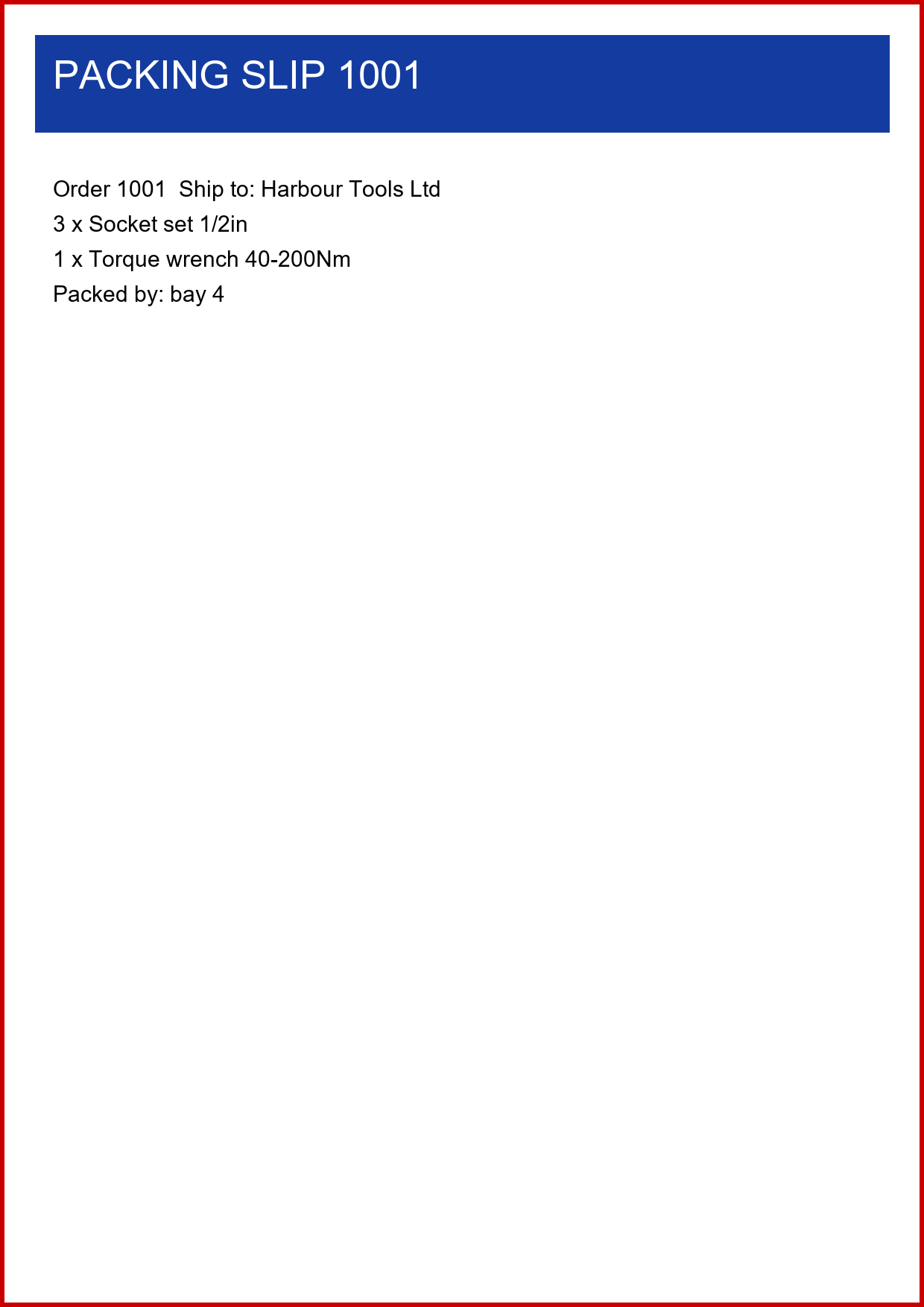
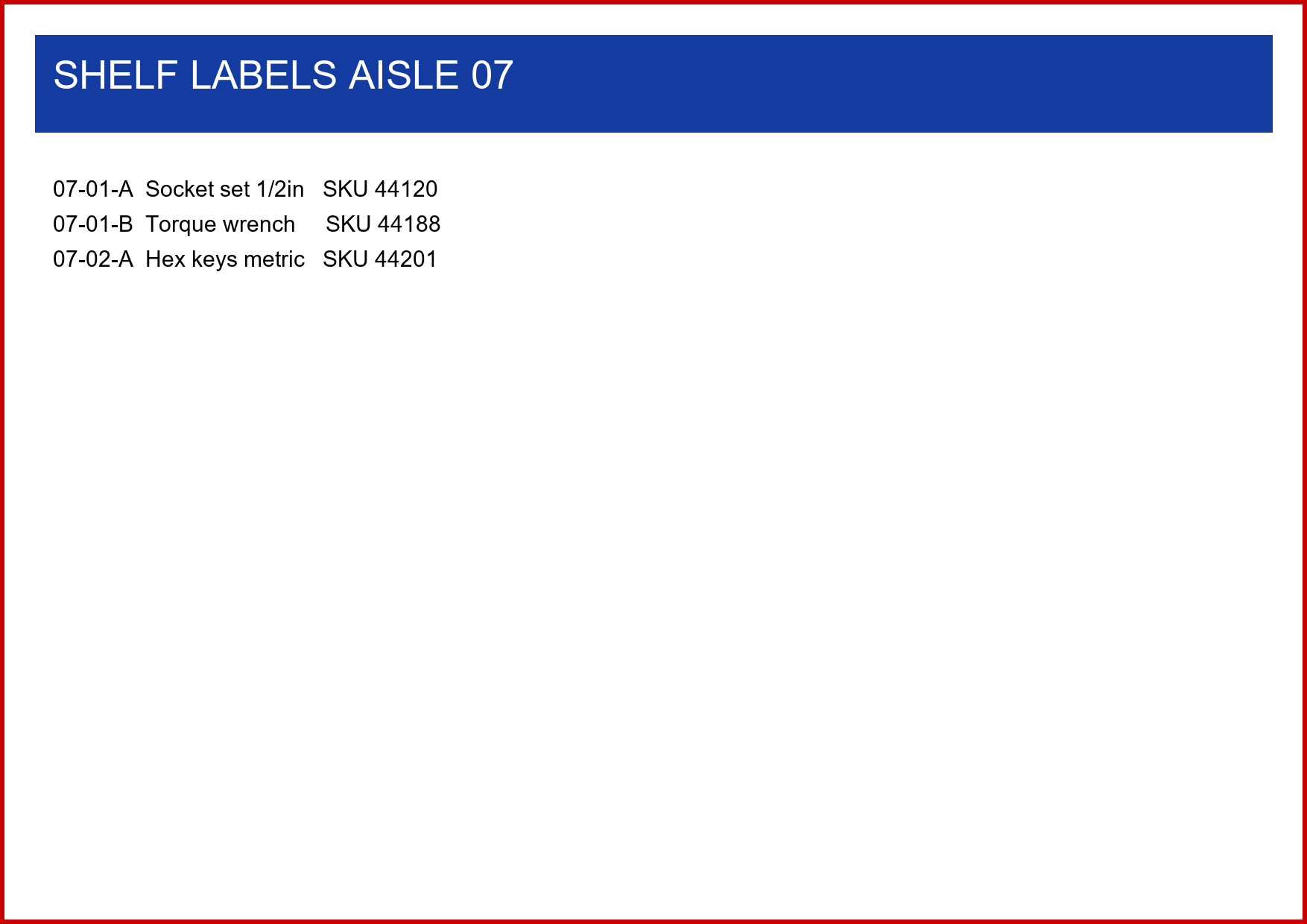
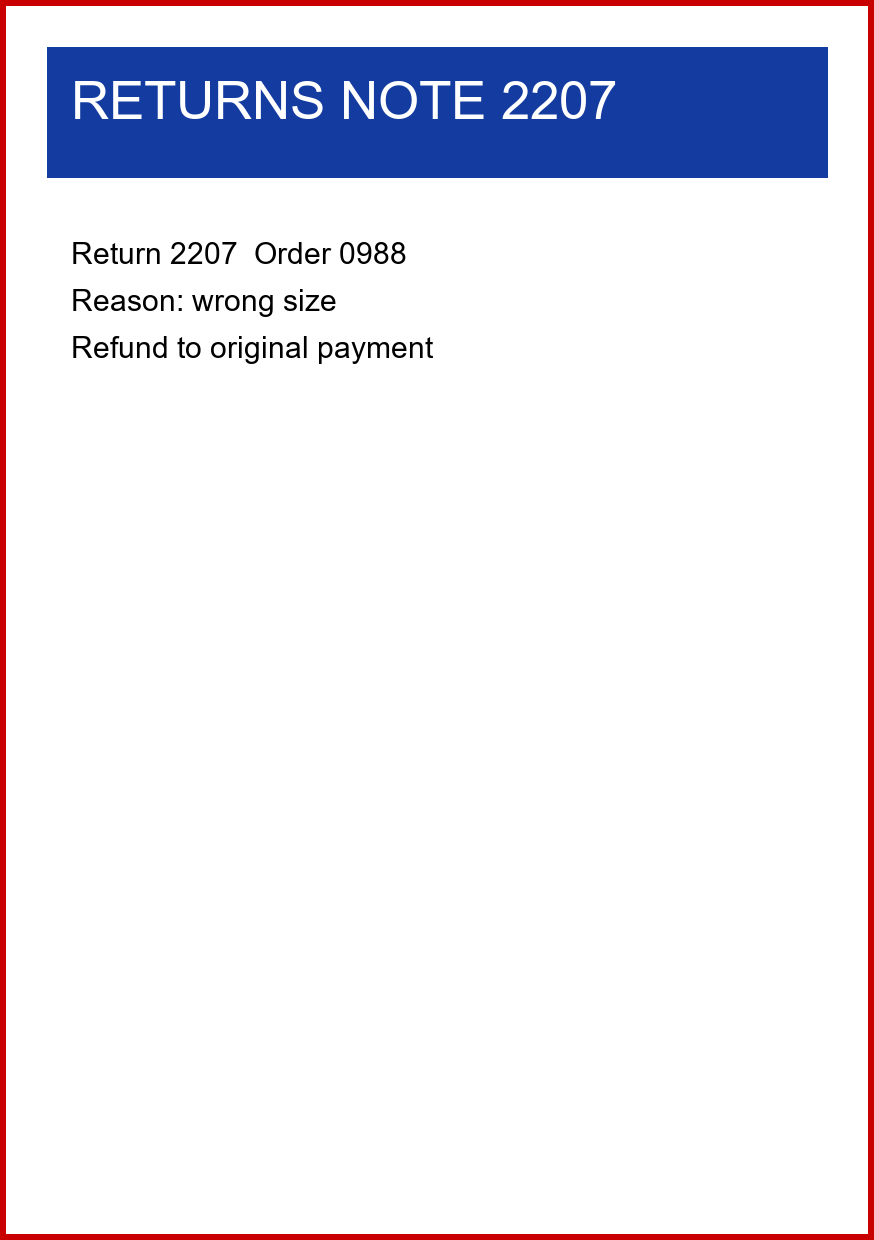
該服務從TestData/jobs列出三個PNG文件,分別為slip-1001.png、labels-aisle-07.png和return-2207.png。 每個都是150 DPI的圖像,邊緣處有紅色邊框。
輸出
以下PDF展示Cursor創建的代碼中每個工作。 每個頁面圖像皆未變更,且保持捕獲頁面的大小。
依IronPrint構建的工作捕獲貨單至文件中,而不是印表機。 該工作擁有一頁縱向A4頁面,列印憑證要求兩份單色拷貝。
依IronPrint構建的工作捕獲架上標籤至文件中,而不是印表機。 此A4橫向頁面尺寸為297x210毫米,列印憑證規範彩色輸出。
依IronPrint構建的工作捕獲退貨單至文件中,而不是印表機。 其單頁A5縱向頁面尺寸為148x210毫米,列印憑證中設定單色輸出。
如何為印刷代碼撰寫回歸測試?
Cursor的雲端代理在Ubuntu機器上運行,範例目標為net9.0-windows,因此在本地代理聊天中發送此請求。
@tests/DespatchDesk.Tests/ @TestData/

Write xUnit tests for DespatchJobs and ReprintService. None of them may send a print job.

Cover these cases with tests:
- Describe returns every row of TestData/expected-jobs.tsv, for both classes.
- The returns note reports a 20 mm bottom margin.
- Print throws when the printer is missing from GetPrinterNames.
- That error message names each printer GetPrinterNames returns when the test runs.
- An installed printer name with its case changed is refused as well.
- Hundredths of an inch convert to the millimeters in expected-jobs.tsv.

Link config and TestData from the repo root into the test output, keeping their relative paths.
Leave expected-jobs.tsv as it is, then run dotnet test.
Tell me how many tests passed and how many failed.拒絕測試使用未安裝的印表機名稱,因此在調用Printer.Print前,會停留在印表機檢查步驟。
AI編碼助手指南從空文件夾進行一項IronPrint任務至根據書面通過標準進行驗證的結果。
在實際運行中,這些提示產生了什麼結果?
Cursor依照派送範例存儲庫的順序收到七個提示。 運行後,每次更改代碼的提交的新的Release構建都重覆以下報告和命令。
- 在移動至IronPrint前和移動之後,工作報告輔助報告的三行都匹配。
- 修正之前重印報告匹配 0 的 3 行,修正之後匹配 3 的 3 行。
- 列印機命令列出了四台已安裝的印表機及其托盤,確認兩台配置的印表機均未安裝。
- Cursor的五個文檔回答中每個引用一個頁面,無文件發生更改。
- 對於GetPrinterNames不返回的名稱,Cursor重覆指南的聲明並注意到專案規則描述了不同的結果。
- 計劃未找到文檔名稱的PrintSettings替代品,並將此記錄為假設。
- 移動後,應用程序只參考了IronPrint包,並且沒有System.Drawing.Printing代碼保留。
- DespatchJobs保留其公共的Describe和Print簽名。
- 列印命令拒絕三個文檔類型的配置印表機,離開碼2並列出四台安裝的印表機。
- 印表機檢查也拒絕低於字母或跘尾空格的已安裝Adobe PDF印表機。
- 修正之前,重印命令將缺失的配置印表機和"adobe pdf"的工作發送至默認印表機。
- 修正後,重印命令拒絕這兩個名稱。 它因未處理的例外而停止,提示06要求不輸出退出碼。
- 所有9個xUnit測試均通過。 它們來自五個測試方法,沒有一個發送工作。
- 運行保留了配置,測試數據和專案規則不變。
- 每次的Release構建都有0警告和0錯誤,沒有文件被手動編輯過。
- 一些步驟與頁面上運行的不同。 每個提示均在本地桌面聊天中手動發送。 提示04被首先粘貼而未被發送,運行的日誌腳本報告該提示在聊天中缺失後被發送。 計畫經在Agent中發送提示04得到批准,而建構從未被點擊過。 Cursor的遷移已經檢查了印表機名稱,正如其計畫所建議的那樣,因此提示05更改了現有檢查。
GitHub Copilot指南還在存儲庫中保存路徑特定的指導文件,而Google Antigravity指南在真實瀏覽器中測試列印頁面。 每個指南的運行記錄列出工具版本、模型、時長和測試機器。
疑難排解
問題?
如果您有任何疑問,請聯繫support@ironsoftware.com

Curtis Chau 擁有卡爾頓大學計算機科學學士學位,專注於前端開發,擅長於 Node.js、TypeScript、JavaScript 和 React。Curtis 熱衷於創建直觀且美觀的用戶界面,喜歡使用現代框架並打造結構良好、視覺吸引人的手冊。

