Iron Suite for .NET
10個 .NET 程式庫。一個完整的文件套件。



Microsoft Build Conference 2023會議總結:AI副駕駛時代

微軟最新創新產品Copilot for Security計劃於2024年4月1日全球發布,將徹底改變全球的網路安全實踐。 利用生成式AI,Copilot賦予安全和IT專業人士無與倫比的見解和指導,增強他們有效檢測和緩解安全風險的能力。 在龐大資料和威脅情報的支持下,包括微軟每天處理的超過78萬億條安全信號,Copilot向使用者提供量身定制的建議,加快響應時間並強化專業知識。
微軟進行的一項最新研究顯示,Copilot的轉型影響,經驗豐富的安全分析師報告效率顯著提高22%,準確性提高7%。 新增的預付費用模式進一步普及了Copilot的使用,使其可以被各種規模的組織獲得。 "作為專門致力於網路安全解決方案的開發者,我們對微軟的Copilot for Security的潛力感到興奮。 我們很期待探索其功能,並將其整合到我們的解決方案中以增強防護" - Justin Pierce,Iron Software首席軟體工程師。
同時,Iron Software在其IronPdf.Extensions.AI NuGet套件中引入了一項創新功能,使使用者可使用OpenAI增強PDF文件。 這個由微軟語義核心驅動的整合,允許使用者生成PDF內容的簡潔摘要,並進行持續查詢以進行深入分析。 通過遵循簡單步驟,使用者可以無縫利用OpenAI來增強其PDF處理任務,這在利用人工智慧進行文件操作方面代表了一個重大飛躍。
"IronPdf.Extensions.AI NuGet套件現在整合了OpenAI,預示著PDF處理的新時代,具備強大的文件增強工具。 具備簡要摘要和持續查詢能力等功能,使用者現在可以前所未有地優化工作流程,提高生產力。" - Justin Pierce,Iron Software高級軟體工程師。 使用NuGet安裝
IronPDF AI能為您做什麼? 這是一個概覽
- 摘要生成: 您可以快速生成冗長PDF文件的簡要摘要。 此功能對於需要高效瀏覽大量資訊的專業人士非常有用。
- 查詢與記憶: IronPDF AI利用複雜算法幫助使用者更好地理解和記住PDF文件的內容。 查詢功能讓您可以在實時中互動式地探索和分析PDF文件。您可以提問、提取相關資料,並深入了解文件內容。
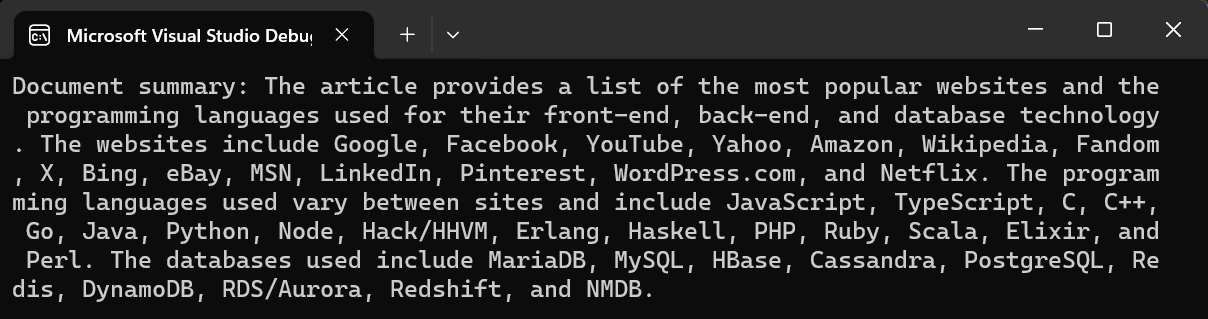
PDF摘要範例
導入PDF文件,並利用Summarize方法生成PDF文件的摘要。 您可以從這裡下載樣本PDF文件。 以下是程式碼範例:
using IronPdf;
using IronPdf.AI;
using Microsoft.SemanticKernel;
using Microsoft.SemanticKernel.Memory;
using System;
using System.Threading.Tasks;

// Configure the Azure endpoint and API key for OpenAI services
string azureEndpoint = "AzureEndPoint";
string apiKey = "APIKEY";

// Initialize a volatile memory store
var volatileMemoryStore = new VolatileMemoryStore();

// Build and configure the Semantic Kernel with Azure OpenAI services
var builder = new KernelBuilder()
    .WithAzureTextEmbeddingGenerationService("oaiembed", azureEndpoint, apiKey)
    .WithAzureChatCompletionService("oaichat", azureEndpoint, apiKey)
    .WithMemoryStorage(volatileMemoryStore);
var kernel = builder.Build();

// Initialize the IronAI with the configured kernel
IronAI.Initialize(kernel);

// Import the PDF document
PdfDocument pdf = PdfDocument.FromFile("wikipedia.pdf");

// Summarize the document asynchronously
string summary = await pdf.Summarize(); // Optionally pass AI instance or use AI instance directly

// Output the document's summary to the console
Console.WriteLine($"Document summary: {summary}");Imports IronPdf
Imports IronPdf.AI
Imports Microsoft.SemanticKernel
Imports Microsoft.SemanticKernel.Memory
Imports System
Imports System.Threading.Tasks
' Configure the Azure endpoint and API key for OpenAI services
Private azureEndpoint As String = "AzureEndPoint"
Private apiKey As String = "APIKEY"
' Initialize a volatile memory store
Private volatileMemoryStore = New VolatileMemoryStore()
' Build and configure the Semantic Kernel with Azure OpenAI services
Private builder = (New KernelBuilder()).WithAzureTextEmbeddingGenerationService("oaiembed", azureEndpoint, apiKey).WithAzureChatCompletionService("oaichat", azureEndpoint, apiKey).WithMemoryStorage(volatileMemoryStore)
Private kernel = builder.Build()
' Initialize the IronAI with the configured kernel
IronAI.Initialize(kernel)
' Import the PDF document
Dim pdf As PdfDocument = PdfDocument.FromFile("wikipedia.pdf")
' Summarize the document asynchronously
Dim summary As String = Await pdf.Summarize() ' Optionally pass AI instance or use AI instance directly
' Output the document's summary to the console
Console.WriteLine($"Document summary: {summary}")輸出摘要
微軟的Copilot for Security和Iron Software的OpenAI整合都在各自領域取得了顯著進展。 儘管Copilot增強了網路安全措施,但Iron Software的OpenAI整合則革新了文件增強技術。 兩項創新均為使用者提供強大的工具,以保護數位資產和精簡工作流程,對於在當前數位環境中應對不斷演變的威脅至關重要。


10 款適用於辦公室文件的 .NET API 產品

