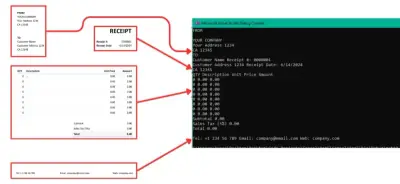
Interfejsy API do skanowania paragonów automatyzują pobieranie danych z paragonów przy użyciu technologii OCR, co znacznie ogranicza błędy związane z ręcznym wprowadzaniem danych i przyspiesza przetwarzanie. Ten przewodnik pokazuje, jak używać IronOCR w języku C# do dokładnego wyodrębniania nazw dostawców, dat, pozycji, cen i sum z obrazów paragonów, z wbudowanym przetwarzaniem wstępnym obrazów i obsługą wielu formatów.
Dlaczego warto wybrać IronOCR do skanowania paragonów?
IronOCR to elastyczna biblioteka OCR, która pozwala na niezawodne wyodrębnianie tekstu ze skanowanych dokumentów, obrazów i plików PDF. Dzięki zaawansowanym algorytmom, wizji komputerowej i modelom uczenia maszynowego IronOCR zapewnia wysoką dokładność nawet w trudnych sytuacjach. Biblioteka obsługuje wiele języków i stylów czcionek, dzięki czemu nadaje się do zastosowań globalnych. Włączając IronOCR do swoich aplikacji, możesz zautomatyzować wprowadzanie danych i analizę tekstu, zwiększając produktywność.
W jaki sposób IronOCR wyodrębnia tekst z obrazów paragonów?
IronOCR pobiera tekst z dokumentów, zdjęć, zrzutów ekranu i obrazu z kamery na żywo w postaci odpowiedzi JSON. Wykorzystując zaawansowane algorytmy i uczenie maszynowe, IronOCR analizuje dane obrazówe, rozpoznaje znaki i przekształca je w tekst nadający się do odczytu maszynowego. Biblioteka wykorzystuje technologię Tesseract 5 wzbogaconą o autorskie ulepszenia zapewniające najwyższą dokładność.
Dlaczego IronOCR doskonale nadaje się do przetwarzania paragonów?
Przed rozpoczęciem pracy z IronOCR upewnij się, że spełnione są następujące warunki wstępne:
Jakie środowiska programistyczne są obsługiwane?
Środowisko programistyczne: Zainstaluj odpowiednie środowisko IDE, takie jak Visual Studio. IronOCR obsługuje systemy Windows, Linux, macOS, Azure i AWS.
Jakie umiejętności programistyczne są wymagane?
Znajomość języka C#: Podstawowa znajomość języka C# pomaga w modyfikowaniu przykładów kodu. IronOCR udostępnia proste przykłady i dokumentację API.
Jakie zależności oprogramowania są niezbędne?
Instalacja IronOCR: Zainstaluj za pomocą menedżera pakietów NuGet. Mogą być wymagane zależności specyficzne dla platformy.
Czy wymagany jest klucz licencyjny?
Klucz licencyjny (opcjonalnie): Dostępna bezpłatna wersja próbna; Korzystanie w środowisku produkcyjnym wymaga licencji.
Jak utworzyć nowy projekt Visual Studio do skanowania paragonów?
Jak rozpocząć nowy projekt w Visual Studio?
Otwórz program Visual Studio, przejdź do menu Pliki, najedź kursorem na opcję Nowy i kliknij Projekt.
Nowy obraz projektu
Który szablon projektu wybrać?
Wybierz opcję Aplikacja konsolowa i kliknij Dalej. Ten szablon jest idealny do nauki obsługi IronOCR przed wdrożeniem go w aplikacjach internetowych.
Aplikacja konsolowa
Jak nazwać mój projekt skanera paragonów?
Wpisz nazwę projektu i lokalizację, a następnie kliknij Dalej. Wybierz opisową nazwę, na przykład 'ReceiptScannerAPI'.
Konfiguracja projektu
Którą wersję .NET Framework należy wybrać?
Wybierz .NET 5.0 lub nowszą wersję, aby uzyskać optymalną kompatybilność, a następnie kliknij Utwórz.
Docelowa platforma
Jak zainstalować IronOCR w moim projekcie?
Dostępne są dwie proste metody instalacji:
Jak korzystać z menedżera pakietów NuGet?
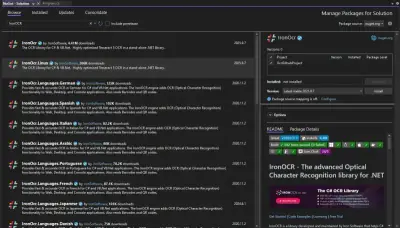
Przejdź do Narzędzia > Menedżer pakietów NuGet > Zarządzaj pakietami NuGet dla rozwiązania
Menedżer pakietów NuGet
Wyszukaj IronOCR i zainstaluj pakiet. W przypadku paragonów w językach innych niż angielski należy zainstalować pakiety dla danego języka.
Jak szybko wyodrębnić dane z paragonu za pomocą IronOCR?
Wyodrębnij dane z paragonu za pomocą zaledwie kilku wierszy kodu:
1Install IronOCR with NuGet Package Manager
PM > Install-Package IronOcr
Install-Package IronOcr
2Skopiuj i uruchom ten fragment kodu.
using IronOcr;using System;var ocr = new IronTesseract();// Configure for receipt scanningocr.Configuration.ReadBarCodes = true;ocr.Configuration.WhiteListCharacters = "0123456789.$,ABCDEFGHIJKLMNOPQRSTUVWXYZabcdefghijklmnopqrstuvwxyz% ";using (var input = new OcrInput(@"receipt.jpg")){ // Apply automatic image enhancement input.DeNoise(); input.Deskew(); input.EnhanceResolution(225); // Extract text from receipt var result = ocr.Read(input); // Display extracted text and confidenceConsole.WriteLine($"Extracted Text:\n{result.Text}");Console.WriteLine($"\nConfidence: {result.Confidence}%");}
using IronOcr;
using System;

var ocr = new IronTesseract();

// Configure for receipt scanning
ocr.Configuration.ReadBarCodes = true;
ocr.Configuration.WhiteListCharacters = "0123456789.$,ABCDEFGHIJKLMNOPQRSTUVWXYZabcdefghijklmnopqrstuvwxyz% ";

using (var input = new OcrInput(@"receipt.jpg"))
{
    // Apply automatic image enhancement
    input.DeNoise();
    input.Deskew();
    input.EnhanceResolution(225);

    // Extract text from receipt
    var result = ocr.Read(input);

    // Display extracted text and confidence
    Console.WriteLine($"Extracted Text:\n{result.Text}");
    Console.WriteLine($"\nConfidence: {result.Confidence}%");
}
Imports IronOcrImports SystemDim ocr = New IronTesseract()' Configure for receipt scanningocr.Configuration.ReadBarCodes = Trueocr.Configuration.WhiteListCharacters = "0123456789.$,ABCDEFGHIJKLMNOPQRSTUVWXYZabcdefghijklmnopqrstuvwxyz% "Using input = New OcrInput("receipt.jpg") ' Apply automatic image enhancement input.DeNoise() input.Deskew() input.EnhanceResolution(225) ' Extract text from receipt Dim result = ocr.Read(input) ' Display extracted text and confidence Console.WriteLine($"Extracted Text:{vbCrLf}{result.Text}") Console.WriteLine($"{vbCrLf}Confidence: {result.Confidence}%")End Using
ImportsIronOcrImportsSystemDim ocr = New IronTesseract()' Configure for receipt scanningocr.Configuration.ReadBarCodes = Trueocr.Configuration.WhiteListCharacters = "0123456789.$,ABCDEFGHIJKLMNOPQRSTUVWXYZabcdefghijklmnopqrstuvwxyz% "Using input = New OcrInput("receipt.jpg") ' Apply automatic image enhancement input.DeNoise() input.Deskew() input.EnhanceResolution(225) ' Extract text from receipt Dim result = ocr.Read(input) ' Display extracted text and confidenceConsole.WriteLine($"Extracted Text:{vbCrLf}{result.Text}")Console.WriteLine($"{vbCrLf}Confidence: {result.Confidence}%")EndUsing
Imports IronOcr
Imports System

Dim ocr = New IronTesseract()

' Configure for receipt scanning
ocr.Configuration.ReadBarCodes = True
ocr.Configuration.WhiteListCharacters = "0123456789.$,ABCDEFGHIJKLMNOPQRSTUVWXYZabcdefghijklmnopqrstuvwxyz% "

Using input = New OcrInput("receipt.jpg")
    ' Apply automatic image enhancement
    input.DeNoise()
    input.Deskew()
    input.EnhanceResolution(225)

    ' Extract text from receipt
    Dim result = ocr.Read(input)

    ' Display extracted text and confidence
    Console.WriteLine($"Extracted Text:{vbCrLf}{result.Text}")
    Console.WriteLine($"{vbCrLf}Confidence: {result.Confidence}%")
End Using
3Wdrożenie do testowania w środowisku produkcyjnym
using IronOcr;using System;using System.Collections.Generic;using System.Text.RegularExpressions;class ReceiptScanner{ static void Main() { var ocr = new IronTesseract(); // Configure OCR for optimal receipt reading ocr.Configuration.WhiteListCharacters = "0123456789.$,ABCDEFGHIJKLMNOPQRSTUVWXYZabcdefghijklmnopqrstuvwxyz% "; ocr.Configuration.BlackListCharacters = "~`@#*_}{][|\\"; ocr.Configuration.TesseractVersion = TesseractVersion.Tesseract5; // Load the image of the receipt using (var input = new OcrInput(@"r2.png")) { // Apply image enhancement filters input.Deskew(); // Fix image rotation input.EnhanceResolution(225); // Optimal DPI for receipts input.DeNoise(); // Remove background noise input.Sharpen(); // Improve text clarity // Perform OCR on the input image var result = ocr.Read(input); // Regular expression patterns to extract relevant details from the OCR result var descriptionPattern = @"\w+\s+(.*?)\s+(\d+\.\d+)\s+Units\s+(\d+\.\d+)\s+Tax15%\s+\$(\d+\.\d+)"; var pricePattern = @"\$\d+(\.\d{2})?"; var datePattern = @"\d{1,2}[/-]\d{1,2}[/-]\d{2,4}"; // Variables to store extracted data var descriptions = new List<string>(); var unitPrices = new List<decimal>(); var taxes = new List<decimal>(); var amounts = new List<decimal>(); var lines = result.Text.Split('\n'); foreach (var line in lines) { // Match each line against the description pattern var descriptionMatch = Regex.Match(line, descriptionPattern); if (descriptionMatch.Success) { descriptions.Add(descriptionMatch.Groups[1].Value.Trim()); unitPrices.Add(decimal.Parse(descriptionMatch.Groups[2].Value)); // Calculate tax and total amount for each item var tax = unitPrices[unitPrices.Count - 1] * 0.15m; taxes.Add(tax); amounts.Add(unitPrices[unitPrices.Count - 1] + tax); } // Extract date if found var dateMatch = Regex.Match(line, datePattern); if (dateMatch.Success) { Console.WriteLine($"Receipt Date: {dateMatch.Value}"); } } // Output the extracted data for (int i = 0; i < descriptions.Count; i++) { Console.WriteLine($"Description: {descriptions[i]}"); Console.WriteLine($"Quantity: 1.00 Units"); Console.WriteLine($"Unit Price: ${unitPrices[i]:0.00}"); Console.WriteLine($"Taxes: ${taxes[i]:0.00}"); Console.WriteLine($"Amount: ${amounts[i]:0.00}"); Console.WriteLine("-----------------------"); } // Calculate and display totals var subtotal = unitPrices.Sum(); var totalTax = taxes.Sum(); var grandTotal = amounts.Sum(); Console.WriteLine($"\nSubtotal: ${subtotal:0.00}"); Console.WriteLine($"Total Tax: ${totalTax:0.00}"); Console.WriteLine($"Grand Total: ${grandTotal:0.00}"); } }}
using IronOcr;using System;using System.Collections.Generic;using System.Text.RegularExpressions;class ReceiptScanner{ static voidMain() { var ocr = new IronTesseract(); // Configure OCR for optimal receipt reading ocr.Configuration.WhiteListCharacters = "0123456789.$,ABCDEFGHIJKLMNOPQRSTUVWXYZabcdefghijklmnopqrstuvwxyz% "; ocr.Configuration.BlackListCharacters = "~`@#*_}{][|\\"; ocr.Configuration.TesseractVersion = TesseractVersion.Tesseract5; // Load the image of the receipt using (var input = new OcrInput(@"r2.png")) { // Apply image enhancement filters input.Deskew(); // Fix image rotation input.EnhanceResolution(225); // Optimal DPI for receipts input.DeNoise(); // Remove background noise input.Sharpen(); // Improve text clarity // Perform OCR on the input image var result = ocr.Read(input); // Regular expression patterns to extract relevant details from the OCR result var descriptionPattern = @"\w+\s+(.*?)\s+(\d+\.\d+)\s+Units\s+(\d+\.\d+)\s+Tax15%\s+\$(\d+\.\d+)"; var pricePattern = @"\$\d+(\.\d{2})?"; var datePattern = @"\d{1,2}[/-]\d{1,2}[/-]\d{2,4}"; // Variables to store extracted data var descriptions = new List<string>(); var unitPrices = new List<decimal>(); var taxes = new List<decimal>(); var amounts = new List<decimal>(); var lines = result.Text.Split('\n'); foreach (var line in lines) { // Match each line against the description pattern var descriptionMatch = Regex.Match(line, descriptionPattern); if (descriptionMatch.Success) { descriptions.Add(descriptionMatch.Groups[1].Value.Trim()); unitPrices.Add(decimal.Parse(descriptionMatch.Groups[2].Value)); // Calculate tax and total amount for each item var tax = unitPrices[unitPrices.Count - 1] * 0.15m; taxes.Add(tax); amounts.Add(unitPrices[unitPrices.Count - 1] + tax); } // Extract date if found var dateMatch = Regex.Match(line, datePattern); if (dateMatch.Success) {Console.WriteLine($"Receipt Date: {dateMatch.Value}"); } } // Output the extracted data for (int i = 0; i < descriptions.Count; i++) {Console.WriteLine($"Description: {descriptions[i]}");Console.WriteLine($"Quantity: 1.00 Units");Console.WriteLine($"Unit Price: ${unitPrices[i]:0.00}");Console.WriteLine($"Taxes: ${taxes[i]:0.00}");Console.WriteLine($"Amount: ${amounts[i]:0.00}");Console.WriteLine("-----------------------"); } // Calculate and display totals var subtotal = unitPrices.Sum(); var totalTax = taxes.Sum(); var grandTotal = amounts.Sum();Console.WriteLine($"\nSubtotal: ${subtotal:0.00}");Console.WriteLine($"Total Tax: ${totalTax:0.00}");Console.WriteLine($"Grand Total: ${grandTotal:0.00}"); } }}
using IronOcr;
using System;
using System.Collections.Generic;
using System.Text.RegularExpressions;

class ReceiptScanner
{
    static void Main()
    {
        var ocr = new IronTesseract();

        // Configure OCR for optimal receipt reading
        ocr.Configuration.WhiteListCharacters = "0123456789.$,ABCDEFGHIJKLMNOPQRSTUVWXYZabcdefghijklmnopqrstuvwxyz% ";
        ocr.Configuration.BlackListCharacters = "~`@#*_}{][|\\";
        ocr.Configuration.TesseractVersion = TesseractVersion.Tesseract5;

        // Load the image of the receipt
        using (var input = new OcrInput(@"r2.png"))
        {
            // Apply image enhancement filters
            input.Deskew(); // Fix image rotation
            input.EnhanceResolution(225); // Optimal DPI for receipts
            input.DeNoise(); // Remove background noise
            input.Sharpen(); // Improve text clarity

            // Perform OCR on the input image
            var result = ocr.Read(input);

            // Regular expression patterns to extract relevant details from the OCR result
            var descriptionPattern = @"\w+\s+(.*?)\s+(\d+\.\d+)\s+Units\s+(\d+\.\d+)\s+Tax15%\s+\$(\d+\.\d+)";
            var pricePattern = @"\$\d+(\.\d{2})?";
            var datePattern = @"\d{1,2}[/-]\d{1,2}[/-]\d{2,4}";

            // Variables to store extracted data
            var descriptions = new List<string>();
            var unitPrices = new List<decimal>();
            var taxes = new List<decimal>();
            var amounts = new List<decimal>();

            var lines = result.Text.Split('\n');
            foreach (var line in lines)
            {
                // Match each line against the description pattern
                var descriptionMatch = Regex.Match(line, descriptionPattern);
                if (descriptionMatch.Success)
                {
                    descriptions.Add(descriptionMatch.Groups[1].Value.Trim());
                    unitPrices.Add(decimal.Parse(descriptionMatch.Groups[2].Value));

                    // Calculate tax and total amount for each item
                    var tax = unitPrices[unitPrices.Count - 1] * 0.15m;
                    taxes.Add(tax);
                    amounts.Add(unitPrices[unitPrices.Count - 1] + tax);
                }

                // Extract date if found
                var dateMatch = Regex.Match(line, datePattern);
                if (dateMatch.Success)
                {
                    Console.WriteLine($"Receipt Date: {dateMatch.Value}");
                }
            }

            // Output the extracted data
            for (int i = 0; i < descriptions.Count; i++)
            {
                Console.WriteLine($"Description: {descriptions[i]}");
                Console.WriteLine($"Quantity: 1.00 Units");
                Console.WriteLine($"Unit Price: ${unitPrices[i]:0.00}");
                Console.WriteLine($"Taxes: ${taxes[i]:0.00}");
                Console.WriteLine($"Amount: ${amounts[i]:0.00}");
                Console.WriteLine("-----------------------");
            }

            // Calculate and display totals
            var subtotal = unitPrices.Sum();
            var totalTax = taxes.Sum();
            var grandTotal = amounts.Sum();

            Console.WriteLine($"\nSubtotal: ${subtotal:0.00}");
            Console.WriteLine($"Total Tax: ${totalTax:0.00}");
            Console.WriteLine($"Grand Total: ${grandTotal:0.00}");
        }
    }
}
Imports IronOcrImports SystemImports System.Collections.GenericImports System.Text.RegularExpressionsClass ReceiptScanner Shared Sub Main() Dim ocr = New IronTesseract() ' Configure OCR for optimal receipt reading ocr.Configuration.WhiteListCharacters = "0123456789.$,ABCDEFGHIJKLMNOPQRSTUVWXYZabcdefghijklmnopqrstuvwxyz% " ocr.Configuration.BlackListCharacters = "~`@#*_}{][|\" ocr.Configuration.TesseractVersion = TesseractVersion.Tesseract5 ' Load the image of the receipt Using input = New OcrInput("r2.png") ' Apply image enhancement filters input.Deskew() ' Fix image rotation input.EnhanceResolution(225) ' Optimal DPI for receipts input.DeNoise() ' Remove background noise input.Sharpen() ' Improve text clarity ' Perform OCR on the input image Dim result = ocr.Read(input) ' Regular expression patterns to extract relevant details from the OCR result Dim descriptionPattern = "\w+\s+(.*?)\s+(\d+\.\d+)\s+Units\s+(\d+\.\d+)\s+Tax15%\s+\$(\d+\.\d+)" Dim pricePattern = "\$\d+(\.\d{2})?" Dim datePattern = "\d{1,2}[/-]\d{1,2}[/-]\d{2,4}" ' Variables to store extracted data Dim descriptions = New List(Of String)() Dim unitPrices = New List(Of Decimal)() Dim taxes = New List(Of Decimal)() Dim amounts = New List(Of Decimal)() Dim lines = result.Text.Split(ControlChars.Lf) For Each line In lines ' Match each line against the description pattern Dim descriptionMatch = Regex.Match(line, descriptionPattern) If descriptionMatch.Success Then descriptions.Add(descriptionMatch.Groups(1).Value.Trim()) unitPrices.Add(Decimal.Parse(descriptionMatch.Groups(2).Value)) ' Calculate tax and total amount for each item Dim tax = unitPrices(unitPrices.Count - 1) * 0.15D taxes.Add(tax) amounts.Add(unitPrices(unitPrices.Count - 1) + tax) End If ' Extract date if found Dim dateMatch = Regex.Match(line, datePattern) If dateMatch.Success Then Console.WriteLine($"Receipt Date: {dateMatch.Value}") End If Next ' Output the extracted data For i As Integer = 0 To descriptions.Count - 1 Console.WriteLine($"Description: {descriptions(i)}") Console.WriteLine("Quantity: 1.00 Units") Console.WriteLine($"Unit Price: ${unitPrices(i):0.00}") Console.WriteLine($"Taxes: ${taxes(i):0.00}") Console.WriteLine($"Amount: ${amounts(i):0.00}") Console.WriteLine("-----------------------") Next ' Calculate and display totals Dim subtotal = unitPrices.Sum() Dim totalTax = taxes.Sum() Dim grandTotal = amounts.Sum() Console.WriteLine(vbCrLf & $"Subtotal: ${subtotal:0.00}") Console.WriteLine($"Total Tax: ${totalTax:0.00}") Console.WriteLine($"Grand Total: ${grandTotal:0.00}") End Using End SubEnd Class
ImportsIronOcrImportsSystemImportsSystem.Collections.GenericImportsSystem.Text.RegularExpressionsClass ReceiptScannerShared Sub Main() Dim ocr = New IronTesseract() ' Configure OCR for optimal receipt reading ocr.Configuration.WhiteListCharacters = "0123456789.$,ABCDEFGHIJKLMNOPQRSTUVWXYZabcdefghijklmnopqrstuvwxyz% " ocr.Configuration.BlackListCharacters = "~`@#*_}{][|\" ocr.Configuration.TesseractVersion = TesseractVersion.Tesseract5 ' Load the image of the receiptUsing input = New OcrInput("r2.png") ' Apply image enhancement filters input.Deskew() ' Fix image rotation input.EnhanceResolution(225) ' Optimal DPI for receipts input.DeNoise() ' Remove background noise input.Sharpen() ' Improve text clarity ' Perform OCR on the input image Dim result = ocr.Read(input) ' Regular expression patterns to extract relevant details from the OCR result Dim descriptionPattern = "\w+\s+(.*?)\s+(\d+\.\d+)\s+Units\s+(\d+\.\d+)\s+Tax15%\s+\$(\d+\.\d+)" Dim pricePattern = "\$\d+(\.\d{2})?" Dim datePattern = "\d{1,2}[/-]\d{1,2}[/-]\d{2,4}" ' Variables to store extracted data Dim descriptions = New List(OfString)() Dim unitPrices = New List(OfDecimal)() Dim taxes = New List(OfDecimal)() Dim amounts = New List(OfDecimal)() Dim lines = result.Text.Split(ControlChars.Lf) For Each line In lines ' Match each line against the description pattern Dim descriptionMatch = Regex.Match(line, descriptionPattern) If descriptionMatch.SuccessThen descriptions.Add(descriptionMatch.Groups(1).Value.Trim()) unitPrices.Add(Decimal.Parse(descriptionMatch.Groups(2).Value)) ' Calculate tax and total amount for each item Dim tax = unitPrices(unitPrices.Count - 1) * 0.15D taxes.Add(tax) amounts.Add(unitPrices(unitPrices.Count - 1) + tax) End If ' Extract date if found Dim dateMatch = Regex.Match(line, datePattern) If dateMatch.SuccessThenConsole.WriteLine($"Receipt Date: {dateMatch.Value}") End If Next ' Output the extracted data For i AsInteger = 0 To descriptions.Count - 1Console.WriteLine($"Description: {descriptions(i)}")Console.WriteLine("Quantity: 1.00 Units")Console.WriteLine($"Unit Price: ${unitPrices(i):0.00}")Console.WriteLine($"Taxes: ${taxes(i):0.00}")Console.WriteLine($"Amount: ${amounts(i):0.00}")Console.WriteLine("-----------------------") Next ' Calculate and display totals Dim subtotal = unitPrices.Sum() Dim totalTax = taxes.Sum() Dim grandTotal = amounts.Sum()Console.WriteLine(vbCrLf & $"Subtotal: ${subtotal:0.00}")Console.WriteLine($"Total Tax: ${totalTax:0.00}")Console.WriteLine($"Grand Total: ${grandTotal:0.00}")EndUsing End SubEnd Class
Imports IronOcr
Imports System
Imports System.Collections.Generic
Imports System.Text.RegularExpressions

Class ReceiptScanner
    Shared Sub Main()
        Dim ocr = New IronTesseract()

        ' Configure OCR for optimal receipt reading
        ocr.Configuration.WhiteListCharacters = "0123456789.$,ABCDEFGHIJKLMNOPQRSTUVWXYZabcdefghijklmnopqrstuvwxyz% "
        ocr.Configuration.BlackListCharacters = "~`@#*_}{][|\"
        ocr.Configuration.TesseractVersion = TesseractVersion.Tesseract5

        ' Load the image of the receipt
        Using input = New OcrInput("r2.png")
            ' Apply image enhancement filters
            input.Deskew() ' Fix image rotation
            input.EnhanceResolution(225) ' Optimal DPI for receipts
            input.DeNoise() ' Remove background noise
            input.Sharpen() ' Improve text clarity

            ' Perform OCR on the input image
            Dim result = ocr.Read(input)

            ' Regular expression patterns to extract relevant details from the OCR result
            Dim descriptionPattern = "\w+\s+(.*?)\s+(\d+\.\d+)\s+Units\s+(\d+\.\d+)\s+Tax15%\s+\$(\d+\.\d+)"
            Dim pricePattern = "\$\d+(\.\d{2})?"
            Dim datePattern = "\d{1,2}[/-]\d{1,2}[/-]\d{2,4}"

            ' Variables to store extracted data
            Dim descriptions = New List(Of String)()
            Dim unitPrices = New List(Of Decimal)()
            Dim taxes = New List(Of Decimal)()
            Dim amounts = New List(Of Decimal)()

            Dim lines = result.Text.Split(ControlChars.Lf)
            For Each line In lines
                ' Match each line against the description pattern
                Dim descriptionMatch = Regex.Match(line, descriptionPattern)
                If descriptionMatch.Success Then
                    descriptions.Add(descriptionMatch.Groups(1).Value.Trim())
                    unitPrices.Add(Decimal.Parse(descriptionMatch.Groups(2).Value))

                    ' Calculate tax and total amount for each item
                    Dim tax = unitPrices(unitPrices.Count - 1) * 0.15D
                    taxes.Add(tax)
                    amounts.Add(unitPrices(unitPrices.Count - 1) + tax)
                End If

                ' Extract date if found
                Dim dateMatch = Regex.Match(line, datePattern)
                If dateMatch.Success Then
                    Console.WriteLine($"Receipt Date: {dateMatch.Value}")
                End If
            Next

            ' Output the extracted data
            For i As Integer = 0 To descriptions.Count - 1
                Console.WriteLine($"Description: {descriptions(i)}")
                Console.WriteLine("Quantity: 1.00 Units")
                Console.WriteLine($"Unit Price: ${unitPrices(i):0.00}")
                Console.WriteLine($"Taxes: ${taxes(i):0.00}")
                Console.WriteLine($"Amount: ${amounts(i):0.00}")
                Console.WriteLine("-----------------------")
            Next

            ' Calculate and display totals
            Dim subtotal = unitPrices.Sum()
            Dim totalTax = taxes.Sum()
            Dim grandTotal = amounts.Sum()

            Console.WriteLine(vbCrLf & $"Subtotal: ${subtotal:0.00}")
            Console.WriteLine($"Total Tax: ${totalTax:0.00}")
            Console.WriteLine($"Grand Total: ${grandTotal:0.00}")
        End Using
    End Sub
End Class
Jakie techniki poprawiają dokładność skanowania paragonów?
Kluczowe techniki dokładnego skanowania paragonów:
Biała lista znaków: Ogranicza rozpoznawanie do oczekiwanych znaków
Wyodrębnij pełną treść paragonu z zachowaniem formatowania:
using IronOcr;using System;using System.Linq;class WholeReceiptExtractor{ static void Main() { var ocr = new IronTesseract(); // Configure for receipt scanning ocr.Configuration.ReadBarCodes = true; // Enable barcode detection ocr.Configuration.TesseractVersion = TesseractVersion.Tesseract5; // Use latest engine ocr.Configuration.EngineMode = TesseractEngineMode.TesseractAndLstm; // Best accuracy using (var input = new OcrInput(@"r3.png")) { // Apply automatic image correction input.WithTitle("Receipt Scan"); // Use computer vision to find text regions var textRegions = input.FindTextRegions(); Console.WriteLine($"Found {textRegions.Count()} text regions"); // Apply optimal filters for receipt processing input.ApplyOcrInputFilters(); // Perform OCR on the entire receipt var result = ocr.Read(input); // Display extracted text Console.WriteLine("=== EXTRACTED RECEIPT TEXT ==="); Console.WriteLine(result.Text); // Get detailed results Console.WriteLine($"\n=== OCR STATISTICS ==="); Console.WriteLine($"OCR Confidence: {result.Confidence:F2}%"); Console.WriteLine($"Pages Processed: {result.Pages.Length}"); Console.WriteLine($"Paragraphs Found: {result.Paragraphs.Length}"); Console.WriteLine($"Lines Detected: {result.Lines.Length}"); Console.WriteLine($"Words Recognized: {result.Words.Length}"); // Extract any barcodes found if (result.Barcodes.Any()) { Console.WriteLine("\n=== BARCODES DETECTED ==="); foreach(var barcode in result.Barcodes) { Console.WriteLine($"Type: {barcode.Type}"); Console.WriteLine($"Value: {barcode.Value}"); Console.WriteLine($"Location: X={barcode.X}, Y={barcode.Y}"); } } // Save as searchable PDF result.SaveAsSearchablePdf("receipt_searchable.pdf"); Console.WriteLine("\nSearchable PDF saved as: receipt_searchable.pdf"); // Export as hOCR for preservation result.SaveAsHocrFile("receipt_hocr.html"); Console.WriteLine("hOCR file saved as: receipt_hocr.html"); } }}
using IronOcr;using System;using System.Linq;class WholeReceiptExtractor{ static voidMain() { var ocr = new IronTesseract(); // Configure for receipt scanning ocr.Configuration.ReadBarCodes = true; // Enable barcode detection ocr.Configuration.TesseractVersion = TesseractVersion.Tesseract5; // Use latest engine ocr.Configuration.EngineMode = TesseractEngineMode.TesseractAndLstm; // Best accuracy using (var input = new OcrInput(@"r3.png")) { // Apply automatic image correction input.WithTitle("Receipt Scan"); // Use computer vision to find text regions var textRegions = input.FindTextRegions();Console.WriteLine($"Found {textRegions.Count()} text regions"); // Apply optimal filters for receipt processing input.ApplyOcrInputFilters(); // Perform OCR on the entire receipt var result = ocr.Read(input); // Display extracted textConsole.WriteLine("=== EXTRACTED RECEIPT TEXT ===");Console.WriteLine(result.Text); // Get detailed resultsConsole.WriteLine($"\n=== OCR STATISTICS ===");Console.WriteLine($"OCR Confidence: {result.Confidence:F2}%");Console.WriteLine($"Pages Processed: {result.Pages.Length}");Console.WriteLine($"Paragraphs Found: {result.Paragraphs.Length}");Console.WriteLine($"Lines Detected: {result.Lines.Length}");Console.WriteLine($"Words Recognized: {result.Words.Length}"); // Extract any barcodes found if (result.Barcodes.Any()) {Console.WriteLine("\n=== BARCODES DETECTED ==="); foreach(var barcode in result.Barcodes) {Console.WriteLine($"Type: {barcode.Type}");Console.WriteLine($"Value: {barcode.Value}");Console.WriteLine($"Location: X={barcode.X}, Y={barcode.Y}"); } } // Save as searchable PDF result.SaveAsSearchablePdf("receipt_searchable.pdf");Console.WriteLine("\nSearchable PDF saved as: receipt_searchable.pdf"); // Export as hOCR for preservation result.SaveAsHocrFile("receipt_hocr.html");Console.WriteLine("hOCR file saved as: receipt_hocr.html"); } }}
using IronOcr;
using System;
using System.Linq;

class WholeReceiptExtractor
{
    static void Main()
    {
        var ocr = new IronTesseract();

        // Configure for receipt scanning
        ocr.Configuration.ReadBarCodes = true; // Enable barcode detection
        ocr.Configuration.TesseractVersion = TesseractVersion.Tesseract5; // Use latest engine
        ocr.Configuration.EngineMode = TesseractEngineMode.TesseractAndLstm; // Best accuracy

        using (var input = new OcrInput(@"r3.png"))
        {
            // Apply automatic image correction
            input.WithTitle("Receipt Scan");

            // Use computer vision to find text regions
            var textRegions = input.FindTextRegions();
            Console.WriteLine($"Found {textRegions.Count()} text regions");

            // Apply optimal filters for receipt processing
            input.ApplyOcrInputFilters();

            // Perform OCR on the entire receipt
            var result = ocr.Read(input);

            // Display extracted text
            Console.WriteLine("=== EXTRACTED RECEIPT TEXT ===");
            Console.WriteLine(result.Text);

            // Get detailed results
            Console.WriteLine($"\n=== OCR STATISTICS ===");
            Console.WriteLine($"OCR Confidence: {result.Confidence:F2}%");
            Console.WriteLine($"Pages Processed: {result.Pages.Length}");
            Console.WriteLine($"Paragraphs Found: {result.Paragraphs.Length}");
            Console.WriteLine($"Lines Detected: {result.Lines.Length}");
            Console.WriteLine($"Words Recognized: {result.Words.Length}");

            // Extract any barcodes found
            if (result.Barcodes.Any())
            {
                Console.WriteLine("\n=== BARCODES DETECTED ===");
                foreach(var barcode in result.Barcodes)
                {
                    Console.WriteLine($"Type: {barcode.Type}");
                    Console.WriteLine($"Value: {barcode.Value}");
                    Console.WriteLine($"Location: X={barcode.X}, Y={barcode.Y}");
                }
            }

            // Save as searchable PDF
            result.SaveAsSearchablePdf("receipt_searchable.pdf");
            Console.WriteLine("\nSearchable PDF saved as: receipt_searchable.pdf");

            // Export as hOCR for preservation
            result.SaveAsHocrFile("receipt_hocr.html");
            Console.WriteLine("hOCR file saved as: receipt_hocr.html");
        }
    }
}
Imports IronOcrImports SystemImports System.LinqClass WholeReceiptExtractor Shared Sub Main() Dim ocr = New IronTesseract() ' Configure for receipt scanning ocr.Configuration.ReadBarCodes = True ' Enable barcode detection ocr.Configuration.TesseractVersion = TesseractVersion.Tesseract5 ' Use latest engine ocr.Configuration.EngineMode = TesseractEngineMode.TesseractAndLstm ' Best accuracy Using input = New OcrInput("r3.png") ' Apply automatic image correction input.WithTitle("Receipt Scan") ' Use computer vision to find text regions Dim textRegions = input.FindTextRegions() Console.WriteLine($"Found {textRegions.Count()} text regions") ' Apply optimal filters for receipt processing input.ApplyOcrInputFilters() ' Perform OCR on the entire receipt Dim result = ocr.Read(input) ' Display extracted text Console.WriteLine("=== EXTRACTED RECEIPT TEXT ===") Console.WriteLine(result.Text) ' Get detailed results Console.WriteLine(vbCrLf & "=== OCR STATISTICS ===") Console.WriteLine($"OCR Confidence: {result.Confidence:F2}%") Console.WriteLine($"Pages Processed: {result.Pages.Length}") Console.WriteLine($"Paragraphs Found: {result.Paragraphs.Length}") Console.WriteLine($"Lines Detected: {result.Lines.Length}") Console.WriteLine($"Words Recognized: {result.Words.Length}") ' Extract any barcodes found If result.Barcodes.Any() Then Console.WriteLine(vbCrLf & "=== BARCODES DETECTED ===") For Each barcode In result.Barcodes Console.WriteLine($"Type: {barcode.Type}") Console.WriteLine($"Value: {barcode.Value}") Console.WriteLine($"Location: X={barcode.X}, Y={barcode.Y}") Next End If ' Save as searchable PDF result.SaveAsSearchablePdf("receipt_searchable.pdf") Console.WriteLine(vbCrLf & "Searchable PDF saved as: receipt_searchable.pdf") ' Export as hOCR for preservation result.SaveAsHocrFile("receipt_hocr.html") Console.WriteLine("hOCR file saved as: receipt_hocr.html") End Using End SubEnd Class
ImportsIronOcrImportsSystemImportsSystem.LinqClass WholeReceiptExtractorShared Sub Main() Dim ocr = New IronTesseract() ' Configure for receipt scanning ocr.Configuration.ReadBarCodes = True ' Enable barcode detection ocr.Configuration.TesseractVersion = TesseractVersion.Tesseract5' Use latest engine ocr.Configuration.EngineMode = TesseractEngineMode.TesseractAndLstm' Best accuracyUsing input = New OcrInput("r3.png") ' Apply automatic image correction input.WithTitle("Receipt Scan") ' Use computer vision to find text regions Dim textRegions = input.FindTextRegions()Console.WriteLine($"Found {textRegions.Count()} text regions") ' Apply optimal filters for receipt processing input.ApplyOcrInputFilters() ' Perform OCR on the entire receipt Dim result = ocr.Read(input) ' Display extracted textConsole.WriteLine("=== EXTRACTED RECEIPT TEXT ===")Console.WriteLine(result.Text) ' Get detailed resultsConsole.WriteLine(vbCrLf & "=== OCR STATISTICS ===")Console.WriteLine($"OCR Confidence: {result.Confidence:F2}%")Console.WriteLine($"Pages Processed: {result.Pages.Length}")Console.WriteLine($"Paragraphs Found: {result.Paragraphs.Length}")Console.WriteLine($"Lines Detected: {result.Lines.Length}")Console.WriteLine($"Words Recognized: {result.Words.Length}") ' Extract any barcodes found If result.Barcodes.Any() ThenConsole.WriteLine(vbCrLf & "=== BARCODES DETECTED ===") For Each barcode In result.BarcodesConsole.WriteLine($"Type: {barcode.Type}")Console.WriteLine($"Value: {barcode.Value}")Console.WriteLine($"Location: X={barcode.X}, Y={barcode.Y}") Next End If ' Save as searchable PDF result.SaveAsSearchablePdf("receipt_searchable.pdf")Console.WriteLine(vbCrLf & "Searchable PDF saved as: receipt_searchable.pdf") ' Export as hOCR for preservation result.SaveAsHocrFile("receipt_hocr.html")Console.WriteLine("hOCR file saved as: receipt_hocr.html")EndUsing End SubEnd Class
Imports IronOcr
Imports System
Imports System.Linq

Class WholeReceiptExtractor
    Shared Sub Main()
        Dim ocr = New IronTesseract()

        ' Configure for receipt scanning
        ocr.Configuration.ReadBarCodes = True ' Enable barcode detection
        ocr.Configuration.TesseractVersion = TesseractVersion.Tesseract5 ' Use latest engine
        ocr.Configuration.EngineMode = TesseractEngineMode.TesseractAndLstm ' Best accuracy

        Using input = New OcrInput("r3.png")
            ' Apply automatic image correction
            input.WithTitle("Receipt Scan")

            ' Use computer vision to find text regions
            Dim textRegions = input.FindTextRegions()
            Console.WriteLine($"Found {textRegions.Count()} text regions")

            ' Apply optimal filters for receipt processing
            input.ApplyOcrInputFilters()

            ' Perform OCR on the entire receipt
            Dim result = ocr.Read(input)

            ' Display extracted text
            Console.WriteLine("=== EXTRACTED RECEIPT TEXT ===")
            Console.WriteLine(result.Text)

            ' Get detailed results
            Console.WriteLine(vbCrLf & "=== OCR STATISTICS ===")
            Console.WriteLine($"OCR Confidence: {result.Confidence:F2}%")
            Console.WriteLine($"Pages Processed: {result.Pages.Length}")
            Console.WriteLine($"Paragraphs Found: {result.Paragraphs.Length}")
            Console.WriteLine($"Lines Detected: {result.Lines.Length}")
            Console.WriteLine($"Words Recognized: {result.Words.Length}")

            ' Extract any barcodes found
            If result.Barcodes.Any() Then
                Console.WriteLine(vbCrLf & "=== BARCODES DETECTED ===")
                For Each barcode In result.Barcodes
                    Console.WriteLine($"Type: {barcode.Type}")
                    Console.WriteLine($"Value: {barcode.Value}")
                    Console.WriteLine($"Location: X={barcode.X}, Y={barcode.Y}")
                Next
            End If

            ' Save as searchable PDF
            result.SaveAsSearchablePdf("receipt_searchable.pdf")
            Console.WriteLine(vbCrLf & "Searchable PDF saved as: receipt_searchable.pdf")

            ' Export as hOCR for preservation
            result.SaveAsHocrFile("receipt_hocr.html")
            Console.WriteLine("hOCR file saved as: receipt_hocr.html")
        End Using
    End Sub
End Class
Wynik działania API skanowania paragonów
Jakie zaawansowane funkcje usprawniają skanowanie paragonów?
IronOCR oferuje kilka zaawansowanych funkcji, które znacznie poprawiają dokładność skanowania paragonów:
// Example: Async receipt processing for high-volume scenariosusing IronOcr;using System;using System.Threading.Tasks;using System.Collections.Generic;using System.IO;class BulkReceiptProcessor{ static async Task Main() { var ocr = new IronTesseract(); // Configure for optimal performance ocr.Configuration.TesseractVersion = TesseractVersion.Tesseract5; ocr.Configuration.UseMultiThreading = true; ocr.Configuration.ProcessorCount = Environment.ProcessorCount; // Process multiple receipts asynchronously var receiptFiles = Directory.GetFiles(@"C:\Receipts\", "*.jpg"); var tasks = new List<Task<OcrResult>>(); foreach (var file in receiptFiles) { tasks.Add(ProcessReceiptAsync(ocr, file)); } // Wait for all receipts to be processed var results = await Task.WhenAll(tasks); // Aggregate results decimal totalAmount = 0; foreach (var result in results) { // Extract total from each receipt var match = System.Text.RegularExpressions.Regex.Match( result.Text, @"Total:?\s*\$?(\d+\.\d{2})"); if (match.Success && decimal.TryParse(match.Groups[1].Value, out var amount)) { totalAmount += amount; } } Console.WriteLine($"Processed {results.Length} receipts"); Console.WriteLine($"Combined total: ${totalAmount:F2}"); } static async Task<OcrResult> ProcessReceiptAsync(IronTesseract ocr, string filePath) { using (var input = new OcrInput(filePath)) { // Apply preprocessing input.DeNoise(); input.Deskew(); input.EnhanceResolution(200); // Process asynchronously return await ocr.ReadAsync(input); } }}
// Example: Async receipt processing for high-volume scenariosusing IronOcr;using System;using System.Threading.Tasks;using System.Collections.Generic;using System.IO;class BulkReceiptProcessor{ static async TaskMain() { var ocr = new IronTesseract(); // Configure for optimal performance ocr.Configuration.TesseractVersion = TesseractVersion.Tesseract5; ocr.Configuration.UseMultiThreading = true; ocr.Configuration.ProcessorCount = Environment.ProcessorCount; // Process multiple receipts asynchronously var receiptFiles = Directory.GetFiles(@"C:\Receipts\", "*.jpg"); var tasks = new List<Task<OcrResult>>(); foreach (var file in receiptFiles) { tasks.Add(ProcessReceiptAsync(ocr, file)); } // Wait for all receipts to be processed var results = awaitTask.WhenAll(tasks); // Aggregate results decimal totalAmount = 0; foreach (var result in results) { // Extract total from each receipt var match = System.Text.RegularExpressions.Regex.Match( result.Text, @"Total:?\s*\$?(\d+\.\d{2})"); if (match.Success && decimal.TryParse(match.Groups[1].Value, out var amount)) { totalAmount += amount; } }Console.WriteLine($"Processed {results.Length} receipts");Console.WriteLine($"Combined total: ${totalAmount:F2}"); } static async Task<OcrResult> ProcessReceiptAsync(IronTesseract ocr, string filePath) { using (var input = new OcrInput(filePath)) { // Apply preprocessing input.DeNoise(); input.Deskew(); input.EnhanceResolution(200); // Process asynchronously return await ocr.ReadAsync(input); } }}
// Example: Async receipt processing for high-volume scenarios
using IronOcr;
using System;
using System.Threading.Tasks;
using System.Collections.Generic;
using System.IO;

class BulkReceiptProcessor
{
    static async Task Main()
    {
        var ocr = new IronTesseract();

        // Configure for optimal performance
        ocr.Configuration.TesseractVersion = TesseractVersion.Tesseract5;
        ocr.Configuration.UseMultiThreading = true;
        ocr.Configuration.ProcessorCount = Environment.ProcessorCount;

        // Process multiple receipts asynchronously
        var receiptFiles = Directory.GetFiles(@"C:\Receipts\", "*.jpg");
        var tasks = new List<Task<OcrResult>>();

        foreach (var file in receiptFiles)
        {
            tasks.Add(ProcessReceiptAsync(ocr, file));
        }

        // Wait for all receipts to be processed
        var results = await Task.WhenAll(tasks);

        // Aggregate results
        decimal totalAmount = 0;
        foreach (var result in results)
        {
            // Extract total from each receipt
            var match = System.Text.RegularExpressions.Regex.Match(
                result.Text, @"Total:?\s*\$?(\d+\.\d{2})");

            if (match.Success && decimal.TryParse(match.Groups[1].Value, out var amount))
            {
                totalAmount += amount;
            }
        }

        Console.WriteLine($"Processed {results.Length} receipts");
        Console.WriteLine($"Combined total: ${totalAmount:F2}");
    }

    static async Task<OcrResult> ProcessReceiptAsync(IronTesseract ocr, string filePath)
    {
        using (var input = new OcrInput(filePath))
        {
            // Apply preprocessing
            input.DeNoise();
            input.Deskew();
            input.EnhanceResolution(200);

            // Process asynchronously
            return await ocr.ReadAsync(input);
        }
    }
}
' Example: Async receipt processing for high-volume scenariosImports IronOcrImports SystemImports System.Threading.TasksImports System.Collections.GenericImports System.IOClass BulkReceiptProcessor Shared Async Function Main() As Task Dim ocr = New IronTesseract() ' Configure for optimal performance ocr.Configuration.TesseractVersion = TesseractVersion.Tesseract5 ocr.Configuration.UseMultiThreading = True ocr.Configuration.ProcessorCount = Environment.ProcessorCount ' Process multiple receipts asynchronously Dim receiptFiles = Directory.GetFiles("C:\Receipts\", "*.jpg") Dim tasks = New List(Of Task(Of OcrResult))() For Each file In receiptFiles tasks.Add(ProcessReceiptAsync(ocr, file)) Next ' Wait for all receipts to be processed Dim results = Await Task.WhenAll(tasks) ' Aggregate results Dim totalAmount As Decimal = 0 For Each result In results ' Extract total from each receipt Dim match = System.Text.RegularExpressions.Regex.Match(result.Text, "Total:?\s*\$?(\d+\.\d{2})") If match.Success AndAlso Decimal.TryParse(match.Groups(1).Value, amount) Then totalAmount += amount End If Next Console.WriteLine($"Processed {results.Length} receipts") Console.WriteLine($"Combined total: ${totalAmount:F2}") End Function Shared Async Function ProcessReceiptAsync(ocr As IronTesseract, filePath As String) As Task(Of OcrResult) Using input = New OcrInput(filePath) ' Apply preprocessing input.DeNoise() input.Deskew() input.EnhanceResolution(200) ' Process asynchronously Return Await ocr.ReadAsync(input) End Using End FunctionEnd Class
' Example: Async receipt processing for high-volume scenariosImportsIronOcrImportsSystemImportsSystem.Threading.TasksImportsSystem.Collections.GenericImportsSystem.IOClass BulkReceiptProcessorSharedAsync Function Main() AsTask Dim ocr = New IronTesseract() ' Configure for optimal performance ocr.Configuration.TesseractVersion = TesseractVersion.Tesseract5 ocr.Configuration.UseMultiThreading = True ocr.Configuration.ProcessorCount = Environment.ProcessorCount ' Process multiple receipts asynchronously Dim receiptFiles = Directory.GetFiles("C:\Receipts\", "*.jpg") Dim tasks = New List(OfTask(OfOcrResult))() For Each file In receiptFiles tasks.Add(ProcessReceiptAsync(ocr, file)) Next ' Wait for all receipts to be processed Dim results = AwaitTask.WhenAll(tasks) ' Aggregate results Dim totalAmount AsDecimal = 0 For Each result In results ' Extract total from each receipt Dim match = System.Text.RegularExpressions.Regex.Match(result.Text, "Total:?\s*\$?(\d+\.\d{2})") If match.SuccessAndAlsoDecimal.TryParse(match.Groups(1).Value, amount) Then totalAmount += amount End If NextConsole.WriteLine($"Processed {results.Length} receipts")Console.WriteLine($"Combined total: ${totalAmount:F2}") End FunctionSharedAsync Function ProcessReceiptAsync(ocr AsIronTesseract, filePath AsString) AsTask(OfOcrResult)Using input = New OcrInput(filePath) ' Apply preprocessing input.DeNoise() input.Deskew() input.EnhanceResolution(200) ' Process asynchronously ReturnAwait ocr.ReadAsync(input)EndUsing End FunctionEnd Class
' Example: Async receipt processing for high-volume scenarios
Imports IronOcr
Imports System
Imports System.Threading.Tasks
Imports System.Collections.Generic
Imports System.IO

Class BulkReceiptProcessor
    Shared Async Function Main() As Task
        Dim ocr = New IronTesseract()

        ' Configure for optimal performance
        ocr.Configuration.TesseractVersion = TesseractVersion.Tesseract5
        ocr.Configuration.UseMultiThreading = True
        ocr.Configuration.ProcessorCount = Environment.ProcessorCount

        ' Process multiple receipts asynchronously
        Dim receiptFiles = Directory.GetFiles("C:\Receipts\", "*.jpg")
        Dim tasks = New List(Of Task(Of OcrResult))()

        For Each file In receiptFiles
            tasks.Add(ProcessReceiptAsync(ocr, file))
        Next

        ' Wait for all receipts to be processed
        Dim results = Await Task.WhenAll(tasks)

        ' Aggregate results
        Dim totalAmount As Decimal = 0
        For Each result In results
            ' Extract total from each receipt
            Dim match = System.Text.RegularExpressions.Regex.Match(result.Text, "Total:?\s*\$?(\d+\.\d{2})")

            If match.Success AndAlso Decimal.TryParse(match.Groups(1).Value, amount) Then
                totalAmount += amount
            End If
        Next

        Console.WriteLine($"Processed {results.Length} receipts")
        Console.WriteLine($"Combined total: ${totalAmount:F2}")
    End Function

    Shared Async Function ProcessReceiptAsync(ocr As IronTesseract, filePath As String) As Task(Of OcrResult)
        Using input = New OcrInput(filePath)
            ' Apply preprocessing
            input.DeNoise()
            input.Deskew()
            input.EnhanceResolution(200)

            ' Process asynchronously
            Return Await ocr.ReadAsync(input)
        End Using
    End Function
End Class
Jak radzić sobie z typowymi wyzwaniami związanymi ze skanowaniem paragonów?
Skanowanie paragonów wiąże się z wyjątkowymi wyzwaniami, w których rozwiązaniu pomaga IronOCR:
Jak radzić sobie z niską jakością zdjęć paragonów?
Obrazy niskiej jakości: Użyj Kreatorafiltrów, aby automatycznie znaleźć optymalne ustawienia przetwarzania wstępnego.
A co z przekrzywionymi lub obróconymi paragonami?
Przekrzywione lub obrócone paragony: Automatyczne wykrywanie obrotu strony zapewnia prawidłową orientację.
Jak przetwarzać wyblakłe lub mało kontrastowe paragony?
Jak zarządzać różnymi formatami i układami paragonów?
Formaty paragonów różnią się znacznie w zależności od sprzedawcy. IronOCR oferuje elastyczne podejście:
using IronOcr;using System;using System.Collections.Generic;using System.Linq;class ReceiptLayoutHandler{ static void Main() { var ocr = new IronTesseract(); // Configure for different receipt layouts ocr.Configuration.PageSegmentationMode = TesseractPageSegmentationMode.AutoOsd; ocr.Configuration.EngineMode = TesseractEngineMode.TesseractAndLstm; using (var input = new OcrInput(@"complex_receipt.jpg")) { // Apply region-specific processing var cropRegion = new CropRectangle(x: 0, y: 100, width: 400, height: 800); input.AddImage(@"complex_receipt.jpg", cropRegion); // Process with confidence tracking var result = ocr.Read(input); // Parse using confidence scores var highConfidenceLines = result.Lines .Where(line => line.Confidence > 85) .Select(line => line.Text) .ToList(); // Extract data with fallback strategies var total = ExtractTotal(highConfidenceLines) ?? ExtractTotalAlternative(result.Text); Console.WriteLine($"Receipt Total: {total}"); } } static decimal? ExtractTotal(List<string> lines) { // Primary extraction method foreach (var line in lines) { if (line.Contains("TOTAL") && System.Text.RegularExpressions.Regex.IsMatch(line, @"\d+\.\d{2}")) { var match = System.Text.RegularExpressions.Regex.Match(line, @"(\d+\.\d{2})"); if (decimal.TryParse(match.Value, out var total)) return total; } } return null; } static decimal? ExtractTotalAlternative(string fullText) { // Fallback extraction method var pattern = @"(?:Total|TOTAL|Grand Total|Amount Due).*?(\d+\.\d{2})"; var match = System.Text.RegularExpressions.Regex.Match(fullText, pattern); if (match.Success && decimal.TryParse(match.Groups[1].Value, out var total)) return total; return null; }}
using IronOcr;using System;using System.Collections.Generic;using System.Linq;class ReceiptLayoutHandler{ static voidMain() { var ocr = new IronTesseract(); // Configure for different receipt layouts ocr.Configuration.PageSegmentationMode = TesseractPageSegmentationMode.AutoOsd; ocr.Configuration.EngineMode = TesseractEngineMode.TesseractAndLstm; using (var input = new OcrInput(@"complex_receipt.jpg")) { // Apply region-specific processing var cropRegion = new CropRectangle(x: 0, y: 100, width: 400, height: 800); input.AddImage(@"complex_receipt.jpg", cropRegion); // Process with confidence tracking var result = ocr.Read(input); // Parse using confidence scores var highConfidenceLines = result.Lines .Where(line => line.Confidence > 85) .Select(line => line.Text) .ToList(); // Extract data with fallback strategies var total = ExtractTotal(highConfidenceLines) ?? ExtractTotalAlternative(result.Text);Console.WriteLine($"Receipt Total: {total}"); } } static decimal? ExtractTotal(List<string> lines) { // Primary extraction method foreach (var line in lines) { if (line.Contains("TOTAL") && System.Text.RegularExpressions.Regex.IsMatch(line, @"\d+\.\d{2}")) { var match = System.Text.RegularExpressions.Regex.Match(line, @"(\d+\.\d{2})"); if (decimal.TryParse(match.Value, out var total)) return total; } } return null; } static decimal? ExtractTotalAlternative(string fullText) { // Fallback extraction method var pattern = @"(?:Total|TOTAL|Grand Total|Amount Due).*?(\d+\.\d{2})"; var match = System.Text.RegularExpressions.Regex.Match(fullText, pattern); if (match.Success && decimal.TryParse(match.Groups[1].Value, out var total)) return total; return null; }}
using IronOcr;
using System;
using System.Collections.Generic;
using System.Linq;

class ReceiptLayoutHandler
{
    static void Main()
    {
        var ocr = new IronTesseract();

        // Configure for different receipt layouts
        ocr.Configuration.PageSegmentationMode = TesseractPageSegmentationMode.AutoOsd;
        ocr.Configuration.EngineMode = TesseractEngineMode.TesseractAndLstm;

        using (var input = new OcrInput(@"complex_receipt.jpg"))
        {
            // Apply region-specific processing
            var cropRegion = new CropRectangle(x: 0, y: 100, width: 400, height: 800);
            input.AddImage(@"complex_receipt.jpg", cropRegion);

            // Process with confidence tracking
            var result = ocr.Read(input);

            // Parse using confidence scores
            var highConfidenceLines = result.Lines
                .Where(line => line.Confidence > 85)
                .Select(line => line.Text)
                .ToList();

            // Extract data with fallback strategies
            var total = ExtractTotal(highConfidenceLines)
                        ?? ExtractTotalAlternative(result.Text);

            Console.WriteLine($"Receipt Total: {total}");
        }
    }

    static decimal? ExtractTotal(List<string> lines)
    {
        // Primary extraction method
        foreach (var line in lines)
        {
            if (line.Contains("TOTAL") &&
                System.Text.RegularExpressions.Regex.IsMatch(line, @"\d+\.\d{2}"))
            {
                var match = System.Text.RegularExpressions.Regex.Match(line, @"(\d+\.\d{2})");
                if (decimal.TryParse(match.Value, out var total))
                    return total;
            }
        }
        return null;
    }

    static decimal? ExtractTotalAlternative(string fullText)
    {
        // Fallback extraction method
        var pattern = @"(?:Total|TOTAL|Grand Total|Amount Due).*?(\d+\.\d{2})";
        var match = System.Text.RegularExpressions.Regex.Match(fullText, pattern);

        if (match.Success && decimal.TryParse(match.Groups[1].Value, out var total))
            return total;

        return null;
    }
}
Imports IronOcrImports SystemImports System.Collections.GenericImports System.LinqClass ReceiptLayoutHandler Shared Sub Main() Dim ocr = New IronTesseract() ' Configure for different receipt layouts ocr.Configuration.PageSegmentationMode = TesseractPageSegmentationMode.AutoOsd ocr.Configuration.EngineMode = TesseractEngineMode.TesseractAndLstm Using input = New OcrInput("complex_receipt.jpg") ' Apply region-specific processing Dim cropRegion = New CropRectangle(x:=0, y:=100, width:=400, height:=800) input.AddImage("complex_receipt.jpg", cropRegion) ' Process with confidence tracking Dim result = ocr.Read(input) ' Parse using confidence scores Dim highConfidenceLines = result.Lines _ .Where(Function(line) line.Confidence > 85) _ .Select(Function(line) line.Text) _ .ToList() ' Extract data with fallback strategies Dim total = ExtractTotal(highConfidenceLines) _ OrElse ExtractTotalAlternative(result.Text) Console.WriteLine($"Receipt Total: {total}") End Using End Sub Shared Function ExtractTotal(lines As List(Of String)) As Decimal? ' Primary extraction method For Each line In lines If line.Contains("TOTAL") AndAlso _ System.Text.RegularExpressions.Regex.IsMatch(line, "\d+\.\d{2}") Then Dim match = System.Text.RegularExpressions.Regex.Match(line, "(\d+\.\d{2})") Dim total As Decimal If Decimal.TryParse(match.Value, total) Then Return total End If End If Next Return Nothing End Function Shared Function ExtractTotalAlternative(fullText As String) As Decimal? ' Fallback extraction method Dim pattern = "(?:Total|TOTAL|Grand Total|Amount Due).*?(\d+\.\d{2})" Dim match = System.Text.RegularExpressions.Regex.Match(fullText, pattern) Dim total As Decimal If match.Success AndAlso Decimal.TryParse(match.Groups(1).Value, total) Then Return total End If Return Nothing End FunctionEnd Class
ImportsIronOcrImportsSystemImportsSystem.Collections.GenericImportsSystem.LinqClass ReceiptLayoutHandlerShared Sub Main() Dim ocr = New IronTesseract() ' Configure for different receipt layouts ocr.Configuration.PageSegmentationMode = TesseractPageSegmentationMode.AutoOsd ocr.Configuration.EngineMode = TesseractEngineMode.TesseractAndLstmUsing input = New OcrInput("complex_receipt.jpg") ' Apply region-specific processing Dim cropRegion = New CropRectangle(x:=0, y:=100, width:=400, height:=800) input.AddImage("complex_receipt.jpg", cropRegion) ' Process with confidence tracking Dim result = ocr.Read(input) ' Parse using confidence scores Dim highConfidenceLines = result.Lines _ .Where(Function(line) line.Confidence > 85) _ .Select(Function(line) line.Text) _ .ToList() ' Extract data with fallback strategies Dim total = ExtractTotal(highConfidenceLines) _OrElseExtractTotalAlternative(result.Text)Console.WriteLine($"Receipt Total: {total}")EndUsing End SubShared Function ExtractTotal(lines AsList(OfString)) AsDecimal? ' Primary extraction method For Each line In lines If line.Contains("TOTAL") AndAlso _System.Text.RegularExpressions.Regex.IsMatch(line, "\d+\.\d{2}") Then Dim match = System.Text.RegularExpressions.Regex.Match(line, "(\d+\.\d{2})") Dim total AsDecimal IfDecimal.TryParse(match.Value, total) Then Return total End If End If Next Return Nothing End FunctionShared Function ExtractTotalAlternative(fullText AsString) AsDecimal? ' Fallback extraction method Dim pattern = "(?:Total|TOTAL|Grand Total|Amount Due).*?(\d+\.\d{2})" Dim match = System.Text.RegularExpressions.Regex.Match(fullText, pattern) Dim total AsDecimal If match.SuccessAndAlsoDecimal.TryParse(match.Groups(1).Value, total) Then Return total End If Return Nothing End FunctionEnd Class
Imports IronOcr
Imports System
Imports System.Collections.Generic
Imports System.Linq

Class ReceiptLayoutHandler
    Shared Sub Main()
        Dim ocr = New IronTesseract()

        ' Configure for different receipt layouts
        ocr.Configuration.PageSegmentationMode = TesseractPageSegmentationMode.AutoOsd
        ocr.Configuration.EngineMode = TesseractEngineMode.TesseractAndLstm

        Using input = New OcrInput("complex_receipt.jpg")
            ' Apply region-specific processing
            Dim cropRegion = New CropRectangle(x:=0, y:=100, width:=400, height:=800)
            input.AddImage("complex_receipt.jpg", cropRegion)

            ' Process with confidence tracking
            Dim result = ocr.Read(input)

            ' Parse using confidence scores
            Dim highConfidenceLines = result.Lines _
                .Where(Function(line) line.Confidence > 85) _
                .Select(Function(line) line.Text) _
                .ToList()

            ' Extract data with fallback strategies
            Dim total = ExtractTotal(highConfidenceLines) _
                        OrElse ExtractTotalAlternative(result.Text)

            Console.WriteLine($"Receipt Total: {total}")
        End Using
    End Sub

    Shared Function ExtractTotal(lines As List(Of String)) As Decimal?
        ' Primary extraction method
        For Each line In lines
            If line.Contains("TOTAL") AndAlso _
                System.Text.RegularExpressions.Regex.IsMatch(line, "\d+\.\d{2}") Then
                Dim match = System.Text.RegularExpressions.Regex.Match(line, "(\d+\.\d{2})")
                Dim total As Decimal
                If Decimal.TryParse(match.Value, total) Then
                    Return total
                End If
            End If
        Next
        Return Nothing
    End Function

    Shared Function ExtractTotalAlternative(fullText As String) As Decimal?
        ' Fallback extraction method
        Dim pattern = "(?:Total|TOTAL|Grand Total|Amount Due).*?(\d+\.\d{2})"
        Dim match = System.Text.RegularExpressions.Regex.Match(fullText, pattern)

        Dim total As Decimal
        If match.Success AndAlso Decimal.TryParse(match.Groups(1).Value, total) Then
            Return total
        End If

        Return Nothing
    End Function
End Class
O czym należy pamiętać w przypadku interfejsów API do skanowania paragonów?
Interfejsy API do skanowania paragonów, takie jak IronOCR, oferują niezawodne rozwiązania do automatycznego pozyskiwania danych z paragonów. Dzięki zaawansowanej technologii OCR firmy mogą automatycznie wyodrębniać nazwy dostawców, daty zakupów, szczegółowe listy produktów, ceny, podatki i sumy. Dzięki obsłudze wielu języków, walut i BARCODE firmy mogą uprościć zarządzanie paragonami, zaoszczędzić czas i podejmować decyzje oparte na danych.
IronOCR zapewnia programistom narzędzia niezbędne do dokładnego i wydajnego pozyskiwania tekstu, umożliwiając automatyzację zadań i zwiększenie wydajności. Pełen zestaw funkcji biblioteki obejmuje obsługę różnych typów dokumentów oraz najnowsze ulepszenia, takie jak 98% redukcja zużycia pamięci.


 Nowy obraz projektu
 Aplikacja konsolowa
 Konfiguracja projektu
 Docelowa platforma
 Menedżer pakietów NuGet
 IronOCR
 Konsola menedżera pakietów

 Wynik
 Wynik działania API skanowania paragonów