
使用IronZIP与AI编码助手

请编码助手在.NET中压缩或解压文件,IronZIP是它可以命名的库之一。 IronZIP是Iron Software的用于ZIP、TAR、GZIP和BZIP2的归档库。自2023年10月以来,它已在NuGet上发布,其指南和代码示例是公开的。
仅凭名称无法告诉助手安装版本的行为。 阅读IronZIP文档的助手可以编写能够正确创建和提取的归档代码。 从记忆中工作的助手可能会混入属于其他ZIP库或旧版本的调用。 在首次请求之前加载文档。


如何与AI编码助手一起使用IronZIP
- 从NuGet下载C# ZIP库
- 在启动时从IronZip_LICENSE_KEY中分配IronZip.License.LicenseKey
- 在写代码之前向助手分享IronZIP的llms.txt索引
- 将IronZIP的规则保存在助手的项目说明文件中
- 打开新会话并粘贴一次性设置提示
- 构建并提取您创建的每个归档文件,并将文件与原始文件进行比较
我的AI助手不能单独处理ZIP文件吗?
IronZIP发布了供工具读取的文档。 一旦助手加载,它可以看到哪些类处理ZIP、TAR、GZIP和BZIP2,以及每个类有哪个成员。
.NET已经通过System.IO.Compression和System.Formats.Tar读取和写入简单的ZIP、GZIP和TAR。
- 可打开的ZIP仍然可能是错误的。缺失的文件或两个相同名称的条目会生成一个无错误打开的ZIP文件。
- 密码保护在.NET 9和.NET 10中缺失。它们的ZIP类没有密码选项,而ZipEncryptionMethod枚举仅在Microsoft的.NET 11文档中出现。IronZIP写入AES-128和AES-256归档。
- BZIP2在.NET中没有类。System.IO.Compression命名空间中没有列出BZIP2类型,因此没有库的BZIP2意味着需要手动编写格式。
- 包名和命名空间的大小写不同。NuGet上的包ID是
IronZIP,而命名空间是IronZip。 助手编造的包名可能会与攻击者故意上传的模仿品匹配,这称为slopsquatting。 给助手准确的名称。 - 许可证无续费。每个IronZIP团队许可证一次付费,许可页面规定了每个层级的开发者数量、地点和项目数量。
步骤1:安装IronZIP
让助手添加包,以便它在编写时可以读取IronZIP的真实类型。
Put IronZIP 2026.10.2 from NuGet into this project and restore it.
Afterwards, report the IronZIP version that the restore resolved.在终端中,此命令可安装当前版本。
dotnet add package IronZIP --version 2026.10.2IronZIP作为.NET Standard 2.0构建的一个包发布。没有单独的Linux、macOS或ARM包可供选择。
步骤 2:应用您的许可证密钥
没有有效的密钥,IronZipArchive接受内存中的文件,但SaveAs抛出IronSoftware.Exceptions.LicensingException,其消息为需要生产许可证。 提取和打开一个归档抛出相同的异常。 输入错误的密钥会抛出许可证密钥未识别。 下方块提供免费试用密钥。
从今天开始在您的项目中使用 IronZIP 免费试用。

在应用启动时应用密钥,在其他IronZIP调用之前。 环境变量在源代码控制之外保存密钥。
IronZip.License.LicenseKey = Environment.GetEnvironmentVariable("IRONZIP_LICENSE_KEY");应用程序分配有效密钥后,IronZip.License.IsLicensed变为真,而IronZip.License.IsValidLicense在不应用它的情况下测试密钥。 IronZIP本身不读取IRONZIP_LICENSE_KEY。 设置变量而不进行分配时,IsLicensed在本文的探测中依然为假,因此SaveAs失败,如同没有密钥一样。
步骤3:将助手指向IronZIP的LLM文档
- llms.txt用每页一个行的摘要索引IronZIP的文档。
- llms-full.txt将每页的摘要集中到一个文件中,但有些摘要描述另一个库,因此代码来自页面本身。
- llms-full-catalog.txt添加博客文章,供演练和比较。
- IronZIP对象引用列出了IronZIP的命名空间和类,以及它们记录的方法和属性。
- 支持技能文件的助手可以加载skill.md,包含安装步骤、许可、配方和修复。
- AI产品资料单提供了一页背景信息。
在索引旁边添加一个清晰的说明。
Read https://ironsoftware.com/zip/csharp/llms.txt ahead of any IronZIP code you write.
Use only APIs that those pages document.
An archive is an IronZipArchive, filled by Add and written by SaveAs.
Confirm anything else against https://ironsoftware.com/zip/csharp/object-reference/api/.
If you cannot confirm a member exists, say so instead of guessing.
Then list the IronZIP members this project calls.允许回答“未记录”的助手有除发明方法以外的选项。
步骤4:将IronZIP上下文添加到您的项目中
输入到聊天的规则会随着会话结束,而项目文件每次都会重新加载。文件名称取决于工具。 Claude Code加载CLAUDE.md,GitHub Copilot加载.github/copilot-instructions.md。 ChatGPT Codex、Cursor和Google Antigravity全部读取AGENTS.md。 Cursor还加载.cursor/rules/中的.mdc规则文件,Antigravity还读取GEMINI.md。 每个文件中的规则文本都是相同的,而Cursor规则文件增加了MDC前言。 从这个块开始。
All archive work in this project uses IronZIP, for ZIP, TAR, GZIP, and BZIP2.
The NuGet package is `IronZIP`, and the namespace is `IronZip`.

Follow these rules for every archive:
- Docs index: https://ironsoftware.com/zip/csharp/llms.txt
- IronZIP skill: https://ironsoftware.com/zip/csharp/skill.md
- Create ZIP files with `new IronZipArchive()` and `Add`.
- Open existing ones with `new IronZipArchive(path, password)`.
- Extract with `IronZipArchive.ExtractArchiveToDirectory`.
- `Add` stores each file under its bare file name.
- Give files from different folders unique names before adding them.
- Do not use `FromDirectory`, which leaves out files in subfolders.
- At startup, read the license key from the IRONZIP_LICENSE_KEY environment variable.
- The key is never inlined in code.
- Extract every archive to a fresh folder before it ships.
- Compare the extracted files with the originals.
- Do not add another compression library. If IronZIP cannot do something, say so.技能文件有两个空缺。 其单文件示例固定在IronZIP 2026.8.2,距离NuGet上2026.10.2的发布版本相差两个版本。 它还推荐IronZipArchive.FromDirectory来压缩文件夹。 在2026.10.2上,该方法仅压缩了一个30个文件测试文件夹顶部的4个文件,并没有错误地遗漏了子文件夹中的26个。
步骤5:一次性设置提示
步骤1到4适用于这个单一提示。 在项目开始或新会话开始时发送。
Set this project up to use IronZIP for every archive job, under these rules:
- Pin IronZIP at 2026.10.2 from NuGet.
- Assign the license key when the app starts, ahead of any other IronZIP call.
- Take it from the IRONZIP_LICENSE_KEY environment variable.
- The key never goes into source code or a committed file.
- Start from https://ironsoftware.com/zip/csharp/llms.txt, and code only against APIs it documents.
- Look up unfamiliar members in the API reference.
- Load https://ironsoftware.com/zip/csharp/skill.md as a skill file when your tool allows it.

Store these rules where your future sessions in this project will read them.
Tell me which file you saved them to.步骤6:产生可用代码的提示模式
这三个习惯让助手在自己的决定上减轻了负担。
命名格式、类和保护。IronZIP为每种格式提供一个类,只有ZIP类需要密码。 说明您需要哪个。
模糊 用IronZIP压缩报告。
更好 使用
IronZipArchive与Encrypt和EncryptionMethods.AES256,将报告文件夹中的每个PDF添加到reports.zip中,然后将其解压缩到临时文件夹,并确认每个文件与原件匹配。
固定版本和框架。成员可能在一个版本到下一个版本之间发生更改。 一个固定的版本为助手提供了一个API来工作。
更好 目标.NET 9和IronZIP 2026.10.2。在第一次归档调用之前从IronZIP_LICENSE_KEY分配许可证密钥。
请求完整的文件。片段可能丢失using行,且加密枚举属于IronZip.Enum命名空间,与归档类分开。
更好 给我完整的Program.cs,包含所有using指令和密钥设置,这样它可以顺利编译。
步骤7:验证收到的内容
首先通过三个检查审查生成的代码。
- 它能编译。发布版本无错误地完成。
- 密钥首先设置。在钥匙行之前运行的IronZIP保存或提取抛出LicensingException。
- 每个归档文件提取到相同的文件。提取到一个空文件夹并与原始文件的哈希比较。
在生成的IronZIP代码中注意这些。
- 使用FromFile打开的归档。
IronZipArchive.FromFile("existing.zip")构建的新的归档包含ZIP文件本身。 使用new IronZipArchive(path, password)打开现有归档。 - 异步归档调用。没有IronZIP归档类有以Async结尾的成员,因此对
SaveAsAsync的调用无法编译。需要在服务器的请求线程之外时,将调用包装在Task.Run中。 - 保存到流。归档可以从流或字节数组中打开,但没有保存方法能写入流或返回字节。 保存到临时文件,并在响应需要它们时读取字节。
让代理验证其自己的工作
允许运行命令的助手可以执行相同的审查。
Do a Release build of this project and run it.

Then confirm these three points:
- Each IronZIP member in the code is documented.
- IronZip.License.IsLicensed returns true.
- Every archive you saved extracts to files identical to the originals.

Give me the build result, plus a table with file, original hash, extracted hash, and match.IronZIP中的条目名称
Add在ZIP和TAR归档中保存每个文件在其裸文件名下。两个文件从不同文件夹中具有一个名称构成重复条目,提取时只保留最后一个写入的,没有错误。 没有添加文件的IronZIP方法接收一个条目名称。 将每个文件复制到一个临时文件夹中,并根据其相对路径构建唯一的名称,并添加副本。
IronZIP中的密码检查
打开AES加密的归档不测试其密码。 new IronZipArchive(path, password)使用错误的密码打开了一个30个条目AES-256测试归档,并计算了所有30个条目。 密码在提取时进行检查。 ExtractArchiveToDirectory使用错误的密码抛出ArgumentException,消息为无效密码!且不写入文件。在2026.10.2上,具有单个条目的受保护归档显示相反。即使是正确的密码,构造函数也抛出无效密码!,提取可以成功。
一个您可以重复的结果
打开一个空文件夹中的新会话并粘贴提示。 助手编写程序的每一行,并在下方的通过列表定义正确的结果。
IRONZIP_LICENSE_KEY中的IronZIP试用或生产密钥。提示
Write a .NET 9 console app to archive legal case files.
If this folder holds a project or source code, report that and stop.
Don't ask questions. Keep all outputs in the project directory.

Follow this order:
1. Add the IronZIP NuGet package at version 2026.10.2 exactly, as the only archive package.
2. IronZIP writes and extracts every archive, using only members its docs show:
- https://ironsoftware.com/zip/csharp/llms.txt with its pages, skill.md included.
- The listed API reference wins any conflict.
3. At startup the program reads IRONZIP_LICENSE_KEY itself and sets IronZip.License.LicenseKey:
- Never print, echo or write the key, or list environment variables.
- Quit with a message if IronZip.License.IsLicensed is false.
4. If casefiles/ is missing, generate it with random seed 2026:
- 30 random-byte files exactly, deepest three folders down, cover-letter.txt on top.
- Sizes 1,024 to 2,097,152 bytes, but exactly 1 empty file.
- summary.txt in three different subfolders, exhibit-a.pdf twice.
- At least two names with a non-ASCII character.
- manifest.csv beside casefiles/, not inside, from the generator's records.
- Rows: forward-slash path, size in bytes, hex SHA-256.
5. Before archiving, measure casefiles/ on disk against those figures:
- If one is off, fix the generator, delete casefiles/ and regenerate.
- After the first archive, casefiles/ stays in place, unchanged.
6. Write these archives:
- bundle.zip: all 30 files, AES-256, password Case-2026.
- bundle.tgz: all 30 files, gzip-compressed TAR.
- cover.zip: cover-letter.txt alone, same password and encryption.
- Each entry name must let a recipient rebuild the relative path.
7. The packing code walks casefiles/ at run time:
- Only step 9 checks read manifest.csv.
- Its only case file literal is cover-letter.txt, and no other file is handled by name.
8. Build in Release and run it.
9. Check the saved archives with code that writes roundtrip.md from measurements:
- Extract each archive into its own kept folder, emptied each run, named in roundtrip.md.
- Extract bundle.zip with password Case-2025 into another such folder, never cleared afterwards.
- Count ZIP names and distinct names with System.IO.Compression.
- Count bundle.tgz likewise with System.Formats.Tar through a GZipStream.

roundtrip.md holds, in order:
- The step 5 figures, the naming rule, then a one-row-per-file table.
- Columns: path, size, manifest SHA-256, zip entry, zip SHA-256, tgz entry, tgz SHA-256, match.
- Extracted hashes come from files your rule finds. match is yes only if all three agree.
- Entry counts, and cover-letter.txt's manifest SHA-256 beside its cover.zip SHA-256.
- The Case-2025 exception type, message and folder file count.

10. You're done when all 30 rows match and each archive has one distinct entry name per file:
- cover.zip returns cover-letter.txt unchanged.
- The Case-2025 attempt throws and leaves its folder empty.
- Until then, fix the packing or checking code, rebuild and rerun over old outputs.
- After six failed runs, stop. Report failing checks, packing approaches tried and the cause.
11. Report the Release build, rows matched per archive, naming rule, step 5 figures, assumptions.IronZIP 2026.10.2上的引用程序校准了提示。 从其自身文件夹中添加每个文件在每个归档中给出了27个不同的名称,而首先准备独特命名的副本在种子2026、77和4101上匹配了30个中的30个。
输出
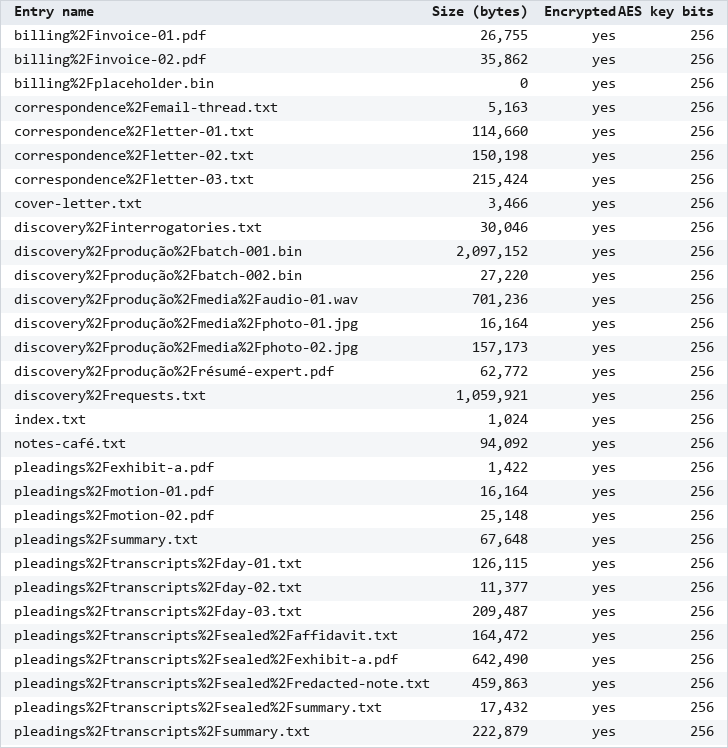
图片显示了IronZIP的Entries方法读取的run's bundle.zip的条目列表。 未编辑的往返表保存了程序测量的每个值。
- net9.0发行版没有产生任何警告和错误。
- Claude Code在程序首次执行中匹配了两个归档中的所有30行,因此修复循环从未运行。
- 在编码之前运行的探测显示Add将casefiles/a/mid.txt存储为mid.txt。
- 程序在相对路径下准备每个文件,写%为%25,/为%2F。
- 测试集包含30个文件和6,762,825字节。
- 两个文件名和一个文件夹名包含非ASCII字符。
- 一个文件是空的,最深的文件在三个文件夹下面的casefiles。
- 两个包分别持有30个不同的条目名称。
- 两个ZIP文件中的每个条目都带有WinZip AES 强度3,AES-256设置。
- 从cover.zip返回的cover-letter.txt保持不变。
- Case-2025尝试抛出ArgumentException并在其文件夹中留下0个文件。
- 独立检查仅使用Python通过pyzipper和tarfile读取每个归档,并通过30个中的30个检查。
- 在项目文件中或会话记录中都未出现许可证密钥。
- 在回答步骤1提示中,由于包名称大小写不匹配,dotnet list package失败,直到Claude Code删除obj并重新恢复。
- 在回答设置提示时,Claude Code将其规则保存到新的CLAUDE.md中,并作为项目技能保存skill.md的未更改副本。
- 在自检中,Claude Code报告程序中记录的所有16个IronZIP成员。
- 有些步骤与页面中的运行不一样。 在接受提示后,Claude Code在一个会话中收到了步骤1、步骤3、步骤5和步骤7的提示。 其API探测在会话的临时文件夹中运行的临时项目中,超出了项目目录范围。 生成器遵循固定的30个路径列表,仅从种子中提取大小和字节。
通过的标准
- 在发布情况下项目在未进行手动代码更改的情况下构建。
- 重复说明部分持有步骤5中的数据,当再度测量casefiles时。
- 往返.md中的所有30行匹配,提取的哈希值均重新从文件中计算,bundle.zip和bundle.tgz各包括30个不同的条目名称。
- cover.zip返回cover-letter.txt不变,提取bundle.zip与Case-2025抛出并且不留任何文件。
- 在项目文件夹中查找许可证密钥不会找到任何文件。
运行记录
- 所有运行都使用一台 Windows 11 x64 台式机,搭载 Core i9-14900KF 和 64 GB 内存。
- 每次运行安装
IronZIP2026.10.2,并且除了在Google Antigravity运行中的.NET 10审核工具外,每个项目都针对.NET 9。 - 每个指南的持续时间是其页面上提示记录时间的总和,而本指南的行仅计算验收提示。
- 表中的版本和型号来自每个工具自己的会话文件和运行日志,而不是独立的版本检查。
- 最后测试 2026年10月26日针对本指南,10月11日对Google Antigravity,10月12日对ChatGPT Codex和GitHub Copilot,10月13日对Claude Code,10月15日对Cursor。
| 指南 | 助手和版本 | 模型 | 持续时间(分钟) |
|---|---|---|---|
| 本指南 | Claude Code 2.1.277,一个会话,关闭权限提示 | Claude Opus 5 | 10.1 |
| Claude Code | Claude Code 2.1.277,计划模式下的提示3 | Claude Sonnet 5,与Claude Opus 5通过opusplan用于提示3的计划 | 32.8 |
| ChatGPT Codex | Codex CLI 0.160.0,恢复的会话 | GPT-6 Luna | 39.4 |
| GitHub Copilot | GitHub Copilot CLI 1.0.95,计划模式下的提示3 | GPT-6 Luna,由Auto引导 | 9.3 |
| Cursor | Cursor 3.23.23桌面应用,计划模式下的提示3 | Grok 4.7 | 57.4 |
| Google Antigravity | Antigravity CLI 1.3.2,在提示1后更新为1.3.3,通过/plan获得提示1和4,跳过许可提示 | Gemini 3.8 Flash(高) | 27.5 |
代理特定指南
每个指南将上述步骤应用于一个工具和一个归档任务。
- 用Claude Code使用IronZIP进行就地更新受保护的案例归档
- 用ChatGPT Codex使用IronZIP解包混合归档格式的合作伙伴投递并检查每个文件的SHA-256
- 用GitHub Copilot使用IronZIP进行每日.tar.gz日志捆绑及拒绝不安全条目的恢复
- 用Cursor使用IronZIP从System.IO.Compression迁移下载捆绑文件到AES-256 ZIP文件
- 用Google Antigravity使用IronZIP从网页提供案例文件作为受保护的ZIP
故障排除
- IronZIP许可证密钥用于生成的代码抛出LicensingException时
- IronZIP文件和归档大小限制对于超过经典4 GB和65,535条目ZIP限制的归档
- 提取受保护的ZIP用于密码保护的归档无法打开时
有问题吗?
如果您有任何问题,请联系support@ironsoftware.com

Curtis Chau 拥有卡尔顿大学的计算机科学学士学位,专注于前端开发,精通 Node.js、TypeScript、JavaScript 和 React。他热衷于打造直观且美观的用户界面,喜欢使用现代框架并创建结构良好、视觉吸引力强的手册。

