


Scrape a Shopping Website in C

Erfahren Sie, wie Sie Produktkategorien und Artikel von Shopping-Websites mit C# und dem WebScraper Framework extrahieren können, um strukturierte Daten aus HTML-Elementen in benutzerdefinierte Modelle zu überführen. Dieser umfassende Leitfaden führt Sie durch den Aufbau eines robusten E-Commerce-Scrapers mit der IronWebScraper Bibliothek.
Schnellstart: Einkaufswebsite in C# scrapen
-
Installieren Sie IronWebScraper mit NuGet Package Manager
-
Kopieren Sie diesen Codeausschnitt und führen Sie ihn aus.
using IronWebScraper; public class QuickShoppingScraper : WebScraper { public override void Init() { // Apply your license key License.LicenseKey = "YOUR-LICENSE-KEY"; // Set the starting URL this.Request("https://shopping-site.com", Parse); } public override void Parse(Response response) { // Extract product data foreach (var product in response.Css(".product-item")) { var item = new { Name = product.Css(".product-name").First().InnerText, Price = product.Css(".price").First().InnerText, Image = product.Css("img").First().Attributes["src"] }; Scrape(item, "products.jsonl"); } } } // Run the scraper var scraper = new QuickShoppingScraper(); scraper.Start(); -
Bereitstellen zum Testen in Ihrer Live-Umgebung
Beginnen Sie noch heute, IronWebScraper in Ihrem Projekt zu verwenden, mit einer kostenlosen Testversion

- Erstellen Sie ein neues Konsolen-App-Projekt namens "ShoppingSiteSample"
- Fügen Sie eine Klasse mit dem Namen "
ShoppingScraper" hinzu, die vonWebScrapererbt. - Erstellen Sie Modelle für
CategoryundProductDaten. - Überschreiben Sie
Init(), um die Start-URL und dieParse()Methode für das Scraping festzulegen. - Führen Sie den Scraper aus, um Kategorien und Produkte in JSONL-Dateien zu extrahieren
Wie analysiere ich die HTML-Struktur der Shopping-Website?
Wählen Sie eine Shopping-Website aus, um ihre Inhaltsstruktur zu analysieren. Das Verständnis der HTML-Struktur ist für ein erfolgreiches Web Scraping entscheidend. Bevor Sie Code schreiben, sollten Sie die Struktur der Ziel-Website mit Hilfe von Browser-Entwickler-Tools analysieren.
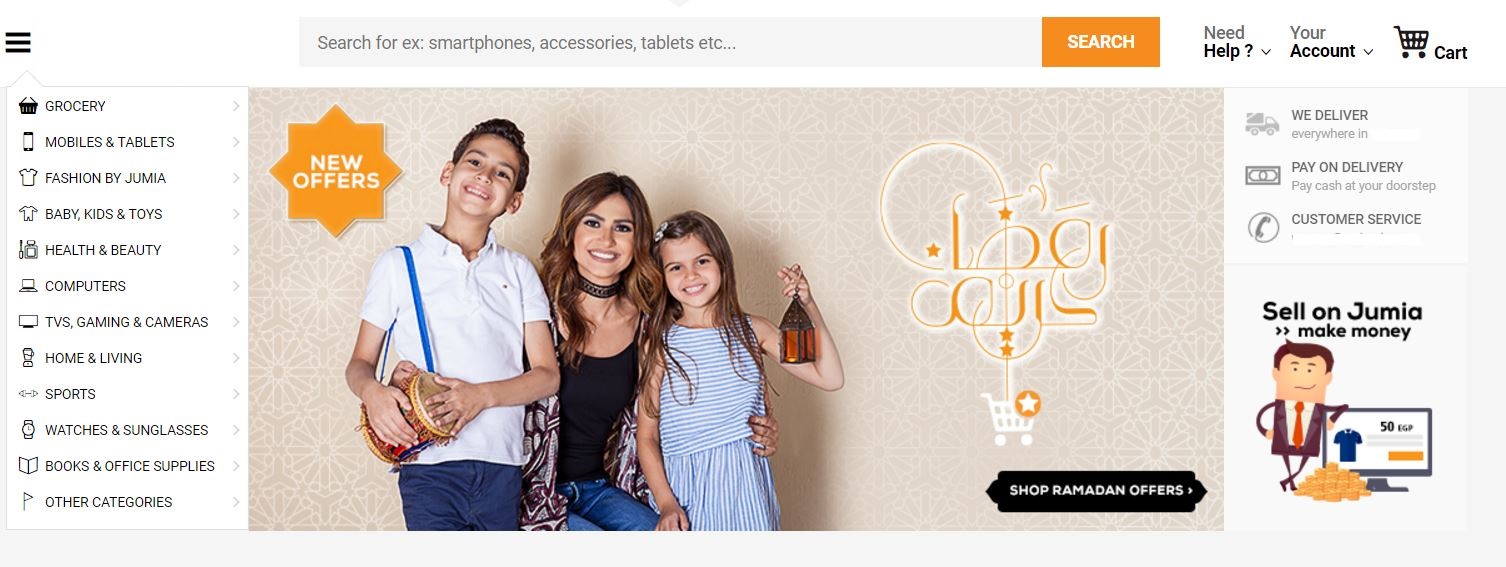
Wie auf dem Bild zu sehen, enthält die linke Seitenleiste Links zu den Produktkategorien der Website. Der erste Schritt besteht darin, den HTML-Code der Website zu untersuchen und das Scraping-Verfahren zu planen. Diese Analysephase ist für die Entwicklung einer effektiven Scraping-Strategie unerlässlich.
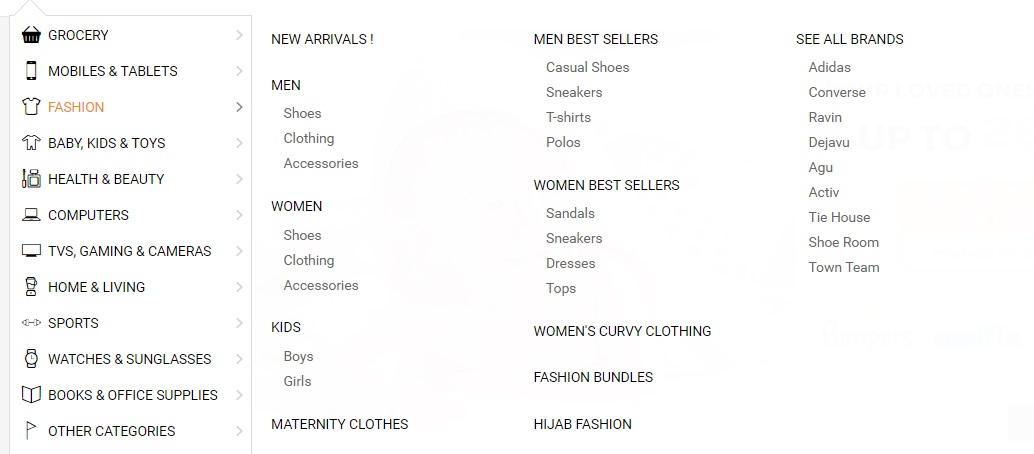
Warum ist es wichtig, die HTML-Struktur zu verstehen?
Die Modekategorien der Seite haben Unterkategorien (Männer, Frauen, Kinder). Das Verständnis dieser hierarchischen Struktur hilft beim Entwurf geeigneter Datenmodelle und Scraping-Logik. Bei der Arbeit mit erweiterten Web-Scraping-Funktionen wird eine korrekte HTML-Analyse noch wichtiger.
<li class="menu-item" data-id="">
<a href="https://domain.com/fashion-by-/" class="main-category">
<i class="cat-icon osh-font-fashion"></i>
<span class="nav-subTxt">FASHION </span>
<i class="osh-font-light-arrow-left"></i><i class="osh-font-light-arrow-right"></i>
</a>
<div class="navLayerWrapper" style="width: 633px; display: none;">
<div class="submenu">
<div class="column">
<div class="categories">
<a class="category" href="https://domain.com/fashion-by-/?sort=newest&dir=desc&viewType=gridView3">New Arrivals !</a>
</div>
<div class="categories">
<a class="category" href="https://domain.com/men-fashion/">Men</a>
<a class="subcategory" href="https://domain.com/mens-shoes/">Shoes</a>
<a class="subcategory" href="https://domain.com/mens-clothing/">Clothing</a>
<a class="subcategory" href="https://domain.com/mens-accessories/">Accessories</a>
</div>
<div class="categories">
<a class="category" href="https://domain.com/women-fashion/">Women</a>
<a class="subcategory" href="https://domain.com/womens-shoes/">Shoes</a>
<a class="subcategory" href="https://domain.com/womens-clothing/">Clothing</a>
<a class="subcategory" href="https://domain.com/womens-accessories/">Accessories</a>
</div>
<div class="categories">
<a class="category" href="https://domain.com/girls-boys-fashion/">Kids</a>
<a class="subcategory" href="https://domain.com/boys-fashion/">Boys</a>
<a class="subcategory" href="https://domain.com/girls/">Girls</a>
</div>
<div class="categories">
<a class="category" href="https://domain.com/maternity-clothes/">Maternity Clothes</a>
</div>
</div>
<div class="column">
<div class="categories">
<span class="category defaultCursor">Men Best Sellers</span>
<a class="subcategory" href="https://domain.com/mens-casual-shoes/">Casual Shoes</a>
<a class="subcategory" href="https://domain.com/mens-sneakers/">Sneakers</a>
<a class="subcategory" href="https://domain.com/mens-t-shirts/">T-shirts</a>
<a class="subcategory" href="https://domain.com/mens-polos/">Polos</a>
</div>
<div class="categories">
<span class="category defaultCursor">Women Best Sellers</span>
<a class="subcategory" href="https://domain.com/womens-sandals/">Sandals</a>
<a class="subcategory" href="https://domain.com/womens-sneakers/">Sneakers</a>
<a class="subcategory" href="https://domain.com/women-dresses/">Dresses</a>
<a class="subcategory" href="https://domain.com/women-tops/">Tops</a>
</div>
<div class="categories">
<a class="category" href="https://domain.com/womens-curvy-clothing/">Women's Curvy Clothing</a>
</div>
<div class="categories">
<a class="category" href="https://domain.com/fashion-bundles/v/">Fashion Bundles</a>
</div>
<div class="categories">
<a class="category" href="https://domain.com/hijab-fashion/">Hijab Fashion</a>
</div>
</div>
<div class="column">
<div class="categories">
<a class="category" href="https://domain.com/brands/fashion-by-/">SEE ALL BRANDS</a>
<a class="subcategory" href="https://domain.com/adidas/">Adidas</a>
<a class="subcategory" href="https://domain.com/converse/">Converse</a>
<a class="subcategory" href="https://domain.com/ravin/">Ravin</a>
<a class="subcategory" href="https://domain.com/dejavu/">Dejavu</a>
<a class="subcategory" href="https://domain.com/agu/">Agu</a>
<a class="subcategory" href="https://domain.com/activ/">Activ</a>
<a class="subcategory" href="https://domain.com/oxford--bellini--tie-house--milano/">Tie House</a>
<a class="subcategory" href="https://domain.com/shoe-room/">Shoe Room</a>
<a class="subcategory" href="https://domain.com/town-team/">Town Team</a>
</div>
</div>
</div>
</div>
</li><li class="menu-item" data-id="">
<a href="https://domain.com/fashion-by-/" class="main-category">
<i class="cat-icon osh-font-fashion"></i>
<span class="nav-subTxt">FASHION </span>
<i class="osh-font-light-arrow-left"></i><i class="osh-font-light-arrow-right"></i>
</a>
<div class="navLayerWrapper" style="width: 633px; display: none;">
<div class="submenu">
<div class="column">
<div class="categories">
<a class="category" href="https://domain.com/fashion-by-/?sort=newest&dir=desc&viewType=gridView3">New Arrivals !</a>
</div>
<div class="categories">
<a class="category" href="https://domain.com/men-fashion/">Men</a>
<a class="subcategory" href="https://domain.com/mens-shoes/">Shoes</a>
<a class="subcategory" href="https://domain.com/mens-clothing/">Clothing</a>
<a class="subcategory" href="https://domain.com/mens-accessories/">Accessories</a>
</div>
<div class="categories">
<a class="category" href="https://domain.com/women-fashion/">Women</a>
<a class="subcategory" href="https://domain.com/womens-shoes/">Shoes</a>
<a class="subcategory" href="https://domain.com/womens-clothing/">Clothing</a>
<a class="subcategory" href="https://domain.com/womens-accessories/">Accessories</a>
</div>
<div class="categories">
<a class="category" href="https://domain.com/girls-boys-fashion/">Kids</a>
<a class="subcategory" href="https://domain.com/boys-fashion/">Boys</a>
<a class="subcategory" href="https://domain.com/girls/">Girls</a>
</div>
<div class="categories">
<a class="category" href="https://domain.com/maternity-clothes/">Maternity Clothes</a>
</div>
</div>
<div class="column">
<div class="categories">
<span class="category defaultCursor">Men Best Sellers</span>
<a class="subcategory" href="https://domain.com/mens-casual-shoes/">Casual Shoes</a>
<a class="subcategory" href="https://domain.com/mens-sneakers/">Sneakers</a>
<a class="subcategory" href="https://domain.com/mens-t-shirts/">T-shirts</a>
<a class="subcategory" href="https://domain.com/mens-polos/">Polos</a>
</div>
<div class="categories">
<span class="category defaultCursor">Women Best Sellers</span>
<a class="subcategory" href="https://domain.com/womens-sandals/">Sandals</a>
<a class="subcategory" href="https://domain.com/womens-sneakers/">Sneakers</a>
<a class="subcategory" href="https://domain.com/women-dresses/">Dresses</a>
<a class="subcategory" href="https://domain.com/women-tops/">Tops</a>
</div>
<div class="categories">
<a class="category" href="https://domain.com/womens-curvy-clothing/">Women's Curvy Clothing</a>
</div>
<div class="categories">
<a class="category" href="https://domain.com/fashion-bundles/v/">Fashion Bundles</a>
</div>
<div class="categories">
<a class="category" href="https://domain.com/hijab-fashion/">Hijab Fashion</a>
</div>
</div>
<div class="column">
<div class="categories">
<a class="category" href="https://domain.com/brands/fashion-by-/">SEE ALL BRANDS</a>
<a class="subcategory" href="https://domain.com/adidas/">Adidas</a>
<a class="subcategory" href="https://domain.com/converse/">Converse</a>
<a class="subcategory" href="https://domain.com/ravin/">Ravin</a>
<a class="subcategory" href="https://domain.com/dejavu/">Dejavu</a>
<a class="subcategory" href="https://domain.com/agu/">Agu</a>
<a class="subcategory" href="https://domain.com/activ/">Activ</a>
<a class="subcategory" href="https://domain.com/oxford--bellini--tie-house--milano/">Tie House</a>
<a class="subcategory" href="https://domain.com/shoe-room/">Shoe Room</a>
<a class="subcategory" href="https://domain.com/town-team/">Town Team</a>
</div>
</div>
</div>
</div>
</li>Wie richte ich das Web-Scraping-Projekt ein?
Richten Sie ein Projekt ein, das den Best Practices für C# Web Scraping folgt.
- Erstellen Sie eine neue Konsolen-App oder fügen Sie einen neuen Ordner für das Beispiel namens "ShoppingSiteSample" hinzu
- Fügen Sie eine neue Klasse mit dem Namen "
ShoppingScraper" hinzu. - Beginnen Sie mit dem Scraping von Seitenkategorien und deren Unterkategorien
- Installieren Sie
IronWebScraperüber den NuGet-Paket-Manager oder die Paket-Manager-Konsole:
Install-Package IronWebScraper
Welches Datenmodell sollte ich für Kategorien verwenden?
Erstellen Sie ein Kategorienmodell, das die entdeckte hierarchische Struktur richtig darstellt:
public class Category
{
    /// <summary>
    /// Gets or sets the name.
    /// </summary>
    /// <value>
    /// The name.
    /// </value>
    public string Name { get; set; }

    /// <summary>
    /// Gets or sets the URL.
    /// </summary>
    /// <value>
    /// The URL.
    /// </value>
    public string URL { get; set; }

    /// <summary>
    /// Gets or sets the subcategories.
    /// </summary>
    /// <value>
    /// The subcategories.
    /// </value>
    public List<Category> SubCategories { get; set; }

    // Additional properties for enhanced data collection
    public int ProductCount { get; set; }
    public DateTime LastScraped { get; set; }
    public string CategoryType { get; set; }
}
public class Category
{
/// <summary>
/// Gets or sets the name.
/// </summary>
/// <value>
/// The name.
/// </value>
public string Name { get; set; }
/// <summary>
/// Gets or sets the URL.
/// </summary>
/// <value>
/// The URL.
/// </value>
public string URL { get; set; }
/// <summary>
/// Gets or sets the subcategories.
/// </summary>
/// <value>
/// The subcategories.
/// </value>
public List<Category> SubCategories { get; set; }
// Additional properties for enhanced data collection
public int ProductCount { get; set; }
public DateTime LastScraped { get; set; }
public string CategoryType { get; set; }
}Public Class Category
''' <summary>
''' Gets or sets the name.
''' </summary>
''' <value>
''' The name.
''' </value>
Public Property Name As String
''' <summary>
''' Gets or sets the URL.
''' </summary>
''' <value>
''' The URL.
''' </value>
Public Property URL As String
''' <summary>
''' Gets or sets the subcategories.
''' </summary>
''' <value>
''' The subcategories.
''' </value>
Public Property SubCategories As List(Of Category)
' Additional properties for enhanced data collection
Public Property ProductCount As Integer
Public Property LastScraped As DateTime
Public Property CategoryType As String
End ClassWie baue ich die grundlegende Scraper-Logik auf?
Erstellen Sie die Scraper-Logik und denken Sie daran, Ihren Lizenzschlüssel anzuwenden, bevor Sie den Scraper ausführen:
public class ShoppingScraper : WebScraper
{
    /// <summary>
    /// Initialize the web scraper, setting the start URLs and allowed/banned domains or URL patterns.
    /// </summary>
    public override void Init()
    {
        // Apply your license key - get one from https://ironsoftware.com/csharp/webscraper/licensing/
        License.LicenseKey = "LicenseKey";
        this.LoggingLevel = WebScraper.LogLevel.All;
        this.WorkingDirectory = AppSetting.GetAppRoot() + @"\ShoppingSiteSample\Output\";

        // Configure request settings for better performance
        this.Request("www.webSite.com", Parse);
    }

    /// <summary>
    /// Parses the HTML document of the response to scrap the necessary data.
    /// </summary>
    /// <param name="response">The HTTP Response object to parse.</param>
    public override void Parse(Response response)
    {
        var categoryList = new List<Category>();

        // Iterate through each link in the menu and extract the category data.
        foreach (var Links in response.Css("#menuFixed > ul > li > a"))
        {
            var cat = new Category
            {
                URL = Links.Attributes["href"],
                Name = Links.InnerText,
                LastScraped = DateTime.Now
            };
            categoryList.Add(cat);
        }

        // Save the scraped data into a JSONL file.
        Scrape(categoryList, "Shopping.jsonl");
    }
}
public class ShoppingScraper : WebScraper
{
/// <summary>
/// Initialize the web scraper, setting the start URLs and allowed/banned domains or URL patterns.
/// </summary>
public override void Init()
{
// Apply your license key - get one from https://ironsoftware.com/csharp/webscraper/licensing/
License.LicenseKey = "LicenseKey";
this.LoggingLevel = WebScraper.LogLevel.All;
this.WorkingDirectory = AppSetting.GetAppRoot() + @"\ShoppingSiteSample\Output\";
// Configure request settings for better performance
this.Request("www.webSite.com", Parse);
}
/// <summary>
/// Parses the HTML document of the response to scrap the necessary data.
/// </summary>
/// <param name="response">The HTTP Response object to parse.</param>
public override void Parse(Response response)
{
var categoryList = new List<Category>();
// Iterate through each link in the menu and extract the category data.
foreach (var Links in response.Css("#menuFixed > ul > li > a"))
{
var cat = new Category
{
URL = Links.Attributes["href"],
Name = Links.InnerText,
LastScraped = DateTime.Now
};
categoryList.Add(cat);
}
// Save the scraped data into a JSONL file.
Scrape(categoryList, "Shopping.jsonl");
}
}Imports System
Imports System.Collections.Generic
Public Class ShoppingScraper
Inherits WebScraper
''' <summary>
''' Initialize the web scraper, setting the start URLs and allowed/banned domains or URL patterns.
''' </summary>
Public Overrides Sub Init()
' Apply your license key - get one from https://ironsoftware.com/csharp/webscraper/licensing/
License.LicenseKey = "LicenseKey"
Me.LoggingLevel = WebScraper.LogLevel.All
Me.WorkingDirectory = AppSetting.GetAppRoot() & "\ShoppingSiteSample\Output\"
' Configure request settings for better performance
Me.Request("www.webSite.com", AddressOf Parse)
End Sub
''' <summary>
''' Parses the HTML document of the response to scrap the necessary data.
''' </summary>
''' <param name="response">The HTTP Response object to parse.</param>
Public Overrides Sub Parse(response As Response)
Dim categoryList As New List(Of Category)()
' Iterate through each link in the menu and extract the category data.
For Each Links In response.Css("#menuFixed > ul > li > a")
Dim cat As New Category With {
.URL = Links.Attributes("href"),
.Name = Links.InnerText,
.LastScraped = DateTime.Now
}
categoryList.Add(cat)
Next
' Save the scraped data into a JSONL file.
Scrape(categoryList, "Shopping.jsonl")
End Sub
End ClassAuf welche Elemente im Menü ziele ich ab?
Das Scraping von Links aus dem Menü erfordert präzise CSS-Selektoren. Die API-Referenz bietet detaillierte Informationen über die verfügbaren Selektor-Methoden:

Wie kann ich sowohl Hauptkategorien als auch Unterkategorien scrapen?
Aktualisieren Sie den Code, um die Hauptkategorien und alle Unterlinks zu scrapen. Dieser Ansatz gewährleistet eine vollständige Erfassung der Navigationsstruktur:
public override void Parse(Response response)
{
    // List of Category Links (Root)
    var categoryList = new List<Category>();

    // Traverse each 'li' under the fixed menu
    foreach (var li in response.Css("#menuFixed > ul > li"))
    {
        // List of Main Links
        foreach (var Links in li.Css("a"))
        {
            var cat = new Category
            {
                URL = Links.Attributes["href"],
                Name = Links.InnerText,
                SubCategories = new List<Category>(),
                LastScraped = DateTime.Now
            };

            // List of Subcategories Links
            foreach (var subCategory in li.Css("a[class=subcategory]"))
            {
                var subcat = new Category
                {
                    URL = subCategory.Attributes["href"],
                    Name = subCategory.InnerText,
                    CategoryType = "Subcategory"
                };

                // Check if subcategory link already exists
                if (cat.SubCategories.Find(c => c.Name == subcat.Name && c.URL == subcat.URL) == null)
                {
                    // Add sublinks
                    cat.SubCategories.Add(subcat);
                }
            }

            // Update product count based on subcategories
            cat.ProductCount = cat.SubCategories.Count;

            // Add Main Category to the list
            categoryList.Add(cat);
        }
    }

    // Save the scraped data into a JSONL file.
    Scrape(categoryList, "Shopping.jsonl");
}
public override void Parse(Response response)
{
// List of Category Links (Root)
var categoryList = new List<Category>();
// Traverse each 'li' under the fixed menu
foreach (var li in response.Css("#menuFixed > ul > li"))
{
// List of Main Links
foreach (var Links in li.Css("a"))
{
var cat = new Category
{
URL = Links.Attributes["href"],
Name = Links.InnerText,
SubCategories = new List<Category>(),
LastScraped = DateTime.Now
};
// List of Subcategories Links
foreach (var subCategory in li.Css("a[class=subcategory]"))
{
var subcat = new Category
{
URL = subCategory.Attributes["href"],
Name = subCategory.InnerText,
CategoryType = "Subcategory"
};
// Check if subcategory link already exists
if (cat.SubCategories.Find(c => c.Name == subcat.Name && c.URL == subcat.URL) == null)
{
// Add sublinks
cat.SubCategories.Add(subcat);
}
}
// Update product count based on subcategories
cat.ProductCount = cat.SubCategories.Count;
// Add Main Category to the list
categoryList.Add(cat);
}
}
// Save the scraped data into a JSONL file.
Scrape(categoryList, "Shopping.jsonl");
}Option Strict On
Public Overrides Sub Parse(response As Response)
' List of Category Links (Root)
Dim categoryList As New List(Of Category)()
' Traverse each 'li' under the fixed menu
For Each li In response.Css("#menuFixed > ul > li")
' List of Main Links
For Each Links In li.Css("a")
Dim cat As New Category With {
.URL = Links.Attributes("href"),
.Name = Links.InnerText,
.SubCategories = New List(Of Category)(),
.LastScraped = DateTime.Now
}
' List of Subcategories Links
For Each subCategory In li.Css("a[class=subcategory]")
Dim subcat As New Category With {
.URL = subCategory.Attributes("href"),
.Name = subCategory.InnerText,
.CategoryType = "Subcategory"
}
' Check if subcategory link already exists
If cat.SubCategories.Find(Function(c) c.Name = subcat.Name AndAlso c.URL = subcat.URL) Is Nothing Then
' Add sublinks
cat.SubCategories.Add(subcat)
End If
Next
' Update product count based on subcategories
cat.ProductCount = cat.SubCategories.Count
' Add Main Category to the list
categoryList.Add(cat)
Next
Next
' Save the scraped data into a JSONL file.
Scrape(categoryList, "Shopping.jsonl")
End SubWie kann ich Produktinformationen aus Kategorieseiten extrahieren?
Da die Links zu allen Website-Kategorien verfügbar sind, beginnen Sie mit dem Scrapen von Produkten innerhalb jeder Kategorie. Bei Produktseiten ist Thread-Sicherheit für eine optimale Leistung wichtig. Navigieren Sie zu einer beliebigen Kategorie und sehen Sie sich den Inhalt an:

Wie sieht die Produkt-HTML-Struktur aus?
Untersuchen Sie die HTML-Struktur, um die Produktorganisation zu verstehen:
<section class="products">
<div class="sku -gallery -validate-size " data-sku="AG249FA0T2PSGNAFAMZ" ft-product-sizes="41,42,43,44,45" ft-product-color="Multicolour">
<a class="link" href="http://www.WebSite.com/agu-bundle-of-2-sneakers-black-navy-blue-653884.html">
<div class="image-wrapper default-state">
<img class="lazy image -loaded" alt="Bundle Of 2 Sneakers - Black & Navy Blue" data-image-vertical="1" width="210" height="262" src="https://static.WebSite.com/p/agu-6208-488356-1-catalog_grid_3.jpg" data-sku="AG249FA0T2PSGNAFAMZ" data-src="https://static.WebSite.com/p/agu-6208-488356-1-catalog_grid_3.jpg" data-placeholder="placeholder_m_1.jpg">
<noscript><img src="https://static.WebSite.com/p/agu-6208-488356-1-catalog_grid_3.jpg" width="210" height="262" class="image" /></noscript>
</div>
<h2 class="title"></h2>
<span class="brand ">Agu </span>
<span class="name" dir="ltr">Bundle Of 2 Sneakers - Black & Navy Blue</span>
</h2>
<div class="price-container clearfix">
<span class="price-box">
<span class="price">
<span data-currency-iso="EGP">EGP</span>
<span dir="ltr" data-price="299">299</span>
</span>
<span class="price -old -no-special"></span>
</span>
</div>
<div class="rating-stars">
<div class="stars-container">
<div class="stars" style="width: 62%"></div>
</div>
<div class="total-ratings">(30)</div>
</div>
<span class="shop-first-logo-container">
<img src="http://www.WebSite.com/images/local/logos/shop_first/ShoppingSite/logo_normal.png" data-src="http://www.WebSite.com/images/local/logos/shop_first/ShoppingSite/logo_normal.png" class="lazy shop-first-logo-img -mbxs -loaded">
</span>
<span class="osh-icon -ShoppingSite-local shop_local--logo -block -mbs -mts"></span>
<div class="list -sizes" data-selected-sku="">
<span class="js-link sku-size" data-href="http://www.WebSite.com/agu-bundle-of-2-sneakers-black-navy-blue-653884.html?size=41">41</span>
<span class="js-link sku-size" data-href="http://www.WebSite.com/agu-bundle-of-2-sneakers-black-navy-blue-653884.html?size=42">42</span>
<span class="js-link sku-size" data-href="http://www.WebSite.com/agu-bundle-of-2-sneakers-black-navy-blue-653884.html?size=43">43</span>
<span class="js-link sku-size" data-href="http://www.WebSite.com/agu-bundle-of-2-sneakers-black-navy-blue-653884.html?size=44">44</span>
<span class="js-link sku-size" data-href="http://www.WebSite.com/agu-bundle-of-2-sneakers-black-navy-blue-653884.html?size=45">45</span>
</div>
</a>
</div>
<div class="sku -gallery -validate-size " data-sku="LE047FA01SRK4NAFAMZ" ft-product-sizes="110,115,120,125,130,135" ft-product-color="Black">
<a class="link" href="http://www.WebSite.com/leather-shop-genuine-leather-belt-black-712030.html">
<div class="image-wrapper default-state">
<img class="lazy image -loaded" alt="Genuine Leather Belt - Black" data-image-vertical="1" width="210" height="262" src="https://static.WebSite.com/p/leather-shop-1831-030217-1-catalog_grid_3.jpg" data-sku="LE047FA01SRK4NAFAMZ" data-src="https://static.WebSite.com/p/leather-shop-1831-030217-1-catalog_grid_3.jpg" data-placeholder="placeholder_m_1.jpg">
<noscript><img src="https://static.WebSite.com/p/leather-shop-1831-030217-1-catalog_grid_3.jpg" width="210" height="262" class="image" /></noscript>
</div>
<h2 class="title"><span class="brand ">Leather Shop </span> <span class="name" dir="ltr">Genuine Leather Belt - Black</span></h2>
<div class="price-container clearfix">
<span class="sale-flag-percent">-29%</span>
<span class="price-box">
<span class="price"><span data-currency-iso="EGP">EGP</span> <span dir="ltr" data-price="96">96</span> </span>
<span class="price -old"><span data-currency-iso="EGP">EGP</span> <span dir="ltr" data-price="135">135</span> </span>
</span>
</div>
<div class="rating-stars">
<div class="stars-container">
<div class="stars" style="width: 100%"></div>
</div>
<div class="total-ratings">(1)</div>
</div>
<span class="osh-icon -ShoppingSite-local shop_local--logo -block -mbs -mts"></span>
<div class="list -sizes" data-selected-sku="">
<span class="js-link sku-size" data-href="http://www.WebSite.com/leather-shop-genuine-leather-belt-black-712030.html?size=110">110</span>
<span class="js-link sku-size"data-href="http://www.WebSite.com/leather-shop-genuine-leather-belt-black-712030.html?size=115">115</span>
<span class="js-link sku-size"data-href="http://www.WebSite.com/leather-shop-genuine-leather-belt-black-712030.html?size=120">120</span>
<span class="js-link sku-size"data-href="http://www.WebSite.com/leather-shop-genuine-leather-belt-black-712030.html?size=125">125</span>
<span class="js-link sku-size"data-href="http://www.WebSite.com/leather-shop-genuine-leather-belt-black-712030.html?size=130">130</span>
<span class="js-link sku-size"data-href="http://www.WebSite.com/leather-shop-genuine-leather-belt-black-712030.html?size=135">135</span>
</div>
</a>
</div>
</section><section class="products">
<div class="sku -gallery -validate-size " data-sku="AG249FA0T2PSGNAFAMZ" ft-product-sizes="41,42,43,44,45" ft-product-color="Multicolour">
<a class="link" href="http://www.WebSite.com/agu-bundle-of-2-sneakers-black-navy-blue-653884.html">
<div class="image-wrapper default-state">
<img class="lazy image -loaded" alt="Bundle Of 2 Sneakers - Black & Navy Blue" data-image-vertical="1" width="210" height="262" src="https://static.WebSite.com/p/agu-6208-488356-1-catalog_grid_3.jpg" data-sku="AG249FA0T2PSGNAFAMZ" data-src="https://static.WebSite.com/p/agu-6208-488356-1-catalog_grid_3.jpg" data-placeholder="placeholder_m_1.jpg">
<noscript><img src="https://static.WebSite.com/p/agu-6208-488356-1-catalog_grid_3.jpg" width="210" height="262" class="image" /></noscript>
</div>
<h2 class="title"></h2>
<span class="brand ">Agu </span>
<span class="name" dir="ltr">Bundle Of 2 Sneakers - Black & Navy Blue</span>
</h2>
<div class="price-container clearfix">
<span class="price-box">
<span class="price">
<span data-currency-iso="EGP">EGP</span>
<span dir="ltr" data-price="299">299</span>
</span>
<span class="price -old -no-special"></span>
</span>
</div>
<div class="rating-stars">
<div class="stars-container">
<div class="stars" style="width: 62%"></div>
</div>
<div class="total-ratings">(30)</div>
</div>
<span class="shop-first-logo-container">
<img src="http://www.WebSite.com/images/local/logos/shop_first/ShoppingSite/logo_normal.png" data-src="http://www.WebSite.com/images/local/logos/shop_first/ShoppingSite/logo_normal.png" class="lazy shop-first-logo-img -mbxs -loaded">
</span>
<span class="osh-icon -ShoppingSite-local shop_local--logo -block -mbs -mts"></span>
<div class="list -sizes" data-selected-sku="">
<span class="js-link sku-size" data-href="http://www.WebSite.com/agu-bundle-of-2-sneakers-black-navy-blue-653884.html?size=41">41</span>
<span class="js-link sku-size" data-href="http://www.WebSite.com/agu-bundle-of-2-sneakers-black-navy-blue-653884.html?size=42">42</span>
<span class="js-link sku-size" data-href="http://www.WebSite.com/agu-bundle-of-2-sneakers-black-navy-blue-653884.html?size=43">43</span>
<span class="js-link sku-size" data-href="http://www.WebSite.com/agu-bundle-of-2-sneakers-black-navy-blue-653884.html?size=44">44</span>
<span class="js-link sku-size" data-href="http://www.WebSite.com/agu-bundle-of-2-sneakers-black-navy-blue-653884.html?size=45">45</span>
</div>
</a>
</div>
<div class="sku -gallery -validate-size " data-sku="LE047FA01SRK4NAFAMZ" ft-product-sizes="110,115,120,125,130,135" ft-product-color="Black">
<a class="link" href="http://www.WebSite.com/leather-shop-genuine-leather-belt-black-712030.html">
<div class="image-wrapper default-state">
<img class="lazy image -loaded" alt="Genuine Leather Belt - Black" data-image-vertical="1" width="210" height="262" src="https://static.WebSite.com/p/leather-shop-1831-030217-1-catalog_grid_3.jpg" data-sku="LE047FA01SRK4NAFAMZ" data-src="https://static.WebSite.com/p/leather-shop-1831-030217-1-catalog_grid_3.jpg" data-placeholder="placeholder_m_1.jpg">
<noscript><img src="https://static.WebSite.com/p/leather-shop-1831-030217-1-catalog_grid_3.jpg" width="210" height="262" class="image" /></noscript>
</div>
<h2 class="title"><span class="brand ">Leather Shop </span> <span class="name" dir="ltr">Genuine Leather Belt - Black</span></h2>
<div class="price-container clearfix">
<span class="sale-flag-percent">-29%</span>
<span class="price-box">
<span class="price"><span data-currency-iso="EGP">EGP</span> <span dir="ltr" data-price="96">96</span> </span>
<span class="price -old"><span data-currency-iso="EGP">EGP</span> <span dir="ltr" data-price="135">135</span> </span>
</span>
</div>
<div class="rating-stars">
<div class="stars-container">
<div class="stars" style="width: 100%"></div>
</div>
<div class="total-ratings">(1)</div>
</div>
<span class="osh-icon -ShoppingSite-local shop_local--logo -block -mbs -mts"></span>
<div class="list -sizes" data-selected-sku="">
<span class="js-link sku-size" data-href="http://www.WebSite.com/leather-shop-genuine-leather-belt-black-712030.html?size=110">110</span>
<span class="js-link sku-size"data-href="http://www.WebSite.com/leather-shop-genuine-leather-belt-black-712030.html?size=115">115</span>
<span class="js-link sku-size"data-href="http://www.WebSite.com/leather-shop-genuine-leather-belt-black-712030.html?size=120">120</span>
<span class="js-link sku-size"data-href="http://www.WebSite.com/leather-shop-genuine-leather-belt-black-712030.html?size=125">125</span>
<span class="js-link sku-size"data-href="http://www.WebSite.com/leather-shop-genuine-leather-belt-black-712030.html?size=130">130</span>
<span class="js-link sku-size"data-href="http://www.WebSite.com/leather-shop-genuine-leather-belt-black-712030.html?size=135">135</span>
</div>
</a>
</div>
</section>Welches Produktmodell soll ich erstellen?
Erstellen Sie ein Produktmodell für diesen Inhalt. Bei der Arbeit mit Shopping-Website-Scraping müssen alle relevanten Produktdetails erfasst werden:
public class Product
{
    /// <summary>
    /// Gets or sets the name.
    /// </summary>
    /// <value>
    /// The name.
    /// </value>
    public string Name { get; set; }

    /// <summary>
    /// Gets or sets the price.
    /// </summary>
    /// <value>
    /// The price.
    /// </value>
    public string Price { get; set; }

    /// <summary>
    /// Gets or sets the image.
    /// </summary>
    /// <value>
    /// The image.
    /// </value>
    public string Image { get; set; }

    // Additional properties for comprehensive data collection
    public string Brand { get; set; }
    public string OldPrice { get; set; }
    public string Discount { get; set; }
    public float Rating { get; set; }
    public int ReviewCount { get; set; }
    public List<string> AvailableSizes { get; set; }
    public string ProductUrl { get; set; }
    public string SKU { get; set; }
    public DateTime ScrapedDate { get; set; }
}
public class Product
{
/// <summary>
/// Gets or sets the name.
/// </summary>
/// <value>
/// The name.
/// </value>
public string Name { get; set; }
/// <summary>
/// Gets or sets the price.
/// </summary>
/// <value>
/// The price.
/// </value>
public string Price { get; set; }
/// <summary>
/// Gets or sets the image.
/// </summary>
/// <value>
/// The image.
/// </value>
public string Image { get; set; }
// Additional properties for comprehensive data collection
public string Brand { get; set; }
public string OldPrice { get; set; }
public string Discount { get; set; }
public float Rating { get; set; }
public int ReviewCount { get; set; }
public List<string> AvailableSizes { get; set; }
public string ProductUrl { get; set; }
public string SKU { get; set; }
public DateTime ScrapedDate { get; set; }
}Public Class Product
''' <summary>
''' Gets or sets the name.
''' </summary>
''' <value>
''' The name.
''' </value>
Public Property Name As String
''' <summary>
''' Gets or sets the price.
''' </summary>
''' <value>
''' The price.
''' </value>
Public Property Price As String
''' <summary>
''' Gets or sets the image.
''' </summary>
''' <value>
''' The image.
''' </value>
Public Property Image As String
' Additional properties for comprehensive data collection
Public Property Brand As String
Public Property OldPrice As String
Public Property Discount As String
Public Property Rating As Single
Public Property ReviewCount As Integer
Public Property AvailableSizes As List(Of String)
Public Property ProductUrl As String
Public Property SKU As String
Public Property ScrapedDate As DateTime
End ClassWie füge ich Produkt-Scraping-Funktionalität hinzu?
Fügen Sie zum Scrapen von Kategorieseiten eine neue Scrape-Methode mit Fehlerbehandlung und Datenvalidierung hinzu:
public void ParseCategory(Response response)
{
    // List of Products
    var productList = new List<Product>();

    // Iterate through product links in the product section
    foreach (var Links in response.Css("section.products > div > a"))
    {
        try
        {
            var product = new Product
            {
                Name = Links.Css("h2.title > span.name").First().InnerText,
                Brand = Links.Css("h2.title > span.brand").FirstOrDefault()?.InnerText ?? "Unknown",
                Price = Links.Css("div.price-container > span.price-box > span.price > span[data-price]").First().InnerText,
                Image = Links.Css("div.image-wrapper.default-state > img").First().Attributes["src"],
                ProductUrl = Links.Attributes["href"],
                SKU = Links.ParentNode.Attributes["data-sku"],
                ScrapedDate = DateTime.Now
            };

            // Extract old price if available
            var oldPriceElement = Links.Css("span.price.-old > span[data-price]").FirstOrDefault();
            if (oldPriceElement != null)
            {
                product.OldPrice = oldPriceElement.InnerText;
            }

            // Extract discount percentage
            var discountElement = Links.Css("span.sale-flag-percent").FirstOrDefault();
            if (discountElement != null)
            {
                product.Discount = discountElement.InnerText;
            }

            // Extract rating information
            var ratingWidth = Links.Css("div.stars").FirstOrDefault()?.Attributes["style"];
            if (!string.IsNullOrEmpty(ratingWidth))
            {
                var width = System.Text.RegularExpressions.Regex.Match(ratingWidth, @"(\d+)%").Groups[1].Value;
                if (int.TryParse(width, out int ratingPercent))
                {
                    product.Rating = ratingPercent / 20.0f; // Convert percentage to 5-star scale
                }
            }

            // Extract review count
            var reviewText = Links.Css("div.total-ratings").FirstOrDefault()?.InnerText;
            if (!string.IsNullOrEmpty(reviewText))
            {
                var reviewCount = System.Text.RegularExpressions.Regex.Match(reviewText, @"\d+").Value;
                if (int.TryParse(reviewCount, out int count))
                {
                    product.ReviewCount = count;
                }
            }

            // Extract available sizes
            product.AvailableSizes = Links.Css("div.list.-sizes > span.sku-size")
                .Select(s => s.InnerText)
                .ToList();

            productList.Add(product);
        }
        catch (Exception ex)
        {
            // Log error and continue with next product
            Console.WriteLine($"Error parsing product: {ex.Message}");
        }
    }

    // Save the scraped product data into a JSONL file.
    Scrape(productList, "Products.jsonl");

    // Handle pagination if needed
    var nextPageLink = response.Css("a.pagination-next").FirstOrDefault();
    if (nextPageLink != null)
    {
        var nextPageUrl = nextPageLink.Attributes["href"];
        this.Request(nextPageUrl, ParseCategory);
    }
}
public void ParseCategory(Response response)
{
// List of Products
var productList = new List<Product>();
// Iterate through product links in the product section
foreach (var Links in response.Css("section.products > div > a"))
{
try
{
var product = new Product
{
Name = Links.Css("h2.title > span.name").First().InnerText,
Brand = Links.Css("h2.title > span.brand").FirstOrDefault()?.InnerText ?? "Unknown",
Price = Links.Css("div.price-container > span.price-box > span.price > span[data-price]").First().InnerText,
Image = Links.Css("div.image-wrapper.default-state > img").First().Attributes["src"],
ProductUrl = Links.Attributes["href"],
SKU = Links.ParentNode.Attributes["data-sku"],
ScrapedDate = DateTime.Now
};
// Extract old price if available
var oldPriceElement = Links.Css("span.price.-old > span[data-price]").FirstOrDefault();
if (oldPriceElement != null)
{
product.OldPrice = oldPriceElement.InnerText;
}
// Extract discount percentage
var discountElement = Links.Css("span.sale-flag-percent").FirstOrDefault();
if (discountElement != null)
{
product.Discount = discountElement.InnerText;
}
// Extract rating information
var ratingWidth = Links.Css("div.stars").FirstOrDefault()?.Attributes["style"];
if (!string.IsNullOrEmpty(ratingWidth))
{
var width = System.Text.RegularExpressions.Regex.Match(ratingWidth, @"(\d+)%").Groups[1].Value;
if (int.TryParse(width, out int ratingPercent))
{
product.Rating = ratingPercent / 20.0f; // Convert percentage to 5-star scale
}
}
// Extract review count
var reviewText = Links.Css("div.total-ratings").FirstOrDefault()?.InnerText;
if (!string.IsNullOrEmpty(reviewText))
{
var reviewCount = System.Text.RegularExpressions.Regex.Match(reviewText, @"\d+").Value;
if (int.TryParse(reviewCount, out int count))
{
product.ReviewCount = count;
}
}
// Extract available sizes
product.AvailableSizes = Links.Css("div.list.-sizes > span.sku-size")
.Select(s => s.InnerText)
.ToList();
productList.Add(product);
}
catch (Exception ex)
{
// Log error and continue with next product
Console.WriteLine($"Error parsing product: {ex.Message}");
}
}
// Save the scraped product data into a JSONL file.
Scrape(productList, "Products.jsonl");
// Handle pagination if needed
var nextPageLink = response.Css("a.pagination-next").FirstOrDefault();
if (nextPageLink != null)
{
var nextPageUrl = nextPageLink.Attributes["href"];
this.Request(nextPageUrl, ParseCategory);
}
}Public Sub ParseCategory(response As Response)
' List of Products
Dim productList As New List(Of Product)()
' Iterate through product links in the product section
For Each Links In response.Css("section.products > div > a")
Try
Dim product As New Product With {
.Name = Links.Css("h2.title > span.name").First().InnerText,
.Brand = If(Links.Css("h2.title > span.brand").FirstOrDefault()?.InnerText, "Unknown"),
.Price = Links.Css("div.price-container > span.price-box > span.price > span[data-price]").First().InnerText,
.Image = Links.Css("div.image-wrapper.default-state > img").First().Attributes("src"),
.ProductUrl = Links.Attributes("href"),
.SKU = Links.ParentNode.Attributes("data-sku"),
.ScrapedDate = DateTime.Now
}
' Extract old price if available
Dim oldPriceElement = Links.Css("span.price.-old > span[data-price]").FirstOrDefault()
If oldPriceElement IsNot Nothing Then
product.OldPrice = oldPriceElement.InnerText
End If
' Extract discount percentage
Dim discountElement = Links.Css("span.sale-flag-percent").FirstOrDefault()
If discountElement IsNot Nothing Then
product.Discount = discountElement.InnerText
End If
' Extract rating information
Dim ratingWidth = Links.Css("div.stars").FirstOrDefault()?.Attributes("style")
If Not String.IsNullOrEmpty(ratingWidth) Then
Dim width = System.Text.RegularExpressions.Regex.Match(ratingWidth, "(\d+)%").Groups(1).Value
Dim ratingPercent As Integer
If Integer.TryParse(width, ratingPercent) Then
product.Rating = ratingPercent / 20.0F ' Convert percentage to 5-star scale
End If
End If
' Extract review count
Dim reviewText = Links.Css("div.total-ratings").FirstOrDefault()?.InnerText
If Not String.IsNullOrEmpty(reviewText) Then
Dim reviewCount = System.Text.RegularExpressions.Regex.Match(reviewText, "\d+").Value
Dim count As Integer
If Integer.TryParse(reviewCount, count) Then
product.ReviewCount = count
End If
End If
' Extract available sizes
product.AvailableSizes = Links.Css("div.list.-sizes > span.sku-size") _
.Select(Function(s) s.InnerText) _
.ToList()
productList.Add(product)
Catch ex As Exception
' Log error and continue with next product
Console.WriteLine($"Error parsing product: {ex.Message}")
End Try
Next
' Save the scraped product data into a JSONL file.
Scrape(productList, "Products.jsonl")
' Handle pagination if needed
Dim nextPageLink = response.Css("a.pagination-next").FirstOrDefault()
If nextPageLink IsNot Nothing Then
Dim nextPageUrl = nextPageLink.Attributes("href")
Me.Request(nextPageUrl, AddressOf ParseCategory)
End If
End SubDieser umfassende Ansatz für das Scraping von Shopping-Websites stellt sicher, dass alle relevanten Produktinformationen erfasst werden und gleichzeitig Fehler elegant behandelt werden. Für fortgeschrittenere Szenarien erkunden Sie die erweiterten Web-Scraping-Funktionen, die in IronWebScraper verfügbar sind.
Häufig gestellte Fragen
Wie extrahiere ich Produktdaten aus Einkaufswebsites in C#?
IronWebscraper erleichtert das Extrahieren von Produktdaten aus Shopping-Websites durch die Verwendung von CSS-Selektoren. Sie können eine WebScraper-Klasse erstellen, die Parse-Methode außer Kraft setzen und response.Css() verwenden, um bestimmte HTML-Elemente wie Produktnamen, Preise und Bilder auszuwählen. Die extrahierten Daten können in verschiedenen Formaten, einschließlich JSON- und JSONL-Dateien, gespeichert werden.
Was sind die grundlegenden Schritte zur Erstellung eines Scrapers für Shopping-Websites?
So erstellen Sie einen Shopping-Website-Scraper mit IronWebScraper 1) Erstellen Sie ein Console App-Projekt, 2) Fügen Sie eine Klasse hinzu, die von WebScraper erbt, 3) Erstellen Sie Datenmodelle für Kategorien und Produkte, 4) Überschreiben Sie die Init()-Methode, um Ihre Start-URL festzulegen, 5) Überschreiben Sie die Parse()-Methode, um Daten mithilfe von CSS-Selektoren zu extrahieren, und 6) Führen Sie den Scraper aus, um Daten in Ihrem bevorzugten Format zu speichern.
Wie kann ich hierarchische Kategoriestrukturen beim Scrapen von E-Commerce-Websites behandeln?
IronWebscraper ermöglicht es Ihnen, hierarchische Strukturen zu handhaben, indem Sie geeignete Datenmodelle erstellen, die die Eltern-Kind-Beziehungen widerspiegeln (z. B. Mode > Männer > Schuhe). Sie können mit CSS-Selektoren durch verschachtelte HTML-Elemente navigieren und Ihre Kategorie-Baumstruktur programmatisch aufbauen, was besonders nützlich ist, wenn Sie mit den erweiterten Funktionen von IronWebscraper arbeiten.
Wie lässt sich die HTML-Struktur einer Shopping-Website vor dem Scraping am besten analysieren?
Bevor Sie IronWebscraper zum Scrapen einer Shopping-Site verwenden, sollten Sie die HTML-Struktur mit Hilfe von Browser-Entwickler-Tools untersuchen. Suchen Sie nach konsistenten Mustern in CSS-Klassen und Elementhierarchien. Diese Analyse hilft Ihnen, die richtigen CSS-Selektoren zu identifizieren, die Sie in Ihrer IronWebScraper Parse()-Methode verwenden können, um Produktinformationen, Kategorien und andere Datenelemente genau zu erfassen.
Kann ich sowohl die Produktlisten als auch die Kategorienavigation von derselben Seite extrahieren?
Ja, IronWebscraper ermöglicht es Ihnen, mehrere Datentypen aus einer einzigen Seite zu extrahieren. In Ihrer Parse()-Methode können Sie verschiedene CSS-Selektoren verwenden, um Kategorie-Links (z.B. '.category-item') und Produktlisten (z.B. '.product-item') gleichzeitig anzusprechen und sie dann in separaten Ausgabedateien oder Datenstrukturen zu speichern.
Wie speichere ich gescrapte Produktdaten in einer Datei?
IronWebscraper bietet eine integrierte Scrape()-Methode, die die extrahierten Daten automatisch speichert. Übergeben Sie einfach Ihr Datenobjekt und den Dateinamen an Scrape(item, "products.jsonl"). Die Bibliothek unterstützt verschiedene Ausgabeformate, darunter JSON, JSONL und CSV, so dass Sie Ihre gescrapten E-Commerce-Daten problemlos zur weiteren Verarbeitung exportieren können.


Scrollst du immer noch?
Sie brauchen schnell einen Beweis? PM > Install-Package IronWebScraper
Führen Sie ein Beispiel aus und beobachten Sie, wie Ihre Zielsite zu strukturierten Daten wird.






 Kostenlos loslegen
 Kostenlos loslegen
 Kostenlose Live-Demo buchen
















