


已更新 2026年6月4日
如何使用 IronWord 在 C# 中建立可填寫的表格範本
學習如何使用 IronWord 在 C# 中建立可填寫的表單範本。
閱讀更多

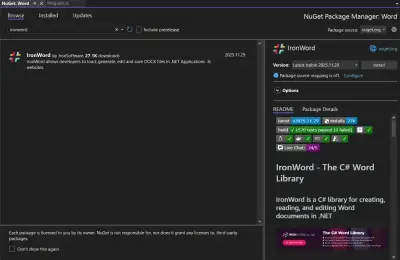
這個 .NET Word API 為開發者提供了強大的工具,以便在應用程式中轉換Word文件、互動並操作MS Word文件。 此API旨在簡化處理Microsoft Word文件的過程,使得程式化地建立、編輯、轉換和管理文件更加容易。 在本文中,我們將探討 IronWord 來了解其在操作Word文件方面的功能。
IronWord 是.NET Word程式庫中.NET Word API生態系統的一部分,專門為在其.NET應用中處理Microsoft Word文件的開發人員設計。 使用IronWord,開發者可以輕鬆地讀取、寫入和修改Word文件,無需在伺服器或客戶端機器上安裝Microsoft Word。 這種能力特別有利於需要自動化文件處理任務的應用,例如生成報告、發票或通過郵件合併功能進行個性化通信。
IronWord 提供了廣泛的功能範圍,以滿足各種Word文件操作的需求。 讓我們探索每個功能集合,重點是如何使其能夠合併和操作多個文件,歸類於"文件結構"和"文件元素"。
讀取和編輯Word: 使用IronWord,您可以從Word文件中提取特定資訊,例如提取用於編輯或重新利用的文字,以及檢索可能需要在其他地方使用的圖像。 這一能力對於旨在合併Word文件並處理現有DOCX文件中包含的資訊的應用至關重要。
多種格式: IronWord支持多種文件格式,增強其在.NET應用中轉換Word文件的實用性。
編輯頁面設置: 使用IronWord可以輕鬆定制Word文件的物理佈局。 您可以調整各種MS Word文件的紙張尺寸為標準或自定義尺寸,更改文件不同部分的方向,設置邊距以確保適當的對齊,甚至修改背景顏色以達到美學目的或突出某些部分。
新增段落: IronWord 使您能夠新增和刪除段落中的文字運行,這對於編輯和格式化大段文字至關重要。 此外,您可以通過直接將圖像和形狀插入文字中來增強段落,調整樣式以符合您的設計規範,並設置對齊方式以獲得完美的外觀。 新增子彈和編號列表的能力也有助於更有效地組織內容。
using IronWord;
using IronWord.Models;

class Program
{
    static void Main()
    {
        // Load docx
        WordDocument doc = new WordDocument();
        // Create and add styled text to a paragraph
        Paragraph paragraph = new Paragraph();

        // Adding regular text
        paragraph.AddTextRun(new TextRun("Exploring text styles within a document."));

        // Adding italic text
        paragraph.AddTextRun(new TextRun("An example in italic.", new TextStyle { IsItalic = true }));

        // Adding bold text
        paragraph.AddTextRun(new TextRun("An example in bold.", new TextStyle { IsBold = true }));

        // Add paragraph to the document and export docx
        doc.AddParagraph(paragraph);
        doc.SaveAs("newdocument.docx");
    }
}Imports IronWord
Imports IronWord.Models
Module Program
Sub Main()
' Load docx
Dim doc As New WordDocument()
' Create and add styled text to a paragraph
Dim paragraph As New Paragraph()
' Adding regular text
paragraph.AddTextRun(New TextRun("Exploring text styles within a document."))
' Adding italic text
paragraph.AddTextRun(New TextRun("An example in italic.", New TextStyle With {.IsItalic = True}))
' Adding bold text
paragraph.AddTextRun(New TextRun("An example in bold.", New TextStyle With {.IsBold = True}))
' Add paragraph to the document and export docx
doc.AddParagraph(paragraph)
doc.SaveAs("newdocument.docx")
End Sub
End ModuleImports IronWord
Imports IronWord.Models
Module Program
Sub Main()
' Load docx
Dim doc As New WordDocument()
' Create and add styled text to a paragraph
Dim paragraph As New Paragraph()
' Adding regular text
paragraph.AddTextRun(New TextRun("Exploring text styles within a document."))
' Adding italic text
paragraph.AddTextRun(New TextRun("An example in italic.", New TextStyle With {.IsItalic = True}))
' Adding bold text
paragraph.AddTextRun(New TextRun("An example in bold.", New TextStyle With {.IsBold = True}))
' Add paragraph to the document and export docx
doc.AddParagraph(paragraph)
doc.SaveAs("newdocument.docx")
End Sub
End Module新增表格: 表格 是DOCX文件的重要組成部分,並且可以使用IronWord輕鬆操作,支持動態文件生成。 您可以新增或刪除行和列,這是動態文件生成中資料量可變的關鍵操作。 合併和拆分儲存格可以讓您靈活地格式化複雜的表格,並且自定義邊框和佈局尺寸使得擁有完美專業的外觀成為可能。
using IronWord;
using IronWord.Models;

class Program
{
    static void Main()
    {
        // Create a table cell with a paragraph containing text
        TableCell cell = new TableCell(new Paragraph(new TextRun("Sample text")));

        // Configure a common border style for the table
        BorderStyle borderStyle = new BorderStyle
        {
            BorderColor = new IronColor(IronSoftware.Drawing.Color.Black),
            BorderValue = IronWord.Models.Enums.BorderValues.Thick,
            BorderSize = 5
        };

        // Apply the border style to the cell
        cell.Borders = new TableBorders
        {
            TopBorder = borderStyle,
            RightBorder = borderStyle,
            BottomBorder = borderStyle,
            LeftBorder = borderStyle
        };

        // Create a table row and add the same cell twice
        TableRow row = new TableRow();
        row.AddCell(cell);
        row.AddCell(cell);

        // Create a table, add the row, then create and export the Word document
        Table table = new Table();
        table.AddRow(row);
        WordDocument doc = new WordDocument(table);
        doc.SaveAs("Document.docx");
    }
}
using IronWord;
using IronWord.Models;
class Program
{
static void Main()
{
// Create a table cell with a paragraph containing text
TableCell cell = new TableCell(new Paragraph(new TextRun("Sample text")));
// Configure a common border style for the table
BorderStyle borderStyle = new BorderStyle
{
BorderColor = new IronColor(IronSoftware.Drawing.Color.Black),
BorderValue = IronWord.Models.Enums.BorderValues.Thick,
BorderSize = 5
};
// Apply the border style to the cell
cell.Borders = new TableBorders
{
TopBorder = borderStyle,
RightBorder = borderStyle,
BottomBorder = borderStyle,
LeftBorder = borderStyle
};
// Create a table row and add the same cell twice
TableRow row = new TableRow();
row.AddCell(cell);
row.AddCell(cell);
// Create a table, add the row, then create and export the Word document
Table table = new Table();
table.AddRow(row);
WordDocument doc = new WordDocument(table);
doc.SaveAs("Document.docx");
}
}Imports IronWord
Imports IronWord.Models
Module Program
Sub Main()
' Create a table cell with a paragraph containing text
Dim cell As New TableCell(New Paragraph(New TextRun("Sample text")))
' Configure a common border style for the table
Dim borderStyle As New BorderStyle With {
.BorderColor = New IronColor(IronSoftware.Drawing.Color.Black),
.BorderValue = IronWord.Models.Enums.BorderValues.Thick,
.BorderSize = 5
}
' Apply the border style to the cell
cell.Borders = New TableBorders With {
.TopBorder = borderStyle,
.RightBorder = borderStyle,
.BottomBorder = borderStyle,
.LeftBorder = borderStyle
}
' Create a table row and add the same cell twice
Dim row As New TableRow()
row.AddCell(cell)
row.AddCell(cell)
' Create a table, add the row, then create and export the Word document
Dim table As New Table()
table.AddRow(row)
Dim doc As New WordDocument(table)
doc.SaveAs("Document.docx")
End Sub
End ModuleImports IronWord
Imports IronWord.Models
Module Program
Sub Main()
' Create a table cell with a paragraph containing text
Dim cell As New TableCell(New Paragraph(New TextRun("Sample text")))
' Configure a common border style for the table
Dim borderStyle As New BorderStyle With {
.BorderColor = New IronColor(IronSoftware.Drawing.Color.Black),
.BorderValue = IronWord.Models.Enums.BorderValues.Thick,
.BorderSize = 5
}
' Apply the border style to the cell
cell.Borders = New TableBorders With {
.TopBorder = borderStyle,
.RightBorder = borderStyle,
.BottomBorder = borderStyle,
.LeftBorder = borderStyle
}
' Create a table row and add the same cell twice
Dim row As New TableRow()
row.AddCell(cell)
row.AddCell(cell)
' Create a table, add the row, then create and export the Word document
Dim table As New Table()
table.AddRow(row)
Dim doc As New WordDocument(table)
doc.SaveAs("Document.docx")
End Sub
End Module 。
新增文字運行: 此功能著重於文字內容的細粒度控制。 您可以新增、附加和拆分文字運行,這對於動態文件建立至關重要。 樣式選項包括更改字體系列、尺寸和顏色,以及新增粗體、斜體和其他文字裝飾。 您還可以在文字運行內嵌入圖像,建立豐富、視覺上引發興趣的文件。
新增圖像: IronWord 允許在 Word 文件中對圖像進行全面的操縱。 您可以從多個來源載入圖像,讓文字無縫環繞它們,並調整尺寸以適合佈局。 設置位置偏移量和文件角落的距離有助於確保您的圖像始終放置得完美無瑕。
using IronWord;
using IronWord.Models;

class Program
{
    static void Main()
    {
        WordDocument doc = new WordDocument();

        // Load and configure the image
        IronWord.Models.Image image = new IronWord.Models.Image("your-image.jpg")
        {
            Width = 200, // In unit pixels
            Height = 200 // In unit pixels
        };

        // Create paragraph, add image, add paragraph to document, and export
        Paragraph paragraph = new Paragraph();
        paragraph.AddImage(image);

        // Add paragraph containing the image to the document
        doc.AddParagraph(paragraph);
        doc.SaveAs("save_document.docx");
    }
}
using IronWord;
using IronWord.Models;
class Program
{
static void Main()
{
WordDocument doc = new WordDocument();
// Load and configure the image
IronWord.Models.Image image = new IronWord.Models.Image("your-image.jpg")
{
Width = 200, // In unit pixels
Height = 200 // In unit pixels
};
// Create paragraph, add image, add paragraph to document, and export
Paragraph paragraph = new Paragraph();
paragraph.AddImage(image);
// Add paragraph containing the image to the document
doc.AddParagraph(paragraph);
doc.SaveAs("save_document.docx");
}
}Imports IronWord
Imports IronWord.Models
Module Program
Sub Main()
Dim doc As New WordDocument()
' Load and configure the image
Dim image As New IronWord.Models.Image("your-image.jpg") With {
.Width = 200, ' In unit pixels
.Height = 200 ' In unit pixels
}
' Create paragraph, add image, add paragraph to document, and export
Dim paragraph As New Paragraph()
paragraph.AddImage(image)
' Add paragraph containing the image to the document
doc.AddParagraph(paragraph)
doc.SaveAs("save_document.docx")
End Sub
End ModuleImports IronWord
Imports IronWord.Models
Module Program
Sub Main()
Dim doc As New WordDocument()
' Load and configure the image
Dim image As New IronWord.Models.Image("your-image.jpg") With {
.Width = 200, ' In unit pixels
.Height = 200 ' In unit pixels
}
' Create paragraph, add image, add paragraph to document, and export
Dim paragraph As New Paragraph()
paragraph.AddImage(image)
' Add paragraph containing the image to the document
doc.AddParagraph(paragraph)
doc.SaveAs("save_document.docx")
End Sub
End Module新增形狀: 形狀可以為文件新增重大視覺影響,IronWord 為您提供了精准插入和自定形狀的工具。 您可以設定形狀型別(如矩形、圓形、箭頭等),確定文字應如何環繞該形狀,指定精確的尺寸和定位,甚至旋轉形狀以達到理想的視覺效果。
 。
IronWord設計為在.NET生態系統中廣泛相容,支持C#、VB.NET和F#,支持多個.NET版本,包括.NET Core、.NET Standard和.NET Framework。 這確保了其在現代和遺留應用中的實用性。 程式庫的多功能性延伸到項目型別,通過與Blazor、WebForms、Xamarin、MAUI、WPF和控制台應用的整合來滿足網頁、移動和桌面應用的需求。
 。
在應用環境方面,IronWord可以適應Windows、Linux、iOS和Android平台,包括對在Docker、Azure和AWS上的容器化和雲部署的特殊支持。 這種廣泛的支持促進了不同環境中的開發。
 。
IronWord也相容主流的整合開發環境(IDEs),如Microsoft Visual Studio、ReSharper和Rider,為開發人員提供選擇工具的靈活性。 最後,它支援多種作業系統和处理器架構(x64、x86、ARM),確保在多樣硬體配置上的高效性能。
IronWord提供不同的授權選項,以滿足不同開發者和組織的需求。 他們提供了永久授權,這意味著您只需支付一次費用,無需支付經常性費用。 每個授權都包括一年的產品支援和更新。 授權級別是基於開發者的數量、位置和項目來設計的。 您也可以獲得免費試用以獲得實際操作經驗,然後再購買授權。
這個選項專為單獨開發項目的個人開發者量身定制。 價格為$999,覆蓋一名開發者在單一位置。
針對小團隊設計,這個授權為$1,499,適用於最多三位開發者,在三個專案中的三個位置使用。
對於較大的團隊,Professional授權的價格為$2,999,支持最多十名開發者。 它旨在滿足更大規模的操作,並包括高級支援功能。
總結來說,IronWord是一個強大且靈活的.NET Word API,提供多種授權選項,以滿足個別開發者及團隊的多樣需求。 其功能賦予高效地管理和操作Word文件的能力,確保多個.NET版本和項目型別的相容性。
Curtis Chau擁有Carleton大學的電腦科學學士學位,專精於前端開發,擁有Node.js、TypeScript、JavaScript和React的專業知識。Curtis熱衷於建立直觀且美觀的使用者介面,喜愛使用現代框架並建立結構良好、視覺吸引力的手冊。

IronWord 是 IRONSUITE 的一部分
10 款適用於辦公室文件的 .NET API 產品

當您需要快速建立、編輯和格式化Word文件。