


已更新 2026年6月4日
如何使用 IronWord 在 C# 中建立可填寫的表格範本
學習如何使用 IronWord 在 C# 中建立可填寫的表單範本。
閱讀更多

建立、編輯和管理Word文件是許多應用程式的常見需求。 雖然用C#建立和編輯Word文件的方法有很多種,但使用Microsoft Interop服務是其中最強大的方法之一。 使用此工具,您可以輕鬆地程式化處理Word文件。
在設置環境並開始程式碼之前,確保您滿足以下先決條件:
首先打開Visual Studio應用程式。 打開後,您將看到歡迎螢幕。
完成這些步驟後,Visual Studio將為您生成一個新的.NET Framework控制臺應用程式。 在Program.cs文件中,您將找到一個帶有Main的方法,這是控制臺應用程式的入口點。
Microsoft.Office.Interop.WordNuGet是.NET的包管理器,並整合到Visual Studio中。 以下是如何使用它來安裝Microsoft.Office.Interop.Word包:
Microsoft.Office.Interop.Word並按下回車。Microsoft.Office.Interop.Word包。
Visual Studio將現在安裝該包並在您的專案中新增對它的參考。 此包包含必需的程式集和工具,用於從您的C#應用程式中與MS Word進行互動。
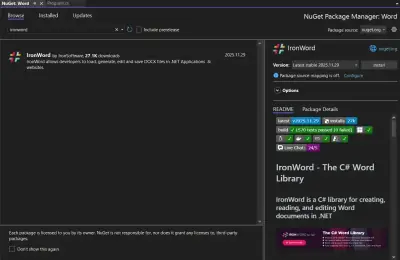
雖然Interop為操作Word和Excel提供了強大的功能,但也存在局限性。 引入IronWord,這是一個為.NET開發者優化的多功能函式庫。 IronWord提供了比Interop更流暢的體驗,尤其是在編輯Word文件任務中。 它不僅確保了相容性和性能,還通過直觀的方法簡化了複雜的任務。 為了便於比較,我將為每個用例在MS Word後提供IronWord程式碼片段,使用IronWord版本2024.1.2。
通常,您可能需要編輯現有的Word文件,以下範例顯示如何在C#中執行此操作:
// Create an instance of the Word Application
var WordApp = new Microsoft.Office.Interop.Word.Application();

// Open a Word document with the specified file path
var WordDoc = WordApp.Documents.Open(@"path_to_your_document.docx");' Create an instance of the Word Application
Dim WordApp = New Microsoft.Office.Interop.Word.Application()
' Open a Word document with the specified file path
Dim WordDoc = WordApp.Documents.Open("path_to_your_document.docx")' Create an instance of the Word Application
Dim WordApp = New Microsoft.Office.Interop.Word.Application()
' Open a Word document with the specified file path
Dim WordDoc = WordApp.Documents.Open("path_to_your_document.docx")在上述程式碼中,用您的docx文件的路徑替換path_to_your_document.docx。
使用IronWord打開Word文件。
// Open a Word document with the specified file path using IronWord
WordDocument doc = new WordDocument(@"path_to_your_document.docx");
// Open a Word document with the specified file path using IronWord
WordDocument doc = new WordDocument(@"path_to_your_document.docx");' Open a Word document with the specified file path using IronWord
Dim doc As New WordDocument("path_to_your_document.docx")' Open a Word document with the specified file path using IronWord
Dim doc As New WordDocument("path_to_your_document.docx")要從零開始建立Word文件:
// Initialize a new instance of the Word Application
var WordApp = new Microsoft.Office.Interop.Word.Application();

// Add a new Word document
var WordDoc = WordApp.Documents.Add();
// Initialize a new instance of the Word Application
var WordApp = new Microsoft.Office.Interop.Word.Application();
// Add a new Word document
var WordDoc = WordApp.Documents.Add();' Initialize a new instance of the Word Application
Dim WordApp = New Microsoft.Office.Interop.Word.Application()
' Add a new Word document
Dim WordDoc = WordApp.Documents.Add()' Initialize a new instance of the Word Application
Dim WordApp = New Microsoft.Office.Interop.Word.Application()
' Add a new Word document
Dim WordDoc = WordApp.Documents.Add()此程式碼片段建立一個新的Word文件,您可以使用C#編寫和編輯。
// Create a new, empty Word document using IronWord
WordDocument doc = new WordDocument();
// Create a new, empty Word document using IronWord
WordDocument doc = new WordDocument();' Create a new, empty Word document using IronWord
Dim doc As New WordDocument()' Create a new, empty Word document using IronWord
Dim doc As New WordDocument()要新增一個新的文字段落:
// Add a new paragraph to the document
WordDoc.Paragraphs.Add();
// Assign text to the newly added paragraph
WordDoc.Paragraphs[1].Range.Text = "This is the first paragraph.";
// Add a new paragraph to the document
WordDoc.Paragraphs.Add();
// Assign text to the newly added paragraph
WordDoc.Paragraphs[1].Range.Text = "This is the first paragraph.";' Add a new paragraph to the document
WordDoc.Paragraphs.Add()
' Assign text to the newly added paragraph
WordDoc.Paragraphs(1).Range.Text = "This is the first paragraph."' Add a new paragraph to the document
WordDoc.Paragraphs.Add()
' Assign text to the newly added paragraph
WordDoc.Paragraphs(1).Range.Text = "This is the first paragraph."Range.Text屬性為其分配新文字。
// Add a new text to the document using IronWord
doc.AddText("Add text using IronWord");
// Add a new text to the document using IronWord
doc.AddText("Add text using IronWord");' Add a new text to the document using IronWord
doc.AddText("Add text using IronWord")' Add a new text to the document using IronWord
doc.AddText("Add text using IronWord")在本教程中,讓我們更改第一段:
// Edit the text of the first paragraph
WordDoc.Paragraphs[1].Range.Text = "This is the edited first paragraph.";
// Edit the text of the first paragraph
WordDoc.Paragraphs[1].Range.Text = "This is the edited first paragraph.";' Edit the text of the first paragraph
WordDoc.Paragraphs(1).Range.Text = "This is the edited first paragraph."' Edit the text of the first paragraph
WordDoc.Paragraphs(1).Range.Text = "This is the edited first paragraph."您還可以使用類似的方法向Word文件新增和編輯其他元素。
// Edit the text of the first paragraph using IronWord
doc.Paragraphs[0].TextRuns[0].Text = "This is the edited first paragraph.";
// Edit the text of the first paragraph using IronWord
doc.Paragraphs[0].TextRuns[0].Text = "This is the edited first paragraph.";' Edit the text of the first paragraph using IronWord
doc.Paragraphs(0).TextRuns(0).Text = "This is the edited first paragraph."' Edit the text of the first paragraph using IronWord
doc.Paragraphs(0).TextRuns(0).Text = "This is the edited first paragraph."完成您所需的編輯後:
// Save the document to a specified path
WordDoc.SaveAs(@"path_where_you_want_to_save.docx");
// Close the document and quit the application
WordDoc.Close();
WordApp.Quit();
// Save the document to a specified path
WordDoc.SaveAs(@"path_where_you_want_to_save.docx");
// Close the document and quit the application
WordDoc.Close();
WordApp.Quit();' Save the document to a specified path
WordDoc.SaveAs("path_where_you_want_to_save.docx")
' Close the document and quit the application
WordDoc.Close()
WordApp.Quit()' Save the document to a specified path
WordDoc.SaveAs("path_where_you_want_to_save.docx")
' Close the document and quit the application
WordDoc.Close()
WordApp.Quit()將path_where_you_want_to_save.docx替換為您所需的路徑。
// Save the document to the desired path using IronWord
doc.SaveAs(@"path_where_you_want_to_save.docx");
// Save the document to the desired path using IronWord
doc.SaveAs(@"path_where_you_want_to_save.docx");' Save the document to the desired path using IronWord
doc.SaveAs("path_where_you_want_to_save.docx")' Save the document to the desired path using IronWord
doc.SaveAs("path_where_you_want_to_save.docx")讓我們將其全部放在一起。 以下是一個完整的程式碼範例,演示如何打開現有的Word文件,編輯它,然後保存更改:
var WordApp = new Microsoft.Office.Interop.Word.Application();

// Create a new Word document
var WordDoc = WordApp.Documents.Add();

// Add new text
WordDoc.Paragraphs.Add();
WordDoc.Paragraphs[1].Range.Text = "This is the first paragraph.";

// Edit the first paragraph
WordDoc.Paragraphs[1].Range.Text = "This is the edited first paragraph.";

// Save and close
WordDoc.SaveAs(@"path_where_you_want_to_save.docx");
WordDoc.Close();
WordApp.Quit();
var WordApp = new Microsoft.Office.Interop.Word.Application();
// Create a new Word document
var WordDoc = WordApp.Documents.Add();
// Add new text
WordDoc.Paragraphs.Add();
WordDoc.Paragraphs[1].Range.Text = "This is the first paragraph.";
// Edit the first paragraph
WordDoc.Paragraphs[1].Range.Text = "This is the edited first paragraph.";
// Save and close
WordDoc.SaveAs(@"path_where_you_want_to_save.docx");
WordDoc.Close();
WordApp.Quit();Dim WordApp = New Microsoft.Office.Interop.Word.Application()
' Create a new Word document
Dim WordDoc = WordApp.Documents.Add()
' Add new text
WordDoc.Paragraphs.Add()
WordDoc.Paragraphs(1).Range.Text = "This is the first paragraph."
' Edit the first paragraph
WordDoc.Paragraphs(1).Range.Text = "This is the edited first paragraph."
' Save and close
WordDoc.SaveAs("path_where_you_want_to_save.docx")
WordDoc.Close()
WordApp.Quit()Dim WordApp = New Microsoft.Office.Interop.Word.Application()
' Create a new Word document
Dim WordDoc = WordApp.Documents.Add()
' Add new text
WordDoc.Paragraphs.Add()
WordDoc.Paragraphs(1).Range.Text = "This is the first paragraph."
' Edit the first paragraph
WordDoc.Paragraphs(1).Range.Text = "This is the edited first paragraph."
' Save and close
WordDoc.SaveAs("path_where_you_want_to_save.docx")
WordDoc.Close()
WordApp.Quit()使用IronWord的完整程式碼範例簡潔。IronWord使用簡潔的程式碼片段來編輯DOCX文件。
// Create an empty Word document
WordDocument doc = new WordDocument();

// Add new text
doc.AddText("This is the first paragraph.");

// Edit the text
doc.Paragraphs[0].TextRuns[0].Text = "This is the edited first paragraph.";

// Export DOCX
doc.SaveAs(@"path_where_you_want_to_save.docx");
// Create an empty Word document
WordDocument doc = new WordDocument();
// Add new text
doc.AddText("This is the first paragraph.");
// Edit the text
doc.Paragraphs[0].TextRuns[0].Text = "This is the edited first paragraph.";
// Export DOCX
doc.SaveAs(@"path_where_you_want_to_save.docx");' Create an empty Word document
Dim doc As New WordDocument()
' Add new text
doc.AddText("This is the first paragraph.")
' Edit the text
doc.Paragraphs(0).TextRuns(0).Text = "This is the edited first paragraph."
' Export DOCX
doc.SaveAs("path_where_you_want_to_save.docx")' Create an empty Word document
Dim doc As New WordDocument()
' Add new text
doc.AddText("This is the first paragraph.")
' Edit the text
doc.Paragraphs(0).TextRuns(0).Text = "This is the edited first paragraph."
' Export DOCX
doc.SaveAs("path_where_you_want_to_save.docx")在.NET應用程式中操作Word和Excel文件的領域中,選擇豐富。 雖然Microsoft的Interop服務一直是許多人的首選,但IronWord這樣的解決方案的出現表明向更高效和使用者友好的工具轉移。
Curtis Chau擁有Carleton大學的電腦科學學士學位,專精於前端開發,擁有Node.js、TypeScript、JavaScript和React的專業知識。Curtis熱衷於建立直觀且美觀的使用者介面,喜愛使用現代框架並建立結構良好、視覺吸引力的手冊。

IronWord 是 IRONSUITE 的一部分
10 款適用於辦公室文件的 .NET API 產品

當您需要快速建立、編輯和格式化Word文件。