
How to Generate Barcode Images in C# .NET Applications

.NET 애플리케이션에서 전문적인 바코드 이미지를 빠르게 생성해야 합니까? 이 튜토리얼은 IronBarcode를 사용하여 간단한 한 줄 구현부터 바코드 모양에 대한 완벽한 제어를 제공하는 고급 스타일링 기술에 이르기까지 바코드를 생성, 사용자 지정, 내보내는 방법을 정확히 보여줍니다.
빠른 시작: 즉시 바코드 이미지 생성 및 저장IronBarcode를 사용하면 한 번의 간단한 호출로 바코드 이미지를 생성하고 내보낼 수 있습니다. 텍스트와 함께 CreateBarcode 메소드를 사용하여 형식과 크기를 선택하고 SaveAsPng 를 호출하세요 — 복잡한 설정은 필요하지 않습니다.
-
1Install IronBarcode with NuGet Package Manager
-
2다음 코드 조각을 복사하여 실행하세요.
IronBarCode.BarcodeWriter.CreateBarcode("Hello123", BarcodeWriterEncoding.Code128, 200, 100).SaveAsPng("barcode.png");C# -
3실제 운영 환경에서 테스트할 수 있도록 배포하세요.
무료 체험판으로 오늘 프로젝트에서 IronBarcode 사용 시작하기
최소 워크플로우(5단계)
- NuGet 패키지 관리자를 통해 IronBarcode 설치
- 한 줄의 코드로 간단한 바코드 생성
- 사용자 지정 스타일링 및 주석을 바코드에 적용
- 이미지, PDF 또는 HTML로 바코드 내보내기
- 효율적인 바코드 생성을 위한 Fluent API 사용
How Do I Install a Barcode Generator Library in C#?
IronBarcode 설치는 NuGet 패키지 관리자를 사용하여 몇 초 만에 완료됩니다. 패키지 관리 콘솔을 통해 직접 설치하거나 DLL을 수동으로 다운로드할 수 있습니다.
 IronBarcode는 .NET 개발자를 위해 포괄적인 바코드 생성 기능을 제공합니다
How Can I Generate a Simple Barcode Using C#?
첫 번째 바코드를 생성하는 데에는 단 두 줄의 코드가 필요합니다. 아래 예제는 표준 Code128 바코드를 생성하고 이를 이미지 파일로 저장하는 것을 보여줍니다.
using IronBarCode;
using IronSoftware.Drawing;

// Fluent API for Barcode Image generation.
string value = "https://ironsoftware.com/csharp/barcode";
AnyBitmap barcodeBitmap = BarcodeWriter.CreateBarcode(value, BarcodeEncoding.PDF417).ResizeTo(300, 200).SetMargins(100).ToBitmap();
System.Drawing.Bitmap barcodeLegacyBitmap = (System.Drawing.Bitmap)barcodeBitmap;Imports IronBarCode
Imports IronSoftware.Drawing
' Fluent API for Barcode Image generation.
Private value As String = "https://ironsoftware.com/csharp/barcode"
Private barcodeBitmap As AnyBitmap = BarcodeWriter.CreateBarcode(value, BarcodeEncoding.PDF417).ResizeTo(300, 200).SetMargins(100).ToBitmap()
Private barcodeLegacyBitmap As System.Drawing.Bitmap = CType(barcodeBitmap, System.Drawing.Bitmap)BarcodeWriter.CreateBarcode() 메소드는 바코드 생성의 진입점입니다. 이 메소드는 두 가지 매개변수를 허용합니다: 인코딩할 데이터와 BarcodeWriterEncoding 열거형에서의 바코드 형식입니다. IronBarcode는 Code128, Code39, EAN13, UPCA, PDF417, DataMatrix, QRCode 코드를 포함한 모든 주요 바코드 형식을 지원합니다.
생성된 후, GeneratedBarcode 객체는 여러 가지 내보내기 옵션을 제공합니다. 다양한 이미지 형식(PNG, JPEG, GIF, TIFF)으로 저장할 수 있으며, PDF로 내보내거나 귀하의 애플리케이션에서 추가 처리를 위해 System.Drawing.Bitmap 로 가져올 수도 있습니다.
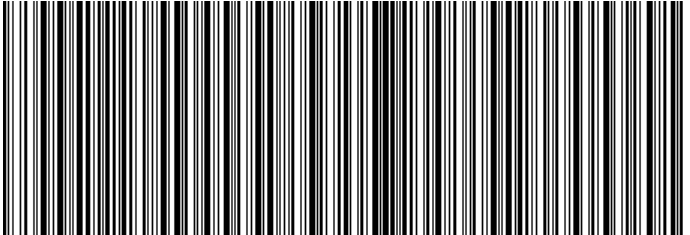
A Code128 barcode generated with IronBarcode displaying a URL
생성된 바코드의 외관을 사용자 지정할 수 있습니까?
IronBarcode는 기본적인 바코드 생성 이상으로 광범위한 사용자 지정 옵션을 제공합니다. 주석을 추가하고, 색상을 조정하고, 여백을 설정하고, 바코드 외관의 모든 측면을 제어할 수 있습니다.
using IronBarCode;
using IronSoftware.Drawing;

// Create a QR code with advanced styling options
GeneratedBarcode myBarCode = BarcodeWriter.CreateBarcode(
    "https://ironsoftware.com/csharp/barcode",
    BarcodeWriterEncoding.QRCode
);

// Add descriptive text above the barcode
myBarCode.AddAnnotationTextAboveBarcode("Product URL:");

// Display the encoded value below the barcode
myBarCode.AddBarcodeValueTextBelowBarcode();

// Set consistent margins around the barcode
myBarCode.SetMargins(100);

// Customize the barcode color (purple in this example)
myBarCode.ChangeBarCodeColor(Color.Purple);

// Export as an HTML file for web integration
myBarCode.SaveAsHtmlFile("MyBarCode.html");Imports IronBarCode
Imports IronSoftware.Drawing
' Create a QR code with advanced styling options
Dim myBarCode As GeneratedBarcode = BarcodeWriter.CreateBarcode("https://ironsoftware.com/csharp/barcode", BarcodeWriterEncoding.QRCode)
' Add descriptive text above the barcode
myBarCode.AddAnnotationTextAboveBarcode("Product URL:")
' Display the encoded value below the barcode
myBarCode.AddBarcodeValueTextBelowBarcode()
' Set consistent margins around the barcode
myBarCode.SetMargins(100)
' Customize the barcode color (purple in this example)
myBarCode.ChangeBarCodeColor(Color.Purple)
' Export as an HTML file for web integration
myBarCode.SaveAsHtmlFile("MyBarCode.html")GeneratedBarcode 클래스는 맞춤화를 위한 풍부한 메소드를 제공합니다:
- 주석:
AddAnnotationTextAboveBarcode()및AddAnnotationTextBelowBarcode()을 사용하여 바코드 주변에 사용자 정의 레이블이나 지시문을 추가하세요 - 값 표시:
AddBarcodeValueTextBelowBarcode()메소드는 자동으로 인코딩된 데이터를 인간이 읽을 수 있는 형식으로 표시합니다 - 간격:
SetMargins()을 사용하여 흰 공간을 제어하여 적절한 스캔과 시각적 매력을 보장합니다 - 색상:
ChangeBarCodeColor()및ChangeBackgroundColor()을 사용하여 전경 및 배경 색상을 변경하세요 - 내보내기 옵션: 이미지 파일, PDF 또는 자체 포함 HTML 문서로 저장합니다.
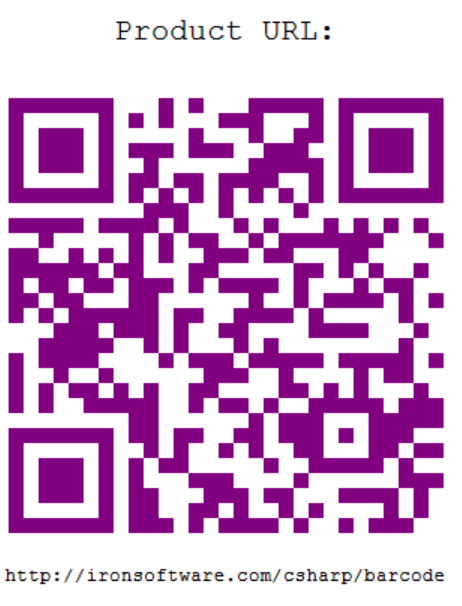
사용자 지정 색상 및 주석 텍스트가 특징인 스타일 QR 코드
자세한 맞춤화 옵션을 위해, 모든 사용할 수 있는 스타일링 메소드와 속성을 다루는 GeneratedBarcode 클래스 문서를 탐색하세요.
하나의 코드 줄에서 바코드를 생성하고 내보내는 방법은?
IronBarcode는 메서드 체이닝을 통해 더 간결하고 읽기 쉬운 코드를 가능하게 하는 유창한 API 설계 패턴을 구현합니다. 이 접근 방식은 바코드에 여러 변환을 적용할 때 특히 유용합니다.
using IronBarCode;
using IronSoftware.Drawing;

// Generate, style, and convert a barcode in a single statement
string value = "https://ironsoftware.com/csharp/barcode";

// Create PDF417 barcode with chained operations
AnyBitmap barcodeBitmap = BarcodeWriter
    .CreateBarcode(value, BarcodeWriterEncoding.PDF417)  // Create PDF417 barcode
    .ResizeTo(300, 200)                                  // Set specific dimensions
    .SetMargins(10)                                      // Add 10px margins
    .ToBitmap();                                         // Convert to bitmap

// Convert to System.Drawing.Bitmap for legacy compatibility
System.Drawing.Bitmap legacyBitmap = barcodeBitmap;Imports IronBarCode
Imports IronSoftware.Drawing
' Generate, style, and convert a barcode in a single statement
Dim value As String = "https://ironsoftware.com/csharp/barcode"
' Create PDF417 barcode with chained operations
Dim barcodeBitmap As AnyBitmap = BarcodeWriter _
.CreateBarcode(value, BarcodeWriterEncoding.PDF417) _ ' Create PDF417 barcode
.ResizeTo(300, 200) _ ' Set specific dimensions
.SetMargins(10) _ ' Add 10px margins
.ToBitmap() ' Convert to bitmap
' Convert to System.Drawing.Bitmap for legacy compatibility
Dim legacyBitmap As System.Drawing.Bitmap = barcodeBitmap유창한 API 패턴은 몇 가지 이점을 제공합니다:
- 가독성: 자연어처럼 읽히는 논리적 순서로 연산을 연결합니다.
- 효율성: 변수 선언과 중간 단계를 줄입니다.
- 유연성: 코드 구조를 변경하지 않고 쉽게 연산을 추가하거나 제거할 수 있습니다.
일반적인 유창한 연산에는 다음이 포함됩니다:
ResizeTo(): 정확한 바코드 크기 제어SetMargins(): 일관된 간격 추가ChangeBarCodeColor(): 외관 수정AddAnnotationTextAboveBarcode(): 설명 텍스트 포함ToBitmap(),SaveAsPng(),SaveAsPdf(): 다양한 형식으로 내보내기
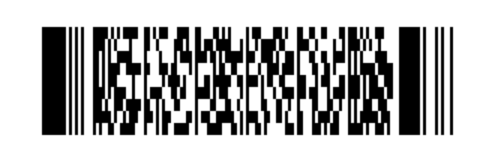
A PDF417 barcode generated using fluent method chaining
IronBarcode에서 지원하는 바코드 형식은 무엇입니까?
IronBarcode는 BarcodeWriterEncoding 열거형을 통해 포괄적인 바코드 형식 생성을 지원합니다. 지원되는 형식은 다음과 같습니다:
1D 바코드: Code128, Code39, Code93, Codabar, ITF, MSI, Plessey, UPCA, UPCE, EAN8, EAN13
2D 바코드: QRCode, DataMatrix, PDF417, Aztec, MaxiCode
전문 형식: IntelligentMail, DataBar, DataBarExpanded, 및 다양한 GS1 표준
각 형식에는 특정 특성과 사용 사례가 있습니다. 예를 들어, QRCode 코드는 URL과 많은 양의 데이터를 저장하는 데 탁월하며, EAN13 는 소매 제품에 표준입니다. 응용 프로그램에 적합한 바코드 형식 선택에 대해 자세히 알아보십시오.
생성된 바코드가 읽을 수 있는지 어떻게 확인할 수 있습니까?
품질 보증은 바코드 구현의 핵심입니다. IronBarcode는 생성된 바코드가 스캔 가능한 상태를 유지하도록 내장된 검증 기능을 포함합니다:
// Generate and verify a barcode
GeneratedBarcode myBarcode = BarcodeWriter
    .CreateBarcode("TEST123", BarcodeWriterEncoding.Code128)
    .ResizeTo(200, 100)
    .ChangeBarCodeColor(Color.DarkBlue);

// Verify the barcode is still readable after modifications
bool isReadable = myBarcode.Verify("TEST123");
Console.WriteLine($"Barcode verification: {(isReadable ? "PASS" : "FAIL")}");Verify() 메소드는 크기 조정 또는 색상 변경과 같은 변환을 적용한 후에도 바코드가 기계 판독 가능하게 유지되는지 여부를 확인합니다. 특히, 비표준 색상이거나 매우 작은 크기를 사용할 때 중요합니다.
추가 바코드 생성 예제는 어디서 찾을 수 있습니까?
바코드 생성 기능을 확장하려면 다음의 추가 리소스를 탐색해 보세요:
소스 코드 및 예제
이 튜토리얼의 전체 소스 코드를 다운로드하십시오:
고급 주제
- 로고가 있는 QR 코드 생성 - QR 코드에 브랜드 추가
- 바코드 스타일링 가이드 - 고급 사용자 정의 기술 마스터
- 이미지에서 바코드 읽기 - 바코드 스캔으로 주기를 완료하십시오.
- 대량 바코드 생성 - 여러 바코드를 효율적으로 생성하세요
API 문서
BarcodeWriter클래스 참조 - 완전한 메소드 문서GeneratedBarcode클래스 참조 - 모든 커스터마이징 옵션BarcodeWriterEncoding열거형 - 지원되는 바코드 형식
프로젝트에 전문 바코드를 생성할 준비되셨나요?
IronBarcode는 바코드 생성을 간단하게 하면서도 전문적인 응용 프로그램에서 필요한 유연성을 제공합니다. 간단한 제품 코드가 필요하든 맞춤형 스타일의 복잡한 2D 바코드가 필요하든, IronBarcode는 최소한의 코드로 모든 것을 처리합니다.
지금 IronBarcode를 다운로드하세요 그리고 몇 분 안에 바코드를 생성하기 시작하세요. 적합한 라이선스를 선택하는 데 도움이 필요하신가요? 라이선스 옵션을 확인하거나 무료 체험 키를 요청하세요 여러분의 제작 환경에서 IronBarcode를 테스트하세요.
자주 묻는 질문
C#에서 바코드 이미지를 어떻게 생성할 수 있나요?
C#에서 바코드 이미지를 생성하려면 IronBarcode의 BarcodeWriter.CreateBarcode() 메서드를 사용할 수 있습니다. 이 메서드를 사용하면 데이터와 바코드 형식을 지정한 다음 SaveAsPng() 와 같은 메서드를 사용하여 PNG 또는 JPEG와 같은 형식으로 이미지를 저장할 수 있습니다.
.NET 프로젝트에 IronBarcode를 설치하는 단계는 무엇인가요?
Visual Studio의 NuGet 패키지 관리자를 사용하여 .NET 프로젝트에 IronBarcode를 설치할 수 있습니다. 또는 IronBarcode 웹사이트에서 DLL 파일을 다운로드하여 프로젝트 참조에 추가할 수도 있습니다.
C#에서 바코드를 PDF 파일로 내보내는 방법은 무엇인가요?
IronBarcode는 GeneratedBarcode 클래스의 SaveAsPdf() 메서드를 사용하여 바코드를 PDF로 내보낼 수 있도록 지원하며, 바코드를 PDF 형식으로 저장하는 간편한 방법을 제공합니다.
C#에서 바코드에 사용할 수 있는 사용자 지정 옵션에는 어떤 것들이 있습니까?
IronBarcode는 ChangeBarCodeColor() 사용하여 바코드 색상을 변경하거나, AddAnnotationTextAboveBarcode() 를 사용하여 텍스트 주석을 추가하거나, SetMargins() 를 사용하여 여백을 설정하는 등 광범위한 사용자 지정 옵션을 제공합니다.
단 한 줄의 코드로 바코드를 빠르게 생성하고 스타일을 지정하는 방법은 무엇인가요?
IronBarcode의 Fluent API를 사용하면 메서드 체이닝을 통해 한 줄로 바코드를 생성하고 스타일을 지정할 수 있습니다. 예: BarcodeWriter.CreateBarcode(data, encoding).ResizeTo(300, 200).SetMargins(10).SaveAsPng(path) .
수정 후에도 바코드가 스캔 가능한지 어떻게 확인할 수 있나요?
스타일 지정이나 크기 조정 후 바코드의 스캔 가능성을 확인하려면 GeneratedBarcode 객체의 Verify() 메서드를 사용하여 기계 판독 가능 여부를 검사하십시오.
C#으로 로고가 포함된 QR 코드를 생성할 수 있나요?
네, IronBarcode는 QRCodeWriter 클래스를 사용하여 로고가 내장된 QR 코드 생성을 지원하며, 이 클래스에는 로고 삽입 및 향상된 오류 수정 기능이 포함되어 있습니다.
C#에서 여러 개의 바코드를 효율적으로 생성하는 과정은 무엇인가요?
IronBarcode를 사용하면 C#에서 여러 개의 바코드를 효율적으로 생성할 수 있습니다. IronBarcode는 배치 처리를 지원하며, 루프 또는 병렬 처리를 통해 대용량 바코드 생성을 처리할 수 있습니다.
C#에서 바코드를 내보낼 때 사용할 수 있는 파일 형식은 무엇인가요?
IronBarcode는 PNG, JPEG, GIF, TIFF, BMP, PDF, HTML 등 다양한 형식으로 바코드 내보내기를 지원하여 다양한 애플리케이션 요구 사항에 맞는 유연성을 제공합니다.
C#에서 바코드 아래에 사람이 읽을 수 있는 텍스트를 추가하려면 어떻게 해야 하나요?
C#에서 바코드 아래에 사람이 읽을 수 있는 텍스트를 추가하려면 AddBarcodeValueTextBelowBarcode() 메서드를 사용하면 됩니다. 이 메서드는 인코딩된 값을 텍스트 형식으로 바코드 이미지 아래에 자동으로 표시합니다.

제이콥 멜러는 Iron Software의 최고 기술 책임자(CTO)이자 C# PDF 기술을 개척한 선구적인 엔지니어입니다. Iron Software의 핵심 코드베이스를 최초로 개발한 그는 창립 초기부터 회사의 제품 아키텍처를 설계해 왔으며, CEO인 캐머런 리밍턴과 함께 회사를 NASA, 테슬라, 그리고 전 세계 정부 기관에 서비스를 제공하는 50명 이상의 직원을 보유한 기업으로 성장시켰습니다.













