


已更新 2026年6月4日
如何使用 IronWord 在 C# 中创建可填写表格模板
了解如何使用 IronWord 在 C# 中创建可填写表格模板。
阅读更多

.NET Word API为开发人员提供了强大的工具,用于转换 Word 文档,以及在应用程序中与 MS Word 文档进行交互和操作。 此 API 旨在简化处理 Microsoft Word 文档的过程,使以编程方式创建、编辑、转换和管理文档变得更加容易。 在本文中,我们将探索IronWord ,以了解其在处理 Word 文档方面的功能。
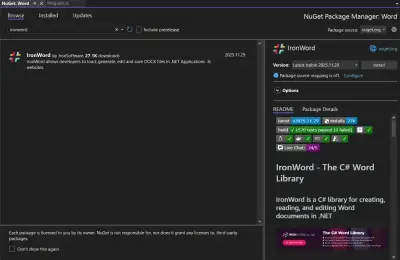
IronWord是 .NET Word API 生态系统中的一个 .NET Word 库,专为在其 .NET 应用程序中处理 Microsoft Word 文档的开发人员而设计。 使用 IronWord,开发人员可以轻松地读取、编写和修改 Word 文档,而无需在服务器或客户端计算机上安装 Microsoft Word。 此功能对于需要自动执行文档处理任务的应用程序尤其有利,例如通过邮件合并功能生成报告、发票或个性化信函。
IronWord 提供了一系列全面的功能,可满足 Word 文档操作的各个方面。 让我们来探索每一组功能,重点关注它们如何实现对多个文档的操作和合并,这些文档按"文档结构"和"文档元素"进行分类。
读取和编辑 Word:使用 IronWord,您可以从 Word 文档中提取特定信息,例如提取文本进行编辑或重新利用,以及检索可能需要在其他地方使用的图像。 对于旨在合并 Word 文档和处理现有 DOCX 文件中包含的信息的应用程序而言,此功能至关重要。
多种格式: IronWord 支持多种文件格式,增强了其在 .NET 应用程序中转换 Word 文档的实用性。
编辑页面设置:使用 IronWord 可以轻松自定义 Word 文档的物理布局。 您可以调整各种 MS Word 文件的纸张尺寸为标准尺寸或自定义尺寸,更改文档不同部分的方向,设置页边距以确保正确对齐,甚至可以出于美观目的或突出显示部分内容而修改背景颜色。
添加段落: IronWord 允许在段落中添加和删除文本行,这对于编辑和格式化大段文本至关重要。 此外,您还可以通过在文本中直接插入图像和形状来增强段落,调整样式以匹配您的设计规范,并设置对齐方式以获得更精致的外观。 添加项目符号和编号列表的功能也有助于更有效地组织内容。
using IronWord;
using IronWord.Models;

class Program
{
    static void Main()
    {
        // Load docx
        WordDocument doc = new WordDocument();
        // Create and add styled text to a paragraph
        Paragraph paragraph = new Paragraph();

        // Adding regular text
        paragraph.AddTextRun(new TextRun("Exploring text styles within a document."));

        // Adding italic text
        paragraph.AddTextRun(new TextRun("An example in italic.", new TextStyle { IsItalic = true }));

        // Adding bold text
        paragraph.AddTextRun(new TextRun("An example in bold.", new TextStyle { IsBold = true }));

        // Add paragraph to the document and export docx
        doc.AddParagraph(paragraph);
        doc.SaveAs("newdocument.docx");
    }
}Imports IronWord
Imports IronWord.Models
Module Program
Sub Main()
' Load docx
Dim doc As New WordDocument()
' Create and add styled text to a paragraph
Dim paragraph As New Paragraph()
' Adding regular text
paragraph.AddTextRun(New TextRun("Exploring text styles within a document."))
' Adding italic text
paragraph.AddTextRun(New TextRun("An example in italic.", New TextStyle With {.IsItalic = True}))
' Adding bold text
paragraph.AddTextRun(New TextRun("An example in bold.", New TextStyle With {.IsBold = True}))
' Add paragraph to the document and export docx
doc.AddParagraph(paragraph)
doc.SaveAs("newdocument.docx")
End Sub
End ModuleImports IronWord
Imports IronWord.Models
Module Program
Sub Main()
' Load docx
Dim doc As New WordDocument()
' Create and add styled text to a paragraph
Dim paragraph As New Paragraph()
' Adding regular text
paragraph.AddTextRun(New TextRun("Exploring text styles within a document."))
' Adding italic text
paragraph.AddTextRun(New TextRun("An example in italic.", New TextStyle With {.IsItalic = True}))
' Adding bold text
paragraph.AddTextRun(New TextRun("An example in bold.", New TextStyle With {.IsBold = True}))
' Add paragraph to the document and export docx
doc.AddParagraph(paragraph)
doc.SaveAs("newdocument.docx")
End Sub
End Module添加表格:表格是 DOCX 文件的重要组成部分,使用 IronWord 可以轻松操作表格,支持动态文档生成。 您可以添加或删除行和列,这对于数据量可能变化的动态文档生成至关重要。 合并和拆分单元格使您能够灵活地格式化复杂的表格,而自定义边框和布局尺寸则可以打造精致、专业的外观。
using IronWord;
using IronWord.Models;

class Program
{
    static void Main()
    {
        // Create a table cell with a paragraph containing text
        TableCell cell = new TableCell(new Paragraph(new TextRun("Sample text")));

        // Configure a common border style for the table
        BorderStyle borderStyle = new BorderStyle
        {
            BorderColor = new IronColor(IronSoftware.Drawing.Color.Black),
            BorderValue = IronWord.Models.Enums.BorderValues.Thick,
            BorderSize = 5
        };

        // Apply the border style to the cell
        cell.Borders = new TableBorders
        {
            TopBorder = borderStyle,
            RightBorder = borderStyle,
            BottomBorder = borderStyle,
            LeftBorder = borderStyle
        };

        // Create a table row and add the same cell twice
        TableRow row = new TableRow();
        row.AddCell(cell);
        row.AddCell(cell);

        // Create a table, add the row, then create and export the Word document
        Table table = new Table();
        table.AddRow(row);
        WordDocument doc = new WordDocument(table);
        doc.SaveAs("Document.docx");
    }
}
using IronWord;
using IronWord.Models;
class Program
{
static void Main()
{
// Create a table cell with a paragraph containing text
TableCell cell = new TableCell(new Paragraph(new TextRun("Sample text")));
// Configure a common border style for the table
BorderStyle borderStyle = new BorderStyle
{
BorderColor = new IronColor(IronSoftware.Drawing.Color.Black),
BorderValue = IronWord.Models.Enums.BorderValues.Thick,
BorderSize = 5
};
// Apply the border style to the cell
cell.Borders = new TableBorders
{
TopBorder = borderStyle,
RightBorder = borderStyle,
BottomBorder = borderStyle,
LeftBorder = borderStyle
};
// Create a table row and add the same cell twice
TableRow row = new TableRow();
row.AddCell(cell);
row.AddCell(cell);
// Create a table, add the row, then create and export the Word document
Table table = new Table();
table.AddRow(row);
WordDocument doc = new WordDocument(table);
doc.SaveAs("Document.docx");
}
}Imports IronWord
Imports IronWord.Models
Module Program
Sub Main()
' Create a table cell with a paragraph containing text
Dim cell As New TableCell(New Paragraph(New TextRun("Sample text")))
' Configure a common border style for the table
Dim borderStyle As New BorderStyle With {
.BorderColor = New IronColor(IronSoftware.Drawing.Color.Black),
.BorderValue = IronWord.Models.Enums.BorderValues.Thick,
.BorderSize = 5
}
' Apply the border style to the cell
cell.Borders = New TableBorders With {
.TopBorder = borderStyle,
.RightBorder = borderStyle,
.BottomBorder = borderStyle,
.LeftBorder = borderStyle
}
' Create a table row and add the same cell twice
Dim row As New TableRow()
row.AddCell(cell)
row.AddCell(cell)
' Create a table, add the row, then create and export the Word document
Dim table As New Table()
table.AddRow(row)
Dim doc As New WordDocument(table)
doc.SaveAs("Document.docx")
End Sub
End ModuleImports IronWord
Imports IronWord.Models
Module Program
Sub Main()
' Create a table cell with a paragraph containing text
Dim cell As New TableCell(New Paragraph(New TextRun("Sample text")))
' Configure a common border style for the table
Dim borderStyle As New BorderStyle With {
.BorderColor = New IronColor(IronSoftware.Drawing.Color.Black),
.BorderValue = IronWord.Models.Enums.BorderValues.Thick,
.BorderSize = 5
}
' Apply the border style to the cell
cell.Borders = New TableBorders With {
.TopBorder = borderStyle,
.RightBorder = borderStyle,
.BottomBorder = borderStyle,
.LeftBorder = borderStyle
}
' Create a table row and add the same cell twice
Dim row As New TableRow()
row.AddCell(cell)
row.AddCell(cell)
' Create a table, add the row, then create and export the Word document
Dim table As New Table()
table.AddRow(row)
Dim doc As New WordDocument(table)
doc.SaveAs("Document.docx")
End Sub
End Module
添加文本运行:此功能侧重于对文本内容进行精细控制。 您可以添加、附加和拆分文本运行,这对于动态文档创建至关重要。 样式选项非常丰富,包括更改字体系列、大小和颜色,以及添加粗体、斜体和其他文本装饰。 您还可以将图像嵌入文本中,从而创建内容丰富、视觉效果引人入胜的文档。
添加图片: IronWord 允许在 Word 文档中进行全面的图像处理。 您可以从各种来源加载图像,使文本无缝环绕图像,并调整图像尺寸以适应您的布局。 通过设置位置偏移量和与文档边角的距离,可以确保您的图像始终完美放置。
using IronWord;
using IronWord.Models;

class Program
{
    static void Main()
    {
        WordDocument doc = new WordDocument();

        // Load and configure the image
        IronWord.Models.Image image = new IronWord.Models.Image("your-image.jpg")
        {
            Width = 200, // In unit pixels
            Height = 200 // In unit pixels
        };

        // Create paragraph, add image, add paragraph to document, and export
        Paragraph paragraph = new Paragraph();
        paragraph.AddImage(image);

        // Add paragraph containing the image to the document
        doc.AddParagraph(paragraph);
        doc.SaveAs("save_document.docx");
    }
}
using IronWord;
using IronWord.Models;
class Program
{
static void Main()
{
WordDocument doc = new WordDocument();
// Load and configure the image
IronWord.Models.Image image = new IronWord.Models.Image("your-image.jpg")
{
Width = 200, // In unit pixels
Height = 200 // In unit pixels
};
// Create paragraph, add image, add paragraph to document, and export
Paragraph paragraph = new Paragraph();
paragraph.AddImage(image);
// Add paragraph containing the image to the document
doc.AddParagraph(paragraph);
doc.SaveAs("save_document.docx");
}
}Imports IronWord
Imports IronWord.Models
Module Program
Sub Main()
Dim doc As New WordDocument()
' Load and configure the image
Dim image As New IronWord.Models.Image("your-image.jpg") With {
.Width = 200, ' In unit pixels
.Height = 200 ' In unit pixels
}
' Create paragraph, add image, add paragraph to document, and export
Dim paragraph As New Paragraph()
paragraph.AddImage(image)
' Add paragraph containing the image to the document
doc.AddParagraph(paragraph)
doc.SaveAs("save_document.docx")
End Sub
End ModuleImports IronWord
Imports IronWord.Models
Module Program
Sub Main()
Dim doc As New WordDocument()
' Load and configure the image
Dim image As New IronWord.Models.Image("your-image.jpg") With {
.Width = 200, ' In unit pixels
.Height = 200 ' In unit pixels
}
' Create paragraph, add image, add paragraph to document, and export
Dim paragraph As New Paragraph()
paragraph.AddImage(image)
' Add paragraph containing the image to the document
doc.AddParagraph(paragraph)
doc.SaveAs("save_document.docx")
End Sub
End Module添加形状:形状可以为文档增添显著的视觉效果,IronWord 为您提供了精确插入和自定义形状的工具。 您可以设置形状类型(如矩形、圆形、箭头等),确定文本应如何环绕形状,指定精确的尺寸和位置,甚至旋转形状以达到所需的视觉效果。

IronWord 旨在与 .NET 生态系统广泛兼容,支持各种 .NET 版本(包括 .NET Core、.NET Standard 和 .NET Framework)上的 C#、VB.NET 和 F#。 这确保了它在现代应用和传统应用中的实用性。 该库的多功能性还体现在项目类型上,通过与 Blazor、WebForms、Xamarin、MAUI、WPF 和控制台应用程序的集成,可满足 Web、移动和桌面应用程序的需求。

在应用环境方面,IronWord 可适应 Windows、Linux、iOS 和 Android 平台,包括对容器化和在 Docker、Azure 和 AWS 上进行云部署的特定支持。 这种广泛的支持有助于在不同环境下的发展。

IronWord 还兼容主流的集成开发环境 (IDE),例如 Microsoft Visual Studio、ReSharper 和 Rider,为开发人员提供了选择工具的灵活性。 最后,它支持各种操作系统和处理器架构(x64、x86、ARM),确保在各种硬件配置下都能高效运行。
IronWord 提供多种许可选项,以满足不同开发者和组织的需求。 他们提供永久授权,这意味着您只需支付一次费用,无需支付任何后续费用。 每个许可证都包含一年的产品支持和更新。 许可等级是根据您的开发人员数量、地点和项目数量设计的。 您还可以获得免费试用版,以便在购买许可证之前获得实际操作经验。
此选项专为单独开发项目的个人开发人员量身定制。 价格为$999,覆盖单个位置的一个开发者。
此许可证面向小型团队,售价为 $1,499,最多可供三名开发人员使用,并适用于三个地点的三个项目。
对于规模较大的团队,专业许可证的价格为 $2,999,最多可支持十名开发人员。 它旨在满足更大规模的操作需求,并包含高级支持功能。
综上所述, IronWord是一款强大而灵活的 .NET Word API,提供一系列许可选项,以满足个人开发者和团队的各种需求。 它的功能可以高效地管理和操作 Word 文档,确保与多个 .NET 版本和项目类型兼容。
Curtis Chau 拥有卡尔顿大学的计算机科学学士学位,专注于前端开发,精通 Node.js、TypeScript、JavaScript 和 React。他热衷于打造直观且美观的用户界面,喜欢使用现代框架并创建结构良好、视觉吸引力强的手册。

IronWord 是 IRONSUITE的一部分
10 个 .NET API 产品用于您的办公文档

当您需要快速创建、编辑和格式化 Word 文档时。