


已更新 2026年6月4日
如何使用 IronWord 在 C# 中创建可填写表格模板
了解如何使用 IronWord 在 C# 中创建可填写表格模板。
阅读更多

在 Microsoft Word 文档等图形用户界面应用程序中显示文本时,文本对齐至关重要。 确实,有很多库可以实现文本对齐。 不过, IronWord NuGet 包仍然是一个强大的工具,可以简化此过程,为管理 C# 应用程序中的格式或对齐方式提供了一种简单有效的方法。 开发人员经常会遇到需要以各种方式对齐文本的情况,无论是用于报表还是控制台应用程序,在所有这些地方都可以轻松使用 IronWord NuGet。 现在让我们深入了解 IronWord NuGet 包,以及如何使用此包对齐文本或段落。
IronWord 是Iron Software开发的一个 C# NuGet 库,旨在以编程方式简化 Microsoft Word 文件的创建、操作和管理。 它允许开发人员自动生成带有对齐文本的 Word 文档,从而更容易在其应用程序中动态生成报告、发票、信件和其他类型的文档。
IronWord 支持多种对齐方式,包括左对齐、右对齐、居中对齐和两端对齐。 这种多功能性使开发人员能够根据自身具体需求选择最合适的格式。
该软件包简化了文本列对齐过程,因此特别适用于生成报告或以结构化格式显示数据。
IronWord 允许开发者自定义文本字段的宽度,确保对齐的文本整齐地适应指定的边界。
您可以轻松地在 Word 文档中插入、替换或删除文本。
该库支持多种格式设置选项,包括字体名称样式、字体大小、颜色和对齐方式。
IronWord 允许您在文档中插入和操作表格和图像。
它可与不同版本的 Microsoft Word 无缝协作,确保兼容性和易用性。
*报表生成:自动生成具有动态数据和文本对齐方式的详细报表。 *创建发票:填写客户和交易详情,创建专业发票。 *合同管理:自动创建包含个性化信息的合同。 *信函和通知:为客户或员工生成个性化的信函和通知。
IronWord 简化了在 .NET 应用程序中处理 Word 文档的操作,对于希望自动化文档生成和管理任务的开发人员来说,它是一款非常有价值的工具。
开始之前,请您务必准备好以下物品:
现在,让我们从创建一个新的 Visual Studio 项目开始。
在下方屏幕上选择"控制台"应用程序模板。

提供项目名称和位置。

选择 .NET 版本,最好选择有支持的最新版本,然后单击"创建"。

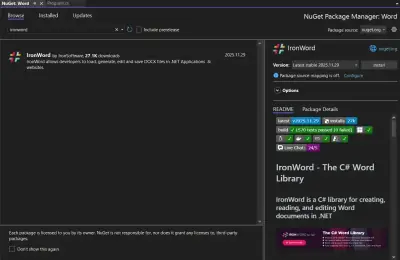
在 Visual Studio 中,按照以下步骤从 NuGet 包管理器安装 IronWord NuGet 包。

或者,请使用以下命令直接通过 CLI 安装。
下面的代码示例展示了如何生成居中对齐文本的 Word 文档。
using IronWord;
using IronWord.Models;

class Program
{
    static void Main()
    {
        // Set your license key for IronWord
        License.LicenseKey = "your key";

        // Create a new document
        var document = new WordDocument();

        // Create a paragraph and add text
        Paragraph paragraph = new Paragraph();
        Text text = new Text() { Text = "IronWord, From IronSoftware" };
        paragraph.AddText(text); // Add text to the paragraph

        // Set text alignment to center aligned
        paragraph.Alignment = IronWord.Models.Enums.TextAlignment.Center;

        // Add the first paragraph to the document
        document.AddParagraph(paragraph);

        // Save the document with the specified filename
        document.SaveAs("output.docx");
    }
}Imports IronWord
Imports IronWord.Models
Friend Class Program
Shared Sub Main()
' Set your license key for IronWord
License.LicenseKey = "your key"
' Create a new document
Dim document = New WordDocument()
' Create a paragraph and add text
Dim paragraph As New Paragraph()
Dim text As New Text() With {.Text = "IronWord, From IronSoftware"}
paragraph.AddText(text) ' Add text to the paragraph
' Set text alignment to center aligned
paragraph.Alignment = IronWord.Models.Enums.TextAlignment.Center
' Add the first paragraph to the document
document.AddParagraph(paragraph)
' Save the document with the specified filename
document.SaveAs("output.docx")
End Sub
End ClassImports IronWord
Imports IronWord.Models
Friend Class Program
Shared Sub Main()
' Set your license key for IronWord
License.LicenseKey = "your key"
' Create a new document
Dim document = New WordDocument()
' Create a paragraph and add text
Dim paragraph As New Paragraph()
Dim text As New Text() With {.Text = "IronWord, From IronSoftware"}
paragraph.AddText(text) ' Add text to the paragraph
' Set text alignment to center aligned
paragraph.Alignment = IronWord.Models.Enums.TextAlignment.Center
' Add the first paragraph to the document
document.AddParagraph(paragraph)
' Save the document with the specified filename
document.SaveAs("output.docx")
End Sub
End Class代码解释
WordDocument实例。IronWord.Models.Enums.TextAlignment.Center对齐段落。output.docx。输出

现在我们来尝试不同的方法。
using IronWord;
using IronWord.Models;
using IronWord.Models.Enums;

class Program
{
    static void Main()
    {
        // Set your license key for IronWord
        License.LicenseKey = "your key";

        // Create a new DOCX document
        var doc = new WordDocument();

        // Sample text for alignment
        Text text = new Text() { Text = "IronWord, From IronSoftware" };

        // Add paragraphs with different alignments
        AddPara(doc, text, TextAlignment.Center);
        AddPara(doc, text, TextAlignment.Left);
        AddPara(doc, text, TextAlignment.Right);
        AddPara(doc, text, TextAlignment.Justified);

        // Save the document with all alignment options
        doc.SaveAs("outputAllOptions.docx");
    }

    // Method to add a paragraph to the document with specified alignment
    private static void AddPara(WordDocument doc, Text text, TextAlignment alignment)
    {
        Paragraph paragraph = new Paragraph();
        paragraph.AddText(text);
        paragraph.Alignment = alignment;
        doc.AddParagraph(paragraph);
    }
}
using IronWord;
using IronWord.Models;
using IronWord.Models.Enums;
class Program
{
static void Main()
{
// Set your license key for IronWord
License.LicenseKey = "your key";
// Create a new DOCX document
var doc = new WordDocument();
// Sample text for alignment
Text text = new Text() { Text = "IronWord, From IronSoftware" };
// Add paragraphs with different alignments
AddPara(doc, text, TextAlignment.Center);
AddPara(doc, text, TextAlignment.Left);
AddPara(doc, text, TextAlignment.Right);
AddPara(doc, text, TextAlignment.Justified);
// Save the document with all alignment options
doc.SaveAs("outputAllOptions.docx");
}
// Method to add a paragraph to the document with specified alignment
private static void AddPara(WordDocument doc, Text text, TextAlignment alignment)
{
Paragraph paragraph = new Paragraph();
paragraph.AddText(text);
paragraph.Alignment = alignment;
doc.AddParagraph(paragraph);
}
}Imports IronWord
Imports IronWord.Models
Imports IronWord.Models.Enums
Friend Class Program
Shared Sub Main()
' Set your license key for IronWord
License.LicenseKey = "your key"
' Create a new DOCX document
Dim doc = New WordDocument()
' Sample text for alignment
Dim text As New Text() With {.Text = "IronWord, From IronSoftware"}
' Add paragraphs with different alignments
AddPara(doc, text, TextAlignment.Center)
AddPara(doc, text, TextAlignment.Left)
AddPara(doc, text, TextAlignment.Right)
AddPara(doc, text, TextAlignment.Justified)
' Save the document with all alignment options
doc.SaveAs("outputAllOptions.docx")
End Sub
' Method to add a paragraph to the document with specified alignment
Private Shared Sub AddPara(ByVal doc As WordDocument, ByVal text As Text, ByVal alignment As TextAlignment)
Dim paragraph As New Paragraph()
paragraph.AddText(text)
paragraph.Alignment = alignment
doc.AddParagraph(paragraph)
End Sub
End ClassImports IronWord
Imports IronWord.Models
Imports IronWord.Models.Enums
Friend Class Program
Shared Sub Main()
' Set your license key for IronWord
License.LicenseKey = "your key"
' Create a new DOCX document
Dim doc = New WordDocument()
' Sample text for alignment
Dim text As New Text() With {.Text = "IronWord, From IronSoftware"}
' Add paragraphs with different alignments
AddPara(doc, text, TextAlignment.Center)
AddPara(doc, text, TextAlignment.Left)
AddPara(doc, text, TextAlignment.Right)
AddPara(doc, text, TextAlignment.Justified)
' Save the document with all alignment options
doc.SaveAs("outputAllOptions.docx")
End Sub
' Method to add a paragraph to the document with specified alignment
Private Shared Sub AddPara(ByVal doc As WordDocument, ByVal text As Text, ByVal alignment As TextAlignment)
Dim paragraph As New Paragraph()
paragraph.AddText(text)
paragraph.Alignment = alignment
doc.AddParagraph(paragraph)
End Sub
End Class代码解释
WordDocument实例。WordDocument实例中。outputAllOptions.docx。输出

IronWord 库是 Iron Software 公司 Iron Suite 的产品之一。 它需要许可证才能运行。 用户可以使用自己的邮箱地址从试用许可证页面下载试用许可证。 数据输入完毕后,许可证将发送到用户的电子邮箱。 在使用 IronWord 库之前,需要将此许可放在用户代码的开头,如下所示。
License.LicenseKey = "your Key Here";License.LicenseKey = "your Key Here";License.LicenseKey = "your Key Here"License.LicenseKey = "your Key Here"IronWord NuGet 包简化了在 .NET 应用程序中处理 Word 文档的过程。 其直观的 API 使开发人员能够轻松地操作文本对齐方式和其他文档元素。 无论您需要将文本左对齐、居中对齐、右对齐还是两端对齐,IronWord 都能提供您创建专业且格式良好的文档所需的工具。
Curtis Chau 拥有卡尔顿大学的计算机科学学士学位,专注于前端开发,精通 Node.js、TypeScript、JavaScript 和 React。他热衷于打造直观且美观的用户界面,喜欢使用现代框架并创建结构良好、视觉吸引力强的手册。

IronWord 是 IRONSUITE的一部分
10 个 .NET API 产品用于您的办公文档

当您需要快速创建、编辑和格式化 Word 文档时。