
Scrape a Shopping Website in C#

学习如何使用C#和WebScraper框架从购物网站中抓取产品类别和项目,将HTML元素中的结构化数据提取到自定义模型中。 本综合指南引导您使用IronWebScraper库构建强大的电子商务爬虫。
-
1Install IronWebScraper with NuGet Package Manager
-
2复制并运行这段代码。
using IronWebScraper; public class QuickShoppingScraper : WebScraper { public override void Init() { // Apply your license key License.LicenseKey = "YOUR-LICENSE-KEY"; // Set the starting URL this.Request("https://shopping-site.com", Parse); } public override void Parse(Response response) { // Extract product data foreach (var product in response.Css(".product-item")) { var item = new { Name = product.Css(".product-name").First().InnerText, Price = product.Css(".price").First().InnerText, Image = product.Css("img").First().Attributes["src"] }; Scrape(item, "products.jsonl"); } } } // Run the scraper var scraper = new QuickShoppingScraper(); scraper.Start();C# -
3部署到您的生产环境中进行测试
通过免费试用立即在您的项目中开始使用IronWebScraper
- 创建一个名为"ShoppingSiteSample"的新控制台应用程序项目
- 添加一个名为"
ShoppingScraper"的类,该类继承自WebScraper - 为
Category和Product数据创建模型 - 重写
Init()以设置起始 URL,并重写Parse()方法进行抓取 - 运行 scraper 将类别和产品提取为 JSONL 文件
如何分析购物网站的 HTML 结构?
选择一个购物网站,分析其内容结构。 了解 HTML 结构是成功进行网络刮擦的关键。 在编写任何代码之前,请花时间使用浏览器开发工具分析目标网站的结构。
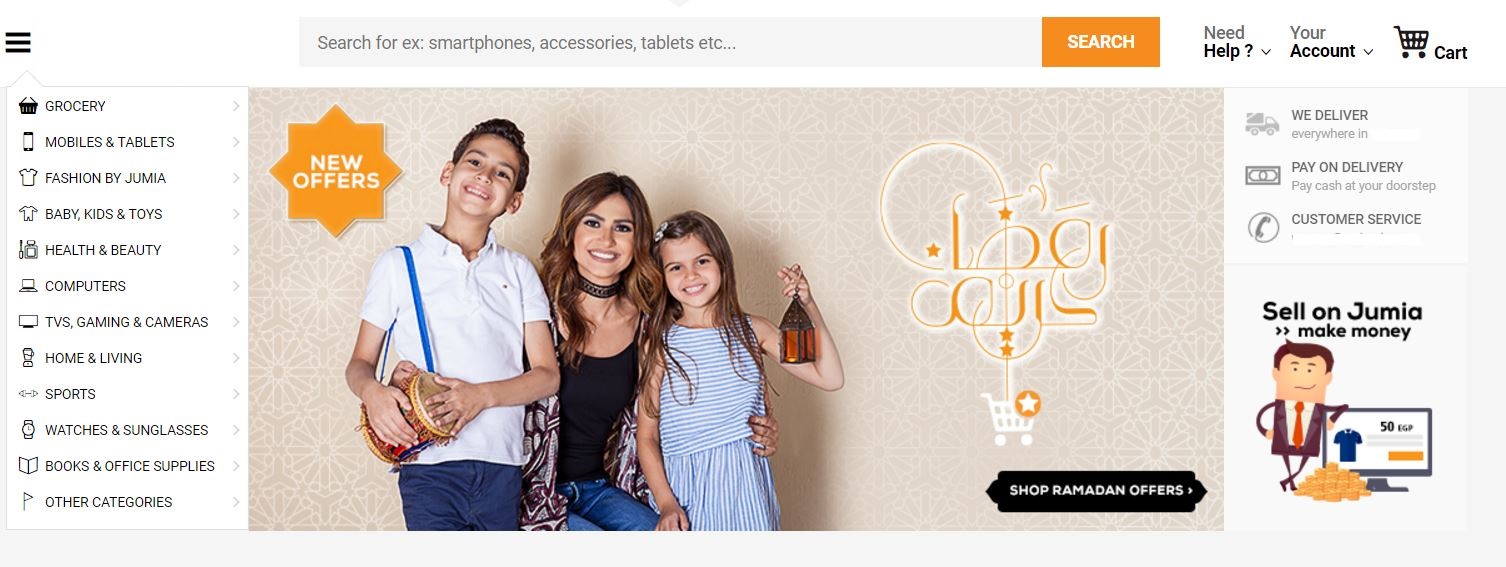
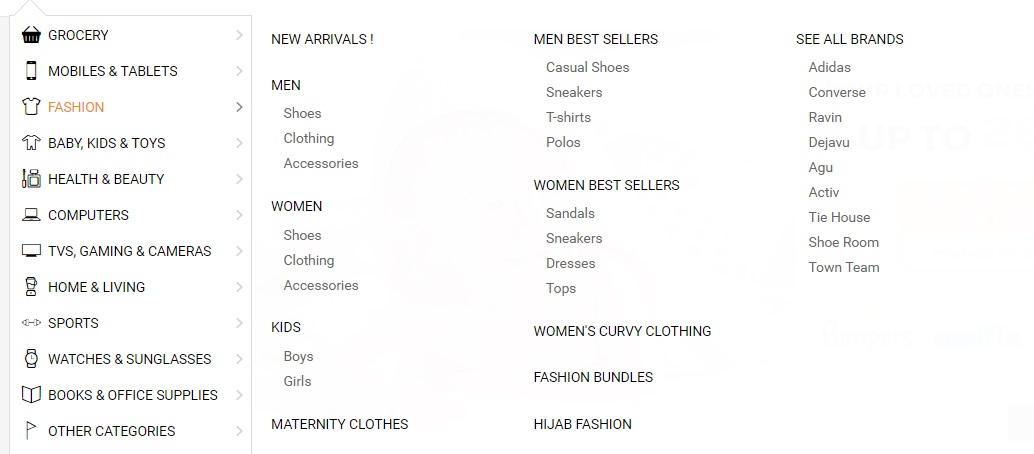
如图所示,左侧边栏包含网站产品类别的链接。 第一步是调查网站的 HTML 并规划刮擦方法。 这一分析阶段对于制定有效的搜索策略至关重要。
为什么理解 HTML 结构很重要?
时尚网站的类别有子类别(男装、女装、儿童)。 了解这种分层结构有助于设计适当的数据模型和搜索逻辑。 在使用 高级网络搜刮功能时,正确的 HTML 分析变得更加重要。
<li class="menu-item" data-id="">
<a href="https://domain.com/fashion-by-/" class="main-category">
<i class="cat-icon osh-font-fashion"></i>
<span class="nav-subTxt">FASHION </span>
<i class="osh-font-light-arrow-left"></i><i class="osh-font-light-arrow-right"></i>
</a>
<div class="navLayerWrapper" style="width: 633px; display: none;">
<div class="submenu">
<div class="column">
<div class="categories">
<a class="category" href="https://domain.com/fashion-by-/?sort=newest&dir=desc&viewType=gridView3">New Arrivals !</a>
</div>
<div class="categories">
<a class="category" href="https://domain.com/men-fashion/">Men</a>
<a class="subcategory" href="https://domain.com/mens-shoes/">Shoes</a>
<a class="subcategory" href="https://domain.com/mens-clothing/">Clothing</a>
<a class="subcategory" href="https://domain.com/mens-accessories/">Accessories</a>
</div>
<div class="categories">
<a class="category" href="https://domain.com/women-fashion/">Women</a>
<a class="subcategory" href="https://domain.com/womens-shoes/">Shoes</a>
<a class="subcategory" href="https://domain.com/womens-clothing/">Clothing</a>
<a class="subcategory" href="https://domain.com/womens-accessories/">Accessories</a>
</div>
<div class="categories">
<a class="category" href="https://domain.com/girls-boys-fashion/">Kids</a>
<a class="subcategory" href="https://domain.com/boys-fashion/">Boys</a>
<a class="subcategory" href="https://domain.com/girls/">Girls</a>
</div>
<div class="categories">
<a class="category" href="https://domain.com/maternity-clothes/">Maternity Clothes</a>
</div>
</div>
<div class="column">
<div class="categories">
<span class="category defaultCursor">Men Best Sellers</span>
<a class="subcategory" href="https://domain.com/mens-casual-shoes/">Casual Shoes</a>
<a class="subcategory" href="https://domain.com/mens-sneakers/">Sneakers</a>
<a class="subcategory" href="https://domain.com/mens-t-shirts/">T-shirts</a>
<a class="subcategory" href="https://domain.com/mens-polos/">Polos</a>
</div>
<div class="categories">
<span class="category defaultCursor">Women Best Sellers</span>
<a class="subcategory" href="https://domain.com/womens-sandals/">Sandals</a>
<a class="subcategory" href="https://domain.com/womens-sneakers/">Sneakers</a>
<a class="subcategory" href="https://domain.com/women-dresses/">Dresses</a>
<a class="subcategory" href="https://domain.com/women-tops/">Tops</a>
</div>
<div class="categories">
<a class="category" href="https://domain.com/womens-curvy-clothing/">Women's Curvy Clothing</a>
</div>
<div class="categories">
<a class="category" href="https://domain.com/fashion-bundles/v/">Fashion Bundles</a>
</div>
<div class="categories">
<a class="category" href="https://domain.com/hijab-fashion/">Hijab Fashion</a>
</div>
</div>
<div class="column">
<div class="categories">
<a class="category" href="https://domain.com/brands/fashion-by-/">SEE ALL BRANDS</a>
<a class="subcategory" href="https://domain.com/adidas/">Adidas</a>
<a class="subcategory" href="https://domain.com/converse/">Converse</a>
<a class="subcategory" href="https://domain.com/ravin/">Ravin</a>
<a class="subcategory" href="https://domain.com/dejavu/">Dejavu</a>
<a class="subcategory" href="https://domain.com/agu/">Agu</a>
<a class="subcategory" href="https://domain.com/activ/">Activ</a>
<a class="subcategory" href="https://domain.com/oxford--bellini--tie-house--milano/">Tie House</a>
<a class="subcategory" href="https://domain.com/shoe-room/">Shoe Room</a>
<a class="subcategory" href="https://domain.com/town-team/">Town Team</a>
</div>
</div>
</div>
</div>
</li>如何设置网络抓取项目?
按照 C# Web scraping 的最佳实践建立一个项目。
- 创建一个新的控制台应用程序或为名为"ShoppingSiteSample"的示例添加新文件夹
- 添加一个名为"
ShoppingScraper"的新类 - 首先抓取网站类别及其子类别
- 通过NuGet包管理器或包管理器控制台安装
IronWebScraper:
分类应使用何种数据模型?
创建一个类别模型,正确表达所发现的层次结构:
public class Category
{
    /// <summary>
    /// Gets or sets the name.
    /// </summary>
    /// <value>
    /// The name.
    /// </value>
    public string Name { get; set; }

    /// <summary>
    /// Gets or sets the URL.
    /// </summary>
    /// <value>
    /// The URL.
    /// </value>
    public string URL { get; set; }

    /// <summary>
    /// Gets or sets the subcategories.
    /// </summary>
    /// <value>
    /// The subcategories.
    /// </value>
    public List<Category> SubCategories { get; set; }

    // Additional properties for enhanced data collection
    public int ProductCount { get; set; }
    public DateTime LastScraped { get; set; }
    public string CategoryType { get; set; }
}Public Class Category
''' <summary>
''' Gets or sets the name.
''' </summary>
''' <value>
''' The name.
''' </value>
Public Property Name As String
''' <summary>
''' Gets or sets the URL.
''' </summary>
''' <value>
''' The URL.
''' </value>
Public Property URL As String
''' <summary>
''' Gets or sets the subcategories.
''' </summary>
''' <value>
''' The subcategories.
''' </value>
Public Property SubCategories As List(Of Category)
' Additional properties for enhanced data collection
Public Property ProductCount As Integer
Public Property LastScraped As DateTime
Public Property CategoryType As String
End Class如何构建基本的 Scraper 逻辑?
构建刮板逻辑,切记在运行刮板之前应用您的许可证密钥:
public class ShoppingScraper : WebScraper
{
    /// <summary>
    /// Initialize the web scraper, setting the start URLs and allowed/banned domains or URL patterns.
    /// </summary>
    public override void Init()
    {
        // Apply your license key - get one from https://ironsoftware.com/csharp/webscraper/licensing/
        License.LicenseKey = "LicenseKey";
        this.LoggingLevel = WebScraper.LogLevel.All;
        this.WorkingDirectory = AppSetting.GetAppRoot() + @"\ShoppingSiteSample\Output\";

        // Configure request settings for better performance
        this.Request("www.webSite.com", Parse);
    }

    /// <summary>
    /// Parses the HTML document of the response to scrap the necessary data.
    /// </summary>
    /// <param name="response">The HTTP Response object to parse.</param>
    public override void Parse(Response response)
    {
        var categoryList = new List<Category>();

        // Iterate through each link in the menu and extract the category data.
        foreach (var Links in response.Css("#menuFixed > ul > li > a"))
        {
            var cat = new Category
            {
                URL = Links.Attributes["href"],
                Name = Links.InnerText,
                LastScraped = DateTime.Now
            };
            categoryList.Add(cat);
        }

        // Save the scraped data into a JSONL file.
        Scrape(categoryList, "Shopping.jsonl");
    }
}Public Class ShoppingScraper
Inherits WebScraper
''' <summary>
''' Initialize the web scraper, setting the start URLs and allowed/banned domains or URL patterns.
''' </summary>
Public Overrides Sub Init()
' Apply your license key - get one from https://ironsoftware.com/csharp/webscraper/licensing/
License.LicenseKey = "LicenseKey"
Me.LoggingLevel = WebScraper.LogLevel.All
Me.WorkingDirectory = AppSetting.GetAppRoot() & "\ShoppingSiteSample\Output\"
' Configure request settings for better performance
Me.Request("www.webSite.com", AddressOf Parse)
End Sub
''' <summary>
''' Parses the HTML document of the response to scrap the necessary data.
''' </summary>
''' <param name="response">The HTTP Response object to parse.</param>
Public Overrides Sub Parse(response As Response)
Dim categoryList As New List(Of Category)()
' Iterate through each link in the menu and extract the category data.
For Each Links In response.Css("#menuFixed > ul > li > a")
Dim cat As New Category With {
.URL = Links.Attributes("href"),
.Name = Links.InnerText,
.LastScraped = DateTime.Now
}
categoryList.Add(cat)
Next
' Save the scraped data into a JSONL file.
Scrape(categoryList, "Shopping.jsonl")
End Sub
End Class菜单中的目标元素是什么?
从菜单中抓取链接需要精确的 CSS 选择器。 API 参考提供了有关可用选择器方法的详细信息:

如何同时抓取主分类和子分类?
更新代码以抓取主要类别和所有子链接。 这种方法可确保完整的导航结构捕获:
public override void Parse(Response response)
{
    // List of Category Links (Root)
    var categoryList = new List<Category>();

    // Traverse each 'li' under the fixed menu
    foreach (var li in response.Css("#menuFixed > ul > li"))
    {
        // List of Main Links
        foreach (var Links in li.Css("a"))
        {
            var cat = new Category
            {
                URL = Links.Attributes["href"],
                Name = Links.InnerText,
                SubCategories = new List<Category>(),
                LastScraped = DateTime.Now
            };

            // List of Subcategories Links
            foreach (var subCategory in li.Css("a[class=subcategory]"))
            {
                var subcat = new Category
                {
                    URL = subCategory.Attributes["href"],
                    Name = subCategory.InnerText,
                    CategoryType = "Subcategory"
                };

                // Check if subcategory link already exists
                if (cat.SubCategories.Find(c => c.Name == subcat.Name && c.URL == subcat.URL) == null)
                {
                    // Add sublinks
                    cat.SubCategories.Add(subcat);
                }
            }

            // Update product count based on subcategories
            cat.ProductCount = cat.SubCategories.Count;

            // Add Main Category to the list
            categoryList.Add(cat);
        }
    }

    // Save the scraped data into a JSONL file.
    Scrape(categoryList, "Shopping.jsonl");
}Public Overrides Sub Parse(response As Response)
' List of Category Links (Root)
Dim categoryList = New List(Of Category)()
' Traverse each 'li' under the fixed menu
For Each li In response.Css("#menuFixed > ul > li")
' List of Main Links
For Each Links In li.Css("a")
Dim cat = New Category With {
.URL = Links.Attributes("href"),
.Name = Links.InnerText,
.SubCategories = New List(Of Category)(),
.LastScraped = DateTime.Now
}
' List of Subcategories Links
For Each subCategory In li.Css("a[class=subcategory]")
Dim subcat = New Category With {
.URL = subCategory.Attributes("href"),
.Name = subCategory.InnerText,
.CategoryType = "Subcategory"
}
' Check if subcategory link already exists
If cat.SubCategories.Find(Function(c) c.Name = subcat.Name AndAlso c.URL = subcat.URL) Is Nothing Then
' Add sublinks
cat.SubCategories.Add(subcat)
End If
Next
' Update product count based on subcategories
cat.ProductCount = cat.SubCategories.Count
' Add Main Category to the list
categoryList.Add(cat)
Next
Next
' Save the scraped data into a JSONL file.
Scrape(categoryList, "Shopping.jsonl")
End Sub如何从分类页面中提取产品信息?
有了所有网站类别的链接,就可以开始搜索每个类别中的产品。 在处理产品页面时,线程安全对于优化性能非常重要。 导航至任何类别并检查内容:

产品的 HTML 结构是什么样的?
检查 HTML 结构以了解产品组织:
<section class="products">
<div class="sku -gallery -validate-size " data-sku="AG249FA0T2PSGNAFAMZ" ft-product-sizes="41,42,43,44,45" ft-product-color="Multicolour">
<a class="link" href="http://www.WebSite.com/agu-bundle-of-2-sneakers-black-navy-blue-653884.html">
<div class="image-wrapper default-state">
<img class="lazy image -loaded" alt="Bundle Of 2 Sneakers - Black & Navy Blue" data-image-vertical="1" width="210" height="262" src="https://static.WebSite.com/p/agu-6208-488356-1-catalog_grid_3.jpg" data-sku="AG249FA0T2PSGNAFAMZ" data-src="https://static.WebSite.com/p/agu-6208-488356-1-catalog_grid_3.jpg" data-placeholder="placeholder_m_1.jpg">
<noscript><img src="https://static.WebSite.com/p/agu-6208-488356-1-catalog_grid_3.jpg" width="210" height="262" class="image" /></noscript>
</div>
<h2 class="title"></h2>
<span class="brand ">Agu </span>
<span class="name" dir="ltr">Bundle Of 2 Sneakers - Black & Navy Blue</span>
</h2>
<div class="price-container clearfix">
<span class="price-box">
<span class="price">
<span data-currency-iso="EGP">EGP</span>
<span dir="ltr" data-price="299">299</span>
</span>
<span class="price -old -no-special"></span>
</span>
</div>
<div class="rating-stars">
<div class="stars-container">
<div class="stars" style="width: 62%"></div>
</div>
<div class="total-ratings">(30)</div>
</div>
<span class="shop-first-logo-container">
<img src="http://www.WebSite.com/images/local/logos/shop_first/ShoppingSite/logo_normal.png" data-src="http://www.WebSite.com/images/local/logos/shop_first/ShoppingSite/logo_normal.png" class="lazy shop-first-logo-img -mbxs -loaded">
</span>
<span class="osh-icon -ShoppingSite-local shop_local--logo -block -mbs -mts"></span>
<div class="list -sizes" data-selected-sku="">
<span class="js-link sku-size" data-href="http://www.WebSite.com/agu-bundle-of-2-sneakers-black-navy-blue-653884.html?size=41">41</span>
<span class="js-link sku-size" data-href="http://www.WebSite.com/agu-bundle-of-2-sneakers-black-navy-blue-653884.html?size=42">42</span>
<span class="js-link sku-size" data-href="http://www.WebSite.com/agu-bundle-of-2-sneakers-black-navy-blue-653884.html?size=43">43</span>
<span class="js-link sku-size" data-href="http://www.WebSite.com/agu-bundle-of-2-sneakers-black-navy-blue-653884.html?size=44">44</span>
<span class="js-link sku-size" data-href="http://www.WebSite.com/agu-bundle-of-2-sneakers-black-navy-blue-653884.html?size=45">45</span>
</div>
</a>
</div>
<div class="sku -gallery -validate-size " data-sku="LE047FA01SRK4NAFAMZ" ft-product-sizes="110,115,120,125,130,135" ft-product-color="Black">
<a class="link" href="http://www.WebSite.com/leather-shop-genuine-leather-belt-black-712030.html">
<div class="image-wrapper default-state">
<img class="lazy image -loaded" alt="Genuine Leather Belt - Black" data-image-vertical="1" width="210" height="262" src="https://static.WebSite.com/p/leather-shop-1831-030217-1-catalog_grid_3.jpg" data-sku="LE047FA01SRK4NAFAMZ" data-src="https://static.WebSite.com/p/leather-shop-1831-030217-1-catalog_grid_3.jpg" data-placeholder="placeholder_m_1.jpg">
<noscript><img src="https://static.WebSite.com/p/leather-shop-1831-030217-1-catalog_grid_3.jpg" width="210" height="262" class="image" /></noscript>
</div>
<h2 class="title"><span class="brand ">Leather Shop </span> <span class="name" dir="ltr">Genuine Leather Belt - Black</span></h2>
<div class="price-container clearfix">
<span class="sale-flag-percent">-29%</span>
<span class="price-box">
<span class="price"><span data-currency-iso="EGP">EGP</span> <span dir="ltr" data-price="96">96</span> </span>
<span class="price -old"><span data-currency-iso="EGP">EGP</span> <span dir="ltr" data-price="135">135</span> </span>
</span>
</div>
<div class="rating-stars">
<div class="stars-container">
<div class="stars" style="width: 100%"></div>
</div>
<div class="total-ratings">(1)</div>
</div>
<span class="osh-icon -ShoppingSite-local shop_local--logo -block -mbs -mts"></span>
<div class="list -sizes" data-selected-sku="">
<span class="js-link sku-size" data-href="http://www.WebSite.com/leather-shop-genuine-leather-belt-black-712030.html?size=110">110</span>
<span class="js-link sku-size"data-href="http://www.WebSite.com/leather-shop-genuine-leather-belt-black-712030.html?size=115">115</span>
<span class="js-link sku-size"data-href="http://www.WebSite.com/leather-shop-genuine-leather-belt-black-712030.html?size=120">120</span>
<span class="js-link sku-size"data-href="http://www.WebSite.com/leather-shop-genuine-leather-belt-black-712030.html?size=125">125</span>
<span class="js-link sku-size"data-href="http://www.WebSite.com/leather-shop-genuine-leather-belt-black-712030.html?size=130">130</span>
<span class="js-link sku-size"data-href="http://www.WebSite.com/leather-shop-genuine-leather-belt-black-712030.html?size=135">135</span>
</div>
</a>
</div>
</section>我应该创建哪种产品模型?
为该内容建立产品模型。 在使用购物网站搜索时,请捕捉所有相关的产品详细信息:
public class Product
{
    /// <summary>
    /// Gets or sets the name.
    /// </summary>
    /// <value>
    /// The name.
    /// </value>
    public string Name { get; set; }

    /// <summary>
    /// Gets or sets the price.
    /// </summary>
    /// <value>
    /// The price.
    /// </value>
    public string Price { get; set; }

    /// <summary>
    /// Gets or sets the image.
    /// </summary>
    /// <value>
    /// The image.
    /// </value>
    public string Image { get; set; }

    // Additional properties for comprehensive data collection
    public string Brand { get; set; }
    public string OldPrice { get; set; }
    public string Discount { get; set; }
    public float Rating { get; set; }
    public int ReviewCount { get; set; }
    public List<string> AvailableSizes { get; set; }
    public string ProductUrl { get; set; }
    public string SKU { get; set; }
    public DateTime ScrapedDate { get; set; }
}Public Class Product
''' <summary>
''' Gets or sets the name.
''' </summary>
''' <value>
''' The name.
''' </value>
Public Property Name As String
''' <summary>
''' Gets or sets the price.
''' </summary>
''' <value>
''' The price.
''' </value>
Public Property Price As String
''' <summary>
''' Gets or sets the image.
''' </summary>
''' <value>
''' The image.
''' </value>
Public Property Image As String
' Additional properties for comprehensive data collection
Public Property Brand As String
Public Property OldPrice As String
Public Property Discount As String
Public Property Rating As Single
Public Property ReviewCount As Integer
Public Property AvailableSizes As List(Of String)
Public Property ProductUrl As String
Public Property SKU As String
Public Property ScrapedDate As DateTime
End Class如何添加产品抓取功能?
要抓取分类页面,请添加一个新的抓取方法,该方法具有错误处理和数据验证功能:
public void ParseCategory(Response response)
{
    // List of Products
    var productList = new List<Product>();

    // Iterate through product links in the product section
    foreach (var Links in response.Css("section.products > div > a"))
    {
        try
        {
            var product = new Product
            {
                Name = Links.Css("h2.title > span.name").First().InnerText,
                Brand = Links.Css("h2.title > span.brand").FirstOrDefault()?.InnerText ?? "Unknown",
                Price = Links.Css("div.price-container > span.price-box > span.price > span[data-price]").First().InnerText,
                Image = Links.Css("div.image-wrapper.default-state > img").First().Attributes["src"],
                ProductUrl = Links.Attributes["href"],
                SKU = Links.ParentNode.Attributes["data-sku"],
                ScrapedDate = DateTime.Now
            };

            // Extract old price if available
            var oldPriceElement = Links.Css("span.price.-old > span[data-price]").FirstOrDefault();
            if (oldPriceElement != null)
            {
                product.OldPrice = oldPriceElement.InnerText;
            }

            // Extract discount percentage
            var discountElement = Links.Css("span.sale-flag-percent").FirstOrDefault();
            if (discountElement != null)
            {
                product.Discount = discountElement.InnerText;
            }

            // Extract rating information
            var ratingWidth = Links.Css("div.stars").FirstOrDefault()?.Attributes["style"];
            if (!string.IsNullOrEmpty(ratingWidth))
            {
                var width = System.Text.RegularExpressions.Regex.Match(ratingWidth, @"(\d+)%").Groups[1].Value;
                if (int.TryParse(width, out int ratingPercent))
                {
                    product.Rating = ratingPercent / 20.0f; // Convert percentage to 5-star scale
                }
            }

            // Extract review count
            var reviewText = Links.Css("div.total-ratings").FirstOrDefault()?.InnerText;
            if (!string.IsNullOrEmpty(reviewText))
            {
                var reviewCount = System.Text.RegularExpressions.Regex.Match(reviewText, @"\d+").Value;
                if (int.TryParse(reviewCount, out int count))
                {
                    product.ReviewCount = count;
                }
            }

            // Extract available sizes
            product.AvailableSizes = Links.Css("div.list.-sizes > span.sku-size")
                .Select(s => s.InnerText)
                .ToList();

            productList.Add(product);
        }
        catch (Exception ex)
        {
            // Log error and continue with next product
            Console.WriteLine($"Error parsing product: {ex.Message}");
        }
    }

    // Save the scraped product data into a JSONL file.
    Scrape(productList, "Products.jsonl");

    // Handle pagination if needed
    var nextPageLink = response.Css("a.pagination-next").FirstOrDefault();
    if (nextPageLink != null)
    {
        var nextPageUrl = nextPageLink.Attributes["href"];
        this.Request(nextPageUrl, ParseCategory);
    }
}Public Sub ParseCategory(response As Response)
' List of Products
Dim productList = New List(Of Product)()
' Iterate through product links in the product section
For Each Links In response.Css("section.products > div > a")
Try
Dim product = New Product With {
.Name = Links.Css("h2.title > span.name").First().InnerText,
.Brand = If(Links.Css("h2.title > span.brand").FirstOrDefault()?.InnerText, "Unknown"),
.Price = Links.Css("div.price-container > span.price-box > span.price > span[data-price]").First().InnerText,
.Image = Links.Css("div.image-wrapper.default-state > img").First().Attributes("src"),
.ProductUrl = Links.Attributes("href"),
.SKU = Links.ParentNode.Attributes("data-sku"),
.ScrapedDate = DateTime.Now
}
' Extract old price if available
Dim oldPriceElement = Links.Css("span.price.-old > span[data-price]").FirstOrDefault()
If oldPriceElement IsNot Nothing Then
product.OldPrice = oldPriceElement.InnerText
End If
' Extract discount percentage
Dim discountElement = Links.Css("span.sale-flag-percent").FirstOrDefault()
If discountElement IsNot Nothing Then
product.Discount = discountElement.InnerText
End If
' Extract rating information
Dim ratingWidth = Links.Css("div.stars").FirstOrDefault()?.Attributes("style")
If Not String.IsNullOrEmpty(ratingWidth) Then
Dim width = System.Text.RegularExpressions.Regex.Match(ratingWidth, "(\d+)%").Groups(1).Value
Dim ratingPercent As Integer
If Integer.TryParse(width, ratingPercent) Then
product.Rating = ratingPercent / 20.0F ' Convert percentage to 5-star scale
End If
End If
' Extract review count
Dim reviewText = Links.Css("div.total-ratings").FirstOrDefault()?.InnerText
If Not String.IsNullOrEmpty(reviewText) Then
Dim reviewCount = System.Text.RegularExpressions.Regex.Match(reviewText, "\d+").Value
Dim count As Integer
If Integer.TryParse(reviewCount, count) Then
product.ReviewCount = count
End If
End If
' Extract available sizes
product.AvailableSizes = Links.Css("div.list.-sizes > span.sku-size").Select(Function(s) s.InnerText).ToList()
productList.Add(product)
Catch ex As Exception
' Log error and continue with next product
Console.WriteLine($"Error parsing product: {ex.Message}")
End Try
Next
' Save the scraped product data into a JSONL file.
Scrape(productList, "Products.jsonl")
' Handle pagination if needed
Dim nextPageLink = response.Css("a.pagination-next").FirstOrDefault()
If nextPageLink IsNot Nothing Then
Dim nextPageUrl = nextPageLink.Attributes("href")
Me.Request(nextPageUrl, AddressOf ParseCategory)
End If
End Sub这种刮擦购物网站的综合方法可确保捕获所有相关产品信息,同时优雅地处理错误。 对于更高级的场景,请探索高级网页抓取功能,这些功能在IronWebScraper中可用。
常见问题解答
如何用 C# 从购物网站提取产品数据?
IronWebScraper 可通过 CSS 选择器轻松提取购物网站中的产品数据。您可以创建一个 WebScraper 类,覆盖 Parse 方法,并使用 response.Css() 来定位特定的 HTML 元素,如产品名称、价格和图片。提取的数据可保存为各种格式,包括 JSON 和 JSONL 文件。
创建购物网站搜索器的基本步骤是什么?
using IronWebScraper 创建购物网站刮板:1) 创建一个控制台应用程序项目;2) 添加一个继承自 WebScraper 的类;3) 为类别和产品创建数据模型;4) 覆盖 Init() 方法以设置起始 URL;5) 覆盖 Parse() 方法以使用 CSS 选择器提取数据;6) 运行 scraper 以将数据保存为首选格式。
在搜索电子商务网站时,如何处理分层分类结构?
IronWebScraper 允许您通过创建反映父子关系的适当数据模型(如时尚 > 男装 > 鞋)来处理分层结构。您可以使用 CSS 选择器浏览嵌套的 HTML 元素,并以编程方式构建分类树结构,这在使用 IronWebScraper 的高级功能时尤其有用。
分析购物网站 HTML 结构的最佳方法是什么?
在使用 IronWebScraper 搜刮购物网站之前,请使用浏览器开发工具检查 HTML 结构。在 CSS 类和元素层次结构中寻找一致的模式。这种分析可帮助您确定要在 IronWebScraper Parse() 方法中使用的正确 CSS 选择器,以便准确定位产品信息、类别和其他数据元素。
我能否从同一个页面中提取产品列表和分类导航?
是的,IronWebScraper 可以让您从一个页面中提取多种类型的数据。在您的 Parse() 方法中,您可以使用不同的 CSS 选择器同时针对类别链接(如".category-item")和产品列表(如".product-item"),然后将它们保存到不同的输出文件或数据结构中。
如何将刮擦的产品数据保存到文件中?
IronWebScraper 提供了一个内置的 Scrape() 方法,可自动保存提取的数据。只需将数据对象和文件名传递给 Scrape(item, "products.jsonl")。该库支持多种输出格式,包括 JSON、JSONL 和 CSV,因此可以轻松导出抓取的电子商务数据,以便进一步处理。
How does `IronWebScraper` improve the efficiency of a web scraping project?
`IronWebScraper` enhances web scraping efficiency through features like concurrent requests, CSS selectors for targeted scraping, and harvesting data into structured formats, making the scraping process faster and more organized.
How do I ensure thread safety when scraping product pages?
To ensure thread safety when scraping product pages, you should manage concurrent requests and resource sharing carefully, using the advanced features of `IronWebScraper` designed to handle multi-threaded operations efficiently.
What are common elements targeted when scraping e-commerce categories?
Common elements targeted when scraping e-commerce categories include category names, URLs, subcategory links, and sometimes metadata like product counts or last updated timestamps.
How do I scrape subcategories along with main categories?
You can scrape subcategories along with main categories by iterating through each main category's HTML structure, identifying subcategory links, and extracting their respective names and URLs using `IronWebScraper`.

Curtis Chau 拥有卡尔顿大学的计算机科学学士学位,专注于前端开发,精通 Node.js、TypeScript、JavaScript 和 React。他热衷于打造直观且美观的用户界面,喜欢使用现代框架并创建结构良好、视觉吸引力强的手册。













