Iron Suite for .NET
10个.NET库。一整套文档。



2023 年 Microsoft Build 大会会议总结:AI Copilot 的时代

微软的最新创新,安全 CoPilot,计划于 2024 年 4 月 1 日全球发布,将在全球范围内改变网络安全实践。 利用生成式 AI,CoPilot 为安全和 IT 专业人员提供无与伦比的洞察力和指导,提高他们有效检测和缓解安全风险的能力。 在包括微软每天处理的 78 万亿个安全信号在内的广泛数据和威胁情报支持下,CoPilot 为用户提供量身定制的建议,加快响应时间并增强专业知识。
微软进行的一项最新研究表明,CoPilot 的变革性影响显著,经验丰富的安全分析师报告称其效率提高了 22%,准确性提高了 7%。 引入的按需付费许可模式进一步普及了 CoPilot 访问,使其对所有规模的组织开放。 "作为深耕于网络安全解决方案的开发者,我们对微软的安全 CoPilot 的潜力感到兴奋。 我们期待探索其能力并将它们整合到我们的解决方案中以增强保护" - Iron Software 首席软件工程师 Justin Pierce。
同时,Iron Software 在其 IronPdf.Extensions.AI NuGet 包中引入了一项创新功能,使用户能够使用 OpenAI 增强 PDF 文档。 这种由 Microsoft Semantic Kernel 支持的集成使用户能够生成 PDF 内容的简洁摘要并执行连续查询以进行更深入的分析。 通过简单的步骤,用户可以无缝利用 OpenAI 来增强其 PDF 处理任务,这在利用人工智能进行文档操作方面是一个重大飞跃。
"IronPdf.Extensions.AI NuGet 包现在集成了 OpenAI,开启了 PDF 处理的新时代,其强大的文档增强工具。 借助简洁摘要和连续查询功能,用户现在可以以前所未有的方式简化工作流程并提高生产率。" - Iron Software 高级软件工程师 Justin Pierce。 通过 NuGet 安装
IronPDF AI 可以为您做什么? 这里有一个简要介绍
- 摘要生成:您可以快速生成冗长 PDF 文档的简洁摘要。 此功能对于需要高效浏览大量信息的专业人士非常有用。
- 查询与记忆:IronPDF AI 使用复杂算法帮助用户更好地理解和记忆 PDF 文档的内容。 查询功能使您能够实时互动地探索和分析 PDF 文档。您可以提出具体问题,提取相关数据,以及更深入地了解文档内容。
总结 PDF 示例
导入PDF文档并使用Summarize方法生成PDF文档的摘要。 您可以在此处下载示例 PDF 文件。 以下是代码示例:
using IronPdf;
using IronPdf.AI;
using Microsoft.SemanticKernel;
using Microsoft.SemanticKernel.Memory;
using System;
using System.Threading.Tasks;

// Configure the Azure endpoint and API key for OpenAI services
string azureEndpoint = "AzureEndPoint";
string apiKey = "APIKEY";

// Initialize a volatile memory store
var volatileMemoryStore = new VolatileMemoryStore();

// Build and configure the Semantic Kernel with Azure OpenAI services
var builder = new KernelBuilder()
    .WithAzureTextEmbeddingGenerationService("oaiembed", azureEndpoint, apiKey)
    .WithAzureChatCompletionService("oaichat", azureEndpoint, apiKey)
    .WithMemoryStorage(volatileMemoryStore);
var kernel = builder.Build();

// Initialize the IronAI with the configured kernel
IronAI.Initialize(kernel);

// Import the PDF document
PdfDocument pdf = PdfDocument.FromFile("wikipedia.pdf");

// Summarize the document asynchronously
string summary = await pdf.Summarize(); // Optionally pass AI instance or use AI instance directly

// Output the document's summary to the console
Console.WriteLine($"Document summary: {summary}");Imports IronPdf
Imports IronPdf.AI
Imports Microsoft.SemanticKernel
Imports Microsoft.SemanticKernel.Memory
Imports System
Imports System.Threading.Tasks
' Configure the Azure endpoint and API key for OpenAI services
Private azureEndpoint As String = "AzureEndPoint"
Private apiKey As String = "APIKEY"
' Initialize a volatile memory store
Private volatileMemoryStore = New VolatileMemoryStore()
' Build and configure the Semantic Kernel with Azure OpenAI services
Private builder = (New KernelBuilder()).WithAzureTextEmbeddingGenerationService("oaiembed", azureEndpoint, apiKey).WithAzureChatCompletionService("oaichat", azureEndpoint, apiKey).WithMemoryStorage(volatileMemoryStore)
Private kernel = builder.Build()
' Initialize the IronAI with the configured kernel
IronAI.Initialize(kernel)
' Import the PDF document
Dim pdf As PdfDocument = PdfDocument.FromFile("wikipedia.pdf")
' Summarize the document asynchronously
Dim summary As String = Await pdf.Summarize() ' Optionally pass AI instance or use AI instance directly
' Output the document's summary to the console
Console.WriteLine($"Document summary: {summary}")输出摘要
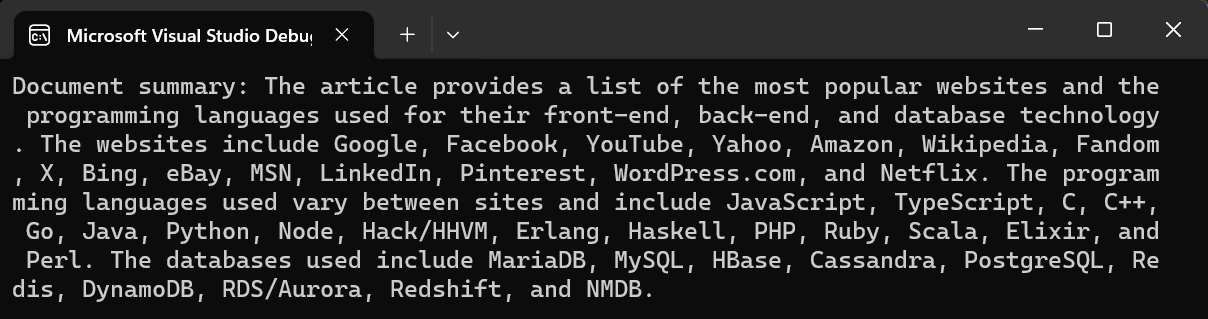
微软的安全 CoPilot 和 Iron Software 的 OpenAI 集成都代表其各自领域的重要进步。 当 CoPilot 增强网络安全措施时,Iron Software 的 OpenAI 集成革新了文档增强。 这两项创新为用户提供了强大的工具来保护数字资产并简化工作流程,这对于在当今数字环境中应对不断变化的威胁至关重要。


10 个 .NET API 产品用于您的办公文档

