


How to Scrape Data from Websites in C

IronWebScraper es una librería .NET para web scraping, extracción de datos web y análisis de contenido web. Es una biblioteca fácil de usar que se puede agregar a proyectos de Microsoft Visual Studio para su uso en desarrollo y producción.
IronWebScraper tiene muchas características y capacidades únicas como controlar las páginas permitidas y prohibidas, objetos, medios, etc. También permite la gestión de múltiples identidades, caché web y muchas otras características que cubriremos en este tutorial.
Comience con IronWebScraper
Comience a usar IronWebScraper en su proyecto hoy con una prueba gratuita.

Público objetivo
Este tutorial está dirigido a desarrolladores de software con habilidades de programación básicas o avanzadas, que deseen construir e implementar soluciones para capacidades avanzadas de scraping (scraping de sitios web, recopilación y extracción de datos de sitios web, análisis de contenidos de sitios web, recolección web).

Habilidades requeridas
- Fundamentos básicos de programación con habilidades en uno de los lenguajes de programación de Microsoft, como C# o VB.NET
- Comprensión básica de las tecnologías web (HTML, JavaScript, JQuery, CSS, etc.) y su funcionamiento
- Conocimiento básico de DOM, XPath, selectores HTML y CSS
Herramientas
- Microsoft Visual Studio 2010 o superior
- Extensiones para desarrolladores web para navegadores como inspector web para Chrome o Firebug para Firefox
¿Por qué raspar? (Reasons and Concepts)
Si desea construir un producto o solución que tenga las capacidades de:
- Extraer datos de sitios web
- Comparar contenidos, precios, características, etc. de múltiples sitios web
- Escanear y almacenar en caché contenido web
Si tienes una o más razones de las anteriores, entonces IronWebScraper es una gran biblioteca para cumplir con tus necesidades
¿Cómo instalar IronWebScraper?
Después de Create a New Project (Ver Apéndice A) puedes agregar la biblioteca IronWebScraper a tu proyecto insertando automáticamente la biblioteca usando NuGet o instalando manualmente el DLL.
Instalar usando NuGet
Para agregar la biblioteca IronWebScraper a nuestro proyecto usando NuGet, podemos hacerlo usando la interfaz visual (Administrador de paquetes NuGet) o mediante comando usando la Consola del Administrador de Paquetes.
Uso del Administrador de paquetes NuGet
- Usando el ratón -> clic derecho en el nombre del proyecto -> Seleccionar administrar paquete NuGet
- Desde la pestaña de exploración -> busca
IronWebScraper-> Instala - Hacer clic en Ok
- Y hemos terminado
Uso de la consola de paquetes NuGet
- Desde herramientas -> Administrador de Paquetes NuGet -> Consola del Administrador de Paquetes
- Elegir Proyecto de Biblioteca de Clases como Proyecto Predeterminado
- Ejecuta el comando ->
Install-Package IronWebScraper
Instalar manualmente
- Ir a https://ironsoftware.com
- Hacer clic en IronWebScraper o visitar su página directamente usando URL https://ironsoftware.com/csharp/webscraper/
- Hacer clic en Descargar DLL.
- Extraer el archivo comprimido descargado
-
En Visual Studio, clic derecho en el proyecto -> agregar -> referencia -> examinar
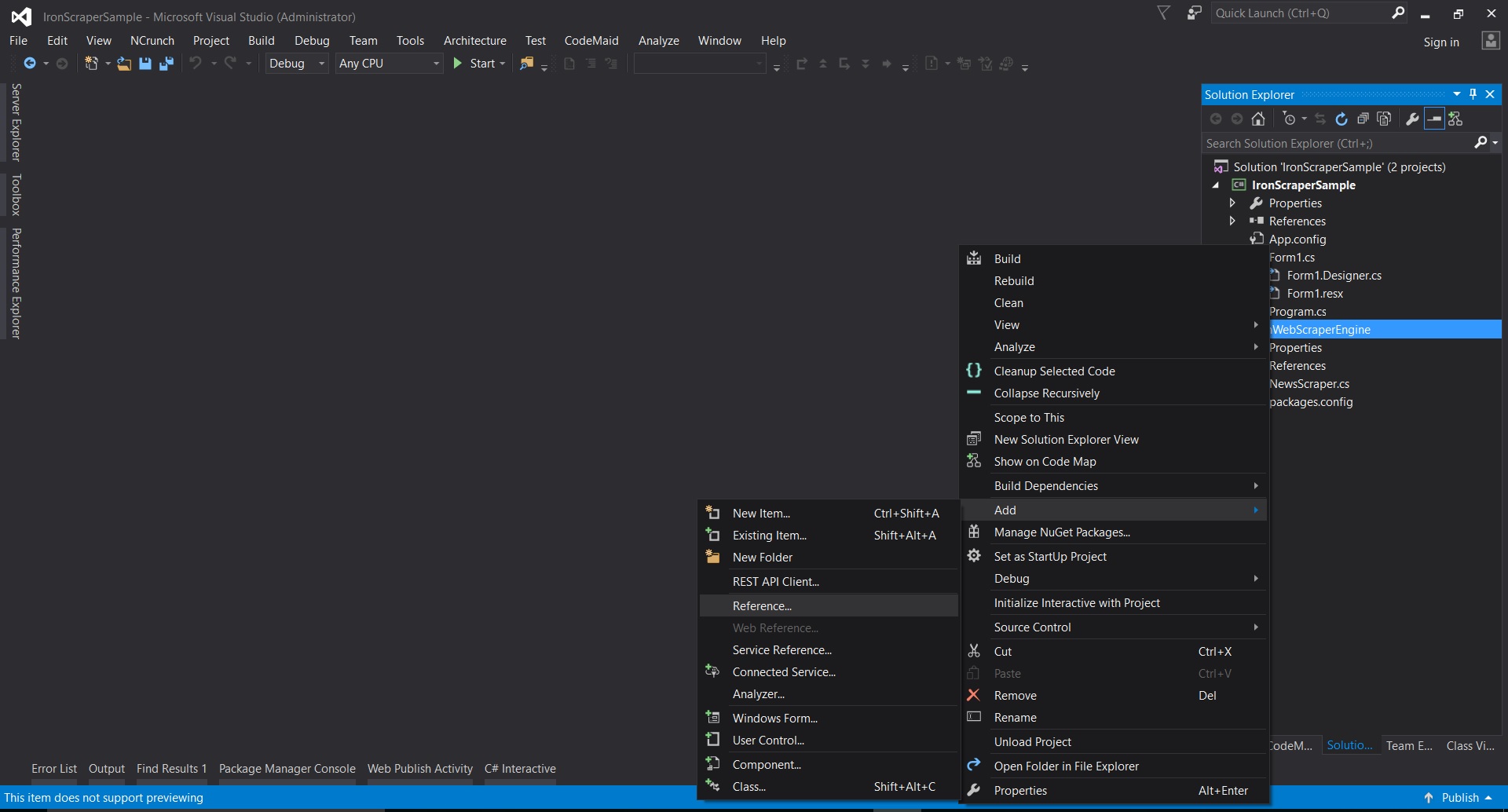
-
Ve a la carpeta extraída ->
netstandard2.0-> y selecciona todos los archivos.dll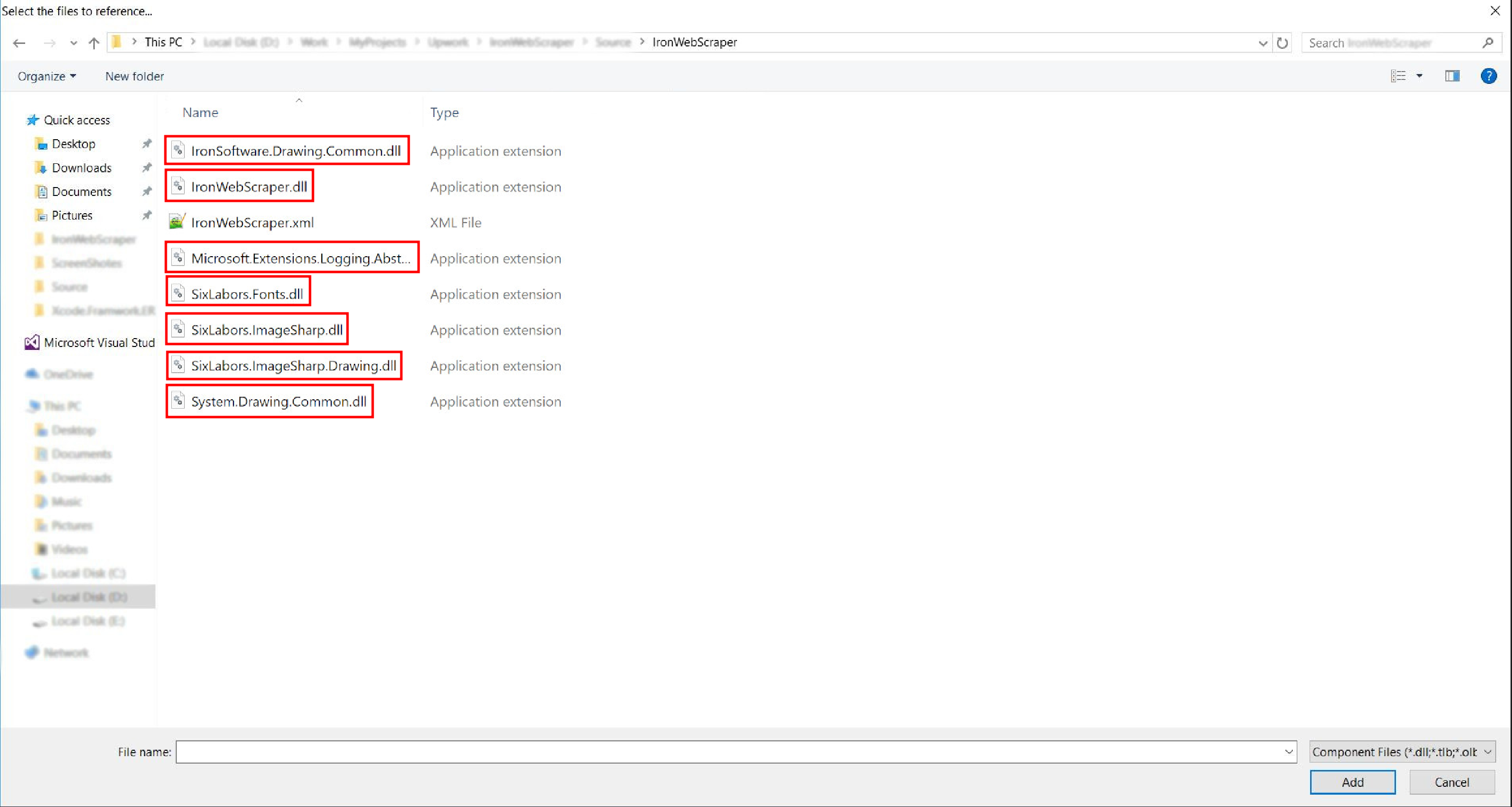
- ¡Y está hecho!
HelloScraper: Nuestra primera muestra de IronWebScraper
Como siempre, comenzaremos implementando la aplicación Hello Scraper para dar nuestro primer paso usando IronWebScraper.
- Hemos creado una nueva aplicación de consola con el nombre "IronWebScraperSample"
Pasos para crear una muestra de IronWebScraper
- Crear una carpeta y nombrarla "HelloScraperSample"
-
Luego añade una nueva clase y nómbrala
HelloScraper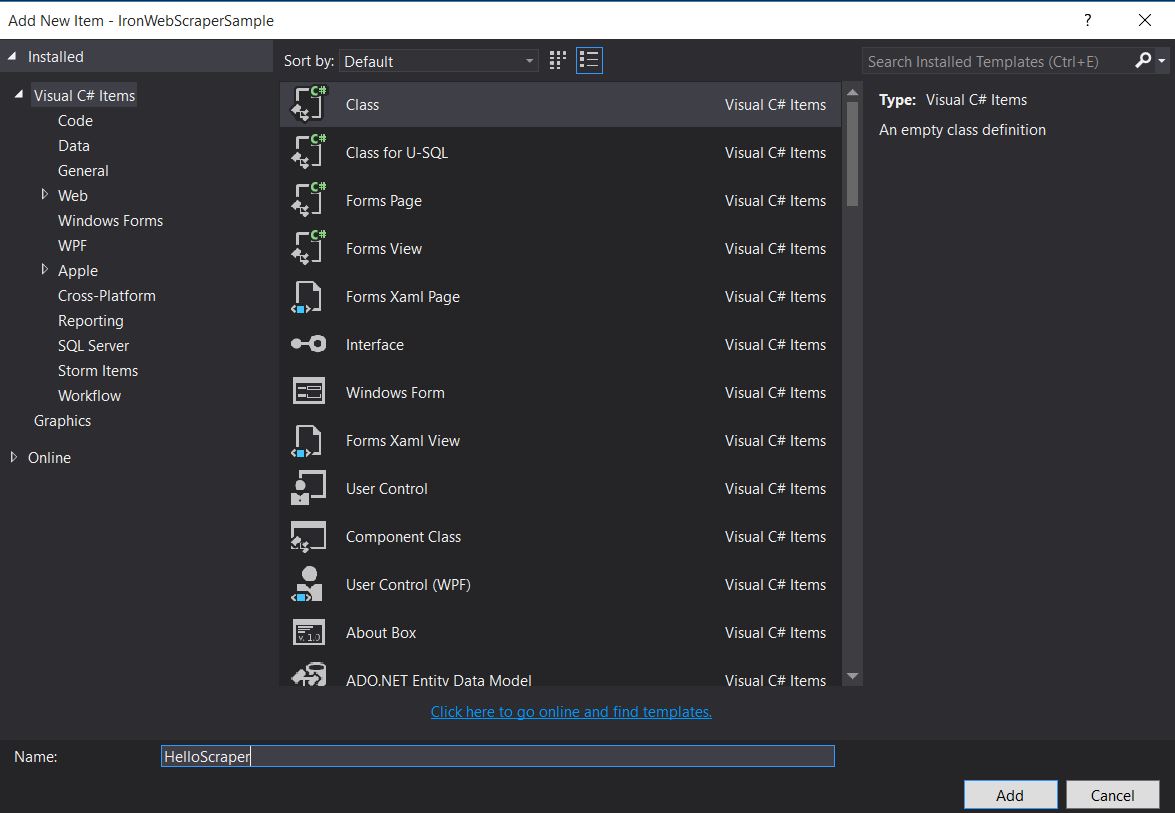
-
Agrega este fragmento de código a
HelloScraperpublic class HelloScraper : WebScraper { /// <summary> /// Override this method to initialize your web scraper. /// Important tasks will be to request at least one start URL and set allowed/banned domain or URL patterns. /// </summary> public override void Init() { License.LicenseKey = "LicenseKey"; // Write License Key this.LoggingLevel = WebScraper.LogLevel.All; // Log all events this.Request("https://blog.scrapinghub.com", Parse); // Initialize a web request to the given URL } /// <summary> /// Override this method to create the default Response handler for your web scraper. /// If you have multiple page types, you can add additional similar methods. /// </summary> /// <param name="response">The HTTP Response object to parse</param> public override void Parse(Response response) { // Set working directory for the project this.WorkingDirectory = AppSetting.GetAppRoot() + @"\HelloScraperSample\Output\"; // Loop on all links foreach (var titleLink in response.Css("h2.entry-title a")) { // Read link text string title = titleLink.TextContentClean; // Save result to file Scrape(new ScrapedData() { { "Title", title } }, "HelloScraper.json"); } // Loop on all links for pagination if (response.CssExists("div.prev-post > a[href]")) { // Get next page URL var nextPage = response.Css("div.prev-post > a[href]")[0].Attributes["href"]; // Scrape next URL this.Request(nextPage, Parse); } } }public class HelloScraper : WebScraper { /// <summary> /// Override this method to initialize your web scraper. /// Important tasks will be to request at least one start URL and set allowed/banned domain or URL patterns. /// </summary> public override void Init() { License.LicenseKey = "LicenseKey"; // Write License Key this.LoggingLevel = WebScraper.LogLevel.All; // Log all events this.Request("https://blog.scrapinghub.com", Parse); // Initialize a web request to the given URL } /// <summary> /// Override this method to create the default Response handler for your web scraper. /// If you have multiple page types, you can add additional similar methods. /// </summary> /// <param name="response">The HTTP Response object to parse</param> public override void Parse(Response response) { // Set working directory for the project this.WorkingDirectory = AppSetting.GetAppRoot() + @"\HelloScraperSample\Output\"; // Loop on all links foreach (var titleLink in response.Css("h2.entry-title a")) { // Read link text string title = titleLink.TextContentClean; // Save result to file Scrape(new ScrapedData() { { "Title", title } }, "HelloScraper.json"); } // Loop on all links for pagination if (response.CssExists("div.prev-post > a[href]")) { // Get next page URL var nextPage = response.Css("div.prev-post > a[href]")[0].Attributes["href"]; // Scrape next URL this.Request(nextPage, Parse); } } }Public Class HelloScraper Inherits WebScraper ''' <summary> ''' Override this method to initialize your web scraper. ''' Important tasks will be to request at least one start URL and set allowed/banned domain or URL patterns. ''' </summary> Public Overrides Sub Init() License.LicenseKey = "LicenseKey" ' Write License Key Me.LoggingLevel = WebScraper.LogLevel.All ' Log all events Me.Request("https://blog.scrapinghub.com", AddressOf Parse) ' Initialize a web request to the given URL End Sub ''' <summary> ''' Override this method to create the default Response handler for your web scraper. ''' If you have multiple page types, you can add additional similar methods. ''' </summary> ''' <param name="response">The HTTP Response object to parse</param> Public Overrides Sub Parse(ByVal response As Response) ' Set working directory for the project Me.WorkingDirectory = AppSetting.GetAppRoot() & "\HelloScraperSample\Output\" ' Loop on all links For Each titleLink In response.Css("h2.entry-title a") ' Read link text Dim title As String = titleLink.TextContentClean ' Save result to file Scrape(New ScrapedData() From { { "Title", title } }, "HelloScraper.json") Next titleLink ' Loop on all links for pagination If response.CssExists("div.prev-post > a[href]") Then ' Get next page URL Dim nextPage = response.Css("div.prev-post > a[href]")(0).Attributes("href") ' Scrape next URL Me.Request(nextPage, AddressOf Parse) End If End Sub End Class$vbLabelText $csharpLabel -
Ahora para iniciar el scraping, agrega este fragmento de código a
Mainstatic void Main(string[] args) { // Create Object From Hello Scrape class HelloScraperSample.HelloScraper scrape = new HelloScraperSample.HelloScraper(); // Start Scraping scrape.Start(); }static void Main(string[] args) { // Create Object From Hello Scrape class HelloScraperSample.HelloScraper scrape = new HelloScraperSample.HelloScraper(); // Start Scraping scrape.Start(); }Shared Sub Main(ByVal args() As String) ' Create Object From Hello Scrape class Dim scrape As New HelloScraperSample.HelloScraper() ' Start Scraping scrape.Start() End Sub$vbLabelText $csharpLabel - El resultado se guardará en un archivo con el formato
WebScraper.WorkingDirectory/classname.Json
Descripción general del código
Scrape.Start() activa la lógica de scraping de la siguiente manera:
- Llama al método
Init()para iniciar variables, propiedades de scraping y atributos de comportamiento. - Configura la solicitud de la página de inicio en
Init()conRequest("https://blog.scrapinghub.com", Parse). - Maneja múltiples solicitudes HTTP e hilos en paralelo, manteniendo el código sincrónico y más fácil de depurar.
- El método
Parse()se activa después deInit()para manejar la respuesta, extrayendo datos usando selectores CSS y guardándolos en formato JSON.
Funciones y opciones de la biblioteca IronWebScraper
La documentación actualizada se puede encontrar dentro del archivo zip descargado con el método de instalación manual (IronWebScraper Documentation.chm File), o puedes consultar la documentación en línea para la última actualización de la biblioteca en https://ironsoftware.com/csharp/webscraper/object-reference/.
Para comenzar a usar IronWebScraper en tu proyecto debes heredar de la clase IronWebScraper.WebScraper, que extiende tu biblioteca de clases y agrega funcionalidad de scraping a ella. Además, debes implementar los métodos Init() y Parse(Response response).
namespace IronWebScraperEngine
{
    public class NewsScraper : IronWebScraper.WebScraper
    {
        public override void Init()
        {
            throw new NotImplementedException();
        }

        public override void Parse(Response response)
        {
            throw new NotImplementedException();
        }
    }
}
namespace IronWebScraperEngine
{
public class NewsScraper : IronWebScraper.WebScraper
{
public override void Init()
{
throw new NotImplementedException();
}
public override void Parse(Response response)
{
throw new NotImplementedException();
}
}
}Namespace IronWebScraperEngine
Public Class NewsScraper
Inherits IronWebScraper.WebScraper
Public Overrides Sub Init()
Throw New NotImplementedException()
End Sub
Public Overrides Sub Parse(ByVal response As Response)
Throw New NotImplementedException()
End Sub
End Class
End Namespace| Propiedades \ funciones | Tipo | Descripción |
|---|---|---|
Init () |
Método | Utilizado para configurar el scraper |
Parse (Response response) |
Método | Usado para implementar la lógica que usará el scraper y cómo la procesará. Puede implementar múltiples métodos para diferentes comportamientos o estructuras de página. |
BannedUrls, AllowedUrls, BannedDomains |
Colecciones | Usado para prohibir/permitir URLs y/o dominios. Ej: BannedUrls.Add("*.zip", "*.exe", "*.gz", "*.pdf"); Soporta comodines y expresiones regulares. |
ObeyRobotsDotTxt |
Booleano | Se utiliza para habilitar o deshabilitar la lectura y seguimiento de las directivas en robots.txt. |
ObeyRobotsDotTxtForHost (string Host) |
Método | Se utiliza para habilitar o deshabilitar la lectura y seguimiento de las directivas en robots.txt para un dominio determinado. |
Scrape, ScrapeUnique |
Método | |
ThrottleMode |
Enumeración | Opciones Enum: ByIpAddress, ByDomainHostName. Permite la limitación inteligente de solicitudes, respetuosa de direcciones IP de host o nombres de dominio. |
EnableWebCache, EnableWebCache (TimeSpan cacheDuration) |
Método | Permite el almacenamiento en caché para solicitudes web. |
MaxHttpConnectionLimit |
Int | Establece el número total de solicitudes HTTP abiertas permitidas (hilos). |
RateLimitPerHost |
TimeSpan | Establece el mínimo retraso (pausa) cortés entre solicitudes a un determinado dominio o dirección IP. |
OpenConnectionLimitPerHost |
Int | Establece el número permitido de solicitudes HTTP concurrentes (hilos) por nombre de host o dirección IP. |
WorkingDirectory |
string | Establece una ruta de directorio de trabajo para almacenar datos. |
Ejemplos y prácticas del mundo real
Rastreando un sitio web de películas en línea
Construyamos un ejemplo en el que scrapeemos un sitio web de películas.
Agrega una nueva clase y nómbrala MovieScraper:
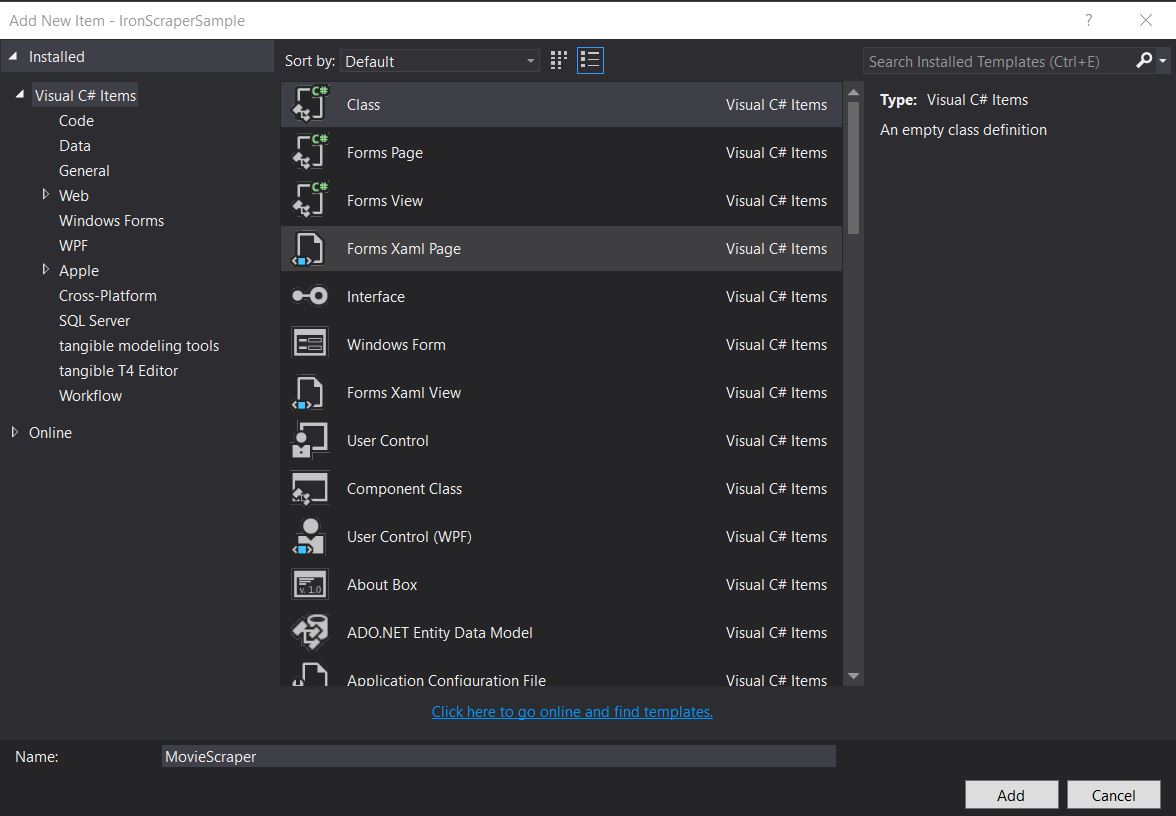
Estructura HTML
Esta es una parte del HTML de la página de inicio que vemos en el sitio web:
<div id="movie-featured" class="movies-list movies-list-full tab-pane in fade active">
    <div data-movie-id="20746" class="ml-item">
        <a href="https://website.com/film/king-arthur-legend-of-the-sword-20746/">
            <span class="mli-quality">CAM</span>
            <img data-original="https://img.gocdn.online/2017/05/16/poster/2116d6719c710eabe83b377463230fbe-king-arthur-legend-of-the-sword.jpg"
                 class="lazy thumb mli-thumb" alt="King Arthur: Legend of the Sword"
                  src="https://img.gocdn.online/2017/05/16/poster/2116d6719c710eabe83b377463230fbe-king-arthur-legend-of-the-sword.jpg"
                 style="display: inline-block;">
            <span class="mli-info"><h2>King Arthur: Legend of the Sword</h2></span>
        </a>
    </div>
    <div data-movie-id="20724" class="ml-item">
        <a href="https://website.com/film/snatched-20724/" >
            <span class="mli-quality">CAM</span>
            <img data-original="https://img.gocdn.online/2017/05/16/poster/5ef66403dc331009bdb5aa37cfe819ba-snatched.jpg"
                 class="lazy thumb mli-thumb" alt="Snatched"
                 src="https://img.gocdn.online/2017/05/16/poster/5ef66403dc331009bdb5aa37cfe819ba-snatched.jpg"
                 style="display: inline-block;">
            <span class="mli-info"><h2>Snatched</h2></span>
        </a>
    </div>
</div>
<div id="movie-featured" class="movies-list movies-list-full tab-pane in fade active">
<div data-movie-id="20746" class="ml-item">
<a href="https://website.com/film/king-arthur-legend-of-the-sword-20746/">
<span class="mli-quality">CAM</span>
<img data-original="https://img.gocdn.online/2017/05/16/poster/2116d6719c710eabe83b377463230fbe-king-arthur-legend-of-the-sword.jpg"
class="lazy thumb mli-thumb" alt="King Arthur: Legend of the Sword"
src="https://img.gocdn.online/2017/05/16/poster/2116d6719c710eabe83b377463230fbe-king-arthur-legend-of-the-sword.jpg"
style="display: inline-block;">
<span class="mli-info"><h2>King Arthur: Legend of the Sword</h2></span>
</a>
</div>
<div data-movie-id="20724" class="ml-item">
<a href="https://website.com/film/snatched-20724/" >
<span class="mli-quality">CAM</span>
<img data-original="https://img.gocdn.online/2017/05/16/poster/5ef66403dc331009bdb5aa37cfe819ba-snatched.jpg"
class="lazy thumb mli-thumb" alt="Snatched"
src="https://img.gocdn.online/2017/05/16/poster/5ef66403dc331009bdb5aa37cfe819ba-snatched.jpg"
style="display: inline-block;">
<span class="mli-info"><h2>Snatched</h2></span>
</a>
</div>
</div>Como podemos ver, tenemos un ID de película, título y enlace a una página detallada. Empecemos a recopilar estos datos:
public class MovieScraper : WebScraper
{
    public override void Init()
    {
        License.LicenseKey = "LicenseKey";
        this.LoggingLevel = WebScraper.LogLevel.All;
        this.WorkingDirectory = AppSetting.GetAppRoot() + @"\MovieSample\Output\";
        this.Request("www.website.com", Parse);
    }

    public override void Parse(Response response)
    {
        foreach (var div in response.Css("#movie-featured > div"))
        {
            if (div.GetAttribute("class") != "clearfix")
            {
                var movieId = div.GetAttribute("data-movie-id");
                var link = div.Css("a")[0];
                var movieTitle = link.TextContentClean;
                Scrape(new ScrapedData() { { "MovieId", movieId }, { "MovieTitle", movieTitle } }, "Movie.Jsonl");
            }
        }
    }
}
public class MovieScraper : WebScraper
{
public override void Init()
{
License.LicenseKey = "LicenseKey";
this.LoggingLevel = WebScraper.LogLevel.All;
this.WorkingDirectory = AppSetting.GetAppRoot() + @"\MovieSample\Output\";
this.Request("www.website.com", Parse);
}
public override void Parse(Response response)
{
foreach (var div in response.Css("#movie-featured > div"))
{
if (div.GetAttribute("class") != "clearfix")
{
var movieId = div.GetAttribute("data-movie-id");
var link = div.Css("a")[0];
var movieTitle = link.TextContentClean;
Scrape(new ScrapedData() { { "MovieId", movieId }, { "MovieTitle", movieTitle } }, "Movie.Jsonl");
}
}
}
}Public Class MovieScraper
Inherits WebScraper
Public Overrides Sub Init()
License.LicenseKey = "LicenseKey"
Me.LoggingLevel = WebScraper.LogLevel.All
Me.WorkingDirectory = AppSetting.GetAppRoot() & "\MovieSample\Output\"
Me.Request("www.website.com", AddressOf Parse)
End Sub
Public Overrides Sub Parse(ByVal response As Response)
For Each div In response.Css("#movie-featured > div")
If div.GetAttribute("class") <> "clearfix" Then
Dim movieId = div.GetAttribute("data-movie-id")
Dim link = div.Css("a")(0)
Dim movieTitle = link.TextContentClean
Scrape(New ScrapedData() From {
{ "MovieId", movieId },
{ "MovieTitle", movieTitle }
},
"Movie.Jsonl")
End If
Next div
End Sub
End ClassClase de cine estructurada
Para mantener nuestros datos formateados, implementemos una clase de película:
public class Movie
{
    public int Id { get; set; }
    public string Title { get; set; }
    public string URL { get; set; }
}
public class Movie
{
public int Id { get; set; }
public string Title { get; set; }
public string URL { get; set; }
}Public Class Movie
Public Property Id As Integer
Public Property Title As String
Public Property URL As String
End ClassAhora actualiza nuestro código para usar la clase Movie:
public class MovieScraper : WebScraper
{
    public override void Init()
    {
        License.LicenseKey = "LicenseKey";
        this.LoggingLevel = WebScraper.LogLevel.All;
        this.WorkingDirectory = AppSetting.GetAppRoot() + @"\MovieSample\Output\";
        this.Request("https://website.com/", Parse);
    }

    public override void Parse(Response response)
    {
        foreach (var div in response.Css("#movie-featured > div"))
        {
            if (div.GetAttribute("class") != "clearfix")
            {
                var movie = new Movie
                {
                    Id = Convert.ToInt32(div.GetAttribute("data-movie-id")),
                    Title = div.Css("a")[0].TextContentClean,
                    URL = div.Css("a")[0].Attributes["href"]
                };
                Scrape(movie, "Movie.Jsonl");
            }
        }
    }
}
public class MovieScraper : WebScraper
{
public override void Init()
{
License.LicenseKey = "LicenseKey";
this.LoggingLevel = WebScraper.LogLevel.All;
this.WorkingDirectory = AppSetting.GetAppRoot() + @"\MovieSample\Output\";
this.Request("https://website.com/", Parse);
}
public override void Parse(Response response)
{
foreach (var div in response.Css("#movie-featured > div"))
{
if (div.GetAttribute("class") != "clearfix")
{
var movie = new Movie
{
Id = Convert.ToInt32(div.GetAttribute("data-movie-id")),
Title = div.Css("a")[0].TextContentClean,
URL = div.Css("a")[0].Attributes["href"]
};
Scrape(movie, "Movie.Jsonl");
}
}
}
}Public Class MovieScraper
Inherits WebScraper
Public Overrides Sub Init()
License.LicenseKey = "LicenseKey"
Me.LoggingLevel = WebScraper.LogLevel.All
Me.WorkingDirectory = AppSetting.GetAppRoot() & "\MovieSample\Output\"
Me.Request("https://website.com/", AddressOf Parse)
End Sub
Public Overrides Sub Parse(ByVal response As Response)
For Each div In response.Css("#movie-featured > div")
If div.GetAttribute("class") <> "clearfix" Then
Dim movie As New Movie With {
.Id = Convert.ToInt32(div.GetAttribute("data-movie-id")),
.Title = div.Css("a")(0).TextContentClean,
.URL = div.Css("a")(0).Attributes("href")
}
Scrape(movie, "Movie.Jsonl")
End If
Next div
End Sub
End ClassExtracción detallada de páginas
Extendamos nuestra clase Movie para tener nuevas propiedades para la información detallada:
public class Movie
{
    public int Id { get; set; }
    public string Title { get; set; }
    public string URL { get; set; }
    public string Description { get; set; }
    public List<string> Genre { get; set; }
    public List<string> Actor { get; set; }
}
public class Movie
{
public int Id { get; set; }
public string Title { get; set; }
public string URL { get; set; }
public string Description { get; set; }
public List<string> Genre { get; set; }
public List<string> Actor { get; set; }
}Public Class Movie
Public Property Id As Integer
Public Property Title As String
Public Property URL As String
Public Property Description As String
Public Property Genre As List(Of String)
Public Property Actor As List(Of String)
End ClassLuego navegue a la página detallada para extraerlo, utilizando las capacidades extendidas de IronWebScraper:
public class MovieScraper : WebScraper
{
    public override void Init()
    {
        License.LicenseKey = "LicenseKey";
        this.LoggingLevel = WebScraper.LogLevel.All;
        this.WorkingDirectory = AppSetting.GetAppRoot() + @"\MovieSample\Output\";
        this.Request("https://domain/", Parse);
    }

    public override void Parse(Response response)
    {
        foreach (var div in response.Css("#movie-featured > div"))
        {
            if (div.GetAttribute("class") != "clearfix")
            {
                var movie = new Movie
                {
                    Id = Convert.ToInt32(div.GetAttribute("data-movie-id")),
                    Title = div.Css("a")[0].TextContentClean,
                    URL = div.Css("a")[0].Attributes["href"]
                };
                this.Request(movie.URL, ParseDetails, new MetaData() { { "movie", movie } });
            }
        }
    }

    public void ParseDetails(Response response)
    {
        var movie = response.MetaData.Get<Movie>("movie");
        var div = response.Css("div.mvic-desc")[0];
        movie.Description = div.Css("div.desc")[0].TextContentClean;
        movie.Genre = div.Css("div > p > a").Select(element => element.TextContentClean).ToList();
        movie.Actor = div.Css("div > p:nth-child(2) > a").Select(element => element.TextContentClean).ToList();

        Scrape(movie, "Movie.Jsonl");
    }
}
public class MovieScraper : WebScraper
{
public override void Init()
{
License.LicenseKey = "LicenseKey";
this.LoggingLevel = WebScraper.LogLevel.All;
this.WorkingDirectory = AppSetting.GetAppRoot() + @"\MovieSample\Output\";
this.Request("https://domain/", Parse);
}
public override void Parse(Response response)
{
foreach (var div in response.Css("#movie-featured > div"))
{
if (div.GetAttribute("class") != "clearfix")
{
var movie = new Movie
{
Id = Convert.ToInt32(div.GetAttribute("data-movie-id")),
Title = div.Css("a")[0].TextContentClean,
URL = div.Css("a")[0].Attributes["href"]
};
this.Request(movie.URL, ParseDetails, new MetaData() { { "movie", movie } });
}
}
}
public void ParseDetails(Response response)
{
var movie = response.MetaData.Get<Movie>("movie");
var div = response.Css("div.mvic-desc")[0];
movie.Description = div.Css("div.desc")[0].TextContentClean;
movie.Genre = div.Css("div > p > a").Select(element => element.TextContentClean).ToList();
movie.Actor = div.Css("div > p:nth-child(2) > a").Select(element => element.TextContentClean).ToList();
Scrape(movie, "Movie.Jsonl");
}
}Public Class MovieScraper
Inherits WebScraper
Public Overrides Sub Init()
License.LicenseKey = "LicenseKey"
Me.LoggingLevel = WebScraper.LogLevel.All
Me.WorkingDirectory = AppSetting.GetAppRoot() & "\MovieSample\Output\"
Me.Request("https://domain/", AddressOf Parse)
End Sub
Public Overrides Sub Parse(ByVal response As Response)
For Each div In response.Css("#movie-featured > div")
If div.GetAttribute("class") <> "clearfix" Then
Dim movie As New Movie With {
.Id = Convert.ToInt32(div.GetAttribute("data-movie-id")),
.Title = div.Css("a")(0).TextContentClean,
.URL = div.Css("a")(0).Attributes("href")
}
Me.Request(movie.URL, AddressOf ParseDetails, New MetaData() From {
{ "movie", movie }
})
End If
Next div
End Sub
Public Sub ParseDetails(ByVal response As Response)
Dim movie = response.MetaData.Get(Of Movie)("movie")
Dim div = response.Css("div.mvic-desc")(0)
movie.Description = div.Css("div.desc")(0).TextContentClean
movie.Genre = div.Css("div > p > a").Select(Function(element) element.TextContentClean).ToList()
movie.Actor = div.Css("div > p:nth-child(2) > a").Select(Function(element) element.TextContentClean).ToList()
Scrape(movie, "Movie.Jsonl")
End Sub
End ClassCaracterísticas de la biblioteca IronWebScraper
Función HttpIdentity
Algunos sistemas requieren que el usuario inicie sesión para ver el contenido; usa HttpIdentity para credenciales:
HttpIdentity id = new HttpIdentity
{
    NetworkUsername = "username",
    NetworkPassword = "pwd"
};
Identities.Add(id);
HttpIdentity id = new HttpIdentity
{
NetworkUsername = "username",
NetworkPassword = "pwd"
};
Identities.Add(id);Dim id As New HttpIdentity With {
.NetworkUsername = "username",
.NetworkPassword = "pwd"
}
Identities.Add(id)Habilitar caché web
Almacenar páginas en caché para reutilizar durante el desarrollo:
public override void Init()
{
    License.LicenseKey = "LicenseKey";
    this.LoggingLevel = WebScraper.LogLevel.All;
    this.WorkingDirectory = AppSetting.GetAppRoot() + @"\ShoppingSiteSample\Output\";
    EnableWebCache();
    this.Request("http://www.WebSite.com", Parse);
}
public override void Init()
{
License.LicenseKey = "LicenseKey";
this.LoggingLevel = WebScraper.LogLevel.All;
this.WorkingDirectory = AppSetting.GetAppRoot() + @"\ShoppingSiteSample\Output\";
EnableWebCache();
this.Request("http://www.WebSite.com", Parse);
}Public Overrides Sub Init()
License.LicenseKey = "LicenseKey"
Me.LoggingLevel = WebScraper.LogLevel.All
Me.WorkingDirectory = AppSetting.GetAppRoot() & "\ShoppingSiteSample\Output\"
EnableWebCache()
Me.Request("http://www.WebSite.com", Parse)
End SubEstrangulamiento
Controlar el número de conexiones y la velocidad:
public override void Init()
{
    License.LicenseKey = "LicenseKey";
    this.LoggingLevel = WebScraper.LogLevel.All;
    this.WorkingDirectory = AppSetting.GetAppRoot() + @"\ShoppingSiteSample\Output\";
    this.MaxHttpConnectionLimit = 80;
    this.RateLimitPerHost = TimeSpan.FromMilliseconds(50);
    this.OpenConnectionLimitPerHost = 25;
    this.ObeyRobotsDotTxt = false;
    this.ThrottleMode = Throttle.ByDomainHostName;
    this.Request("https://www.Website.com", Parse);
}
public override void Init()
{
License.LicenseKey = "LicenseKey";
this.LoggingLevel = WebScraper.LogLevel.All;
this.WorkingDirectory = AppSetting.GetAppRoot() + @"\ShoppingSiteSample\Output\";
this.MaxHttpConnectionLimit = 80;
this.RateLimitPerHost = TimeSpan.FromMilliseconds(50);
this.OpenConnectionLimitPerHost = 25;
this.ObeyRobotsDotTxt = false;
this.ThrottleMode = Throttle.ByDomainHostName;
this.Request("https://www.Website.com", Parse);
}Public Overrides Sub Init()
License.LicenseKey = "LicenseKey"
Me.LoggingLevel = WebScraper.LogLevel.All
Me.WorkingDirectory = AppSetting.GetAppRoot() & "\ShoppingSiteSample\Output\"
Me.MaxHttpConnectionLimit = 80
Me.RateLimitPerHost = TimeSpan.FromMilliseconds(50)
Me.OpenConnectionLimitPerHost = 25
Me.ObeyRobotsDotTxt = False
Me.ThrottleMode = Throttle.ByDomainHostName
Me.Request("https://www.Website.com", Parse)
End SubPropiedades de estrangulamiento
MaxHttpConnectionLimit
número total de solicitudes HTTP permitidas abiertas (hilos)RateLimitPerHost
retardo mínimo educado (pausa) entre las solicitudes a un dominio o dirección IP dadaOpenConnectionLimitPerHost
número permitido de solicitudes HTTP concurrentes (hilos) por nombre de host o dirección IPThrottleMode
Hace que el WebScraper limite inteligentemente las solicitudes no solo por nombre de host, sino también por direcciones IP de los servidores host. Esto es cortés en caso de que múltiples dominios extraídos estén alojados en la misma máquina.
Apéndice
¿Cómo crear una aplicación de Windows Form?
Use Visual Studio 2013 o superior.
- Abre Visual Studio.
-
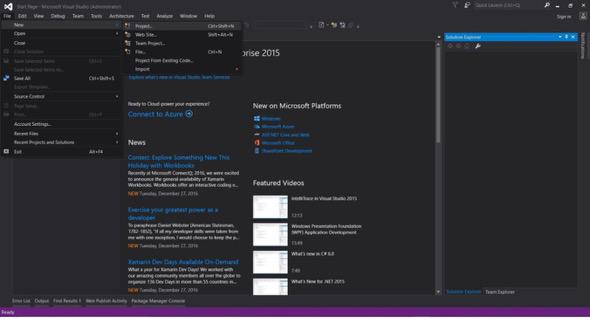
Archivo -> Nuevo -> Proyecto
- Elija Visual C# o VB -> Windows -> Aplicación de formularios de Windows.
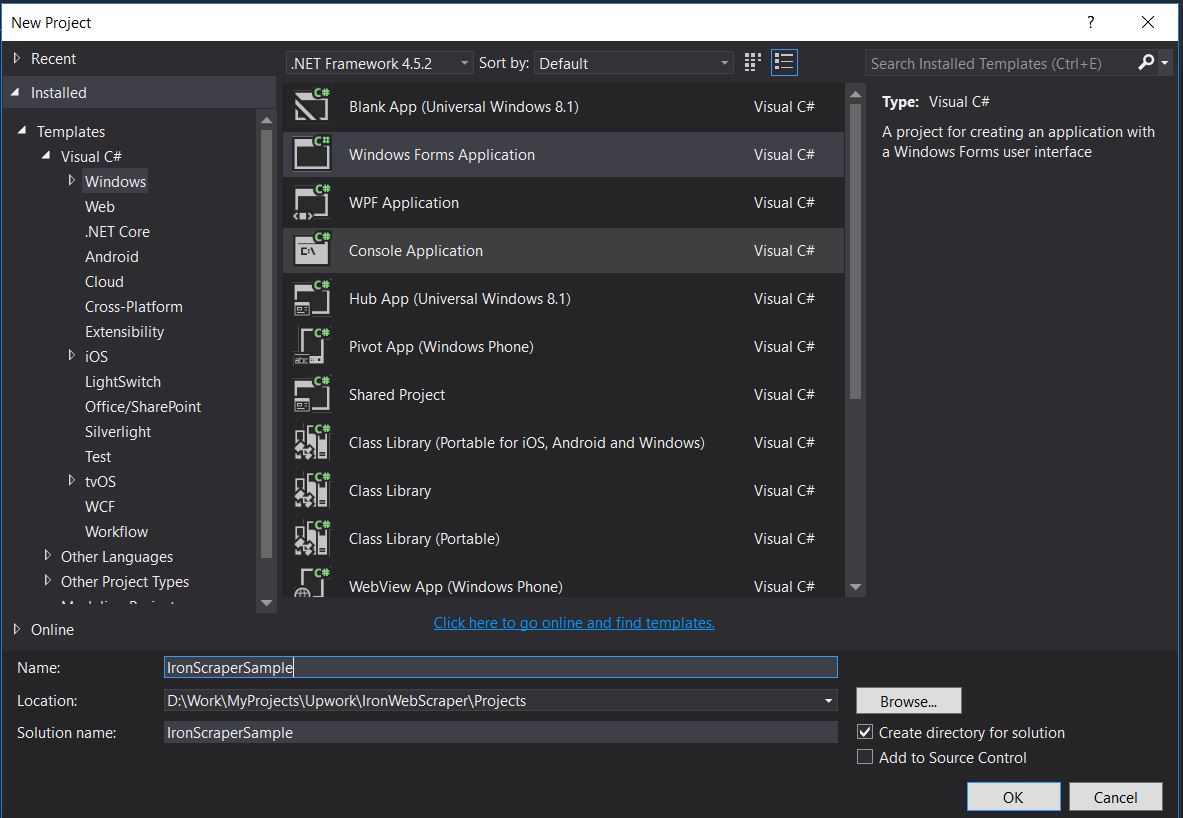
Nombre del Proyecto: IronScraperSample
Ubicación: Seleccione una ubicación en su disco.
¿Cómo crear una aplicación de formulario web ASP.NET?
-
Abre Visual Studio.
-
Archivo -> Nuevo -> Proyecto
- Elija Visual C# o VB -> Web -> Aplicación web ASP.NET (.NET Framework).
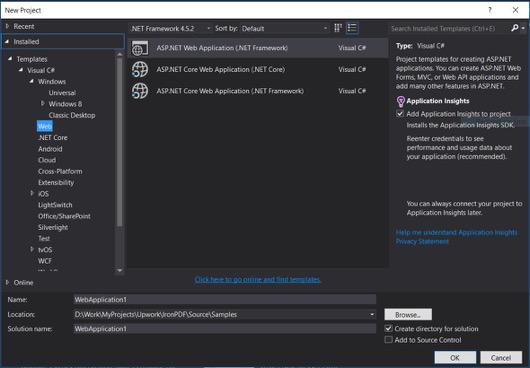
Nombre del Proyecto: IronScraperSample
Ubicación: Seleccione una ubicación en su disco.
-
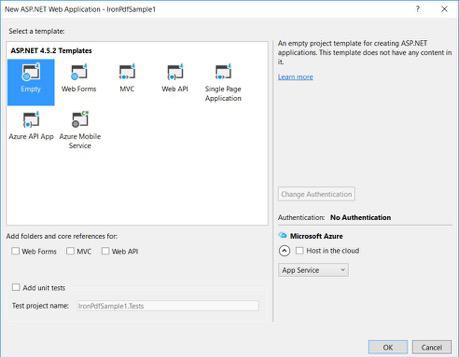
Desde sus plantillas ASP.NET, seleccione una plantilla vacía y marque Formularios Web.
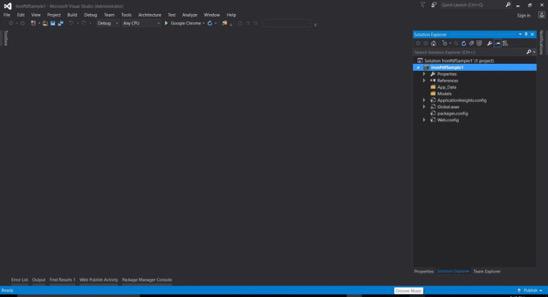
- Su proyecto básico de Formulario Web ASP.NET está creado.
Descargar el proyecto de código de muestra de tutorial completo aquí.
Preguntas Frecuentes
¿Cómo extraer datos de sitios web en C#?
Puedes usar IronWebScraper para extraer datos de sitios web en C#. Comienza instalando la librería a través de NuGet y establece una aplicación de consola básica para comenzar a extraer datos web eficientemente.
¿Cuáles son los requisitos para el web scraping en C#?
Para realizar web scraping en C#, debes tener habilidades básicas de programación en C# o VB.NET, y entender tecnologías web como HTML, JavaScript y CSS, junto con familiaridad con DOM, XPath y selectores CSS.
¿Cómo puedo instalar una librería de web scraping en un proyecto .NET?
Para instalar IronWebScraper en un proyecto .NET, usa la consola del administrador de paquetes NuGet con el comando Install-Package IronWebScraper o navega a través de la interfaz del Administrador de Paquetes NuGet en Visual Studio.
¿Cómo puedo implementar la limitación de solicitudes en mi web scraper?
IronWebScraper te permite implementar la limitación de solicitudes para gestionar la frecuencia de las solicitudes realizadas a un servidor. Esto se puede configurar usando configuraciones como MaxHttpConnectionLimit, RateLimitPerHost y OpenConnectionLimitPerHost.
¿Cuál es el propósito de habilitar la caché web en el web scraping?
Habilitar la caché web en el web scraping ayuda a reducir el número de solicitudes enviadas a un servidor almacenando y reutilizando respuestas anteriores. Esto se puede configurar en IronWebScraper usando el método EnableWebCache.
¿Cómo se puede manejar la autenticación en el web scraping?
Con IronWebScraper, puedes usar HttpIdentity para gestionar la autenticación, permitiendo el acceso a contenido detrás de formularios de inicio de sesión o áreas restringidas, lo que habilita el scraping de recursos protegidos.
¿Cuál es un ejemplo simple de un web scraper en C#?
El 'HelloScraper' es un ejemplo simple proporcionado en el tutorial. Demuestra cómo configurar un web scraper básico usando IronWebScraper, incluyendo cómo iniciar solicitudes y analizar respuestas.
¿Cómo puedo extender mi web scraper para manejar estructuras de páginas complejas?
Usando IronWebScraper, puedes extender tu scraper para manejar estructuras de páginas complejas personalizando los métodos Parse para procesar diferentes tipos de páginas, permitiendo estrategias flexibles de extracción de datos.
¿Cuáles son los beneficios de usar una librería de web scraping?
Usar una librería de web scraping como IronWebScraper ofrece beneficios como extracción de datos simplificada, gestión de dominios, limitación de solicitudes, almacenamiento en caché y soporte para autenticación, lo que permite un manejo eficiente de tareas de web scraping.


¿Aún desplazándote?
¿Quieres una prueba rápida? PM > Install-Package IronWebScraper
ejecuta una muestra observa cómo tu sitio de destino se convierte en datos estructurados.






 Comience gratis
 Comience gratis
 Reserve demostración en vivo gratis
















