Iron Suite for .NET
10 .NETライブラリ。1つの完全なドキュメントスイート。



Microsoft Build Conference 2023 セッション要約: AI Copilotの時代

Microsoftの最新の革新であるCopilot for Securityは、2024年4月1日に世界的にリリースされる予定で、世界中のサイバーセキュリティ慣行を変革するとされています。 生成AIを活用することで、CopilotはセキュリティとITの専門家に比類のない洞察とガイダンスを提供し、セキュリティリスクを効果的に検出し軽減する能力を向上させます。 Microsoftが毎日処理する78兆以上のセキュリティシグナルを含む広範なデータと脅威インテリジェンスに支えられたCopilotは、ユーザーに対してカスタマイズされた推奨を提供し、応答時間を加速し、専門知識を強化します。
Microsoftが行った最近の研究により、Copilotの変革的な効果が実証され、経験豊富なセキュリティアナリストは効率の22%の向上と、様々なタスクでの精度の7%の改善を報告しました。 提供された従量課金ライセンスモデルの導入により、あらゆる規模の組織がCopilotを利用できるようになり、アクセスが民主化されました。 "サイバーセキュリティソリューションに深く関与する開発者として、MicrosoftのCopilot for Securityの可能性に興奮しています。 その能力を探求し、我々のソリューションに組み込んでさらなる保護を実現することに意欲を燃やしています" - Iron Softwareのリードソフトウェアエンジニア、ジャスティン・ピアース。
一方、Iron Softwareは、OpenAIを使用してPDF文書を強化できる革新的な機能を、IronPdf.Extensions.AI NuGetパッケージに導入しました。 Microsoft Semantic Kernelによって動力されるこの統合により、ユーザーはPDFの内容を簡潔な要約として生成し、より深い分析のための継続的なクエリを実行することができます。 ユーザーは、簡単なステップに従うことで、OpenAIをシームレスに活用し、PDF処理タスクを強化できます。これにより、文書操作にAIを利用する上での重要な飛躍が表れています。
"IronPdf.Extensions.AI NuGetパッケージは現在OpenAIを統合し、その強力な文書強化ツールとともにPDF処理に新しい時代を告げています。 簡潔な要約や継続的なクエリ機能といった特徴により、ユーザーはワークフローを効率化し、生産性をこれまでにないほど向上させることができます。" - Iron Softwareのシニアソフトウェアエンジニア、ジャスティン・ピアース。 NuGetでインストールする
IronPDF AIはあなたに何ができるのか? ここに概要を示します
- 要約: 長いPDF文書を素早く簡潔な要約として生成できます。 この機能は、大量の情報を効率的に処理する必要のある専門家にとって非常に有用です。
- クエリと記憶: IronPDF AIは洗練されたアルゴリズムを使用して、ユーザーがPDF文書の内容をより良く理解し記憶するのを助けます。 クエリ機能により、PDF文書をリアルタイムで対話的に探索し、分析することができます。特定の質問をすることや関連データを抽出し、文書の内容についてより深い洞察を得ることができます。
PDF要約の例
PDFドキュメントをインポートし、PDFドキュメントの要約を生成するためにSummarizeメソッドを利用してください。 サンプルPDFファイルはこちらからダウンロードできます。 以下にコードサンプルを示します:
using IronPdf;
using IronPdf.AI;
using Microsoft.SemanticKernel;
using Microsoft.SemanticKernel.Memory;
using System;
using System.Threading.Tasks;

// Configure the Azure endpoint and API key for OpenAI services
string azureEndpoint = "AzureEndPoint";
string apiKey = "APIKEY";

// Initialize a volatile memory store
var volatileMemoryStore = new VolatileMemoryStore();

// Build and configure the Semantic Kernel with Azure OpenAI services
var builder = new KernelBuilder()
    .WithAzureTextEmbeddingGenerationService("oaiembed", azureEndpoint, apiKey)
    .WithAzureChatCompletionService("oaichat", azureEndpoint, apiKey)
    .WithMemoryStorage(volatileMemoryStore);
var kernel = builder.Build();

// Initialize the IronAI with the configured kernel
IronAI.Initialize(kernel);

// Import the PDF document
PdfDocument pdf = PdfDocument.FromFile("wikipedia.pdf");

// Summarize the document asynchronously
string summary = await pdf.Summarize(); // Optionally pass AI instance or use AI instance directly

// Output the document's summary to the console
Console.WriteLine($"Document summary: {summary}");Imports IronPdf
Imports IronPdf.AI
Imports Microsoft.SemanticKernel
Imports Microsoft.SemanticKernel.Memory
Imports System
Imports System.Threading.Tasks
' Configure the Azure endpoint and API key for OpenAI services
Private azureEndpoint As String = "AzureEndPoint"
Private apiKey As String = "APIKEY"
' Initialize a volatile memory store
Private volatileMemoryStore = New VolatileMemoryStore()
' Build and configure the Semantic Kernel with Azure OpenAI services
Private builder = (New KernelBuilder()).WithAzureTextEmbeddingGenerationService("oaiembed", azureEndpoint, apiKey).WithAzureChatCompletionService("oaichat", azureEndpoint, apiKey).WithMemoryStorage(volatileMemoryStore)
Private kernel = builder.Build()
' Initialize the IronAI with the configured kernel
IronAI.Initialize(kernel)
' Import the PDF document
Dim pdf As PdfDocument = PdfDocument.FromFile("wikipedia.pdf")
' Summarize the document asynchronously
Dim summary As String = Await pdf.Summarize() ' Optionally pass AI instance or use AI instance directly
' Output the document's summary to the console
Console.WriteLine($"Document summary: {summary}")出力要約
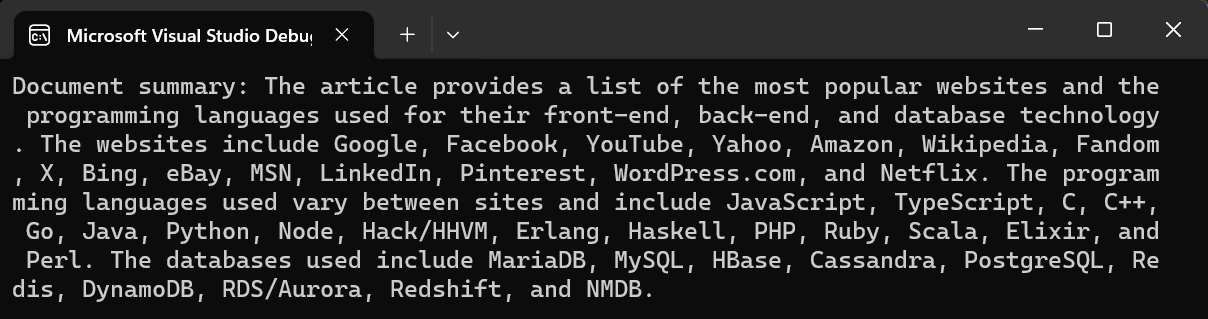
MicrosoftのCopilot for SecurityとIron SoftwareのOpenAI統合は、それぞれの分野における重要な進展を表しています。 Copilotはサイバーセキュリティ対策を強化し、Iron SoftwareのOpenAI統合は文書強化を革命的に変えます。 どちらの革新も、進化する脅威に先んじるためにデジタル資産を保護し、ワークフローを効率化する強力なツールでユーザーを支援します。


オフィス文書向けの.NET API製品10個

